Android
Activity Life Cycle
Android Applications
 Applications are defined to Android via the android manifest file. (AndroidManifest.xml)
 The manifest editor is the normal way of creating and modifying the manifest file (defining
the app to the system)
 An Android application is a collection of activities, an activity correlates to a screen or
form that is presented to the user.
 The HelloAndroid is a simple one screen app that is essentially the same as a Java app run
in a terminal/command window. Its AndroidManisest.xml file reflects this :
AndroidManifest.xml
 <?xml version="1.0" encoding="utf-8"?>
 <manifest xmlns:android="http://schemas.android.com/apk/res/android"
 package="com.example.helloandroid"
 android:versionCode="1"
 android:versionName="1.0">
 <application android:icon="@drawable/icon" android:label="@string/app_name">
 <activity android:name=".HelloAndroid"
 android:label="@string/app_name">
 <intent-filter>
 <action android:name="android.intent.action.MAIN" />
 <category android:name="android.intent.category.LAUNCHER" />
 </intent-filter>
 </activity>
 </application>
 </manifest>
<activity>
 child tag of <manifest>
 need one <activity> tag for each activity of the application
 attributes:
 android:name; the name of the activity, this will be used as the name of the Java file and
the resulting class
 android:label; a string that we will be able to programatically retrieve the activity name at
run time.
Life Cycle
 Each application runs in its own process.
 Each activity of an app is run in the apps process
 Processes are started and stopped as needed to run an apps components.
 Processes may be killed to reclaim needed resources.
 Killed apps may be restored to their last state when requested by the user

Management
 Most management of the life cycle is done automatically by the system via the activity stack.
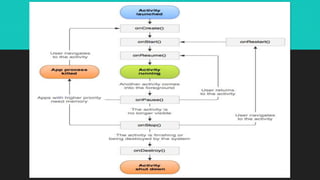
 The activity class has the following method callbacks to help you manage the app:
 onCreate()
 onStart()
 onResume()
 onPause()
 onStop()
 onRestart()
 onDestroy()
Android Life Cycle
Android Life Cycle

Android Life Cycle

  • 1.
  • 2.
    Android Applications  Applicationsare defined to Android via the android manifest file. (AndroidManifest.xml)  The manifest editor is the normal way of creating and modifying the manifest file (defining the app to the system)
  • 3.
     An Androidapplication is a collection of activities, an activity correlates to a screen or form that is presented to the user.  The HelloAndroid is a simple one screen app that is essentially the same as a Java app run in a terminal/command window. Its AndroidManisest.xml file reflects this :
  • 4.
    AndroidManifest.xml  <?xml version="1.0"encoding="utf-8"?>  <manifest xmlns:android="http://schemas.android.com/apk/res/android"  package="com.example.helloandroid"  android:versionCode="1"  android:versionName="1.0">  <application android:icon="@drawable/icon" android:label="@string/app_name">  <activity android:name=".HelloAndroid"  android:label="@string/app_name">  <intent-filter>  <action android:name="android.intent.action.MAIN" />  <category android:name="android.intent.category.LAUNCHER" />  </intent-filter>  </activity>  </application>  </manifest>
  • 5.
    <activity>  child tagof <manifest>  need one <activity> tag for each activity of the application  attributes:  android:name; the name of the activity, this will be used as the name of the Java file and the resulting class  android:label; a string that we will be able to programatically retrieve the activity name at run time.
  • 6.
    Life Cycle  Eachapplication runs in its own process.  Each activity of an app is run in the apps process  Processes are started and stopped as needed to run an apps components.  Processes may be killed to reclaim needed resources.  Killed apps may be restored to their last state when requested by the user 
  • 7.
    Management  Most managementof the life cycle is done automatically by the system via the activity stack.  The activity class has the following method callbacks to help you manage the app:  onCreate()  onStart()  onResume()  onPause()  onStop()  onRestart()  onDestroy()