Android basics:
Activities and Intents
This tutorial presentation will guide you through
some basic components of android application
and their usage during android application
development.
2
Android:
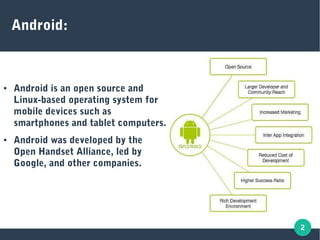
● Android is an open source and
Linux-based operating system for
mobile devices such as
smartphones and tablet computers.
● Android was developed by the
Open Handset Alliance, led by
Google, and other companies.
3
Android Applications:
● Android apps have their own process and thus lives in
their own world.
● Android app files are only visible to the app.
● Android apps can make use of other applications and
share information among them.
● Android apps are build using andorid components with
which all above things work smoothly.
4
An android app consists of following basic components:
Activity
An activity represents a single screen with a user interface
Activity is the User visible Window
Activity performs actions on the screen
For eg. an email application might have one activity that shows a list of new emails, another
activity to compose an email, and another activity for reading emails
If an application has more than one activity, then one of them should be marked as the
activity that is presented first when the application is launched
An activity is implemented as a subclass of Activity class as follows-
public class YourActivity extends Activity {
}
Android Component: Activity
5
Android Component: Service
A service is basically a component that runs in the background to
perform long-running operations.
For example, a service might play music in the background while the
user is in a different application, or it might fetch data over the
network without blocking user interaction with the current visible
activity.
A service is implemented as a subclass of Service class as follows −
public class YourService extends Service {
}
6
Android Component: BroadCast Receiver
Broadcast Receivers simply respond to broadcast messages from other
applications or from the system. For example, applications can also initiate
broadcasts to let other applications know that some data has been downloaded
to the device and is available for them to use, so this is broadcast receiver who
will intercept this communication and will initiate appropriate action.
A broadcast receiver is implemented as a subclass of BroadcastReceiver class
and each message is broadcasted as an Intent object.
public class YourReceiver extends BroadcastReceiver {
public void onReceive(context,intent){ }
}
7
Android Component: Content Provider
A content provider component supplies data from one application to others
on request.
Such requests are handled by the methods of the ContentResolver class.
The data shared with others may be stored in the file system, the database or
somewhere else entirely.
A content provider is implemented as a subclass of ContentProvider class
and must implement a standard set of APIs that enable other applications to
perform transactions.
public class YourContentProvider extends ContentProvider {
public void onCreate(){}
}
8
Android Manifest:
● Every android application holds an application description file
named as AndroidManifest.xml which resides at the root of the
application project directory.
● This file works as an interface between Android OS and our
application.
● Whatever component we use as a part of our application
development procedure , we declare them all in this manifest file.
● if we do not declare our components in this file, then it will not be
considered by the OS.
9
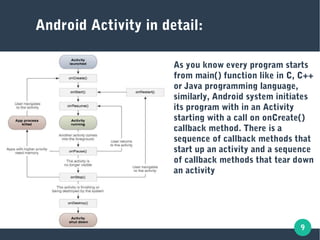
Android Activity in detail:
As you know every program starts
from main() function like in C, C++
or Java programming language,
similarly, Android system initiates
its program with in an Activity
starting with a call on onCreate()
callback method. There is a
sequence of callback methods that
start up an activity and a sequence
of callback methods that tear down
an activity
10
An Activity Lifecycle
onCreate() This is the first callback and called when the activity is first created.
onStart() This callback is called when the activity becomes visible to the user.
onResume() This is called when the user starts interacting with the application.
OnPause() The paused activity does not receive user input and cannot execute any
code and called when the current activity is being paused and the
previous activity is being resumed.
onStop() This callback is called when the activity is no longer visible.
onDestroy() This callback is called before the activity is destroyed by the system.
onRestart() This callback is called when the activity restarts after stopping it.
11
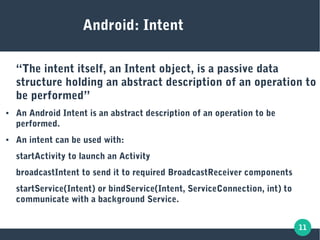
Android: Intent
“The intent itself, an Intent object, is a passive data
structure holding an abstract description of an operation to
be performed”
● An Android Intent is an abstract description of an operation to be
performed.
● An intent can be used with:
startActivity to launch an Activity
broadcastIntent to send it to required BroadcastReceiver components
startService(Intent) or bindService(Intent, ServiceConnection, int) to
communicate with a background Service.
12
Android Intent: Types
● An Intent object is a bundle of
information which is used by the
component that receives the intent
as well as information used by the
Android system.
● There are basically two types of
intents:
Explicit Intent
Implicit Intent
13
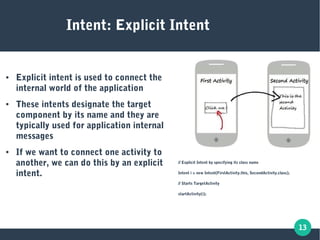
Intent: Explicit Intent
● Explicit intent is used to connect the
internal world of the application
● These intents designate the target
component by its name and they are
typically used for application internal
messages
● If we want to connect one activity to
another, we can do this by an explicit
intent.
// Explicit Intent by specifying its class name
Intent i = new Intent(FirstActivity.this, SecondActivity.class);
// Starts TargetActivity
startActivity(i);
14
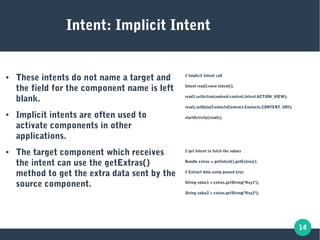
Intent: Implicit Intent
● These intents do not name a target and
the field for the component name is left
blank.
● Implicit intents are often used to
activate components in other
applications.
● The target component which receives
the intent can use the getExtras()
method to get the extra data sent by the
source component.
// Implicit Intent call
Intent read1=new Intent();
read1.setAction(android.content.Intent.ACTION_VIEW);
read1.setData(ContactsContract.Contacts.CONTENT_URI);
startActivity(read1);
// get Intent to fetch the values
Bundle extras = getIntent().getExtras();
// Extract data using passed keys
String value1 = extras.getString("Key1");
String value2 = extras.getString("Key2");
15
The implementation of the android components
just told about will be shown to you now.
Thank you.

Ppt 2 android_basics

  • 1.
    Android basics: Activities andIntents This tutorial presentation will guide you through some basic components of android application and their usage during android application development.
  • 2.
    2 Android: ● Android isan open source and Linux-based operating system for mobile devices such as smartphones and tablet computers. ● Android was developed by the Open Handset Alliance, led by Google, and other companies.
  • 3.
    3 Android Applications: ● Androidapps have their own process and thus lives in their own world. ● Android app files are only visible to the app. ● Android apps can make use of other applications and share information among them. ● Android apps are build using andorid components with which all above things work smoothly.
  • 4.
    4 An android appconsists of following basic components: Activity An activity represents a single screen with a user interface Activity is the User visible Window Activity performs actions on the screen For eg. an email application might have one activity that shows a list of new emails, another activity to compose an email, and another activity for reading emails If an application has more than one activity, then one of them should be marked as the activity that is presented first when the application is launched An activity is implemented as a subclass of Activity class as follows- public class YourActivity extends Activity { } Android Component: Activity
  • 5.
    5 Android Component: Service Aservice is basically a component that runs in the background to perform long-running operations. For example, a service might play music in the background while the user is in a different application, or it might fetch data over the network without blocking user interaction with the current visible activity. A service is implemented as a subclass of Service class as follows − public class YourService extends Service { }
  • 6.
    6 Android Component: BroadCastReceiver Broadcast Receivers simply respond to broadcast messages from other applications or from the system. For example, applications can also initiate broadcasts to let other applications know that some data has been downloaded to the device and is available for them to use, so this is broadcast receiver who will intercept this communication and will initiate appropriate action. A broadcast receiver is implemented as a subclass of BroadcastReceiver class and each message is broadcasted as an Intent object. public class YourReceiver extends BroadcastReceiver { public void onReceive(context,intent){ } }
  • 7.
    7 Android Component: ContentProvider A content provider component supplies data from one application to others on request. Such requests are handled by the methods of the ContentResolver class. The data shared with others may be stored in the file system, the database or somewhere else entirely. A content provider is implemented as a subclass of ContentProvider class and must implement a standard set of APIs that enable other applications to perform transactions. public class YourContentProvider extends ContentProvider { public void onCreate(){} }
  • 8.
    8 Android Manifest: ● Everyandroid application holds an application description file named as AndroidManifest.xml which resides at the root of the application project directory. ● This file works as an interface between Android OS and our application. ● Whatever component we use as a part of our application development procedure , we declare them all in this manifest file. ● if we do not declare our components in this file, then it will not be considered by the OS.
  • 9.
    9 Android Activity indetail: As you know every program starts from main() function like in C, C++ or Java programming language, similarly, Android system initiates its program with in an Activity starting with a call on onCreate() callback method. There is a sequence of callback methods that start up an activity and a sequence of callback methods that tear down an activity
  • 10.
    10 An Activity Lifecycle onCreate()This is the first callback and called when the activity is first created. onStart() This callback is called when the activity becomes visible to the user. onResume() This is called when the user starts interacting with the application. OnPause() The paused activity does not receive user input and cannot execute any code and called when the current activity is being paused and the previous activity is being resumed. onStop() This callback is called when the activity is no longer visible. onDestroy() This callback is called before the activity is destroyed by the system. onRestart() This callback is called when the activity restarts after stopping it.
  • 11.
    11 Android: Intent “The intentitself, an Intent object, is a passive data structure holding an abstract description of an operation to be performed” ● An Android Intent is an abstract description of an operation to be performed. ● An intent can be used with: startActivity to launch an Activity broadcastIntent to send it to required BroadcastReceiver components startService(Intent) or bindService(Intent, ServiceConnection, int) to communicate with a background Service.
  • 12.
    12 Android Intent: Types ●An Intent object is a bundle of information which is used by the component that receives the intent as well as information used by the Android system. ● There are basically two types of intents: Explicit Intent Implicit Intent
  • 13.
    13 Intent: Explicit Intent ●Explicit intent is used to connect the internal world of the application ● These intents designate the target component by its name and they are typically used for application internal messages ● If we want to connect one activity to another, we can do this by an explicit intent. // Explicit Intent by specifying its class name Intent i = new Intent(FirstActivity.this, SecondActivity.class); // Starts TargetActivity startActivity(i);
  • 14.
    14 Intent: Implicit Intent ●These intents do not name a target and the field for the component name is left blank. ● Implicit intents are often used to activate components in other applications. ● The target component which receives the intent can use the getExtras() method to get the extra data sent by the source component. // Implicit Intent call Intent read1=new Intent(); read1.setAction(android.content.Intent.ACTION_VIEW); read1.setData(ContactsContract.Contacts.CONTENT_URI); startActivity(read1); // get Intent to fetch the values Bundle extras = getIntent().getExtras(); // Extract data using passed keys String value1 = extras.getString("Key1"); String value2 = extras.getString("Key2");
  • 15.
    15 The implementation ofthe android components just told about will be shown to you now. Thank you.