ANDROID
WIDGET
Topics
 What is an App Widget?
App Widget framework
Steps for creating an App Widget
Creating App Widget
configuration Activity
What is App Widget?
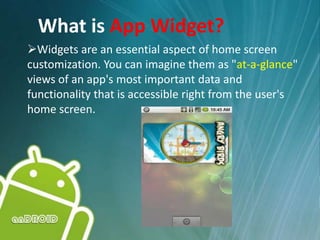
Widgets are an essential aspect of home screen
customization. You can imagine them as "at-a-glance"
views of an app's most important data and
functionality that is accessible right from the user's
home screen.
Usage Examples of App Widgets
• People can drop widgets onto their home
screen and interact.
• Widgets can provide a quick glimpse into fully
featured apps, such as showing upcoming
calendar events, or viewing details about a
song playing in the background.
• Users can also interact with your app through
the widget, for example pausing or switching
music tracks.
AppWidget Framework
• AppWidgetProviderInfo object
> Describes the metadata for an App Widget, such as
the App Widget's layout, update frequency, and the
AppWidgetProvider class.
> This should be defined in XML.
AppWidget Framework
• AppWidgetProvider class
> Defines the basic methods that allow you to
programmatically interface with the App Widget,
based on broadcast events. (AppWidgetProvider
class is a child class of BroadcastReceiver class.)
> Through it, you will receive broadcasts when the App
Widget is updated, enabled, disabled and deleted.
AppWidget Framework(cont..)
• View layout
> Defines the initial layout for the App
Widget, defined in XML.
• Additionally, you can implement an App Widget
configuration Activity.
Steps for Building an App Widget
Declare an AppWidgetProvider in the Manifest
file
Create the AppWidgetProviderInfo Metadata
XML file
Create the App Widget Layout XML file
Write the AppWidgetProvider Class
Declare AppWidgetProvider in
Manifest
• The <receiver> element requires the android:name
attribute, which specifies the AppWidgetProvider
• The <intent-filter> element must include an <action>
element with the android:name attribute. This attribute
specifies that the AppWidgetProvider accepts the
ACTION_APPWIDGET_UPDATE broadcast.
• The <meta-data> element specifies the location
Create AppWidgetProviderInfo Metadata
• Define the AppWidgetProviderInfo object in an XML
resource using a single <appwidget-provider> element
and save it in the project's res/xml/ folder.
> This file is referenced from the manifest file
• Defines the essential qualities of an App Widget, such
as its minimum layout dimensions, its initial layout
resource, how often to update the AppWidget, and
(optionally) a configuration Activity to launch at create time.
Create App Widget Layout
• App Widget layouts are based on RemoteViews,
which do not support every kind of layout or
view widget.
• A RemoteViews object (and, consequently, an
App Widget) can support the following layouts
and Widget classes
Write AppWidgetProvider Class
The AppWidgetProvider class extends BroadcastReceiver as
a convenience class to handle the App Widget broadcasts
• Methods to override
> onUpdate(Context, AppWidgetManager, int[]) - called
when each App Widget is added to a host (unless you
use a configuration Activity), Typically the only
method that needs to be present
> onDeleted(Context, int[])
> onEnabled(Context)
>onDisabled(Context)
> onReceive(Context, Intent)
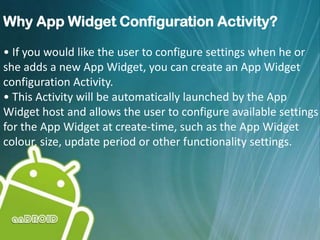
Why App Widget Configuration Activity?
• If you would like the user to configure settings when he or
she adds a new App Widget, you can create an App Widget
configuration Activity.
• This Activity will be automatically launched by the App
Widget host and allows the user to configure available settings
for the App Widget at create-time, such as the App Widget
colour, size, update period or other functionality settings.
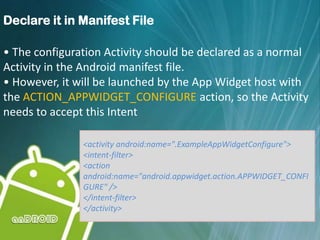
Declare it in Manifest File
• The configuration Activity should be declared as a normal
Activity in the Android manifest file.
• However, it will be launched by the App Widget host with
the ACTION_APPWIDGET_CONFIGURE action, so the Activity
needs to accept this Intent
<activity android:name=".ExampleAppWidgetConfigure">
<intent-filter>
<action
android:name="android.appwidget.action.APPWIDGET_CONFI
GURE" />
</intent-filter>
</activity>
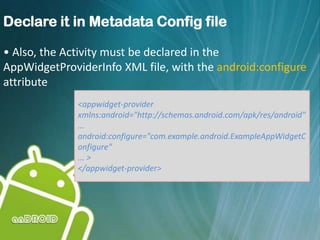
Declare it in Metadata Config file
• Also, the Activity must be declared in the
AppWidgetProviderInfo XML file, with the android:configure
attribute
<appwidget-provider
xmlns:android="http://schemas.android.com/apk/res/android"
...
android:configure="com.example.android.ExampleAppWidgetC
onfigure"
... >
</appwidget-provider>
Thank you

Android Widget

  • 1.
  • 2.
    Topics  What isan App Widget? App Widget framework Steps for creating an App Widget Creating App Widget configuration Activity
  • 3.
    What is AppWidget? Widgets are an essential aspect of home screen customization. You can imagine them as "at-a-glance" views of an app's most important data and functionality that is accessible right from the user's home screen.
  • 4.
    Usage Examples ofApp Widgets • People can drop widgets onto their home screen and interact. • Widgets can provide a quick glimpse into fully featured apps, such as showing upcoming calendar events, or viewing details about a song playing in the background. • Users can also interact with your app through the widget, for example pausing or switching music tracks.
  • 5.
    AppWidget Framework • AppWidgetProviderInfoobject > Describes the metadata for an App Widget, such as the App Widget's layout, update frequency, and the AppWidgetProvider class. > This should be defined in XML.
  • 6.
    AppWidget Framework • AppWidgetProviderclass > Defines the basic methods that allow you to programmatically interface with the App Widget, based on broadcast events. (AppWidgetProvider class is a child class of BroadcastReceiver class.) > Through it, you will receive broadcasts when the App Widget is updated, enabled, disabled and deleted.
  • 7.
    AppWidget Framework(cont..) • Viewlayout > Defines the initial layout for the App Widget, defined in XML. • Additionally, you can implement an App Widget configuration Activity.
  • 8.
    Steps for Buildingan App Widget Declare an AppWidgetProvider in the Manifest file Create the AppWidgetProviderInfo Metadata XML file Create the App Widget Layout XML file Write the AppWidgetProvider Class
  • 9.
    Declare AppWidgetProvider in Manifest •The <receiver> element requires the android:name attribute, which specifies the AppWidgetProvider • The <intent-filter> element must include an <action> element with the android:name attribute. This attribute specifies that the AppWidgetProvider accepts the ACTION_APPWIDGET_UPDATE broadcast. • The <meta-data> element specifies the location
  • 10.
    Create AppWidgetProviderInfo Metadata •Define the AppWidgetProviderInfo object in an XML resource using a single <appwidget-provider> element and save it in the project's res/xml/ folder. > This file is referenced from the manifest file • Defines the essential qualities of an App Widget, such as its minimum layout dimensions, its initial layout resource, how often to update the AppWidget, and (optionally) a configuration Activity to launch at create time.
  • 11.
    Create App WidgetLayout • App Widget layouts are based on RemoteViews, which do not support every kind of layout or view widget. • A RemoteViews object (and, consequently, an App Widget) can support the following layouts and Widget classes
  • 12.
    Write AppWidgetProvider Class TheAppWidgetProvider class extends BroadcastReceiver as a convenience class to handle the App Widget broadcasts • Methods to override > onUpdate(Context, AppWidgetManager, int[]) - called when each App Widget is added to a host (unless you use a configuration Activity), Typically the only method that needs to be present > onDeleted(Context, int[]) > onEnabled(Context) >onDisabled(Context) > onReceive(Context, Intent)
  • 13.
    Why App WidgetConfiguration Activity? • If you would like the user to configure settings when he or she adds a new App Widget, you can create an App Widget configuration Activity. • This Activity will be automatically launched by the App Widget host and allows the user to configure available settings for the App Widget at create-time, such as the App Widget colour, size, update period or other functionality settings.
  • 14.
    Declare it inManifest File • The configuration Activity should be declared as a normal Activity in the Android manifest file. • However, it will be launched by the App Widget host with the ACTION_APPWIDGET_CONFIGURE action, so the Activity needs to accept this Intent <activity android:name=".ExampleAppWidgetConfigure"> <intent-filter> <action android:name="android.appwidget.action.APPWIDGET_CONFI GURE" /> </intent-filter> </activity>
  • 15.
    Declare it inMetadata Config file • Also, the Activity must be declared in the AppWidgetProviderInfo XML file, with the android:configure attribute <appwidget-provider xmlns:android="http://schemas.android.com/apk/res/android" ... android:configure="com.example.android.ExampleAppWidgetC onfigure" ... > </appwidget-provider>
  • 16.