


HELLO
WE MEET AGAIN 
Android System
Architecture
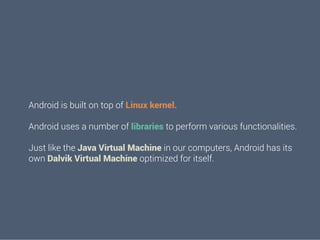
Android is built on top of Linux kernel.
Android uses a number of libraries to perform various functionalities.
Android is built on top of Linux kernel.
Android uses a number of libraries to perform various functionalities.
Just like the Java Virtual Machine in our computers, Android has its
own Dalvik Virtual Machine optimized for itself.
Android is built on top of Linux kernel.
Android uses a number of libraries to perform various functionalities.
Just like the Java Virtual Machine in our computers, Android has its
own Dalvik Virtual Machine optimized for itself.
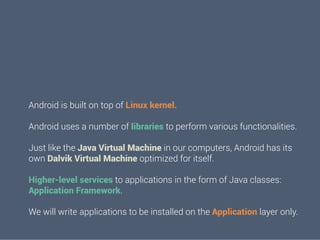
Higher-level services to applications in the form of Java classes:
Application Framework.
Android is built on top of Linux kernel.
Android uses a number of libraries to perform various functionalities.
Just like the Java Virtual Machine in our computers, Android has its
own Dalvik Virtual Machine optimized for itself.
Higher-level services to applications in the form of Java classes:
Application Framework.
We will write applications to be installed on the Application layer only.
Introduction to

xml	
  
Android’s defined tags

Introduction to

xml	
  

Used to define some of
the resources
-  Layouts
-  Strings
Used in Android
Manifest
Preferred way for
defining UI elements
-  Separation of
code
Simple UI
LO
AU
YT

Eclipse has a great UI creator
-  Generates all the xml for you
Composed of View objects

Can be specified for portrait or
landscape
-  Different designs for different
orientation.
VIEWS
A layout/activity is composed of
Views and ViewGroups.
View is something that is visible.
Examples:
- 
- 
- 
- 

TextViews,
Buttons,
TimePicker,
DatePicker
VIEWS
3 ways to declare width and height

a. 
b. 
c. 

fill_parent
wrap_content
match_parent

<Button
android:id = “@+id/button”
android:layout_width = “fill_parent”
android:layout_height = “wrap_content”
android:text = “Button”/>

{

DO NOT FORGET

TO DEFINE US
VIEWS

{

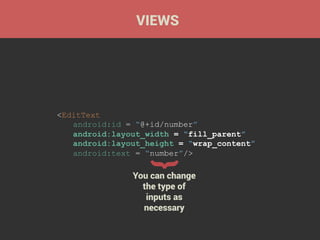
<EditText
android:id = “@+id/number”
android:layout_width = “fill_parent”
android:layout_height = “wrap_content”
android:text = “number”/>

You can change
the type of
inputs as
necessary
VIEWS

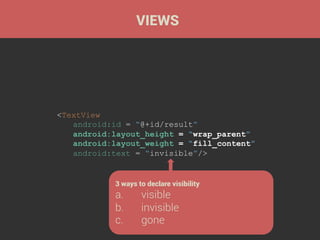
<TextView
android:id = “@+id/result”
android:layout_height = “wrap_parent”
android:layout_weight = “fill_content”
android:text = “invisible”/>

3 ways to declare visibility

a. 
b. 
c. 

visible
invisible
gone
FrameLayout

4

One or more View can be
grouped into a ViewGroup

RelativeLayout

3

This is the <body> to your
view.

LinearLayout

2

ViewGroups

1

TableLayout

5

ScrollView, etc.
Each layout has something
unique to it.
Each layout has a purpose!
LinearLayout
Declaring the XML namespace (done
in the 1st ViewGroup)

<LinearLayout
xmlns:android=“http://schemas.android.com/apk/res/
android”
android:layout_width= “match_parent”
android:layout_height= “match_parent”
android:orientation= “vertical”>
… (TextViews, Buttons etc.)
</LinearLayout>
Unique for this ViewGroup
a.  Vertical
b.  Horizontal
RelativeLayout

Does not have any android:orientation.

Affects the layouts inside it

Views are arranged according to references.
RelativeLayout

<RelativeLayout ..>
<Button android:id= “@+id/btn”
android:layout_alignParentTop= "true" … />
<TextView android:layout_below = “@id/btn” … />
<TextView android:layout_toRightOf = “@id/btn” …/>
<TextView android:layout_toLeftOf = “@id/btn” …/>
<TextView android:layout_alignParentBottom =
“true” .../>
</RelativeLayout>
Various other positioning
techniques also there:
alignLeft
alignBaseLine
above, etc.
LinearLayout

vs

RelativeLayout
LETS UNITE!
<LinearLayout … >
<RelativeLayout … >
…
</RelativeLayout>
</LinearLayout>
You can use ViewGroup within ViewGroup

LAYOUTCEPTION!
INTENTS
ENTS

<a href= “target”>page 2</a>

Intent ~ Redirecting !

Intent is used to call into android's drivers,
other applications as well.

Powerful inter/intra application messagepassing framework.

While working with intents we also have to
work with the

Android Manifest
Android Manifest
Presents essential information
about the application to the
Android system
Information the system must have before it
can run any of the application's code.
Remember this?
Manifest
Name of the Java package for the
application.

It describes the components of
the application
the activities, services, broadcast receivers, and
content providers.
Manifest
It declares which permissions the
application must have in order to
access protected parts of the API and
interact with other applications.

It declares the minimum level of the
Android API that the application
requires … and much more.
MODIFICATION IN ANDROID MANIFEST

Declares an activity (an Activity
subclass) that implements part of the
application’s visual user interface.

<activity android:name=".OtherClass">
<intent-filter>
<action android:name="android.intent.action.NAME"/>
<category
android:name="android.intent.category.DEFAULT"/>
</intent-filter>
</activity>
The types of intents that an app can
respond to

Adds an action to an intent filter

Adds a category name to an intent
filter
In MainActivity
Intent i = new Intent(MainActivity.this,
OtherClass.class); // Instantiating the intent
class
i.putExtra(“name”, value); // values to be sent
startActivity(i); // Starting the intent

In OtherClass
Intent i = getIntent(); //getting the intent
object
String name = i.getStringExtra(“name”); //
getting value from passed intent

Intents
HAVE YOU EVER WONDERED
WHAT HAPPENS WHEN YOU
PRESS THE BACK BUTTON/
HOME BUTTON ON ANDROID?
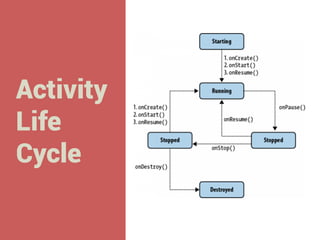
Activity
Life
Cycle
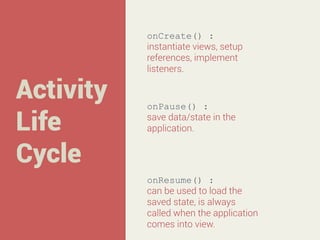
Activity
Life
Cycle

onCreate() :
instantiate views, setup
references, implement
listeners.

onPause() :
save data/state in the
application.

onResume() :
can be used to load the
saved state, is always
called when the application
comes into view.
THAT’S ALL FOLKS!
WE’LL SEE YOU TOMORROW

Training Session 2 - Day 2

  • 1.
  • 2.
  • 4.
    Android is builton top of Linux kernel.
  • 5.
    Android is builton top of Linux kernel. Android uses a number of libraries to perform various functionalities.
  • 6.
    Android is builton top of Linux kernel. Android uses a number of libraries to perform various functionalities. Just like the Java Virtual Machine in our computers, Android has its own Dalvik Virtual Machine optimized for itself.
  • 7.
    Android is builton top of Linux kernel. Android uses a number of libraries to perform various functionalities. Just like the Java Virtual Machine in our computers, Android has its own Dalvik Virtual Machine optimized for itself. Higher-level services to applications in the form of Java classes: Application Framework.
  • 8.
    Android is builton top of Linux kernel. Android uses a number of libraries to perform various functionalities. Just like the Java Virtual Machine in our computers, Android has its own Dalvik Virtual Machine optimized for itself. Higher-level services to applications in the form of Java classes: Application Framework. We will write applications to be installed on the Application layer only.
  • 9.
  • 10.
    Android’s defined tags Introductionto xml   Used to define some of the resources -  Layouts -  Strings Used in Android Manifest Preferred way for defining UI elements -  Separation of code
  • 11.
  • 12.
    LO AU YT Eclipse has agreat UI creator -  Generates all the xml for you Composed of View objects Can be specified for portrait or landscape -  Different designs for different orientation.
  • 13.
    VIEWS A layout/activity iscomposed of Views and ViewGroups. View is something that is visible. Examples: -  -  -  -  TextViews, Buttons, TimePicker, DatePicker
  • 14.
    VIEWS 3 ways todeclare width and height a.  b.  c.  fill_parent wrap_content match_parent <Button android:id = “@+id/button” android:layout_width = “fill_parent” android:layout_height = “wrap_content” android:text = “Button”/> { DO NOT FORGET TO DEFINE US
  • 15.
    VIEWS { <EditText android:id = “@+id/number” android:layout_width= “fill_parent” android:layout_height = “wrap_content” android:text = “number”/> You can change the type of inputs as necessary
  • 16.
    VIEWS <TextView android:id = “@+id/result” android:layout_height= “wrap_parent” android:layout_weight = “fill_content” android:text = “invisible”/> 3 ways to declare visibility a.  b.  c.  visible invisible gone
  • 17.
    FrameLayout 4 One or moreView can be grouped into a ViewGroup RelativeLayout 3 This is the <body> to your view. LinearLayout 2 ViewGroups 1 TableLayout 5 ScrollView, etc.
  • 18.
    Each layout hassomething unique to it. Each layout has a purpose!
  • 19.
    LinearLayout Declaring the XMLnamespace (done in the 1st ViewGroup) <LinearLayout xmlns:android=“http://schemas.android.com/apk/res/ android” android:layout_width= “match_parent” android:layout_height= “match_parent” android:orientation= “vertical”> … (TextViews, Buttons etc.) </LinearLayout> Unique for this ViewGroup a.  Vertical b.  Horizontal
  • 20.
    RelativeLayout Does not haveany android:orientation. Affects the layouts inside it Views are arranged according to references.
  • 21.
    RelativeLayout <RelativeLayout ..> <Button android:id=“@+id/btn” android:layout_alignParentTop= "true" … /> <TextView android:layout_below = “@id/btn” … /> <TextView android:layout_toRightOf = “@id/btn” …/> <TextView android:layout_toLeftOf = “@id/btn” …/> <TextView android:layout_alignParentBottom = “true” .../> </RelativeLayout> Various other positioning techniques also there: alignLeft alignBaseLine above, etc.
  • 22.
  • 23.
    LETS UNITE! <LinearLayout …> <RelativeLayout … > … </RelativeLayout> </LinearLayout>
  • 24.
    You can useViewGroup within ViewGroup LAYOUTCEPTION!
  • 25.
  • 26.
    ENTS <a href= “target”>page2</a> Intent ~ Redirecting ! Intent is used to call into android's drivers, other applications as well. Powerful inter/intra application messagepassing framework. While working with intents we also have to work with the Android Manifest
  • 27.
    Android Manifest Presents essentialinformation about the application to the Android system Information the system must have before it can run any of the application's code.
  • 28.
  • 29.
    Manifest Name of theJava package for the application. It describes the components of the application the activities, services, broadcast receivers, and content providers.
  • 30.
    Manifest It declares whichpermissions the application must have in order to access protected parts of the API and interact with other applications. It declares the minimum level of the Android API that the application requires … and much more.
  • 31.
    MODIFICATION IN ANDROIDMANIFEST Declares an activity (an Activity subclass) that implements part of the application’s visual user interface. <activity android:name=".OtherClass"> <intent-filter> <action android:name="android.intent.action.NAME"/> <category android:name="android.intent.category.DEFAULT"/> </intent-filter> </activity> The types of intents that an app can respond to Adds an action to an intent filter Adds a category name to an intent filter
  • 32.
    In MainActivity Intent i= new Intent(MainActivity.this, OtherClass.class); // Instantiating the intent class i.putExtra(“name”, value); // values to be sent startActivity(i); // Starting the intent In OtherClass Intent i = getIntent(); //getting the intent object String name = i.getStringExtra(“name”); // getting value from passed intent Intents
  • 33.
    HAVE YOU EVERWONDERED WHAT HAPPENS WHEN YOU PRESS THE BACK BUTTON/ HOME BUTTON ON ANDROID?
  • 34.
  • 35.
    Activity Life Cycle onCreate() : instantiate views,setup references, implement listeners. onPause() : save data/state in the application. onResume() : can be used to load the saved state, is always called when the application comes into view.
  • 36.