Android HTTP Library
Allan Shih
2
Agenda

Introduction

HTTP library
- Apache Http Client
- HttpUrlConnection
- OkHttp
- Volley

Image library
- Picasso
- Glide

Reference
3
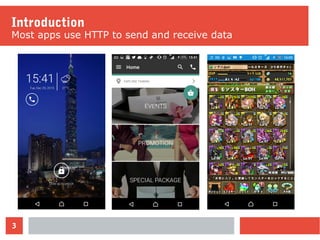
Introduction
Most apps use HTTP to send and receive data
4
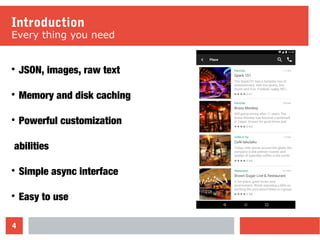
Introduction
Every thing you need

JSON, images, raw text

Memory and disk caching

Powerful customization
abilities

Simple async interface

Easy to use
5
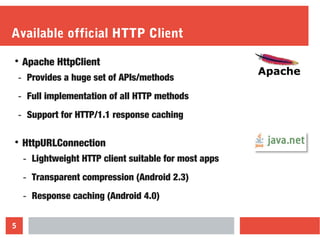
Available official HTTP Client

Apache HttpClient
- Provides a huge set of APIs/methods
- Full implementation of all HTTP methods
- Support for HTTP/1.1 response caching

HttpURLConnection
- Lightweight HTTP client suitable for most apps
- Transparent compression (Android 2.3)
- Response caching (Android 4.0)
6
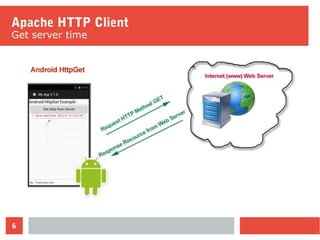
Apache HTTP Client
Get server time
7
Apache HTTP Client
Make a default HttpClient
HttpClient client = new DefaultHttpClient();
class HttpGetTask extends AsyncTask<String, Void, String> {
protected String doInBackground(String... params) {
HttpGet httpGet = new HttpGet(params[0]);
httpGet.addHeader("Accept", "application/json");
HttpResponse response = client.execute(httpGet);
return getJsonString(httpResponse);
}
...
}
8
Apache HTTP Client
Add Headers to the request
HttpClient client = new DefaultHttpClient();
class HttpGetTask extends AsyncTask<String, Void, String> {
protected String doInBackground(String... params) {
HttpGet httpGet = new HttpGet(params[0]);
httpGet.addHeader("Accept", "application/json");
HttpResponse response = client.execute(httpGet);
return getJsonString(httpResponse);
}
...
}
9
Apache HTTP Client
Make http request call
HttpClient client = new DefaultHttpClient();
class HttpGetTask extends AsyncTask<String, Void, String> {
protected String doInBackground(String... params) {
HttpGet httpGet = new HttpGet(params[0]);
httpGet.addHeader("Accept", "application/json");
HttpResponse response = client.execute(httpGet);
return getJsonString(httpResponse);
}
...
}
10
HTTPUrlConnection
Getting a connection from a URL
class HttpGetTask extends AsyncTask<String, Void, String> {
protected String doInBackground(String... params) {
URL mURL = new URL(params[0]);
HttpURLConnection conn = (HttpURLConnection)
mURL.openConnection();
conn.setRequestMethod("GET");
conn.setRequestProperty("Accept", "application/json");
result = getJsonString(conn.getInputStream());
conn.disconnect();
}
11
HTTPUrlConnection
Add Headers to the request
class HttpGetTask extends AsyncTask<String, Void, String> {
protected String doInBackground(String... params) {
URL mURL = new URL(params[0]);
HttpURLConnection conn = (HttpURLConnection)
mURL.openConnection();
conn.setRequestMethod("GET");
conn.setRequestProperty("Accept", "application/json");
result = getJsonString(conn.getInputStream());
conn.disconnect();
}
12
HTTPUrlConnection
Read the response
class HttpGetTask extends AsyncTask<String, Void, String> {
protected String doInBackground(String... params) {
URL mURL = new URL(params[0]);
HttpURLConnection conn = (HttpURLConnection)
mURL.openConnection();
conn.setRequestMethod("GET");
conn.setRequestProperty("Accept", "application/json");
result = getJsonString(conn.getInputStream());
conn.disconnect();
}
13
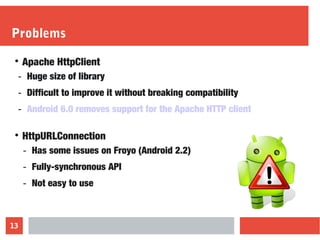
Problems

Apache HttpClient
- Huge size of library
- Difficult to improve it without breaking compatibility
- Android 6.0 removes support for the Apache HTTP client

HttpURLConnection
- Has some issues on Froyo (Android 2.2)
- Fully-synchronous API
- Not easy to use
OkHttp
An efficient HTTP client developed by Square
15
OkHttp Client

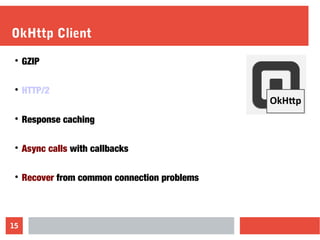
GZIP

HTTP/2

Response caching

Async calls with callbacks

Recover from common connection problems
16
OkHttp Client
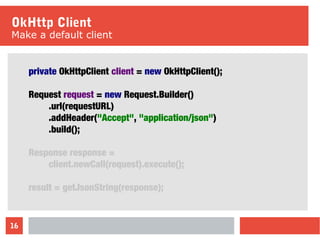
Make a default client
private OkHttpClient client = new OkHttpClient();
Request request = new Request.Builder()
.url(requestURL)
.addHeader("Accept", "application/json")
.build();
Response response =
client.newCall(request).execute();
result = getJsonString(response);
17
OkHttp Client
Synchronous Get
private OkHttpClient client = new OkHttpClient();
Request request = new Request.Builder()
.url(params[0])
.addHeader("Accept", "application/json")
.build();
Response response = client.newCall(request).execute();
result = getJsonString(response.body().byteStream());
18
OkHttp Client
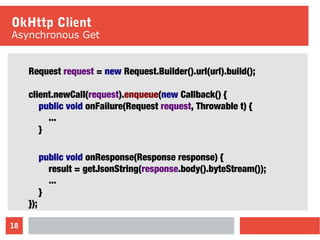
Asynchronous Get
Request request = new Request.Builder().url(url).build();
client.newCall(request).enqueue(new Callback() {
public void onFailure(Request request, Throwable t) {
...
}
public void onResponse(Response response) {
result = getJsonString(response.body().byteStream());
...
}
});
Volley
Easy, Fast Networking for Android
20
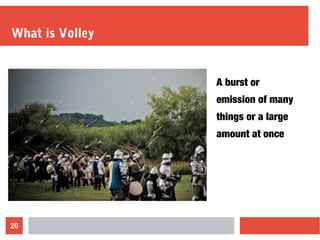
What is Volley
A burst or
emission of many
things or a large
amount at once
21
Volley

Automatic scheduling

Response caching

Support prioritization

Cancellation request API

Ease of customization

Debugging and tracing tools
22
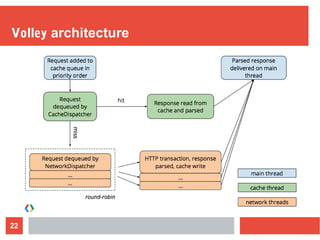
Volley architecture
23
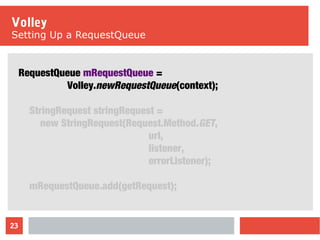
Volley
Setting Up a RequestQueue
RequestQueue mRequestQueue =
Volley.newRequestQueue(context);
StringRequest stringRequest =
new StringRequest(Request.Method.GET,
url,
listener,
errorListener);
mRequestQueue.add(getRequest);
24
Volley
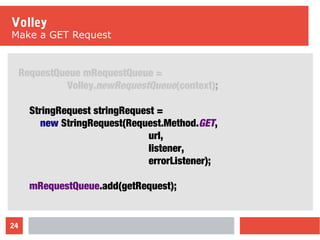
Make a GET Request
RequestQueue mRequestQueue =
Volley.newRequestQueue(context);
StringRequest stringRequest =
new StringRequest(Request.Method.GET,
url,
listener,
errorListener);
mRequestQueue.add(getRequest);
25
Volley
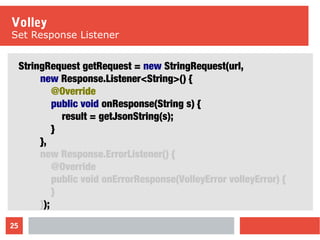
Set Response Listener
StringRequest getRequest = new StringRequest(url,
new Response.Listener<String>() {
@Override
public void onResponse(String s) {
result = getJsonString(s);
}
},
new Response.ErrorListener() {
@Override
public void onErrorResponse(VolleyError volleyError) {
}
});
26
Volley
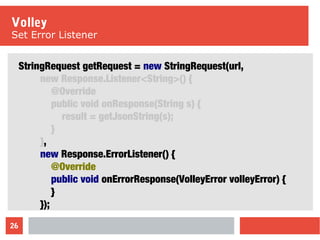
Set Error Listener
StringRequest getRequest = new StringRequest(url,
new Response.Listener<String>() {
@Override
public void onResponse(String s) {
result = getJsonString(s);
}
},
new Response.ErrorListener() {
@Override
public void onErrorResponse(VolleyError volleyError) {
}
});
27
Volley
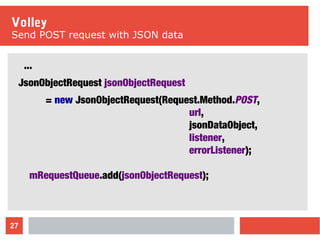
Send POST request with JSON data
...
JsonObjectRequest jsonObjectRequest
= new JsonObjectRequest(Request.Method.POST,
url,
jsonDataObject,
listener,
errorListener);
mRequestQueue.add(jsonObjectRequest);
Benchmark
Using the Google Places Service
29
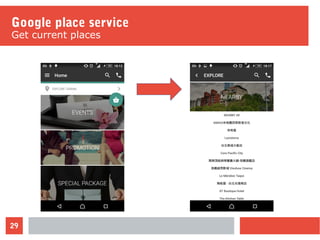
Google place service
Get current places
30
Google place service
Json data
"results" : [
{
"geometry" : {
"location" : {
"lat" : 25.0352548,
"lng" : 121.5625101
}
},
"id" : "137348ad7b2fc06d1ed646ca215062ccbf",
"name" : "Grand Hyatt Taipei",
"place_id" : "ChIJty1ap7erQjQRWmO-mTv1zkQ",
"rating" : 4,
"scope" : "GOOGLE",
"types" : ["restaurant", "food"],
"vicinity" : "No. 2, Songshou Road, Xinyi District"
},
31
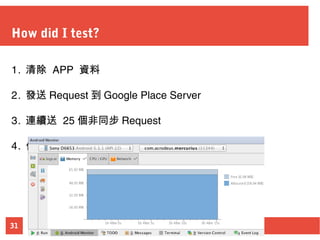
How did I test?
1. 清除 APP 資料
2. 發送 Request 到 Google Place Server
3. 連續送 25 個非同步 Request
4. 使用 Android Studio Monitor 記錄結果
32
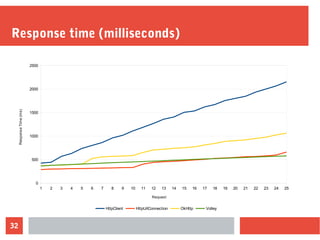
Response time (milliseconds)
1 2 3 4 5 6 7 8 9 10 11 12 13 14 15 16 17 18 19 20 21 22 23 24 25
0
500
1000
1500
2000
2500
HttpClient HttpUrlConnection OkHttp Volley
Request
ResponseTime(ms)
33
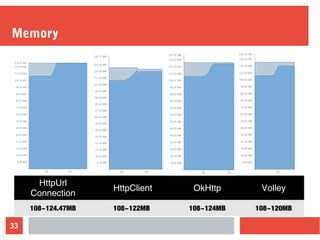
Memory
HttpUrl
Connection
HttpClient OkHttp Volley
108~124.47MB 108~122MB 108~124MB 108~120MB
34
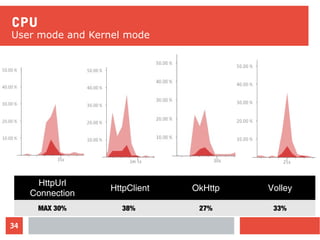
CPU
User mode and Kernel mode
HttpUrl
Connection
HttpClient OkHttp Volley
MAX 30% 38% 27% 33%
35
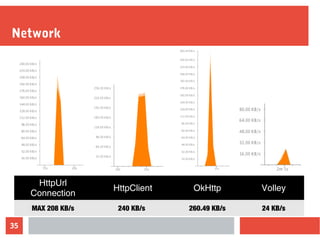
Network
HttpUrl
Connection
HttpClient OkHttp Volley
MAX 208 KB/s 240 KB/s 260.49 KB/s 24 KB/s
36
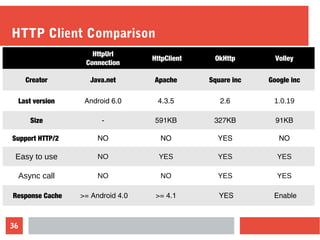
HTTP Client Comparison
HttpUrl
Connection
HttpClient OkHttp Volley
Creator Java.net Apache Square inc Google inc
Last version Android 6.0 4.3.5 2.6 1.0.19
Size - 591KB 327KB 91KB
Support HTTP/2 NO NO YES NO
Easy to use NO YES YES YES
Async call NO NO YES YES
Response Cache >= Android 4.0 >= 4.1 YES Enable
Image Loading
Load image from remote URL in ImageView
38
Typical implementation
ImageAsyncTask
public class ImageAsyncTask extends AsyncTask<String, Void, Bitmap> {
protected Bitmap doInBackground(String... strings) {
HttpURLConnection connection = null;
URL imageUrl = new URL(strings[0]);
connection = (HttpURLConnection) imageUrl.openConnection();
if(connection.getResponseCode() == HttpURLConnection.HTTP_OK){
return BitmapFactory.decodeStream(connection.getInputStream());
}
connection.disconnect();
return null;
}
public void onPostExecute(Bitmap bitmap){
if (bitmap != null) mImageView.setImageBitmap(bitmap);
}
39
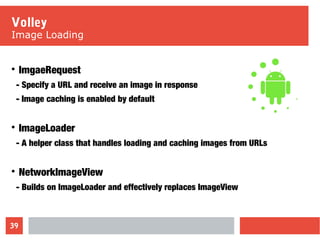
Volley
Image Loading

ImgaeRequest
- Specify a URL and receive an image in response
- Image caching is enabled by default

ImageLoader
- A helper class that handles loading and caching images from URLs

NetworkImageView
- Builds on ImageLoader and effectively replaces ImageView
40
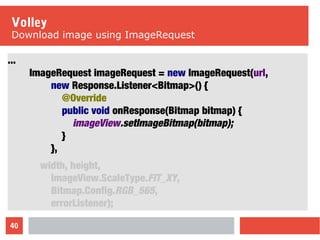
Volley
Download image using ImageRequest
...
ImageRequest imageRequest = new ImageRequest(url,
new Response.Listener<Bitmap>() {
@Override
public void onResponse(Bitmap bitmap) {
imageView.setImageBitmap(bitmap);
}
},
width, height,
ImageView.ScaleType.FIT_XY,
Bitmap.Config.RGB_565,
errorListener);
41
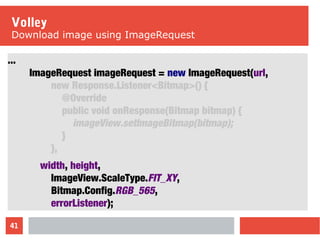
Volley
Download image using ImageRequest
...
ImageRequest imageRequest = new ImageRequest(url,
new Response.Listener<Bitmap>() {
@Override
public void onResponse(Bitmap bitmap) {
imageView.setImageBitmap(bitmap);
}
},
width, height,
ImageView.ScaleType.FIT_XY,
Bitmap.Config.RGB_565,
errorListener);
42
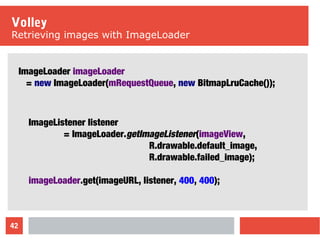
Volley
Retrieving images with ImageLoader
ImageLoader imageLoader
= new ImageLoader(mRequestQueue, new BitmapLruCache());
ImageListener listener
= ImageLoader.getImageListener(imageView,
R.drawable.default_image,
R.drawable.failed_image);
imageLoader.get(imageURL, listener, 400, 400);
43
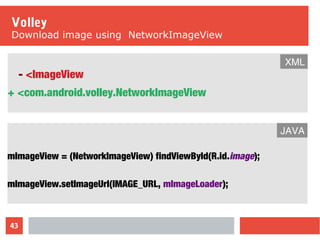
Volley
Download image using NetworkImageView
- <ImageView
+ <com.android.volley.NetworkImageView
XML
mImageView = (NetworkImageView) findViewById(R.id.image);
mImageView.setImageUrl(IMAGE_URL, mImageLoader);
JAVA
44
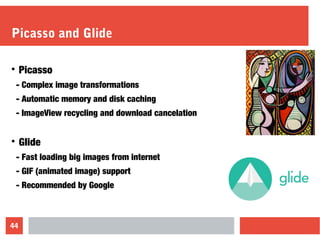
Picasso and Glide

Picasso
- Complex image transformations
- Automatic memory and disk caching
- ImageView recycling and download cancelation

Glide
- Fast loading big images from internet
- GIF (animated image) support
- Recommended by Google
45
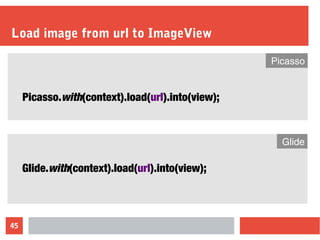
Load image from url to ImageView
Picasso.with(context).load(url).into(view);
Picasso
Glide.with(context).load(url).into(view);
Glide
46
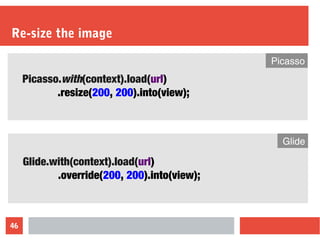
Re-size the image
Picasso.with(context).load(url)
.resize(200, 200).into(view);
Picasso
Glide.with(context).load(url)
.override(200, 200).into(view);
Glide
47
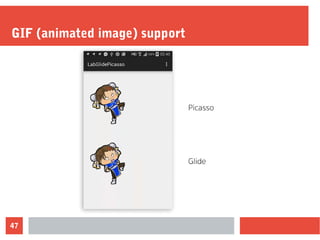
GIF (animated image) support
48
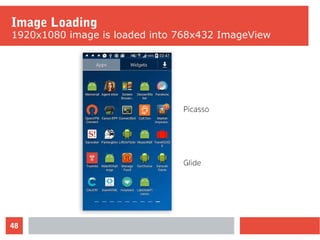
Image Loading
1920x1080 image is loaded into 768x432 ImageView
49
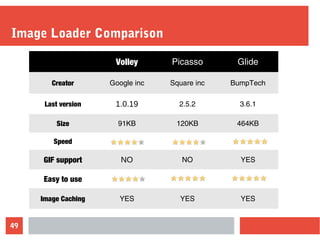
Image Loader Comparison
Volley Picasso Glide
Creator Google inc Square inc BumpTech
Last version 1.0.19 2.5.2 3.6.1
Size 91KB 120KB 464KB
Speed
GIF support NO NO YES
Easy to use
Image Caching YES YES YES
50
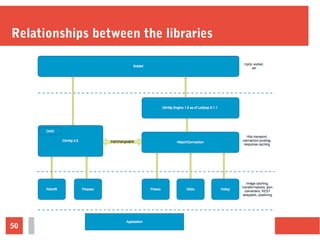
Relationships between the libraries
51
Reference
1. HttpUrlConnection
2. Apache HTTP Client https://hc.apache.org/httpcomponents-client-ga/
3. Square OkHttp http://square.github.io/okhttp/
4. Volley documentation https://developer.android.com/training/volley
5. Picasso http://square.github.io/picasso/
6. Glide https://github.com/bumptech/glide
7. Which Android HTTP library to use?
8. HTTP 2.0

Android httpclient

  • 1.
  • 2.
    2 Agenda  Introduction  HTTP library - ApacheHttp Client - HttpUrlConnection - OkHttp - Volley  Image library - Picasso - Glide  Reference
  • 3.
    3 Introduction Most apps useHTTP to send and receive data
  • 4.
    4 Introduction Every thing youneed  JSON, images, raw text  Memory and disk caching  Powerful customization abilities  Simple async interface  Easy to use
  • 5.
    5 Available official HTTPClient  Apache HttpClient - Provides a huge set of APIs/methods - Full implementation of all HTTP methods - Support for HTTP/1.1 response caching  HttpURLConnection - Lightweight HTTP client suitable for most apps - Transparent compression (Android 2.3) - Response caching (Android 4.0)
  • 6.
  • 7.
    7 Apache HTTP Client Makea default HttpClient HttpClient client = new DefaultHttpClient(); class HttpGetTask extends AsyncTask<String, Void, String> { protected String doInBackground(String... params) { HttpGet httpGet = new HttpGet(params[0]); httpGet.addHeader("Accept", "application/json"); HttpResponse response = client.execute(httpGet); return getJsonString(httpResponse); } ... }
  • 8.
    8 Apache HTTP Client AddHeaders to the request HttpClient client = new DefaultHttpClient(); class HttpGetTask extends AsyncTask<String, Void, String> { protected String doInBackground(String... params) { HttpGet httpGet = new HttpGet(params[0]); httpGet.addHeader("Accept", "application/json"); HttpResponse response = client.execute(httpGet); return getJsonString(httpResponse); } ... }
  • 9.
    9 Apache HTTP Client Makehttp request call HttpClient client = new DefaultHttpClient(); class HttpGetTask extends AsyncTask<String, Void, String> { protected String doInBackground(String... params) { HttpGet httpGet = new HttpGet(params[0]); httpGet.addHeader("Accept", "application/json"); HttpResponse response = client.execute(httpGet); return getJsonString(httpResponse); } ... }
  • 10.
    10 HTTPUrlConnection Getting a connectionfrom a URL class HttpGetTask extends AsyncTask<String, Void, String> { protected String doInBackground(String... params) { URL mURL = new URL(params[0]); HttpURLConnection conn = (HttpURLConnection) mURL.openConnection(); conn.setRequestMethod("GET"); conn.setRequestProperty("Accept", "application/json"); result = getJsonString(conn.getInputStream()); conn.disconnect(); }
  • 11.
    11 HTTPUrlConnection Add Headers tothe request class HttpGetTask extends AsyncTask<String, Void, String> { protected String doInBackground(String... params) { URL mURL = new URL(params[0]); HttpURLConnection conn = (HttpURLConnection) mURL.openConnection(); conn.setRequestMethod("GET"); conn.setRequestProperty("Accept", "application/json"); result = getJsonString(conn.getInputStream()); conn.disconnect(); }
  • 12.
    12 HTTPUrlConnection Read the response classHttpGetTask extends AsyncTask<String, Void, String> { protected String doInBackground(String... params) { URL mURL = new URL(params[0]); HttpURLConnection conn = (HttpURLConnection) mURL.openConnection(); conn.setRequestMethod("GET"); conn.setRequestProperty("Accept", "application/json"); result = getJsonString(conn.getInputStream()); conn.disconnect(); }
  • 13.
    13 Problems  Apache HttpClient - Hugesize of library - Difficult to improve it without breaking compatibility - Android 6.0 removes support for the Apache HTTP client  HttpURLConnection - Has some issues on Froyo (Android 2.2) - Fully-synchronous API - Not easy to use
  • 14.
    OkHttp An efficient HTTPclient developed by Square
  • 15.
    15 OkHttp Client  GZIP  HTTP/2  Response caching  Asynccalls with callbacks  Recover from common connection problems
  • 16.
    16 OkHttp Client Make adefault client private OkHttpClient client = new OkHttpClient(); Request request = new Request.Builder() .url(requestURL) .addHeader("Accept", "application/json") .build(); Response response = client.newCall(request).execute(); result = getJsonString(response);
  • 17.
    17 OkHttp Client Synchronous Get privateOkHttpClient client = new OkHttpClient(); Request request = new Request.Builder() .url(params[0]) .addHeader("Accept", "application/json") .build(); Response response = client.newCall(request).execute(); result = getJsonString(response.body().byteStream());
  • 18.
    18 OkHttp Client Asynchronous Get Requestrequest = new Request.Builder().url(url).build(); client.newCall(request).enqueue(new Callback() { public void onFailure(Request request, Throwable t) { ... } public void onResponse(Response response) { result = getJsonString(response.body().byteStream()); ... } });
  • 19.
  • 20.
    20 What is Volley Aburst or emission of many things or a large amount at once
  • 21.
    21 Volley  Automatic scheduling  Response caching  Supportprioritization  Cancellation request API  Ease of customization  Debugging and tracing tools
  • 22.
  • 23.
    23 Volley Setting Up aRequestQueue RequestQueue mRequestQueue = Volley.newRequestQueue(context); StringRequest stringRequest = new StringRequest(Request.Method.GET, url, listener, errorListener); mRequestQueue.add(getRequest);
  • 24.
    24 Volley Make a GETRequest RequestQueue mRequestQueue = Volley.newRequestQueue(context); StringRequest stringRequest = new StringRequest(Request.Method.GET, url, listener, errorListener); mRequestQueue.add(getRequest);
  • 25.
    25 Volley Set Response Listener StringRequestgetRequest = new StringRequest(url, new Response.Listener<String>() { @Override public void onResponse(String s) { result = getJsonString(s); } }, new Response.ErrorListener() { @Override public void onErrorResponse(VolleyError volleyError) { } });
  • 26.
    26 Volley Set Error Listener StringRequestgetRequest = new StringRequest(url, new Response.Listener<String>() { @Override public void onResponse(String s) { result = getJsonString(s); } }, new Response.ErrorListener() { @Override public void onErrorResponse(VolleyError volleyError) { } });
  • 27.
    27 Volley Send POST requestwith JSON data ... JsonObjectRequest jsonObjectRequest = new JsonObjectRequest(Request.Method.POST, url, jsonDataObject, listener, errorListener); mRequestQueue.add(jsonObjectRequest);
  • 28.
  • 29.
  • 30.
    30 Google place service Jsondata "results" : [ { "geometry" : { "location" : { "lat" : 25.0352548, "lng" : 121.5625101 } }, "id" : "137348ad7b2fc06d1ed646ca215062ccbf", "name" : "Grand Hyatt Taipei", "place_id" : "ChIJty1ap7erQjQRWmO-mTv1zkQ", "rating" : 4, "scope" : "GOOGLE", "types" : ["restaurant", "food"], "vicinity" : "No. 2, Songshou Road, Xinyi District" },
  • 31.
    31 How did Itest? 1. 清除 APP 資料 2. 發送 Request 到 Google Place Server 3. 連續送 25 個非同步 Request 4. 使用 Android Studio Monitor 記錄結果
  • 32.
    32 Response time (milliseconds) 12 3 4 5 6 7 8 9 10 11 12 13 14 15 16 17 18 19 20 21 22 23 24 25 0 500 1000 1500 2000 2500 HttpClient HttpUrlConnection OkHttp Volley Request ResponseTime(ms)
  • 33.
  • 34.
    34 CPU User mode andKernel mode HttpUrl Connection HttpClient OkHttp Volley MAX 30% 38% 27% 33%
  • 35.
  • 36.
    36 HTTP Client Comparison HttpUrl Connection HttpClientOkHttp Volley Creator Java.net Apache Square inc Google inc Last version Android 6.0 4.3.5 2.6 1.0.19 Size - 591KB 327KB 91KB Support HTTP/2 NO NO YES NO Easy to use NO YES YES YES Async call NO NO YES YES Response Cache >= Android 4.0 >= 4.1 YES Enable
  • 37.
    Image Loading Load imagefrom remote URL in ImageView
  • 38.
    38 Typical implementation ImageAsyncTask public classImageAsyncTask extends AsyncTask<String, Void, Bitmap> { protected Bitmap doInBackground(String... strings) { HttpURLConnection connection = null; URL imageUrl = new URL(strings[0]); connection = (HttpURLConnection) imageUrl.openConnection(); if(connection.getResponseCode() == HttpURLConnection.HTTP_OK){ return BitmapFactory.decodeStream(connection.getInputStream()); } connection.disconnect(); return null; } public void onPostExecute(Bitmap bitmap){ if (bitmap != null) mImageView.setImageBitmap(bitmap); }
  • 39.
    39 Volley Image Loading  ImgaeRequest - Specifya URL and receive an image in response - Image caching is enabled by default  ImageLoader - A helper class that handles loading and caching images from URLs  NetworkImageView - Builds on ImageLoader and effectively replaces ImageView
  • 40.
    40 Volley Download image usingImageRequest ... ImageRequest imageRequest = new ImageRequest(url, new Response.Listener<Bitmap>() { @Override public void onResponse(Bitmap bitmap) { imageView.setImageBitmap(bitmap); } }, width, height, ImageView.ScaleType.FIT_XY, Bitmap.Config.RGB_565, errorListener);
  • 41.
    41 Volley Download image usingImageRequest ... ImageRequest imageRequest = new ImageRequest(url, new Response.Listener<Bitmap>() { @Override public void onResponse(Bitmap bitmap) { imageView.setImageBitmap(bitmap); } }, width, height, ImageView.ScaleType.FIT_XY, Bitmap.Config.RGB_565, errorListener);
  • 42.
    42 Volley Retrieving images withImageLoader ImageLoader imageLoader = new ImageLoader(mRequestQueue, new BitmapLruCache()); ImageListener listener = ImageLoader.getImageListener(imageView, R.drawable.default_image, R.drawable.failed_image); imageLoader.get(imageURL, listener, 400, 400);
  • 43.
    43 Volley Download image usingNetworkImageView - <ImageView + <com.android.volley.NetworkImageView XML mImageView = (NetworkImageView) findViewById(R.id.image); mImageView.setImageUrl(IMAGE_URL, mImageLoader); JAVA
  • 44.
    44 Picasso and Glide  Picasso -Complex image transformations - Automatic memory and disk caching - ImageView recycling and download cancelation  Glide - Fast loading big images from internet - GIF (animated image) support - Recommended by Google
  • 45.
    45 Load image fromurl to ImageView Picasso.with(context).load(url).into(view); Picasso Glide.with(context).load(url).into(view); Glide
  • 46.
    46 Re-size the image Picasso.with(context).load(url) .resize(200,200).into(view); Picasso Glide.with(context).load(url) .override(200, 200).into(view); Glide
  • 47.
  • 48.
    48 Image Loading 1920x1080 imageis loaded into 768x432 ImageView
  • 49.
    49 Image Loader Comparison VolleyPicasso Glide Creator Google inc Square inc BumpTech Last version 1.0.19 2.5.2 3.6.1 Size 91KB 120KB 464KB Speed GIF support NO NO YES Easy to use Image Caching YES YES YES
  • 50.
  • 51.
    51 Reference 1. HttpUrlConnection 2. ApacheHTTP Client https://hc.apache.org/httpcomponents-client-ga/ 3. Square OkHttp http://square.github.io/okhttp/ 4. Volley documentation https://developer.android.com/training/volley 5. Picasso http://square.github.io/picasso/ 6. Glide https://github.com/bumptech/glide 7. Which Android HTTP library to use? 8. HTTP 2.0