Creating Rich Client Web Applications 
with AJAX
Agenda 
• Web Apps: Whats good, whats not 
• What is AJAX and how can AJAX help with the 
bad? 
• Creating simple AJAX applications 
• AJAX endpoints and payloads 
• Using third-party AJAX libraries 
• AJAX security 
• ASP.NET 2.0 client callbacks and Atlas
The Good, Bad and Ugly 
(of Web Applications) Condensed Version 
• The Good 
– Centralized control of the application 
– Easy deployment 
• The Bad 
– Locked into the browser sandbox 
– Loose the “thick-client” experience 
– One way to get data – the browser postback 
• The Ugly 
– Browser compatibility
How does AJAX help? 
• Keep all of the good of thin client 
• Bring the “thick-client” experience much closer to 
the thin client 
• Escape the standard client/server HTTP request 
communications paradigm (the “postback”)
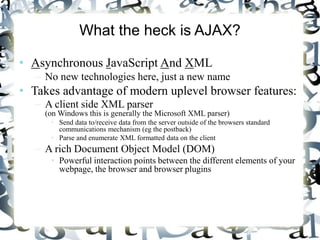
What the heck is AJAX? 
• Asynchronous JavaScript And XML 
– No new technologies here, just a new name 
• Takes advantage of modern uplevel browser features: 
– A client side XML parser 
(on Windows this is generally the Microsoft XML parser) 
• Send data to/receive data from the server outside of the browsers standard 
communications mechanism (eg the postback) 
• Parse and enumerate XML formatted data on the client 
– A rich Document Object Model (DOM) 
• Powerful interaction points between the different elements of your 
webpage, the browser and browser plugins
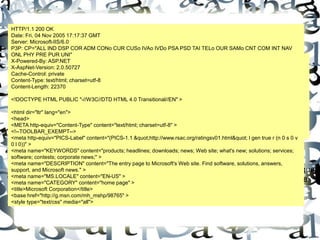
The standard web client/server 
request processing model 
HTTP/1.1 200 OK 
Date: Fri, 04 Nov 2005 17:17:37 GMT 
Server: Microsoft-IIS/6.0 
P3P: CP="ALL IND DSP COR ADM CONo CUR CUSo IVAo IVDo PSA PSD TAI TELo OUR SAMo CNT COM INT NAV 
ONL PHY PRE PUR UNI" 
X-Powered-By: ASP.NET 
X-AspNet-Version: 2.0.50727 
Cache-Control: private 
Content-Type: text/html; charset=utf-8 
Content-Length: 22370 
GET / HTTP/1.1 
Accept: image/gif, image/x-xbitmap, image/jpeg, image/pjpeg, application/x-shockwave-flash, 
application/vnd.ms-excel, application/vnd.ms-powerpoint, application/msword, */* 
Accept-Language: en-us 
Accept-Encoding: gzip, deflate 
User-Agent: Mozilla/4.0 (compatible; MSIE 6.0; Windows NT 5.1; SV1; .NET CLR 1.1.4322; .NET CLR 
2.0.50727) 
Host: www.microsoft.com 
Proxy-Connection: Keep-Alive 
Cookie: MC1=GUID=5cd2d5ca1a1cc54183c10f4bacaa45fa&HASH=cad5&LV=20059&V=3; 
A=I&I=AxUFAAAAAABuCAAAzJInmvNBZzRHm8aAr99x0A!!; msresearch=1 
Browser makes a resource 
request to the server 
<html dir="ltr" lang="en"> 
<head> 
<META http-equiv="Content-Type" content="text/html; charset=utf-8" > 
<!--TOOLBAR_EXEMPT--> 
<meta http-equiv="PICS-Label" content="(PICS-1.1 &quot;http://www.rsac.org/ratingsv01.html&quot; l gen true r (n 0 s 0 v 
0 l 0))" > 
<meta name="KEYWORDS" content="products; headlines; downloads; news; Web site; what's new; solutions; services; 
software; contests; corporate news;" > 
<meta name="DESCRIPTION" content="The entry page to Microsoft's Web site. Find software, solutions, answers, 
support, and Microsoft news." > 
<meta name="MS.LOCALE" content="EN-US" > 
<meta name="CATEGORY" content="home page" > 
<title>Microsoft Corporation</title> 
<base href="http://g.msn.com/mh_mshp/98765" > 
<style type="text/css" media="all"> 
Server processes the request 
and returns a result to the 
browser 
HTTP Request 
<!DOCTYPE HTML PUBLIC "-//W3C//DTD HTML 4.0 Transitional//EN" > 
HTTP Response
Demo 
• A simple HTML postback example
Problems with this model 
• To get any data requires complete round trip to the 
server which is inefficient 
• UI suffers because the entire UI must be refreshed 
as part of the postback, even if it does not change 
(users see the page “flash”) 
• User is blocked from continuing to work until the 
page is returned from the postback
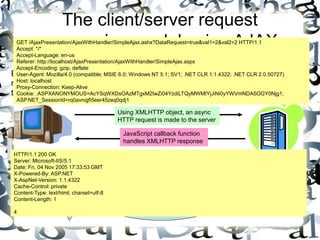
The client/server request 
processing model using AJAX 
GET /AjaxPresentation/AjaxWithHandler/SimpleAjax.ashx?DataRequest=true&val1=2&val2=2 HTTP/1.1 
Accept: */* 
Accept-Language: en-us 
Referer: http://localhost/AjaxPresentation/AjaxWithHandler/SimpleAjax.aspx 
Accept-Encoding: gzip, deflate 
User-Agent: Mozilla/4.0 (compatible; MSIE 6.0; Windows NT 5.1; SV1; .NET CLR 1.1.4322; .NET CLR 2.0.50727) 
Host: localhost 
Proxy-Connection: Keep-Alive 
Cookie: .ASPXANONYMOUS=AcYSqWXDsOAzMTgxM2IwZi04YzdiLTQyMWMtYjJiNi0yYWVmNDA5OGY0Njg1; 
ASP.NET_SessionId=rq0avnqjfi5eer45zeq0qdj1 
Server processes the 
request and returns a 
result to the browser 
Browser makes a 
resource request to 
the server 
HTTP Request 
Using XMLHTTP object, an async 
HTTP request is made to the server 
JavaScript callback function 
handles XMLHTTP response 
HTTP Response 
HTTP/1.1 200 OK 
Server: Microsoft-IIS/5.1 
Date: Fri, 04 Nov 2005 17:33:53 GMT 
X-Powered-By: ASP.NET 
X-AspNet-Version: 1.1.4322 
Cache-Control: private 
Content-Type: text/html; charset=utf-8 
Content-Length: 1 
4
AJAX Advantages 
• Send an receive only the data you need 
– Think chatty, not chunky 
• Only update portions of the page that need to be 
updated 
• Asynchronous, so users can continue to work while 
the page is updated, and more data is fetched
Creating Ajax applications 
• Use JavaScript to instantiate the XML parser 
//Works in Mozilla (Firefox) and Safari 
var oXml = new XMLHttpRequest(); 
Works in Internet Explorer 
var oXml = new ActiveXObject("Microsoft.XMLHTTP"); 
• Use the XML object to create a new HTTP request to 
the server: 
oXml.Open("GET", “Endpoint.aspx”, true); 
• Use the XML objects onreadystatechange property to 
assign a client-side callback method
Demo 
• A simple AJAX demo
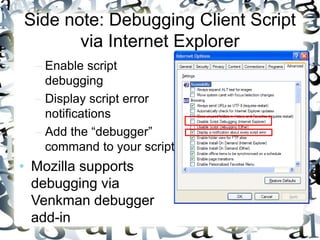
Side note: Debugging Client Script 
via Internet Explorer 
– Enable script 
debugging 
– Display script error 
notifications 
– Add the “debugger” 
command to your script 
• Mozilla supports 
debugging via 
Venkman debugger 
add-in
AJAX Endpoints 
• Anything that can be accessed via HTTP can serve as 
an AJAX endpoint 
– Standard ASP.NET webpages (*.aspx) 
– HTTP Handlers (*.ashx, or custom extenstions) 
– Web Services (*.asmx) 
– PHP Web Pages 
• Think about endpoint performance 
– ASPX endpoints require a complete page lifecycle to 
execute on each request 
– Handlers and Web Services are much more lightweight 
– Both can access Session, Cache etc
Demo 
• Using Handlers as AJAX endpoints 
• Accessing Session from an Handler
Controlling Asynchronous 
Communications 
• Create timer based operations using JavaScripts 
setInterval command 
• Make sure you control the number of open HTTP 
connections, as well as the polling interval
Demo 
• Adding AJAX Asynchronous polling
AJAX Payloads 
• The AJAX “Payload” is the data returned by the 
HTTP request. 
• Since Ajax is simply a standard HTTP 
request/response, the response payload can be 
anything you like 
• Examples: 
– XML, HTML, Simple Types (number, string), JSON 
• Remember that the actual HTTP payload will always 
be a type of string, so objects must be serialized
Primary Payload Types 
• Two primary types of payloads in AJAX: 
– XML 
• Simple, easy to read format, but you generally must use the MS 
XML Parser and DOM to work with it 
• Native to .NET – easy to create on and transport from the server 
– JSON (JavaScript Object Notation) 
• Slightly more complex 
• Data must be massaged into JSON format 
• Easier to work with once its on the client 
• Either supports complex object serialization
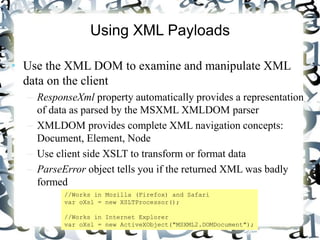
Using XML Payloads 
• Use the XML DOM to examine and manipulate XML 
data on the client 
– ResponseXml property automatically provides a representation 
of data as parsed by the MSXML XMLDOM parser 
– XMLDOM provides complete XML navigation concepts: 
Document, Element, Node 
– Use client side XSLT to transform or format data 
– ParseError object tells you if the returned XML was badly 
formed 
//Works in Mozilla (Firefox) and Safari 
var oXsl = new XSLTProcessor(); 
//Works in Internet Explorer 
var oXsl = new ActiveXObject("MSXML2.DOMDocument");
Demo 
• Parsing AJAX XML payloads 
• Using XSLT with AJAX Payloads
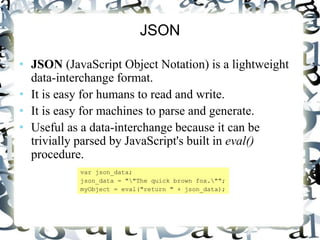
JSON 
• JSON (JavaScript Object Notation) is a lightweight 
data-interchange format. 
• It is easy for humans to read and write. 
• It is easy for machines to parse and generate. 
• Useful as a data-interchange because it can be 
trivially parsed by JavaScript's built in eval() 
procedure. 
var json_data; 
json_data = ""The quick brown fox.""; 
myObject = eval("return " + json_data);
Examples of JSON 
• Object serialized to JSON example 
{"menu": { 
"id": "file", 
"value": "File", 
"popup": { 
"menuitem": [ 
{"value": "New", "onclick": "CreateNewDoc()"}, 
{"value": "Open", "onclick": "OpenDoc()"}, 
{"value": "Close", "onclick": "CloseDoc()"} 
] 
} 
}} 
• The same text expressed as XML: 
<menu id="file" value="File"> 
<popup> 
<menuitem value="New" onclick="CreateNewDoc()" /> 
<menuitem value="Open" onclick="OpenDoc()" /> 
<menuitem value="Close" onclick="CloseDoc()" /> 
</popup> 
</menu>
Other AJAX libraries 
• Server Side Libraries 
– Ajax.NET 
http://ajax.schwarz-interactive.de/csharpsample/default.aspx 
– PHP & ASP 
http://cpaint.sourceforge.net/ 
• Client Side Libraries 
– Google AJAXSLT 
http://goog-ajaxslt.sourceforge.net/ 
– Dojo 
http://dojotoolkit.org/
Ajax.NET 
• Open Source AJAX implementation for .NET 
(Note: while still available, the project is not longer being actively developed) 
• Easy to use. Requires a simple method attribute ( 
[AjaxMethod()]) to expose server side methods as AJAX 
endpoints 
• Automatically uses JSON to transport complex objects like 
DataSets 
• Uses dynamically generated JavaScript to create client side 
proxies for server side objects 
• Supports transport of integers, strings, doubles, booleans, 
DateTime, DataSets, DataTables and primitive types of custom 
classes and arrays 
• Other types supported via Custom Type converters
Demo 
• Using Ajax.NET
AJAX Security 
• HTTPS is your friend 
• Keep sensitive code or data on the server where you 
can control it 
• By default everything is sent clear text over the wire 
(including client side code), and could potentially be 
captured in transit and modified 
• JavaScript has no intrinsic over-the-wire encryption 
support, but you can implement your own encryption 
(search Google for ‘AJAX encryption’)
Client Callbacks 
• New Feature in ASP.NET 2.0 
• Add client-side callbacks to your web pages or server 
controls 
• Executes in the context of the current page 
– Allows you to access existing control state on the server 
during the callback process 
– Keeps you from having to pass as much data back 
• Not as flexible in setting endpoints, and passing 
arguments
Atlas 
• Microsofts next generation AJAX framework 
– Cross browser compatible 
• Includes both declarative and imperative programming 
models 
– Code in vanilla JavaScript, or use the Atlas “tag” 
programming model 
• Attempts to bring JavaScript to a first class language 
– Uses abstraction layers to add familiar programming 
constructs like Types, Enumerations, Class Inheritance 
– Also uses abstraction layers to abstract cross browser 
problems 
• Includes a number of controls for common functionality
Declarative Atlas 
<page xmlns:script="http://schemas.microsoft.com/xml-script/2005" xmlns:wiki="wiki"> 
<components> 
<label targetElement="loadingMsg1"> 
<bindings> 
<binding dataContext="documentsSource1" dataPath="isReady" property="visible" transform="Invert"/> 
</bindings> 
</label> 
<textBox targetElement="<%= navCategoryID.ClientID %>" /> 
<textBox targetElement="<%= navDefaultDocumentTitle.ClientID %>"/> 
<textBox targetElement="recurseSubfolders1"/> 
<dataSource id="documentsSource1" serviceURL="<%= ResolveUrl("~/WebServices/DocumentWebService.asmx") %>"> 
<bindings> 
<binding dataContext="<%= navCategoryID.ClientID %>" dataPath="text" property="selectParameters" propertyKey="categoryID"/> 
<binding dataContext="<%= navDefaultDocumentTitle.ClientID %>" dataPath="text" property="selectParameters“ 
propertyKey="defaultDocumentTitle"/> 
<binding dataContext="recurseSubfolders1" dataPath="text" property="selectParameters" propertyKey="strRecurseSubfolders"/> 
</bindings> 
</dataSource>

Synapseindia dot net development web applications with ajax

  • 1.
    Creating Rich ClientWeb Applications with AJAX
  • 2.
    Agenda • WebApps: Whats good, whats not • What is AJAX and how can AJAX help with the bad? • Creating simple AJAX applications • AJAX endpoints and payloads • Using third-party AJAX libraries • AJAX security • ASP.NET 2.0 client callbacks and Atlas
  • 3.
    The Good, Badand Ugly (of Web Applications) Condensed Version • The Good – Centralized control of the application – Easy deployment • The Bad – Locked into the browser sandbox – Loose the “thick-client” experience – One way to get data – the browser postback • The Ugly – Browser compatibility
  • 4.
    How does AJAXhelp? • Keep all of the good of thin client • Bring the “thick-client” experience much closer to the thin client • Escape the standard client/server HTTP request communications paradigm (the “postback”)
  • 5.
    What the heckis AJAX? • Asynchronous JavaScript And XML – No new technologies here, just a new name • Takes advantage of modern uplevel browser features: – A client side XML parser (on Windows this is generally the Microsoft XML parser) • Send data to/receive data from the server outside of the browsers standard communications mechanism (eg the postback) • Parse and enumerate XML formatted data on the client – A rich Document Object Model (DOM) • Powerful interaction points between the different elements of your webpage, the browser and browser plugins
  • 6.
    The standard webclient/server request processing model HTTP/1.1 200 OK Date: Fri, 04 Nov 2005 17:17:37 GMT Server: Microsoft-IIS/6.0 P3P: CP="ALL IND DSP COR ADM CONo CUR CUSo IVAo IVDo PSA PSD TAI TELo OUR SAMo CNT COM INT NAV ONL PHY PRE PUR UNI" X-Powered-By: ASP.NET X-AspNet-Version: 2.0.50727 Cache-Control: private Content-Type: text/html; charset=utf-8 Content-Length: 22370 GET / HTTP/1.1 Accept: image/gif, image/x-xbitmap, image/jpeg, image/pjpeg, application/x-shockwave-flash, application/vnd.ms-excel, application/vnd.ms-powerpoint, application/msword, */* Accept-Language: en-us Accept-Encoding: gzip, deflate User-Agent: Mozilla/4.0 (compatible; MSIE 6.0; Windows NT 5.1; SV1; .NET CLR 1.1.4322; .NET CLR 2.0.50727) Host: www.microsoft.com Proxy-Connection: Keep-Alive Cookie: MC1=GUID=5cd2d5ca1a1cc54183c10f4bacaa45fa&HASH=cad5&LV=20059&V=3; A=I&I=AxUFAAAAAABuCAAAzJInmvNBZzRHm8aAr99x0A!!; msresearch=1 Browser makes a resource request to the server <html dir="ltr" lang="en"> <head> <META http-equiv="Content-Type" content="text/html; charset=utf-8" > <!--TOOLBAR_EXEMPT--> <meta http-equiv="PICS-Label" content="(PICS-1.1 &quot;http://www.rsac.org/ratingsv01.html&quot; l gen true r (n 0 s 0 v 0 l 0))" > <meta name="KEYWORDS" content="products; headlines; downloads; news; Web site; what's new; solutions; services; software; contests; corporate news;" > <meta name="DESCRIPTION" content="The entry page to Microsoft's Web site. Find software, solutions, answers, support, and Microsoft news." > <meta name="MS.LOCALE" content="EN-US" > <meta name="CATEGORY" content="home page" > <title>Microsoft Corporation</title> <base href="http://g.msn.com/mh_mshp/98765" > <style type="text/css" media="all"> Server processes the request and returns a result to the browser HTTP Request <!DOCTYPE HTML PUBLIC "-//W3C//DTD HTML 4.0 Transitional//EN" > HTTP Response
  • 7.
    Demo • Asimple HTML postback example
  • 8.
    Problems with thismodel • To get any data requires complete round trip to the server which is inefficient • UI suffers because the entire UI must be refreshed as part of the postback, even if it does not change (users see the page “flash”) • User is blocked from continuing to work until the page is returned from the postback
  • 9.
    The client/server request processing model using AJAX GET /AjaxPresentation/AjaxWithHandler/SimpleAjax.ashx?DataRequest=true&val1=2&val2=2 HTTP/1.1 Accept: */* Accept-Language: en-us Referer: http://localhost/AjaxPresentation/AjaxWithHandler/SimpleAjax.aspx Accept-Encoding: gzip, deflate User-Agent: Mozilla/4.0 (compatible; MSIE 6.0; Windows NT 5.1; SV1; .NET CLR 1.1.4322; .NET CLR 2.0.50727) Host: localhost Proxy-Connection: Keep-Alive Cookie: .ASPXANONYMOUS=AcYSqWXDsOAzMTgxM2IwZi04YzdiLTQyMWMtYjJiNi0yYWVmNDA5OGY0Njg1; ASP.NET_SessionId=rq0avnqjfi5eer45zeq0qdj1 Server processes the request and returns a result to the browser Browser makes a resource request to the server HTTP Request Using XMLHTTP object, an async HTTP request is made to the server JavaScript callback function handles XMLHTTP response HTTP Response HTTP/1.1 200 OK Server: Microsoft-IIS/5.1 Date: Fri, 04 Nov 2005 17:33:53 GMT X-Powered-By: ASP.NET X-AspNet-Version: 1.1.4322 Cache-Control: private Content-Type: text/html; charset=utf-8 Content-Length: 1 4
  • 10.
    AJAX Advantages •Send an receive only the data you need – Think chatty, not chunky • Only update portions of the page that need to be updated • Asynchronous, so users can continue to work while the page is updated, and more data is fetched
  • 11.
    Creating Ajax applications • Use JavaScript to instantiate the XML parser //Works in Mozilla (Firefox) and Safari var oXml = new XMLHttpRequest(); Works in Internet Explorer var oXml = new ActiveXObject("Microsoft.XMLHTTP"); • Use the XML object to create a new HTTP request to the server: oXml.Open("GET", “Endpoint.aspx”, true); • Use the XML objects onreadystatechange property to assign a client-side callback method
  • 12.
    Demo • Asimple AJAX demo
  • 13.
    Side note: DebuggingClient Script via Internet Explorer – Enable script debugging – Display script error notifications – Add the “debugger” command to your script • Mozilla supports debugging via Venkman debugger add-in
  • 14.
    AJAX Endpoints •Anything that can be accessed via HTTP can serve as an AJAX endpoint – Standard ASP.NET webpages (*.aspx) – HTTP Handlers (*.ashx, or custom extenstions) – Web Services (*.asmx) – PHP Web Pages • Think about endpoint performance – ASPX endpoints require a complete page lifecycle to execute on each request – Handlers and Web Services are much more lightweight – Both can access Session, Cache etc
  • 15.
    Demo • UsingHandlers as AJAX endpoints • Accessing Session from an Handler
  • 16.
    Controlling Asynchronous Communications • Create timer based operations using JavaScripts setInterval command • Make sure you control the number of open HTTP connections, as well as the polling interval
  • 17.
    Demo • AddingAJAX Asynchronous polling
  • 18.
    AJAX Payloads •The AJAX “Payload” is the data returned by the HTTP request. • Since Ajax is simply a standard HTTP request/response, the response payload can be anything you like • Examples: – XML, HTML, Simple Types (number, string), JSON • Remember that the actual HTTP payload will always be a type of string, so objects must be serialized
  • 19.
    Primary Payload Types • Two primary types of payloads in AJAX: – XML • Simple, easy to read format, but you generally must use the MS XML Parser and DOM to work with it • Native to .NET – easy to create on and transport from the server – JSON (JavaScript Object Notation) • Slightly more complex • Data must be massaged into JSON format • Easier to work with once its on the client • Either supports complex object serialization
  • 20.
    Using XML Payloads • Use the XML DOM to examine and manipulate XML data on the client – ResponseXml property automatically provides a representation of data as parsed by the MSXML XMLDOM parser – XMLDOM provides complete XML navigation concepts: Document, Element, Node – Use client side XSLT to transform or format data – ParseError object tells you if the returned XML was badly formed //Works in Mozilla (Firefox) and Safari var oXsl = new XSLTProcessor(); //Works in Internet Explorer var oXsl = new ActiveXObject("MSXML2.DOMDocument");
  • 21.
    Demo • ParsingAJAX XML payloads • Using XSLT with AJAX Payloads
  • 22.
    JSON • JSON(JavaScript Object Notation) is a lightweight data-interchange format. • It is easy for humans to read and write. • It is easy for machines to parse and generate. • Useful as a data-interchange because it can be trivially parsed by JavaScript's built in eval() procedure. var json_data; json_data = ""The quick brown fox.""; myObject = eval("return " + json_data);
  • 23.
    Examples of JSON • Object serialized to JSON example {"menu": { "id": "file", "value": "File", "popup": { "menuitem": [ {"value": "New", "onclick": "CreateNewDoc()"}, {"value": "Open", "onclick": "OpenDoc()"}, {"value": "Close", "onclick": "CloseDoc()"} ] } }} • The same text expressed as XML: <menu id="file" value="File"> <popup> <menuitem value="New" onclick="CreateNewDoc()" /> <menuitem value="Open" onclick="OpenDoc()" /> <menuitem value="Close" onclick="CloseDoc()" /> </popup> </menu>
  • 24.
    Other AJAX libraries • Server Side Libraries – Ajax.NET http://ajax.schwarz-interactive.de/csharpsample/default.aspx – PHP & ASP http://cpaint.sourceforge.net/ • Client Side Libraries – Google AJAXSLT http://goog-ajaxslt.sourceforge.net/ – Dojo http://dojotoolkit.org/
  • 25.
    Ajax.NET • OpenSource AJAX implementation for .NET (Note: while still available, the project is not longer being actively developed) • Easy to use. Requires a simple method attribute ( [AjaxMethod()]) to expose server side methods as AJAX endpoints • Automatically uses JSON to transport complex objects like DataSets • Uses dynamically generated JavaScript to create client side proxies for server side objects • Supports transport of integers, strings, doubles, booleans, DateTime, DataSets, DataTables and primitive types of custom classes and arrays • Other types supported via Custom Type converters
  • 26.
  • 27.
    AJAX Security •HTTPS is your friend • Keep sensitive code or data on the server where you can control it • By default everything is sent clear text over the wire (including client side code), and could potentially be captured in transit and modified • JavaScript has no intrinsic over-the-wire encryption support, but you can implement your own encryption (search Google for ‘AJAX encryption’)
  • 28.
    Client Callbacks •New Feature in ASP.NET 2.0 • Add client-side callbacks to your web pages or server controls • Executes in the context of the current page – Allows you to access existing control state on the server during the callback process – Keeps you from having to pass as much data back • Not as flexible in setting endpoints, and passing arguments
  • 29.
    Atlas • Microsoftsnext generation AJAX framework – Cross browser compatible • Includes both declarative and imperative programming models – Code in vanilla JavaScript, or use the Atlas “tag” programming model • Attempts to bring JavaScript to a first class language – Uses abstraction layers to add familiar programming constructs like Types, Enumerations, Class Inheritance – Also uses abstraction layers to abstract cross browser problems • Includes a number of controls for common functionality
  • 30.
    Declarative Atlas <pagexmlns:script="http://schemas.microsoft.com/xml-script/2005" xmlns:wiki="wiki"> <components> <label targetElement="loadingMsg1"> <bindings> <binding dataContext="documentsSource1" dataPath="isReady" property="visible" transform="Invert"/> </bindings> </label> <textBox targetElement="<%= navCategoryID.ClientID %>" /> <textBox targetElement="<%= navDefaultDocumentTitle.ClientID %>"/> <textBox targetElement="recurseSubfolders1"/> <dataSource id="documentsSource1" serviceURL="<%= ResolveUrl("~/WebServices/DocumentWebService.asmx") %>"> <bindings> <binding dataContext="<%= navCategoryID.ClientID %>" dataPath="text" property="selectParameters" propertyKey="categoryID"/> <binding dataContext="<%= navDefaultDocumentTitle.ClientID %>" dataPath="text" property="selectParameters“ propertyKey="defaultDocumentTitle"/> <binding dataContext="recurseSubfolders1" dataPath="text" property="selectParameters" propertyKey="strRecurseSubfolders"/> </bindings> </dataSource>