Lecture6- Web Server
NET 445 – Internet Programming
Web Servers
2
 Web servers respond to HypertextTransfer Protocol
(HTTP) requests
 from clients and send back a response
 containing a status code and often content such as HTML,
XML or JSON as well.
 Examples for web servers:
 Apache and Nginx (linux web servers)
 Internet Information Services (IIS) ( for windows)
 Examples for web clients
 Google Chrome, Firefox, and Microsoft Edge.
Why are web servers necessary?
3
 The server and client speak the standardized language of
the World WideWeb.
 This standard language is why an old Mozilla Netscape
browser can still talk to a modern Apache or Nginx web
server,
 even if it cannot properly render the page design like a modern
web browser can.
 The basic language of the Web with the request and
response cycle from client to server then server back to
client remains the same
 as it was when theWeb was invented by Tim Berners-Lee at
CERN in 1989.
 Modern browsers and web servers have simply extended
the language of the Web to incorporate new standards.
Web server implementations
4
 The conceptual web server idea can be implemented
in various ways.The following web server
implementations each have varying features,
extensions and configurations.
 The Apache HTTP Server has been the most commonly
deployed web server on the Internet for 20+ years.
 Nginx is the second most commonly used server for the
top 100,000 websites and often serves as a reverse proxy
for PythonWSGI servers.
 Caddy is a newcomer to the web server scene and is
focused on serving the HTTP/2 protocol with HTTPS.
What is an HTTP Server?
5
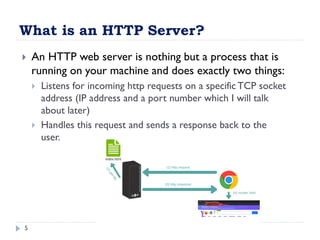
 An HTTP web server is nothing but a process that is
running on your machine and does exactly two things:
 Listens for incoming http requests on a specificTCP socket
address (IP address and a port number which I will talk
about later)
 Handles this request and sends a response back to the
user.
Simple HTTP Server using Sockets
6
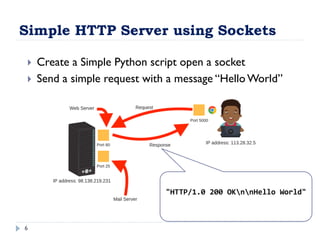
"HTTP/1.0 200 OKnnHello World"
 Create a Simple Python script open a socket
 Send a simple request with a message “Hello World”
Simple HTTP Server using Sockets
7
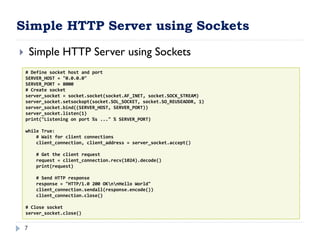
 Simple HTTP Server using Sockets
# Define socket host and port
SERVER_HOST = "0.0.0.0"
SERVER_PORT = 8000
# Create socket
server_socket = socket.socket(socket.AF_INET, socket.SOCK_STREAM)
server_socket.setsockopt(socket.SOL_SOCKET, socket.SO_REUSEADDR, 1)
server_socket.bind((SERVER_HOST, SERVER_PORT))
server_socket.listen(1)
print("Listening on port %s ..." % SERVER_PORT)
while True:
# Wait for client connections
client_connection, client_address = server_socket.accept()
# Get the client request
request = client_connection.recv(1024).decode()
print(request)
# Send HTTP response
response = "HTTP/1.0 200 OKnnHello World"
client_connection.sendall(response.encode())
client_connection.close()
# Close socket
server_socket.close()
Simple HTTP Server using http.server
8
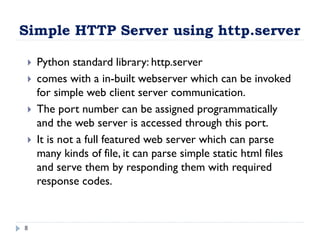
 Python standard library: http.server
 comes with a in-built webserver which can be invoked
for simple web client server communication.
 The port number can be assigned programmatically
and the web server is accessed through this port.
 It is not a full featured web server which can parse
many kinds of file, it can parse simple static html files
and serve them by responding them with required
response codes.
Creating a simple HTML file to serve
9
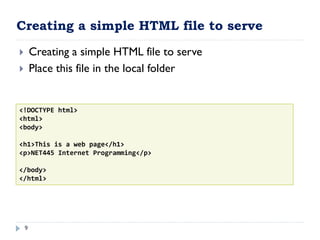
 Creating a simple HTML file to serve
 Place this file in the local folder
<!DOCTYPE html>
<html>
<body>
<h1>This is a web page</h1>
<p>NET445 Internet Programming</p>
</body>
</html>
Simple HTTP Server using http.server
10
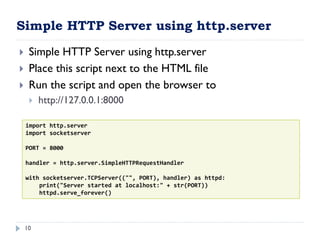
 Simple HTTP Server using http.server
 Place this script next to the HTML file
 Run the script and open the browser to
 http://127.0.0.1:8000
import http.server
import socketserver
PORT = 8000
handler = http.server.SimpleHTTPRequestHandler
with socketserver.TCPServer(("", PORT), handler) as httpd:
print("Server started at localhost:" + str(PORT))
httpd.serve_forever()
Flask Web Framework
11
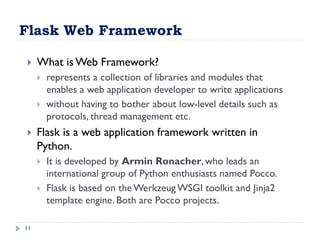
 What is Web Framework?
 represents a collection of libraries and modules that
enables a web application developer to write applications
 without having to bother about low-level details such as
protocols, thread management etc.
 Flask is a web application framework written in
Python.
 It is developed by Armin Ronacher, who leads an
international group of Python enthusiasts named Pocco.
 Flask is based on theWerkzeug WSGI toolkit and Jinja2
template engine. Both are Pocco projects.
Flask Web Framework
12
 WSGI
 Web Server Gateway Interface (WSGI) has been adopted
as a standard for Python web application development.
 WSGI is a specification for a universal interface between
the web server and the web applications.
 Jinja2
 Jinja2 is a popular templating engine for Python.
 A web templating system combines a template with a
certain data source to render dynamic web pages.
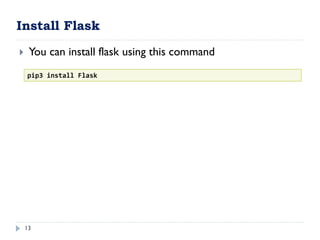
Install Flask
13
 You can install flask using this command
pip3 install Flask
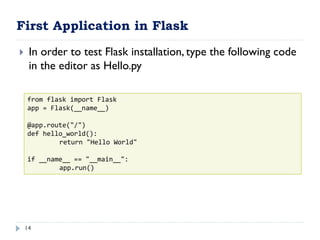
First Application in Flask
14
 In order to test Flask installation, type the following code
in the editor as Hello.py
from flask import Flask
app = Flask(__name__)
@app.route("/")
def hello_world():
return "Hello World"
if __name__ == "__main__":
app.run()
Simple Application in details
15
 Flask constructor takes the name of current module
(__name__) as argument.
 The route() function of the Flask class is a decorator, which tells
the application which URL should call the associated function.
 app.route(rule, options)
 The rule parameter represents URL binding with the function.
 The options is a list of parameters to be forwarded to the
underlying Rule object.
 In the above example,‘/’ URL is bound with hello_world()
function. Hence, when the home page of web server is opened
in browser, the output of this function will be rendered.
 Finally the run() method of Flask class runs the application on
the local development server.
Flask – Routing
16
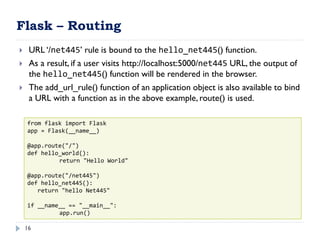
 URL ‘/net445’ rule is bound to the hello_net445() function.
 As a result, if a user visits http://localhost:5000/net445 URL, the output of
the hello_net445() function will be rendered in the browser.
 The add_url_rule() function of an application object is also available to bind
a URL with a function as in the above example, route() is used.
from flask import Flask
app = Flask(__name__)
@app.route("/")
def hello_world():
return "Hello World"
@app.route("/net445")
def hello_net445():
return "hello Net445"
if __name__ == "__main__":
app.run()
Flask – Variable Rules
17
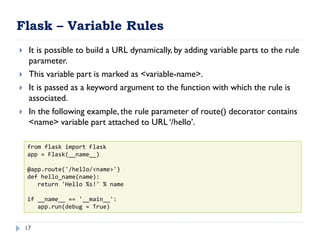
 It is possible to build a URL dynamically, by adding variable parts to the rule
parameter.
 This variable part is marked as <variable-name>.
 It is passed as a keyword argument to the function with which the rule is
associated.
 In the following example, the rule parameter of route() decorator contains
<name> variable part attached to URL ‘/hello’.
from flask import Flask
app = Flask(__name__)
@app.route('/hello/<name>')
def hello_name(name):
return 'Hello %s!' % name
if __name__ == '__main__':
app.run(debug = True)
Flask – Variable Rules and Conversions
18
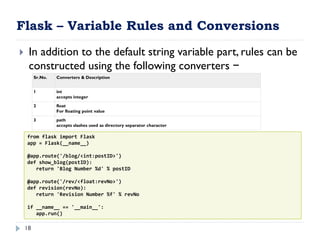
 In addition to the default string variable part, rules can be
constructed using the following converters −
from flask import Flask
app = Flask(__name__)
@app.route('/blog/<int:postID>')
def show_blog(postID):
return 'Blog Number %d' % postID
@app.route('/rev/<float:revNo>')
def revision(revNo):
return 'Revision Number %f' % revNo
if __name__ == '__main__':
app.run()
Sr.No. Converters & Description
1 int
accepts integer
2 float
For floating point value
3 path
accepts slashes used as directory separator character
Flask – Templates
19
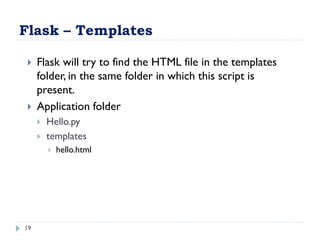
 Flask will try to find the HTML file in the templates
folder, in the same folder in which this script is
present.
 Application folder
 Hello.py
 templates
 hello.html
jinja2 – Templates
20
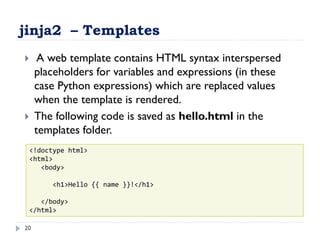
 A web template contains HTML syntax interspersed
placeholders for variables and expressions (in these
case Python expressions) which are replaced values
when the template is rendered.
 The following code is saved as hello.html in the
templates folder.
<!doctype html>
<html>
<body>
<h1>Hello {{ name }}!</h1>
</body>
</html>
Simple Template in Flask
21
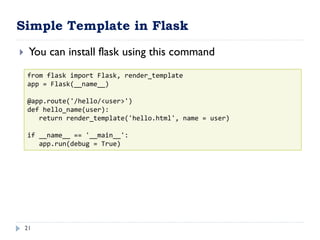
 You can install flask using this command
from flask import Flask, render_template
app = Flask(__name__)
@app.route('/hello/<user>')
def hello_name(user):
return render_template('hello.html', name = user)
if __name__ == '__main__':
app.run(debug = True)
jinja2 – Templates
22
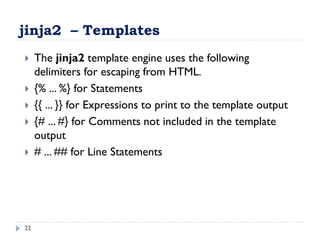
 The jinja2 template engine uses the following
delimiters for escaping from HTML.
 {% ... %} for Statements
 {{ ... }} for Expressions to print to the template output
 {# ... #} for Comments not included in the template
output
 # ... ## for Line Statements
Advanced Template – HTML code
23
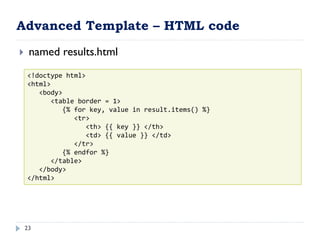
 named results.html
<!doctype html>
<html>
<body>
<table border = 1>
{% for key, value in result.items() %}
<tr>
<th> {{ key }} </th>
<td> {{ value }} </td>
</tr>
{% endfor %}
</table>
</body>
</html>
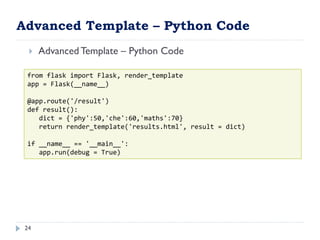
Advanced Template – Python Code
24
 Advanced Template – Python Code
from flask import Flask, render_template
app = Flask(__name__)
@app.route('/result')
def result():
dict = {'phy':50,'che':60,'maths':70}
return render_template('results.html', result = dict)
if __name__ == '__main__':
app.run(debug = True)
References:
 Foundations of Python Network ProgrammingThird
Edition by Brandon Rhodes (2014)
 James F. Kurose, and KeithW Ross, Computer
Networking:A Top-Down Approach,6th Edition
 Python 3 documentation
 https://wiki.python.org/moin/UdpCommunicat
ion
 https://www.w3schools.com/python/
 https://www.tutorialspoint.com/python/
25

Web Server and how we can design app in C#

  • 1.
    Lecture6- Web Server NET445 – Internet Programming
  • 2.
    Web Servers 2  Webservers respond to HypertextTransfer Protocol (HTTP) requests  from clients and send back a response  containing a status code and often content such as HTML, XML or JSON as well.  Examples for web servers:  Apache and Nginx (linux web servers)  Internet Information Services (IIS) ( for windows)  Examples for web clients  Google Chrome, Firefox, and Microsoft Edge.
  • 3.
    Why are webservers necessary? 3  The server and client speak the standardized language of the World WideWeb.  This standard language is why an old Mozilla Netscape browser can still talk to a modern Apache or Nginx web server,  even if it cannot properly render the page design like a modern web browser can.  The basic language of the Web with the request and response cycle from client to server then server back to client remains the same  as it was when theWeb was invented by Tim Berners-Lee at CERN in 1989.  Modern browsers and web servers have simply extended the language of the Web to incorporate new standards.
  • 4.
    Web server implementations 4 The conceptual web server idea can be implemented in various ways.The following web server implementations each have varying features, extensions and configurations.  The Apache HTTP Server has been the most commonly deployed web server on the Internet for 20+ years.  Nginx is the second most commonly used server for the top 100,000 websites and often serves as a reverse proxy for PythonWSGI servers.  Caddy is a newcomer to the web server scene and is focused on serving the HTTP/2 protocol with HTTPS.
  • 5.
    What is anHTTP Server? 5  An HTTP web server is nothing but a process that is running on your machine and does exactly two things:  Listens for incoming http requests on a specificTCP socket address (IP address and a port number which I will talk about later)  Handles this request and sends a response back to the user.
  • 6.
    Simple HTTP Serverusing Sockets 6 "HTTP/1.0 200 OKnnHello World"  Create a Simple Python script open a socket  Send a simple request with a message “Hello World”
  • 7.
    Simple HTTP Serverusing Sockets 7  Simple HTTP Server using Sockets # Define socket host and port SERVER_HOST = "0.0.0.0" SERVER_PORT = 8000 # Create socket server_socket = socket.socket(socket.AF_INET, socket.SOCK_STREAM) server_socket.setsockopt(socket.SOL_SOCKET, socket.SO_REUSEADDR, 1) server_socket.bind((SERVER_HOST, SERVER_PORT)) server_socket.listen(1) print("Listening on port %s ..." % SERVER_PORT) while True: # Wait for client connections client_connection, client_address = server_socket.accept() # Get the client request request = client_connection.recv(1024).decode() print(request) # Send HTTP response response = "HTTP/1.0 200 OKnnHello World" client_connection.sendall(response.encode()) client_connection.close() # Close socket server_socket.close()
  • 8.
    Simple HTTP Serverusing http.server 8  Python standard library: http.server  comes with a in-built webserver which can be invoked for simple web client server communication.  The port number can be assigned programmatically and the web server is accessed through this port.  It is not a full featured web server which can parse many kinds of file, it can parse simple static html files and serve them by responding them with required response codes.
  • 9.
    Creating a simpleHTML file to serve 9  Creating a simple HTML file to serve  Place this file in the local folder <!DOCTYPE html> <html> <body> <h1>This is a web page</h1> <p>NET445 Internet Programming</p> </body> </html>
  • 10.
    Simple HTTP Serverusing http.server 10  Simple HTTP Server using http.server  Place this script next to the HTML file  Run the script and open the browser to  http://127.0.0.1:8000 import http.server import socketserver PORT = 8000 handler = http.server.SimpleHTTPRequestHandler with socketserver.TCPServer(("", PORT), handler) as httpd: print("Server started at localhost:" + str(PORT)) httpd.serve_forever()
  • 11.
    Flask Web Framework 11 What is Web Framework?  represents a collection of libraries and modules that enables a web application developer to write applications  without having to bother about low-level details such as protocols, thread management etc.  Flask is a web application framework written in Python.  It is developed by Armin Ronacher, who leads an international group of Python enthusiasts named Pocco.  Flask is based on theWerkzeug WSGI toolkit and Jinja2 template engine. Both are Pocco projects.
  • 12.
    Flask Web Framework 12 WSGI  Web Server Gateway Interface (WSGI) has been adopted as a standard for Python web application development.  WSGI is a specification for a universal interface between the web server and the web applications.  Jinja2  Jinja2 is a popular templating engine for Python.  A web templating system combines a template with a certain data source to render dynamic web pages.
  • 13.
    Install Flask 13  Youcan install flask using this command pip3 install Flask
  • 14.
    First Application inFlask 14  In order to test Flask installation, type the following code in the editor as Hello.py from flask import Flask app = Flask(__name__) @app.route("/") def hello_world(): return "Hello World" if __name__ == "__main__": app.run()
  • 15.
    Simple Application indetails 15  Flask constructor takes the name of current module (__name__) as argument.  The route() function of the Flask class is a decorator, which tells the application which URL should call the associated function.  app.route(rule, options)  The rule parameter represents URL binding with the function.  The options is a list of parameters to be forwarded to the underlying Rule object.  In the above example,‘/’ URL is bound with hello_world() function. Hence, when the home page of web server is opened in browser, the output of this function will be rendered.  Finally the run() method of Flask class runs the application on the local development server.
  • 16.
    Flask – Routing 16 URL ‘/net445’ rule is bound to the hello_net445() function.  As a result, if a user visits http://localhost:5000/net445 URL, the output of the hello_net445() function will be rendered in the browser.  The add_url_rule() function of an application object is also available to bind a URL with a function as in the above example, route() is used. from flask import Flask app = Flask(__name__) @app.route("/") def hello_world(): return "Hello World" @app.route("/net445") def hello_net445(): return "hello Net445" if __name__ == "__main__": app.run()
  • 17.
    Flask – VariableRules 17  It is possible to build a URL dynamically, by adding variable parts to the rule parameter.  This variable part is marked as <variable-name>.  It is passed as a keyword argument to the function with which the rule is associated.  In the following example, the rule parameter of route() decorator contains <name> variable part attached to URL ‘/hello’. from flask import Flask app = Flask(__name__) @app.route('/hello/<name>') def hello_name(name): return 'Hello %s!' % name if __name__ == '__main__': app.run(debug = True)
  • 18.
    Flask – VariableRules and Conversions 18  In addition to the default string variable part, rules can be constructed using the following converters − from flask import Flask app = Flask(__name__) @app.route('/blog/<int:postID>') def show_blog(postID): return 'Blog Number %d' % postID @app.route('/rev/<float:revNo>') def revision(revNo): return 'Revision Number %f' % revNo if __name__ == '__main__': app.run() Sr.No. Converters & Description 1 int accepts integer 2 float For floating point value 3 path accepts slashes used as directory separator character
  • 19.
    Flask – Templates 19 Flask will try to find the HTML file in the templates folder, in the same folder in which this script is present.  Application folder  Hello.py  templates  hello.html
  • 20.
    jinja2 – Templates 20 A web template contains HTML syntax interspersed placeholders for variables and expressions (in these case Python expressions) which are replaced values when the template is rendered.  The following code is saved as hello.html in the templates folder. <!doctype html> <html> <body> <h1>Hello {{ name }}!</h1> </body> </html>
  • 21.
    Simple Template inFlask 21  You can install flask using this command from flask import Flask, render_template app = Flask(__name__) @app.route('/hello/<user>') def hello_name(user): return render_template('hello.html', name = user) if __name__ == '__main__': app.run(debug = True)
  • 22.
    jinja2 – Templates 22 The jinja2 template engine uses the following delimiters for escaping from HTML.  {% ... %} for Statements  {{ ... }} for Expressions to print to the template output  {# ... #} for Comments not included in the template output  # ... ## for Line Statements
  • 23.
    Advanced Template –HTML code 23  named results.html <!doctype html> <html> <body> <table border = 1> {% for key, value in result.items() %} <tr> <th> {{ key }} </th> <td> {{ value }} </td> </tr> {% endfor %} </table> </body> </html>
  • 24.
    Advanced Template –Python Code 24  Advanced Template – Python Code from flask import Flask, render_template app = Flask(__name__) @app.route('/result') def result(): dict = {'phy':50,'che':60,'maths':70} return render_template('results.html', result = dict) if __name__ == '__main__': app.run(debug = True)
  • 25.
    References:  Foundations ofPython Network ProgrammingThird Edition by Brandon Rhodes (2014)  James F. Kurose, and KeithW Ross, Computer Networking:A Top-Down Approach,6th Edition  Python 3 documentation  https://wiki.python.org/moin/UdpCommunicat ion  https://www.w3schools.com/python/  https://www.tutorialspoint.com/python/ 25