Net… work!
Yonatan Levin
04/7/2016
Wifi: GoogleGuestPSK
pass: pUp3EkaP
4
First,
Yonatan Levin
Google Developer Expert
parahall
levin.yonatan
> 1200 members Largest Android Active Community
Yonatan Levin
Google Developer Expert &
Android @ Gett
Idan Felix
Senior Android & Redhead
Varonis
Jonathan Yarkoni
Android Developer &
Advocate
Ironsource
Android Academy Staff
Britt Barak
Android Lead
Stealth Startup
Muiriel Felix
Android Design
52 Cities > 20M usersRuby, Go, Python, Microservices
Logistics
https://www.facebook.com/groups/android.academy.ils/
What’s next?
10/8 - Felix
- Battery & CPU
14/9 - Britt
- Threading
30 / 10 / 2016
New course coming
Special Guest!
Program Manager at Google
What’s in menu?
- Network
- Offline
- Scheduler
- Batching
- Pre-fetching
What was I doing wrong?
Common errors
- Polling chat/message from server every 5 seconds even when
app in the background
- Pulling photos/articles from server every time user opens the
Gallery even when nothing is changed
- Retrying failing networking requests till them will succeed.
- Service that never stops...
- A lot of bugs :)
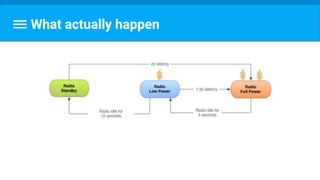
What actually happen
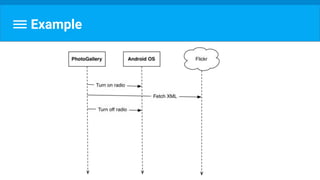
Example
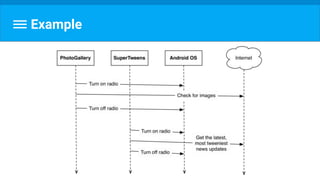
Example
Two scenarios
I want it now!
Does it really works for most of the time?
What we want really to give the user?
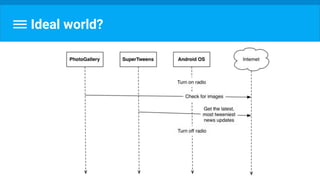
Ideal world?
Let’s start with basics
1
It’s also called HTTP
Net… work
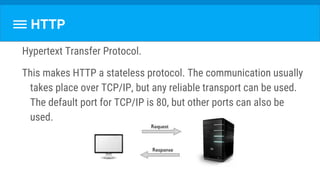
Hypertext Transfer Protocol.
This makes HTTP a stateless protocol. The communication usually
takes place over TCP/IP, but any reliable transport can be used.
The default port for TCP/IP is 80, but other ports can also be
used.
HTTP
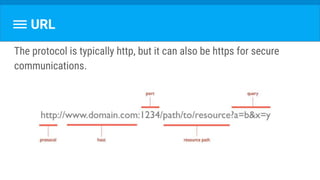
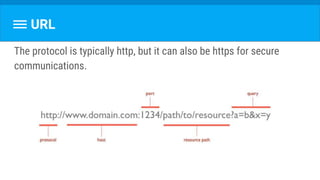
URL
The protocol is typically http, but it can also be https for secure
communications.
HTTP Verb
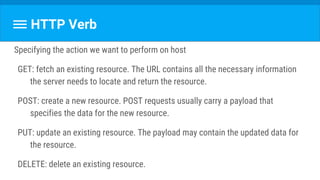
Specifying the action we want to perform on host
GET: fetch an existing resource. The URL contains all the necessary information
the server needs to locate and return the resource.
POST: create a new resource. POST requests usually carry a payload that
specifies the data for the new resource.
PUT: update an existing resource. The payload may contain the updated data for
the resource.
DELETE: delete an existing resource.
Status Code
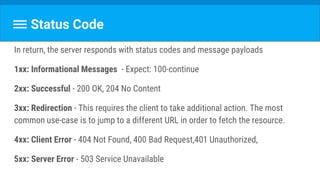
In return, the server responds with status codes and message payloads
1xx: Informational Messages - Expect: 100-continue
2xx: Successful - 200 OK, 204 No Content
3xx: Redirection - This requires the client to take additional action. The most
common use-case is to jump to a different URL in order to fetch the resource.
4xx: Client Error - 404 Not Found, 400 Bad Request,401 Unauthorized,
5xx: Server Error - 503 Service Unavailable
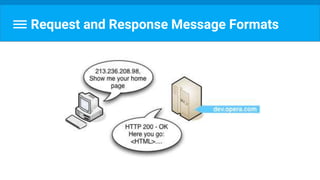
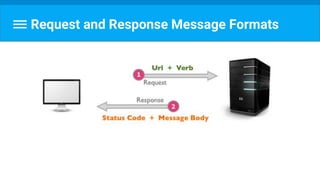
Request and Response Message Formats
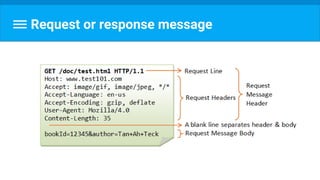
Request or response message
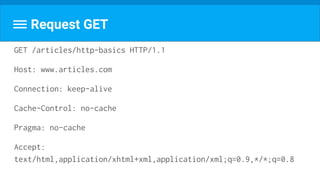
Request GET
GET /articles/http-basics HTTP/1.1
Host: www.articles.com
Connection: keep-alive
Cache-Control: no-cache
Pragma: no-cache
Accept:
text/html,application/xhtml+xml,application/xml;q=0.9,*/*;q=0.8
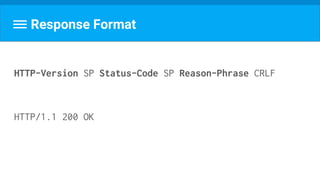
Response Format
HTTP-Version SP Status-Code SP Reason-Phrase CRLF
HTTP/1.1 200 OK
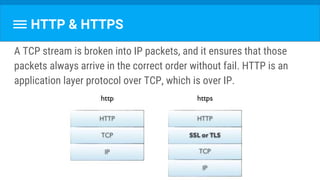
HTTP & HTTPS
A TCP stream is broken into IP packets, and it ensures that those
packets always arrive in the correct order without fail. HTTP is an
application layer protocol over TCP, which is over IP.
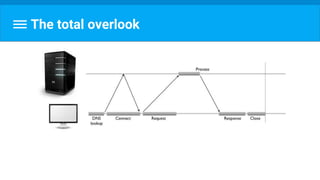
The total overlook
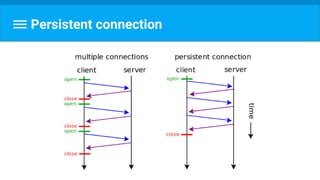
Should I connect every time?!
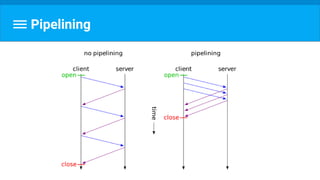
Persistent connection
Parallel connections
If there are six assets that the client needs to download from a
website, the client makes six parallel connections to download those
assets, resulting in a faster turnaround.
Pipelining
Server side
establishing a socket to start listening on port 80 (or some other port)
receiving the request and parsing the message
processing the response
setting response headers
sending the response to the client
close the connection if a Connection: close request header was found
2
Because really there is only one
HTTP Client
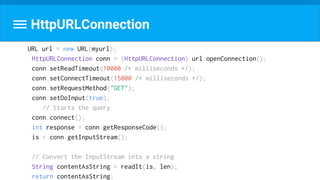
URL url = new URL(myurl);
HttpURLConnection conn = (HttpURLConnection) url.openConnection();
conn.setReadTimeout(10000 /* milliseconds */);
conn.setConnectTimeout(15000 /* milliseconds */);
conn.setRequestMethod("GET");
conn.setDoInput(true);
// Starts the query
conn.connect();
int response = conn.getResponseCode();
is = conn.getInputStream();
// Convert the InputStream into a string
String contentAsString = readIt(is, len);
return contentAsString;
HttpURLConnection
Wait! I forgot something!
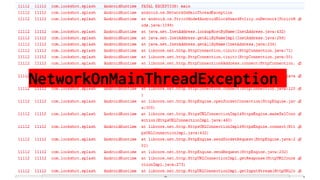
NetworkOnMainThreadException
Brave one that know how to implement
readIt(InputStream is)?
ReadIt()

public String readIt(InputStream stream) throws IOException,
UnsupportedEncodingException {
Reader reader = null;
reader = new InputStreamReader(stream, "UTF-8");
char[] buffer = new char[1024];
reader.read(buffer);
return new String(buffer);
}
What if it’s image?
Luckily, we have
Retrofit 2
A type-safe HTTP client for Android and Java
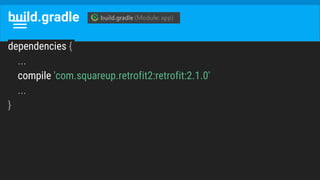
build.gradle
dependencies {
...
compile 'com.squareup.retrofit2:retrofit:2.1.0'
...
}
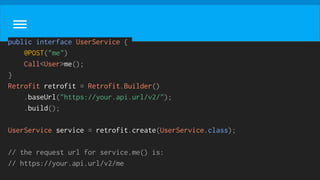
public interface UserService {
@POST("me")
Call<User>me();
}
Retrofit retrofit = Retrofit.Builder()
.baseUrl("https://your.api.url/v2/");
.build();
UserService service = retrofit.create(UserService.class);
// the request url for service.me() is:
// https://your.api.url/v2/me
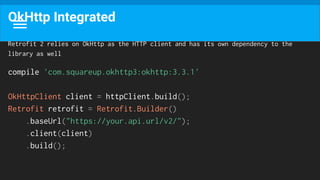
OkHttp Integrated
Retrofit 2 relies on OkHttp as the HTTP client and has its own dependency to the
library as well
compile 'com.squareup.okhttp3:okhttp:3.3.1'
OkHttpClient client = httpClient.build();
Retrofit retrofit = Retrofit.Builder()
.baseUrl("https://your.api.url/v2/");
.client(client)
.build();
Why OkHttp called “Ok”?
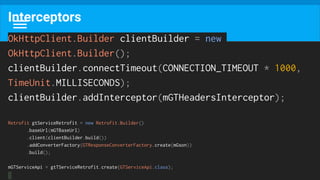
Interceptors
OkHttpClient.Builder clientBuilder = new
OkHttpClient.Builder();
clientBuilder.connectTimeout(CONNECTION_TIMEOUT * 1000,
TimeUnit.MILLISECONDS);
clientBuilder.addInterceptor(mGTHeadersInterceptor);
Retrofit gtServiceRetrofit = new Retrofit.Builder()
.baseUrl(mGTBaseUrl)
.client(clientBuilder.build())
.addConverterFactory(GTResponseConverterFactory.create(mGson))
.build();
mGTServiceApi = gtTServiceRetrofit.create(GTServiceApi.class);
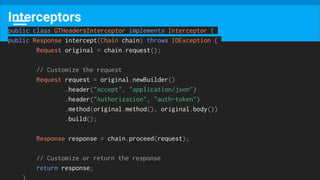
Interceptors
public class GTHeadersInterceptor implements Interceptor {
public Response intercept(Chain chain) throws IOException {
Request original = chain.request();
// Customize the request
Request request = original.newBuilder()
.header("Accept", "application/json")
.header("Authorization", "auth-token")
.method(original.method(), original.body())
.build();
Response response = chain.proceed(request);
// Customize or return the response
return response;
}
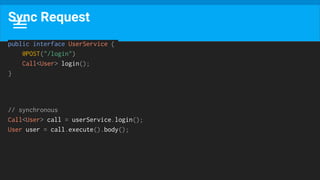
Sync Request
public interface UserService {
@POST("/login")
Call<User> login();
}
// synchronous
Call<User> call = userService.login();
User user = call.execute().body();
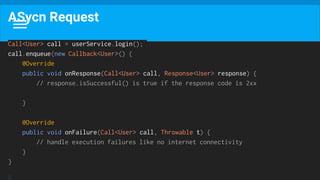
ASycn Request
Call<User> call = userService.login();
call.enqueue(new Callback<User>() {
@Override
public void onResponse(Call<User> call, Response<User> response) {
// response.isSuccessful() is true if the response code is 2xx
}
@Override
public void onFailure(Call<User> call, Throwable t) {
// handle execution failures like no internet connectivity
}
}
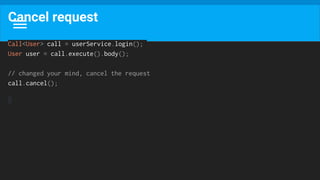
Cancel request
Call<User> call = userService.login();
User user = call.execute().body();
// changed your mind, cancel the request
call.cancel();
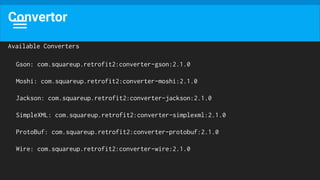
Convertor
Available Converters
Gson: com.squareup.retrofit2:converter-gson:2.1.0
Moshi: com.squareup.retrofit2:converter-moshi:2.1.0
Jackson: com.squareup.retrofit2:converter-jackson:2.1.0
SimpleXML: com.squareup.retrofit2:converter-simplexml:2.1.0
ProtoBuf: com.squareup.retrofit2:converter-protobuf:2.1.0
Wire: com.squareup.retrofit2:converter-wire:2.1.0
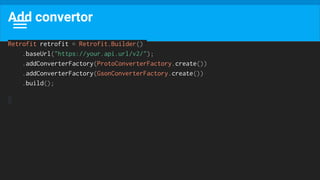
Add convertor
Retrofit retrofit = Retrofit.Builder()
.baseUrl("https://your.api.url/v2/");
.addConverterFactory(ProtoConverterFactory.create())
.addConverterFactory(GsonConverterFactory.create())
.build();
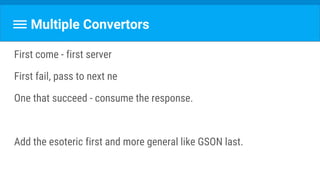
Multiple Convertors
First come - first server
First fail, pass to next ne
One that succeed - consume the response.
Add the esoteric first and more general like GSON last.
‫הבנת‬‫הנקרא‬ :
I want to add query parameter to every
request. What should i do?
URL
The protocol is typically http, but it can also be https for secure
communications.
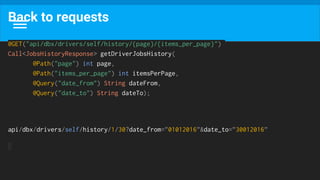
Back to requests
@GET("api/dbx/drivers/self/history/{page}/{items_per_page}")
Call<JobsHistoryResponse> getDriverJobsHistory(
@Path("page") int page,
@Path("items_per_page") int itemsPerPage,
@Query("date_from") String dateFrom,
@Query("date_to") String dateTo);
api/dbx/drivers/self/history/1/30?date_from=”01012016”&date_to=”30012016”
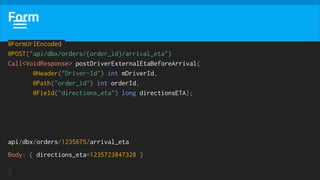
Form
@FormUrlEncoded
@POST("api/dbx/orders/{order_id}/arrival_eta")
Call<VoidResponse> postDriverExternalEtaBeforeArrival(
@Header("Driver-Id") int mDriverId,
@Path("order_id") int orderId,
@Field("directions_eta") long directionsETA);
api/dbx/orders/1235675/arrival_eta
Body: { directions_eta=1235723847328 }
More read
https://futurestud.io/blog/retrofit-getting-started-and-android-client
Shot of whisky?
What if i need different BASE_URL for couple
requests?
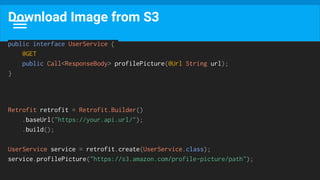
Download Image from S3
public interface UserService {
@GET
public Call<ResponseBody> profilePicture(@Url String url);
}
Retrofit retrofit = Retrofit.Builder()
.baseUrl("https://your.api.url/");
.build();
UserService service = retrofit.create(UserService.class);
service.profilePicture("https://s3.amazon.com/profile-picture/path");
2
Execute at right time
Schedulers
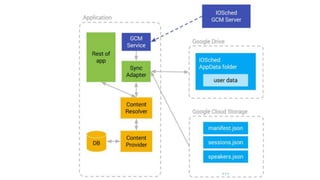
SyncAdapter
What is it and how i eat that
Android Framework
API >= 7 (Android 2.1)
Synchronizing data between an Android device and web servers
You specify what you should sync , how often - and it will do the rest
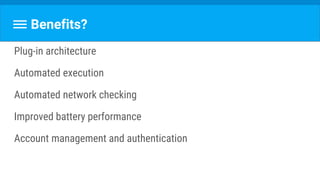
Benefits?
Plug-in architecture
Automated execution
Automated network checking
Improved battery performance
Account management and authentication
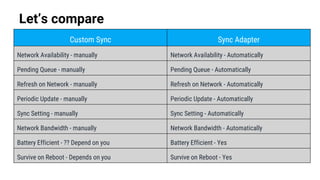
Let’s compare
Custom Sync Sync Adapter
Network Availability - manually Network Availability - Automatically
Pending Queue - manually Pending Queue - Automatically
Refresh on Network - manually Refresh on Network - Automatically
Periodic Update - manually Periodic Update - Automatically
Sync Setting - manually Sync Setting - Automatically
Network Bandwidth - manually Network Bandwidth - Automatically
Battery Efficient - ?? Depend on you Battery Efficient - Yes
Survive on Reboot - Depends on you Survive on Reboot - Yes
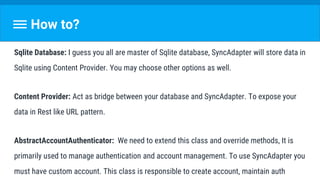
How to?
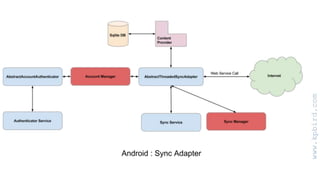
Sqlite Database: I guess you all are master of Sqlite database, SyncAdapter will store data in
Sqlite using Content Provider. You may choose other options as well.
Content Provider: Act as bridge between your database and SyncAdapter. To expose your
data in Rest like URL pattern.
AbstractAccountAuthenticator: We need to extend this class and override methods, It is
primarily used to manage authentication and account management. To use SyncAdapter you
must have custom account. This class is responsible to create account, maintain auth
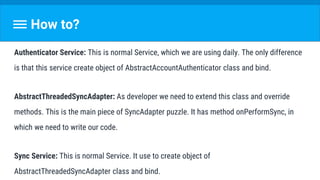
How to?
Authenticator Service: This is normal Service, which we are using daily. The only difference
is that this service create object of AbstractAccountAuthenticator class and bind.
AbstractThreadedSyncAdapter: As developer we need to extend this class and override
methods. This is the main piece of SyncAdapter puzzle. It has method onPerformSync, in
which we need to write our code.
Sync Service: This is normal Service. It use to create object of
AbstractThreadedSyncAdapter class and bind.
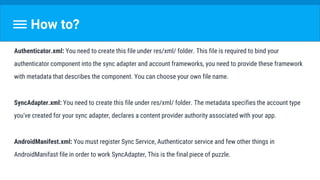
How to?
Authenticator.xml: You need to create this file under res/xml/ folder. This file is required to bind your
authenticator component into the sync adapter and account frameworks, you need to provide these framework
with metadata that describes the component. You can choose your own file name.
SyncAdapter.xml: You need to create this file under res/xml/ folder. The metadata specifies the account type
you've created for your sync adapter, declares a content provider authority associated with your app.
AndroidManifest.xml: You must register Sync Service, Authenticator service and few other things in
AndroidManifast file in order to work SyncAdapter, This is the final piece of puzzle.
JobScheduler/GCMNetworkManager
What?
Schedule the task to execute it when certain conditions met.
(charging, idle, connected to a network or connected to an unmetered
network)
Why two?
JobScheduler was introduced in API >= 21 (Lollipop).
GCMNetworkManager - is part of GCM package. When using on
devices >= 21, use JobScheduler underneath.
Deep Dive
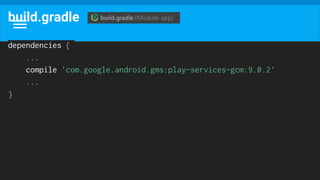
build.gradle
dependencies {
...
compile 'com.google.android.gms:play-services-gcm:9.0.2'
...
}
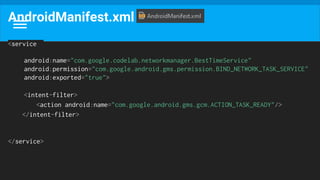
AndroidManifest.xml
<service
android:name="com.google.codelab.networkmanager.BestTimeService"
android:permission="com.google.android.gms.permission.BIND_NETWORK_TASK_SERVICE"
android:exported="true">
<intent-filter>
<action android:name="com.google.android.gms.gcm.ACTION_TASK_READY"/>
</intent-filter>
</service>
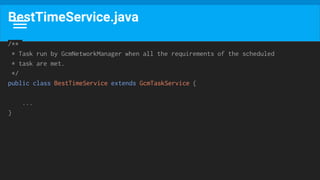
BestTimeService.java
/**
* Task run by GcmNetworkManager when all the requirements of the scheduled
* task are met.
*/
public class BestTimeService extends GcmTaskService {
...
}
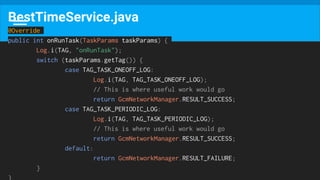
BestTimeService.java
@Override
public int onRunTask(TaskParams taskParams) {
Log.i(TAG, "onRunTask");
switch (taskParams.getTag()) {
case TAG_TASK_ONEOFF_LOG:
Log.i(TAG, TAG_TASK_ONEOFF_LOG);
// This is where useful work would go
return GcmNetworkManager.RESULT_SUCCESS;
case TAG_TASK_PERIODIC_LOG:
Log.i(TAG, TAG_TASK_PERIODIC_LOG);
// This is where useful work would go
return GcmNetworkManager.RESULT_SUCCESS;
default:
return GcmNetworkManager.RESULT_FAILURE;
}
}
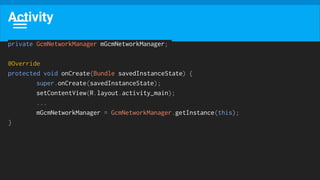
Activity
private GcmNetworkManager mGcmNetworkManager;
@Override
protected void onCreate(Bundle savedInstanceState) {
super.onCreate(savedInstanceState);
setContentView(R.layout.activity_main);
...
mGcmNetworkManager = GcmNetworkManager.getInstance(this);
}
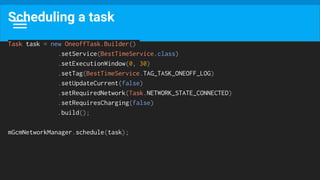
Scheduling a task
Task task = new OneoffTask.Builder()
.setService(BestTimeService.class)
.setExecutionWindow(0, 30)
.setTag(BestTimeService.TAG_TASK_ONEOFF_LOG)
.setUpdateCurrent(false)
.setRequiredNetwork(Task.NETWORK_STATE_CONNECTED)
.setRequiresCharging(false)
.build();
mGcmNetworkManager.schedule(task);
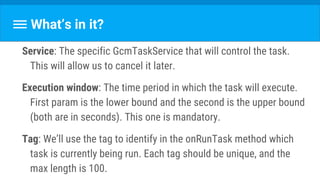
What’s in it?
Service: The specific GcmTaskService that will control the task.
This will allow us to cancel it later.
Execution window: The time period in which the task will execute.
First param is the lower bound and the second is the upper bound
(both are in seconds). This one is mandatory.
Tag: We’ll use the tag to identify in the onRunTask method which
task is currently being run. Each tag should be unique, and the
max length is 100.
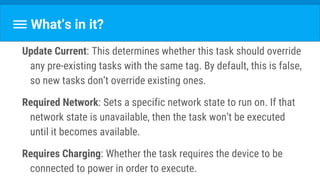
What’s in it?
Update Current: This determines whether this task should override
any pre-existing tasks with the same tag. By default, this is false,
so new tasks don’t override existing ones.
Required Network: Sets a specific network state to run on. If that
network state is unavailable, then the task won’t be executed
until it becomes available.
Requires Charging: Whether the task requires the device to be
connected to power in order to execute.
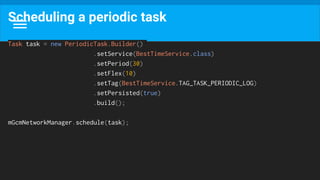
Scheduling a periodic task
Task task = new PeriodicTask.Builder()
.setService(BestTimeService.class)
.setPeriod(30)
.setFlex(10)
.setTag(BestTimeService.TAG_TASK_PERIODIC_LOG)
.setPersisted(true)
.build();
mGcmNetworkManager.schedule(task);
What’s in it?
Period: Specifies that the task should recur once every interval at
most, where the interval is the input param in seconds. By
default, you have no control over where in that period the task will
execute. This setter is mandatory.
Flex: Specifies how close to the end of the period (set above) the
task may execute. With a period of 30 seconds and a flex of 10,
the scheduler will execute the task between the 20-30 second
range.
What’s in it?
Persisted: Determines whether the task should be persisted across
reboots. Defaults to true for periodic tasks, and is not supported
for one-off tasks. Requires “Receive Boot Completed” permission,
or the setter will be ignored.
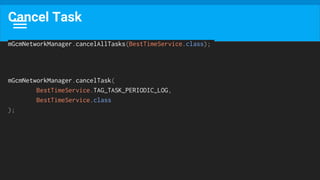
Cancel Task
mGcmNetworkManager.cancelAllTasks(BestTimeService.class);
mGcmNetworkManager.cancelTask(
BestTimeService.TAG_TASK_PERIODIC_LOG,
BestTimeService.class
);
There is a problem hiding here
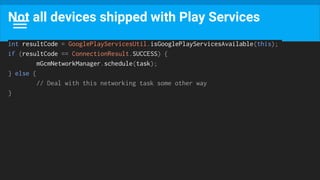
Not all devices shipped with Play Services
int resultCode = GooglePlayServicesUtil.isGooglePlayServicesAvailable(this);
if (resultCode == ConnectionResult.SUCCESS) {
mGcmNetworkManager.schedule(task);
} else {
// Deal with this networking task some other way
}
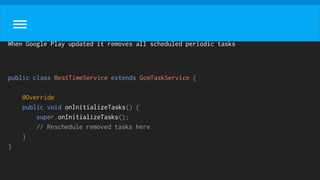
When Google Play updated it removes all scheduled periodic tasks
public class BestTimeService extends GcmTaskService {
@Override
public void onInitializeTasks() {
super.onInitializeTasks();
// Reschedule removed tasks here
}
}
4
Predict what your user will need
Prefetch data
Prefetch strategy
The goal is simple:
Reduce the number of radio activations required to download the
data.
Result
Improve the latency,
Lower the required bandwidth
Reduce download times.
User Experience!!!!!
Strategy
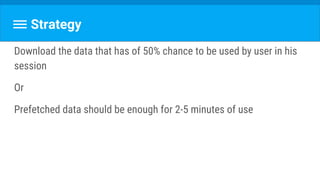
Download the data that has of 50% chance to be used by user in his
session
Or
Prefetched data should be enough for 2-5 minutes of use
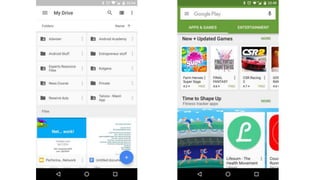
Let’s practice!
Example
4
Minimizing the Effect of Regular Updates
With GCM/FCM
Triggered update
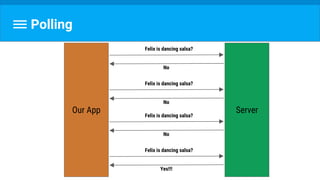
Polling
ServerOur App
Felix is dancing salsa?
No
Felix is dancing salsa?
No
Felix is dancing salsa?
No
Felix is dancing salsa?
Yes!!!
What if there is 50M clients?
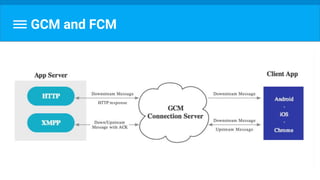
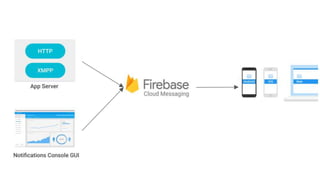
GCM and FCM
GCM and FCM
How to
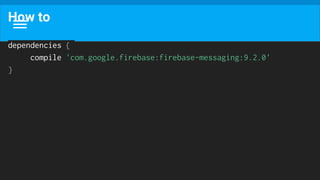
dependencies {
compile 'com.google.firebase:firebase-messaging:9.2.0'
}
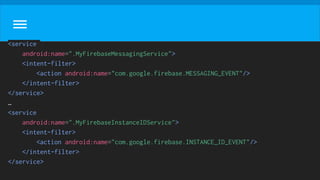
<service
android:name=".MyFirebaseMessagingService">
<intent-filter>
<action android:name="com.google.firebase.MESSAGING_EVENT"/>
</intent-filter>
</service>
…
<service
android:name=".MyFirebaseInstanceIDService">
<intent-filter>
<action android:name="com.google.firebase.INSTANCE_ID_EVENT"/>
</intent-filter>
</service>
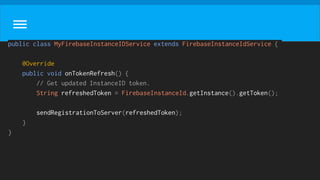
public class MyFirebaseInstanceIDService extends FirebaseInstanceIdService {
@Override
public void onTokenRefresh() {
// Get updated InstanceID token.
String refreshedToken = FirebaseInstanceId.getInstance().getToken();
sendRegistrationToServer(refreshedToken);
}
}
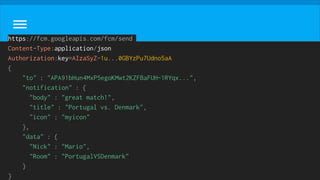
https://fcm.googleapis.com/fcm/send
Content-Type:application/json
Authorization:key=AIzaSyZ-1u...0GBYzPu7Udno5aA
{
"to" : "APA91bHun4MxP5egoKMwt2KZFBaFUH-1RYqx...",
"notification" : {
"body" : "great match!",
"title" : "Portugal vs. Denmark",
"icon" : "myicon"
},
"data" : {
"Nick" : "Mario",
"Room" : "PortugalVSDenmark"
}
}
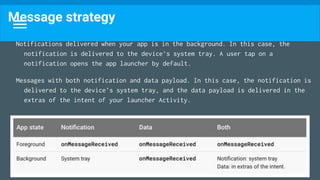
Message strategy
Notifications delivered when your app is in the background. In this case, the
notification is delivered to the device’s system tray. A user tap on a
notification opens the app launcher by default.
Messages with both notification and data payload. In this case, the notification is
delivered to the device’s system tray, and the data payload is delivered in the
extras of the intent of your launcher Activity.
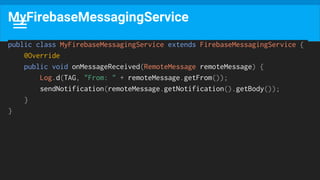
public class MyFirebaseMessagingService extends FirebaseMessagingService {
@Override
public void onMessageReceived(RemoteMessage remoteMessage) {
Log.d(TAG, "From: " + remoteMessage.getFrom());
sendNotification(remoteMessage.getNotification().getBody());
}
}
MyFirebaseMessagingService
4
Don’t download that you already have
Redundant Download
Don’t download what you already have
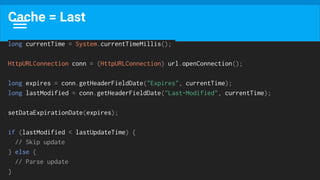
Cache = Last
long currentTime = System.currentTimeMillis();
HttpURLConnection conn = (HttpURLConnection) url.openConnection();
long expires = conn.getHeaderFieldDate("Expires", currentTime);
long lastModified = conn.getHeaderFieldDate("Last-Modified", currentTime);
setDataExpirationDate(expires);
if (lastModified < lastUpdateTime) {
// Skip update
} else {
// Parse update
}
How to do that in Retrofit?
4
The shy guy that no shy anymore
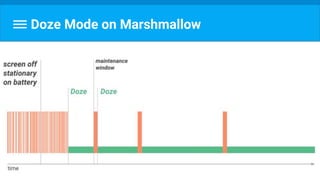
Doze Mode
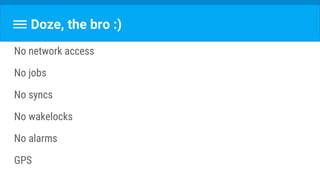
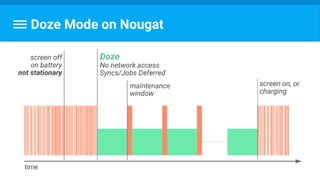
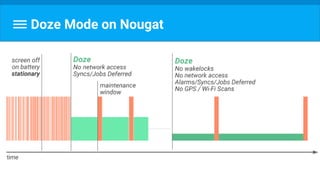
Doze, the bro :)
No network access
No jobs
No syncs
No wakelocks
No alarms
GPS
Doze Mode on Marshmallow
Not shy anymore
Doze Mode on Nougat
Doze Mode on Nougat
Doze, bye
- User pickup the phone
- User plug the phone to the charger
- Real alarm (clock) is going to kick on
So how i survive my background service to
track Felix?
Will doze mode affect my app?
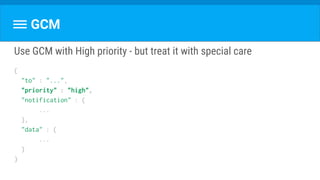
GCM
Use GCM with High priority - but treat it with special care
{
"to" : "...",
"priority" : "high",
"notification" : {
...
},
"data" : {
...
}
}
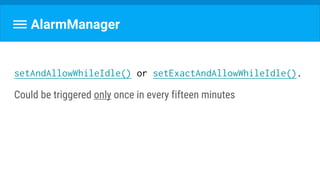
AlarmManager
setAndAllowWhileIdle() or setExactAndAllowWhileIdle().
Could be triggered only once in every fifteen minutes
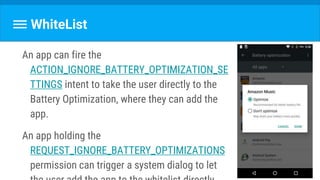
WhiteList
An app can fire the
ACTION_IGNORE_BATTERY_OPTIMIZATION_SE
TTINGS intent to take the user directly to the
Battery Optimization, where they can add the
app.
An app holding the
REQUEST_IGNORE_BATTERY_OPTIMIZATIONS
permission can trigger a system dialog to let
WhiteList
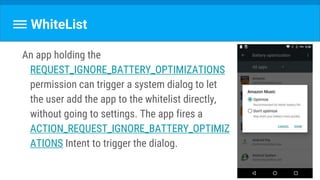
An app holding the
REQUEST_IGNORE_BATTERY_OPTIMIZATIONS
permission can trigger a system dialog to let
the user add the app to the whitelist directly,
without going to settings. The app fires a
ACTION_REQUEST_IGNORE_BATTERY_OPTIMIZ
ATIONS Intent to trigger the dialog.
Note: Google Play policies prohibit apps from
requesting direct exemption from Power
Management features in Android 6.0+ (Doze
and App Standby) unless the core function of
the app is adversely affected.
Payload
Because size is matter
4
Serialization
Flatbuffers
4
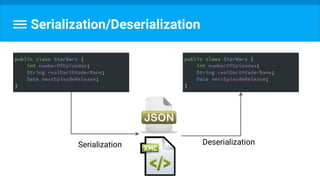
Serialization/Deserialization
Serialization Deserialization
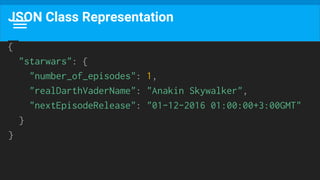
JSON Class Representation
{
"starwars": {
"number_of_episodes": 1,
"realDarthVaderName": "Anakin Skywalker",
"nextEpisodeRelease": "01-12-2016 01:00:00+3:00GMT"
}
}
Serialization/Deserialization
Advantage - It’s human readable. And it’s biggest weak point.
Memory overhead
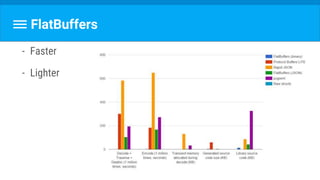
- Faster
- Lighter
FlatBuffers
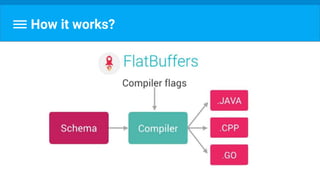
How it works?
Process
1.Create schema
2.Compile schema with flatc compiler
3.Import generated files into your project
4.Read from byte[]:
java.nio.ByteBuffer buf = builder.dataBuffer();
// Deserialize the data from the buffer.
Performance #4  network

Performance #4 network