BUILT IN FAIRFIELD COUNTY:
FRONT END DEVELOPERS MEETUP
TUES. MAY 14, 2013
JSON: The Basics
About Jeff Fox (@jfox015)
 16 year web development professional
 (Almost) entirely self taught
 Has used various Ajax-esque data technologies since
2000, including XML, MS data islands and AMF for
Flash
 Develops JavaScript based web apps that rely on
JSON for data workflow
Overview
 What is JSON?
 Comparisons with XML
 Syntax
 Data Types
 Usage
 Live Examples
What is JSON?
JSON is…
 A lightweight text based data-interchange format
 Completely language independent
 Based on a subset of the JavaScript Programming
Language
 Easy to understand, manipulate and generate
JSON is NOT…
 Overly Complex
 A “document” format
 A markup language
 A programming language
Why use JSON?
 Straightforward syntax
 Easy to create and manipulate
 Can be natively parsed in JavaScript using eval()
 Supported by all major JavaScript frameworks
 Supported by most backend technologies
JSON vs. XML
Much Like XML
 Plain text formats
 “Self-describing“ (human readable)
 Hierarchical (Values can contain lists of objects or
values)
Not Like XML
 Lighter and faster than XML
 JSON uses typed objects. All XML values are type-
less strings and must be parsed at runtime.
 Less syntax, no semantics
 Properties are immediately accessible to JavaScript
code
Knocks against JSON
 Lack of namespaces
 No inherit validation (XML has DTD and
templates, but there is JSONlint)
 Not extensible
 It’s basically just not XML
Syntax
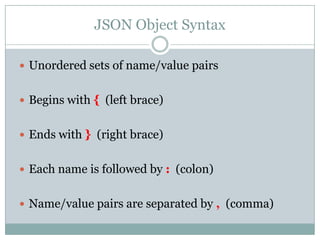
JSON Object Syntax
 Unordered sets of name/value pairs
 Begins with { (left brace)
 Ends with } (right brace)
 Each name is followed by : (colon)
 Name/value pairs are separated by , (comma)
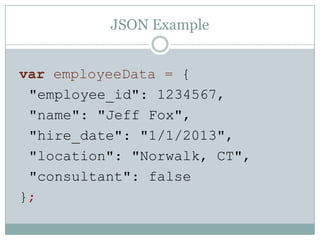
JSON Example
var employeeData = {
"employee_id": 1234567,
"name": "Jeff Fox",
"hire_date": "1/1/2013",
"location": "Norwalk, CT",
"consultant": false
};
Arrays in JSON
 An ordered collection of values
 Begins with [ (left bracket)
 Ends with ] (right bracket)
 Name/value pairs are separated by , (comma)
JSON Array Example
var employeeData = {
"employee_id": 1236937,
"name": "Jeff Fox",
"hire_date": "1/1/2013",
"location": "Norwalk, CT",
"consultant": false,
"random_nums": [ 24,65,12,94 ]
};
Data Types
Data Types: Strings
 Sequence of 0 or more Unicode characters
 Wrapped in "double quotes“
 Backslash escapement
Data Types: Numbers
 Integer
 Real
 Scientific
 No octal or hex
 No NaN or Infinity – Use null instead.
Data Types: Booleans & Null
 Booleans: true or false
 Null: A value that specifies nothing or no value.
Data Types: Objects & Arrays
 Objects: Unordered key/value pairs wrapped in { }
 Arrays: Ordered key/value pairs wrapped in [ ]
JSON Usage
How & When to use JSON
 Transfer data to and from a server
 Perform asynchronous data calls without requiring
a page refresh
 Working with data stores
 Compile and save form or user data for local
storage
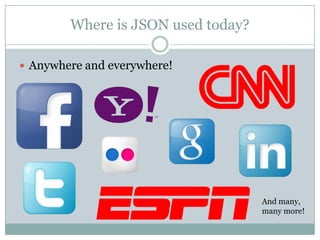
Where is JSON used today?
 Anywhere and everywhere!
And many,
many more!
Simple Example
Simple Demo
 Build a JSON data object in code
 Display raw output
 Display formatted output
 Manipulate via form input
Questions?
Resources
 Simple Demo on Github:
https://github.com/jfox015/BIFC-Simple-JSON-
Demo
 Another JSON Tutorial:
http://iviewsource.com/codingtutorials/getting-
started-with-javascript-object-notation-json-for-
absolute-beginners/
 JSON.org: http://www.json.org/
JSON: The Basics

JSON: The Basics

  • 1.
    BUILT IN FAIRFIELDCOUNTY: FRONT END DEVELOPERS MEETUP TUES. MAY 14, 2013 JSON: The Basics
  • 2.
    About Jeff Fox(@jfox015)  16 year web development professional  (Almost) entirely self taught  Has used various Ajax-esque data technologies since 2000, including XML, MS data islands and AMF for Flash  Develops JavaScript based web apps that rely on JSON for data workflow
  • 3.
    Overview  What isJSON?  Comparisons with XML  Syntax  Data Types  Usage  Live Examples
  • 4.
  • 5.
    JSON is…  Alightweight text based data-interchange format  Completely language independent  Based on a subset of the JavaScript Programming Language  Easy to understand, manipulate and generate
  • 6.
    JSON is NOT… Overly Complex  A “document” format  A markup language  A programming language
  • 7.
    Why use JSON? Straightforward syntax  Easy to create and manipulate  Can be natively parsed in JavaScript using eval()  Supported by all major JavaScript frameworks  Supported by most backend technologies
  • 8.
  • 9.
    Much Like XML Plain text formats  “Self-describing“ (human readable)  Hierarchical (Values can contain lists of objects or values)
  • 10.
    Not Like XML Lighter and faster than XML  JSON uses typed objects. All XML values are type- less strings and must be parsed at runtime.  Less syntax, no semantics  Properties are immediately accessible to JavaScript code
  • 11.
    Knocks against JSON Lack of namespaces  No inherit validation (XML has DTD and templates, but there is JSONlint)  Not extensible  It’s basically just not XML
  • 12.
  • 13.
    JSON Object Syntax Unordered sets of name/value pairs  Begins with { (left brace)  Ends with } (right brace)  Each name is followed by : (colon)  Name/value pairs are separated by , (comma)
  • 14.
    JSON Example var employeeData= { "employee_id": 1234567, "name": "Jeff Fox", "hire_date": "1/1/2013", "location": "Norwalk, CT", "consultant": false };
  • 15.
    Arrays in JSON An ordered collection of values  Begins with [ (left bracket)  Ends with ] (right bracket)  Name/value pairs are separated by , (comma)
  • 16.
    JSON Array Example varemployeeData = { "employee_id": 1236937, "name": "Jeff Fox", "hire_date": "1/1/2013", "location": "Norwalk, CT", "consultant": false, "random_nums": [ 24,65,12,94 ] };
  • 17.
  • 18.
    Data Types: Strings Sequence of 0 or more Unicode characters  Wrapped in "double quotes“  Backslash escapement
  • 19.
    Data Types: Numbers Integer  Real  Scientific  No octal or hex  No NaN or Infinity – Use null instead.
  • 20.
    Data Types: Booleans& Null  Booleans: true or false  Null: A value that specifies nothing or no value.
  • 21.
    Data Types: Objects& Arrays  Objects: Unordered key/value pairs wrapped in { }  Arrays: Ordered key/value pairs wrapped in [ ]
  • 22.
  • 23.
    How & Whento use JSON  Transfer data to and from a server  Perform asynchronous data calls without requiring a page refresh  Working with data stores  Compile and save form or user data for local storage
  • 24.
    Where is JSONused today?  Anywhere and everywhere! And many, many more!
  • 25.
  • 26.
    Simple Demo  Builda JSON data object in code  Display raw output  Display formatted output  Manipulate via form input
  • 27.
  • 28.
    Resources  Simple Demoon Github: https://github.com/jfox015/BIFC-Simple-JSON- Demo  Another JSON Tutorial: http://iviewsource.com/codingtutorials/getting- started-with-javascript-object-notation-json-for- absolute-beginners/  JSON.org: http://www.json.org/