25/07/16 Presentation 1
Android HTTP library
Surviving with Android
Presentation 225/07/16
What is it?
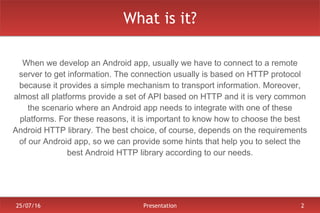
When we develop an Android app, usually we have to connect to a remote
server to get information. The connection usually is based on HTTP protocol
because it provides a simple mechanism to transport information. Moreover,
almost all platforms provide a set of API based on HTTP and it is very common
the scenario where an Android app needs to integrate with one of these
platforms. For these reasons, it is important to know how to choose the best
Android HTTP library. The best choice, of course, depends on the requirements
of our Android app, so we can provide some hints that help you to select the
best Android HTTP library according to our needs.
Presentation 325/07/16
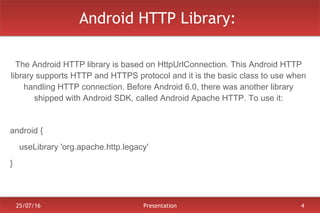
Android HTTP Library:
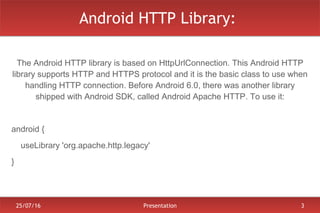
The Android HTTP library is based on HttpUrlConnection. This Android HTTP
library supports HTTP and HTTPS protocol and it is the basic class to use when
handling HTTP connection. Before Android 6.0, there was another library
shipped with Android SDK, called Android Apache HTTP. To use it:
android {
    useLibrary 'org.apache.http.legacy'
}
Presentation 425/07/16
Android HTTP Library:
The Android HTTP library is based on HttpUrlConnection. This Android HTTP
library supports HTTP and HTTPS protocol and it is the basic class to use when
handling HTTP connection. Before Android 6.0, there was another library
shipped with Android SDK, called Android Apache HTTP. To use it:
android {
    useLibrary 'org.apache.http.legacy'
}
Presentation 525/07/16
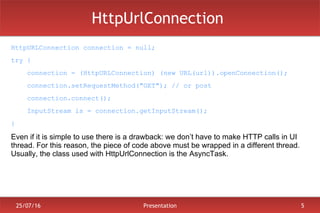
HttpUrlConnection
HttpURLConnection connection = null;
try {
connection = (HttpURLConnection) (new URL(url)).openConnection();
connection.setRequestMethod("GET"); // or post
connection.connect();
InputStream is = connection.getInputStream();
}
Even if it is simple to use there is a drawback: we don’t have to make HTTP calls in UI
thread. For this reason, the piece of code above must be wrapped in a different thread.
Usually, the class used with HttpUrlConnection is the AsyncTask.
Presentation 625/07/16
Android HTTP Alternatives
Third-part libraries have these advantages:
● Efficiency
● Parallel requests
● Caching system
● Non-blocking UI thread
● HTTP/2 support
At level of HTTP handling there are two main libraries:
● Volley
● OkHTTP
Presentation 725/07/16
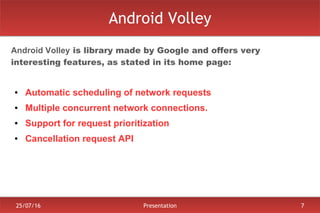
Android Volley
Android Volley is library made by Google and offers very
interesting features, as stated in its home page:
● Automatic scheduling of network requests
● Multiple concurrent network connections.
● Support for request prioritization
● Cancellation request API
Presentation 825/07/16
Android Volley: How to..
RequestQueue queue = Volley.newRequestQueue(ctx);
StringRequest req = new StringRequest(Request.Method.GET, url,
new Response.Listener<String>() {
@Override
public void onResponse(String data) {}
},
new Response.ErrorListener() {
@Override
OnError(...) {}
} );
queue.add(req);
Presentation 925/07/16
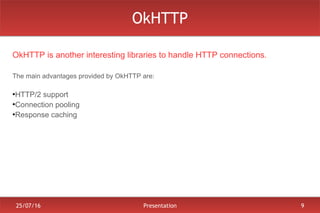
OkHTTP
OkHTTP is another interesting libraries to handle HTTP connections.
The main advantages provided by OkHTTP are:
●
HTTP/2 support
●
Connection pooling
●
Response caching
Presentation 1025/07/16
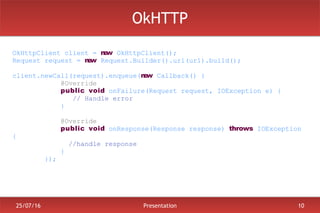
OkHTTP
OkHttpClient client = new OkHttpClient();
Request request = new Request.Builder().url(url).build();
client.newCall(request).enqueue(new Callback() {
@Override
public void onFailure(Request request, IOException e) {
// Handle error
}
@Override
public void onResponse(Response response) throws IOException
{
//handle response
}
});
Presentation 1125/07/16
Find more...
To find more information please visit
Android HTTP library: Handle HTTP, JSON, Images
Follow me @survivingwithan
25/07/16 Presentation 12
Thank you

Android http library

  • 1.
    25/07/16 Presentation 1 AndroidHTTP library Surviving with Android
  • 2.
    Presentation 225/07/16 What isit? When we develop an Android app, usually we have to connect to a remote server to get information. The connection usually is based on HTTP protocol because it provides a simple mechanism to transport information. Moreover, almost all platforms provide a set of API based on HTTP and it is very common the scenario where an Android app needs to integrate with one of these platforms. For these reasons, it is important to know how to choose the best Android HTTP library. The best choice, of course, depends on the requirements of our Android app, so we can provide some hints that help you to select the best Android HTTP library according to our needs.
  • 3.
    Presentation 325/07/16 Android HTTPLibrary: The Android HTTP library is based on HttpUrlConnection. This Android HTTP library supports HTTP and HTTPS protocol and it is the basic class to use when handling HTTP connection. Before Android 6.0, there was another library shipped with Android SDK, called Android Apache HTTP. To use it: android {     useLibrary 'org.apache.http.legacy' }
  • 4.
    Presentation 425/07/16 Android HTTPLibrary: The Android HTTP library is based on HttpUrlConnection. This Android HTTP library supports HTTP and HTTPS protocol and it is the basic class to use when handling HTTP connection. Before Android 6.0, there was another library shipped with Android SDK, called Android Apache HTTP. To use it: android {     useLibrary 'org.apache.http.legacy' }
  • 5.
    Presentation 525/07/16 HttpUrlConnection HttpURLConnection connection= null; try { connection = (HttpURLConnection) (new URL(url)).openConnection(); connection.setRequestMethod("GET"); // or post connection.connect(); InputStream is = connection.getInputStream(); } Even if it is simple to use there is a drawback: we don’t have to make HTTP calls in UI thread. For this reason, the piece of code above must be wrapped in a different thread. Usually, the class used with HttpUrlConnection is the AsyncTask.
  • 6.
    Presentation 625/07/16 Android HTTPAlternatives Third-part libraries have these advantages: ● Efficiency ● Parallel requests ● Caching system ● Non-blocking UI thread ● HTTP/2 support At level of HTTP handling there are two main libraries: ● Volley ● OkHTTP
  • 7.
    Presentation 725/07/16 Android Volley AndroidVolley is library made by Google and offers very interesting features, as stated in its home page: ● Automatic scheduling of network requests ● Multiple concurrent network connections. ● Support for request prioritization ● Cancellation request API
  • 8.
    Presentation 825/07/16 Android Volley:How to.. RequestQueue queue = Volley.newRequestQueue(ctx); StringRequest req = new StringRequest(Request.Method.GET, url, new Response.Listener<String>() { @Override public void onResponse(String data) {} }, new Response.ErrorListener() { @Override OnError(...) {} } ); queue.add(req);
  • 9.
    Presentation 925/07/16 OkHTTP OkHTTP isanother interesting libraries to handle HTTP connections. The main advantages provided by OkHTTP are: ● HTTP/2 support ● Connection pooling ● Response caching
  • 10.
    Presentation 1025/07/16 OkHTTP OkHttpClient client= new OkHttpClient(); Request request = new Request.Builder().url(url).build(); client.newCall(request).enqueue(new Callback() { @Override public void onFailure(Request request, IOException e) { // Handle error } @Override public void onResponse(Response response) throws IOException { //handle response } });
  • 11.
    Presentation 1125/07/16 Find more... Tofind more information please visit Android HTTP library: Handle HTTP, JSON, Images Follow me @survivingwithan
  • 12.