Digital Technology
       What are binary digits?
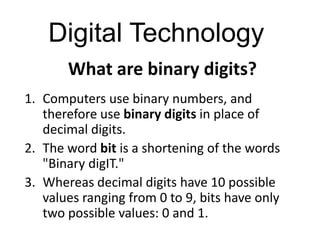
1. Computers use binary numbers, and
   therefore use binary digits in place of
   decimal digits.
2. The word bit is a shortening of the words
   "Binary digIT."
3. Whereas decimal digits have 10 possible
   values ranging from 0 to 9, bits have only
   two possible values: 0 and 1.
Decimal and binary numbers.
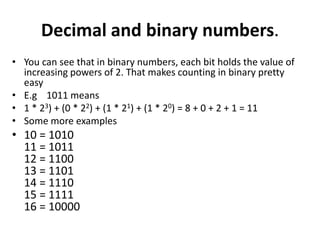
• You can see that in binary numbers, each bit holds the value of
  increasing powers of 2. That makes counting in binary pretty
  easy
• E.g 1011 means
• 1 * 23) + (0 * 22) + (1 * 21) + (1 * 20) = 8 + 0 + 2 + 1 = 11
• Some more examples
• 10 = 1010
  11 = 1011
  12 = 1100
  13 = 1101
  14 = 1110
  15 = 1111
  16 = 10000
Bits and bytes.
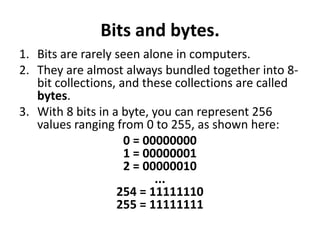
1. Bits are rarely seen alone in computers.
2. They are almost always bundled together into 8-
   bit collections, and these collections are called
   bytes.
3. With 8 bits in a byte, you can represent 256
   values ranging from 0 to 255, as shown here:
                     0 = 00000000
                     1 = 00000001
                     2 = 00000010
                           ...
                   254 = 11111110
                   255 = 11111111
Bits and bytes continued
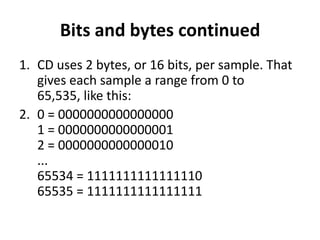
1. CD uses 2 bytes, or 16 bits, per sample. That
   gives each sample a range from 0 to
   65,535, like this:
2. 0 = 0000000000000000
   1 = 0000000000000001
   2 = 0000000000000010
   ...
   65534 = 1111111111111110
   65535 = 1111111111111111
Analogue at a glance

1. As a technology, analogue is the process of
   taking an audio or video signal (in most
   cases, the human voice) and translating it
   into electronic pulses.
2. Digital on the other hand is breaking the
   signal into a binary format where the audio
   or video data is represented by a series of
   "1"s and "0"s.
Analogue to Digital (A to D)
1. Digital technology breaks your voice (or
   television) signal into binary code—a series
   of 1s and 0s—transfers it to the other end
   where another device (phone, modem or TV)
   takes all the numbers and reassembles them
   into the original signal.
2. The beauty of digital is that it knows what it
   should be when it reaches the end of the
   transmission.
Is the duplication perfect?
1. Like any technology, digital has a few
   shortcomings.
2. Since devices are constantly
   translating, coding, and reassembling your
   voice, you won't get the same rich sound
   quality as you do with analogue.
Can we use the digital phone using
        an analogue line?
• There are digital-to-analog adapters that not only let
  you use analog equipment in a digital environment,
  but also safeguard against frying the internal circuitry
  of your phone, fax, modem, or laptop.
• Some adapters come designed to work with one
  specific piece of office equipment: phone, modem,
  laptop, or teleconferencer. Simply connect the
  adapter in between your digital line and your analog
  device.
Comparing Analogue Vs. Digital
• http://telecom.hellodirect.com/docs/Tutorials
  /AnalogVsDigital.1.051501.asp


  Visit the above site for more details of
  Analogue Vs. Digital
Recording the analogue way
1. In the Beginning: Etching Tin
2. Thomas Edison is credited with creating the first
   device for recording and playing back sounds in 1877.
   His approach used a very simple mechanism to store
   an analog wave mechanically.
3. In Edison's original phonograph, a diaphragm directly
   controlled a needle, and the needle scratched an
   analog signal onto a tinfoil cylinder . (see the clip in
   the link below)
4. http://communication.howstuffworks.com/analog-
   digital1.htm
An analogue wave


                                                Image from
                                                www.howstuffworks.com


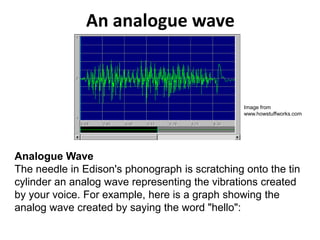
Analogue Wave
The needle in Edison's phonograph is scratching onto the tin
cylinder an analog wave representing the vibrations created
by your voice. For example, here is a graph showing the
analog wave created by saying the word "hello":
Analogue recording cont….
1. The waveform was recorded electronically rather
   than on tinfoil, but the principle is the same.
2. What the graph is showing is, essentially, the
   position of the microphone's diaphragm (Y axis)
   over time (X axis).
3. The vibrations are very quick -- the diaphragm is
   vibrating on the order of 1,000 oscillations per
   second.
4. This is the sort of wave scratched onto the tinfoil in
   Edison's device. Notice that the waveform for the
   word "hello" is fairly complex.
Getting in to the digital world
1. In a CD (and any other digital recording technology), the
   goal is to create a recording with very high fidelity (very
   high similarity between the original signal and the
   reproduced signal) and perfect reproduction (the
   recording sounds the same every single time you play it
   no matter how many times you play it).
2. To accomplish these two goals, digital recording converts
   the analog wave into a stream of numbers and records
   the numbers instead of the wave.
3. The conversion is done by a device called an analog-to-
   digital converter (ADC).
4. To play back the music, the stream of numbers is
   converted back to an analog wave by a digital-to-analog
   converter (DAC).
5. The analog wave produced by the DAC is amplified and
   fed to the speakers to produce the sound.
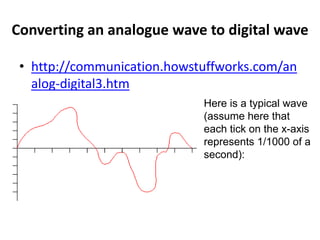
Converting an analogue wave to digital wave

 • http://communication.howstuffworks.com/an
   alog-digital3.htm
                             Here is a typical wave
                             (assume here that
                             each tick on the x-axis
                             represents 1/1000 of a
                             second):
……………..contd…
• When you sample the wave with an analog-to-
  digital converter, you have control over two
  variables:
• The sampling rate - Controls how many
  samples are taken per second
• The sampling precision - Controls how many
  different gradations (quantization levels) are
  possible when taking the sample
Convert the curve to numbers
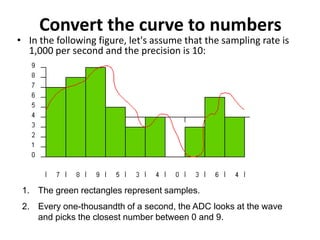
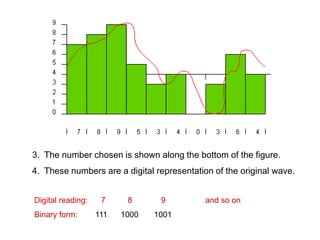
• In the following figure, let's assume that the sampling rate is
  1,000 per second and the precision is 10:


 1. The green rectangles represent samples.
 2. Every one-thousandth of a second, the ADC looks at the wave
    and picks the closest number between 0 and 9.
3. The number chosen is shown along the bottom of the figure.
4. These numbers are a digital representation of the original wave.


Digital reading:    7     8      9          and so on
Binary form:       111   1000   1001
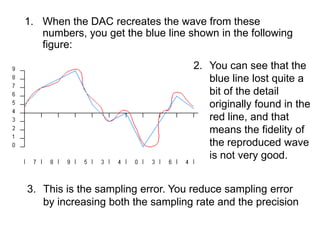
1. When the DAC recreates the wave from these
   numbers, you get the blue line shown in the following
   figure:
                                   2. You can see that the
                                      blue line lost quite a
                                      bit of the detail
                                      originally found in the
                                      red line, and that
                                      means the fidelity of
                                      the reproduced wave
                                      is not very good.


3. This is the sampling error. You reduce sampling error
   by increasing both the sampling rate and the precision
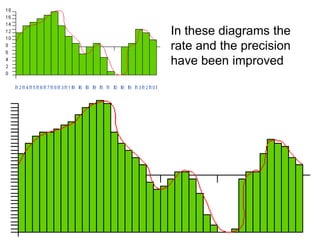
In these diagrams the
rate and the precision
have been improved

Analogue to digital conversion

  • 1.
    Digital Technology What are binary digits? 1. Computers use binary numbers, and therefore use binary digits in place of decimal digits. 2. The word bit is a shortening of the words "Binary digIT." 3. Whereas decimal digits have 10 possible values ranging from 0 to 9, bits have only two possible values: 0 and 1.
  • 2.
    Decimal and binarynumbers. • You can see that in binary numbers, each bit holds the value of increasing powers of 2. That makes counting in binary pretty easy • E.g 1011 means • 1 * 23) + (0 * 22) + (1 * 21) + (1 * 20) = 8 + 0 + 2 + 1 = 11 • Some more examples • 10 = 1010 11 = 1011 12 = 1100 13 = 1101 14 = 1110 15 = 1111 16 = 10000
  • 3.
    Bits and bytes. 1.Bits are rarely seen alone in computers. 2. They are almost always bundled together into 8- bit collections, and these collections are called bytes. 3. With 8 bits in a byte, you can represent 256 values ranging from 0 to 255, as shown here: 0 = 00000000 1 = 00000001 2 = 00000010 ... 254 = 11111110 255 = 11111111
  • 4.
    Bits and bytescontinued 1. CD uses 2 bytes, or 16 bits, per sample. That gives each sample a range from 0 to 65,535, like this: 2. 0 = 0000000000000000 1 = 0000000000000001 2 = 0000000000000010 ... 65534 = 1111111111111110 65535 = 1111111111111111
  • 5.
    Analogue at aglance 1. As a technology, analogue is the process of taking an audio or video signal (in most cases, the human voice) and translating it into electronic pulses. 2. Digital on the other hand is breaking the signal into a binary format where the audio or video data is represented by a series of "1"s and "0"s.
  • 6.
    Analogue to Digital(A to D) 1. Digital technology breaks your voice (or television) signal into binary code—a series of 1s and 0s—transfers it to the other end where another device (phone, modem or TV) takes all the numbers and reassembles them into the original signal. 2. The beauty of digital is that it knows what it should be when it reaches the end of the transmission.
  • 7.
    Is the duplicationperfect? 1. Like any technology, digital has a few shortcomings. 2. Since devices are constantly translating, coding, and reassembling your voice, you won't get the same rich sound quality as you do with analogue.
  • 8.
    Can we usethe digital phone using an analogue line? • There are digital-to-analog adapters that not only let you use analog equipment in a digital environment, but also safeguard against frying the internal circuitry of your phone, fax, modem, or laptop. • Some adapters come designed to work with one specific piece of office equipment: phone, modem, laptop, or teleconferencer. Simply connect the adapter in between your digital line and your analog device.
  • 9.
    Comparing Analogue Vs.Digital • http://telecom.hellodirect.com/docs/Tutorials /AnalogVsDigital.1.051501.asp Visit the above site for more details of Analogue Vs. Digital
  • 10.
    Recording the analogueway 1. In the Beginning: Etching Tin 2. Thomas Edison is credited with creating the first device for recording and playing back sounds in 1877. His approach used a very simple mechanism to store an analog wave mechanically. 3. In Edison's original phonograph, a diaphragm directly controlled a needle, and the needle scratched an analog signal onto a tinfoil cylinder . (see the clip in the link below) 4. http://communication.howstuffworks.com/analog- digital1.htm
  • 11.
    An analogue wave Image from www.howstuffworks.com Analogue Wave The needle in Edison's phonograph is scratching onto the tin cylinder an analog wave representing the vibrations created by your voice. For example, here is a graph showing the analog wave created by saying the word "hello":
  • 12.
    Analogue recording cont…. 1.The waveform was recorded electronically rather than on tinfoil, but the principle is the same. 2. What the graph is showing is, essentially, the position of the microphone's diaphragm (Y axis) over time (X axis). 3. The vibrations are very quick -- the diaphragm is vibrating on the order of 1,000 oscillations per second. 4. This is the sort of wave scratched onto the tinfoil in Edison's device. Notice that the waveform for the word "hello" is fairly complex.
  • 13.
    Getting in tothe digital world 1. In a CD (and any other digital recording technology), the goal is to create a recording with very high fidelity (very high similarity between the original signal and the reproduced signal) and perfect reproduction (the recording sounds the same every single time you play it no matter how many times you play it). 2. To accomplish these two goals, digital recording converts the analog wave into a stream of numbers and records the numbers instead of the wave. 3. The conversion is done by a device called an analog-to- digital converter (ADC). 4. To play back the music, the stream of numbers is converted back to an analog wave by a digital-to-analog converter (DAC). 5. The analog wave produced by the DAC is amplified and fed to the speakers to produce the sound.
  • 14.
    Converting an analoguewave to digital wave • http://communication.howstuffworks.com/an alog-digital3.htm Here is a typical wave (assume here that each tick on the x-axis represents 1/1000 of a second):
  • 15.
    ……………..contd… • When yousample the wave with an analog-to- digital converter, you have control over two variables: • The sampling rate - Controls how many samples are taken per second • The sampling precision - Controls how many different gradations (quantization levels) are possible when taking the sample
  • 16.
    Convert the curveto numbers • In the following figure, let's assume that the sampling rate is 1,000 per second and the precision is 10: 1. The green rectangles represent samples. 2. Every one-thousandth of a second, the ADC looks at the wave and picks the closest number between 0 and 9.
  • 17.
    3. The numberchosen is shown along the bottom of the figure. 4. These numbers are a digital representation of the original wave. Digital reading: 7 8 9 and so on Binary form: 111 1000 1001
  • 18.
    1. When theDAC recreates the wave from these numbers, you get the blue line shown in the following figure: 2. You can see that the blue line lost quite a bit of the detail originally found in the red line, and that means the fidelity of the reproduced wave is not very good. 3. This is the sampling error. You reduce sampling error by increasing both the sampling rate and the precision
  • 19.
    In these diagramsthe rate and the precision have been improved