An Introduction to
Enterprise Architecture
Visual Modeling
With the ArchiMate 2.1 Language
Iver Band
Director of Enterprise and Solution
Architecture
August, 2015
Iver Band
• Thirty years technology experience: development,
management, architecture
• TOGAF and ArchiMate Certified
• Vice Chair Open Group ArchiMate Forum since late 2011
– Co-developer of current certification exams
– Currently developing next version of language
• Enterprise Architect at Cambia Health Solutions
• Director of Enterprise and Solution Architecture at EA
Principals, a training and consulting firm
• Introduced or assisted with ArchiMate usage in at least six
organizations beginning in late 2010
Agenda
• Core Concepts
• Visual Overview
• Case Study
• Conclusion
An Introduction to
The ArchiMate 2.1 Language
• Core Concepts
• Visual Overview
• Case Study
• Conclusion
What is Architectural Modeling?
• We use architecture modeling languages to create
models of historical, actual or desired reality
• Architectural modeling focuses on the components of a
system, their relationships, and the principles that
govern the system’s design and evolution
• We model what is relevant to our situation, and
abstract out the rest
• We visualize architectural models with views
• We use viewpoints as templates when we create views
• We define viewpoints to address sets of related
stakeholder concerns
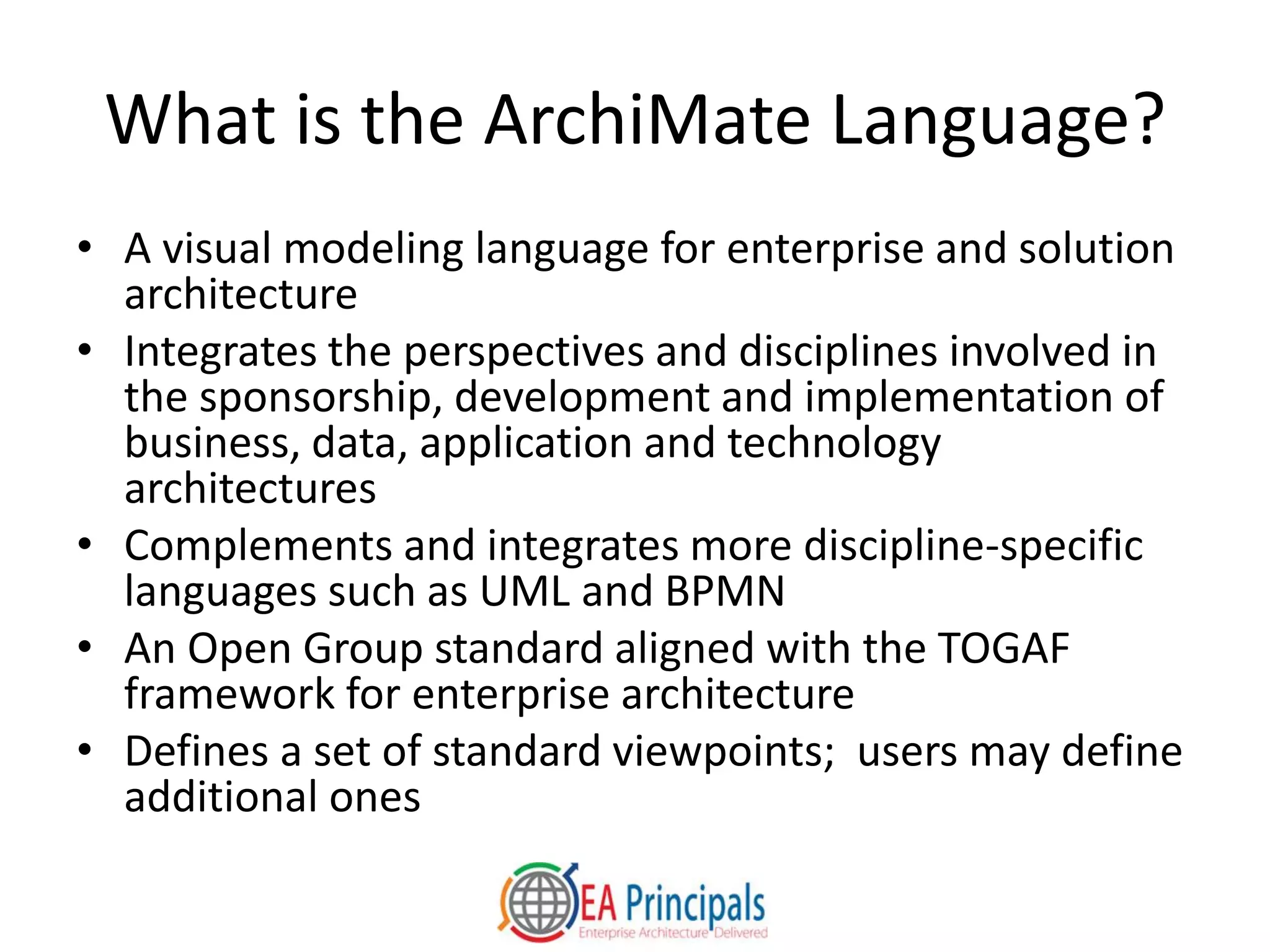
What is the ArchiMate Language?
• A visual modeling language for enterprise and solution
architecture
• Integrates the perspectives and disciplines involved in
the sponsorship, development and implementation of
business, data, application and technology
architectures
• Complements and integrates more discipline-specific
languages such as UML and BPMN
• An Open Group standard aligned with the TOGAF
framework for enterprise architecture
• Defines a set of standard viewpoints; users may define
additional ones
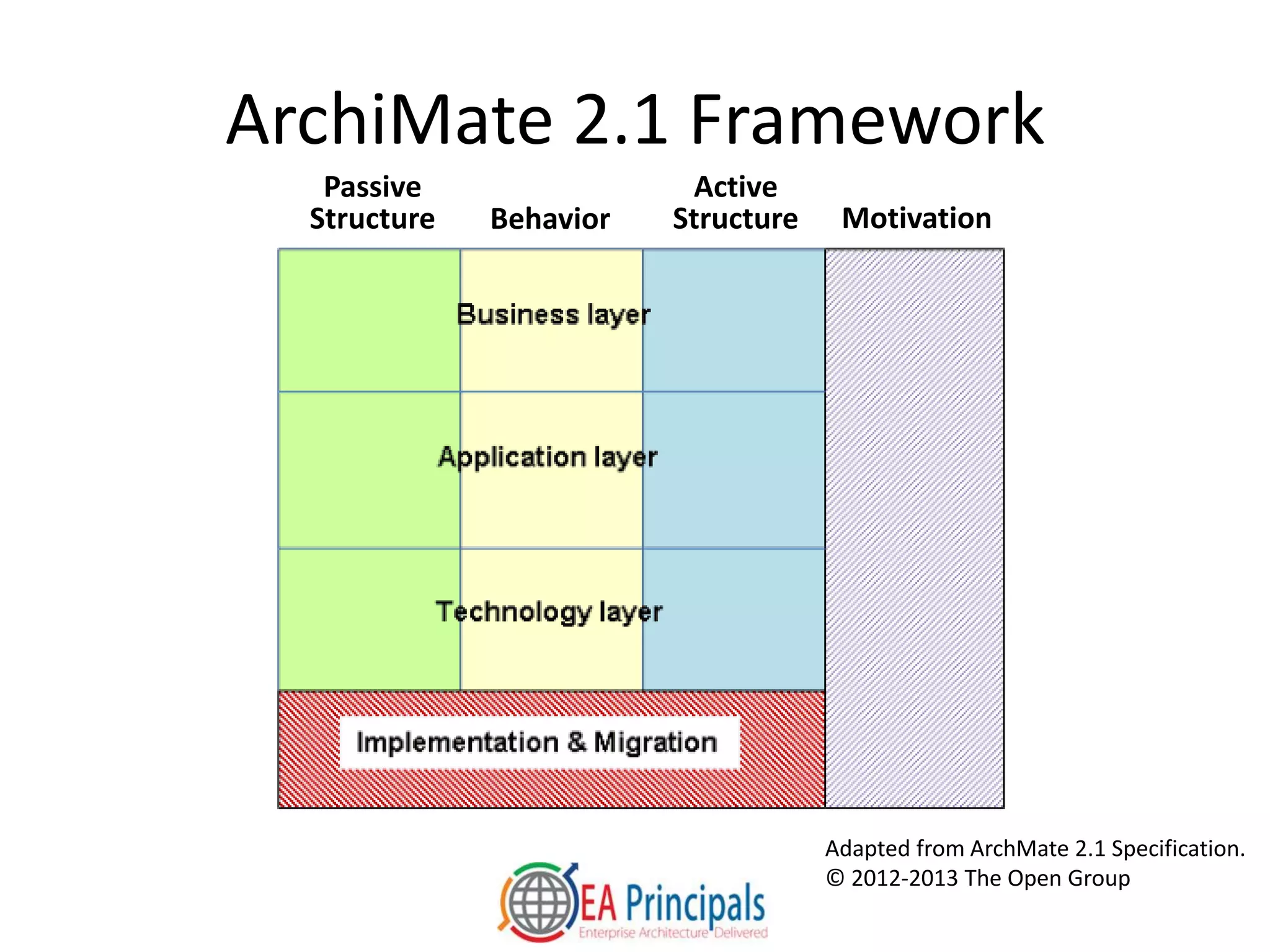
ArchiMate 2.1 Framework
Adapted from ArchMate 2.1 Specification.
© 2012-2013 The Open Group
Passive
Structure Behavior
Active
Structure Motivation
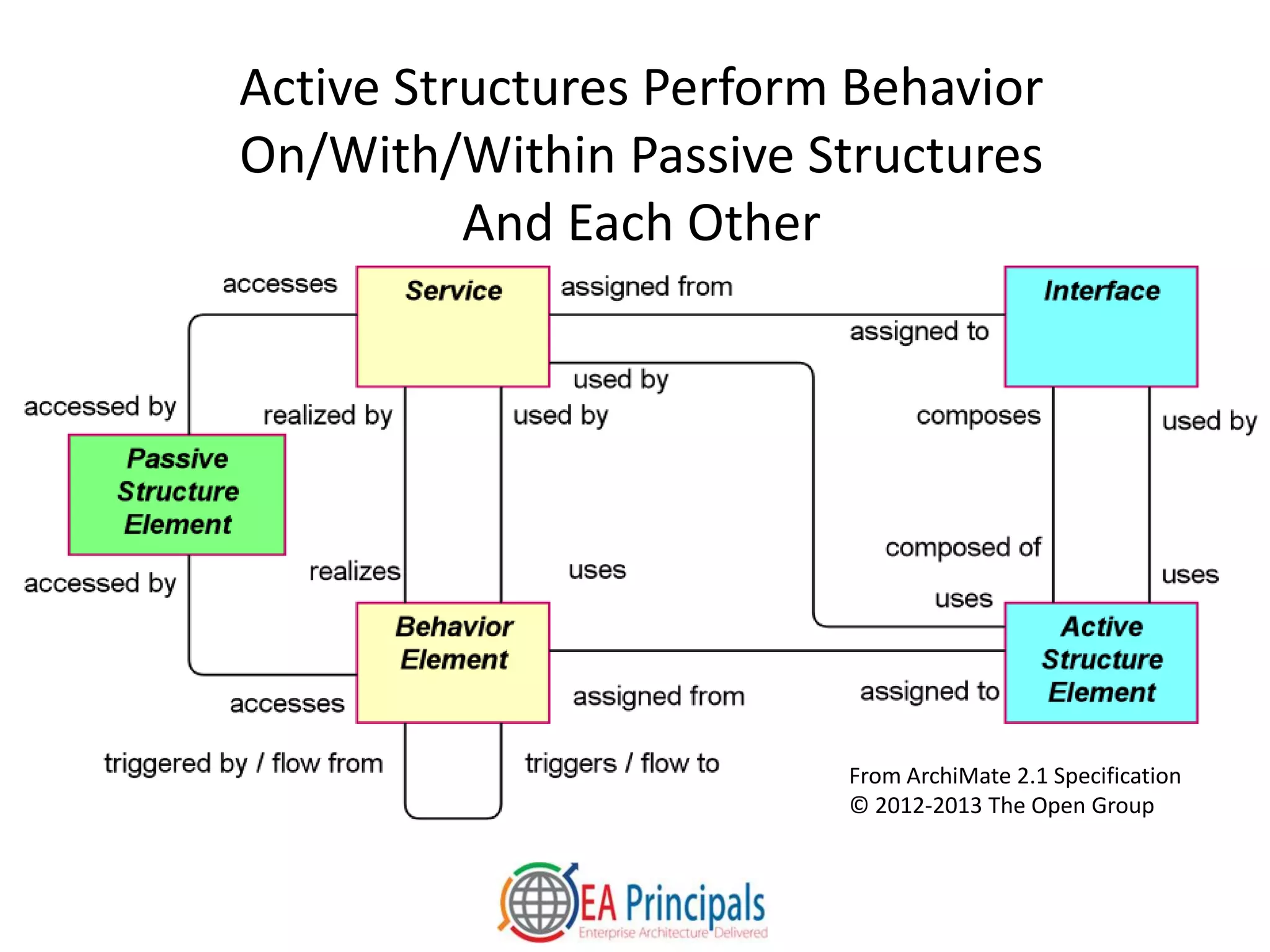
Active Structures Perform Behavior
On/With/Within Passive Structures
And Each Other
From ArchiMate 2.1 Specification
© 2012-2013 The Open Group
An Introduction to
The ArchiMate 2.1 Language
• Core Concepts
• Visual Overview
• Case Study
• Conclusion
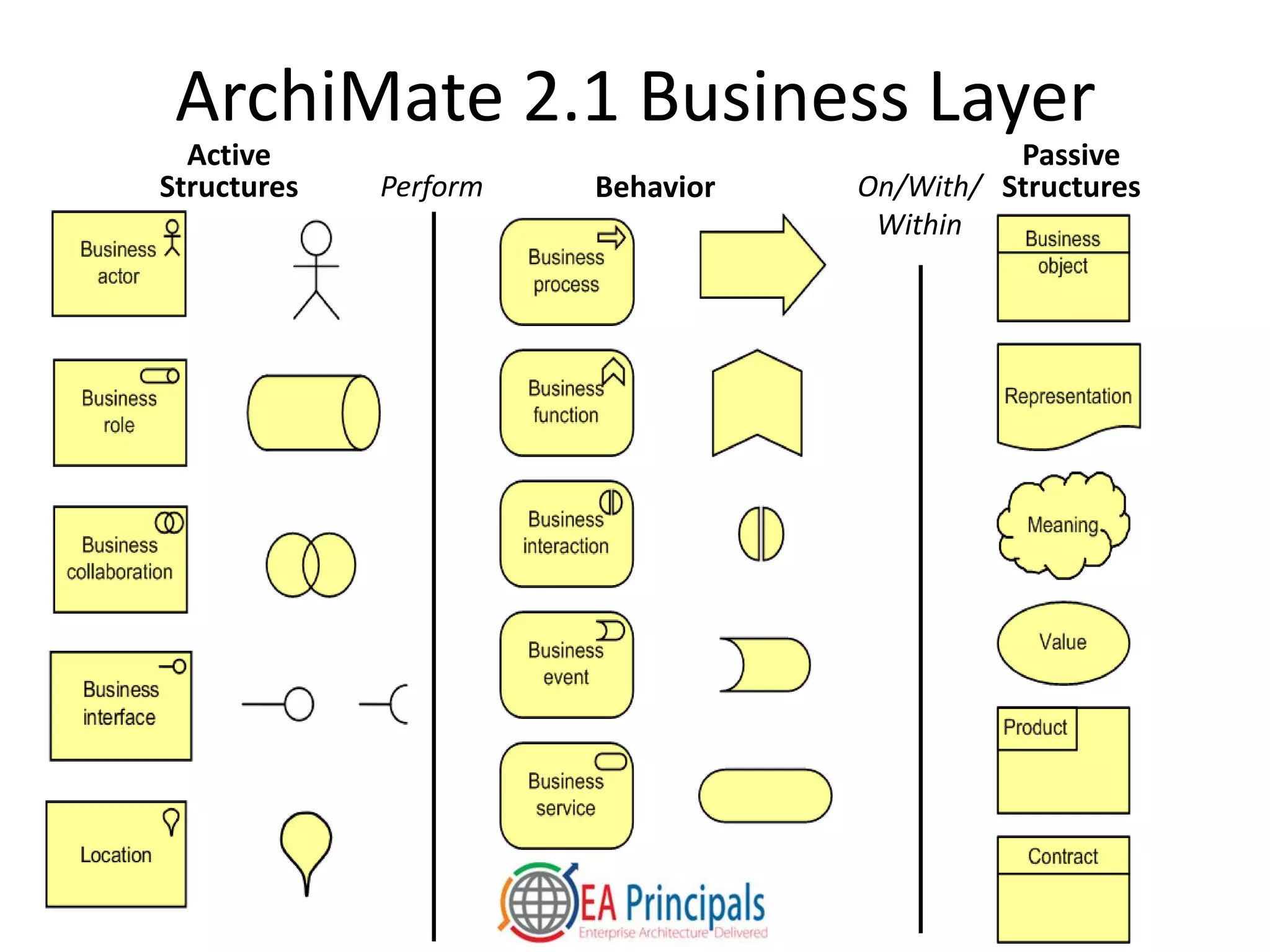
ArchiMate 2.1 Business Layer
Passive
StructuresBehavior
Active
Structures Perform On/With/
Within
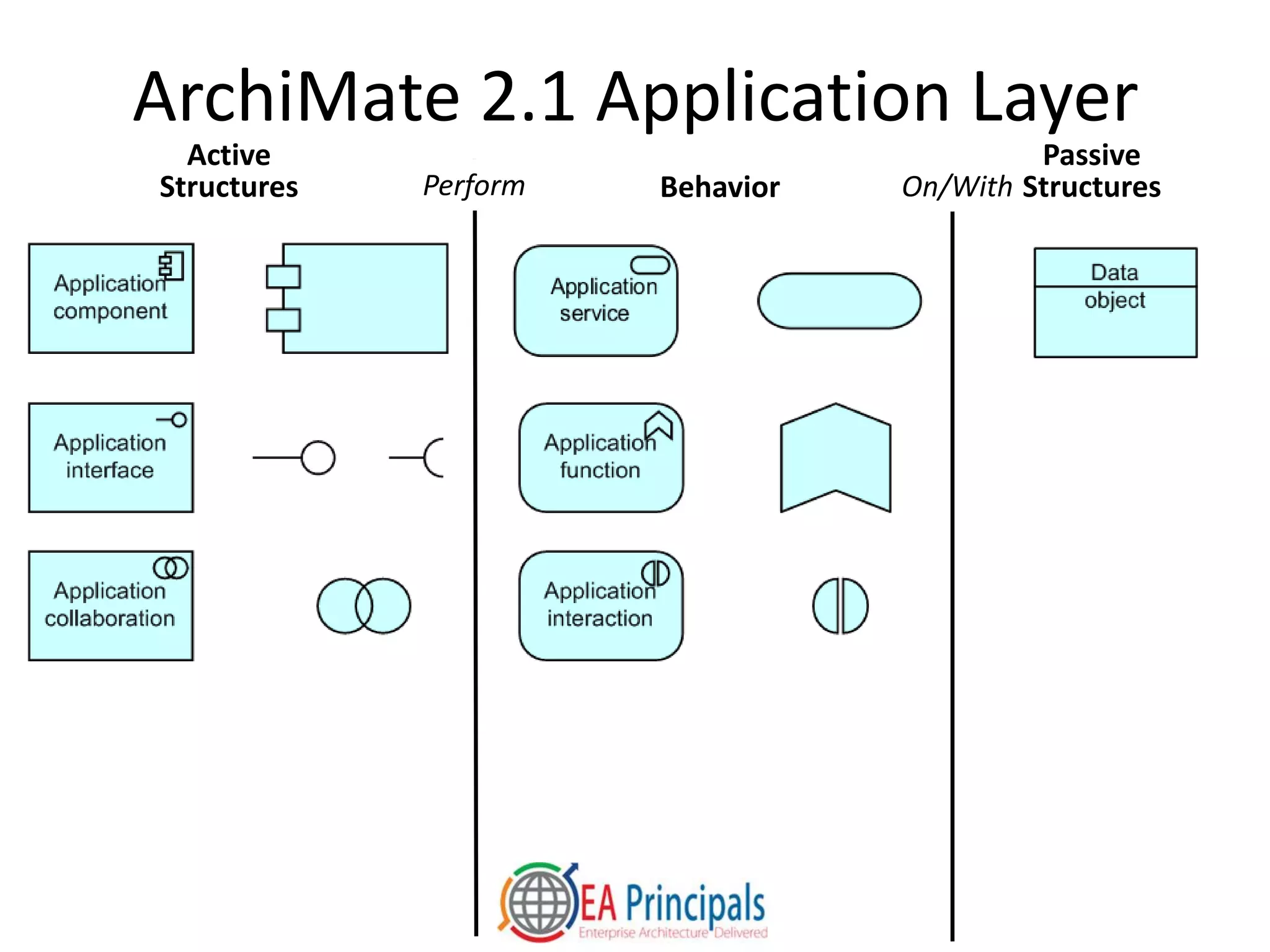
ArchiMate 2.1 Application Layer
Passive
StructuresBehavior
Active
Structures Perform On/With
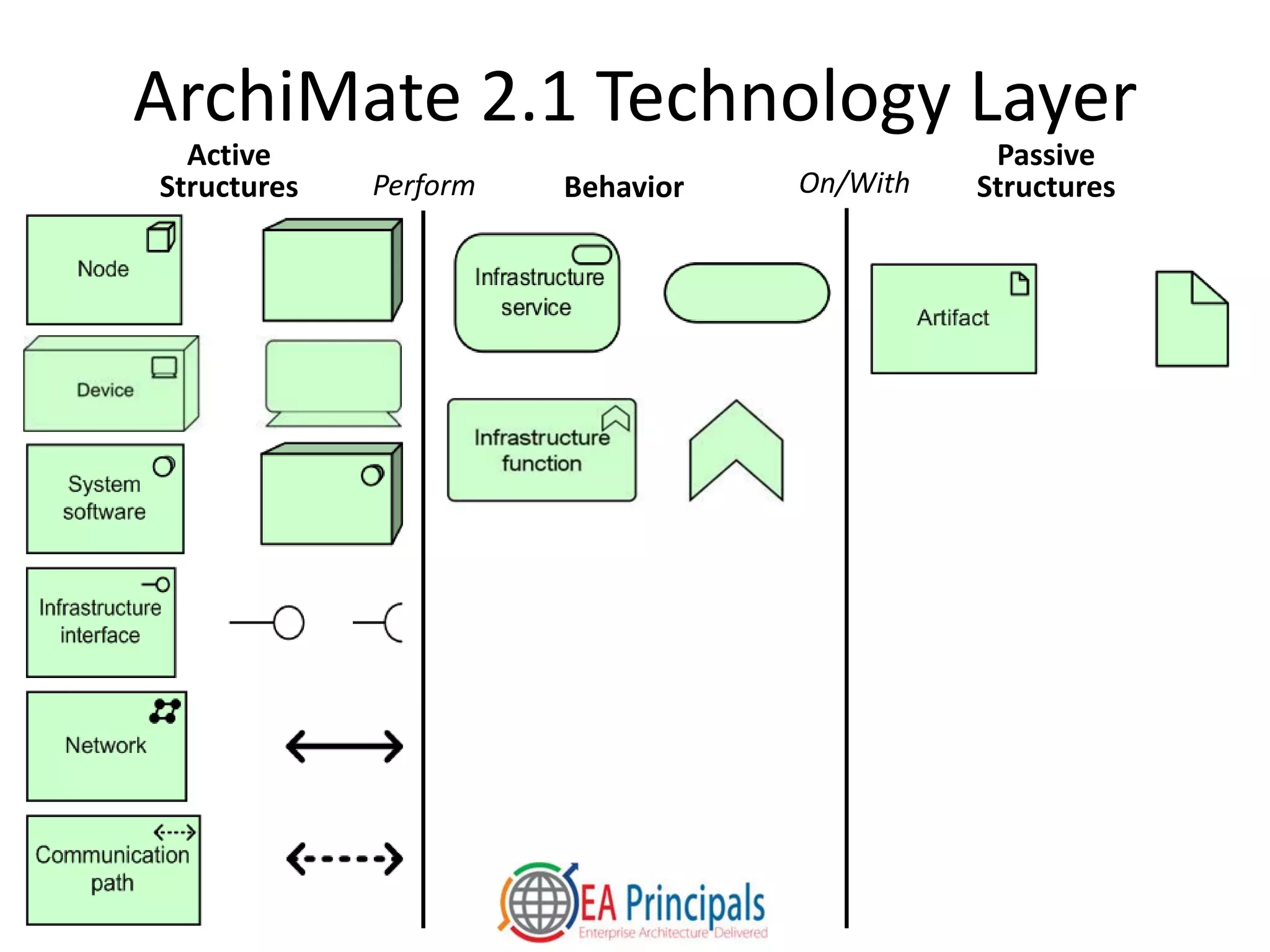
ArchiMate 2.1 Technology Layer
Passive
StructuresBehavior
Active
Structures Perform On/With
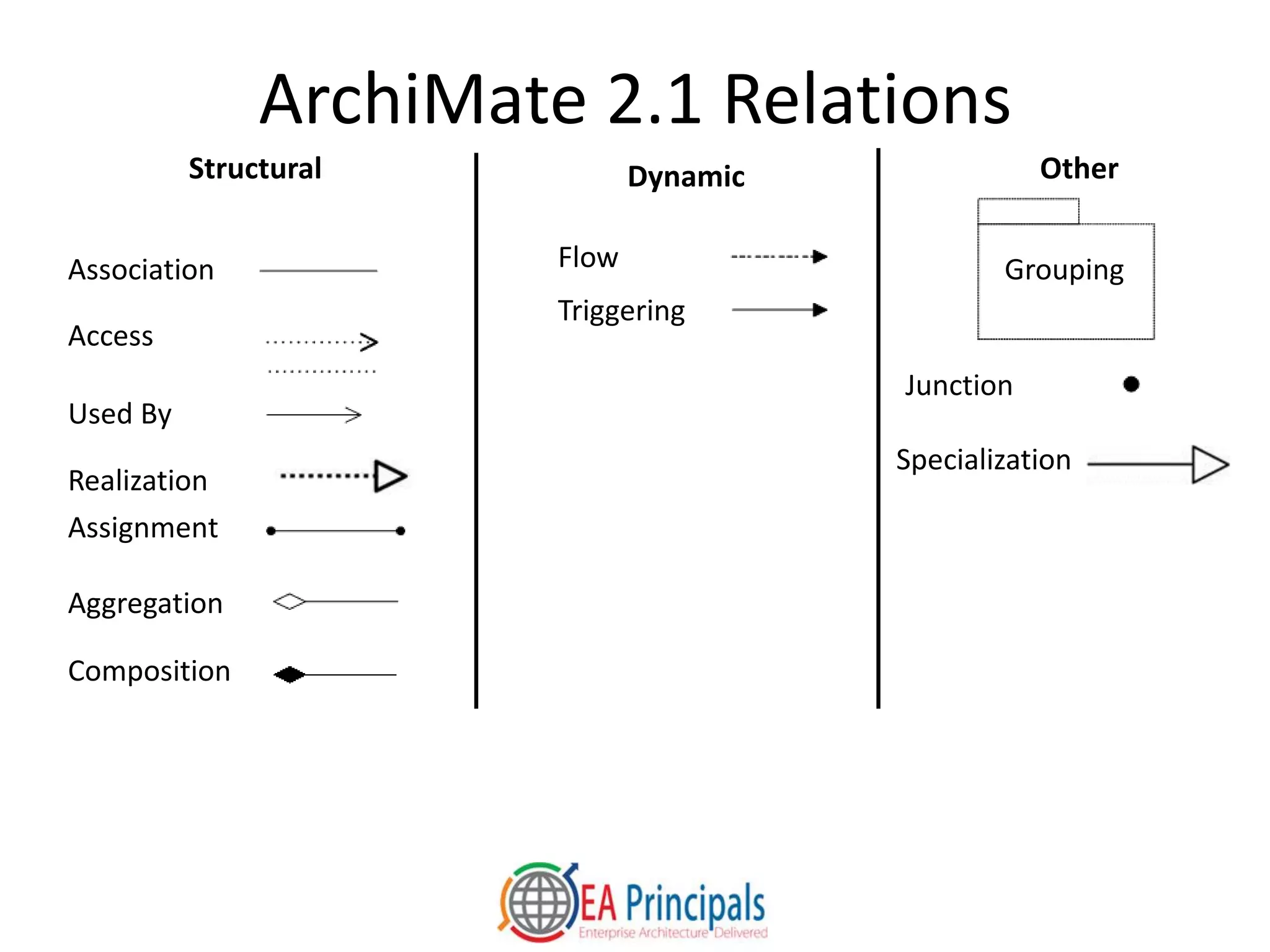
ArchiMate 2.1 Relations
OtherDynamicStructural
Association
Access
Used By
Realization
Assignment
Aggregation
Composition
Flow
Triggering
Specialization
Junction
Grouping
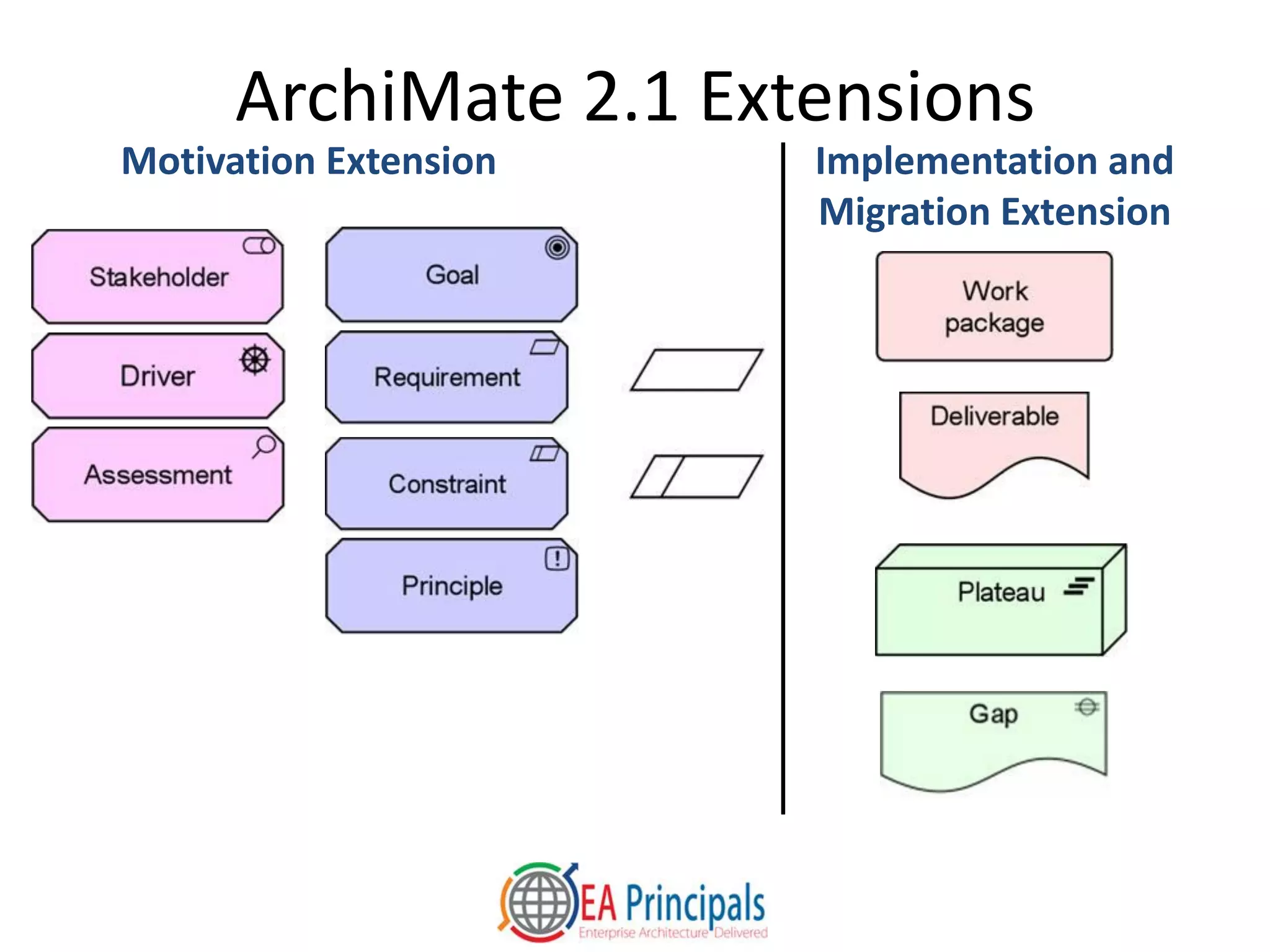
ArchiMate 2.1 Extensions
Motivation Extension Implementation and
Migration Extension
The Archi Tool
• Available at www.archimatetool.com
• High-quality language implementation
• All standard ArchiMate viewpoints are ready to
use
• Good on-ramp to commercial, repository-based
tools
• Easy to import and export data
• Many tools import Archi models
– Common model file format standard developed with
major tool vendors recently approved by The Open
Group
An Introduction to
The ArchiMate 2.1 Language
• Core Concepts
• Visual Overview
• Case Study
• Conclusion
Case Study: Facility Security at the
Acme Corporation
• Acme Corporation is a small manufacturer and
distributor of tools for industrial markets
• Recent incidents have left Acme executives
concerned about the physical security of their
headquarters, factory and warehouse
• This case study presents views of an
ArchiMate model developed with the Archi
free tool
Organization View Exercise
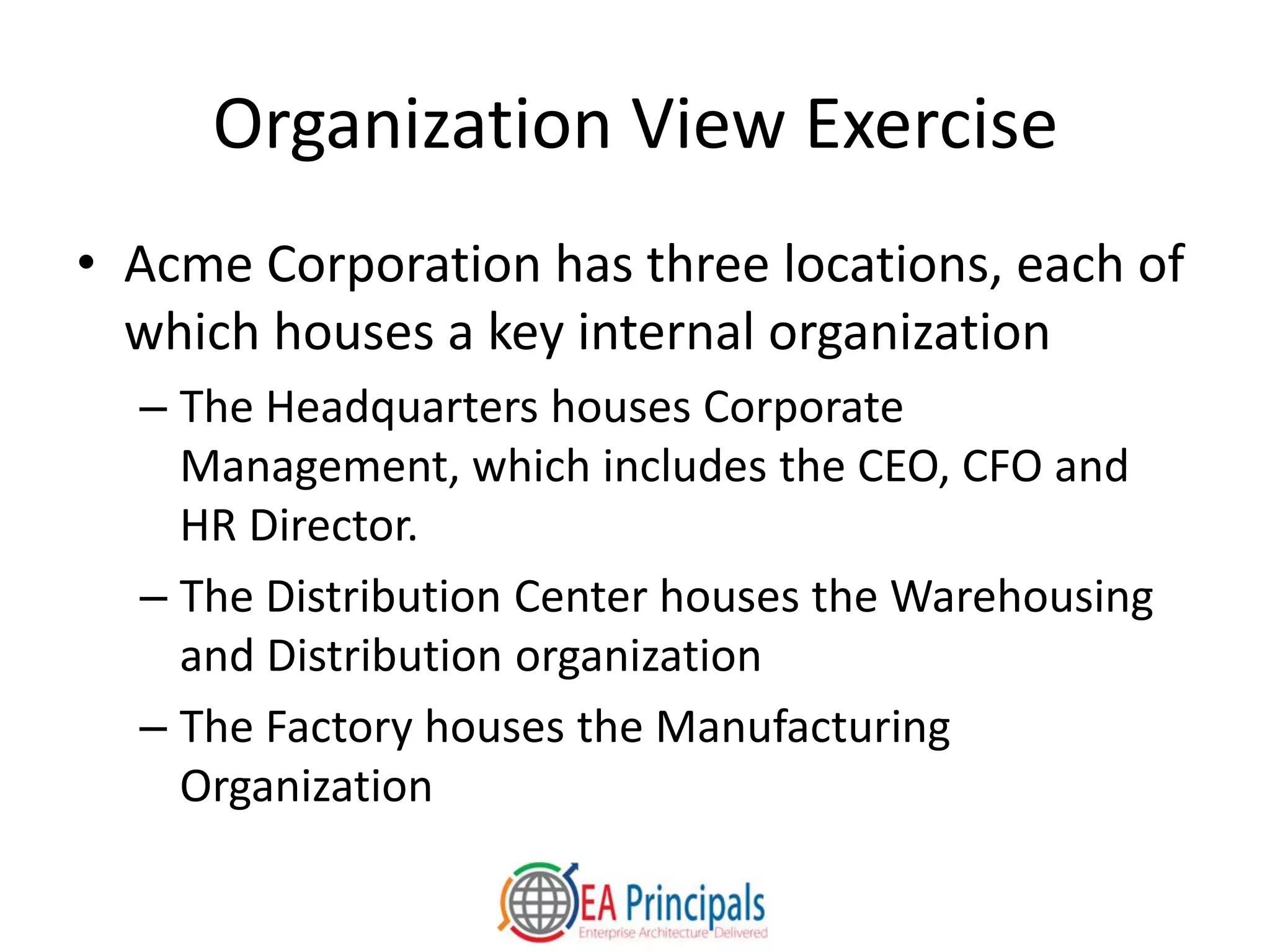
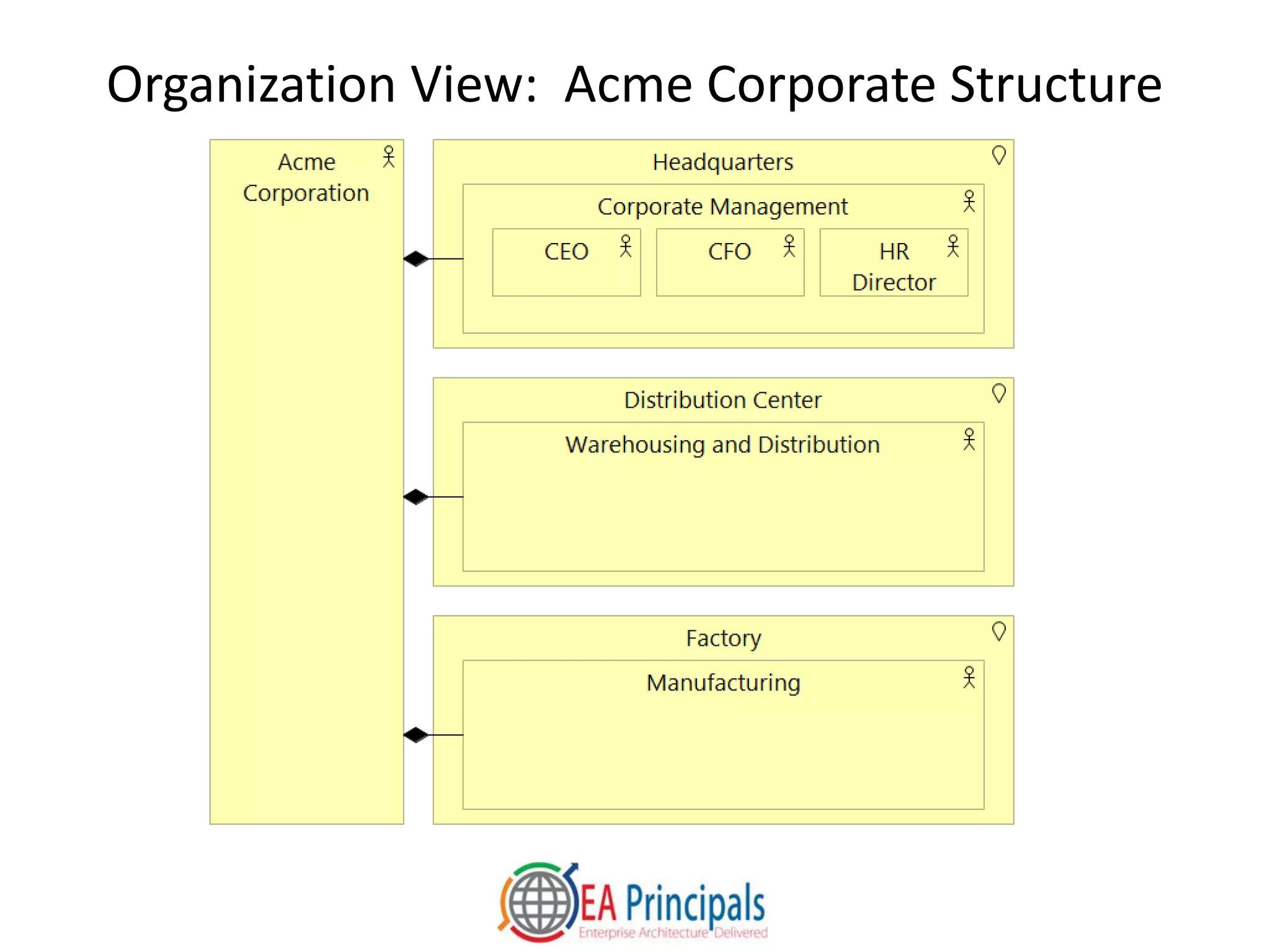
• Acme Corporation has three locations, each of
which houses a key internal organization
– The Headquarters houses Corporate
Management, which includes the CEO, CFO and
HR Director.
– The Distribution Center houses the Warehousing
and Distribution organization
– The Factory houses the Manufacturing
Organization
Organization View: Acme Corporate Structure
Stakeholder View Exercise
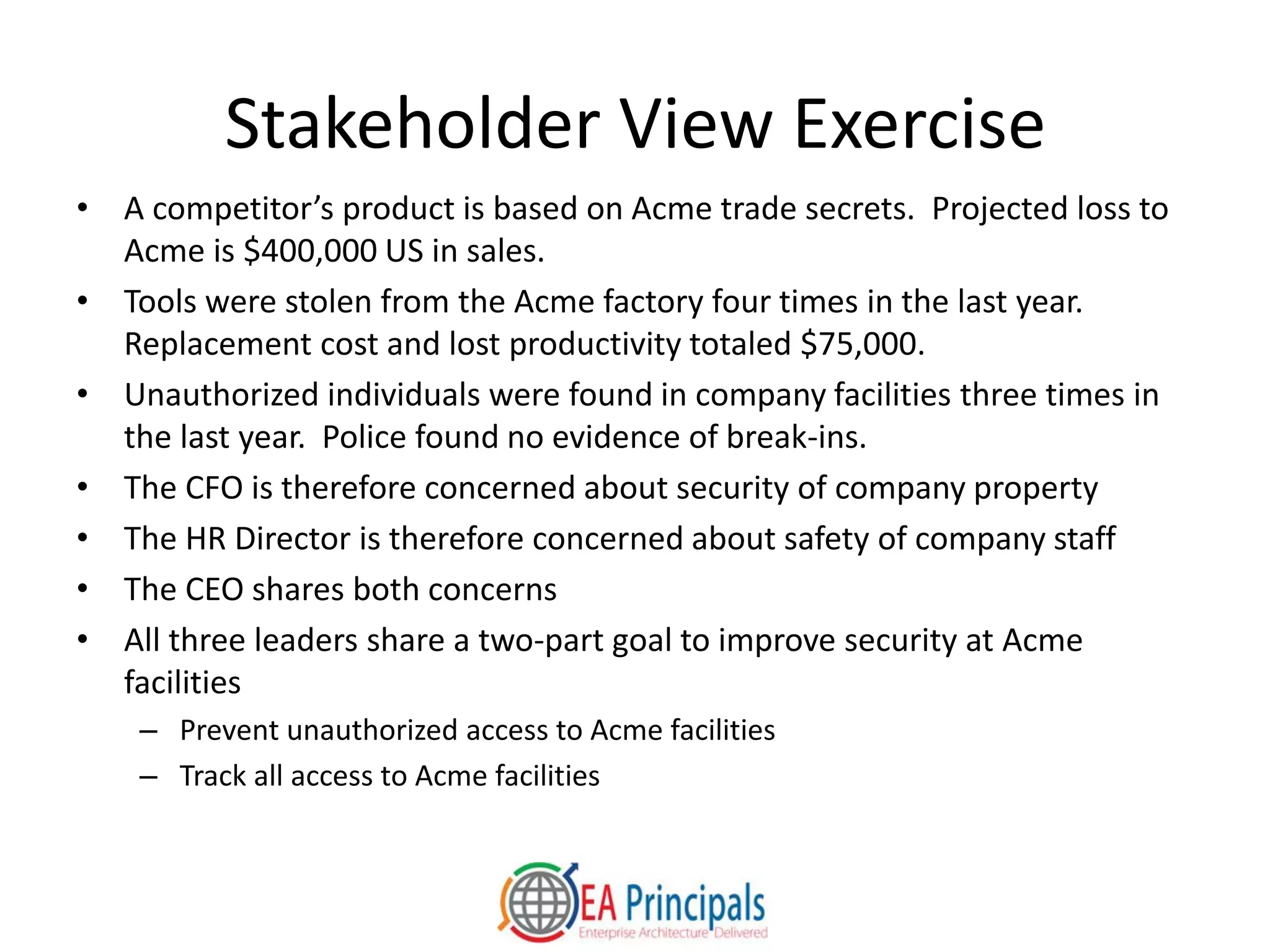
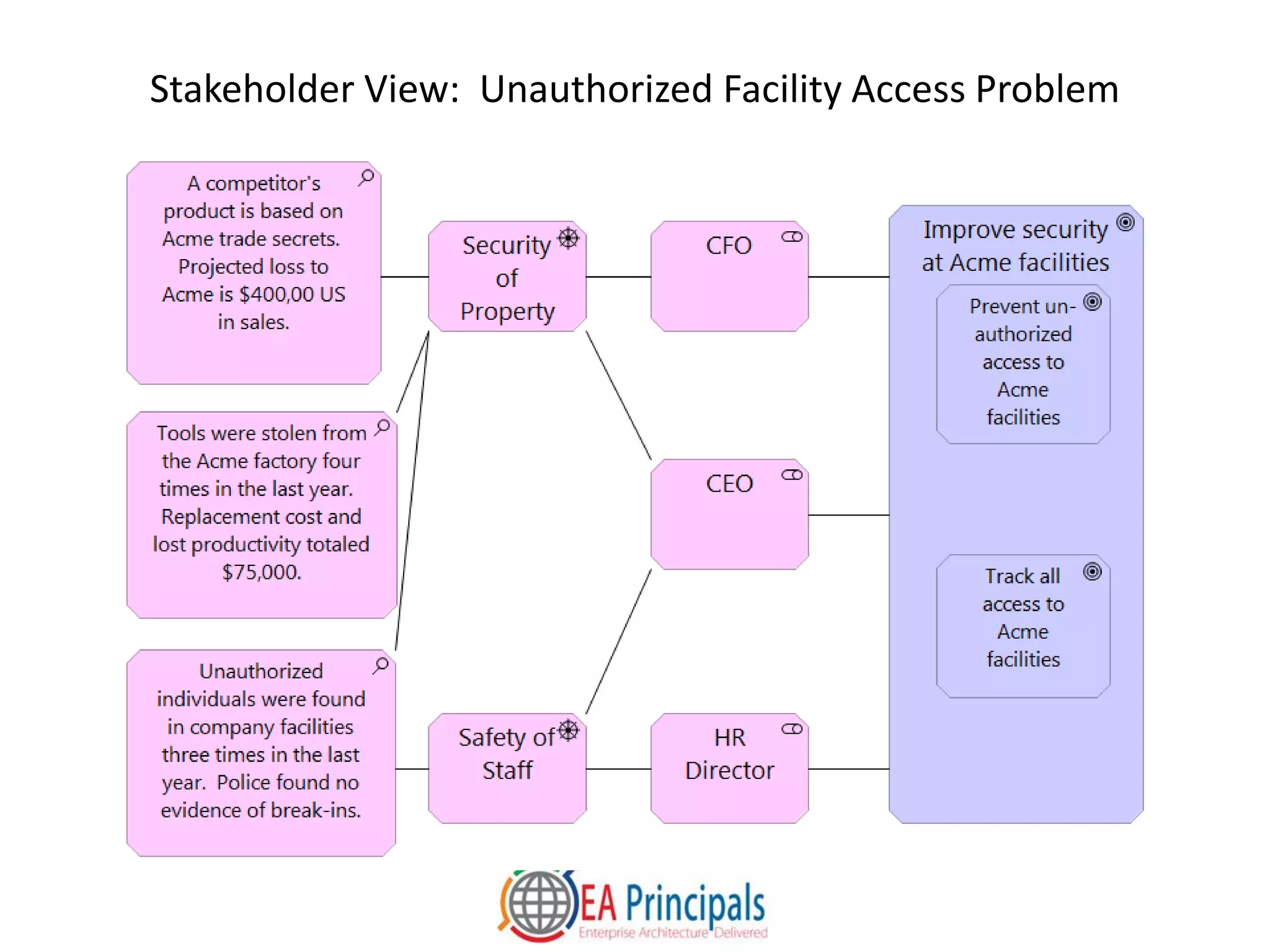
• A competitor’s product is based on Acme trade secrets. Projected loss to
Acme is $400,000 US in sales.
• Tools were stolen from the Acme factory four times in the last year.
Replacement cost and lost productivity totaled $75,000.
• Unauthorized individuals were found in company facilities three times in
the last year. Police found no evidence of break-ins.
• The CFO is therefore concerned about security of company property
• The HR Director is therefore concerned about safety of company staff
• The CEO shares both concerns
• All three leaders share a two-part goal to improve security at Acme
facilities
– Prevent unauthorized access to Acme facilities
– Track all access to Acme facilities
Stakeholder View: Unauthorized Facility Access Problem
Requirements Realization View
Exercise
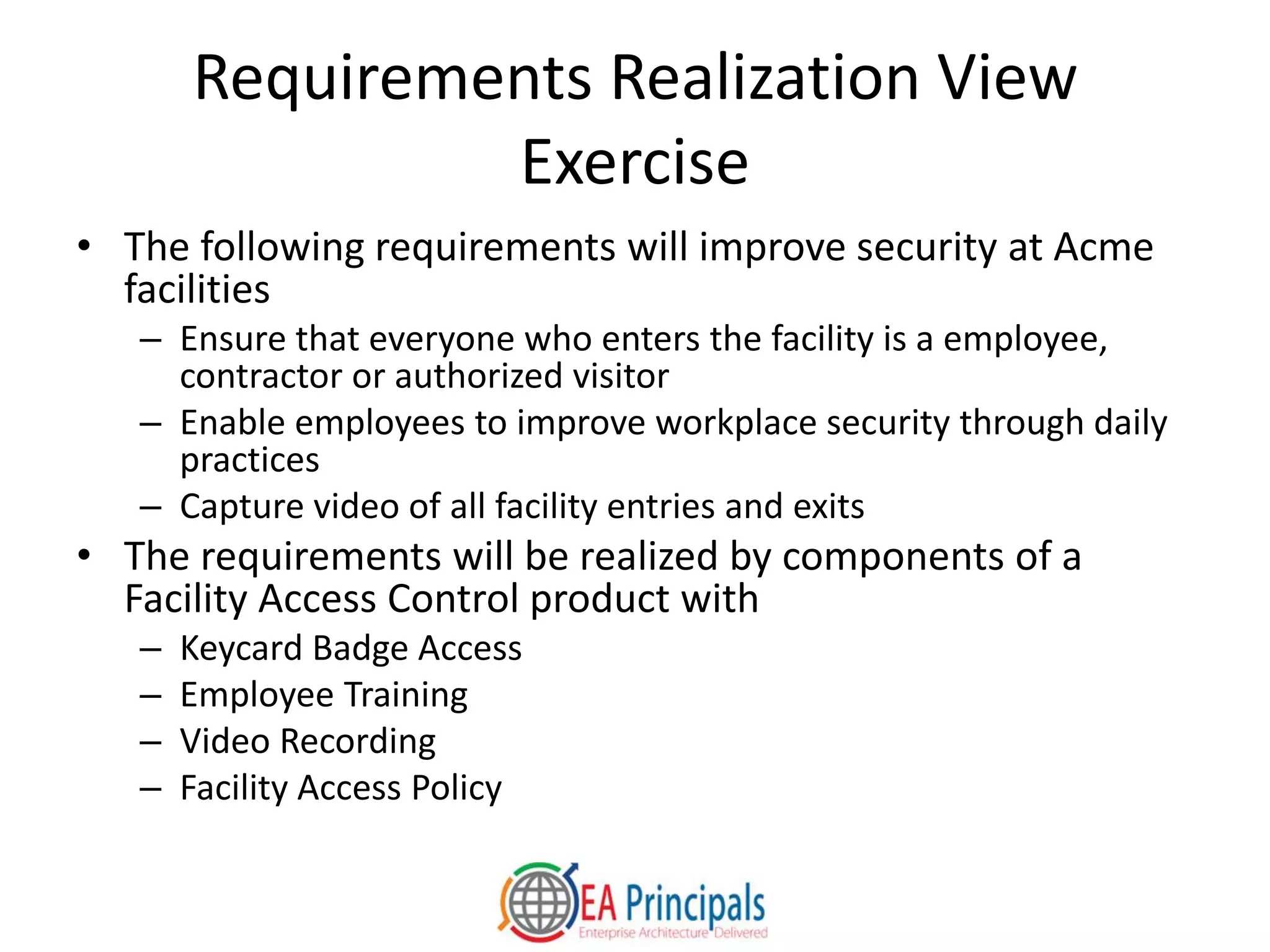
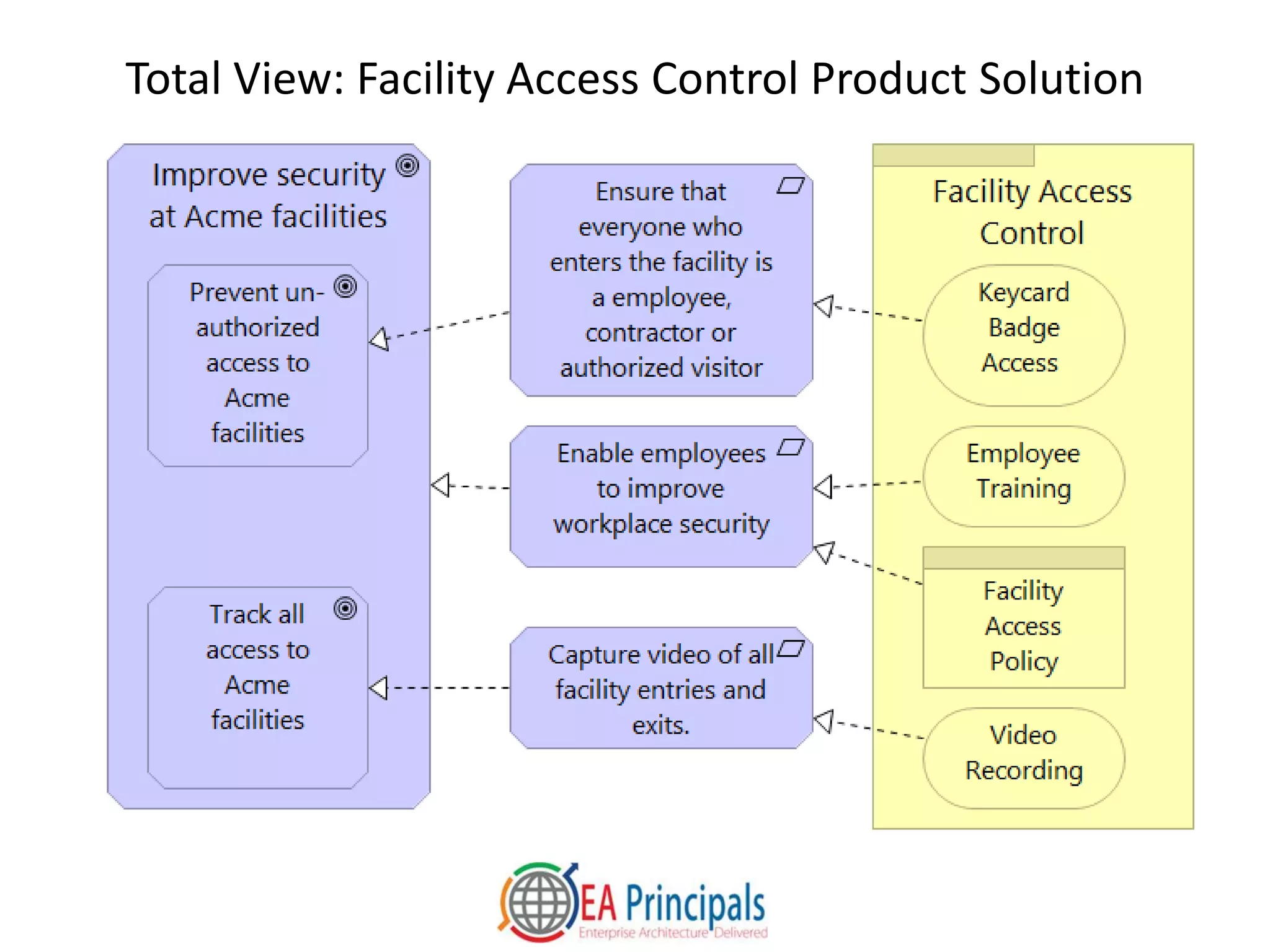
• The following requirements will improve security at Acme
facilities
– Ensure that everyone who enters the facility is a employee,
contractor or authorized visitor
– Enable employees to improve workplace security through daily
practices
– Capture video of all facility entries and exits
• The requirements will be realized by components of a
Facility Access Control product with
– Keycard Badge Access
– Employee Training
– Video Recording
– Facility Access Policy
Total View: Facility Access Control Product Solution
Business Process View Exercise
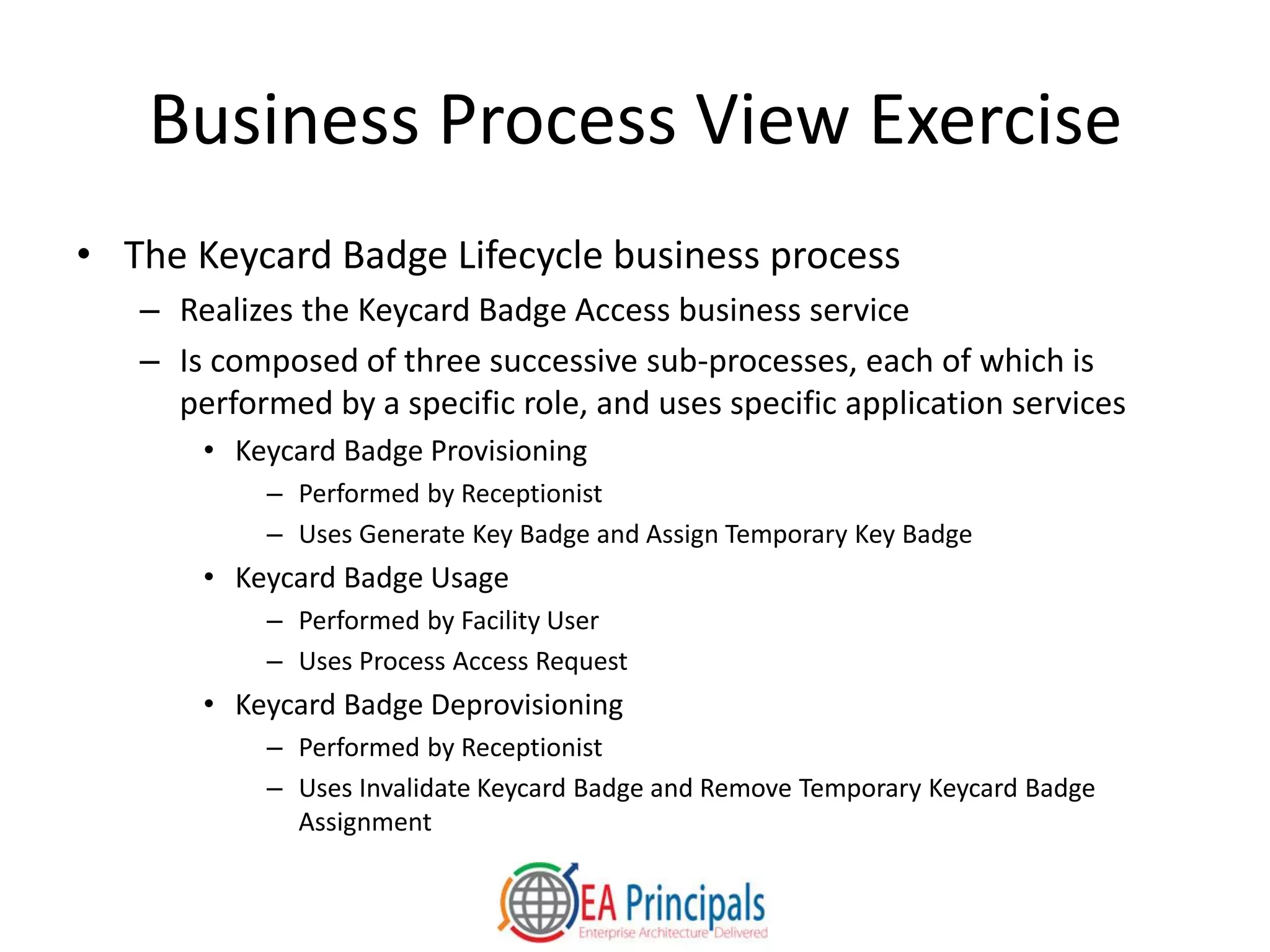
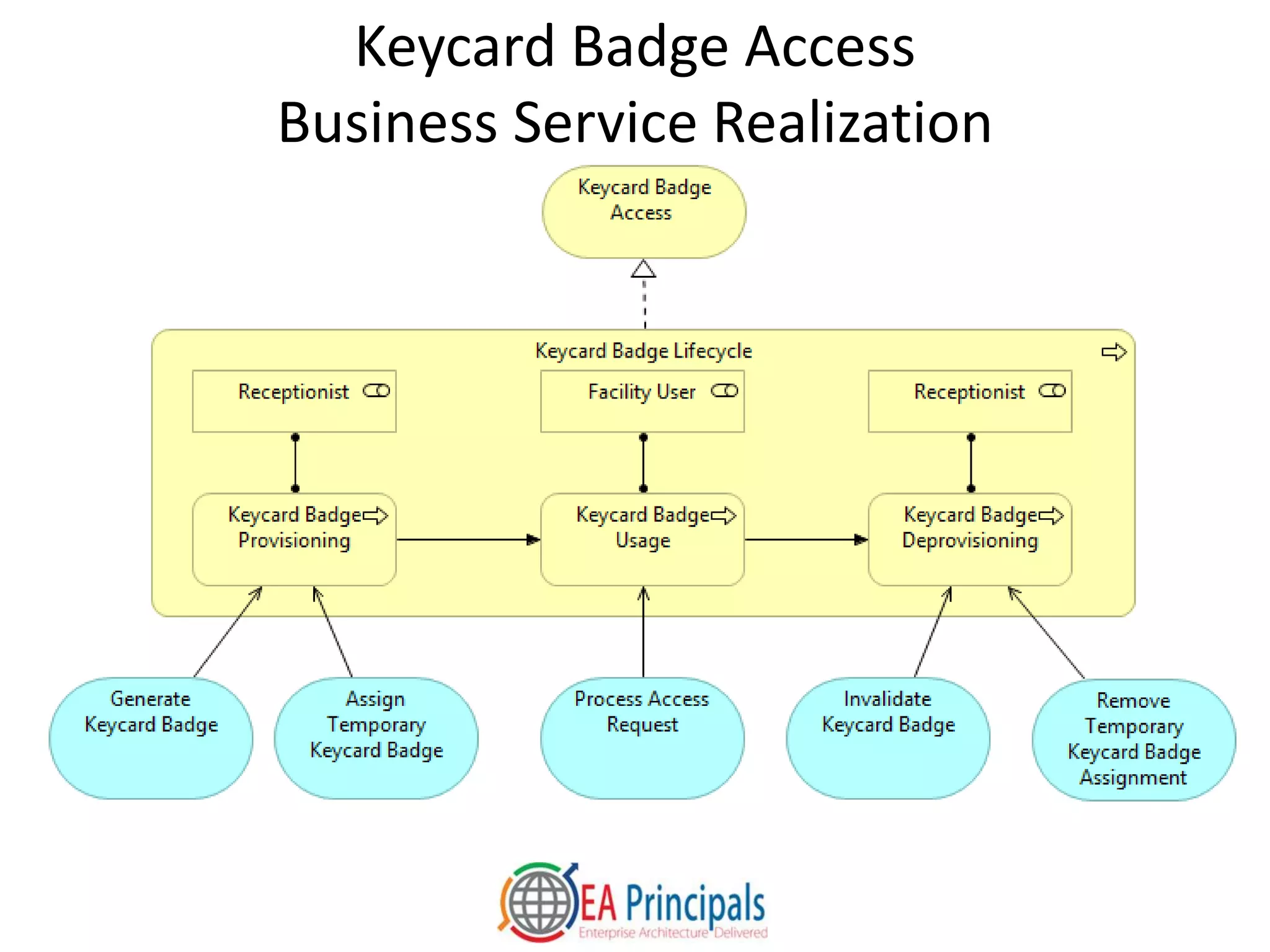
• The Keycard Badge Lifecycle business process
– Realizes the Keycard Badge Access business service
– Is composed of three successive sub-processes, each of which is
performed by a specific role, and uses specific application services
• Keycard Badge Provisioning
– Performed by Receptionist
– Uses Generate Key Badge and Assign Temporary Key Badge
• Keycard Badge Usage
– Performed by Facility User
– Uses Process Access Request
• Keycard Badge Deprovisioning
– Performed by Receptionist
– Uses Invalidate Keycard Badge and Remove Temporary Keycard Badge
Assignment
Keycard Badge Access
Business Service Realization
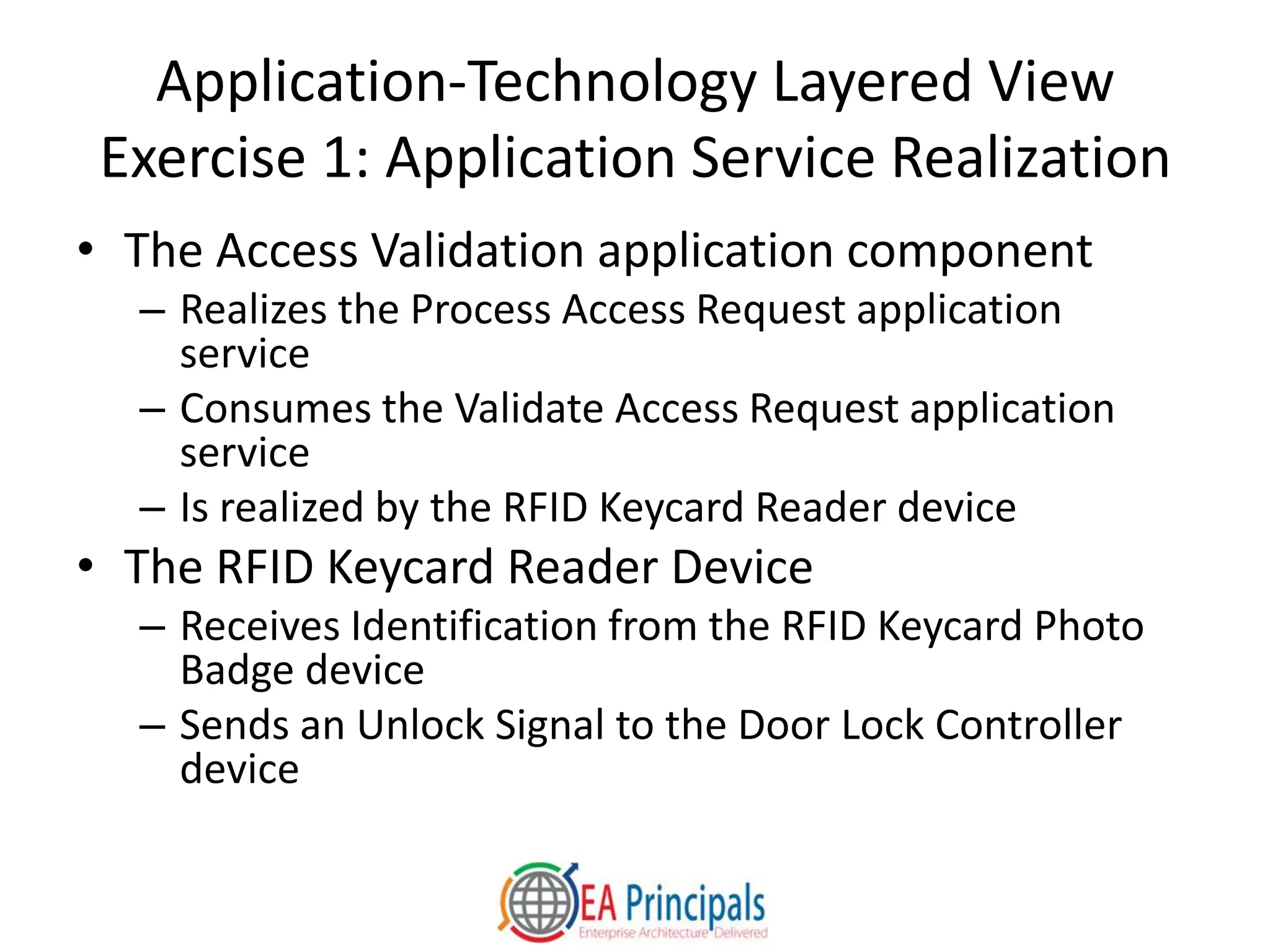
Application-Technology Layered View
Exercise 1: Application Service Realization
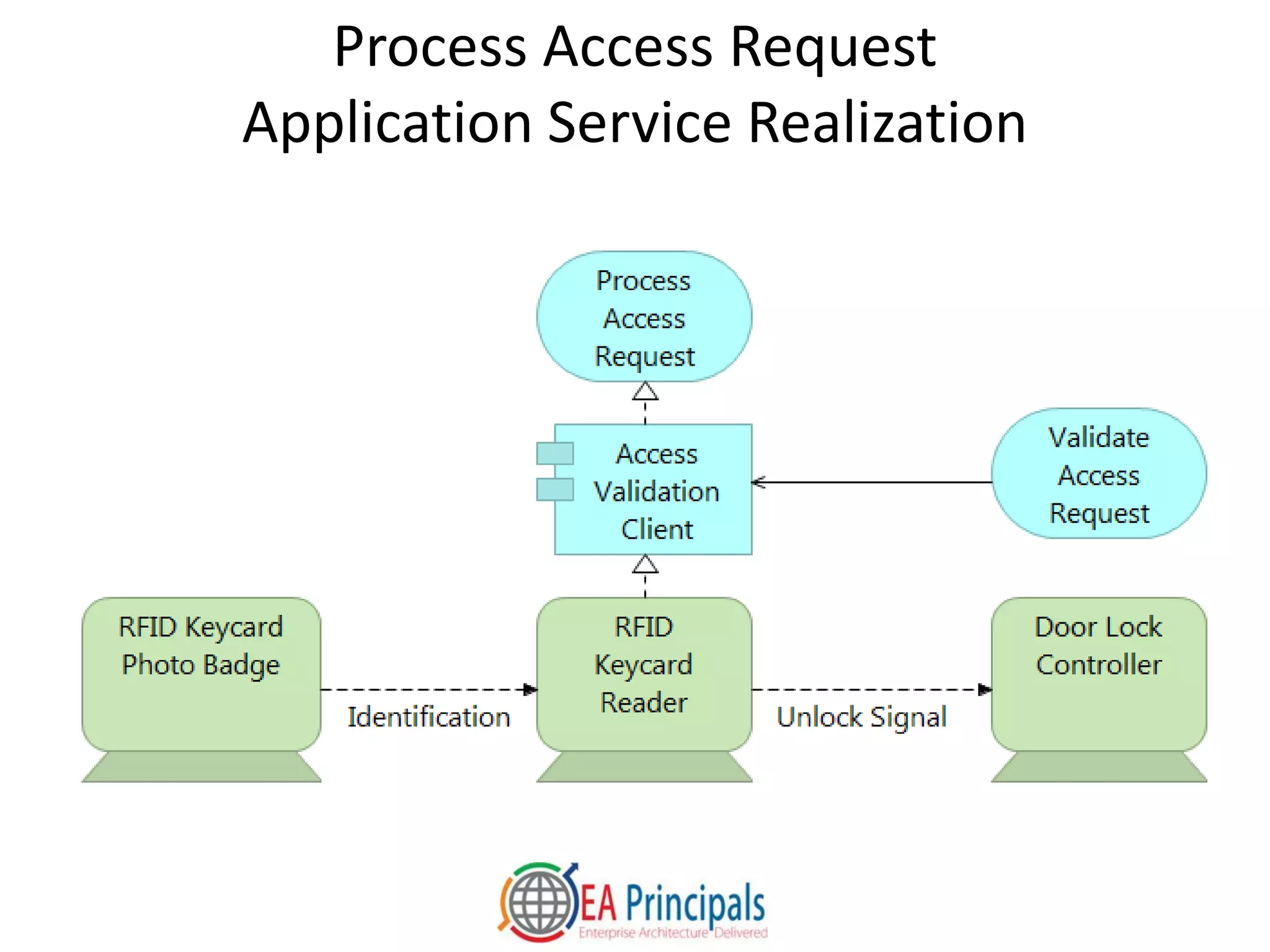
• The Access Validation application component
– Realizes the Process Access Request application
service
– Consumes the Validate Access Request application
service
– Is realized by the RFID Keycard Reader device
• The RFID Keycard Reader Device
– Receives Identification from the RFID Keycard Photo
Badge device
– Sends an Unlock Signal to the Door Lock Controller
device
Process Access Request
Application Service Realization
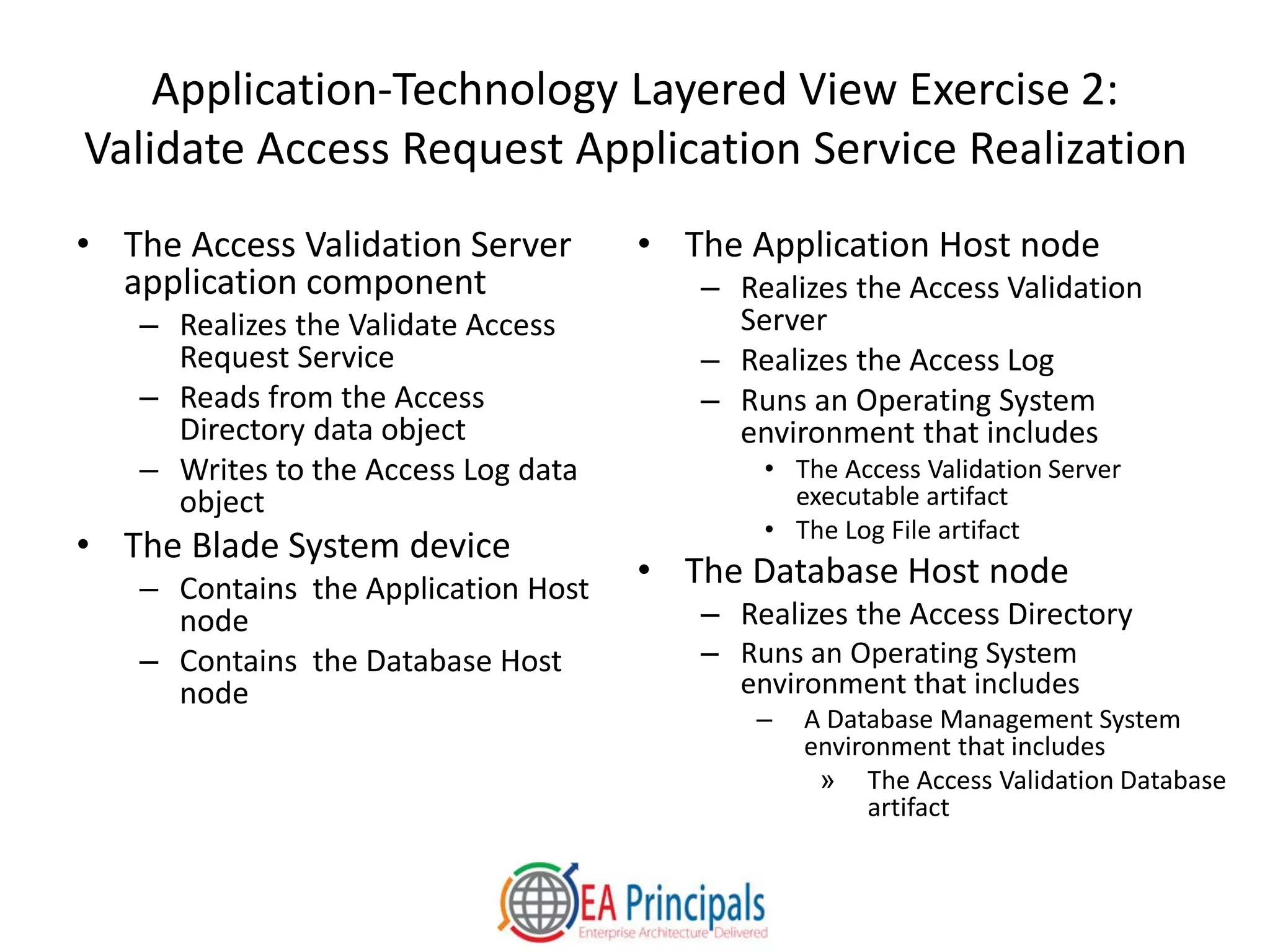
Application-Technology Layered View Exercise 2:
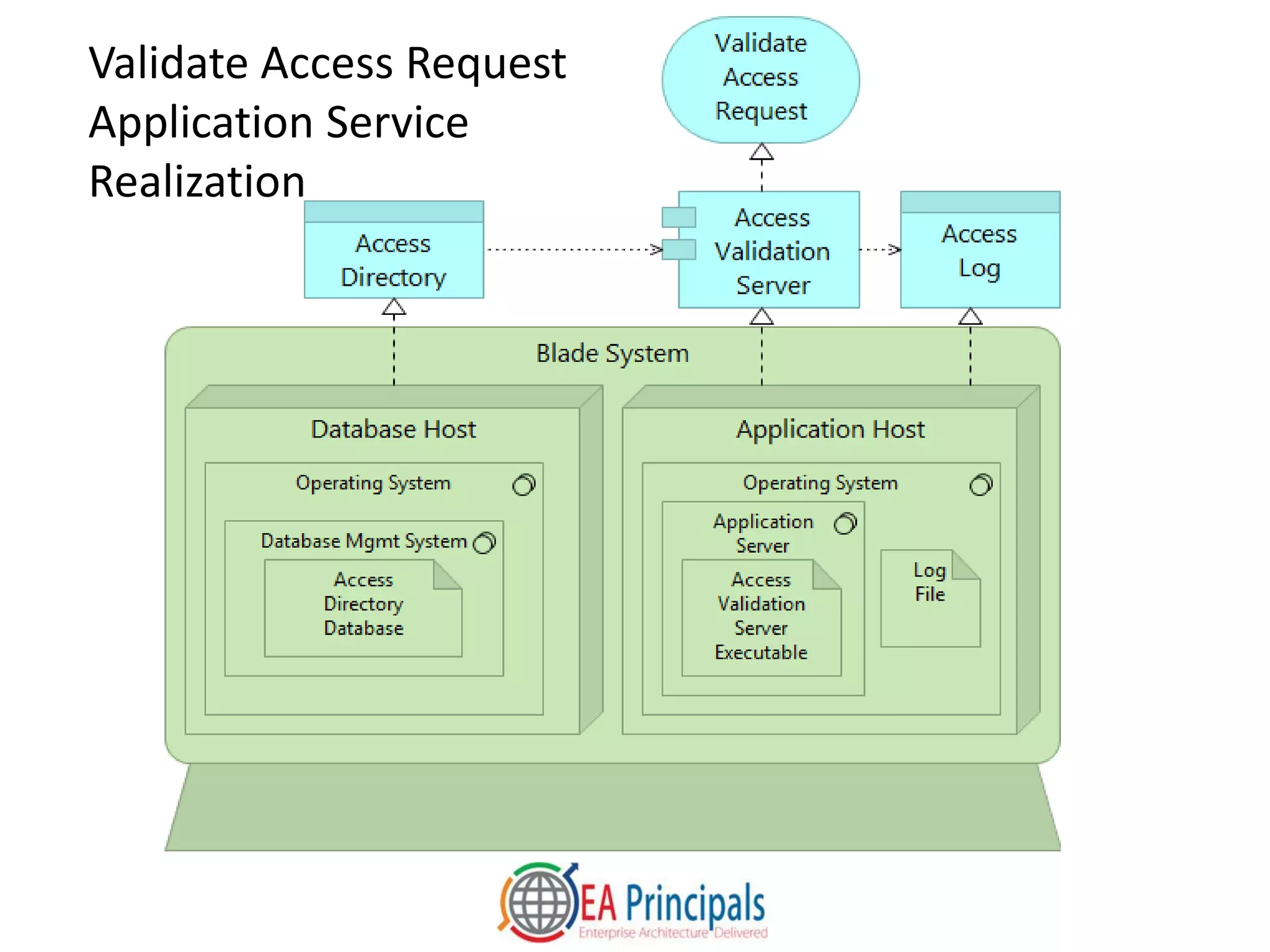
Validate Access Request Application Service Realization
• The Access Validation Server
application component
– Realizes the Validate Access
Request Service
– Reads from the Access
Directory data object
– Writes to the Access Log data
object
• The Blade System device
– Contains the Application Host
node
– Contains the Database Host
node
• The Application Host node
– Realizes the Access Validation
Server
– Realizes the Access Log
– Runs an Operating System
environment that includes
• The Access Validation Server
executable artifact
• The Log File artifact
• The Database Host node
– Realizes the Access Directory
– Runs an Operating System
environment that includes
– A Database Management System
environment that includes
» The Access Validation Database
artifact
Validate Access Request
Application Service
Realization
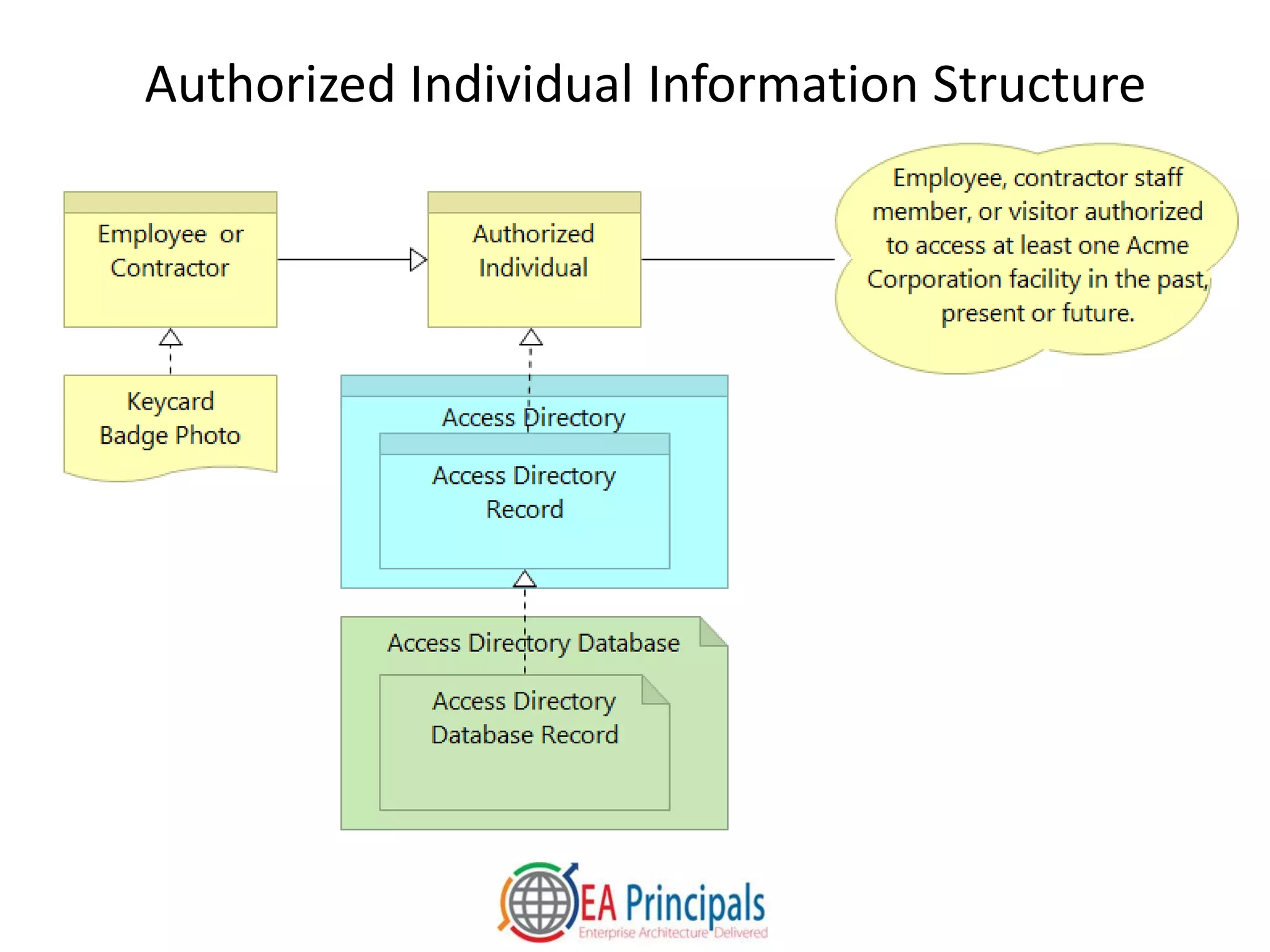
Information Structure View Exercise
• An Authorized Individual business object is an
– Employee, contractor staff member, or visitor authorized
to access at least one Acme Corporation facility in the past,
present, or future
• Access Directory Records within the Access Directory
realize Authorized Individuals
• Access Directory Database Record artifacts within the
Access Directory Database realize Access Directory
Records
• An Employee or Contractor is a type of Authorized
Individual, and is represented by a Keycard Badge
Photo
Authorized Individual Information Structure
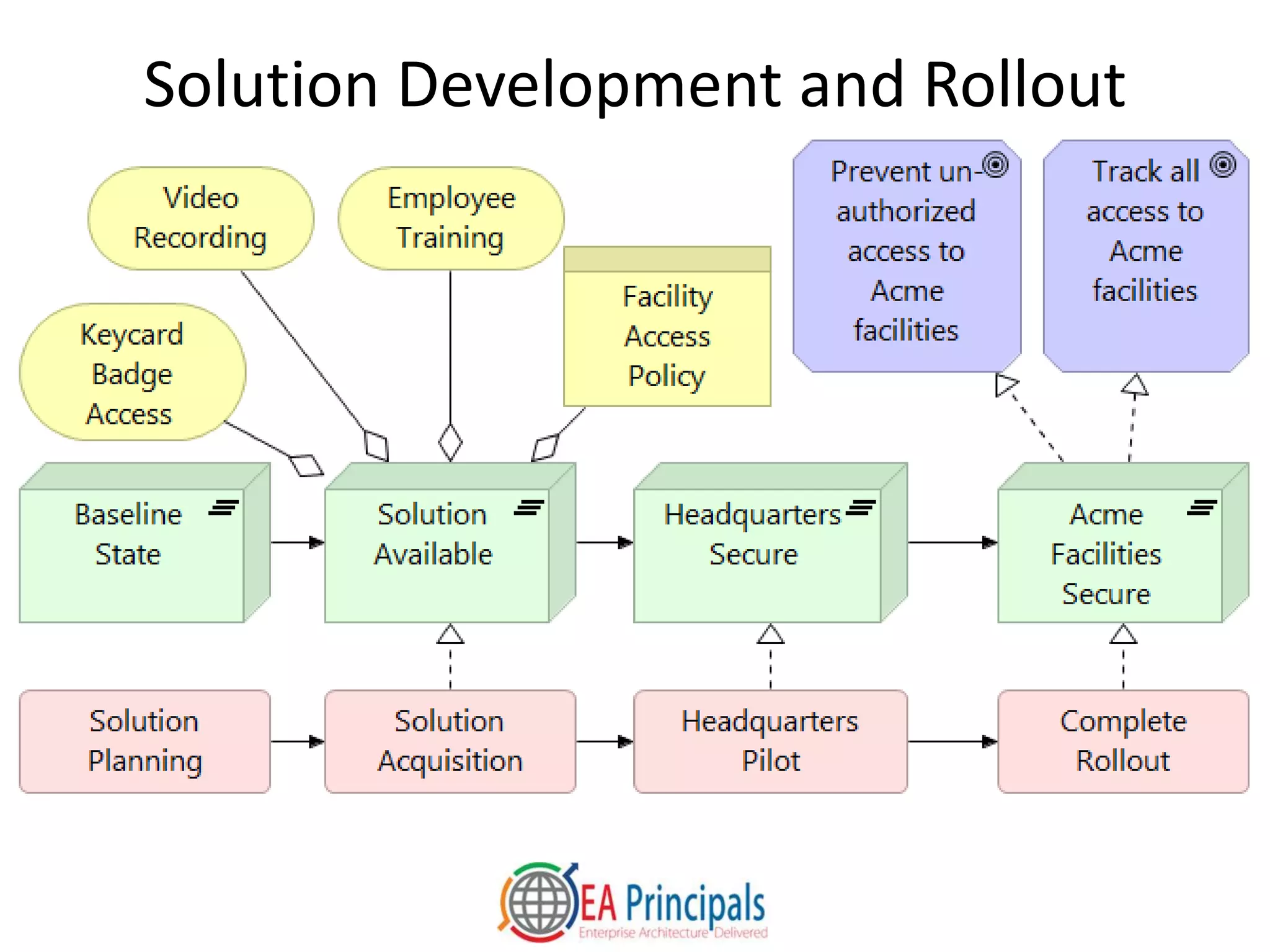
Implementation and Migration View
Exercise
• Four successive work packages are
planned:
– Solution Planning, Solution Acquisition,
Headquarters Pilot, and Complete
Rollout
• The roadmap consists of four
plateaus
– Baseline State, Solution Available,
Headquarters Secure, Acme Facilities
Secure
• Work packages progress the
architecture from the Baseline State
– Solution Acquisition realizes Solution
Available
– Headquarters Pilot realizes
Headquarters Secure
– Complete Rollout realizes Acme
Facilities Secure
• Solution Available is the first plateau
that contains the components of the
Facility Access Control product
• The Acme Facilities Secure realizes
two goals
– Prevent unauthorized access to Acme
facilities
– Track all access to Acme Facilities
Solution Development and Rollout
An Introduction to
The ArchiMate 2.1 Language
• Core Concepts
• Visual Overview
• Case Study
• Conclusion
What Does the ArchiMate Standard
Provide?
• Support for creation of coherent visual models using
– Three layers: Business, Application, and Technology
– Two extensions: Motivation, and Implementation and
Migration
• Unambiguous specification of
– Enterprise and solution architecture components and their
relationships
– The strategies and motivations behind them
– The roadmaps, programs and projects that implement
them
Why Model with the ArchiMate Language?
• Architecture contributors can use the ArchiMate language to
– Clarify organizational strategy and link it to detailed execution guidance
– Visualize all aspects of strategy execution, including business, data, application
and technology architectures and roadmaps
– Integrate capability-based planning, enterprise architecture, portfolio
management, and solution architecture
– Build consensus across diverse organizations, levels of management and
disciplines
– Rapidly and clearly represent ideas, possibilities and solutions
• Stakeholders with no prior ArchiMate knowledge can understand views that
are thoughtfully designed and labeled
– Consider stakeholder concerns, background, learning styles, and preferences
• Architecture contributors and consumers can rigorously link
– High-level views for senior leaders
– Detailed views in ArchiMate and other visual languages
– Feature epics, user stories and other types of specifications
Next Steps for Learning the ArchiMate
Language
• Explore the Open Group ArchiMate 2.1 specification:
http://pubs.opengroup.org/architecture/archimate2-doc/
• Download the Archi free tool, if you haven’t already:
http://www.archimatetool.com
• Purchase and download the Open Group ArchiMate 2
Certification Self-Study Pack:
https://store.opengroup.org/catalog/product_info.php?products_id=132
• Explore presentations and white papers at:
slideshare.net/iverband
• Contact EA Principals for expert training and
consulting: http://www.eaprincipals.com

An Introduction to Enterprise Architecture Visual Modeling With The ArchiMate 2.1 Language

  • 1.
    An Introduction to EnterpriseArchitecture Visual Modeling With the ArchiMate 2.1 Language Iver Band Director of Enterprise and Solution Architecture August, 2015
  • 2.
    Iver Band • Thirtyyears technology experience: development, management, architecture • TOGAF and ArchiMate Certified • Vice Chair Open Group ArchiMate Forum since late 2011 – Co-developer of current certification exams – Currently developing next version of language • Enterprise Architect at Cambia Health Solutions • Director of Enterprise and Solution Architecture at EA Principals, a training and consulting firm • Introduced or assisted with ArchiMate usage in at least six organizations beginning in late 2010
  • 3.
    Agenda • Core Concepts •Visual Overview • Case Study • Conclusion
  • 4.
    An Introduction to TheArchiMate 2.1 Language • Core Concepts • Visual Overview • Case Study • Conclusion
  • 5.
    What is ArchitecturalModeling? • We use architecture modeling languages to create models of historical, actual or desired reality • Architectural modeling focuses on the components of a system, their relationships, and the principles that govern the system’s design and evolution • We model what is relevant to our situation, and abstract out the rest • We visualize architectural models with views • We use viewpoints as templates when we create views • We define viewpoints to address sets of related stakeholder concerns
  • 6.
    What is theArchiMate Language? • A visual modeling language for enterprise and solution architecture • Integrates the perspectives and disciplines involved in the sponsorship, development and implementation of business, data, application and technology architectures • Complements and integrates more discipline-specific languages such as UML and BPMN • An Open Group standard aligned with the TOGAF framework for enterprise architecture • Defines a set of standard viewpoints; users may define additional ones
  • 7.
    ArchiMate 2.1 Framework Adaptedfrom ArchMate 2.1 Specification. © 2012-2013 The Open Group Passive Structure Behavior Active Structure Motivation
  • 8.
    Active Structures PerformBehavior On/With/Within Passive Structures And Each Other From ArchiMate 2.1 Specification © 2012-2013 The Open Group
  • 9.
    An Introduction to TheArchiMate 2.1 Language • Core Concepts • Visual Overview • Case Study • Conclusion
  • 10.
    ArchiMate 2.1 BusinessLayer Passive StructuresBehavior Active Structures Perform On/With/ Within
  • 11.
    ArchiMate 2.1 ApplicationLayer Passive StructuresBehavior Active Structures Perform On/With
  • 12.
    ArchiMate 2.1 TechnologyLayer Passive StructuresBehavior Active Structures Perform On/With
  • 13.
    ArchiMate 2.1 Relations OtherDynamicStructural Association Access UsedBy Realization Assignment Aggregation Composition Flow Triggering Specialization Junction Grouping
  • 14.
    ArchiMate 2.1 Extensions MotivationExtension Implementation and Migration Extension
  • 15.
    The Archi Tool •Available at www.archimatetool.com • High-quality language implementation • All standard ArchiMate viewpoints are ready to use • Good on-ramp to commercial, repository-based tools • Easy to import and export data • Many tools import Archi models – Common model file format standard developed with major tool vendors recently approved by The Open Group
  • 16.
    An Introduction to TheArchiMate 2.1 Language • Core Concepts • Visual Overview • Case Study • Conclusion
  • 17.
    Case Study: FacilitySecurity at the Acme Corporation • Acme Corporation is a small manufacturer and distributor of tools for industrial markets • Recent incidents have left Acme executives concerned about the physical security of their headquarters, factory and warehouse • This case study presents views of an ArchiMate model developed with the Archi free tool
  • 18.
    Organization View Exercise •Acme Corporation has three locations, each of which houses a key internal organization – The Headquarters houses Corporate Management, which includes the CEO, CFO and HR Director. – The Distribution Center houses the Warehousing and Distribution organization – The Factory houses the Manufacturing Organization
  • 19.
    Organization View: AcmeCorporate Structure
  • 20.
    Stakeholder View Exercise •A competitor’s product is based on Acme trade secrets. Projected loss to Acme is $400,000 US in sales. • Tools were stolen from the Acme factory four times in the last year. Replacement cost and lost productivity totaled $75,000. • Unauthorized individuals were found in company facilities three times in the last year. Police found no evidence of break-ins. • The CFO is therefore concerned about security of company property • The HR Director is therefore concerned about safety of company staff • The CEO shares both concerns • All three leaders share a two-part goal to improve security at Acme facilities – Prevent unauthorized access to Acme facilities – Track all access to Acme facilities
  • 21.
    Stakeholder View: UnauthorizedFacility Access Problem
  • 22.
    Requirements Realization View Exercise •The following requirements will improve security at Acme facilities – Ensure that everyone who enters the facility is a employee, contractor or authorized visitor – Enable employees to improve workplace security through daily practices – Capture video of all facility entries and exits • The requirements will be realized by components of a Facility Access Control product with – Keycard Badge Access – Employee Training – Video Recording – Facility Access Policy
  • 23.
    Total View: FacilityAccess Control Product Solution
  • 24.
    Business Process ViewExercise • The Keycard Badge Lifecycle business process – Realizes the Keycard Badge Access business service – Is composed of three successive sub-processes, each of which is performed by a specific role, and uses specific application services • Keycard Badge Provisioning – Performed by Receptionist – Uses Generate Key Badge and Assign Temporary Key Badge • Keycard Badge Usage – Performed by Facility User – Uses Process Access Request • Keycard Badge Deprovisioning – Performed by Receptionist – Uses Invalidate Keycard Badge and Remove Temporary Keycard Badge Assignment
  • 25.
    Keycard Badge Access BusinessService Realization
  • 26.
    Application-Technology Layered View Exercise1: Application Service Realization • The Access Validation application component – Realizes the Process Access Request application service – Consumes the Validate Access Request application service – Is realized by the RFID Keycard Reader device • The RFID Keycard Reader Device – Receives Identification from the RFID Keycard Photo Badge device – Sends an Unlock Signal to the Door Lock Controller device
  • 27.
  • 28.
    Application-Technology Layered ViewExercise 2: Validate Access Request Application Service Realization • The Access Validation Server application component – Realizes the Validate Access Request Service – Reads from the Access Directory data object – Writes to the Access Log data object • The Blade System device – Contains the Application Host node – Contains the Database Host node • The Application Host node – Realizes the Access Validation Server – Realizes the Access Log – Runs an Operating System environment that includes • The Access Validation Server executable artifact • The Log File artifact • The Database Host node – Realizes the Access Directory – Runs an Operating System environment that includes – A Database Management System environment that includes » The Access Validation Database artifact
  • 29.
  • 30.
    Information Structure ViewExercise • An Authorized Individual business object is an – Employee, contractor staff member, or visitor authorized to access at least one Acme Corporation facility in the past, present, or future • Access Directory Records within the Access Directory realize Authorized Individuals • Access Directory Database Record artifacts within the Access Directory Database realize Access Directory Records • An Employee or Contractor is a type of Authorized Individual, and is represented by a Keycard Badge Photo
  • 31.
  • 32.
    Implementation and MigrationView Exercise • Four successive work packages are planned: – Solution Planning, Solution Acquisition, Headquarters Pilot, and Complete Rollout • The roadmap consists of four plateaus – Baseline State, Solution Available, Headquarters Secure, Acme Facilities Secure • Work packages progress the architecture from the Baseline State – Solution Acquisition realizes Solution Available – Headquarters Pilot realizes Headquarters Secure – Complete Rollout realizes Acme Facilities Secure • Solution Available is the first plateau that contains the components of the Facility Access Control product • The Acme Facilities Secure realizes two goals – Prevent unauthorized access to Acme facilities – Track all access to Acme Facilities
  • 33.
  • 34.
    An Introduction to TheArchiMate 2.1 Language • Core Concepts • Visual Overview • Case Study • Conclusion
  • 35.
    What Does theArchiMate Standard Provide? • Support for creation of coherent visual models using – Three layers: Business, Application, and Technology – Two extensions: Motivation, and Implementation and Migration • Unambiguous specification of – Enterprise and solution architecture components and their relationships – The strategies and motivations behind them – The roadmaps, programs and projects that implement them
  • 36.
    Why Model withthe ArchiMate Language? • Architecture contributors can use the ArchiMate language to – Clarify organizational strategy and link it to detailed execution guidance – Visualize all aspects of strategy execution, including business, data, application and technology architectures and roadmaps – Integrate capability-based planning, enterprise architecture, portfolio management, and solution architecture – Build consensus across diverse organizations, levels of management and disciplines – Rapidly and clearly represent ideas, possibilities and solutions • Stakeholders with no prior ArchiMate knowledge can understand views that are thoughtfully designed and labeled – Consider stakeholder concerns, background, learning styles, and preferences • Architecture contributors and consumers can rigorously link – High-level views for senior leaders – Detailed views in ArchiMate and other visual languages – Feature epics, user stories and other types of specifications
  • 37.
    Next Steps forLearning the ArchiMate Language • Explore the Open Group ArchiMate 2.1 specification: http://pubs.opengroup.org/architecture/archimate2-doc/ • Download the Archi free tool, if you haven’t already: http://www.archimatetool.com • Purchase and download the Open Group ArchiMate 2 Certification Self-Study Pack: https://store.opengroup.org/catalog/product_info.php?products_id=132 • Explore presentations and white papers at: slideshare.net/iverband • Contact EA Principals for expert training and consulting: http://www.eaprincipals.com