ALSTOM – Micom
Introduction to Micom Protective
Relays
Principles of Micom S1 Agile Software
Compiled by: Meisam Ghasemibarghi
April-2016 Faraniroo Co.
1
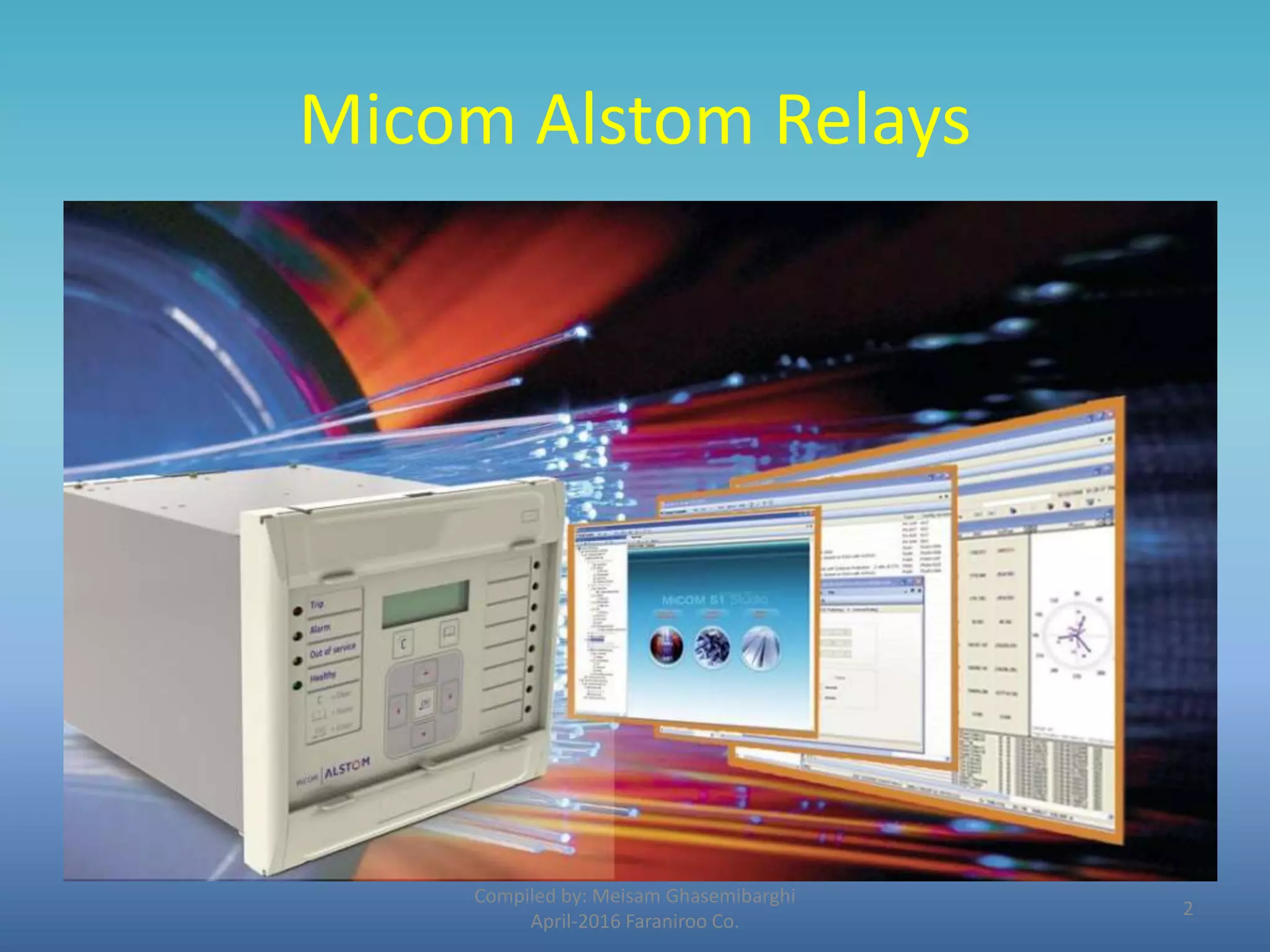
Micom Alstom Relays
Compiled by: Meisam Ghasemibarghi
April-2016 Faraniroo Co.
2
Agile Protection relays
• Alstom’s Agile range protects critical power system assets, right
from industrial systems, through distribution, rail, generation
and up to the highest transmission voltages. Short-circuits,
overloads and other faults are cleared in tripping times as fast as
sub-cycle.
• From the simplest self-powered P50 Agile relay, through the
colour touch-screen P60 Agile, up to the compact and modular
MiCOM P40 Agile ranges, security and dependability of
operation is paramount. Agile devices are multifunction and
fully numerical, including cyber secure substation
communications interoperable with international standards such
as IEC 61850 edition 2. Applications include feeder, motor,
generator, distance, differential, transformer, line, busbar,
voltage and frequency intelligent solutions.
Compiled by: Meisam Ghasemibarghi
April-2016 Faraniroo Co.
3
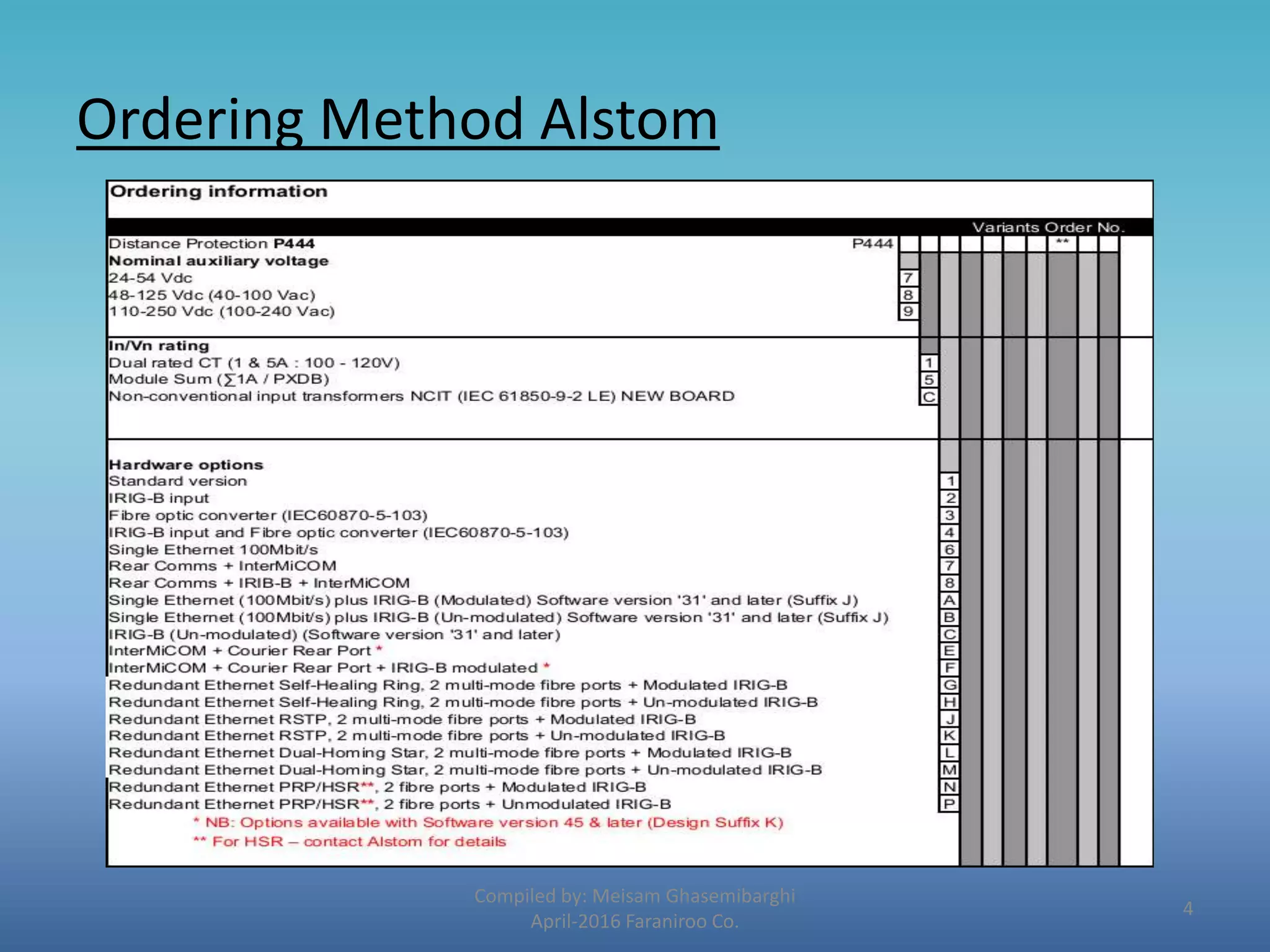
Ordering Method Alstom
Compiled by: Meisam Ghasemibarghi
April-2016 Faraniroo Co.
4
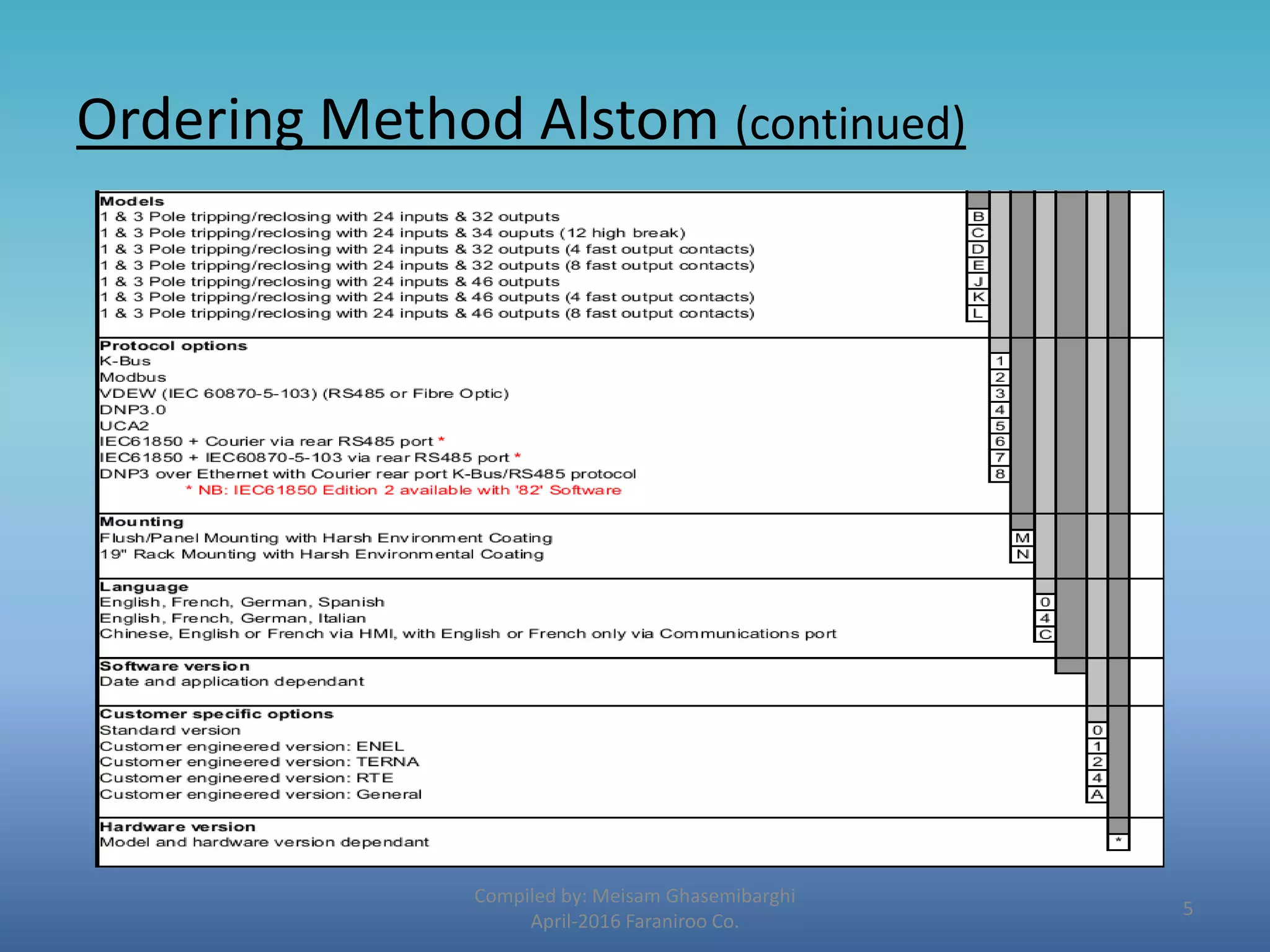
Ordering Method Alstom (continued)
Compiled by: Meisam Ghasemibarghi
April-2016 Faraniroo Co.
5
Ordering Method schneider
Compiled by: Meisam Ghasemibarghi
April-2016 Faraniroo Co.
6
Introduction to the Relay
Compiled by: Meisam Ghasemibarghi
April-2016 Faraniroo Co.
• USER INTERFACES AND MENU STRUCTURE
The settings and functions of the MiCOM protection relay can be
accessed both from the front panel keypad and LCD, and via the
front and rear communication ports.
Front panel
The front panel of the relay is shown in the following figures :
7
Introduction to the Relay
Compiled by: Meisam Ghasemibarghi
April-2016 Faraniroo Co.
• RELAY FRONT VIEW ARRANGEMENT WITH HOTKEYS (HARDWARE G, H
AND J)
8
Introduction to the Relay
Compiled by: Meisam Ghasemibarghi
April-2016 Faraniroo Co.
• RELAY FRONT VIEW WITH FUNCTION KEYS (HARDWARE K)
9
Introduction to the Relay
Compiled by: Meisam Ghasemibarghi
April-2016 Faraniroo Co.
The front panel of the relay includes the following:
• A 16-character by 2- or 3-line (since version C2.X) alphanumeric
liquid crystal display (LCD).
• A keypad comprising 4 arrow keys, an enter key , a clear key ,
and a read key and two additive hotkeys (since hardware G-J,
software C2.X).
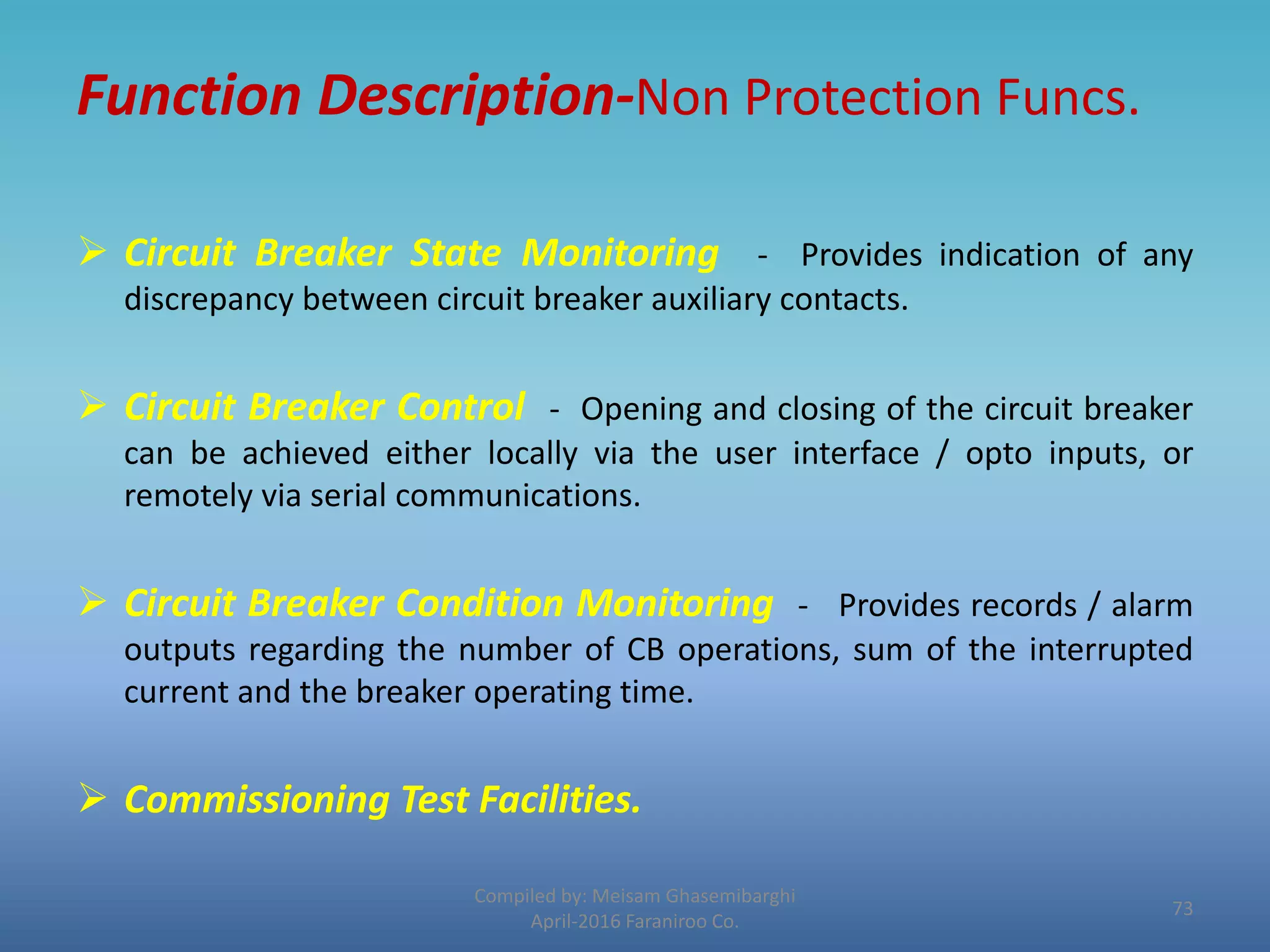
• 12 LEDs; 4 fixed function LEDs on the left hand side of the front
panel and 8 programmable function LEDs on the right hand side.
• 10 additional function keys plus 10 additional LEDs (since
hardware K, software D1.x)
10
Introduction to the Relay
Compiled by: Meisam Ghasemibarghi
April-2016 Faraniroo Co.
• Hotkey functionality
• SCROLL: Starts scrolling through the various default displays.
• STOP: Stops scrolling the default display for control of setting
groups, control inputs and circuit breaker operation.
11
Introduction to the Relay
Compiled by: Meisam Ghasemibarghi
April-2016 Faraniroo Co.
Function key functionality
The relay front panel, features control pushbutton switches with
programmable LEDs that facilitate local control.
With these 10 direct-action push buttons and LEDs e.g.
Enable/Disable the auto-recloser function.
Using programmable scheme logic, the user can readily change the
default direct-action pushbutton functions and LED indications to
fit specific control and operational needs.
12
Introduction to the Relay
Compiled by: Meisam Ghasemibarghi
April-2016 Faraniroo Co.
Under the top hinged cover:
The relay serial number, and the relay’s current and voltage rating
information.
Under the bottom hinged cover:
 battery compartment to hold the ½ AA size battery which is used
for memory back-up for the real time clock, ev ent, fault and
disturbance records.
 a 9-pin female D-type front port for communication with a PC
locally to the relay (up to 15m distance) via an EIA(RS)232 serial
data connection.
 a 25-pin female D-type port providing internal signal monitoring
and high speed local downloading of software and language text
via a parallel data connection.
13
Introduction to the Relay
Compiled by: Meisam Ghasemibarghi
April-2016 Faraniroo Co.
Fixed function LEDs :
 Trip (Red) indicates that the relay has issued a trip signal. It is reset when the
associated fault record is cleared from the front display. (Alternatively the trip LED
can be configured to be self-resetting).
 Alarm (Yellow) flashes to indicate that the relay has registered an alarm.
This may be triggered by a fault, event or maintenance record. The LED
will flash until the alarms have been accepted (read), after which the LED
will change to constant illumination, and will extinguish when the alarms
have been cleared.
 Out of service (Yellow) indicates that the relay’s protection is unavailable.
 Healthy (Green) indicates that the relay is in correct working order, and
should be on at all times. It will be extinguished if the relay’s self-test
facilities indicate that there is an error with the relay’s hardware or
software. The state of the healthy LED is reflected by the watchdog
contact at the back of the relay.
14
Introduction to the Relay
Compiled by: Meisam Ghasemibarghi
April-2016 Faraniroo Co.
Relay rear panel
All current and voltage signals, digital logic input signals and
output contacts are connected at the rear of t he relay.
Also connected at the rear is the twisted pair wiring for the rear
EIA(RS)485 comm. port, the IRIG-B time synchronizing input and
the optical fiber rear communication port (IEC103 or UCA2 by
Ethernet) which are both optional. A second rear port (Courier)
and an inter MiCOM port are also available.
15
Introduction to the Relay
Compiled by: Meisam Ghasemibarghi
April-2016 Faraniroo Co.
16
Micom S1 Agile
S1 - Moving forwards with Agility
• Next generation in tools for configuration and
maintenance of MiCOM – redefining MiCOM S1.
• The move from S1 Studio to S1 Agile underlines
Alstom’s R&D investment in usability: to assemble all
tools in a palette for simple entry, with intuitive
navigation via fewer mouse-clicks.
• All applications are embedded.
Compiled by: Meisam Ghasemibarghi
April-2016 Faraniroo Co.
17
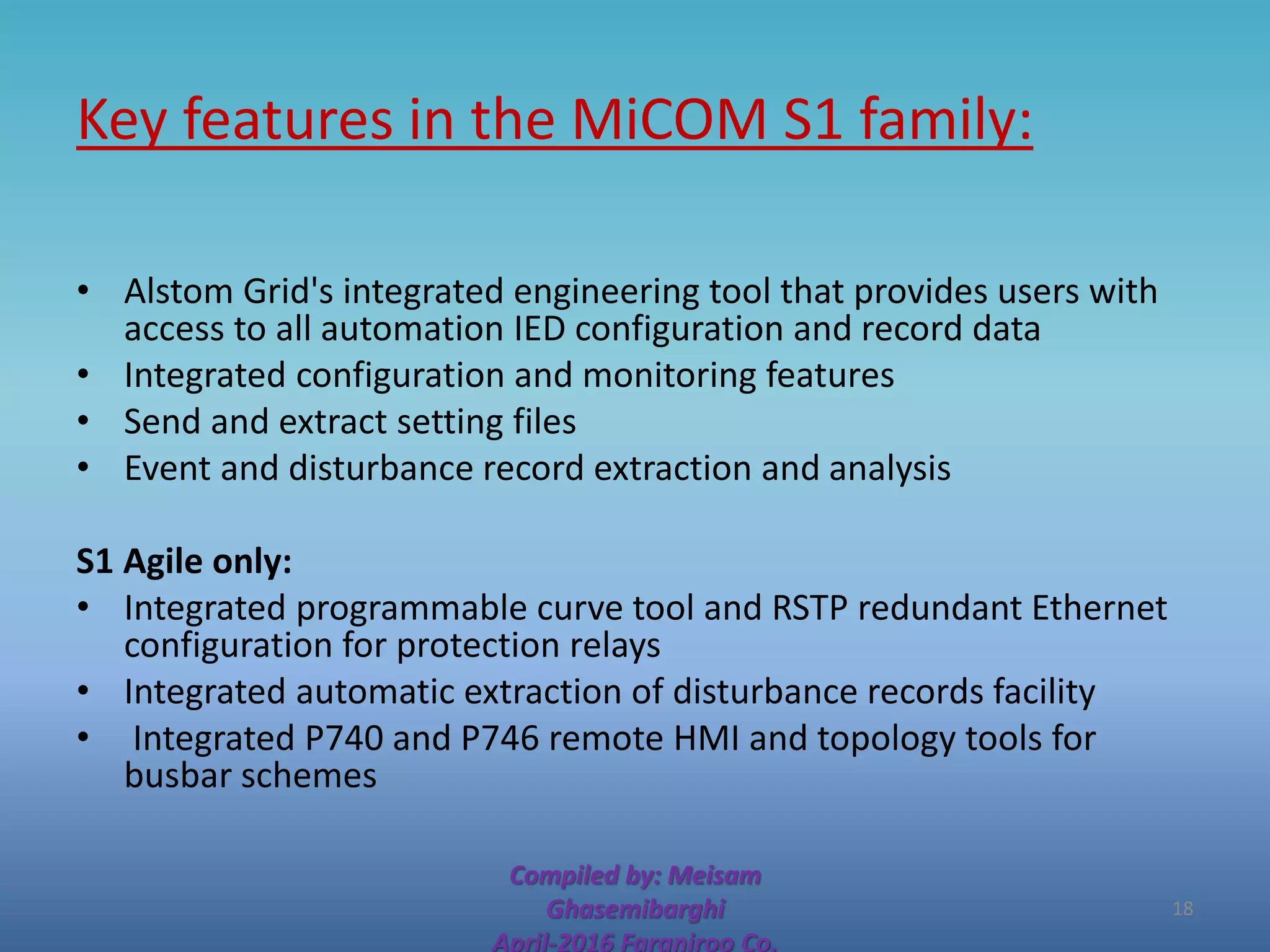
Key features in the MiCOM S1 family:
• Alstom Grid's integrated engineering tool that provides users with
access to all automation IED configuration and record data
• Integrated configuration and monitoring features
• Send and extract setting files
• Event and disturbance record extraction and analysis
S1 Agile only:
• Integrated programmable curve tool and RSTP redundant Ethernet
configuration for protection relays
• Integrated automatic extraction of disturbance records facility
• Integrated P740 and P746 remote HMI and topology tools for
busbar schemes
Compiled by: Meisam
Ghasemibarghi
April-2016 Faraniroo Co.
18
Micom S1 Installation Steps :
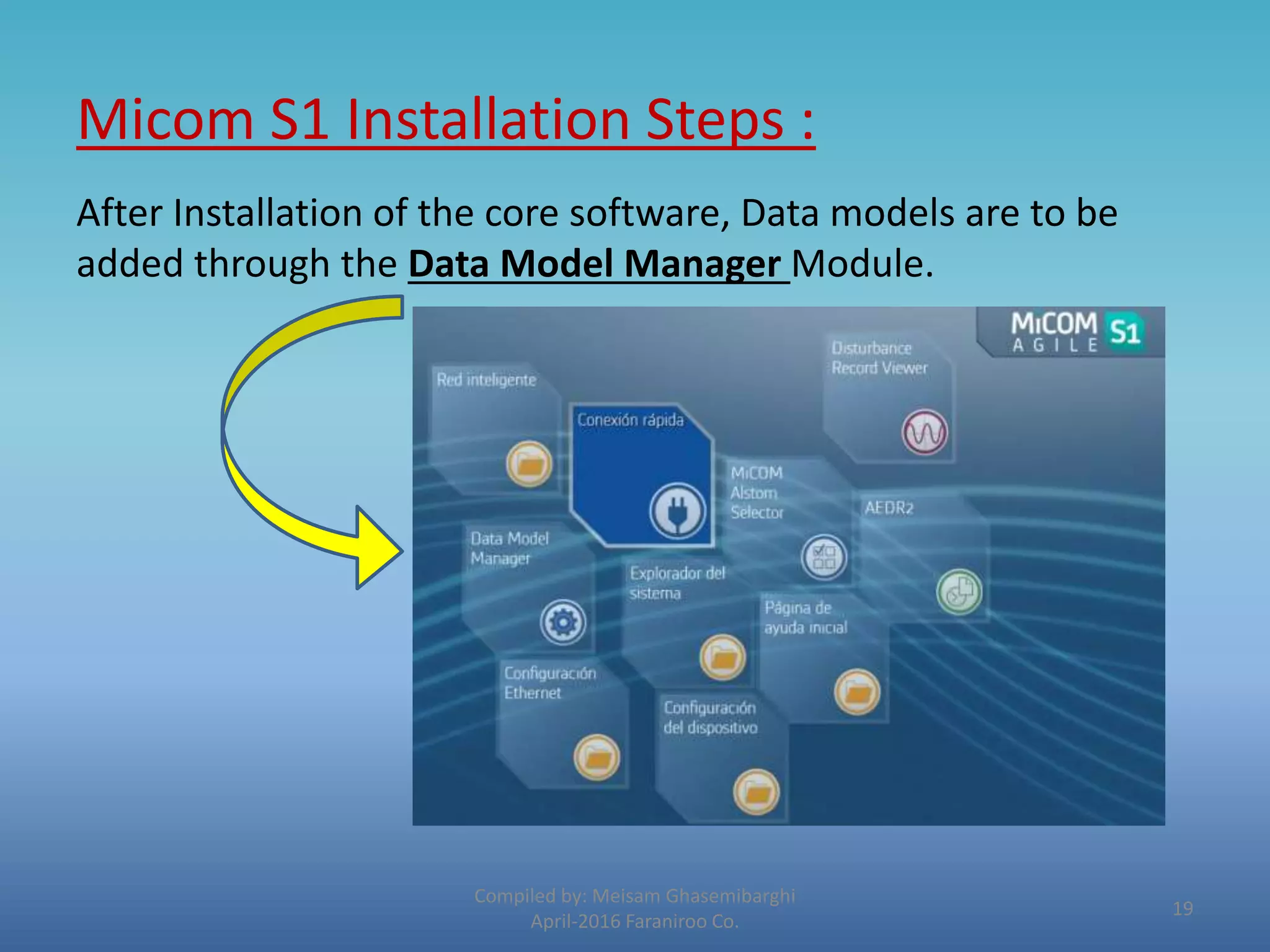
After Installation of the core software, Data models are to be
added through the Data Model Manager Module.
Compiled by: Meisam Ghasemibarghi
April-2016 Faraniroo Co.
19
Data Model illustration:
Compiled by: Meisam Ghasemibarghi
April-2016 Faraniroo Co.
But first of all : What are data Models?
The data model of any IEC 61850 IED can be viewed as a hierarchy of information.
20
Data Model Definition :
The levels of this hierarchy can be described as follows:
 Physical Device: Identifies the actual IED within a system. Typically
the device’s name or IP address can be used (for example Feeder_1
or 10.0.0.2 ).
 Logical Device: Identifies groups of related Logical Nodes within the
Physical Device. For the MiCOM relays, 5 Logical Devices exist:
Control, Measurements, Protection, Records, System.
 Wrapper/Logical Node Instance: Identifies the major functional
areas within the IEC 61850 data model. Either 3 or 6 characters are
used as a prefix to define the functional group (wrapper) while the
actual functionality is identified by a 4 character Logical Node name
suffixed by an instance number. For example, XCBR1 (circuit
breaker), MMXU1 (measurements), FrqPTOF2 (over frequency
protection, stage 2).
Compiled by: Meisam Ghasemibarghi
April-2016 Faraniroo Co.
21
Data Model Definition : (Continued)
 Data Object : This next layer is used to identify the type of
data you will be presented with. For example, Pos. (position)
of Logical Node type XCBR.
 Data Attribute :This is the actual data (measurement value,
status, description, etc.). For example, stVal. (status value)
indicating actual position of circuit breaker for Data Object
type Pos. of Logical Node type XCBR .
Compiled by: Meisam Ghasemibarghi
April-2016 Faraniroo Co.
22
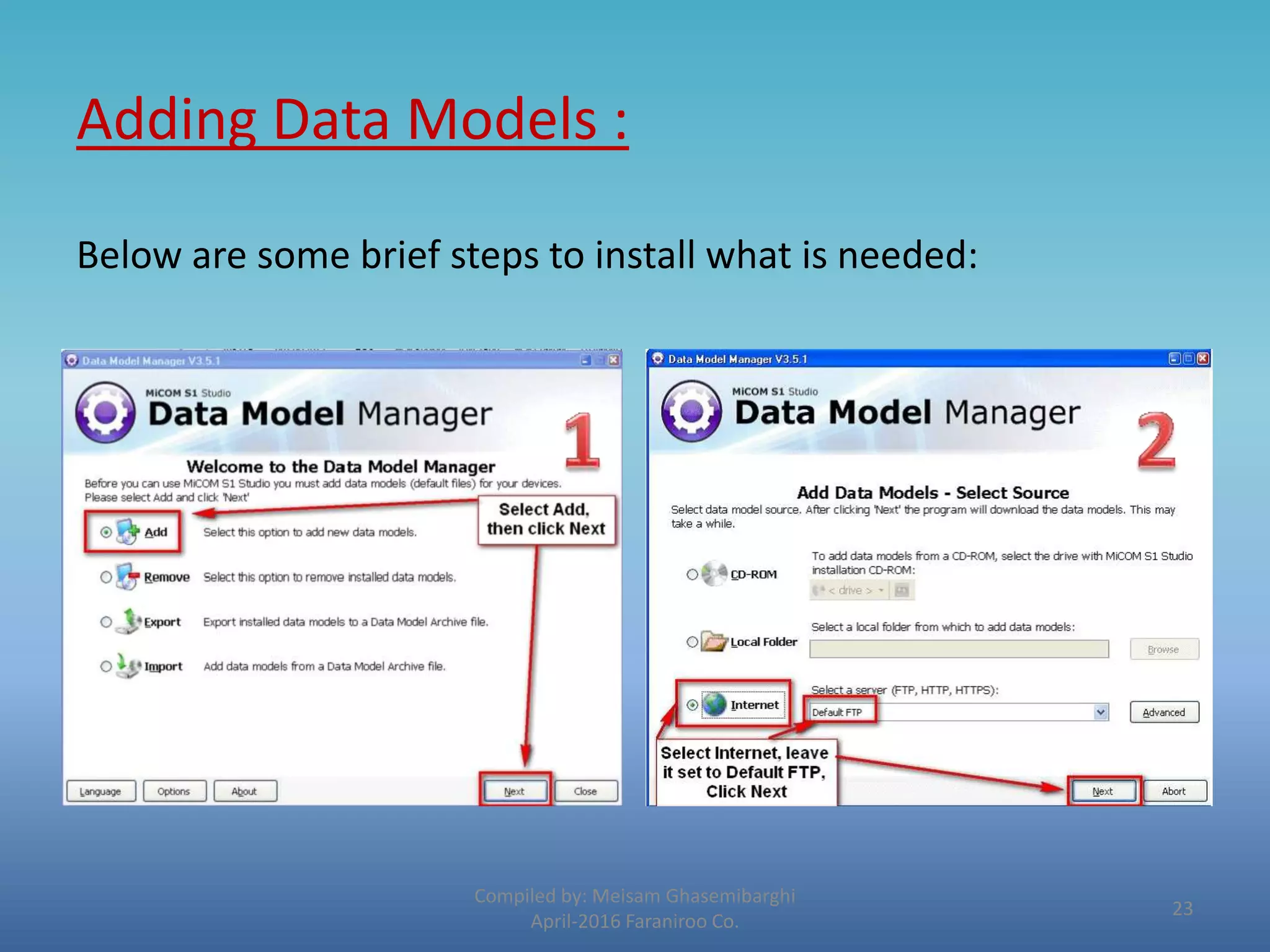
Adding Data Models :
Below are some brief steps to install what is needed:
Compiled by: Meisam Ghasemibarghi
April-2016 Faraniroo Co.
23
Compiled by: Meisam Ghasemibarghi
April-2016 Faraniroo Co.
24
Compiled by: Meisam Ghasemibarghi
April-2016 Faraniroo Co.
25
Adding a New Project:
Now that we have the core software and all required Data
Models installed, its time to create our new project.
1. Create a new system – File New System
2. Add a new Substation
Compiled by: Meisam Ghasemibarghi
April-2016 Faraniroo Co.
26
New Project (Continued)
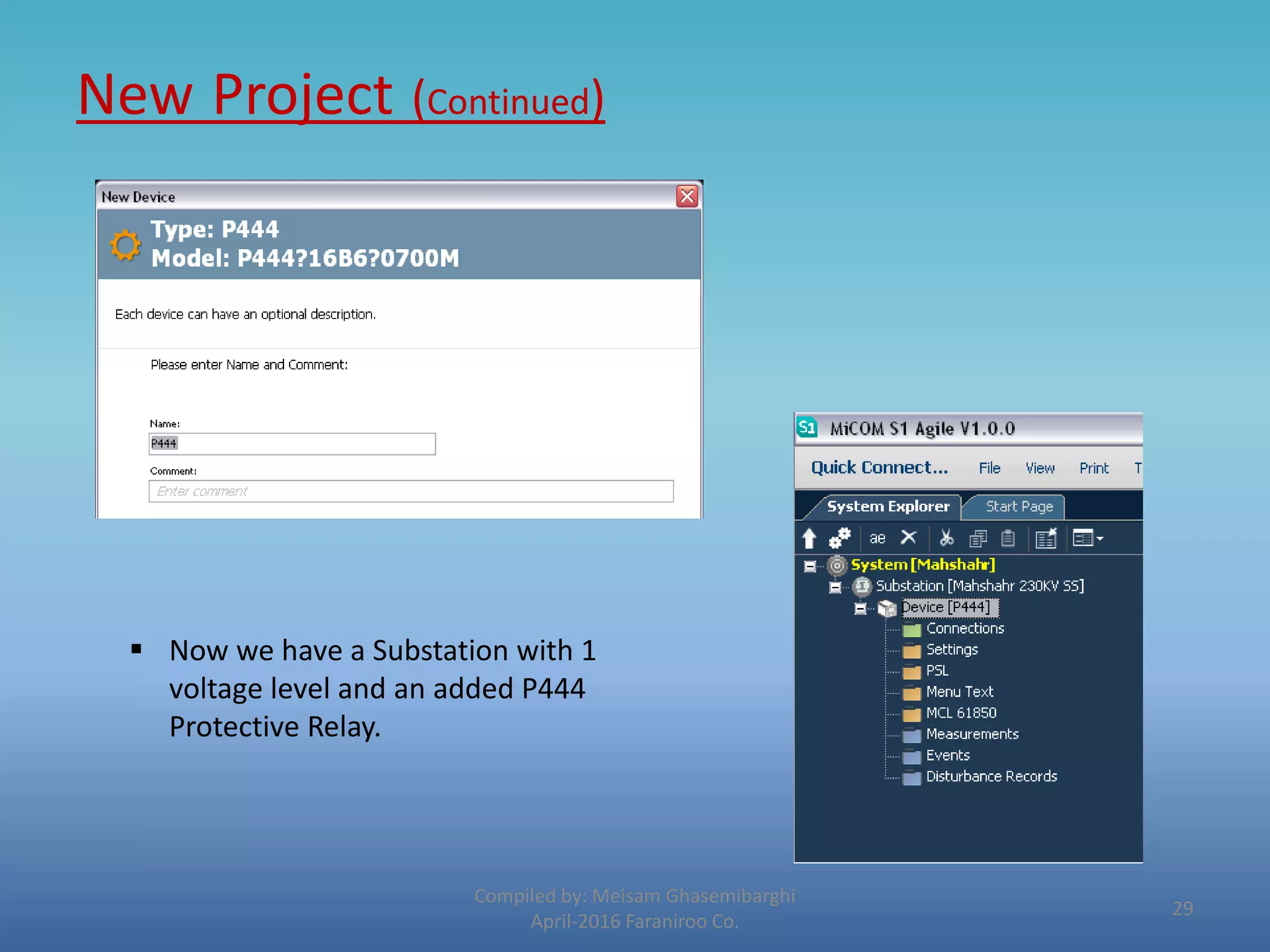
3. Add a new Device
Compiled by: Meisam Ghasemibarghi
April-2016 Faraniroo Co.
 In the type window , it
should be defined that
your device belongs to
which Series of Micom
devices.
 Here we are going to
add a P444 Protective
relay which obviously
belongs to PX40 Series
.
27
New Project (Continued)
4. In this step model number should be exerted exactly according
to the Cortec. file of the ordered relay.
Compiled by: Meisam Ghasemibarghi
April-2016 Faraniroo Co.
28
New Project (Continued)
Compiled by: Meisam Ghasemibarghi
April-2016 Faraniroo Co.
 Now we have a Substation with 1
voltage level and an added P444
Protective Relay.
29
New Project (Continued)
Now followed is the explanation of each item from the drop
down list :
• 1. Connection
Compiled by: Meisam Ghasemibarghi
April-2016 Faraniroo Co.
30
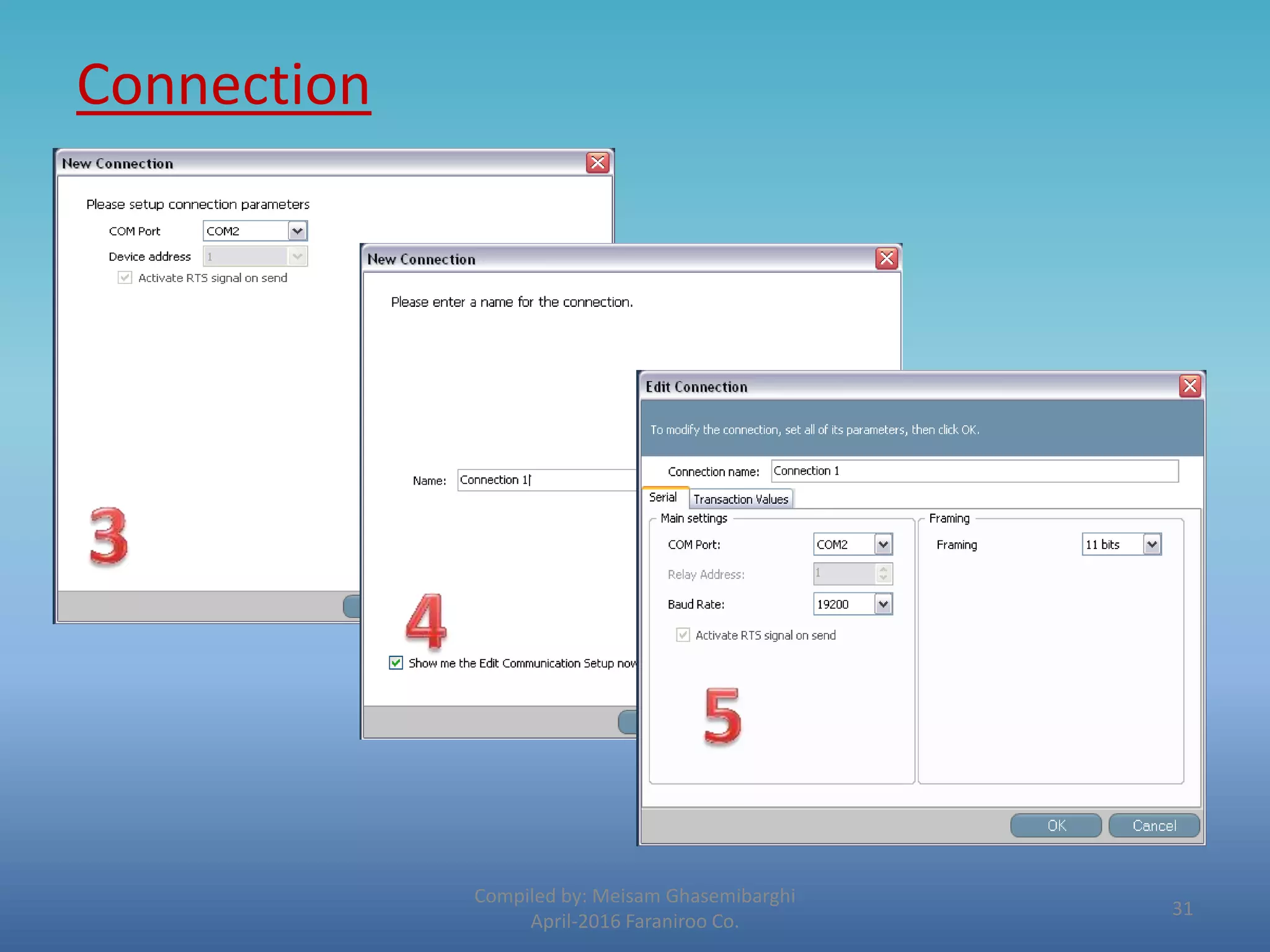
Connection
Compiled by: Meisam Ghasemibarghi
April-2016 Faraniroo Co.
31
Settings
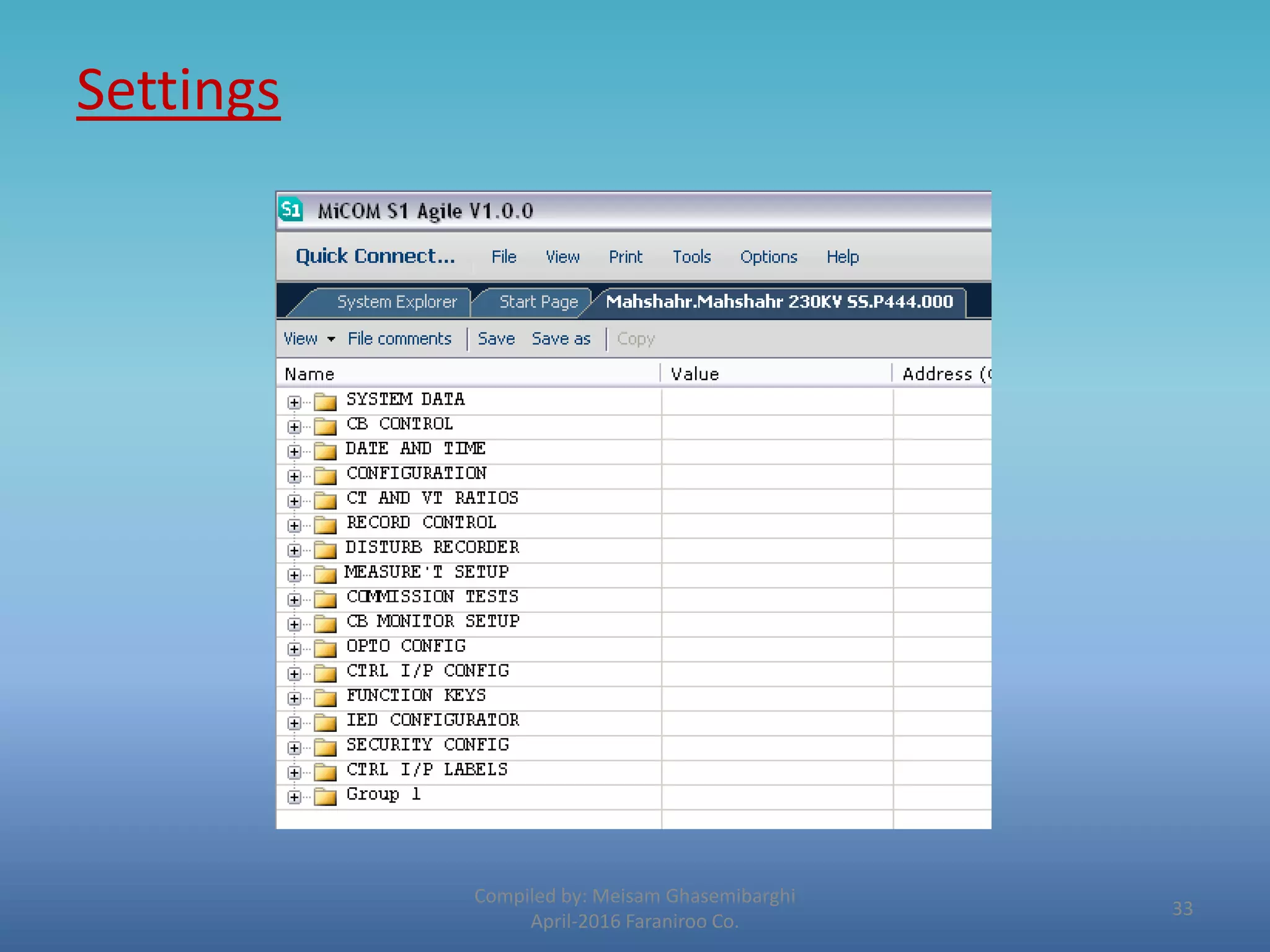
2. Settings
The settings database contains all of the settings and data for the relay, including the
protection, disturbance recorder and control & support settings. The settings are
maintained in non-volatile E2PROM memory.
Compiled by: Meisam Ghasemibarghi
April-2016 Faraniroo Co.
32
Settings
Compiled by: Meisam Ghasemibarghi
April-2016 Faraniroo Co.
33
Settings
Compiled by: Meisam Ghasemibarghi
April-2016 Faraniroo Co.
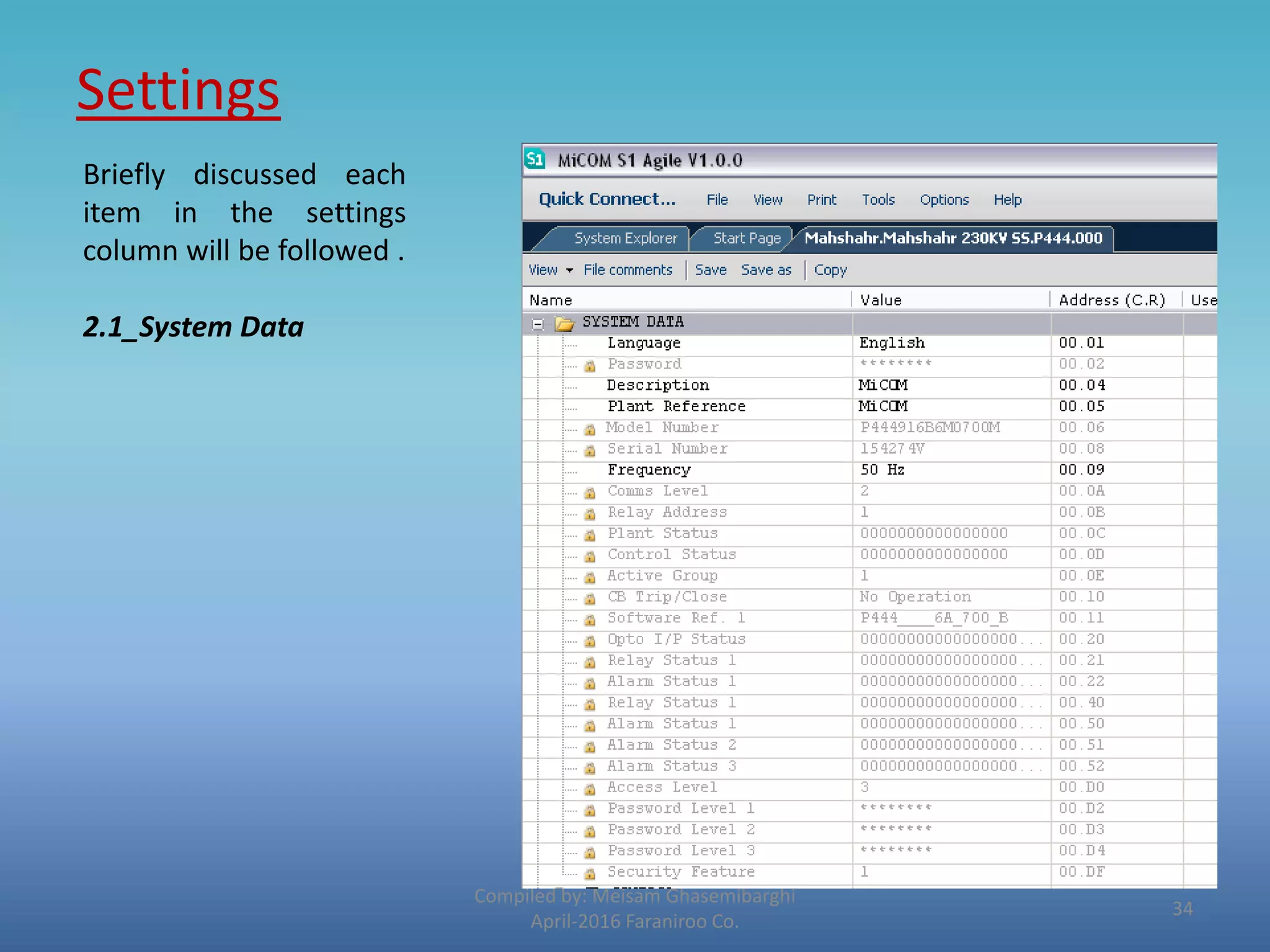
Briefly discussed each
item in the settings
column will be followed .
2.1_System Data
34
Settings
Compiled by: Meisam Ghasemibarghi
April-2016 Faraniroo Co.
2.2_Configuration
35
Settings
Compiled by: Meisam Ghasemibarghi
April-2016 Faraniroo Co.
2.3_CT & VT Ratios
36
Settings
Compiled by: Meisam Ghasemibarghi
April-2016 Faraniroo Co.
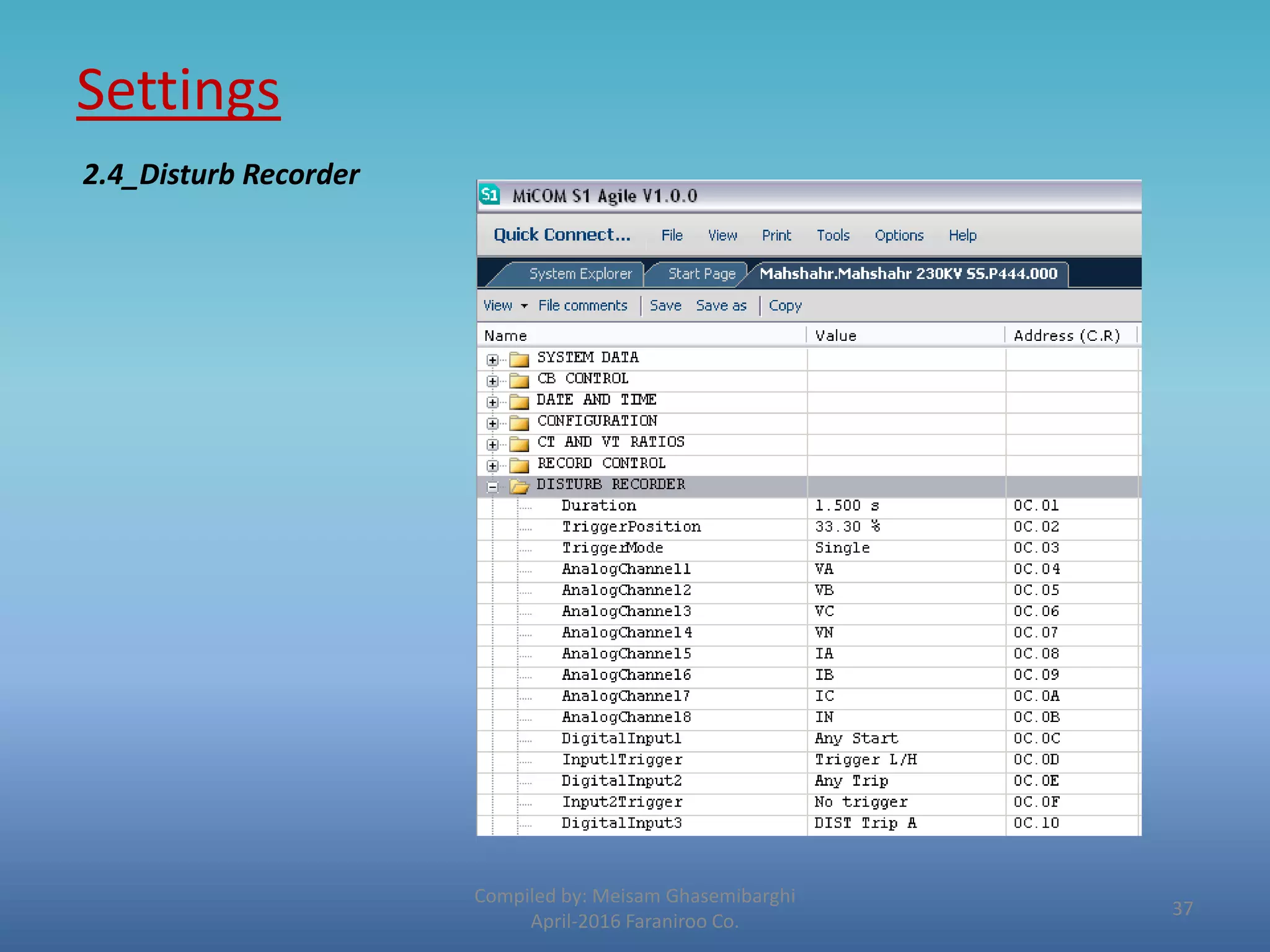
2.4_Disturb Recorder
37
Settings
Compiled by: Meisam Ghasemibarghi
April-2016 Faraniroo Co.
2.5_Measurement Setup
38
Settings
Compiled by: Meisam Ghasemibarghi
April-2016 Faraniroo Co.
2.6_Control I/P Config
The hotkeys in the front
panel can perform a
direct command if a
dedicated PSL has been
previously created using
“CONTROL INPUT” cell.
MiCOM Relays offer up
to 32 control inputs
which can be activated
by the Hotkey manually
or by the IEC 103 remote
communication
39
Settings
Compiled by: Meisam Ghasemibarghi
April-2016 Faraniroo Co.
2.6_Group 1
Based on the target
Protective relay and
applied configuration,
this item consists of
specific items.
Detailed explanation of
each sub menu item for
typical relays will be
discussed later in this
course.
40
PSL (Programmable scheme logic )
Compiled by: Meisam Ghasemibarghi
April-2016 Faraniroo Co.
The purpose of the programmable scheme logic (PSL) is to allow the relay user to
configure an individual protection scheme to suit their own particular application. This
is achieved through the use of programmable logic gates and delay timers.
Inputs : The input to the PSL is any combination of the status of the digital input signals
from the opto-isolators on the input board, the outputs of the protection elements, e.g.
protection starts and trips, and the outputs of the fixed protection scheme logic.
Output: The outputs of the PSL are the LEDs on the front panel of the re lay and the
output contacts at the rear.
Only the part of the PSL logic that is affected by the
particular input change that has occurred is
processed. This reduces the amount of processing
time that is used by the PSL.
41
PSL (Continued)
Compiled by: Meisam Ghasemibarghi
April-2016 Faraniroo Co.
42
Inputs :
• Opto Signals VS Input Signals
 Opto Signals are those which represent external hardwired signals such as
( Positions , fail/healthy conditions and so on ).
 Input signals however are those which used to indicate a partial software logic
inside the relay.
Compiled by: Meisam Ghasemibarghi
April-2016 Faraniroo Co.
43
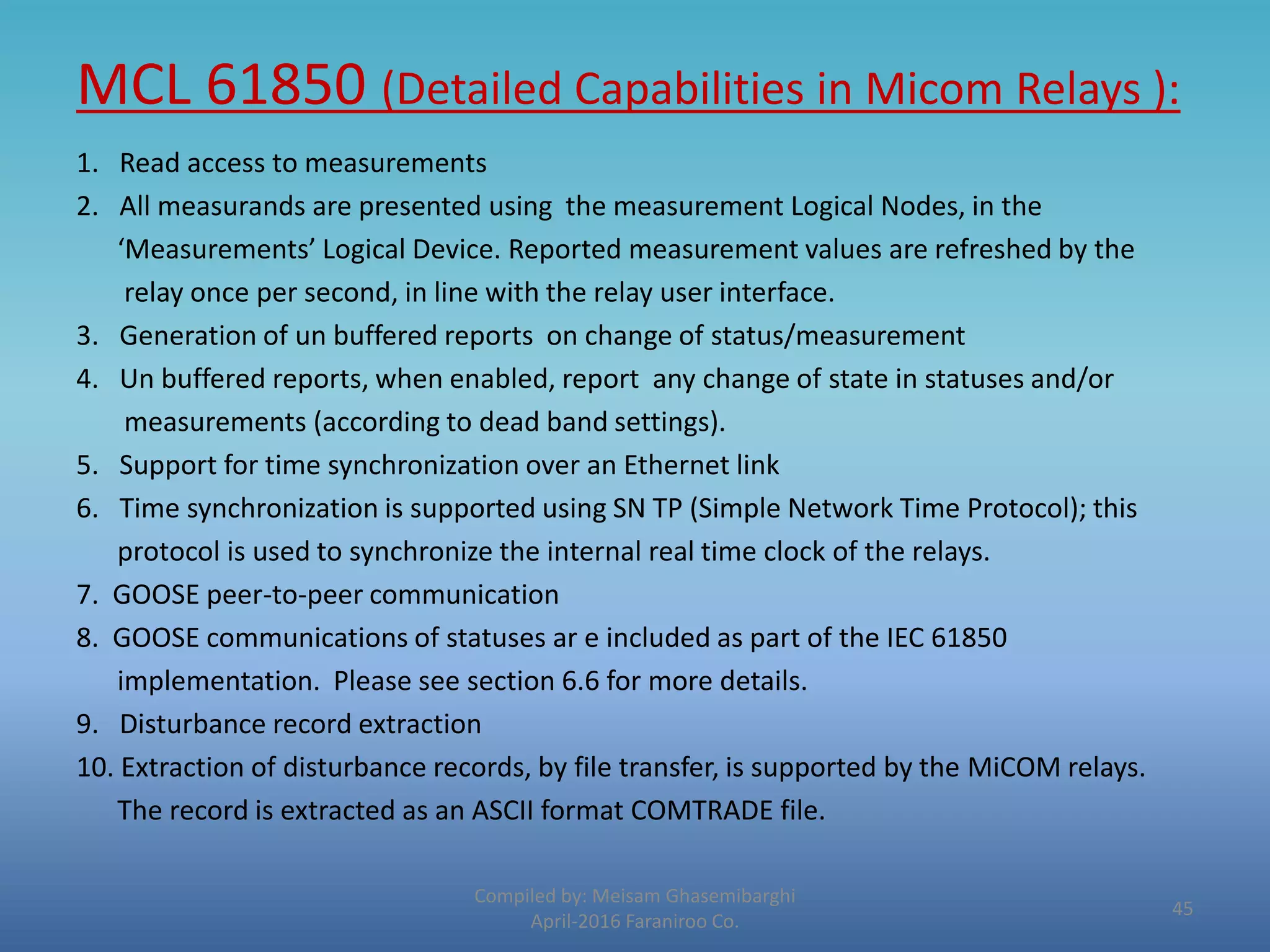
MCL 61850 (Detailed Capabilities in Micom Relays ):
Compiled by: Meisam Ghasemibarghi
April-2016 Faraniroo Co.
1. Read access to measurements
2. All measurands are presented using the measurement Logical Nodes, in the
‘Measurements’ Logical Device. Reported measurement values are refreshed by the
relay once per second, in line with the relay user interface.
3. Generation of un buffered reports on change of status/measurement
4. Un buffered reports, when enabled, report any change of state in statuses and/or
measurements (according to dead band settings).
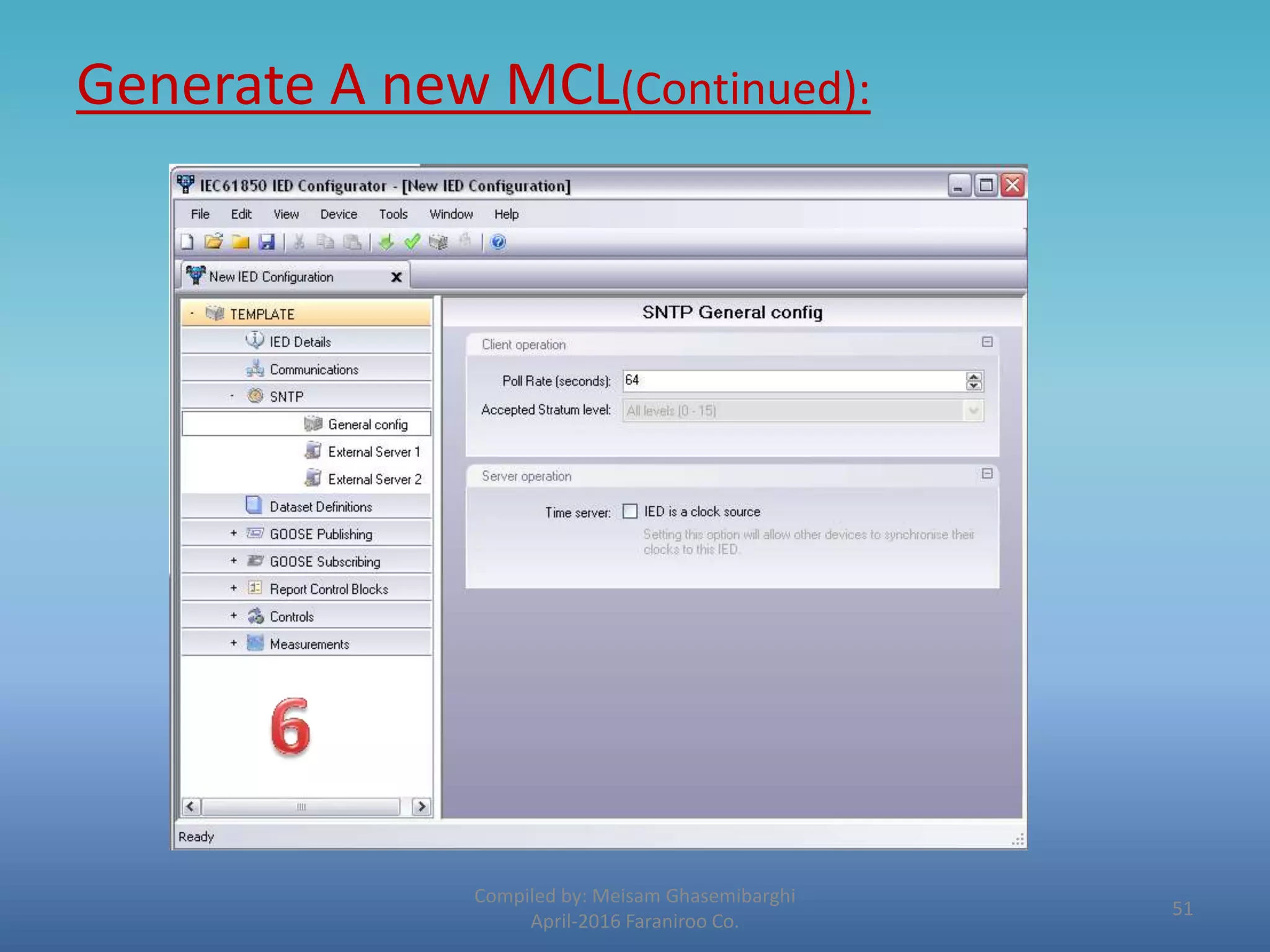
5. Support for time synchronization over an Ethernet link
6. Time synchronization is supported using SN TP (Simple Network Time Protocol); this
protocol is used to synchronize the internal real time clock of the relays.
7. GOOSE peer-to-peer communication
8. GOOSE communications of statuses ar e included as part of the IEC 61850
implementation. Please see section 6.6 for more details.
9. Disturbance record extraction
10. Extraction of disturbance records, by file transfer, is supported by the MiCOM relays.
The record is extracted as an ASCII format COMTRADE file.
45
MCL 61850 - Generate A new MCL:
Compiled by: Meisam Ghasemibarghi
April-2016 Faraniroo Co.
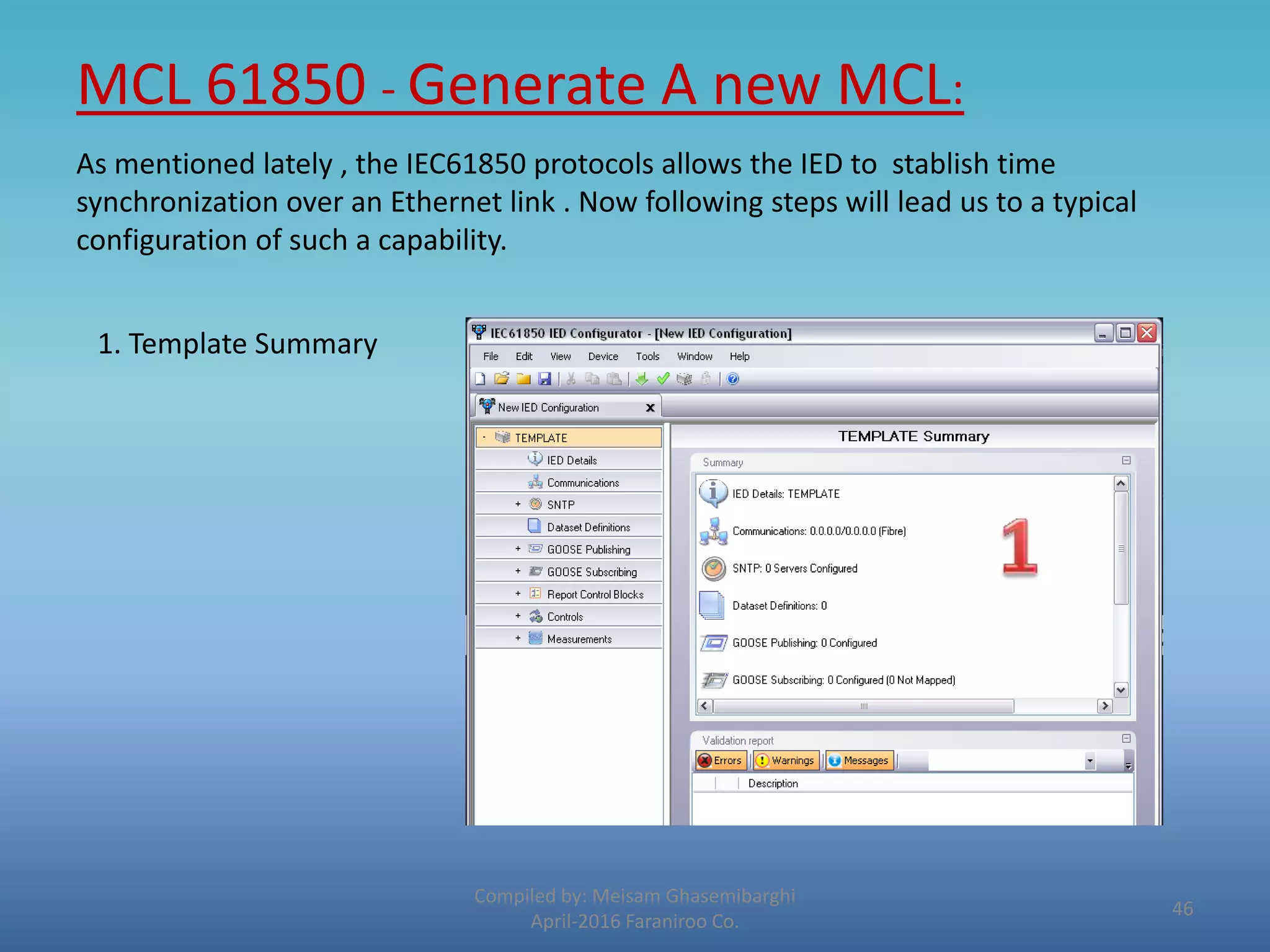
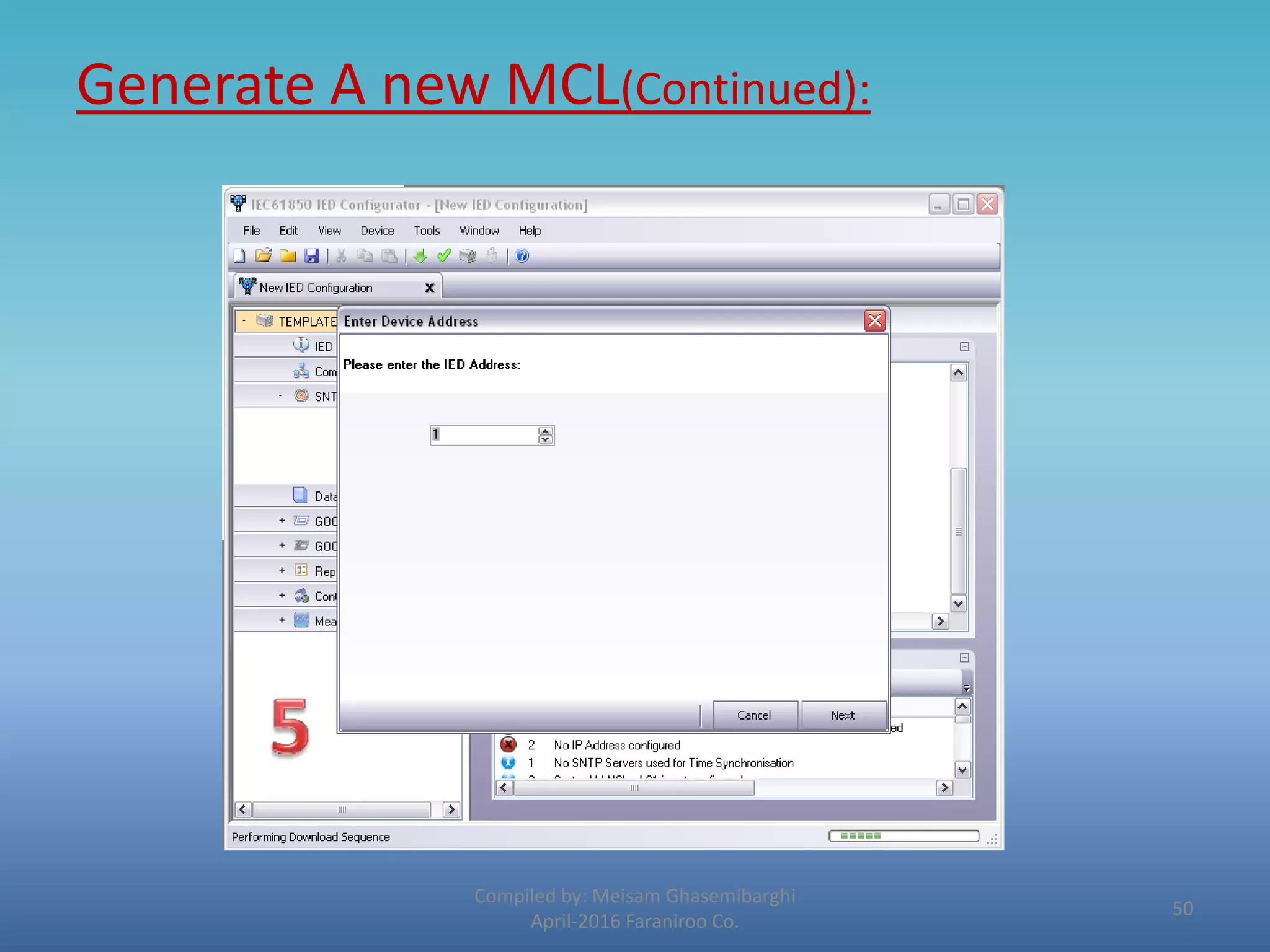
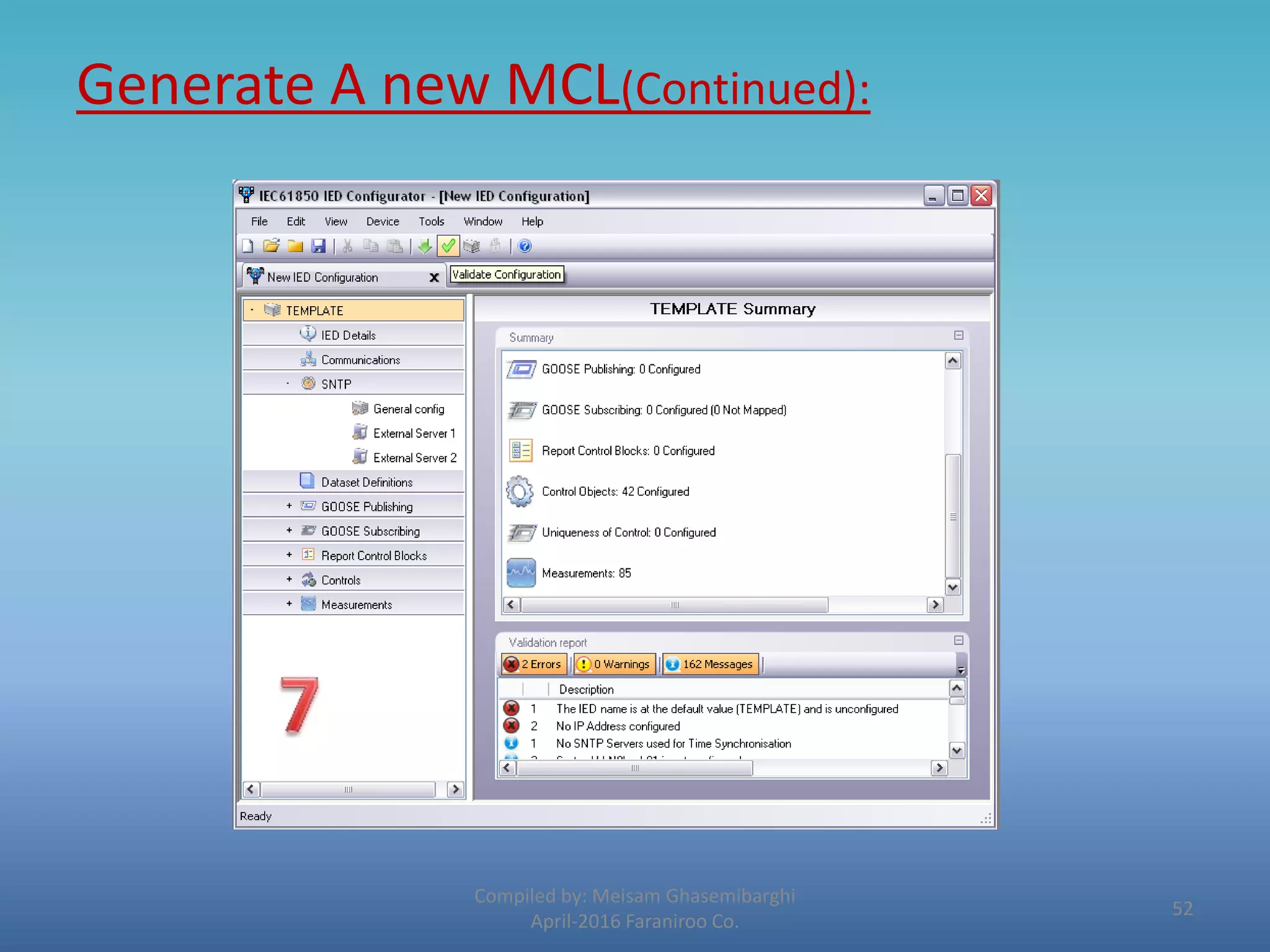
As mentioned lately , the IEC61850 protocols allows the IED to stablish time
synchronization over an Ethernet link . Now following steps will lead us to a typical
configuration of such a capability.
1. Template Summary
46
Generate A new MCL(Continued):
Compiled by: Meisam Ghasemibarghi
April-2016 Faraniroo Co.
47
Generate A new MCL(Continued):
Compiled by: Meisam Ghasemibarghi
April-2016 Faraniroo Co.
48
Generate A new MCL(Continued):
Compiled by: Meisam Ghasemibarghi
April-2016 Faraniroo Co.
49
Generate A new MCL(Continued):
Compiled by: Meisam Ghasemibarghi
April-2016 Faraniroo Co.
50
Generate A new MCL(Continued):
Compiled by: Meisam Ghasemibarghi
April-2016 Faraniroo Co.
51
Generate A new MCL(Continued):
Compiled by: Meisam Ghasemibarghi
April-2016 Faraniroo Co.
52
Events :
Compiled by: Meisam Ghasemibarghi
April-2016 Faraniroo Co.
• Where every single occurred incident could be reached for further
analyses.
53
Case Study
Mahshahr 230KV Power Plant
Substation
Compiled by: Meisam Ghasemibarghi
April-2016 Faraniroo Co.
54
Mahshar 230KV Power Plant Substation
Compiled by: Meisam Ghasemibarghi
April-2016 Faraniroo Co.
First of all what is the case ?
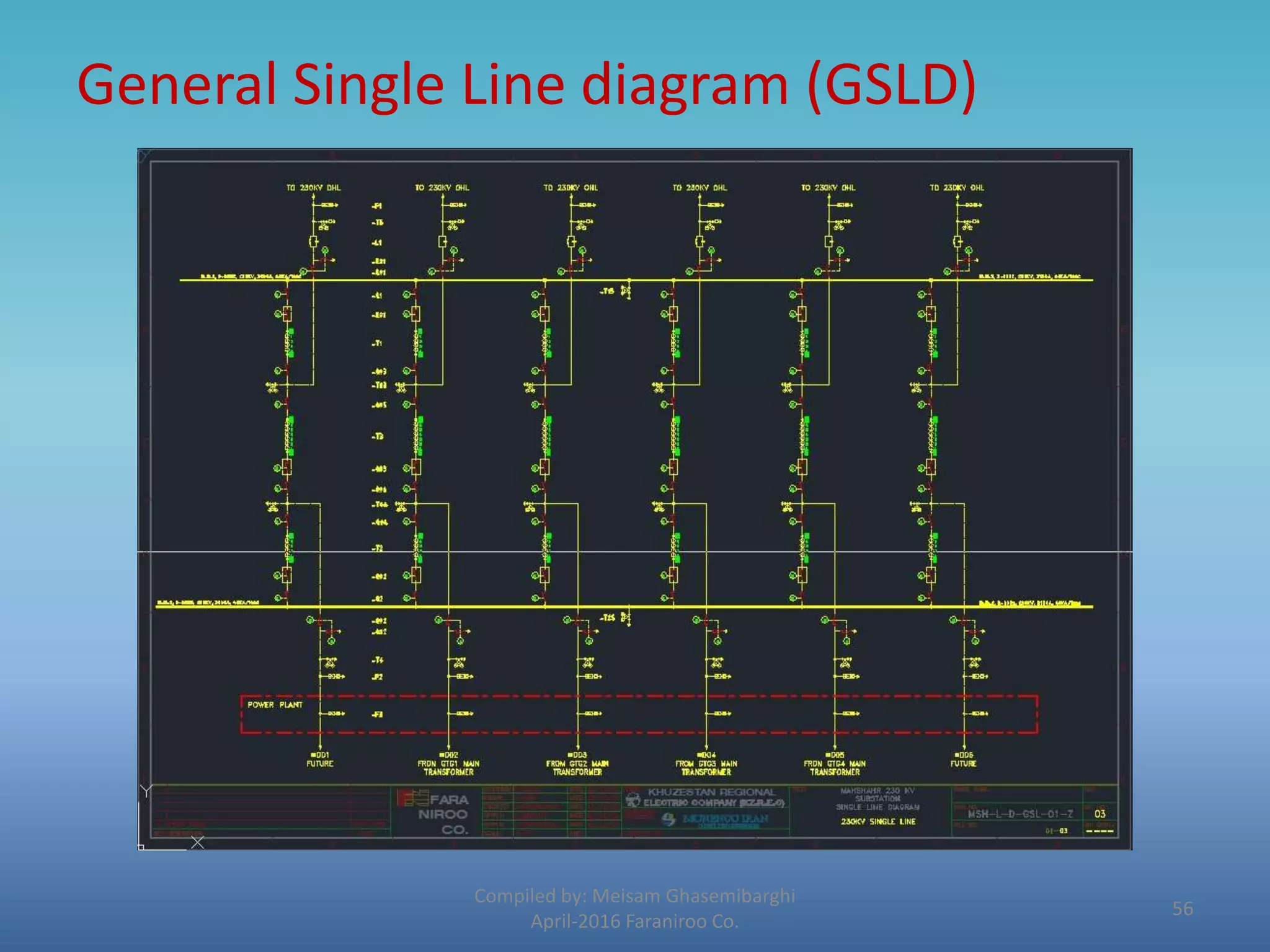
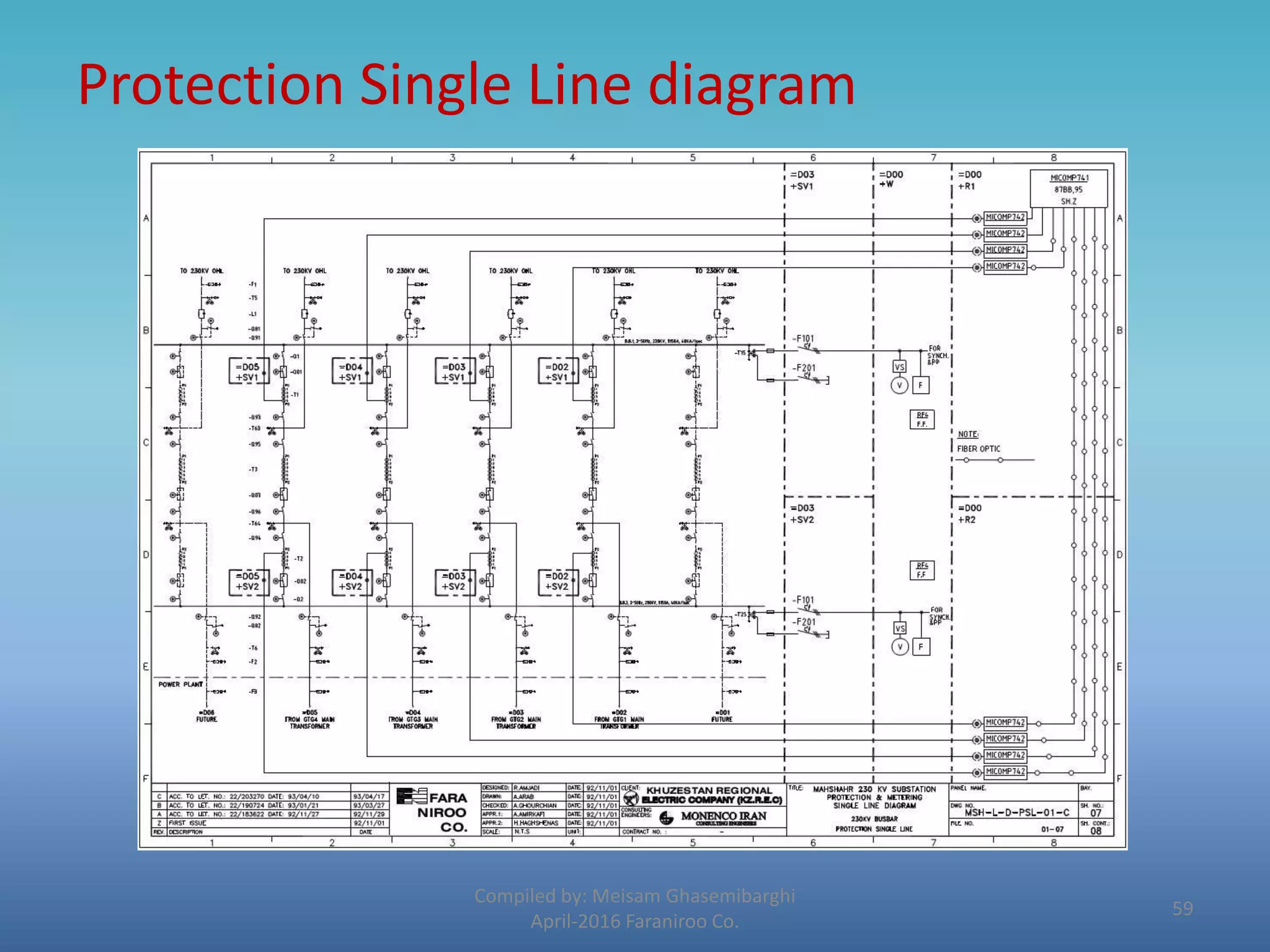
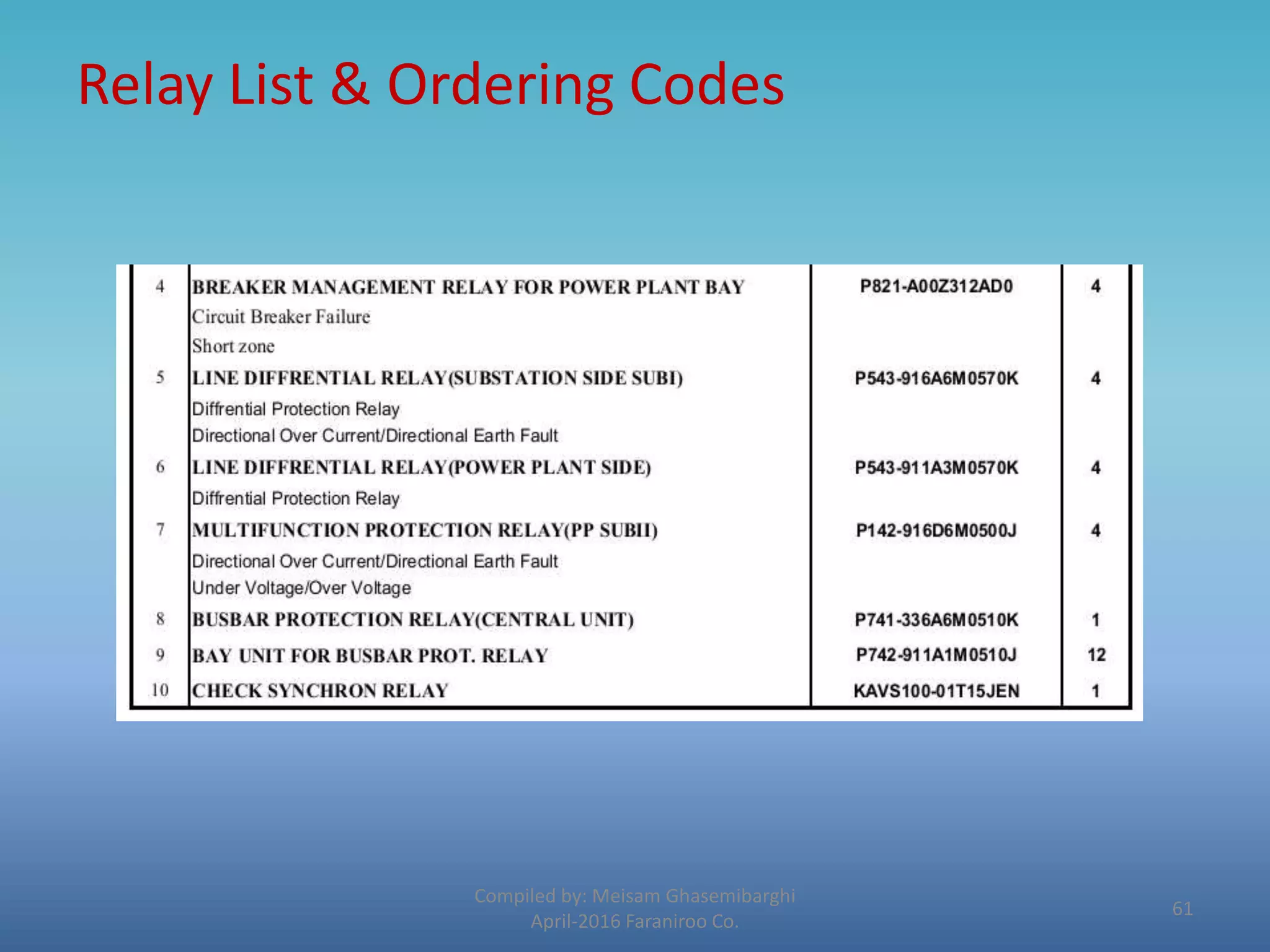
Following are some core basic documents of our case study
1. General Single Line diagram (GSLD)
2. Protection Single Line diagram (PSLD)
3. Relay List – Ordering Codes
4. Function Description
55
General Single Line diagram (GSLD)
Compiled by: Meisam Ghasemibarghi
April-2016 Faraniroo Co.
56
Protection Single Line diagram
Compiled by: Meisam Ghasemibarghi
April-2016 Faraniroo Co.
57
Protection Single Line diagram
Compiled by: Meisam Ghasemibarghi
April-2016 Faraniroo Co.
58
Protection Single Line diagram
Compiled by: Meisam Ghasemibarghi
April-2016 Faraniroo Co.
59
Relay List & Ordering Codes
Compiled by: Meisam Ghasemibarghi
April-2016 Faraniroo Co.
60
Relay List & Ordering Codes
Compiled by: Meisam Ghasemibarghi
April-2016 Faraniroo Co.
61
Distance Relay (P444)
According to what is ordered for this project the relay has below
illustrated functions embedded in it.
 It is now the time for partial explanation of each.
Compiled by: Meisam Ghasemibarghi
April-2016 Faraniroo Co.
62
Function Description-Distance Relay
Compiled by: Meisam Ghasemibarghi
April-2016 Faraniroo Co.
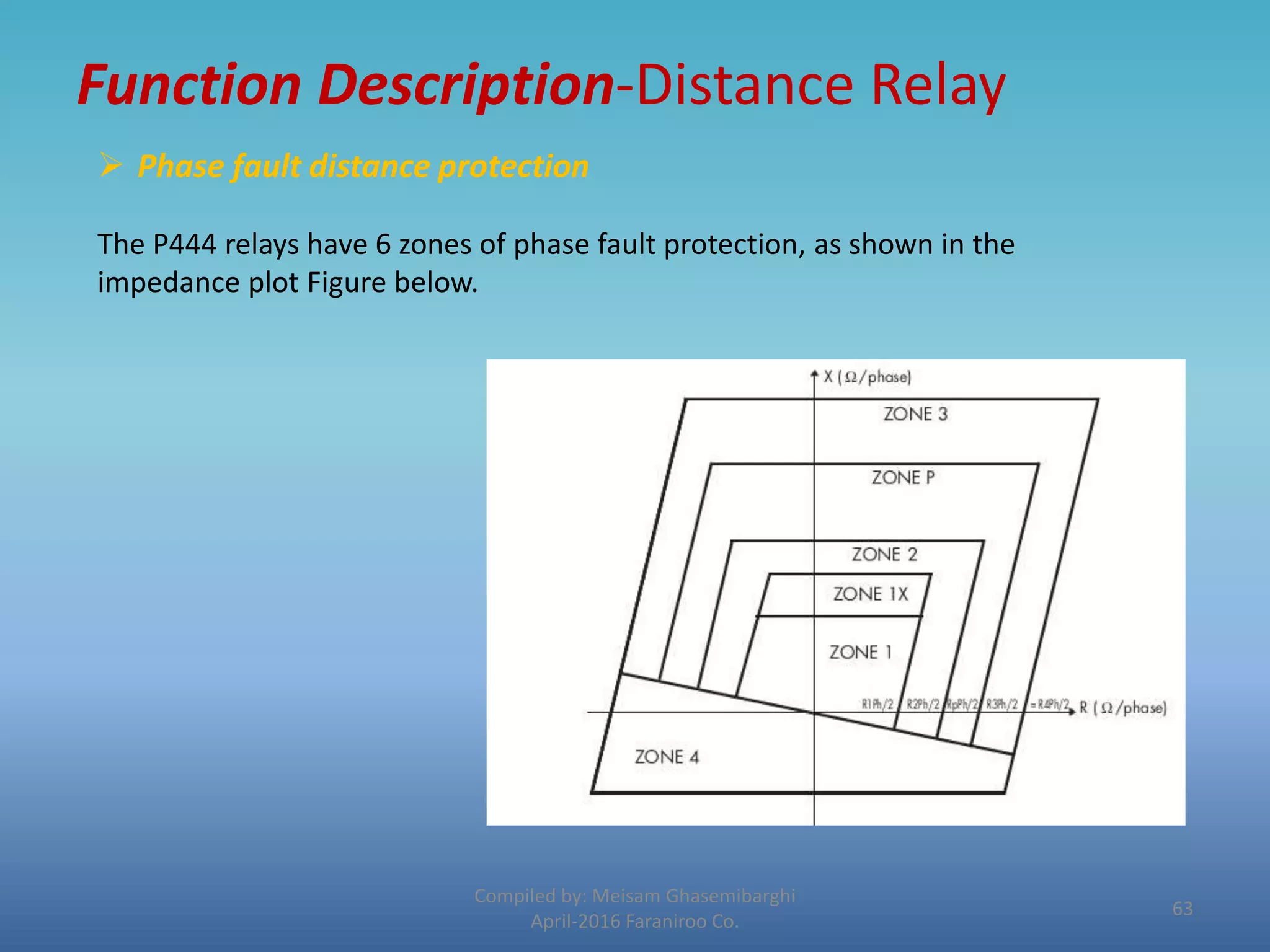
 Phase fault distance protection
The P444 relays have 6 zones of phase fault protection, as shown in the
impedance plot Figure below.
63
Function Description-Distance
All phase fault protection elements are quadrilateral shaped, and are
directionalised as follows:
• Zones 1, 2 and 3 - Directional forward zones, as used in conventional
three zone distance schemes. Note that Zone 1 can be extended to Zone
1X when required in zone 1 extension schemes (see page 17 §2.5.2).
• Zone p and q - Programmable. Selectable in MiCOM S1 (Distance
schemeFault type) as a directional forward or reverse zone.
• Zone 4 - Directional reverse zone. Note that zone 3 and zone 4 can be set
with same Rloop value to provide a general start of the relay.
Compiled by: Meisam Ghasemibarghi
April-2016 Faraniroo Co.
64
Function Description-Distance
Compiled by: Meisam Ghasemibarghi
April-2016 Faraniroo Co.
 Earth fault distance protection
The P441, P 442 and P444 relays have 6 zones of earth (ground) fault protection,
as shown in the earth loop impedance plot Figure below.
Type of fault can be selected in MiCOM S1 (only Phase/Phase or P/P & P/Ground)
65
Function Description-Protection Functions
Protection Functions
The relay series has been designed to cater for the protection of a wide range
of overhead lines and underground cables from distribution to transmission
voltage levels .
 21G/21P : Phase and earth fault distance protection, each with up to 5
independent zones of protection (6 zones from version C5.0, model 36J).
Standard and customized signaling schemes are available to give fast fault
clearance for the whole of the protected line or cable .
 50/51 : Instantaneous and time delayed overcurrent protection - Four
elements are available, with independent directional control for the
1stand 2nd element. The 3rd element can be used for SOFT/TOR logic. The
fourth element can be configured for stub bus protection in 1½ circuit
breaker arrangements.
Compiled by: Meisam Ghasemibarghi
April-2016 Faraniroo Co.
66
Function Description-Protection Functions
 50N/51N : Instantaneous and time delay ed neutral overcurrent
protection. Two elements are available (four elements from version C1.0,
model 020G or 020H).
 67N : Directional earth fault protection (DEF) - This can be configured for
channel aided protection, plus two elements are available for backup DEF.
 32N : Maximum of Residual Power Protection - Zero sequence Power
Protection This element provides protection for high resistance faults,
eliminated without communication channel.
 27 : Under voltage Protection - Two stage, configurable as either phase to
phase or phase to neutral measuring. Stage 1 may be selected as either
IDMT or DT and stage 2 is DT only.
Compiled by: Meisam Ghasemibarghi
April-2016 Faraniroo Co.
67
Function Description-Protection Functions
Compiled by: Meisam Ghasemibarghi
April-2016 Faraniroo Co.
 49 : (Since version C2.X) Thermal overload Protection - with dual time
constant. This element provides separate alarm and trip thresholds.
59 : Overvoltage Protection - Two stages, configurable as either phase to
phase or phase to neutral measuring. Stage 1 may be selected as either
IDMT or DT and stage 2 is DT only.
 67/46 : Directional or non-directional negative sequence overcurrent
protection - This element can provide backup protection for many unbalanced
fault conditions.
 50/27 : Switch on to fault (SOTF) protection - These settings enhance
the protection applied for manual circuit breaker closure.
68
Function Description-Protection Functions
 50/27 : Trip on reclose (TOR) protection - These settings enhance the
protection applied on autoreclosure of the circuit breaker.
 78 – 68 : Power swing blocking - Selective blocking of distance protection
zones ensures stability during the power swings experienced on sub-
transmission and transmission systems (stable swing or Out of Step
condition = loss of synchronism). From version C1.0, the relay can
differentiate between a stable power swing and a loss of synchronism (out
of steps).
 VTS : Voltage transformer supervision (VTS). - To detect VT fuse failures.
This prevents maloperation of voltage dependent protection on AC
voltage input failure.
Compiled by: Meisam Ghasemibarghi
April-2016 Faraniroo Co.
69
Function Description-Protection Functions
 CTS : Current transformer supervision - To raise an alarm should one or
more of the connections from the phase CTs become faulty.
 46 BC : Broken conductor detection - To detect network faults such as
open circuits, where a conductor may be broken but not in contact with
another conductor or the earth.
 50 BF : Circuit breaker failure protection - Generally set to back trip
upstream circuit breakers, should the circuit breaker at the protected
terminal fail to trip. Two stages are provided.
Compiled by: Meisam Ghasemibarghi
April-2016 Faraniroo Co.
70
Function Description
Non-Protection Functions
 79/25 : Auto reclosure with Check synchronism - This permits up to 4
reclose shots, with voltage synchronism, differential voltage, live line/dead
bus, and dead bus/live line interlocking available. Check synchronism is
optional.
 Measurements - Selected measurement values polled at the
line/cable terminal, available for display on the relay or accessed from the
serial communications facility.
 Fault/Event/Disturbance Records - Available from the serial
communications or on the relay display (fault and event records only).
Compiled by: Meisam Ghasemibarghi
April-2016 Faraniroo Co.
71
Function Description-Non Protection Funcs.
 Distance to fault locator - Reading in km, miles or % of line length.
 Four Setting Groups - Independent setting groups to cater for
alternative power system arrangements or customer specific applications.
 Remote Serial Communications - To allow remote access to the
relays. The following communications protocols are supported: Courier,
MODBUS, IEC60870-5/103 and DNP3 (UCA2 soon available).
 Continuous Self Monitoring - Power on di agnostics and self
checking routines to provide maximum relay reliability and availability
Compiled by: Meisam Ghasemibarghi
April-2016 Faraniroo Co.
72
Function Description-Non Protection Funcs.
 Circuit Breaker State Monitoring - Provides indication of any
discrepancy between circuit breaker auxiliary contacts.
 Circuit Breaker Control - Opening and closing of the circuit breaker
can be achieved either locally via the user interface / opto inputs, or
remotely via serial communications.
 Circuit Breaker Condition Monitoring - Provides records / alarm
outputs regarding the number of CB operations, sum of the interrupted
current and the breaker operating time.
 Commissioning Test Facilities.
Compiled by: Meisam Ghasemibarghi
April-2016 Faraniroo Co.
73
Additional Features (P444)
 Single pole tripping and autoreclose.
 Real Time Clock Synchronization - Time synchronization is
possible from the relay IRIG-B input. (IRIG-B must be
specified as an option at time of order).
 Fiber optic converter for IEC60870-5/103 communication
(optional).
 Second rear port in COURIER Protocol (KBus/RS232/RS485)
 24 Logic Inputs - For monitoring of the circuit breaker and
other plant status.
 32 Output relay contacts - For tripping, alarming, status
indication and remote control.
Compiled by: Meisam Ghasemibarghi
April-2016 Faraniroo Co.
74

ALSTOM – Micom

  • 1.
    ALSTOM – Micom Introductionto Micom Protective Relays Principles of Micom S1 Agile Software Compiled by: Meisam Ghasemibarghi April-2016 Faraniroo Co. 1
  • 2.
    Micom Alstom Relays Compiledby: Meisam Ghasemibarghi April-2016 Faraniroo Co. 2
  • 3.
    Agile Protection relays •Alstom’s Agile range protects critical power system assets, right from industrial systems, through distribution, rail, generation and up to the highest transmission voltages. Short-circuits, overloads and other faults are cleared in tripping times as fast as sub-cycle. • From the simplest self-powered P50 Agile relay, through the colour touch-screen P60 Agile, up to the compact and modular MiCOM P40 Agile ranges, security and dependability of operation is paramount. Agile devices are multifunction and fully numerical, including cyber secure substation communications interoperable with international standards such as IEC 61850 edition 2. Applications include feeder, motor, generator, distance, differential, transformer, line, busbar, voltage and frequency intelligent solutions. Compiled by: Meisam Ghasemibarghi April-2016 Faraniroo Co. 3
  • 4.
    Ordering Method Alstom Compiledby: Meisam Ghasemibarghi April-2016 Faraniroo Co. 4
  • 5.
    Ordering Method Alstom(continued) Compiled by: Meisam Ghasemibarghi April-2016 Faraniroo Co. 5
  • 6.
    Ordering Method schneider Compiledby: Meisam Ghasemibarghi April-2016 Faraniroo Co. 6
  • 7.
    Introduction to theRelay Compiled by: Meisam Ghasemibarghi April-2016 Faraniroo Co. • USER INTERFACES AND MENU STRUCTURE The settings and functions of the MiCOM protection relay can be accessed both from the front panel keypad and LCD, and via the front and rear communication ports. Front panel The front panel of the relay is shown in the following figures : 7
  • 8.
    Introduction to theRelay Compiled by: Meisam Ghasemibarghi April-2016 Faraniroo Co. • RELAY FRONT VIEW ARRANGEMENT WITH HOTKEYS (HARDWARE G, H AND J) 8
  • 9.
    Introduction to theRelay Compiled by: Meisam Ghasemibarghi April-2016 Faraniroo Co. • RELAY FRONT VIEW WITH FUNCTION KEYS (HARDWARE K) 9
  • 10.
    Introduction to theRelay Compiled by: Meisam Ghasemibarghi April-2016 Faraniroo Co. The front panel of the relay includes the following: • A 16-character by 2- or 3-line (since version C2.X) alphanumeric liquid crystal display (LCD). • A keypad comprising 4 arrow keys, an enter key , a clear key , and a read key and two additive hotkeys (since hardware G-J, software C2.X). • 12 LEDs; 4 fixed function LEDs on the left hand side of the front panel and 8 programmable function LEDs on the right hand side. • 10 additional function keys plus 10 additional LEDs (since hardware K, software D1.x) 10
  • 11.
    Introduction to theRelay Compiled by: Meisam Ghasemibarghi April-2016 Faraniroo Co. • Hotkey functionality • SCROLL: Starts scrolling through the various default displays. • STOP: Stops scrolling the default display for control of setting groups, control inputs and circuit breaker operation. 11
  • 12.
    Introduction to theRelay Compiled by: Meisam Ghasemibarghi April-2016 Faraniroo Co. Function key functionality The relay front panel, features control pushbutton switches with programmable LEDs that facilitate local control. With these 10 direct-action push buttons and LEDs e.g. Enable/Disable the auto-recloser function. Using programmable scheme logic, the user can readily change the default direct-action pushbutton functions and LED indications to fit specific control and operational needs. 12
  • 13.
    Introduction to theRelay Compiled by: Meisam Ghasemibarghi April-2016 Faraniroo Co. Under the top hinged cover: The relay serial number, and the relay’s current and voltage rating information. Under the bottom hinged cover:  battery compartment to hold the ½ AA size battery which is used for memory back-up for the real time clock, ev ent, fault and disturbance records.  a 9-pin female D-type front port for communication with a PC locally to the relay (up to 15m distance) via an EIA(RS)232 serial data connection.  a 25-pin female D-type port providing internal signal monitoring and high speed local downloading of software and language text via a parallel data connection. 13
  • 14.
    Introduction to theRelay Compiled by: Meisam Ghasemibarghi April-2016 Faraniroo Co. Fixed function LEDs :  Trip (Red) indicates that the relay has issued a trip signal. It is reset when the associated fault record is cleared from the front display. (Alternatively the trip LED can be configured to be self-resetting).  Alarm (Yellow) flashes to indicate that the relay has registered an alarm. This may be triggered by a fault, event or maintenance record. The LED will flash until the alarms have been accepted (read), after which the LED will change to constant illumination, and will extinguish when the alarms have been cleared.  Out of service (Yellow) indicates that the relay’s protection is unavailable.  Healthy (Green) indicates that the relay is in correct working order, and should be on at all times. It will be extinguished if the relay’s self-test facilities indicate that there is an error with the relay’s hardware or software. The state of the healthy LED is reflected by the watchdog contact at the back of the relay. 14
  • 15.
    Introduction to theRelay Compiled by: Meisam Ghasemibarghi April-2016 Faraniroo Co. Relay rear panel All current and voltage signals, digital logic input signals and output contacts are connected at the rear of t he relay. Also connected at the rear is the twisted pair wiring for the rear EIA(RS)485 comm. port, the IRIG-B time synchronizing input and the optical fiber rear communication port (IEC103 or UCA2 by Ethernet) which are both optional. A second rear port (Courier) and an inter MiCOM port are also available. 15
  • 16.
    Introduction to theRelay Compiled by: Meisam Ghasemibarghi April-2016 Faraniroo Co. 16
  • 17.
    Micom S1 Agile S1- Moving forwards with Agility • Next generation in tools for configuration and maintenance of MiCOM – redefining MiCOM S1. • The move from S1 Studio to S1 Agile underlines Alstom’s R&D investment in usability: to assemble all tools in a palette for simple entry, with intuitive navigation via fewer mouse-clicks. • All applications are embedded. Compiled by: Meisam Ghasemibarghi April-2016 Faraniroo Co. 17
  • 18.
    Key features inthe MiCOM S1 family: • Alstom Grid's integrated engineering tool that provides users with access to all automation IED configuration and record data • Integrated configuration and monitoring features • Send and extract setting files • Event and disturbance record extraction and analysis S1 Agile only: • Integrated programmable curve tool and RSTP redundant Ethernet configuration for protection relays • Integrated automatic extraction of disturbance records facility • Integrated P740 and P746 remote HMI and topology tools for busbar schemes Compiled by: Meisam Ghasemibarghi April-2016 Faraniroo Co. 18
  • 19.
    Micom S1 InstallationSteps : After Installation of the core software, Data models are to be added through the Data Model Manager Module. Compiled by: Meisam Ghasemibarghi April-2016 Faraniroo Co. 19
  • 20.
    Data Model illustration: Compiledby: Meisam Ghasemibarghi April-2016 Faraniroo Co. But first of all : What are data Models? The data model of any IEC 61850 IED can be viewed as a hierarchy of information. 20
  • 21.
    Data Model Definition: The levels of this hierarchy can be described as follows:  Physical Device: Identifies the actual IED within a system. Typically the device’s name or IP address can be used (for example Feeder_1 or 10.0.0.2 ).  Logical Device: Identifies groups of related Logical Nodes within the Physical Device. For the MiCOM relays, 5 Logical Devices exist: Control, Measurements, Protection, Records, System.  Wrapper/Logical Node Instance: Identifies the major functional areas within the IEC 61850 data model. Either 3 or 6 characters are used as a prefix to define the functional group (wrapper) while the actual functionality is identified by a 4 character Logical Node name suffixed by an instance number. For example, XCBR1 (circuit breaker), MMXU1 (measurements), FrqPTOF2 (over frequency protection, stage 2). Compiled by: Meisam Ghasemibarghi April-2016 Faraniroo Co. 21
  • 22.
    Data Model Definition: (Continued)  Data Object : This next layer is used to identify the type of data you will be presented with. For example, Pos. (position) of Logical Node type XCBR.  Data Attribute :This is the actual data (measurement value, status, description, etc.). For example, stVal. (status value) indicating actual position of circuit breaker for Data Object type Pos. of Logical Node type XCBR . Compiled by: Meisam Ghasemibarghi April-2016 Faraniroo Co. 22
  • 23.
    Adding Data Models: Below are some brief steps to install what is needed: Compiled by: Meisam Ghasemibarghi April-2016 Faraniroo Co. 23
  • 24.
    Compiled by: MeisamGhasemibarghi April-2016 Faraniroo Co. 24
  • 25.
    Compiled by: MeisamGhasemibarghi April-2016 Faraniroo Co. 25
  • 26.
    Adding a NewProject: Now that we have the core software and all required Data Models installed, its time to create our new project. 1. Create a new system – File New System 2. Add a new Substation Compiled by: Meisam Ghasemibarghi April-2016 Faraniroo Co. 26
  • 27.
    New Project (Continued) 3.Add a new Device Compiled by: Meisam Ghasemibarghi April-2016 Faraniroo Co.  In the type window , it should be defined that your device belongs to which Series of Micom devices.  Here we are going to add a P444 Protective relay which obviously belongs to PX40 Series . 27
  • 28.
    New Project (Continued) 4.In this step model number should be exerted exactly according to the Cortec. file of the ordered relay. Compiled by: Meisam Ghasemibarghi April-2016 Faraniroo Co. 28
  • 29.
    New Project (Continued) Compiledby: Meisam Ghasemibarghi April-2016 Faraniroo Co.  Now we have a Substation with 1 voltage level and an added P444 Protective Relay. 29
  • 30.
    New Project (Continued) Nowfollowed is the explanation of each item from the drop down list : • 1. Connection Compiled by: Meisam Ghasemibarghi April-2016 Faraniroo Co. 30
  • 31.
    Connection Compiled by: MeisamGhasemibarghi April-2016 Faraniroo Co. 31
  • 32.
    Settings 2. Settings The settingsdatabase contains all of the settings and data for the relay, including the protection, disturbance recorder and control & support settings. The settings are maintained in non-volatile E2PROM memory. Compiled by: Meisam Ghasemibarghi April-2016 Faraniroo Co. 32
  • 33.
    Settings Compiled by: MeisamGhasemibarghi April-2016 Faraniroo Co. 33
  • 34.
    Settings Compiled by: MeisamGhasemibarghi April-2016 Faraniroo Co. Briefly discussed each item in the settings column will be followed . 2.1_System Data 34
  • 35.
    Settings Compiled by: MeisamGhasemibarghi April-2016 Faraniroo Co. 2.2_Configuration 35
  • 36.
    Settings Compiled by: MeisamGhasemibarghi April-2016 Faraniroo Co. 2.3_CT & VT Ratios 36
  • 37.
    Settings Compiled by: MeisamGhasemibarghi April-2016 Faraniroo Co. 2.4_Disturb Recorder 37
  • 38.
    Settings Compiled by: MeisamGhasemibarghi April-2016 Faraniroo Co. 2.5_Measurement Setup 38
  • 39.
    Settings Compiled by: MeisamGhasemibarghi April-2016 Faraniroo Co. 2.6_Control I/P Config The hotkeys in the front panel can perform a direct command if a dedicated PSL has been previously created using “CONTROL INPUT” cell. MiCOM Relays offer up to 32 control inputs which can be activated by the Hotkey manually or by the IEC 103 remote communication 39
  • 40.
    Settings Compiled by: MeisamGhasemibarghi April-2016 Faraniroo Co. 2.6_Group 1 Based on the target Protective relay and applied configuration, this item consists of specific items. Detailed explanation of each sub menu item for typical relays will be discussed later in this course. 40
  • 41.
    PSL (Programmable schemelogic ) Compiled by: Meisam Ghasemibarghi April-2016 Faraniroo Co. The purpose of the programmable scheme logic (PSL) is to allow the relay user to configure an individual protection scheme to suit their own particular application. This is achieved through the use of programmable logic gates and delay timers. Inputs : The input to the PSL is any combination of the status of the digital input signals from the opto-isolators on the input board, the outputs of the protection elements, e.g. protection starts and trips, and the outputs of the fixed protection scheme logic. Output: The outputs of the PSL are the LEDs on the front panel of the re lay and the output contacts at the rear. Only the part of the PSL logic that is affected by the particular input change that has occurred is processed. This reduces the amount of processing time that is used by the PSL. 41
  • 42.
    PSL (Continued) Compiled by:Meisam Ghasemibarghi April-2016 Faraniroo Co. 42
  • 43.
    Inputs : • OptoSignals VS Input Signals  Opto Signals are those which represent external hardwired signals such as ( Positions , fail/healthy conditions and so on ).  Input signals however are those which used to indicate a partial software logic inside the relay. Compiled by: Meisam Ghasemibarghi April-2016 Faraniroo Co. 43
  • 44.
    MCL 61850 (DetailedCapabilities in Micom Relays ): Compiled by: Meisam Ghasemibarghi April-2016 Faraniroo Co. 1. Read access to measurements 2. All measurands are presented using the measurement Logical Nodes, in the ‘Measurements’ Logical Device. Reported measurement values are refreshed by the relay once per second, in line with the relay user interface. 3. Generation of un buffered reports on change of status/measurement 4. Un buffered reports, when enabled, report any change of state in statuses and/or measurements (according to dead band settings). 5. Support for time synchronization over an Ethernet link 6. Time synchronization is supported using SN TP (Simple Network Time Protocol); this protocol is used to synchronize the internal real time clock of the relays. 7. GOOSE peer-to-peer communication 8. GOOSE communications of statuses ar e included as part of the IEC 61850 implementation. Please see section 6.6 for more details. 9. Disturbance record extraction 10. Extraction of disturbance records, by file transfer, is supported by the MiCOM relays. The record is extracted as an ASCII format COMTRADE file. 45
  • 45.
    MCL 61850 -Generate A new MCL: Compiled by: Meisam Ghasemibarghi April-2016 Faraniroo Co. As mentioned lately , the IEC61850 protocols allows the IED to stablish time synchronization over an Ethernet link . Now following steps will lead us to a typical configuration of such a capability. 1. Template Summary 46
  • 46.
    Generate A newMCL(Continued): Compiled by: Meisam Ghasemibarghi April-2016 Faraniroo Co. 47
  • 47.
    Generate A newMCL(Continued): Compiled by: Meisam Ghasemibarghi April-2016 Faraniroo Co. 48
  • 48.
    Generate A newMCL(Continued): Compiled by: Meisam Ghasemibarghi April-2016 Faraniroo Co. 49
  • 49.
    Generate A newMCL(Continued): Compiled by: Meisam Ghasemibarghi April-2016 Faraniroo Co. 50
  • 50.
    Generate A newMCL(Continued): Compiled by: Meisam Ghasemibarghi April-2016 Faraniroo Co. 51
  • 51.
    Generate A newMCL(Continued): Compiled by: Meisam Ghasemibarghi April-2016 Faraniroo Co. 52
  • 52.
    Events : Compiled by:Meisam Ghasemibarghi April-2016 Faraniroo Co. • Where every single occurred incident could be reached for further analyses. 53
  • 53.
    Case Study Mahshahr 230KVPower Plant Substation Compiled by: Meisam Ghasemibarghi April-2016 Faraniroo Co. 54
  • 54.
    Mahshar 230KV PowerPlant Substation Compiled by: Meisam Ghasemibarghi April-2016 Faraniroo Co. First of all what is the case ? Following are some core basic documents of our case study 1. General Single Line diagram (GSLD) 2. Protection Single Line diagram (PSLD) 3. Relay List – Ordering Codes 4. Function Description 55
  • 55.
    General Single Linediagram (GSLD) Compiled by: Meisam Ghasemibarghi April-2016 Faraniroo Co. 56
  • 56.
    Protection Single Linediagram Compiled by: Meisam Ghasemibarghi April-2016 Faraniroo Co. 57
  • 57.
    Protection Single Linediagram Compiled by: Meisam Ghasemibarghi April-2016 Faraniroo Co. 58
  • 58.
    Protection Single Linediagram Compiled by: Meisam Ghasemibarghi April-2016 Faraniroo Co. 59
  • 59.
    Relay List &Ordering Codes Compiled by: Meisam Ghasemibarghi April-2016 Faraniroo Co. 60
  • 60.
    Relay List &Ordering Codes Compiled by: Meisam Ghasemibarghi April-2016 Faraniroo Co. 61
  • 61.
    Distance Relay (P444) Accordingto what is ordered for this project the relay has below illustrated functions embedded in it.  It is now the time for partial explanation of each. Compiled by: Meisam Ghasemibarghi April-2016 Faraniroo Co. 62
  • 62.
    Function Description-Distance Relay Compiledby: Meisam Ghasemibarghi April-2016 Faraniroo Co.  Phase fault distance protection The P444 relays have 6 zones of phase fault protection, as shown in the impedance plot Figure below. 63
  • 63.
    Function Description-Distance All phasefault protection elements are quadrilateral shaped, and are directionalised as follows: • Zones 1, 2 and 3 - Directional forward zones, as used in conventional three zone distance schemes. Note that Zone 1 can be extended to Zone 1X when required in zone 1 extension schemes (see page 17 §2.5.2). • Zone p and q - Programmable. Selectable in MiCOM S1 (Distance schemeFault type) as a directional forward or reverse zone. • Zone 4 - Directional reverse zone. Note that zone 3 and zone 4 can be set with same Rloop value to provide a general start of the relay. Compiled by: Meisam Ghasemibarghi April-2016 Faraniroo Co. 64
  • 64.
    Function Description-Distance Compiled by:Meisam Ghasemibarghi April-2016 Faraniroo Co.  Earth fault distance protection The P441, P 442 and P444 relays have 6 zones of earth (ground) fault protection, as shown in the earth loop impedance plot Figure below. Type of fault can be selected in MiCOM S1 (only Phase/Phase or P/P & P/Ground) 65
  • 65.
    Function Description-Protection Functions ProtectionFunctions The relay series has been designed to cater for the protection of a wide range of overhead lines and underground cables from distribution to transmission voltage levels .  21G/21P : Phase and earth fault distance protection, each with up to 5 independent zones of protection (6 zones from version C5.0, model 36J). Standard and customized signaling schemes are available to give fast fault clearance for the whole of the protected line or cable .  50/51 : Instantaneous and time delayed overcurrent protection - Four elements are available, with independent directional control for the 1stand 2nd element. The 3rd element can be used for SOFT/TOR logic. The fourth element can be configured for stub bus protection in 1½ circuit breaker arrangements. Compiled by: Meisam Ghasemibarghi April-2016 Faraniroo Co. 66
  • 66.
    Function Description-Protection Functions 50N/51N : Instantaneous and time delay ed neutral overcurrent protection. Two elements are available (four elements from version C1.0, model 020G or 020H).  67N : Directional earth fault protection (DEF) - This can be configured for channel aided protection, plus two elements are available for backup DEF.  32N : Maximum of Residual Power Protection - Zero sequence Power Protection This element provides protection for high resistance faults, eliminated without communication channel.  27 : Under voltage Protection - Two stage, configurable as either phase to phase or phase to neutral measuring. Stage 1 may be selected as either IDMT or DT and stage 2 is DT only. Compiled by: Meisam Ghasemibarghi April-2016 Faraniroo Co. 67
  • 67.
    Function Description-Protection Functions Compiledby: Meisam Ghasemibarghi April-2016 Faraniroo Co.  49 : (Since version C2.X) Thermal overload Protection - with dual time constant. This element provides separate alarm and trip thresholds. 59 : Overvoltage Protection - Two stages, configurable as either phase to phase or phase to neutral measuring. Stage 1 may be selected as either IDMT or DT and stage 2 is DT only.  67/46 : Directional or non-directional negative sequence overcurrent protection - This element can provide backup protection for many unbalanced fault conditions.  50/27 : Switch on to fault (SOTF) protection - These settings enhance the protection applied for manual circuit breaker closure. 68
  • 68.
    Function Description-Protection Functions 50/27 : Trip on reclose (TOR) protection - These settings enhance the protection applied on autoreclosure of the circuit breaker.  78 – 68 : Power swing blocking - Selective blocking of distance protection zones ensures stability during the power swings experienced on sub- transmission and transmission systems (stable swing or Out of Step condition = loss of synchronism). From version C1.0, the relay can differentiate between a stable power swing and a loss of synchronism (out of steps).  VTS : Voltage transformer supervision (VTS). - To detect VT fuse failures. This prevents maloperation of voltage dependent protection on AC voltage input failure. Compiled by: Meisam Ghasemibarghi April-2016 Faraniroo Co. 69
  • 69.
    Function Description-Protection Functions CTS : Current transformer supervision - To raise an alarm should one or more of the connections from the phase CTs become faulty.  46 BC : Broken conductor detection - To detect network faults such as open circuits, where a conductor may be broken but not in contact with another conductor or the earth.  50 BF : Circuit breaker failure protection - Generally set to back trip upstream circuit breakers, should the circuit breaker at the protected terminal fail to trip. Two stages are provided. Compiled by: Meisam Ghasemibarghi April-2016 Faraniroo Co. 70
  • 70.
    Function Description Non-Protection Functions 79/25 : Auto reclosure with Check synchronism - This permits up to 4 reclose shots, with voltage synchronism, differential voltage, live line/dead bus, and dead bus/live line interlocking available. Check synchronism is optional.  Measurements - Selected measurement values polled at the line/cable terminal, available for display on the relay or accessed from the serial communications facility.  Fault/Event/Disturbance Records - Available from the serial communications or on the relay display (fault and event records only). Compiled by: Meisam Ghasemibarghi April-2016 Faraniroo Co. 71
  • 71.
    Function Description-Non ProtectionFuncs.  Distance to fault locator - Reading in km, miles or % of line length.  Four Setting Groups - Independent setting groups to cater for alternative power system arrangements or customer specific applications.  Remote Serial Communications - To allow remote access to the relays. The following communications protocols are supported: Courier, MODBUS, IEC60870-5/103 and DNP3 (UCA2 soon available).  Continuous Self Monitoring - Power on di agnostics and self checking routines to provide maximum relay reliability and availability Compiled by: Meisam Ghasemibarghi April-2016 Faraniroo Co. 72
  • 72.
    Function Description-Non ProtectionFuncs.  Circuit Breaker State Monitoring - Provides indication of any discrepancy between circuit breaker auxiliary contacts.  Circuit Breaker Control - Opening and closing of the circuit breaker can be achieved either locally via the user interface / opto inputs, or remotely via serial communications.  Circuit Breaker Condition Monitoring - Provides records / alarm outputs regarding the number of CB operations, sum of the interrupted current and the breaker operating time.  Commissioning Test Facilities. Compiled by: Meisam Ghasemibarghi April-2016 Faraniroo Co. 73
  • 73.
    Additional Features (P444) Single pole tripping and autoreclose.  Real Time Clock Synchronization - Time synchronization is possible from the relay IRIG-B input. (IRIG-B must be specified as an option at time of order).  Fiber optic converter for IEC60870-5/103 communication (optional).  Second rear port in COURIER Protocol (KBus/RS232/RS485)  24 Logic Inputs - For monitoring of the circuit breaker and other plant status.  32 Output relay contacts - For tripping, alarming, status indication and remote control. Compiled by: Meisam Ghasemibarghi April-2016 Faraniroo Co. 74