turning data into actionable insights copyright (c) 2013pixlcloud |
afterglow.sf.net
copyright (c) 2013pixlcloud | turning data into actionable insights
Data Processing
CSV File
AfterGlow
Graph
LanguageFile
digraph structs {
graph [label="AfterGlow 1.5.8", fontsize=8];
node [shape=ellipse, style=filled,
fontsize=10, width=1, height=1,
fixedsize=true];
edge [len=1.6];
"aaelenes" -> "Printing Resume" ;
"abbe" -> "Information Encryption" ;
"aanna" -> "Patent Access" ;
"aatharuv" -> "Ping" ;
}
aaelenes,Printing Resume
abbe,Information Encrytion
aanna,Patent Access
aatharuy,Ping
Parser Grapher
copyright (c) 2013pixlcloud | turning data into actionable insights
Data Processing
CSV File
AfterGlow
Graph
LanguageFile
digraph structs {
graph [label="AfterGlow 1.5.8", fontsize=8];
node [shape=ellipse, style=filled,
fontsize=10, width=1, height=1,
fixedsize=true];
edge [len=1.6];
"aaelenes" -> "Printing Resume" ;
"abbe" -> "Information Encryption" ;
"aanna" -> "Patent Access" ;
"aatharuv" -> "Ping" ;
}
aaelenes,Printing Resume
abbe,Information Encrytion
aanna,Patent Access
aatharuy,Ping
Parser Grapher
copyright (c) 2013pixlcloud | turning data into actionable insights
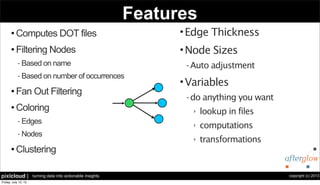
Features
• Computes DOT files
• Filtering Nodes
- Based on name
- Based on number of occurrences
• Fan Out Filtering
• Coloring
- Edges
- Nodes
• Clustering
Fan Out: 3
•Edge Thickness
•Node Sizes
- Auto adjustment
•Variables
- do anything you want
‣ lookup in files
‣ computations
‣ transformations
copyright (c) 2013pixlcloud | turning data into actionable insights
Configuration
l Coloring:
color.[source|event|target|edge|sourcetarget]=
<perl expression returning a color name>
l Array @fields contains input-line, split into tokens:
color.event=“red” if ($fields[1] =~ /^192..*/)
l Filter nodes with “invisible” color:
color.target=“invisible” if ($fields[0] eq “IIS Action”)
copyright (c) 2013pixlcloud | turning data into actionable insights
a
b
c
d
e
End-To-End Example
Output:
Input Data:
a,b
a,c
d,e
a
b
c
d
e
Command:
cat file | ./afterglow –c simple.properties –t |
neato –Tgif –o test.gif
simple.properties:
color.source=“green” if ($fields[0] ne “d”)
color.target=“blue” if ($fields[1] ne “e”)
color.source=“red”
color=“green”
copyright (c) 2013pixlcloud | turning data into actionable insights
More Configuration
l Clustering:
cluster.[source|event|target]=
<perl expression returning a cluster name>
l Node Sizes:
size.[source|event|target]=
<perl expression returning a number>
maxnodesize=<value>
sum.[source|event|target]=[0|1]
copyright (c) 2013pixlcloud | turning data into actionable insights
Variables / Code
l Variables
l Definition:
l Use:
l There are no limits on what to do with the “variables” keyword! You can put entire
scripts in there!
# Watch Lists
variable=@privileged=( "aaerchak" );
color.target="gold" if (grep(/$fields[0]/,@privileged));
copyright (c) 2013pixlcloud | turning data into actionable insights
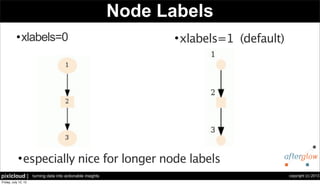
Node Labels
•xlabels=0 •xlabels=1 (default)
•especially nice for longer node labels
copyright (c) 2013pixlcloud | turning data into actionable insights
Command Line Options
Usage: afterglow.pl [-adhkmnqrstvx] [-b lines] [-c conffile] [-e length] [-f threshold ] [-g threshold] [-l lines]
[-o threshold] [-p mode] [-x color] [-m maxsize]
-a : turn off labelelling of the output graph with the configuration used
-b lines : number of lines to skip (e.g., 1 for header line)
-c conffile : config file
-d : print node count
-e length : edge length
-f threshold : source fan out threshold
-g threshold : event fan out threshold (only in three node mode)
-h : this (help) message
-i file : read from input file, instead of from STDIN
-k : output in GDF format instead of DOT
-l lines : the maximum number of lines to read
-m : the maximum size for a node
-n : don't print node labels
-o threshold : omit threshold (minimum count for nodes to be displayed)
Non-connected nodes will be filtered too.
-p mode : split mode for predicate nodes where mode is
0 = only one unique predicate node (default)
1 = one predicate node per unique subject node.
2 = one predicate node per unique target node.
3 = one predicate node per unique source/target node.
-q : suppress all output. Attention! You should use -w to write output to a file!
-r : print source node names
-s : split subject and object nodes
-t : two node mode (skip over objects)
-v : verbose output
-w file : write output to a file instead of STDOUT
-x : text label color
copyright (c) 2013pixlcloud | turning data into actionable insights
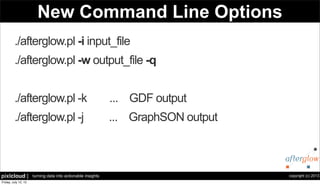
New Command Line Options
./afterglow.pl -i input_file
./afterglow.pl -w output_file -q
./afterglow.pl -k ... GDF output
./afterglow.pl -j ... GraphSON output
copyright (c) 2013pixlcloud | turning data into actionable insights
Sample Configurations
# Variable and Color
variable=@violation=("Backdoor Access", "HackerTool Download”);
color.target="orange" if (grep(/$fields[1]/,@violation));
color.target="palegreen"
# Node Size and Threshold
maxnodesize=1;
size.source=$fields[2]
size=0.5
sum.source=0;
threshold.source=14;
# Color and Cluster
color.source="palegreen" if ($fields[0] =~ /^111/)
color.source="red"
color.target="palegreen"
cluster.source=regex_replace("(d+).d+")."/8"
copyright (c) 2013pixlcloud | turning data into actionable insights
Advanced Configuration
• match() match("[0-9]")
- matches the current field and returns 0 or 1
• field() "red" if (field() eq "foo");
• subnet() subnet($fields[0],0.0.0.0/7)
- returns 0 or 1 depending on whether the value is in the given subnet
• regex_replace()
cluster.source=regex_replace("(d+.d+)")."/16" 
if (!match("^(212.254.110|195.141.69)"))
- if one of the two ranges match(), then return the first two octets of the source IP and add the "/16" string.
• get_severity() color.source=get_severity($fields[2], 10)
- use a 10 step color range based on the third columns value
copyright (c) 2013pixlcloud | turning data into actionable insights
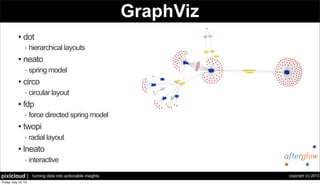
GraphViz
• dot
- hierarchical layouts
• neato
- spring model
• circo
- circular layout
• fdp
- force directed spring model
• twopi
- radial layout
• lneato
- interactive
copyright (c) 2013pixlcloud | turning data into actionable insights
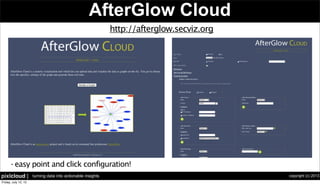
AfterGlow Cloud
- easy point and click configuration!
http://afterglow.secviz.org
copyright (c) 2013pixlcloud | turning data into actionable insights
Future
•AfterGlow 1.6.4
-GraphSON output
•AfterGlow Cloud 2.0
-New, interactive Web interface
copyright (c) 2013pixlcloud | turning data into actionable insights
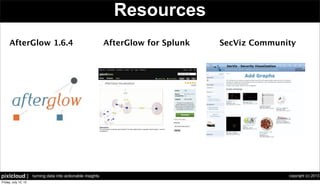
Resources
AfterGlow 1.6.4 AfterGlow for Splunk SecViz Community
copyright (c) 2013pixlcloud | turning data into actionable insights
pixlcloud
Powered By:
info@pixlcloud.com

AfterGlow

  • 1.
    turning data intoactionable insights copyright (c) 2013pixlcloud | afterglow.sf.net
  • 2.
    copyright (c) 2013pixlcloud| turning data into actionable insights Data Processing CSV File AfterGlow Graph LanguageFile digraph structs { graph [label="AfterGlow 1.5.8", fontsize=8]; node [shape=ellipse, style=filled, fontsize=10, width=1, height=1, fixedsize=true]; edge [len=1.6]; "aaelenes" -> "Printing Resume" ; "abbe" -> "Information Encryption" ; "aanna" -> "Patent Access" ; "aatharuv" -> "Ping" ; } aaelenes,Printing Resume abbe,Information Encrytion aanna,Patent Access aatharuy,Ping Parser Grapher
  • 3.
    copyright (c) 2013pixlcloud| turning data into actionable insights Data Processing CSV File AfterGlow Graph LanguageFile digraph structs { graph [label="AfterGlow 1.5.8", fontsize=8]; node [shape=ellipse, style=filled, fontsize=10, width=1, height=1, fixedsize=true]; edge [len=1.6]; "aaelenes" -> "Printing Resume" ; "abbe" -> "Information Encryption" ; "aanna" -> "Patent Access" ; "aatharuv" -> "Ping" ; } aaelenes,Printing Resume abbe,Information Encrytion aanna,Patent Access aatharuy,Ping Parser Grapher
  • 4.
    copyright (c) 2013pixlcloud| turning data into actionable insights Features • Computes DOT files • Filtering Nodes - Based on name - Based on number of occurrences • Fan Out Filtering • Coloring - Edges - Nodes • Clustering Fan Out: 3 •Edge Thickness •Node Sizes - Auto adjustment •Variables - do anything you want ‣ lookup in files ‣ computations ‣ transformations
  • 5.
    copyright (c) 2013pixlcloud| turning data into actionable insights Configuration l Coloring: color.[source|event|target|edge|sourcetarget]= <perl expression returning a color name> l Array @fields contains input-line, split into tokens: color.event=“red” if ($fields[1] =~ /^192..*/) l Filter nodes with “invisible” color: color.target=“invisible” if ($fields[0] eq “IIS Action”)
  • 6.
    copyright (c) 2013pixlcloud| turning data into actionable insights a b c d e End-To-End Example Output: Input Data: a,b a,c d,e a b c d e Command: cat file | ./afterglow –c simple.properties –t | neato –Tgif –o test.gif simple.properties: color.source=“green” if ($fields[0] ne “d”) color.target=“blue” if ($fields[1] ne “e”) color.source=“red” color=“green”
  • 7.
    copyright (c) 2013pixlcloud| turning data into actionable insights More Configuration l Clustering: cluster.[source|event|target]= <perl expression returning a cluster name> l Node Sizes: size.[source|event|target]= <perl expression returning a number> maxnodesize=<value> sum.[source|event|target]=[0|1]
  • 8.
    copyright (c) 2013pixlcloud| turning data into actionable insights Variables / Code l Variables l Definition: l Use: l There are no limits on what to do with the “variables” keyword! You can put entire scripts in there! # Watch Lists variable=@privileged=( "aaerchak" ); color.target="gold" if (grep(/$fields[0]/,@privileged));
  • 9.
    copyright (c) 2013pixlcloud| turning data into actionable insights Node Labels •xlabels=0 •xlabels=1 (default) •especially nice for longer node labels
  • 10.
    copyright (c) 2013pixlcloud| turning data into actionable insights Command Line Options Usage: afterglow.pl [-adhkmnqrstvx] [-b lines] [-c conffile] [-e length] [-f threshold ] [-g threshold] [-l lines] [-o threshold] [-p mode] [-x color] [-m maxsize] -a : turn off labelelling of the output graph with the configuration used -b lines : number of lines to skip (e.g., 1 for header line) -c conffile : config file -d : print node count -e length : edge length -f threshold : source fan out threshold -g threshold : event fan out threshold (only in three node mode) -h : this (help) message -i file : read from input file, instead of from STDIN -k : output in GDF format instead of DOT -l lines : the maximum number of lines to read -m : the maximum size for a node -n : don't print node labels -o threshold : omit threshold (minimum count for nodes to be displayed) Non-connected nodes will be filtered too. -p mode : split mode for predicate nodes where mode is 0 = only one unique predicate node (default) 1 = one predicate node per unique subject node. 2 = one predicate node per unique target node. 3 = one predicate node per unique source/target node. -q : suppress all output. Attention! You should use -w to write output to a file! -r : print source node names -s : split subject and object nodes -t : two node mode (skip over objects) -v : verbose output -w file : write output to a file instead of STDOUT -x : text label color
  • 11.
    copyright (c) 2013pixlcloud| turning data into actionable insights New Command Line Options ./afterglow.pl -i input_file ./afterglow.pl -w output_file -q ./afterglow.pl -k ... GDF output ./afterglow.pl -j ... GraphSON output
  • 12.
    copyright (c) 2013pixlcloud| turning data into actionable insights Sample Configurations # Variable and Color variable=@violation=("Backdoor Access", "HackerTool Download”); color.target="orange" if (grep(/$fields[1]/,@violation)); color.target="palegreen" # Node Size and Threshold maxnodesize=1; size.source=$fields[2] size=0.5 sum.source=0; threshold.source=14; # Color and Cluster color.source="palegreen" if ($fields[0] =~ /^111/) color.source="red" color.target="palegreen" cluster.source=regex_replace("(d+).d+")."/8"
  • 13.
    copyright (c) 2013pixlcloud| turning data into actionable insights Advanced Configuration • match() match("[0-9]") - matches the current field and returns 0 or 1 • field() "red" if (field() eq "foo"); • subnet() subnet($fields[0],0.0.0.0/7) - returns 0 or 1 depending on whether the value is in the given subnet • regex_replace() cluster.source=regex_replace("(d+.d+)")."/16" if (!match("^(212.254.110|195.141.69)")) - if one of the two ranges match(), then return the first two octets of the source IP and add the "/16" string. • get_severity() color.source=get_severity($fields[2], 10) - use a 10 step color range based on the third columns value
  • 14.
    copyright (c) 2013pixlcloud| turning data into actionable insights GraphViz • dot - hierarchical layouts • neato - spring model • circo - circular layout • fdp - force directed spring model • twopi - radial layout • lneato - interactive
  • 15.
    copyright (c) 2013pixlcloud| turning data into actionable insights AfterGlow Cloud - easy point and click configuration! http://afterglow.secviz.org
  • 16.
    copyright (c) 2013pixlcloud| turning data into actionable insights Future •AfterGlow 1.6.4 -GraphSON output •AfterGlow Cloud 2.0 -New, interactive Web interface
  • 17.
    copyright (c) 2013pixlcloud| turning data into actionable insights Resources AfterGlow 1.6.4 AfterGlow for Splunk SecViz Community
  • 18.
    copyright (c) 2013pixlcloud| turning data into actionable insights pixlcloud Powered By: info@pixlcloud.com