






Data Modeling with Apache Cassandra™
DuyHai DOAN
Apache Cassandra™ Evangelist, Apache Zeppelin™ committer
1 Data modeling objectives
2 The partition key
3 The clustering column(s)
4 Other critical details
5 Workshop
© DataStax, All Rights Reserved. 2
Data Modeling Objectives
Data modeling objectives
1) Get your data out of Cassandra
2) Reduce query latency, make your queries faster
3) Avoid disaster in production
© DataStax, All Rights Reserved. 4
Data modeling objectives
1) Get your data out of Cassandra
2) Reduce query latency, make your queries faster
3) Avoid disaster in production
© DataStax, All Rights Reserved. 5
Data modeling objectives
1) Get your data out of Cassandra
2) Reduce query latency, make your queries faster
3) Avoid disaster in production
© DataStax, All Rights Reserved. 6
Data modeling methodology
Design by query
•  first, know your functional queries (find users by xxx, …)
•  then design the table(s) for direct access
•  denormalize if necessary
Output of design phase = schema.cql
Then start coding
© DataStax, All Rights Reserved. 7
The partition key
Role
Partition key
•  main entry point for query (INSERT/SELECT …)
•  help distribute/locate data on the cluster
No partition key = full cluster scan 😱
© DataStax, All Rights Reserved. 9
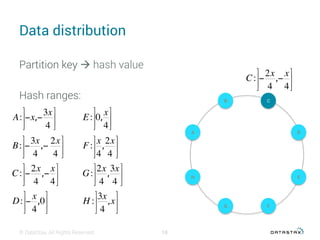
Data distribution
© DataStax, All Rights Reserved.
A: −x,−
3x
4
⎤
⎦
⎥
⎥
⎤
⎦
⎥
⎥
B: −
3x
4
,−
2x
4
⎤
⎦
⎥
⎥
⎤
⎦
⎥
⎥
C: −
2x
4
,−
x
4
⎤
⎦
⎥
⎥
⎤
⎦
⎥
⎥
D: −
x
4
,0
⎤
⎦
⎥
⎥
⎤
⎦
⎥
⎥
E: 0,
x
4
⎤
⎦
⎥
⎥
⎤
⎦
⎥
⎥
F:
x
4
,
2x
4
⎤
⎦
⎥
⎥
⎤
⎦
⎥
⎥
G:
2x
4
,
3x
4
⎤
⎦
⎥
⎥
⎤
⎦
⎥
⎥
H :
3x
4
,x
⎤
⎦
⎥
⎥
⎤
⎦
⎥
⎥
H
A
E
D
B C
G F
Partition key à hash value
Hash ranges:
10
C: −
2x
4
,−
x
4
⎤
⎦
⎥
⎥
⎤
⎦
⎥
⎥
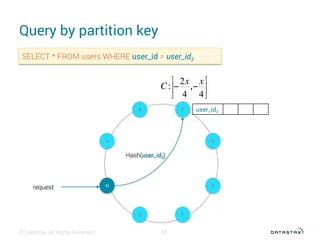
Query by partition key
© DataStax, All Rights Reserved.
SELECT * FROM users WHERE user_id = user_id3
H
A
E
D
B C
G F
user_id3
request
Hash(user_id3)
C: −
2x
4
,−
x
4
⎤
⎦
⎥
⎥
⎤
⎦
⎥
⎥
11
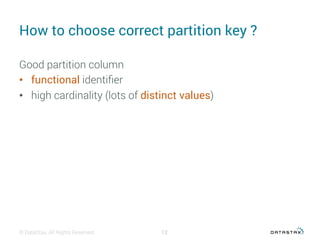
How to choose correct partition key ?
Good partition column
•  functional identifier
•  high cardinality (lots of distinct values)
© DataStax, All Rights Reserved. 12
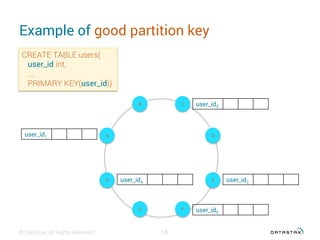
Example of good partition key
© DataStax, All Rights Reserved.
CREATE TABLE users(
user_id int,
…,
PRIMARY KEY(user_id))
H
A
E
D
B C
G F
user_id1
user_id2
user_id3
user_id4
user_id5
13
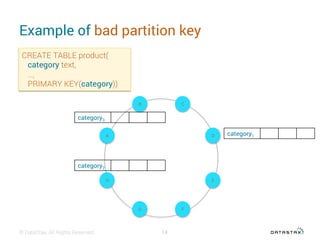
Example of bad partition key
© DataStax, All Rights Reserved.
CREATE TABLE product(
category text,
…,
PRIMARY KEY(category))
H
A
E
D
B C
G F
category1
14
category2
category3
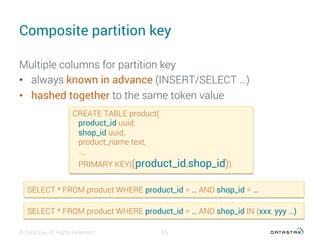
Composite partition key
Multiple columns for partition key
•  always known in advance (INSERT/SELECT …)
•  hashed together to the same token value
© DataStax, All Rights Reserved.
CREATE TABLE product(
product_id uuid,
shop_id uuid,
product_name text,
…,
PRIMARY KEY((product_id,shop_id))
SELECT * FROM product WHERE product_id = … AND shop_id = …
15
SELECT * FROM product WHERE product_id = … AND shop_id IN (xxx, yyy …)
The clustering column(s)
Role
Clustering column(s)
•  simulate 1 – N relationship
•  sort data (logically & on disk)
© DataStax, All Rights Reserved. 17
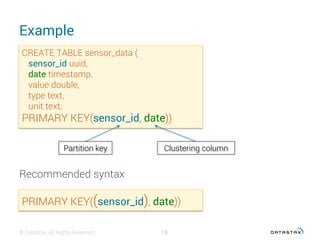
Example
© DataStax, All Rights Reserved. 18
CREATE TABLE sensor_data (
sensor_id uuid,
date timestamp,
value double,
type text,
unit text,
PRIMARY KEY(sensor_id, date))
Partition key Clustering column
Recommended syntax
PRIMARY KEY((sensor_id), date))
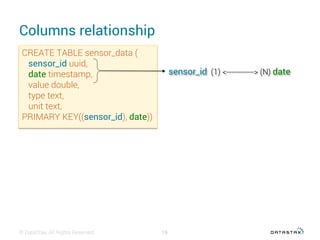
Columns relationship
© DataStax, All Rights Reserved. 19
CREATE TABLE sensor_data (
sensor_id uuid,
date timestamp,
value double,
type text,
unit text,
PRIMARY KEY((sensor_id), date))
sensor_id (1) <------------> (N) date
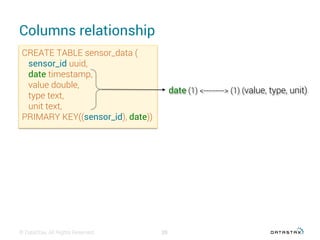
Columns relationship
© DataStax, All Rights Reserved. 20
CREATE TABLE sensor_data (
sensor_id uuid,
date timestamp,
value double,
type text,
unit text,
PRIMARY KEY((sensor_id), date))
date (1) <---------> (1) (value, type, unit)
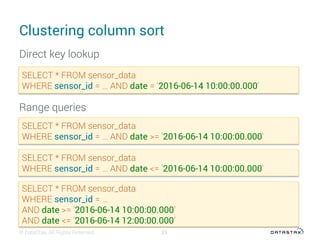
Clustering column sort
© DataStax, All Rights Reserved. 21
SELECT * FROM sensor_data
WHERE sensor_id = … AND date = '2016-06-14 10:00:00.000'
Direct key lookup
Range queries
SELECT * FROM sensor_data
WHERE sensor_id = … AND date >= '2016-06-14 10:00:00.000'
SELECT * FROM sensor_data
WHERE sensor_id = … AND date <= '2016-06-14 10:00:00.000'
SELECT * FROM sensor_data
WHERE sensor_id = …
AND date >= '2016-06-14 10:00:00.000’
AND date <= '2016-06-14 12:00:00.000’
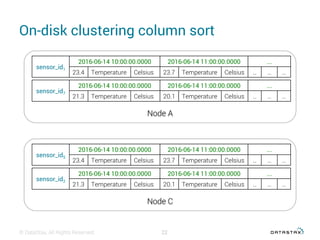
On-disk clustering column sort
© DataStax, All Rights Reserved. 22
sensor_id1
2016-06-14 10:00:00.0000 2016-06-14 11:00:00.0000 ...
23.4 Temperature Celsius 23.7 Temperature Celsius … … …
sensor_id7
2016-06-14 10:00:00.0000 2016-06-14 11:00:00.0000 ...
21.3 Temperature Celsius 20.1 Temperature Celsius … … …
Node A
sensor_id5
2016-06-14 10:00:00.0000 2016-06-14 11:00:00.0000 ...
23.4 Temperature Celsius 23.7 Temperature Celsius … … …
sensor_id2
2016-06-14 10:00:00.0000 2016-06-14 11:00:00.0000 ...
21.3 Temperature Celsius 20.1 Temperature Celsius … … …
Node C
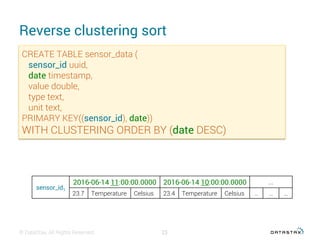
Reverse clustering sort
© DataStax, All Rights Reserved. 23
CREATE TABLE sensor_data (
sensor_id uuid,
date timestamp,
value double,
type text,
unit text,
PRIMARY KEY((sensor_id), date))
WITH CLUSTERING ORDER BY (date DESC)
sensor_id1
2016-06-14 11:00:00.0000 2016-06-14 10:00:00.0000 ...
23.7 Temperature Celsius 23.4 Temperature Celsius … … …
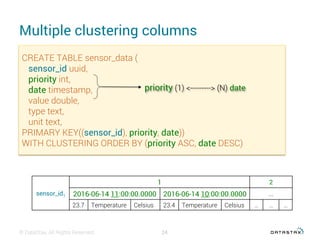
Multiple clustering columns
© DataStax, All Rights Reserved. 24
CREATE TABLE sensor_data (
sensor_id uuid,
priority int,
date timestamp,
value double,
type text,
unit text,
PRIMARY KEY((sensor_id), priority, date))
WITH CLUSTERING ORDER BY (priority ASC, date DESC)
sensor_id1
1 2
2016-06-14 11:00:00.0000 2016-06-14 10:00:00.0000 ...
23.7 Temperature Celsius 23.4 Temperature Celsius … … …
priority (1) <---------> (N) date
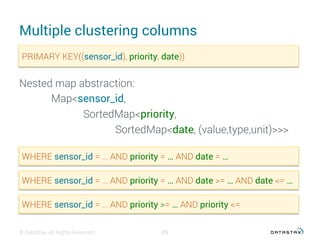
Multiple clustering columns
© DataStax, All Rights Reserved. 25
WHERE sensor_id = … AND priority = … AND date = …
WHERE sensor_id = … AND priority = … AND date >= … AND date <= …
WHERE sensor_id = … AND priority >= … AND priority <=
Nested map abstraction:
Map<sensor_id,
SortedMap<priority,
SortedMap<date, (value,type,unit)>>>
PRIMARY KEY((sensor_id), priority, date))
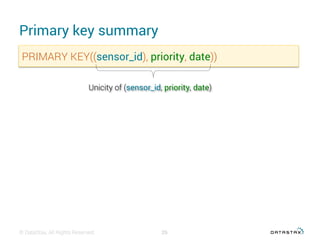
Primary key summary
© DataStax, All Rights Reserved. 26
PRIMARY KEY((sensor_id), priority, date))
Unicity of (sensor_id, priority, date)
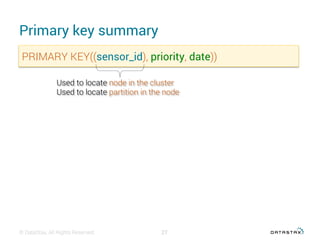
Primary key summary
© DataStax, All Rights Reserved. 27
PRIMARY KEY((sensor_id), priority, date))
Used to locate node in the cluster
Used to locate partition in the node
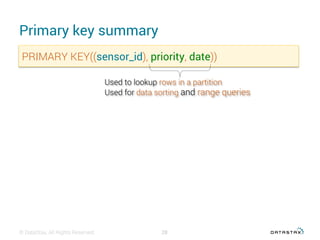
Primary key summary
© DataStax, All Rights Reserved. 28
PRIMARY KEY((sensor_id), priority, date))
Used to lookup rows in a partition
Used for data sorting and range queries
Other critical details
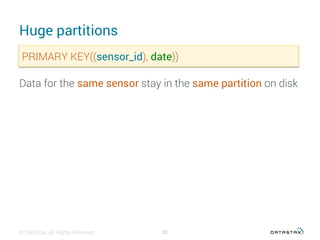
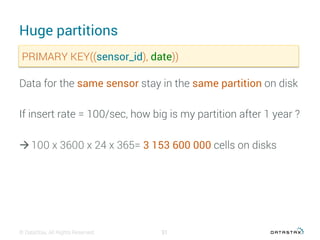
Huge partitions
© DataStax, All Rights Reserved. 30
PRIMARY KEY((sensor_id), date))
Data for the same sensor stay in the same partition on disk
Huge partitions
© DataStax, All Rights Reserved. 31
PRIMARY KEY((sensor_id), date))
Data for the same sensor stay in the same partition on disk
If insert rate = 100/sec, how big is my partition after 1 year ?
à 100 x 3600 x 24 x 365= 3 153 600 000 cells on disks
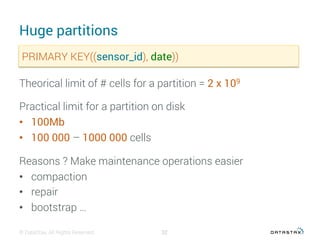
Huge partitions
© DataStax, All Rights Reserved. 32
PRIMARY KEY((sensor_id), date))
Theorical limit of # cells for a partition = 2 x 10⁹
Practical limit for a partition on disk
•  100Mb
•  100 000 – 1000 000 cells
Reasons ? Make maintenance operations easier
•  compaction
•  repair
•  bootstrap …
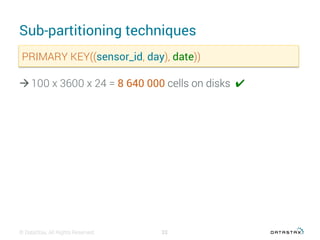
Sub-partitioning techniques
© DataStax, All Rights Reserved. 33
PRIMARY KEY((sensor_id, day), date))
à 100 x 3600 x 24 = 8 640 000 cells on disks ✔︎
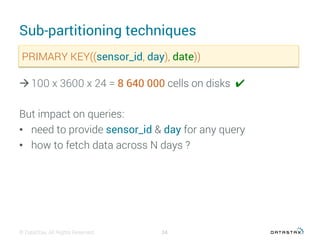
Sub-partitioning techniques
© DataStax, All Rights Reserved. 34
PRIMARY KEY((sensor_id, day), date))
à 100 x 3600 x 24 = 8 640 000 cells on disks ✔︎
But impact on queries:
•  need to provide sensor_id & day for any query
•  how to fetch data across N days ?
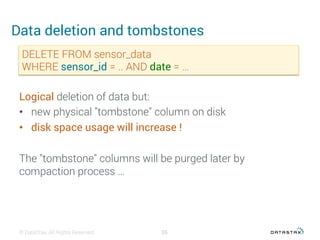
Data deletion and tombstones
© DataStax, All Rights Reserved. 35
DELETE FROM sensor_data
WHERE sensor_id = .. AND date = …
Logical deletion of data but:
•  new physical "tombstone" column on disk
•  disk space usage will increase !
The "tombstone" columns will be purged later by
compaction process …
Workshop
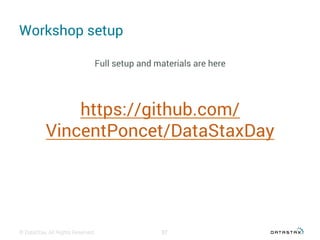
Workshop setup
Full setup and materials are here
https://github.com/
VincentPoncet/DataStaxDay
© DataStax, All Rights Reserved. 37

Datastax day 2016 : Cassandra data modeling basics

  • 1.
    Data Modeling withApache Cassandra™ DuyHai DOAN Apache Cassandra™ Evangelist, Apache Zeppelin™ committer
  • 2.
    1 Data modelingobjectives 2 The partition key 3 The clustering column(s) 4 Other critical details 5 Workshop © DataStax, All Rights Reserved. 2
  • 3.
  • 4.
    Data modeling objectives 1) Getyour data out of Cassandra 2) Reduce query latency, make your queries faster 3) Avoid disaster in production © DataStax, All Rights Reserved. 4
  • 5.
    Data modeling objectives 1) Getyour data out of Cassandra 2) Reduce query latency, make your queries faster 3) Avoid disaster in production © DataStax, All Rights Reserved. 5
  • 6.
    Data modeling objectives 1) Getyour data out of Cassandra 2) Reduce query latency, make your queries faster 3) Avoid disaster in production © DataStax, All Rights Reserved. 6
  • 7.
    Data modeling methodology Designby query •  first, know your functional queries (find users by xxx, …) •  then design the table(s) for direct access •  denormalize if necessary Output of design phase = schema.cql Then start coding © DataStax, All Rights Reserved. 7
  • 8.
  • 9.
    Role Partition key •  mainentry point for query (INSERT/SELECT …) •  help distribute/locate data on the cluster No partition key = full cluster scan 😱 © DataStax, All Rights Reserved. 9
  • 10.
    Data distribution © DataStax,All Rights Reserved. A: −x,− 3x 4 ⎤ ⎦ ⎥ ⎥ ⎤ ⎦ ⎥ ⎥ B: − 3x 4 ,− 2x 4 ⎤ ⎦ ⎥ ⎥ ⎤ ⎦ ⎥ ⎥ C: − 2x 4 ,− x 4 ⎤ ⎦ ⎥ ⎥ ⎤ ⎦ ⎥ ⎥ D: − x 4 ,0 ⎤ ⎦ ⎥ ⎥ ⎤ ⎦ ⎥ ⎥ E: 0, x 4 ⎤ ⎦ ⎥ ⎥ ⎤ ⎦ ⎥ ⎥ F: x 4 , 2x 4 ⎤ ⎦ ⎥ ⎥ ⎤ ⎦ ⎥ ⎥ G: 2x 4 , 3x 4 ⎤ ⎦ ⎥ ⎥ ⎤ ⎦ ⎥ ⎥ H : 3x 4 ,x ⎤ ⎦ ⎥ ⎥ ⎤ ⎦ ⎥ ⎥ H A E D B C G F Partition key à hash value Hash ranges: 10 C: − 2x 4 ,− x 4 ⎤ ⎦ ⎥ ⎥ ⎤ ⎦ ⎥ ⎥
  • 11.
    Query by partitionkey © DataStax, All Rights Reserved. SELECT * FROM users WHERE user_id = user_id3 H A E D B C G F user_id3 request Hash(user_id3) C: − 2x 4 ,− x 4 ⎤ ⎦ ⎥ ⎥ ⎤ ⎦ ⎥ ⎥ 11
  • 12.
    How to choosecorrect partition key ? Good partition column •  functional identifier •  high cardinality (lots of distinct values) © DataStax, All Rights Reserved. 12
  • 13.
    Example of goodpartition key © DataStax, All Rights Reserved. CREATE TABLE users( user_id int, …, PRIMARY KEY(user_id)) H A E D B C G F user_id1 user_id2 user_id3 user_id4 user_id5 13
  • 14.
    Example of badpartition key © DataStax, All Rights Reserved. CREATE TABLE product( category text, …, PRIMARY KEY(category)) H A E D B C G F category1 14 category2 category3
  • 15.
    Composite partition key Multiplecolumns for partition key •  always known in advance (INSERT/SELECT …) •  hashed together to the same token value © DataStax, All Rights Reserved. CREATE TABLE product( product_id uuid, shop_id uuid, product_name text, …, PRIMARY KEY((product_id,shop_id)) SELECT * FROM product WHERE product_id = … AND shop_id = … 15 SELECT * FROM product WHERE product_id = … AND shop_id IN (xxx, yyy …)
  • 16.
  • 17.
    Role Clustering column(s) •  simulate1 – N relationship •  sort data (logically & on disk) © DataStax, All Rights Reserved. 17
  • 18.
    Example © DataStax, AllRights Reserved. 18 CREATE TABLE sensor_data ( sensor_id uuid, date timestamp, value double, type text, unit text, PRIMARY KEY(sensor_id, date)) Partition key Clustering column Recommended syntax PRIMARY KEY((sensor_id), date))
  • 19.
    Columns relationship © DataStax,All Rights Reserved. 19 CREATE TABLE sensor_data ( sensor_id uuid, date timestamp, value double, type text, unit text, PRIMARY KEY((sensor_id), date)) sensor_id (1) <------------> (N) date
  • 20.
    Columns relationship © DataStax,All Rights Reserved. 20 CREATE TABLE sensor_data ( sensor_id uuid, date timestamp, value double, type text, unit text, PRIMARY KEY((sensor_id), date)) date (1) <---------> (1) (value, type, unit)
  • 21.
    Clustering column sort ©DataStax, All Rights Reserved. 21 SELECT * FROM sensor_data WHERE sensor_id = … AND date = '2016-06-14 10:00:00.000' Direct key lookup Range queries SELECT * FROM sensor_data WHERE sensor_id = … AND date >= '2016-06-14 10:00:00.000' SELECT * FROM sensor_data WHERE sensor_id = … AND date <= '2016-06-14 10:00:00.000' SELECT * FROM sensor_data WHERE sensor_id = … AND date >= '2016-06-14 10:00:00.000’ AND date <= '2016-06-14 12:00:00.000’
  • 22.
    On-disk clustering columnsort © DataStax, All Rights Reserved. 22 sensor_id1 2016-06-14 10:00:00.0000 2016-06-14 11:00:00.0000 ... 23.4 Temperature Celsius 23.7 Temperature Celsius … … … sensor_id7 2016-06-14 10:00:00.0000 2016-06-14 11:00:00.0000 ... 21.3 Temperature Celsius 20.1 Temperature Celsius … … … Node A sensor_id5 2016-06-14 10:00:00.0000 2016-06-14 11:00:00.0000 ... 23.4 Temperature Celsius 23.7 Temperature Celsius … … … sensor_id2 2016-06-14 10:00:00.0000 2016-06-14 11:00:00.0000 ... 21.3 Temperature Celsius 20.1 Temperature Celsius … … … Node C
  • 23.
    Reverse clustering sort ©DataStax, All Rights Reserved. 23 CREATE TABLE sensor_data ( sensor_id uuid, date timestamp, value double, type text, unit text, PRIMARY KEY((sensor_id), date)) WITH CLUSTERING ORDER BY (date DESC) sensor_id1 2016-06-14 11:00:00.0000 2016-06-14 10:00:00.0000 ... 23.7 Temperature Celsius 23.4 Temperature Celsius … … …
  • 24.
    Multiple clustering columns ©DataStax, All Rights Reserved. 24 CREATE TABLE sensor_data ( sensor_id uuid, priority int, date timestamp, value double, type text, unit text, PRIMARY KEY((sensor_id), priority, date)) WITH CLUSTERING ORDER BY (priority ASC, date DESC) sensor_id1 1 2 2016-06-14 11:00:00.0000 2016-06-14 10:00:00.0000 ... 23.7 Temperature Celsius 23.4 Temperature Celsius … … … priority (1) <---------> (N) date
  • 25.
    Multiple clustering columns ©DataStax, All Rights Reserved. 25 WHERE sensor_id = … AND priority = … AND date = … WHERE sensor_id = … AND priority = … AND date >= … AND date <= … WHERE sensor_id = … AND priority >= … AND priority <= Nested map abstraction: Map<sensor_id, SortedMap<priority, SortedMap<date, (value,type,unit)>>> PRIMARY KEY((sensor_id), priority, date))
  • 26.
    Primary key summary ©DataStax, All Rights Reserved. 26 PRIMARY KEY((sensor_id), priority, date)) Unicity of (sensor_id, priority, date)
  • 27.
    Primary key summary ©DataStax, All Rights Reserved. 27 PRIMARY KEY((sensor_id), priority, date)) Used to locate node in the cluster Used to locate partition in the node
  • 28.
    Primary key summary ©DataStax, All Rights Reserved. 28 PRIMARY KEY((sensor_id), priority, date)) Used to lookup rows in a partition Used for data sorting and range queries
  • 29.
  • 30.
    Huge partitions © DataStax,All Rights Reserved. 30 PRIMARY KEY((sensor_id), date)) Data for the same sensor stay in the same partition on disk
  • 31.
    Huge partitions © DataStax,All Rights Reserved. 31 PRIMARY KEY((sensor_id), date)) Data for the same sensor stay in the same partition on disk If insert rate = 100/sec, how big is my partition after 1 year ? à 100 x 3600 x 24 x 365= 3 153 600 000 cells on disks
  • 32.
    Huge partitions © DataStax,All Rights Reserved. 32 PRIMARY KEY((sensor_id), date)) Theorical limit of # cells for a partition = 2 x 10⁹ Practical limit for a partition on disk •  100Mb •  100 000 – 1000 000 cells Reasons ? Make maintenance operations easier •  compaction •  repair •  bootstrap …
  • 33.
    Sub-partitioning techniques © DataStax,All Rights Reserved. 33 PRIMARY KEY((sensor_id, day), date)) à 100 x 3600 x 24 = 8 640 000 cells on disks ✔︎
  • 34.
    Sub-partitioning techniques © DataStax,All Rights Reserved. 34 PRIMARY KEY((sensor_id, day), date)) à 100 x 3600 x 24 = 8 640 000 cells on disks ✔︎ But impact on queries: •  need to provide sensor_id & day for any query •  how to fetch data across N days ?
  • 35.
    Data deletion andtombstones © DataStax, All Rights Reserved. 35 DELETE FROM sensor_data WHERE sensor_id = .. AND date = … Logical deletion of data but: •  new physical "tombstone" column on disk •  disk space usage will increase ! The "tombstone" columns will be purged later by compaction process …
  • 36.
  • 37.
    Workshop setup Full setupand materials are here https://github.com/ VincentPoncet/DataStaxDay © DataStax, All Rights Reserved. 37