
For Data Analysis
PRAVEEN NAIR
blog.ninethsense.com/
HISTORY
• Late 1980
• Started using by 1989
• V1.0 – 1994-2000
• v2.0 – 2000-2010
• v3.0 – 2008-current
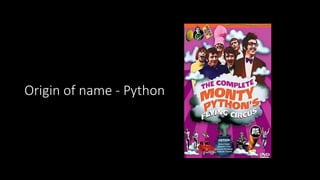
Origin of name - Python
Guido van Rossum
Highlights
• Simple and Easy to Learn
• Free and Open Source
• High Level Language
• Portable
• Object Oriented
• Embeddable
• Extensive Libraries
Applications for Python
• Web and Internet Development
• Scientific and Numeric
• Education
• Desktop GUIs
• Software Development
Who uses Python?
• Google
• Yahoo
• YouTube
• BitTorrent
• Maya
• Intel, Cisco, HP, Seagate, IBM etc.
• Pixar/Disney
• JPMorgan, UBS, Citadel
• NASA
• Redhat
• USA CIA
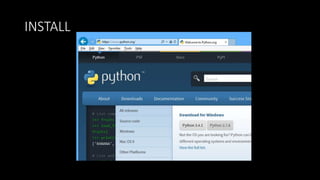
INSTALL
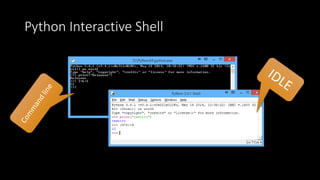
Python Interactive Shell
interpreter OR compiler ?
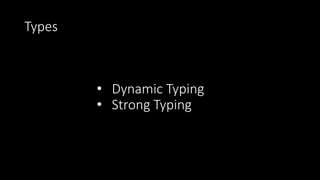
Types
• Dynamic Typing
• Strong Typing
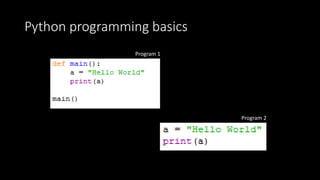
Python programming basics
Program 1
Program 2
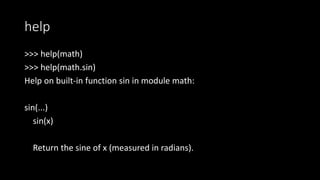
help
>>> help(math)
>>> help(math.sin)
Help on built-in function sin in module math:
sin(...)
sin(x)
Return the sine of x (measured in radians).
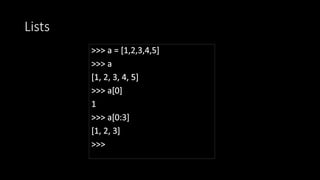
Lists
Strings
>>> s = "Hello World"
>>> s.upper()
'HELLO WORLD'
>>> s.lower()
'hello world'
>>> s.find("ll")
2
>>> s.split("o")
['Hell', ' W', 'rld']
>>> s[2:6]
'llo '
Strings - cont
>>> a = "Hello"
>>> a
'Hello'
>>> a[0]
'H'
>>> a[0] = "t"
Traceback (most recent call last):
File "<pyshell#3>", line 1, in <module>
a[0] = "t"
TypeError: 'str' object does not support item
assignment
>>> a = ['hello','what','abc']
>>> a.sort()
>>> a
['abc', 'hello', 'what']
>>> a.append("test")
>>> a
['abc', 'hello', 'what', 'test']
>>> a.append("test")
>>> a
['abc', 'hello', 'what', 'test']
>>> a.sort()
>>> a
['abc', 'hello', 'test', 'what']
>>> a.reverse()
>>> a
['what', 'test', 'hello', 'abc']
>>> a.insert(0,"blah")
>>> a
['blah', 'what', 'test', 'hello', 'abc']
>>>
Dictionary
>>> a = {'c': 'ccc', 'a': 'aaa', 'b': 'bbb'}
>>> a
{'c': 'ccc', 'a': 'aaa', 'b': 'bbb'}
>>> a["b"]
'bbb'
>>> a.get("b")
'bbb'
>>> a.keys()
dict_keys(['c', 'a', 'b'])
>>> a.values()
dict_values(['ccc', 'aaa', 'bbb'])
>>> a.items()
dict_items([('c', 'ccc'), ('a', 'aaa'), ('b', 'bbb')])
>>> del a["a"]
>>> a
{'c': 'ccc', 'b': 'bbb'}
>>> a.update({"a":"aaaa"})
>>> a
{'c': 'ccc', 'a': 'aaaa', 'b': 'bbb'}
>>>
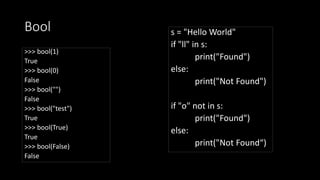
Bool
>>> bool(1)
True
>>> bool(0)
False
>>> bool("")
False
>>> bool("test")
True
>>> bool(True)
True
>>> bool(False)
False
s = "Hello World"
if "ll" in s:
print("Found")
else:
print("Not Found")
if "o" not in s:
print("Found")
else:
print("Not Found“)
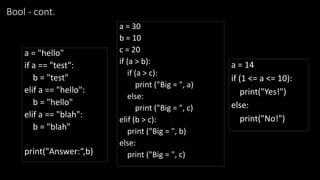
Bool - cont.
a = "hello"
if a == "test":
b = "test"
elif a == "hello":
b = "hello"
elif a == "blah":
b = "blah"
print("Answer:“,b)
a = 30
b = 10
c = 20
if (a > b):
if (a > c):
print ("Big = ", a)
else:
print ("Big = ", c)
elif (b > c):
print ("Big = ", b)
else:
print ("Big = ", c)
a = 14
if (1 <= a <= 10):
print("Yes!")
else:
print("No!")
For
>>> for l in "HELLO WORLD":
print(l)
H
E
L
L
O
W
O
R
L
D
>>> a = ["hello","world","kochi"]
>>> a
['hello', 'world', 'kochi']
>>> for x in a:
print(x)
hello
world
kochi
>>>
>>> for i in range(1,5):
print(i)
1
2
3
4
Files – reading and writing
>>> f = open("d:test.txt")
>>> f.readline()
'Praveenn'
>>> open("d:test.txt").readlines()
['Praveenn', 'Hellon', 'World']
>>> o = open("d:test2.txt","w")
>>> o.write("test")
>>> o.close()
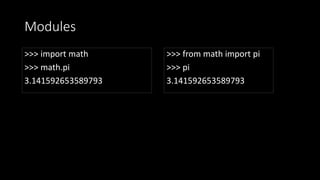
Modules
>>> import math
>>> math.pi
3.141592653589793
>>> from math import pi
>>> pi
3.141592653589793
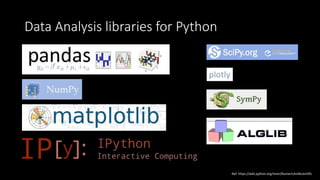
Data Analysis libraries for Python
plotly
Ref: https://wiki.python.org/moin/NumericAndScientific
DEMO

Python and Data Analysis

  • 1.
    For Data Analysis PRAVEENNAIR blog.ninethsense.com/
  • 2.
    HISTORY • Late 1980 •Started using by 1989 • V1.0 – 1994-2000 • v2.0 – 2000-2010 • v3.0 – 2008-current
  • 3.
  • 4.
  • 6.
    Highlights • Simple andEasy to Learn • Free and Open Source • High Level Language • Portable • Object Oriented • Embeddable • Extensive Libraries
  • 7.
    Applications for Python •Web and Internet Development • Scientific and Numeric • Education • Desktop GUIs • Software Development
  • 8.
    Who uses Python? •Google • Yahoo • YouTube • BitTorrent • Maya • Intel, Cisco, HP, Seagate, IBM etc. • Pixar/Disney • JPMorgan, UBS, Citadel • NASA • Redhat • USA CIA
  • 9.
  • 10.
  • 11.
  • 12.
  • 13.
  • 14.
    help >>> help(math) >>> help(math.sin) Helpon built-in function sin in module math: sin(...) sin(x) Return the sine of x (measured in radians).
  • 15.
  • 16.
    Strings >>> s ="Hello World" >>> s.upper() 'HELLO WORLD' >>> s.lower() 'hello world' >>> s.find("ll") 2 >>> s.split("o") ['Hell', ' W', 'rld'] >>> s[2:6] 'llo '
  • 17.
    Strings - cont >>>a = "Hello" >>> a 'Hello' >>> a[0] 'H' >>> a[0] = "t" Traceback (most recent call last): File "<pyshell#3>", line 1, in <module> a[0] = "t" TypeError: 'str' object does not support item assignment >>> a = ['hello','what','abc'] >>> a.sort() >>> a ['abc', 'hello', 'what'] >>> a.append("test") >>> a ['abc', 'hello', 'what', 'test'] >>> a.append("test") >>> a ['abc', 'hello', 'what', 'test'] >>> a.sort() >>> a ['abc', 'hello', 'test', 'what'] >>> a.reverse() >>> a ['what', 'test', 'hello', 'abc'] >>> a.insert(0,"blah") >>> a ['blah', 'what', 'test', 'hello', 'abc'] >>>
  • 18.
    Dictionary >>> a ={'c': 'ccc', 'a': 'aaa', 'b': 'bbb'} >>> a {'c': 'ccc', 'a': 'aaa', 'b': 'bbb'} >>> a["b"] 'bbb' >>> a.get("b") 'bbb' >>> a.keys() dict_keys(['c', 'a', 'b']) >>> a.values() dict_values(['ccc', 'aaa', 'bbb']) >>> a.items() dict_items([('c', 'ccc'), ('a', 'aaa'), ('b', 'bbb')]) >>> del a["a"] >>> a {'c': 'ccc', 'b': 'bbb'} >>> a.update({"a":"aaaa"}) >>> a {'c': 'ccc', 'a': 'aaaa', 'b': 'bbb'} >>>
  • 19.
    Bool >>> bool(1) True >>> bool(0) False >>>bool("") False >>> bool("test") True >>> bool(True) True >>> bool(False) False s = "Hello World" if "ll" in s: print("Found") else: print("Not Found") if "o" not in s: print("Found") else: print("Not Found“)
  • 20.
    Bool - cont. a= "hello" if a == "test": b = "test" elif a == "hello": b = "hello" elif a == "blah": b = "blah" print("Answer:“,b) a = 30 b = 10 c = 20 if (a > b): if (a > c): print ("Big = ", a) else: print ("Big = ", c) elif (b > c): print ("Big = ", b) else: print ("Big = ", c) a = 14 if (1 <= a <= 10): print("Yes!") else: print("No!")
  • 21.
    For >>> for lin "HELLO WORLD": print(l) H E L L O W O R L D >>> a = ["hello","world","kochi"] >>> a ['hello', 'world', 'kochi'] >>> for x in a: print(x) hello world kochi >>> >>> for i in range(1,5): print(i) 1 2 3 4
  • 22.
    Files – readingand writing >>> f = open("d:test.txt") >>> f.readline() 'Praveenn' >>> open("d:test.txt").readlines() ['Praveenn', 'Hellon', 'World'] >>> o = open("d:test2.txt","w") >>> o.write("test") >>> o.close()
  • 23.
    Modules >>> import math >>>math.pi 3.141592653589793 >>> from math import pi >>> pi 3.141592653589793
  • 24.
    Data Analysis librariesfor Python plotly Ref: https://wiki.python.org/moin/NumericAndScientific
  • 25.