©2013 DataStax Confidential. Do not distribute without consent.
@PatrickMcFadin
Patrick McFadin

Chief Evangelist for Apache Cassandra
Advanced Data Modeling
with Apache Cassandra
1
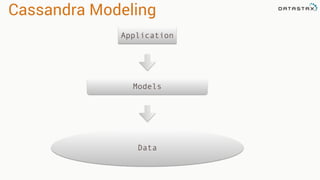
Cassandra Modeling
Data
Models
Application
Think Before You Model
Or how to keep doing what you’re already doing
3
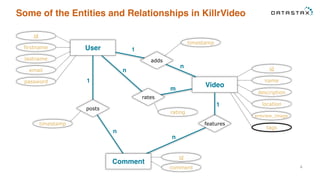
Some of the Entities and Relationships in KillrVideo
4
User
id
firstname
lastname
email
password
Video
id
name
description
location
preview_image
tags
features
Comment
comment
id
adds
timestamp
posts
timestamp
1
n
n
1
1
n
n
m
rates
rating
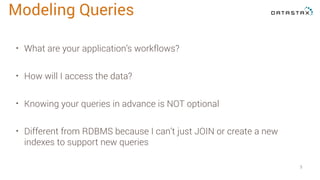
• What are your application’s workflows?
• How will I access the data?
• Knowing your queries in advance is NOT optional
• Different from RDBMS because I can’t just JOIN or create a new
indexes to support new queries
5
Modeling Queries
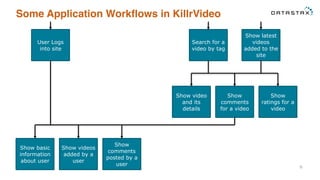
Some Application Workflows in KillrVideo
6
User Logs
into site
Show basic
information
about user
Show videos
added by a
user
Show
comments
posted by a
user
Search for a
video by tag
Show latest
videos
added to the
site
Show
comments
for a video
Show
ratings for a
video
Show video
and its
details
Some Queries in KillrVideo to Support Workflows
7
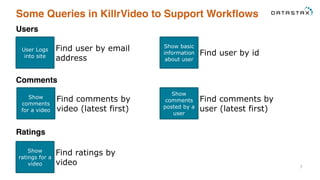
Users
User Logs
into site
Find user by email
address
Show basic
information
about user
Find user by id
Comments
Show
comments
for a video
Find comments by
video (latest first)
Show
comments
posted by a
user
Find comments by
user (latest first)
Ratings
Show
ratings for a
video
Find ratings by
video
Some Queries in KillrVideo to Support Workflows
8
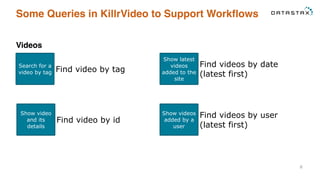
Videos
Search for a
video by tag Find video by tag
Show latest
videos
added to the
site
Find videos by date
(latest first)
Show video
and its
details
Find video by id
Show videos
added by a
user
Find videos by user
(latest first)
Data Modeling Refresher
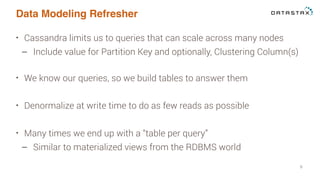
• Cassandra limits us to queries that can scale across many nodes
– Include value for Partition Key and optionally, Clustering Column(s)
• We know our queries, so we build tables to answer them
• Denormalize at write time to do as few reads as possible
• Many times we end up with a “table per query”
– Similar to materialized views from the RDBMS world
9
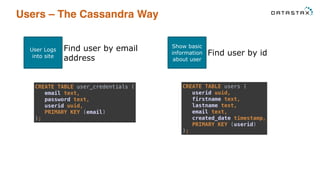
Users – The Cassandra Way
User Logs
into site
Find user by email
address
Show basic
information
about user
Find user by id
CREATE TABLE user_credentials (

email text,

password text,

userid uuid,

PRIMARY KEY (email)

);
CREATE TABLE users (

userid uuid,

firstname text,

lastname text,

email text,

created_date timestamp,

PRIMARY KEY (userid)

);
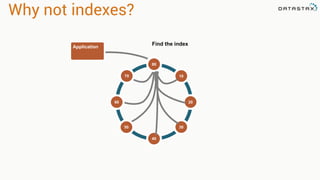
Application
Find the index
80
10
3050
70
60
40
20
Why not indexes?
12
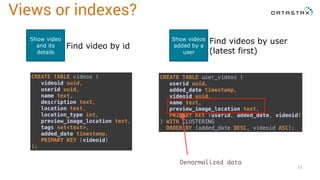
Show video
and its
details
Find video by id
Show videos
added by a
user
Find videos by user
(latest first)
CREATE TABLE videos (

videoid uuid,

userid uuid,

name text,

description text,

location text,

location_type int,

preview_image_location text,

tags set<text>,

added_date timestamp,

PRIMARY KEY (videoid)

);
CREATE TABLE user_videos (

userid uuid,

added_date timestamp,

videoid uuid,

name text,

preview_image_location text,

PRIMARY KEY (userid, added_date, videoid)

) WITH CLUSTERING
ORDER BY (added_date DESC, videoid ASC);
Views or indexes?
Denormalized data
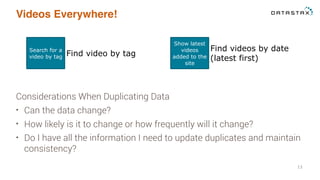
Videos Everywhere!
Considerations When Duplicating Data
• Can the data change?
• How likely is it to change or how frequently will it change?
• Do I have all the information I need to update duplicates and maintain
consistency?
13
Search for a
video by tag Find video by tag
Show latest
videos
added to the
site
Find videos by date
(latest first)
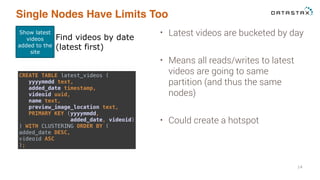
Single Nodes Have Limits Too
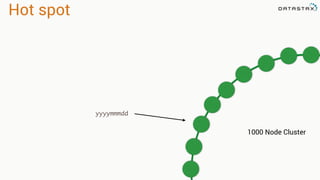
• Latest videos are bucketed by day
• Means all reads/writes to latest
videos are going to same
partition (and thus the same
nodes)
• Could create a hotspot
14
Show latest
videos
added to the
site
Find videos by date
(latest first)
CREATE TABLE latest_videos (

yyyymmdd text,

added_date timestamp,

videoid uuid,

name text,

preview_image_location text,

PRIMARY KEY (yyyymmdd,

added_date, videoid)

) WITH CLUSTERING ORDER BY (

added_date DESC,

videoid ASC

);
CREATE TABLE latest_videos (

yyyymmdd text,
bucket_number int,

added_date timestamp,

videoid uuid,

name text,

preview_image_location text,

PRIMARY KEY ((yyyymmdd, bucket_number),

added_date, videoid)

) WITH CLUSTERING
ORDER BY (added_date DESC,

videoid ASC

);
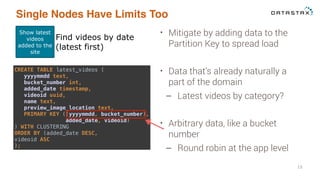
Single Nodes Have Limits Too
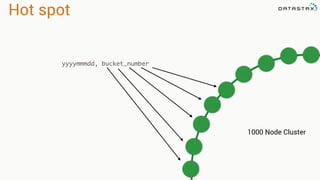
• Mitigate by adding data to the
Partition Key to spread load
• Data that’s already naturally a
part of the domain
– Latest videos by category?
• Arbitrary data, like a bucket
number
– Round robin at the app level
15
Show latest
videos
added to the
site
Find videos by date
(latest first)
Hot spot
1000 Node Cluster
yyyymmmdd
Hot spot
1000 Node Cluster
yyyymmmdd, bucket_number
Use Case Examples
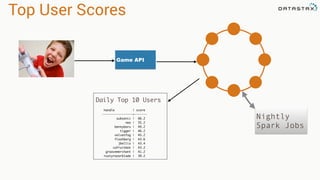
Top User Scores
Game API
Nightly
Spark Jobs
Daily Top 10 Users
handle | score
-----------------+-------
subsonic | 66.2
neo | 55.2
bennybaru | 49.2
tigger | 46.2
velvetfog | 45.2
flashberg | 43.6
jbellis | 43.4
cafruitbat | 43.2
groovemerchant | 41.2
rustyrazorblade | 39.2
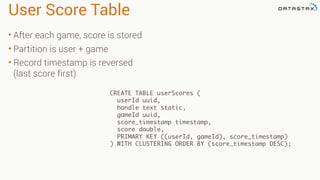
User Score Table
• After each game, score is stored
• Partition is user + game
• Record timestamp is reversed
(last score first)
CREATE TABLE userScores (
userId uuid,
handle text static,
gameId uuid,
score_timestamp timestamp,
score double,
PRIMARY KEY ((userId, gameId), score_timestamp)
) WITH CLUSTERING ORDER BY (score_timestamp DESC);
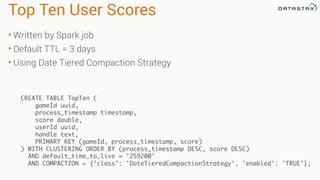
Top Ten User Scores
• Written by Spark job
• Default TTL = 3 days
• Using Date Tiered Compaction Strategy
CREATE TABLE TopTen (
gameId uuid,
process_timestamp timestamp,
score double,
userId uuid,
handle text,
PRIMARY KEY (gameId, process_timestamp, score)
) WITH CLUSTERING ORDER BY (process_timestamp DESC, score DESC)
AND default_time_to_live = '259200'
AND COMPACTION = {'class': 'DateTieredCompactionStrategy', 'enabled': 'TRUE'};
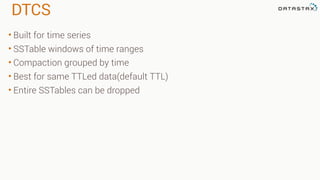
DTCS
• Built for time series
• SSTable windows of time ranges
• Compaction grouped by time
• Best for same TTLed data(default TTL)
• Entire SSTables can be dropped
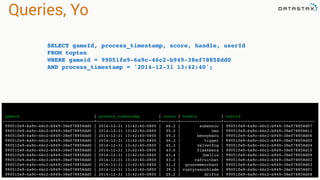
Queries, Yo
gameid | process_timestamp | score | handle | userid
--------------------------------------+--------------------------+-------+-----------------+--------------------------------------
99051fe9-6a9c-46c2-b949-38ef78858dd0 | 2014-12-31 13:42:40-0800 | 66.2 | subsonic | 99051fe9-6a9c-46c2-b949-38ef78858d07
99051fe9-6a9c-46c2-b949-38ef78858dd0 | 2014-12-31 13:42:40-0800 | 55.2 | neo | 99051fe9-6a9c-46c2-b949-38ef78858d11
99051fe9-6a9c-46c2-b949-38ef78858dd0 | 2014-12-31 13:42:40-0800 | 49.2 | bennybaru | 99051fe9-6a9c-46c2-b949-38ef78858d06
99051fe9-6a9c-46c2-b949-38ef78858dd0 | 2014-12-31 13:42:40-0800 | 46.2 | tigger | 99051fe9-6a9c-46c2-b949-38ef78858d05
99051fe9-6a9c-46c2-b949-38ef78858dd0 | 2014-12-31 13:42:40-0800 | 45.2 | velvetfog | 99051fe9-6a9c-46c2-b949-38ef78858d04
99051fe9-6a9c-46c2-b949-38ef78858dd0 | 2014-12-31 13:42:40-0800 | 43.6 | flashberg | 99051fe9-6a9c-46c2-b949-38ef78858d10
99051fe9-6a9c-46c2-b949-38ef78858dd0 | 2014-12-31 13:42:40-0800 | 43.4 | jbellis | 99051fe9-6a9c-46c2-b949-38ef78858d09
99051fe9-6a9c-46c2-b949-38ef78858dd0 | 2014-12-31 13:42:40-0800 | 43.2 | cafruitbat | 99051fe9-6a9c-46c2-b949-38ef78858d02
99051fe9-6a9c-46c2-b949-38ef78858dd0 | 2014-12-31 13:42:40-0800 | 41.2 | groovemerchant | 99051fe9-6a9c-46c2-b949-38ef78858d03
99051fe9-6a9c-46c2-b949-38ef78858dd0 | 2014-12-31 13:42:40-0800 | 39.2 | rustyrazorblade | 99051fe9-6a9c-46c2-b949-38ef78858d01
99051fe9-6a9c-46c2-b949-38ef78858dd0 | 2014-12-31 13:42:40-0800 | 20.2 | driftx | 99051fe9-6a9c-46c2-b949-38ef78858d08
SELECT gameId, process_timestamp, score, handle, userId
FROM topten
WHERE gameid = 99051fe9-6a9c-46c2-b949-38ef78858dd0
AND process_timestamp = '2014-12-31 13:42:40';
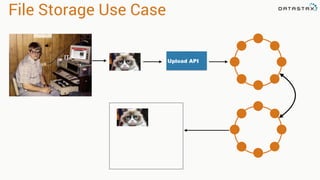
File Storage Use Case
Upload API
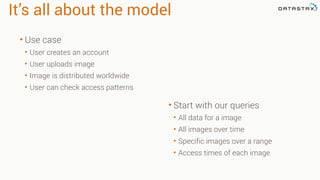
It’s all about the model
• Start with our queries
• All data for a image
• All images over time
• Specific images over a range
• Access times of each image
• Use case
• User creates an account
• User uploads image
• Image is distributed worldwide
• User can check access patterns
user Table
• Our standard POJO
• emails are dynamic
CREATE TABLE user (
username text,
firstname text,
lastname text,
emails list<text>,
PRIMARY KEY (username)
);
INSERT INTO user (username, firstname, lastname, emails)
VALUES (‘pmcfadin’, ‘Patrick’, ‘McFadin’, [‘patrick@datastax.com’,
‘patrick.mcfadin@datastax.com’]
IF NOT EXISTS;
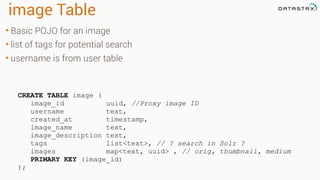
image Table
• Basic POJO for an image
• list of tags for potential search
• username is from user table
CREATE TABLE image (
image_id uuid, //Proxy image ID
username text,
created_at timestamp,
image_name text,
image_description text,
tags list<text>, // ? search in Solr ?
images map<text, uuid> , // orig, thumbnail, medium
PRIMARY KEY (image_id)
);
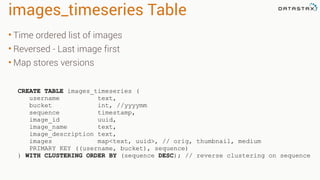
images_timeseries Table
• Time ordered list of images
• Reversed - Last image first
• Map stores versions
CREATE TABLE images_timeseries (
username text,
bucket int, //yyyymm
sequence timestamp,
image_id uuid,
image_name text,
image_description text,
images map<text, uuid>, // orig, thumbnail, medium
PRIMARY KEY ((username, bucket), sequence)
) WITH CLUSTERING ORDER BY (sequence DESC); // reverse clustering on sequence
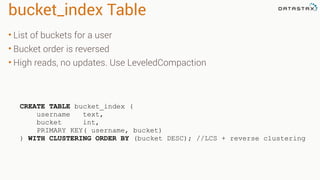
bucket_index Table
• List of buckets for a user
• Bucket order is reversed
• High reads, no updates. Use LeveledCompaction
CREATE TABLE bucket_index (
username text,
bucket int,
PRIMARY KEY( username, bucket)
) WITH CLUSTERING ORDER BY (bucket DESC); //LCS + reverse clustering
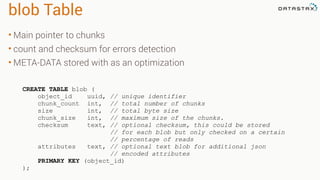
blob Table
• Main pointer to chunks
• count and checksum for errors detection
• META-DATA stored with as an optimization
CREATE TABLE blob (
object_id uuid, // unique identifier
chunk_count int, // total number of chunks
size int, // total byte size
chunk_size int, // maximum size of the chunks.
checksum text, // optional checksum, this could be stored
// for each blob but only checked on a certain
// percentage of reads
attributes text, // optional text blob for additional json
// encoded attributes
PRIMARY KEY (object_id)
);
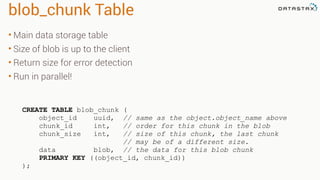
blob_chunk Table
• Main data storage table
• Size of blob is up to the client
• Return size for error detection
• Run in parallel!
CREATE TABLE blob_chunk (
object_id uuid, // same as the object.object_name above
chunk_id int, // order for this chunk in the blob
chunk_size int, // size of this chunk, the last chunk
// may be of a different size.
data blob, // the data for this blob chunk
PRIMARY KEY ((object_id, chunk_id))
);
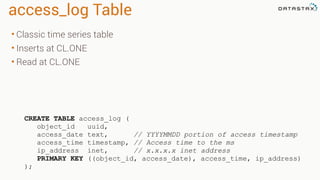
access_log Table
• Classic time series table
• Inserts at CL.ONE
• Read at CL.ONE
CREATE TABLE access_log (
object_id uuid,
access_date text, // YYYYMMDD portion of access timestamp
access_time timestamp, // Access time to the ms
ip_address inet, // x.x.x.x inet address
PRIMARY KEY ((object_id, access_date), access_time, ip_address)
);
Light Weight Transactions
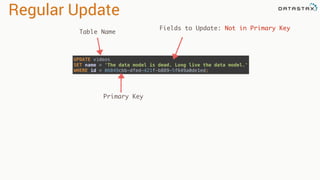
Regular Update
UPDATE videos

SET name = 'The data model is dead. Long live the data model.'

WHERE id = 06049cbb-dfed-421f-b889-5f649a0de1ed;
Table Name
Fields to Update: Not in Primary Key
Primary Key
The race is on
Process 1 Process 2
SELECT firstName, lastName
FROM users
WHERE username = 'pmcfadin';
SELECT firstName, lastName
FROM users
WHERE username = 'pmcfadin';
(0 rows)
(0 rows)
INSERT INTO users (username, firstname,
lastname, email, password, created_date)
VALUES ('pmcfadin','Patrick','McFadin',
['patrick@datastax.com'],
'ba27e03fd95e507daf2937c937d499ab',
'2011-06-20 13:50:00');
INSERT INTO users (username, firstname,
lastname, email, password, created_date)
VALUES ('pmcfadin','Paul','McFadin',
['paul@oracle.com'],
'ea24e13ad95a209ded8912e937d499de',
'2011-06-20 13:51:00');
T0
T1
T2
T3
Got nothing! Good to go!
This one wins
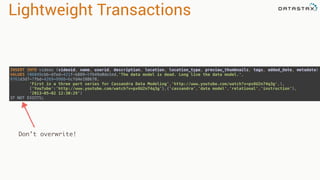
Lightweight Transactions
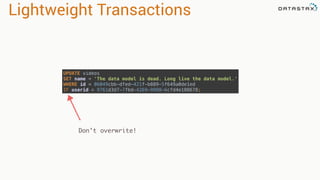
Don’t overwrite!
INSERT INTO videos (videoid, name, userid, description, location, location_type, preview_thumbnails, tags, added_date, metadata)

VALUES (06049cbb-dfed-421f-b889-5f649a0de1ed,'The data model is dead. Long live the data model.',
9761d3d7-7fbd-4269-9988-6cfd4e188678, 

'First in a three part series for Cassandra Data Modeling','http://www.youtube.com/watch?v=px6U2n74q3g',1,

{'YouTube':'http://www.youtube.com/watch?v=px6U2n74q3g'},{'cassandra','data model','relational','instruction'},

'2013-05-02 12:30:29’)
IF NOT EXISTS;
Lightweight Transactions
Don’t overwrite!
UPDATE videos

SET name = 'The data model is dead. Long live the data model.'

WHERE id = 06049cbb-dfed-421f-b889-5f649a0de1ed
IF userid = 9761d3d7-7fbd-4269-9988-6cfd4e188678;
Solution LWT
Process 1
INSERT INTO users (username, firstname,
lastname, email, password, created_date)
VALUES ('pmcfadin','Patrick','McFadin',
['patrick@datastax.com'],
'ba27e03fd95e507daf2937c937d499ab',
'2011-06-20 13:50:00')
IF NOT EXISTS;
T0
T1
[applied]
-----------
True
•Check performed for record
•Paxos ensures exclusive access
•applied = true: Success
Solution LWT
Process 2
T2
T3
[applied] | username | created_date | firstname | lastname
-----------+----------+--------------------------+-----------+----------
False | pmcfadin | 2011-06-20 13:50:00-0700 | Patrick | McFadin
INSERT INTO users (username, firstname,
lastname, email, password, created_date)
VALUES ('pmcfadin','Paul','McFadin',
['paul@oracle.com'],
'ea24e13ad95a209ded8912e937d499de',
'2011-06-20 13:51:00')
IF NOT EXISTS;
•applied = false: Rejected
•No record stomping!
Lightweight Transactions
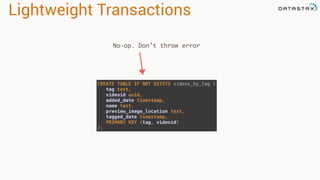
No-op. Don’t throw error
CREATE TABLE IF NOT EXISTS videos_by_tag (

tag text,

videoid uuid,

added_date timestamp,

name text,

preview_image_location text,

tagged_date timestamp,

PRIMARY KEY (tag, videoid)

);
User Defined Types
User Defined Types
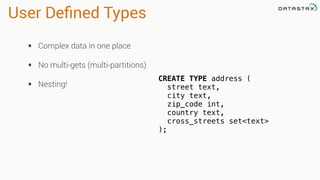
• Complex data in one place
• No multi-gets (multi-partitions)
• Nesting!
CREATE TYPE address (
street text,
city text,
zip_code int,
country text,
cross_streets set<text>
);
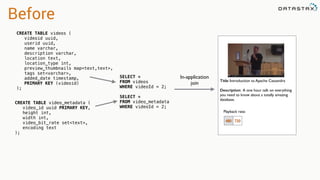
Before
CREATE TABLE videos (
videoid uuid,
userid uuid,
name varchar,
description varchar,
location text,
location_type int,
preview_thumbnails map<text,text>,
tags set<varchar>,
added_date timestamp,
PRIMARY KEY (videoid)
);
CREATE TABLE video_metadata (
video_id uuid PRIMARY KEY,
height int,
width int,
video_bit_rate set<text>,
encoding text
);
SELECT *
FROM videos
WHERE videoId = 2;
SELECT *
FROM video_metadata
WHERE videoId = 2;
Title: Introduction to Apache Cassandra
Description: A one hour talk on everything
you need to know about a totally amazing
database.
480 720
Playback rate:
In-application
join
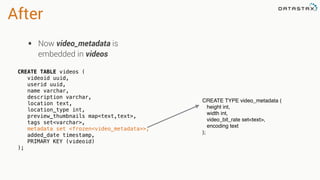
After
• Now video_metadata is
embedded in videos
CREATE TYPE video_metadata (
height int,
width int,
video_bit_rate set<text>,
encoding text
);
CREATE TABLE videos (
videoid uuid,
userid uuid,
name varchar,
description varchar,
location text,
location_type int,
preview_thumbnails map<text,text>,
tags set<varchar>,
metadata set <frozen<video_metadata>>,
added_date timestamp,
PRIMARY KEY (videoid)
);
Wait! Frozen??
• Staying out of technical
debt
• 3.0 UDTs will not have to
be frozen
• Applicable to User Defined
Types and Tuples
Do you want to build a schema?
Do you want to store some JSON?
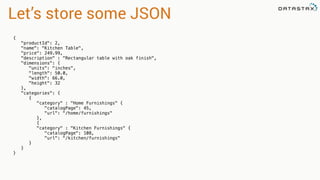
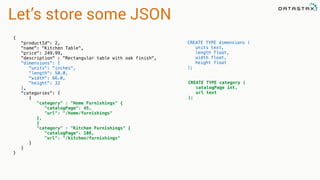
Let’s store some JSON
{
"productId": 2,
"name": "Kitchen Table",
"price": 249.99,
"description" : "Rectangular table with oak finish",
"dimensions": {
"units": "inches",
"length": 50.0,
"width": 66.0,
"height": 32
},
"categories": {
{
"category" : "Home Furnishings" {
"catalogPage": 45,
"url": "/home/furnishings"
},
{
"category" : "Kitchen Furnishings" {
"catalogPage": 108,
"url": "/kitchen/furnishings"
}
}
}
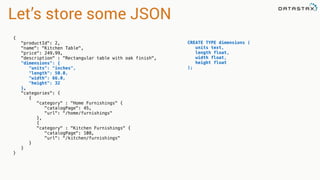
Let’s store some JSON
{
"productId": 2,
"name": "Kitchen Table",
"price": 249.99,
"description" : "Rectangular table with oak finish",
"dimensions": {
"units": "inches",
"length": 50.0,
"width": 66.0,
"height": 32
},
"categories": {
{
"category" : "Home Furnishings" {
"catalogPage": 45,
"url": "/home/furnishings"
},
{
"category" : "Kitchen Furnishings" {
"catalogPage": 108,
"url": "/kitchen/furnishings"
}
}
}
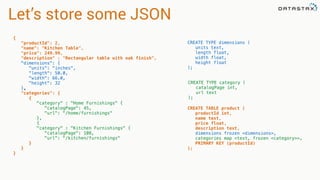
CREATE TYPE dimensions (
units text,
length float,
width float,
height float
);
Let’s store some JSON
{
"productId": 2,
"name": "Kitchen Table",
"price": 249.99,
"description" : "Rectangular table with oak finish",
"dimensions": {
"units": "inches",
"length": 50.0,
"width": 66.0,
"height": 32
},
"categories": {
{
"category" : "Home Furnishings" {
"catalogPage": 45,
"url": "/home/furnishings"
},
{
"category" : "Kitchen Furnishings" {
"catalogPage": 108,
"url": "/kitchen/furnishings"
}
}
}
CREATE TYPE dimensions (
units text,
length float,
width float,
height float
);
CREATE TYPE category (
catalogPage int,
url text
);
Let’s store some JSON
{
"productId": 2,
"name": "Kitchen Table",
"price": 249.99,
"description" : "Rectangular table with oak finish",
"dimensions": {
"units": "inches",
"length": 50.0,
"width": 66.0,
"height": 32
},
"categories": {
{
"category" : "Home Furnishings" {
"catalogPage": 45,
"url": "/home/furnishings"
},
{
"category" : "Kitchen Furnishings" {
"catalogPage": 108,
"url": "/kitchen/furnishings"
}
}
}
CREATE TYPE dimensions (
units text,
length float,
width float,
height float
);
CREATE TYPE category (
catalogPage int,
url text
);
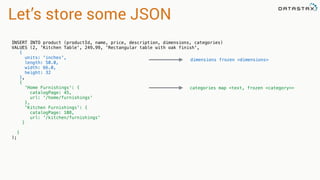
CREATE TABLE product (
productId int,
name text,
price float,
description text,
dimensions frozen <dimensions>,
categories map <text, frozen <category>>,
PRIMARY KEY (productId)
);
Let’s store some JSON
INSERT INTO product (productId, name, price, description, dimensions, categories)
VALUES (2, 'Kitchen Table', 249.99, 'Rectangular table with oak finish',
{
units: 'inches',
length: 50.0,
width: 66.0,
height: 32
},
{
'Home Furnishings': {
catalogPage: 45,
url: '/home/furnishings'
},
'Kitchen Furnishings': {
catalogPage: 108,
url: '/kitchen/furnishings'
}
}
);
dimensions frozen <dimensions>
categories map <text, frozen <category>>
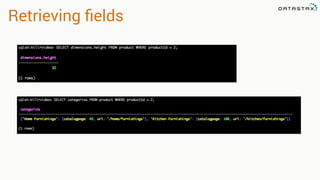
Retrieving fields
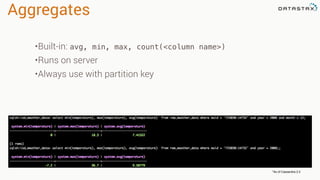
Aggregates
*As of Cassandra 2.2
•Built-in: avg, min, max, count(<column name>)
•Runs on server
•Always use with partition key
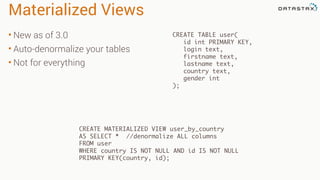
Materialized Views
CREATE TABLE user(
id int PRIMARY KEY,
login text,
firstname text,
lastname text,
country text,
gender int
);
• New as of 3.0
• Auto-denormalize your tables
• Not for everything
CREATE MATERIALIZED VIEW user_by_country
AS SELECT * //denormalize ALL columns
FROM user
WHERE country IS NOT NULL AND id IS NOT NULL
PRIMARY KEY(country, id);
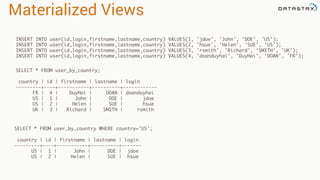
Materialized Views
INSERT INTO user(id,login,firstname,lastname,country) VALUES(1, 'jdoe', 'John', 'DOE', 'US');
INSERT INTO user(id,login,firstname,lastname,country) VALUES(2, 'hsue', 'Helen', 'SUE', 'US');
INSERT INTO user(id,login,firstname,lastname,country) VALUES(3, 'rsmith', 'Richard', 'SMITH', 'UK');
INSERT INTO user(id,login,firstname,lastname,country) VALUES(4, 'doanduyhai', 'DuyHai', 'DOAN', 'FR');
SELECT * FROM user_by_country;
country | id | firstname | lastname | login
---------+----+-----------+----------+------------
FR | 4 | DuyHai | DOAN | doanduyhai
US | 1 | John | DOE | jdoe
US | 2 | Helen | SUE | hsue
UK | 3 | Richard | SMITH | rsmith
SELECT * FROM user_by_country WHERE country='US';
country | id | firstname | lastname | login
---------+----+-----------+----------+-------
US | 1 | John | DOE | jdoe
US | 2 | Helen | SUE | hsue
Thank you!
Bring the questions
Follow me on twitter
@PatrickMcFadin

Advanced Data Modeling with Apache Cassandra

  • 1.
    ©2013 DataStax Confidential.Do not distribute without consent. @PatrickMcFadin Patrick McFadin
 Chief Evangelist for Apache Cassandra Advanced Data Modeling with Apache Cassandra 1
  • 2.
  • 3.
    Think Before YouModel Or how to keep doing what you’re already doing 3
  • 4.
    Some of theEntities and Relationships in KillrVideo 4 User id firstname lastname email password Video id name description location preview_image tags features Comment comment id adds timestamp posts timestamp 1 n n 1 1 n n m rates rating
  • 5.
    • What areyour application’s workflows? • How will I access the data? • Knowing your queries in advance is NOT optional • Different from RDBMS because I can’t just JOIN or create a new indexes to support new queries 5 Modeling Queries
  • 6.
    Some Application Workflowsin KillrVideo 6 User Logs into site Show basic information about user Show videos added by a user Show comments posted by a user Search for a video by tag Show latest videos added to the site Show comments for a video Show ratings for a video Show video and its details
  • 7.
    Some Queries inKillrVideo to Support Workflows 7 Users User Logs into site Find user by email address Show basic information about user Find user by id Comments Show comments for a video Find comments by video (latest first) Show comments posted by a user Find comments by user (latest first) Ratings Show ratings for a video Find ratings by video
  • 8.
    Some Queries inKillrVideo to Support Workflows 8 Videos Search for a video by tag Find video by tag Show latest videos added to the site Find videos by date (latest first) Show video and its details Find video by id Show videos added by a user Find videos by user (latest first)
  • 9.
    Data Modeling Refresher •Cassandra limits us to queries that can scale across many nodes – Include value for Partition Key and optionally, Clustering Column(s) • We know our queries, so we build tables to answer them • Denormalize at write time to do as few reads as possible • Many times we end up with a “table per query” – Similar to materialized views from the RDBMS world 9
  • 10.
    Users – TheCassandra Way User Logs into site Find user by email address Show basic information about user Find user by id CREATE TABLE user_credentials (
 email text,
 password text,
 userid uuid,
 PRIMARY KEY (email)
 ); CREATE TABLE users (
 userid uuid,
 firstname text,
 lastname text,
 email text,
 created_date timestamp,
 PRIMARY KEY (userid)
 );
  • 11.
  • 12.
    12 Show video and its details Findvideo by id Show videos added by a user Find videos by user (latest first) CREATE TABLE videos (
 videoid uuid,
 userid uuid,
 name text,
 description text,
 location text,
 location_type int,
 preview_image_location text,
 tags set<text>,
 added_date timestamp,
 PRIMARY KEY (videoid)
 ); CREATE TABLE user_videos (
 userid uuid,
 added_date timestamp,
 videoid uuid,
 name text,
 preview_image_location text,
 PRIMARY KEY (userid, added_date, videoid)
 ) WITH CLUSTERING ORDER BY (added_date DESC, videoid ASC); Views or indexes? Denormalized data
  • 13.
    Videos Everywhere! Considerations WhenDuplicating Data • Can the data change? • How likely is it to change or how frequently will it change? • Do I have all the information I need to update duplicates and maintain consistency? 13 Search for a video by tag Find video by tag Show latest videos added to the site Find videos by date (latest first)
  • 14.
    Single Nodes HaveLimits Too • Latest videos are bucketed by day • Means all reads/writes to latest videos are going to same partition (and thus the same nodes) • Could create a hotspot 14 Show latest videos added to the site Find videos by date (latest first) CREATE TABLE latest_videos (
 yyyymmdd text,
 added_date timestamp,
 videoid uuid,
 name text,
 preview_image_location text,
 PRIMARY KEY (yyyymmdd,
 added_date, videoid)
 ) WITH CLUSTERING ORDER BY (
 added_date DESC,
 videoid ASC
 );
  • 15.
    CREATE TABLE latest_videos(
 yyyymmdd text, bucket_number int,
 added_date timestamp,
 videoid uuid,
 name text,
 preview_image_location text,
 PRIMARY KEY ((yyyymmdd, bucket_number),
 added_date, videoid)
 ) WITH CLUSTERING ORDER BY (added_date DESC,
 videoid ASC
 ); Single Nodes Have Limits Too • Mitigate by adding data to the Partition Key to spread load • Data that’s already naturally a part of the domain – Latest videos by category? • Arbitrary data, like a bucket number – Round robin at the app level 15 Show latest videos added to the site Find videos by date (latest first)
  • 16.
    Hot spot 1000 NodeCluster yyyymmmdd
  • 17.
    Hot spot 1000 NodeCluster yyyymmmdd, bucket_number
  • 18.
  • 19.
    Top User Scores GameAPI Nightly Spark Jobs Daily Top 10 Users handle | score -----------------+------- subsonic | 66.2 neo | 55.2 bennybaru | 49.2 tigger | 46.2 velvetfog | 45.2 flashberg | 43.6 jbellis | 43.4 cafruitbat | 43.2 groovemerchant | 41.2 rustyrazorblade | 39.2
  • 20.
    User Score Table •After each game, score is stored • Partition is user + game • Record timestamp is reversed (last score first) CREATE TABLE userScores ( userId uuid, handle text static, gameId uuid, score_timestamp timestamp, score double, PRIMARY KEY ((userId, gameId), score_timestamp) ) WITH CLUSTERING ORDER BY (score_timestamp DESC);
  • 21.
    Top Ten UserScores • Written by Spark job • Default TTL = 3 days • Using Date Tiered Compaction Strategy CREATE TABLE TopTen ( gameId uuid, process_timestamp timestamp, score double, userId uuid, handle text, PRIMARY KEY (gameId, process_timestamp, score) ) WITH CLUSTERING ORDER BY (process_timestamp DESC, score DESC) AND default_time_to_live = '259200' AND COMPACTION = {'class': 'DateTieredCompactionStrategy', 'enabled': 'TRUE'};
  • 22.
    DTCS • Built fortime series • SSTable windows of time ranges • Compaction grouped by time • Best for same TTLed data(default TTL) • Entire SSTables can be dropped
  • 23.
    Queries, Yo gameid |process_timestamp | score | handle | userid --------------------------------------+--------------------------+-------+-----------------+-------------------------------------- 99051fe9-6a9c-46c2-b949-38ef78858dd0 | 2014-12-31 13:42:40-0800 | 66.2 | subsonic | 99051fe9-6a9c-46c2-b949-38ef78858d07 99051fe9-6a9c-46c2-b949-38ef78858dd0 | 2014-12-31 13:42:40-0800 | 55.2 | neo | 99051fe9-6a9c-46c2-b949-38ef78858d11 99051fe9-6a9c-46c2-b949-38ef78858dd0 | 2014-12-31 13:42:40-0800 | 49.2 | bennybaru | 99051fe9-6a9c-46c2-b949-38ef78858d06 99051fe9-6a9c-46c2-b949-38ef78858dd0 | 2014-12-31 13:42:40-0800 | 46.2 | tigger | 99051fe9-6a9c-46c2-b949-38ef78858d05 99051fe9-6a9c-46c2-b949-38ef78858dd0 | 2014-12-31 13:42:40-0800 | 45.2 | velvetfog | 99051fe9-6a9c-46c2-b949-38ef78858d04 99051fe9-6a9c-46c2-b949-38ef78858dd0 | 2014-12-31 13:42:40-0800 | 43.6 | flashberg | 99051fe9-6a9c-46c2-b949-38ef78858d10 99051fe9-6a9c-46c2-b949-38ef78858dd0 | 2014-12-31 13:42:40-0800 | 43.4 | jbellis | 99051fe9-6a9c-46c2-b949-38ef78858d09 99051fe9-6a9c-46c2-b949-38ef78858dd0 | 2014-12-31 13:42:40-0800 | 43.2 | cafruitbat | 99051fe9-6a9c-46c2-b949-38ef78858d02 99051fe9-6a9c-46c2-b949-38ef78858dd0 | 2014-12-31 13:42:40-0800 | 41.2 | groovemerchant | 99051fe9-6a9c-46c2-b949-38ef78858d03 99051fe9-6a9c-46c2-b949-38ef78858dd0 | 2014-12-31 13:42:40-0800 | 39.2 | rustyrazorblade | 99051fe9-6a9c-46c2-b949-38ef78858d01 99051fe9-6a9c-46c2-b949-38ef78858dd0 | 2014-12-31 13:42:40-0800 | 20.2 | driftx | 99051fe9-6a9c-46c2-b949-38ef78858d08 SELECT gameId, process_timestamp, score, handle, userId FROM topten WHERE gameid = 99051fe9-6a9c-46c2-b949-38ef78858dd0 AND process_timestamp = '2014-12-31 13:42:40';
  • 24.
    File Storage UseCase Upload API
  • 25.
    It’s all aboutthe model • Start with our queries • All data for a image • All images over time • Specific images over a range • Access times of each image • Use case • User creates an account • User uploads image • Image is distributed worldwide • User can check access patterns
  • 26.
    user Table • Ourstandard POJO • emails are dynamic CREATE TABLE user ( username text, firstname text, lastname text, emails list<text>, PRIMARY KEY (username) ); INSERT INTO user (username, firstname, lastname, emails) VALUES (‘pmcfadin’, ‘Patrick’, ‘McFadin’, [‘patrick@datastax.com’, ‘patrick.mcfadin@datastax.com’] IF NOT EXISTS;
  • 27.
    image Table • BasicPOJO for an image • list of tags for potential search • username is from user table CREATE TABLE image ( image_id uuid, //Proxy image ID username text, created_at timestamp, image_name text, image_description text, tags list<text>, // ? search in Solr ? images map<text, uuid> , // orig, thumbnail, medium PRIMARY KEY (image_id) );
  • 28.
    images_timeseries Table • Timeordered list of images • Reversed - Last image first • Map stores versions CREATE TABLE images_timeseries ( username text, bucket int, //yyyymm sequence timestamp, image_id uuid, image_name text, image_description text, images map<text, uuid>, // orig, thumbnail, medium PRIMARY KEY ((username, bucket), sequence) ) WITH CLUSTERING ORDER BY (sequence DESC); // reverse clustering on sequence
  • 29.
    bucket_index Table • Listof buckets for a user • Bucket order is reversed • High reads, no updates. Use LeveledCompaction CREATE TABLE bucket_index ( username text, bucket int, PRIMARY KEY( username, bucket) ) WITH CLUSTERING ORDER BY (bucket DESC); //LCS + reverse clustering
  • 30.
    blob Table • Mainpointer to chunks • count and checksum for errors detection • META-DATA stored with as an optimization CREATE TABLE blob ( object_id uuid, // unique identifier chunk_count int, // total number of chunks size int, // total byte size chunk_size int, // maximum size of the chunks. checksum text, // optional checksum, this could be stored // for each blob but only checked on a certain // percentage of reads attributes text, // optional text blob for additional json // encoded attributes PRIMARY KEY (object_id) );
  • 31.
    blob_chunk Table • Maindata storage table • Size of blob is up to the client • Return size for error detection • Run in parallel! CREATE TABLE blob_chunk ( object_id uuid, // same as the object.object_name above chunk_id int, // order for this chunk in the blob chunk_size int, // size of this chunk, the last chunk // may be of a different size. data blob, // the data for this blob chunk PRIMARY KEY ((object_id, chunk_id)) );
  • 32.
    access_log Table • Classictime series table • Inserts at CL.ONE • Read at CL.ONE CREATE TABLE access_log ( object_id uuid, access_date text, // YYYYMMDD portion of access timestamp access_time timestamp, // Access time to the ms ip_address inet, // x.x.x.x inet address PRIMARY KEY ((object_id, access_date), access_time, ip_address) );
  • 33.
  • 34.
    Regular Update UPDATE videos
 SETname = 'The data model is dead. Long live the data model.'
 WHERE id = 06049cbb-dfed-421f-b889-5f649a0de1ed; Table Name Fields to Update: Not in Primary Key Primary Key
  • 35.
    The race ison Process 1 Process 2 SELECT firstName, lastName FROM users WHERE username = 'pmcfadin'; SELECT firstName, lastName FROM users WHERE username = 'pmcfadin'; (0 rows) (0 rows) INSERT INTO users (username, firstname, lastname, email, password, created_date) VALUES ('pmcfadin','Patrick','McFadin', ['patrick@datastax.com'], 'ba27e03fd95e507daf2937c937d499ab', '2011-06-20 13:50:00'); INSERT INTO users (username, firstname, lastname, email, password, created_date) VALUES ('pmcfadin','Paul','McFadin', ['paul@oracle.com'], 'ea24e13ad95a209ded8912e937d499de', '2011-06-20 13:51:00'); T0 T1 T2 T3 Got nothing! Good to go! This one wins
  • 36.
    Lightweight Transactions Don’t overwrite! INSERTINTO videos (videoid, name, userid, description, location, location_type, preview_thumbnails, tags, added_date, metadata)
 VALUES (06049cbb-dfed-421f-b889-5f649a0de1ed,'The data model is dead. Long live the data model.', 9761d3d7-7fbd-4269-9988-6cfd4e188678, 
 'First in a three part series for Cassandra Data Modeling','http://www.youtube.com/watch?v=px6U2n74q3g',1,
 {'YouTube':'http://www.youtube.com/watch?v=px6U2n74q3g'},{'cassandra','data model','relational','instruction'},
 '2013-05-02 12:30:29’) IF NOT EXISTS;
  • 37.
    Lightweight Transactions Don’t overwrite! UPDATEvideos
 SET name = 'The data model is dead. Long live the data model.'
 WHERE id = 06049cbb-dfed-421f-b889-5f649a0de1ed IF userid = 9761d3d7-7fbd-4269-9988-6cfd4e188678;
  • 38.
    Solution LWT Process 1 INSERTINTO users (username, firstname, lastname, email, password, created_date) VALUES ('pmcfadin','Patrick','McFadin', ['patrick@datastax.com'], 'ba27e03fd95e507daf2937c937d499ab', '2011-06-20 13:50:00') IF NOT EXISTS; T0 T1 [applied] ----------- True •Check performed for record •Paxos ensures exclusive access •applied = true: Success
  • 39.
    Solution LWT Process 2 T2 T3 [applied]| username | created_date | firstname | lastname -----------+----------+--------------------------+-----------+---------- False | pmcfadin | 2011-06-20 13:50:00-0700 | Patrick | McFadin INSERT INTO users (username, firstname, lastname, email, password, created_date) VALUES ('pmcfadin','Paul','McFadin', ['paul@oracle.com'], 'ea24e13ad95a209ded8912e937d499de', '2011-06-20 13:51:00') IF NOT EXISTS; •applied = false: Rejected •No record stomping!
  • 40.
    Lightweight Transactions No-op. Don’tthrow error CREATE TABLE IF NOT EXISTS videos_by_tag (
 tag text,
 videoid uuid,
 added_date timestamp,
 name text,
 preview_image_location text,
 tagged_date timestamp,
 PRIMARY KEY (tag, videoid)
 );
  • 41.
  • 42.
    User Defined Types •Complex data in one place • No multi-gets (multi-partitions) • Nesting! CREATE TYPE address ( street text, city text, zip_code int, country text, cross_streets set<text> );
  • 43.
    Before CREATE TABLE videos( videoid uuid, userid uuid, name varchar, description varchar, location text, location_type int, preview_thumbnails map<text,text>, tags set<varchar>, added_date timestamp, PRIMARY KEY (videoid) ); CREATE TABLE video_metadata ( video_id uuid PRIMARY KEY, height int, width int, video_bit_rate set<text>, encoding text ); SELECT * FROM videos WHERE videoId = 2; SELECT * FROM video_metadata WHERE videoId = 2; Title: Introduction to Apache Cassandra Description: A one hour talk on everything you need to know about a totally amazing database. 480 720 Playback rate: In-application join
  • 44.
    After • Now video_metadatais embedded in videos CREATE TYPE video_metadata ( height int, width int, video_bit_rate set<text>, encoding text ); CREATE TABLE videos ( videoid uuid, userid uuid, name varchar, description varchar, location text, location_type int, preview_thumbnails map<text,text>, tags set<varchar>, metadata set <frozen<video_metadata>>, added_date timestamp, PRIMARY KEY (videoid) );
  • 45.
    Wait! Frozen?? • Stayingout of technical debt • 3.0 UDTs will not have to be frozen • Applicable to User Defined Types and Tuples Do you want to build a schema? Do you want to store some JSON?
  • 46.
    Let’s store someJSON { "productId": 2, "name": "Kitchen Table", "price": 249.99, "description" : "Rectangular table with oak finish", "dimensions": { "units": "inches", "length": 50.0, "width": 66.0, "height": 32 }, "categories": { { "category" : "Home Furnishings" { "catalogPage": 45, "url": "/home/furnishings" }, { "category" : "Kitchen Furnishings" { "catalogPage": 108, "url": "/kitchen/furnishings" } } }
  • 47.
    Let’s store someJSON { "productId": 2, "name": "Kitchen Table", "price": 249.99, "description" : "Rectangular table with oak finish", "dimensions": { "units": "inches", "length": 50.0, "width": 66.0, "height": 32 }, "categories": { { "category" : "Home Furnishings" { "catalogPage": 45, "url": "/home/furnishings" }, { "category" : "Kitchen Furnishings" { "catalogPage": 108, "url": "/kitchen/furnishings" } } } CREATE TYPE dimensions ( units text, length float, width float, height float );
  • 48.
    Let’s store someJSON { "productId": 2, "name": "Kitchen Table", "price": 249.99, "description" : "Rectangular table with oak finish", "dimensions": { "units": "inches", "length": 50.0, "width": 66.0, "height": 32 }, "categories": { { "category" : "Home Furnishings" { "catalogPage": 45, "url": "/home/furnishings" }, { "category" : "Kitchen Furnishings" { "catalogPage": 108, "url": "/kitchen/furnishings" } } } CREATE TYPE dimensions ( units text, length float, width float, height float ); CREATE TYPE category ( catalogPage int, url text );
  • 49.
    Let’s store someJSON { "productId": 2, "name": "Kitchen Table", "price": 249.99, "description" : "Rectangular table with oak finish", "dimensions": { "units": "inches", "length": 50.0, "width": 66.0, "height": 32 }, "categories": { { "category" : "Home Furnishings" { "catalogPage": 45, "url": "/home/furnishings" }, { "category" : "Kitchen Furnishings" { "catalogPage": 108, "url": "/kitchen/furnishings" } } } CREATE TYPE dimensions ( units text, length float, width float, height float ); CREATE TYPE category ( catalogPage int, url text ); CREATE TABLE product ( productId int, name text, price float, description text, dimensions frozen <dimensions>, categories map <text, frozen <category>>, PRIMARY KEY (productId) );
  • 50.
    Let’s store someJSON INSERT INTO product (productId, name, price, description, dimensions, categories) VALUES (2, 'Kitchen Table', 249.99, 'Rectangular table with oak finish', { units: 'inches', length: 50.0, width: 66.0, height: 32 }, { 'Home Furnishings': { catalogPage: 45, url: '/home/furnishings' }, 'Kitchen Furnishings': { catalogPage: 108, url: '/kitchen/furnishings' } } ); dimensions frozen <dimensions> categories map <text, frozen <category>>
  • 51.
  • 52.
    Aggregates *As of Cassandra2.2 •Built-in: avg, min, max, count(<column name>) •Runs on server •Always use with partition key
  • 53.
    Materialized Views CREATE TABLEuser( id int PRIMARY KEY, login text, firstname text, lastname text, country text, gender int ); • New as of 3.0 • Auto-denormalize your tables • Not for everything CREATE MATERIALIZED VIEW user_by_country AS SELECT * //denormalize ALL columns FROM user WHERE country IS NOT NULL AND id IS NOT NULL PRIMARY KEY(country, id);
  • 54.
    Materialized Views INSERT INTOuser(id,login,firstname,lastname,country) VALUES(1, 'jdoe', 'John', 'DOE', 'US'); INSERT INTO user(id,login,firstname,lastname,country) VALUES(2, 'hsue', 'Helen', 'SUE', 'US'); INSERT INTO user(id,login,firstname,lastname,country) VALUES(3, 'rsmith', 'Richard', 'SMITH', 'UK'); INSERT INTO user(id,login,firstname,lastname,country) VALUES(4, 'doanduyhai', 'DuyHai', 'DOAN', 'FR'); SELECT * FROM user_by_country; country | id | firstname | lastname | login ---------+----+-----------+----------+------------ FR | 4 | DuyHai | DOAN | doanduyhai US | 1 | John | DOE | jdoe US | 2 | Helen | SUE | hsue UK | 3 | Richard | SMITH | rsmith SELECT * FROM user_by_country WHERE country='US'; country | id | firstname | lastname | login ---------+----+-----------+----------+------- US | 1 | John | DOE | jdoe US | 2 | Helen | SUE | hsue
  • 55.
    Thank you! Bring thequestions Follow me on twitter @PatrickMcFadin