Cassandra nice use-cases and worst anti-patterns 
DuyHai DOAN, Technical Advocate 
@doanduyhai
Agenda! 
@doanduyhai 
2 
Anti-patterns 
• Queue-like designs 
• CQL null values 
• Intensive update on same column 
• Design around dynamic schema
Agenda! 
@doanduyhai 
3 
Nice use-cases 
• Rate-limiting 
• Anti Fraud 
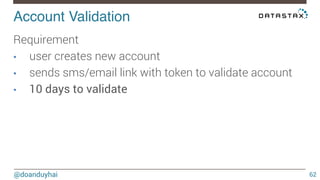
• Account validation 
• Sensor data timeseries
Worst anti-patterns! 
Queue-like designs! 
CQL null! 
Intensive update on same column! 
Design around dynamic schema! 
!
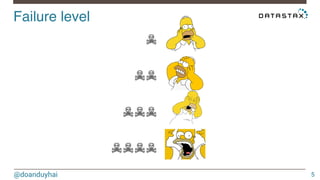
Failure level! 
@doanduyhai 
5 
☠ 
☠☠ 
☠☠☠ 
☠☠☠☠
Queue-like designs! 
@doanduyhai 
6 
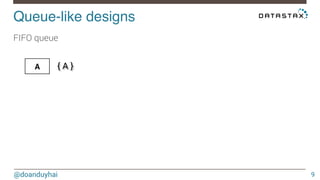
Adding new message ☞ 1 physical insert
Queue-like designs! 
@doanduyhai 
7 
Adding new message ☞ 1 physical insert 
Consuming message = deleting it ☞ 1 physical insert (tombstone)
Queue-like designs! 
@doanduyhai 
8 
Adding new message ☞ 1 physical insert 
Consuming message = deleting it ☞ 1 physical insert (tombstone) 
Transactional queue = re-inserting messages ☞ physical insert * <many>
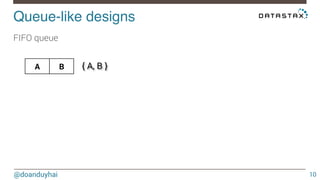
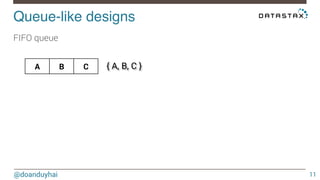
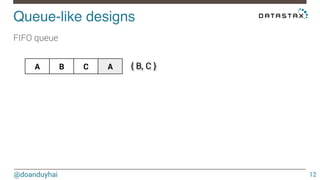
Queue-like designs! 
FIFO queue 
@doanduyhai 
9 
A 
{ A }
Queue-like designs! 
FIFO queue 
@doanduyhai 
10 
A B 
{ A, B }
Queue-like designs! 
FIFO queue 
@doanduyhai 
11 
A B C 
{ A, B, C }
Queue-like designs! 
FIFO queue 
@doanduyhai 
12 
A B C A 
{ B, C }
Queue-like designs! 
FIFO queue 
@doanduyhai 
13 
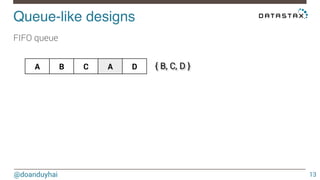
A B C A D 
{ B, C, D }
Queue-like designs! 
FIFO queue 
@doanduyhai 
14 
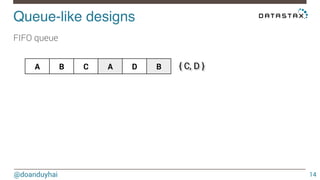
A B C A D B 
{ C, D }
Queue-like designs! 
FIFO queue 
@doanduyhai 
15 
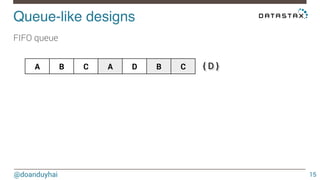
A B C A D B C 
{ D }
Queue-like designs! 
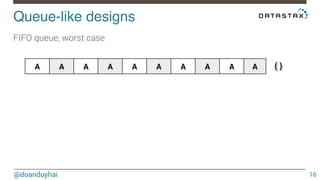
FIFO queue, worst case 
@doanduyhai 
16 
A A A A A A A A A A 
{ }
Failure level! 
@doanduyhai 
17 
☠☠☠
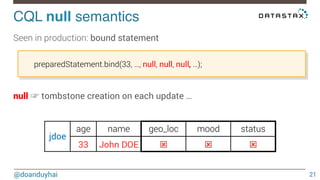
CQL null semantics! 
@doanduyhai 
18 
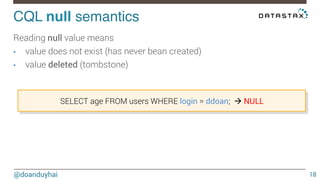
Reading null value means 
• value does not exist (has never bean created) 
• value deleted (tombstone) 
SELECT age FROM users WHERE login = ddoan; à NULL
CQL null semantics! 
@doanduyhai 
19 
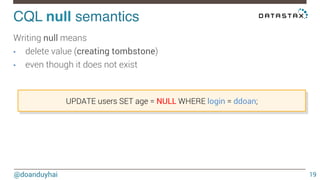
Writing null means 
• delete value (creating tombstone) 
• even though it does not exist 
UPDATE users SET age = NULL WHERE login = ddoan;
CQL null semantics! 
@doanduyhai 
20 
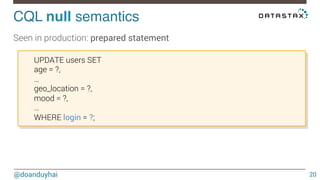
Seen in production: prepared statement 
UPDATE users SET 
age = ?, 
… 
geo_location = ?, 
mood = ?, 
… 
WHERE login = ?;
CQL null semantics! 
@doanduyhai 
21 
Seen in production: bound statement 
preparedStatement.bind(33, …, null, null, null, …); 
null ☞ tombstone creation on each update … 
jdoe 
age name geo_loc mood status 
33 John DOE ý ý ý
Failure level! 
@doanduyhai 
22 
☠
Intensive update! 
@doanduyhai 
23 
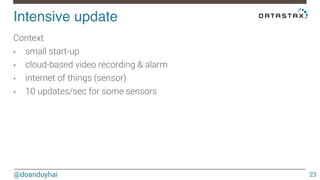
Context 
• small start-up 
• cloud-based video recording & alarm 
• internet of things (sensor) 
• 10 updates/sec for some sensors
Intensive update on same column! 
@doanduyhai 
24 
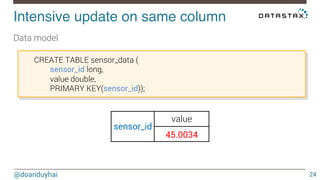
Data model 
sensor_id 
value 
45.0034 
CREATE TABLE sensor_data ( 
sensor_id long, 
value double, 
PRIMARY KEY(sensor_id));
Intensive update on same column! 
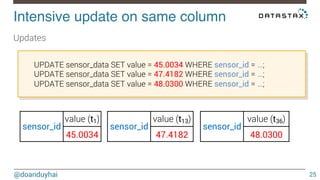
UPDATE sensor_data SET value = 45.0034 WHERE sensor_id = …; 
UPDATE sensor_data SET value = 47.4182 WHERE sensor_id = …; 
UPDATE sensor_data SET value = 48.0300 WHERE sensor_id = …; 
@doanduyhai 
25 
Updates 
sensor_id 
value (t1) 
45.0034 
sensor_id 
value (t13) 
47.4182 
sensor_id 
value (t36) 
48.0300
Intensive update on same column! 
@doanduyhai 
26 
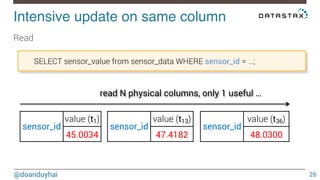
Read 
SELECT sensor_value from sensor_data WHERE sensor_id = …; 
read N physical columns, only 1 useful … 
sensor_id 
value (t1) 
45.0034 
sensor_id 
value (t13) 
47.4182 
sensor_id 
value (t36) 
48.0300
Intensive update on same column! 
@doanduyhai 
27 
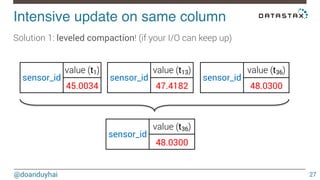
Solution 1: leveled compaction! (if your I/O can keep up) 
sensor_id 
value (t1) 
45.0034 
sensor_id 
value (t13) 
47.4182 
sensor_id 
value (t36) 
48.0300 
sensor_id 
value (t36) 
48.0300
Intensive update on same column! 
@doanduyhai 
28 
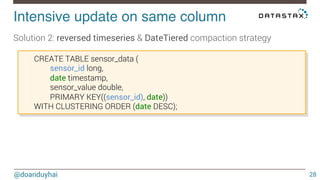
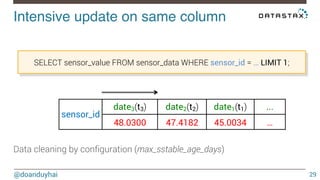
Solution 2: reversed timeseries & DateTiered compaction strategy 
CREATE TABLE sensor_data ( 
sensor_id long, 
date timestamp, 
sensor_value double, 
PRIMARY KEY((sensor_id), date)) 
WITH CLUSTERING ORDER (date DESC);
Intensive update on same column! 
SELECT sensor_value FROM sensor_data WHERE sensor_id = … LIMIT 1; 
@doanduyhai 
29 
sensor_id 
date3(t3) 
date2(t2) 
date1(t1) 
Data cleaning by configuration (max_sstable_age_days) 
... 
48.0300 47.4182 45.0034 …
Failure level! 
@doanduyhai 
30 
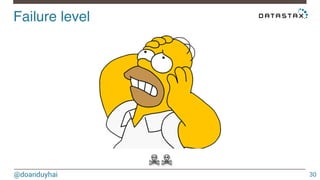
☠☠
Design around dynamic schema! 
@doanduyhai 
31 
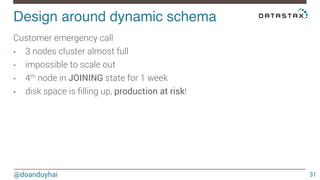
Customer emergency call 
• 3 nodes cluster almost full 
• impossible to scale out 
• 4th node in JOINING state for 1 week 
• disk space is filling up, production at risk!
Design around dynamic schema! 
@doanduyhai 
32 
After investigation 
• 4th node in JOINING state because streaming is stalled 
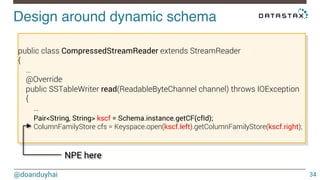
• NPE in logs
Design around dynamic schema! 
@doanduyhai 
33 
After investigation 
• 4th node in JOINING state because streaming is stalled 
• NPE in logs 
Cassandra source-code to the rescue
Design around dynamic schema! 
@doanduyhai 
34 
public class CompressedStreamReader extends StreamReader 
{ 
… 
@Override 
public SSTableWriter read(ReadableByteChannel channel) throws IOException 
{ 
… 
Pair<String, String> kscf = Schema.instance.getCF(cfId); 
ColumnFamilyStore cfs = Keyspace.open(kscf.left).getColumnFamilyStore(kscf.right); 
NPE here
Design around dynamic schema! 
@doanduyhai 
35 
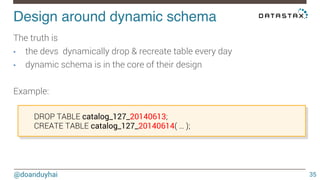
The truth is 
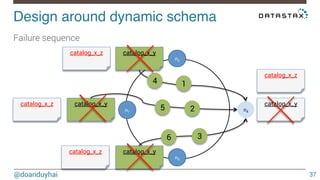
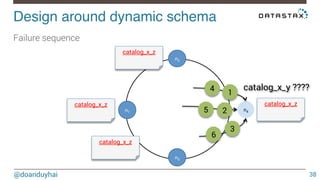
• the devs dynamically drop & recreate table every day 
• dynamic schema is in the core of their design 
Example: 
DROP TABLE catalog_127_20140613; 
CREATE TABLE catalog_127_20140614( … );
Design around dynamic schema! 
@doanduyhai 
36 
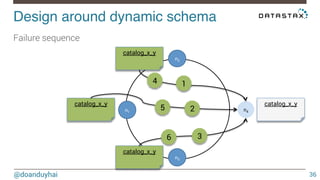
Failure sequence 
n1 
n2 
n4 
n3 
catalog_x_y 
catalog_x_y 
catalog_x_y 
catalog_x_y 
4 1 
2 
3 
5 
6
Design around dynamic schema! 
@doanduyhai 
37 
Failure sequence 
n1 
n2 
n4 
n3 
catalog_x_y 
catalog_x_y 
catalog_x_y 
catalog_x_y 
4 1 
2 
3 
5 
6 
catalog_x_z 
catalog_x_z 
catalog_x_z 
catalog_x_z
Design around dynamic schema! 
@doanduyhai 
catalog_x_y ???? 
38 
Failure sequence 
n1 
n2 
n4 
n3 
4 1 
2 
3 
5 
6 
catalog_x_z 
catalog_x_z 
catalog_x_z 
catalog_x_z
Design around dynamic schema! 
@doanduyhai 
39 
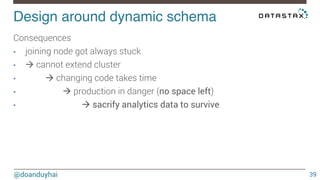
Consequences 
• joining node got always stuck 
• à cannot extend cluster 
• 
à changing code takes time 
• 
à production in danger (no space left) 
• 
à sacrify analytics data to survive
Design around dynamic schema! 
@doanduyhai 
40 
Nutshell 
• dynamic schema change as normal operations is not recommended 
• concurrent schema AND topology change is an anti-pattern
Failure level! 
@doanduyhai 
41 
☠☠☠☠
! " 
! 
Q & R
Nice Examples! 
Rate limiting! 
Anti Fraud! 
Account Validation! 
Sensor Data Timeseries!
Rate limiting! 
@doanduyhai 
44 
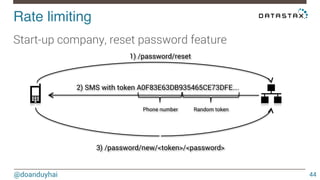
Start-up company, reset password feature 
1) /password/reset 
2) SMS with token A0F83E63DB935465CE73DFE…. 
Phone number Random token 
3) /password/new/<token>/<password>
Rate limiting! 
@doanduyhai 
45 
Problem 1 
• account created with premium phone number
Rate limiting! 
@doanduyhai 
46 
Problem 1 
• account created with premium phone number 
• /password/reset x 100
Rate limiting! 
@doanduyhai 
47 
« money, money, money, give money, in the richman’s world » $$$
Rate limiting! 
@doanduyhai 
48 
Problem 2 
• massive hack
Rate limiting! 
@doanduyhai 
49 
Problem 2 
• massive hack 
• 106 /password/reset calls from few accounts
Rate limiting! 
@doanduyhai 
50 
Problem 2 
• massive hack 
• 106 /password/reset calls from few accounts 
• SMS messages are cheap
Rate limiting! 
@doanduyhai 
51 
Problem 2 
• ☞ but not at the 106/per user/per day scale
Rate limiting! 
@doanduyhai 
52 
Solution 
• premium phone number ☞ Google libphonenumber
Rate limiting! 
@doanduyhai 
53 
Solution 
• premium phone number ☞ Google libphonenumber 
• massive hack ☞ rate limiting with Cassandra
Cassandra Time To Live! 
@doanduyhai 
54 
Time to live 
• built-in feature 
• insert data with a TTL in sec 
• expires server-side automatically 
• ☞ use as sliding-window
Rate limiting in action! 
@doanduyhai 
55 
Implementation 
• threshold = max 3 reset password per sliding 24h
Rate limiting in action! 
@doanduyhai 
56 
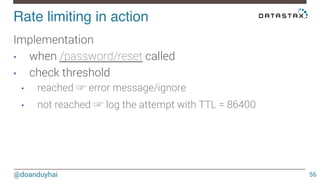
Implementation 
• when /password/reset called 
• check threshold 
• reached ☞ error message/ignore 
• not reached ☞ log the attempt with TTL = 86400
Rate limiting 
demo
Anti Fraud! 
@doanduyhai 
58 
Real story 
• many special offers available 
• 30 mins international calls (50 countries) 
• unlimited land-line calls to 5 countries 
• …
Anti Fraud! 
@doanduyhai 
59 
Real story 
• each offer has a duration (week/month/year) 
• only one offer active at a time
Anti Fraud! 
@doanduyhai 
60 
Cassandra TTL 
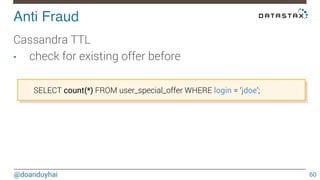
• check for existing offer before 
SELECT count(*) FROM user_special_offer WHERE login = ‘jdoe’;
Anti Fraud! 
@doanduyhai 
61 
Cassandra TTL 
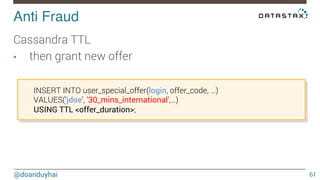
• then grant new offer 
INSERT INTO user_special_offer(login, offer_code, …) 
VALUES(‘jdoe’, ’30_mins_international’,…) 
USING TTL <offer_duration>;
Account Validation! 
@doanduyhai 
62 
Requirement 
• user creates new account 
• sends sms/email link with token to validate account 
• 10 days to validate
Account Validation! 
@doanduyhai 
63 
How to ? 
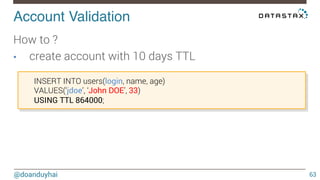
• create account with 10 days TTL 
INSERT INTO users(login, name, age) 
VALUES(‘jdoe’, ‘John DOE’, 33) 
USING TTL 864000;
Account Validation! 
@doanduyhai 
64 
How to ? 
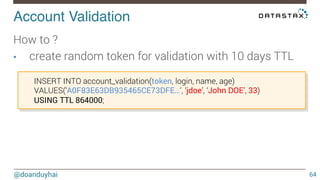
• create random token for validation with 10 days TTL 
INSERT INTO account_validation(token, login, name, age) 
VALUES(‘A0F83E63DB935465CE73DFE…’, ‘jdoe’, ‘John DOE’, 33) 
USING TTL 864000;
Account Validation! 
@doanduyhai 
65 
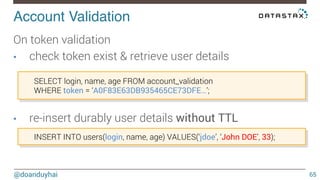
On token validation 
• check token exist & retrieve user details 
SELECT login, name, age FROM account_validation 
WHERE token = ‘A0F83E63DB935465CE73DFE…’; 
• re-insert durably user details without TTL 
INSERT INTO users(login, name, age) VALUES(‘jdoe’, ‘John DOE’, 33);
Sensor Data Timeseries! 
@doanduyhai 
66 
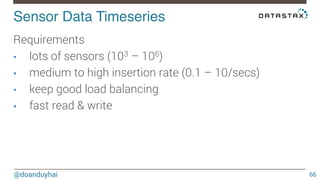
Requirements 
• lots of sensors (103 – 106) 
• medium to high insertion rate (0.1 – 10/secs) 
• keep good load balancing 
• fast read & write
Bucketing! 
@doanduyhai 
67 
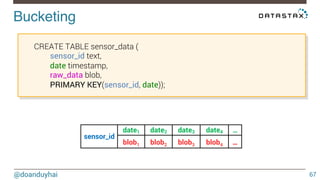
CREATE TABLE sensor_data ( 
sensor_id text, 
date timestamp, 
raw_data blob, 
PRIMARY KEY(sensor_id, date)); 
sensor_id 
date1 date2 date3 date4 … 
blob1 blob2 blob3 blob4 …
Bucketing! 
@doanduyhai 
68 
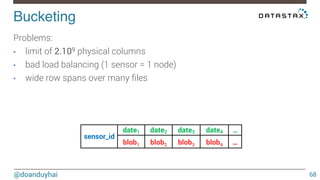
Problems: 
• limit of 2.109 physical columns 
• bad load balancing (1 sensor = 1 node) 
• wide row spans over many files 
sensor_id 
date1 date2 date3 date4 … 
blob1 blob2 blob3 blob4 …
Bucketing! 
@doanduyhai 
69 
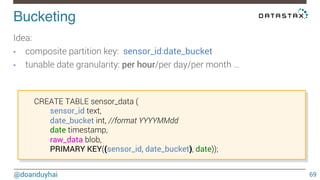
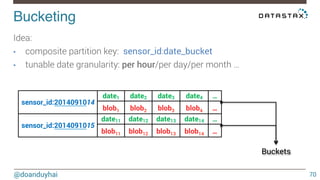
Idea: 
• composite partition key: sensor_id:date_bucket 
• tunable date granularity: per hour/per day/per month … 
CREATE TABLE sensor_data ( 
sensor_id text, 
date_bucket int, //format YYYYMMdd 
date timestamp, 
raw_data blob, 
PRIMARY KEY((sensor_id, date_bucket), date));
Bucketing! 
Idea: 
• composite partition key: sensor_id:date_bucket 
• tunable date granularity: per hour/per day/per month … 
@doanduyhai 
70 
sensor_id:2014091014 
date1 date2 date3 date4 … 
blob1 blob2 blob3 blob4 … 
sensor_id:2014091015 
date11 date12 date13 date14 … 
blob11 blob12 blob13 blob14 … 
Buckets
Bucketing! 
@doanduyhai 
71 
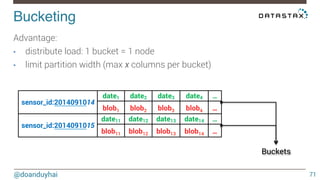
Advantage: 
• distribute load: 1 bucket = 1 node 
• limit partition width (max x columns per bucket) 
Buckets 
sensor_id:2014091014 
date1 date2 date3 date4 … 
blob1 blob2 blob3 blob4 … 
sensor_id:2014091015 
date11 date12 date13 date14 … 
blob11 blob12 blob13 blob14 …
Bucketing! 
@doanduyhai 
72 
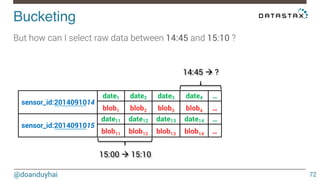
But how can I select raw data between 14:45 and 15:10 ? 
14:45 à ? 
15:00 à 15:10 
sensor_id:2014091014 
date1 date2 date3 date4 … 
blob1 blob2 blob3 blob4 … 
sensor_id:2014091015 
date11 date12 date13 date14 … 
blob11 blob12 blob13 blob14 …
Bucketing! 
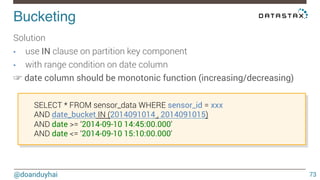
Solution 
• use IN clause on partition key component 
• with range condition on date column 
☞ date column should be monotonic function (increasing/decreasing) 
@doanduyhai 
73 
SELECT * FROM sensor_data WHERE sensor_id = xxx 
AND date_bucket IN (2014091014 , 2014091015) 
AND date >= ‘2014-09-10 14:45:00.000‘ 
AND date <= ‘2014-09-10 15:10:00.000‘
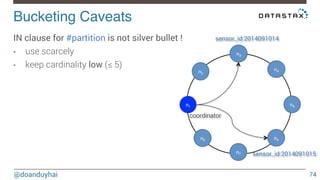
Bucketing Caveats! 
@doanduyhai 
74 
IN clause for #partition is not silver bullet ! 
• use scarcely 
• keep cardinality low (≤ 5) 
n1 
n2 
n3 
n4 
n5 
n6 
n7 
coordinator 
n8 
sensor_id:2014091014 
sensor_id:2014091015
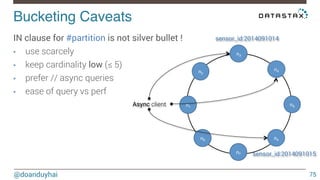
Bucketing Caveats! 
@doanduyhai 
75 
IN clause for #partition is not silver bullet ! 
• use scarcely 
• keep cardinality low (≤ 5) 
• prefer // async queries 
• ease of query vs perf 
n1 
n2 
n3 
n4 
n5 
n6 
n7 
n8 
Async client 
sensor_id:2014091014 
sensor_id:2014091015
! " 
! 
Q & R
Cassandra developers! 
@doanduyhai 
77 
Rule n°1 
If you don’t know, ask for help 
(me, Cassandra ML, PlanetCassandra, stackoverflow, …) 
!
Cassandra developers! 
@doanduyhai 
78 
Rule n°2 
Do not blind-guess troubleshooting 
alone in production 
(ask for help, see rule n°1) 
!
Cassandra developers! 
@doanduyhai 
79 
Rule n°3 
Share with the community 
(your best use-cases … and worst failures) 
! 
http://planetcassandra.org/
Thank You 
@doanduyhai 
duy_hai.doan@datastax.com

Cassandra nice use cases and worst anti patterns

  • 1.
    Cassandra nice use-casesand worst anti-patterns DuyHai DOAN, Technical Advocate @doanduyhai
  • 2.
    Agenda! @doanduyhai 2 Anti-patterns • Queue-like designs • CQL null values • Intensive update on same column • Design around dynamic schema
  • 3.
    Agenda! @doanduyhai 3 Nice use-cases • Rate-limiting • Anti Fraud • Account validation • Sensor data timeseries
  • 4.
    Worst anti-patterns! Queue-likedesigns! CQL null! Intensive update on same column! Design around dynamic schema! !
  • 5.
    Failure level! @doanduyhai 5 ☠ ☠☠ ☠☠☠ ☠☠☠☠
  • 6.
    Queue-like designs! @doanduyhai 6 Adding new message ☞ 1 physical insert
  • 7.
    Queue-like designs! @doanduyhai 7 Adding new message ☞ 1 physical insert Consuming message = deleting it ☞ 1 physical insert (tombstone)
  • 8.
    Queue-like designs! @doanduyhai 8 Adding new message ☞ 1 physical insert Consuming message = deleting it ☞ 1 physical insert (tombstone) Transactional queue = re-inserting messages ☞ physical insert * <many>
  • 9.
    Queue-like designs! FIFOqueue @doanduyhai 9 A { A }
  • 10.
    Queue-like designs! FIFOqueue @doanduyhai 10 A B { A, B }
  • 11.
    Queue-like designs! FIFOqueue @doanduyhai 11 A B C { A, B, C }
  • 12.
    Queue-like designs! FIFOqueue @doanduyhai 12 A B C A { B, C }
  • 13.
    Queue-like designs! FIFOqueue @doanduyhai 13 A B C A D { B, C, D }
  • 14.
    Queue-like designs! FIFOqueue @doanduyhai 14 A B C A D B { C, D }
  • 15.
    Queue-like designs! FIFOqueue @doanduyhai 15 A B C A D B C { D }
  • 16.
    Queue-like designs! FIFOqueue, worst case @doanduyhai 16 A A A A A A A A A A { }
  • 17.
  • 18.
    CQL null semantics! @doanduyhai 18 Reading null value means • value does not exist (has never bean created) • value deleted (tombstone) SELECT age FROM users WHERE login = ddoan; à NULL
  • 19.
    CQL null semantics! @doanduyhai 19 Writing null means • delete value (creating tombstone) • even though it does not exist UPDATE users SET age = NULL WHERE login = ddoan;
  • 20.
    CQL null semantics! @doanduyhai 20 Seen in production: prepared statement UPDATE users SET age = ?, … geo_location = ?, mood = ?, … WHERE login = ?;
  • 21.
    CQL null semantics! @doanduyhai 21 Seen in production: bound statement preparedStatement.bind(33, …, null, null, null, …); null ☞ tombstone creation on each update … jdoe age name geo_loc mood status 33 John DOE ý ý ý
  • 22.
  • 23.
    Intensive update! @doanduyhai 23 Context • small start-up • cloud-based video recording & alarm • internet of things (sensor) • 10 updates/sec for some sensors
  • 24.
    Intensive update onsame column! @doanduyhai 24 Data model sensor_id value 45.0034 CREATE TABLE sensor_data ( sensor_id long, value double, PRIMARY KEY(sensor_id));
  • 25.
    Intensive update onsame column! UPDATE sensor_data SET value = 45.0034 WHERE sensor_id = …; UPDATE sensor_data SET value = 47.4182 WHERE sensor_id = …; UPDATE sensor_data SET value = 48.0300 WHERE sensor_id = …; @doanduyhai 25 Updates sensor_id value (t1) 45.0034 sensor_id value (t13) 47.4182 sensor_id value (t36) 48.0300
  • 26.
    Intensive update onsame column! @doanduyhai 26 Read SELECT sensor_value from sensor_data WHERE sensor_id = …; read N physical columns, only 1 useful … sensor_id value (t1) 45.0034 sensor_id value (t13) 47.4182 sensor_id value (t36) 48.0300
  • 27.
    Intensive update onsame column! @doanduyhai 27 Solution 1: leveled compaction! (if your I/O can keep up) sensor_id value (t1) 45.0034 sensor_id value (t13) 47.4182 sensor_id value (t36) 48.0300 sensor_id value (t36) 48.0300
  • 28.
    Intensive update onsame column! @doanduyhai 28 Solution 2: reversed timeseries & DateTiered compaction strategy CREATE TABLE sensor_data ( sensor_id long, date timestamp, sensor_value double, PRIMARY KEY((sensor_id), date)) WITH CLUSTERING ORDER (date DESC);
  • 29.
    Intensive update onsame column! SELECT sensor_value FROM sensor_data WHERE sensor_id = … LIMIT 1; @doanduyhai 29 sensor_id date3(t3) date2(t2) date1(t1) Data cleaning by configuration (max_sstable_age_days) ... 48.0300 47.4182 45.0034 …
  • 30.
  • 31.
    Design around dynamicschema! @doanduyhai 31 Customer emergency call • 3 nodes cluster almost full • impossible to scale out • 4th node in JOINING state for 1 week • disk space is filling up, production at risk!
  • 32.
    Design around dynamicschema! @doanduyhai 32 After investigation • 4th node in JOINING state because streaming is stalled • NPE in logs
  • 33.
    Design around dynamicschema! @doanduyhai 33 After investigation • 4th node in JOINING state because streaming is stalled • NPE in logs Cassandra source-code to the rescue
  • 34.
    Design around dynamicschema! @doanduyhai 34 public class CompressedStreamReader extends StreamReader { … @Override public SSTableWriter read(ReadableByteChannel channel) throws IOException { … Pair<String, String> kscf = Schema.instance.getCF(cfId); ColumnFamilyStore cfs = Keyspace.open(kscf.left).getColumnFamilyStore(kscf.right); NPE here
  • 35.
    Design around dynamicschema! @doanduyhai 35 The truth is • the devs dynamically drop & recreate table every day • dynamic schema is in the core of their design Example: DROP TABLE catalog_127_20140613; CREATE TABLE catalog_127_20140614( … );
  • 36.
    Design around dynamicschema! @doanduyhai 36 Failure sequence n1 n2 n4 n3 catalog_x_y catalog_x_y catalog_x_y catalog_x_y 4 1 2 3 5 6
  • 37.
    Design around dynamicschema! @doanduyhai 37 Failure sequence n1 n2 n4 n3 catalog_x_y catalog_x_y catalog_x_y catalog_x_y 4 1 2 3 5 6 catalog_x_z catalog_x_z catalog_x_z catalog_x_z
  • 38.
    Design around dynamicschema! @doanduyhai catalog_x_y ???? 38 Failure sequence n1 n2 n4 n3 4 1 2 3 5 6 catalog_x_z catalog_x_z catalog_x_z catalog_x_z
  • 39.
    Design around dynamicschema! @doanduyhai 39 Consequences • joining node got always stuck • à cannot extend cluster • à changing code takes time • à production in danger (no space left) • à sacrify analytics data to survive
  • 40.
    Design around dynamicschema! @doanduyhai 40 Nutshell • dynamic schema change as normal operations is not recommended • concurrent schema AND topology change is an anti-pattern
  • 41.
  • 42.
    ! " ! Q & R
  • 43.
    Nice Examples! Ratelimiting! Anti Fraud! Account Validation! Sensor Data Timeseries!
  • 44.
    Rate limiting! @doanduyhai 44 Start-up company, reset password feature 1) /password/reset 2) SMS with token A0F83E63DB935465CE73DFE…. Phone number Random token 3) /password/new/<token>/<password>
  • 45.
    Rate limiting! @doanduyhai 45 Problem 1 • account created with premium phone number
  • 46.
    Rate limiting! @doanduyhai 46 Problem 1 • account created with premium phone number • /password/reset x 100
  • 47.
    Rate limiting! @doanduyhai 47 « money, money, money, give money, in the richman’s world » $$$
  • 48.
    Rate limiting! @doanduyhai 48 Problem 2 • massive hack
  • 49.
    Rate limiting! @doanduyhai 49 Problem 2 • massive hack • 106 /password/reset calls from few accounts
  • 50.
    Rate limiting! @doanduyhai 50 Problem 2 • massive hack • 106 /password/reset calls from few accounts • SMS messages are cheap
  • 51.
    Rate limiting! @doanduyhai 51 Problem 2 • ☞ but not at the 106/per user/per day scale
  • 52.
    Rate limiting! @doanduyhai 52 Solution • premium phone number ☞ Google libphonenumber
  • 53.
    Rate limiting! @doanduyhai 53 Solution • premium phone number ☞ Google libphonenumber • massive hack ☞ rate limiting with Cassandra
  • 54.
    Cassandra Time ToLive! @doanduyhai 54 Time to live • built-in feature • insert data with a TTL in sec • expires server-side automatically • ☞ use as sliding-window
  • 55.
    Rate limiting inaction! @doanduyhai 55 Implementation • threshold = max 3 reset password per sliding 24h
  • 56.
    Rate limiting inaction! @doanduyhai 56 Implementation • when /password/reset called • check threshold • reached ☞ error message/ignore • not reached ☞ log the attempt with TTL = 86400
  • 57.
  • 58.
    Anti Fraud! @doanduyhai 58 Real story • many special offers available • 30 mins international calls (50 countries) • unlimited land-line calls to 5 countries • …
  • 59.
    Anti Fraud! @doanduyhai 59 Real story • each offer has a duration (week/month/year) • only one offer active at a time
  • 60.
    Anti Fraud! @doanduyhai 60 Cassandra TTL • check for existing offer before SELECT count(*) FROM user_special_offer WHERE login = ‘jdoe’;
  • 61.
    Anti Fraud! @doanduyhai 61 Cassandra TTL • then grant new offer INSERT INTO user_special_offer(login, offer_code, …) VALUES(‘jdoe’, ’30_mins_international’,…) USING TTL <offer_duration>;
  • 62.
    Account Validation! @doanduyhai 62 Requirement • user creates new account • sends sms/email link with token to validate account • 10 days to validate
  • 63.
    Account Validation! @doanduyhai 63 How to ? • create account with 10 days TTL INSERT INTO users(login, name, age) VALUES(‘jdoe’, ‘John DOE’, 33) USING TTL 864000;
  • 64.
    Account Validation! @doanduyhai 64 How to ? • create random token for validation with 10 days TTL INSERT INTO account_validation(token, login, name, age) VALUES(‘A0F83E63DB935465CE73DFE…’, ‘jdoe’, ‘John DOE’, 33) USING TTL 864000;
  • 65.
    Account Validation! @doanduyhai 65 On token validation • check token exist & retrieve user details SELECT login, name, age FROM account_validation WHERE token = ‘A0F83E63DB935465CE73DFE…’; • re-insert durably user details without TTL INSERT INTO users(login, name, age) VALUES(‘jdoe’, ‘John DOE’, 33);
  • 66.
    Sensor Data Timeseries! @doanduyhai 66 Requirements • lots of sensors (103 – 106) • medium to high insertion rate (0.1 – 10/secs) • keep good load balancing • fast read & write
  • 67.
    Bucketing! @doanduyhai 67 CREATE TABLE sensor_data ( sensor_id text, date timestamp, raw_data blob, PRIMARY KEY(sensor_id, date)); sensor_id date1 date2 date3 date4 … blob1 blob2 blob3 blob4 …
  • 68.
    Bucketing! @doanduyhai 68 Problems: • limit of 2.109 physical columns • bad load balancing (1 sensor = 1 node) • wide row spans over many files sensor_id date1 date2 date3 date4 … blob1 blob2 blob3 blob4 …
  • 69.
    Bucketing! @doanduyhai 69 Idea: • composite partition key: sensor_id:date_bucket • tunable date granularity: per hour/per day/per month … CREATE TABLE sensor_data ( sensor_id text, date_bucket int, //format YYYYMMdd date timestamp, raw_data blob, PRIMARY KEY((sensor_id, date_bucket), date));
  • 70.
    Bucketing! Idea: •composite partition key: sensor_id:date_bucket • tunable date granularity: per hour/per day/per month … @doanduyhai 70 sensor_id:2014091014 date1 date2 date3 date4 … blob1 blob2 blob3 blob4 … sensor_id:2014091015 date11 date12 date13 date14 … blob11 blob12 blob13 blob14 … Buckets
  • 71.
    Bucketing! @doanduyhai 71 Advantage: • distribute load: 1 bucket = 1 node • limit partition width (max x columns per bucket) Buckets sensor_id:2014091014 date1 date2 date3 date4 … blob1 blob2 blob3 blob4 … sensor_id:2014091015 date11 date12 date13 date14 … blob11 blob12 blob13 blob14 …
  • 72.
    Bucketing! @doanduyhai 72 But how can I select raw data between 14:45 and 15:10 ? 14:45 à ? 15:00 à 15:10 sensor_id:2014091014 date1 date2 date3 date4 … blob1 blob2 blob3 blob4 … sensor_id:2014091015 date11 date12 date13 date14 … blob11 blob12 blob13 blob14 …
  • 73.
    Bucketing! Solution •use IN clause on partition key component • with range condition on date column ☞ date column should be monotonic function (increasing/decreasing) @doanduyhai 73 SELECT * FROM sensor_data WHERE sensor_id = xxx AND date_bucket IN (2014091014 , 2014091015) AND date >= ‘2014-09-10 14:45:00.000‘ AND date <= ‘2014-09-10 15:10:00.000‘
  • 74.
    Bucketing Caveats! @doanduyhai 74 IN clause for #partition is not silver bullet ! • use scarcely • keep cardinality low (≤ 5) n1 n2 n3 n4 n5 n6 n7 coordinator n8 sensor_id:2014091014 sensor_id:2014091015
  • 75.
    Bucketing Caveats! @doanduyhai 75 IN clause for #partition is not silver bullet ! • use scarcely • keep cardinality low (≤ 5) • prefer // async queries • ease of query vs perf n1 n2 n3 n4 n5 n6 n7 n8 Async client sensor_id:2014091014 sensor_id:2014091015
  • 76.
    ! " ! Q & R
  • 77.
    Cassandra developers! @doanduyhai 77 Rule n°1 If you don’t know, ask for help (me, Cassandra ML, PlanetCassandra, stackoverflow, …) !
  • 78.
    Cassandra developers! @doanduyhai 78 Rule n°2 Do not blind-guess troubleshooting alone in production (ask for help, see rule n°1) !
  • 79.
    Cassandra developers! @doanduyhai 79 Rule n°3 Share with the community (your best use-cases … and worst failures) ! http://planetcassandra.org/
  • 80.
    Thank You @doanduyhai duy_hai.doan@datastax.com