Date: 04/22/14
File: SWINCCS_07e.1
SIMATIC HMI
Siemens AG 2000. All rights reserved.©
SITRAIN Training for
Automation and Drives
User Archives
Date: 04/22/14
File: SWINCCS_07e.2
SIMATIC HMI
Siemens AG 2000. All rights reserved.©
SITRAIN Training for
Automation and Drives
Objectives
- Creating a User Archive
- Creating a Table View
- Creating a Form View
- Accessing a User Archive
- Data Transfer to a Controller
Date: 04/22/14
File: SWINCCS_07e.3
SIMATIC HMI
Siemens AG 2000. All rights reserved.©
SITRAIN Training for
Automation and Drives
User Archives
Advantages of user archives for:
• Recipes
• Batch data
• Production data
• Data storage for data from the controller
• Tool management
•
•
Access to user archives through:
• Table window
• Internal functions
• API functions (described in the WinCC Help, among others)
• ODBC / SQL
• MS Query
• Communication with the controller using tags
• Communication with the controller using raw data
Date: 04/22/14
File: SWINCCS_07e.4
SIMATIC HMI
Siemens AG 2000. All rights reserved.©
SITRAIN Training for
Automation and Drives
WinCC Help (System)
WinCC Help
Date: 04/22/14
File: SWINCCS_07e.5
SIMATIC HMI
Siemens AG 2000. All rights reserved.©
SITRAIN Training for
Automation and Drives
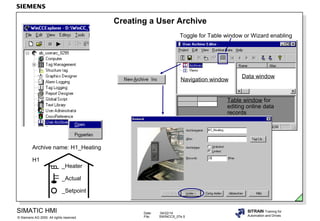
Creating a User Archive
Navigation window
Data window
Archive name: H1_Heating
H1
_Heater
_Actual
_Setpoint
Table window for
editing online data
records
Toggle for Table window or Wizard enabling
Date: 04/22/14
File: SWINCCS_07e.6
SIMATIC HMI
Siemens AG 2000. All rights reserved.©
SITRAIN Training for
Automation and Drives
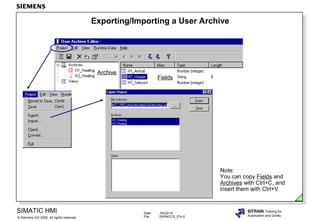
Exporting/Importing a User Archive
Note:
You can copy Fields and
Archives with Ctrl+C, and
insert them with Ctrl+V
Fields
Archive
Date: 04/22/14
File: SWINCCS_07e.7
SIMATIC HMI
Siemens AG 2000. All rights reserved.©
SITRAIN Training for
Automation and Drives
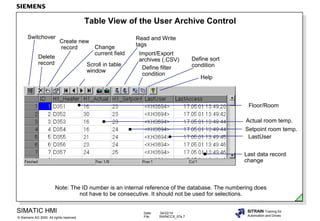
Table View of the User Archive Control
Switchover
Delete
record
Create new
record Change
current field
Scroll in table
window
Read and Write
tags
Import/Export
archives (.CSV)
Define filter
condition
Define sort
condition
Note: The ID number is an internal reference of the database. The numbering does
not have to be consecutive. It should not be used for selections.
Help
Floor/Room
Actual room temp.
Setpoint room temp.
LastUser
Last data record
change
Date: 04/22/14
File: SWINCCS_07e.8
SIMATIC HMI
Siemens AG 2000. All rights reserved.©
SITRAIN Training for
Automation and Drives
Form View of the User Archive Control
Operation outside of the Control
Date: 04/22/14
File: SWINCCS_07e.9
SIMATIC HMI
Siemens AG 2000. All rights reserved.©
SITRAIN Training for
Automation and Drives
Communication with the Controller using Tags,
Operator Controlled
Runtime
Select
Interface tags
RT DB
Date: 04/22/14
File: SWINCCS_07e.10
SIMATIC HMI
Siemens AG 2000. All rights reserved.©
SITRAIN Training for
Automation and Drives
Runtime
RT DB
Communication with the Controller using Tags,
PLC Controlled
Control tags Interface tags
Are supplied by the controller
Date: 04/22/14
File: SWINCCS_07e.11
SIMATIC HMI
Siemens AG 2000. All rights reserved.©
SITRAIN Training for
Automation and Drives
Runtime
Sort
Date: 04/22/14
File: SWINCCS_07e.12
SIMATIC HMI
Siemens AG 2000. All rights reserved.©
SITRAIN Training for
Automation and Drives
Runtime
Filter Condition
Date: 04/22/14
File: SWINCCS_07e.13
SIMATIC HMI
Siemens AG 2000. All rights reserved.©
SITRAIN Training for
Automation and Drives
Creating Views
Shortcut menu
Date: 04/22/14
File: SWINCCS_07e.14
SIMATIC HMI
Siemens AG 2000. All rights reserved.©
SITRAIN Training for
Automation and Drives
Exercise 1: Creating an Archive
User Archive Editor
• Creating an Archive
• Creating Archive Fields
• Editing Table Windows
Archive fields
Date: 04/22/14
File: SWINCCS_07e.15
SIMATIC HMI
Siemens AG 2000. All rights reserved.©
SITRAIN Training for
Automation and Drives
Exercise 1: Integrating a Control
Form window call
You can change the column width after you press Ctrl+double-click.
You can activate the editing mode for the form window by
pressing Ctrl+double-click!
Date: 04/22/14
File: SWINCCS_07e.16
SIMATIC HMI
Siemens AG 2000. All rights reserved.©
SITRAIN Training for
Automation and Drives
Exercise 1: Setting Control Parameters
Note: Every time you make a change to the archive structure, you have to reselect the source
(archive).
Double-click
Date: 04/22/14
File: SWINCCS_07e.17
SIMATIC HMI
Siemens AG 2000. All rights reserved.©
SITRAIN Training for
Automation and Drives
Exercise 2: Form View
• Expanding the exercise picture with the form view of the
User Archive- Table Element
Configuration
Switch over
Shortcut menu
Runtime
Date: 04/22/14
File: SWINCCS_07e.18
SIMATIC HMI
Siemens AG 2000. All rights reserved.©
SITRAIN Training for
Automation and Drives
Exercise 3: A Second User Archive
• Expanding the exercise picture
Views Archives
Date: 04/22/14
File: SWINCCS_07e.19
SIMATIC HMI
Siemens AG 2000. All rights reserved.©
SITRAIN Training for
Automation and Drives
Exercise 4: Views of the Two Databases
• Expanding the exercise picture
Date: 04/22/14
File: SWINCCS_07e.20
SIMATIC HMI
Siemens AG 2000. All rights reserved.©
SITRAIN Training for
Automation and Drives
Double-click
Exercise 4: Integrating a Control
for views

A d swincc07e

  • 1.
    Date: 04/22/14 File: SWINCCS_07e.1 SIMATICHMI Siemens AG 2000. All rights reserved.© SITRAIN Training for Automation and Drives User Archives
  • 2.
    Date: 04/22/14 File: SWINCCS_07e.2 SIMATICHMI Siemens AG 2000. All rights reserved.© SITRAIN Training for Automation and Drives Objectives - Creating a User Archive - Creating a Table View - Creating a Form View - Accessing a User Archive - Data Transfer to a Controller
  • 3.
    Date: 04/22/14 File: SWINCCS_07e.3 SIMATICHMI Siemens AG 2000. All rights reserved.© SITRAIN Training for Automation and Drives User Archives Advantages of user archives for: • Recipes • Batch data • Production data • Data storage for data from the controller • Tool management • • Access to user archives through: • Table window • Internal functions • API functions (described in the WinCC Help, among others) • ODBC / SQL • MS Query • Communication with the controller using tags • Communication with the controller using raw data
  • 4.
    Date: 04/22/14 File: SWINCCS_07e.4 SIMATICHMI Siemens AG 2000. All rights reserved.© SITRAIN Training for Automation and Drives WinCC Help (System) WinCC Help
  • 5.
    Date: 04/22/14 File: SWINCCS_07e.5 SIMATICHMI Siemens AG 2000. All rights reserved.© SITRAIN Training for Automation and Drives Creating a User Archive Navigation window Data window Archive name: H1_Heating H1 _Heater _Actual _Setpoint Table window for editing online data records Toggle for Table window or Wizard enabling
  • 6.
    Date: 04/22/14 File: SWINCCS_07e.6 SIMATICHMI Siemens AG 2000. All rights reserved.© SITRAIN Training for Automation and Drives Exporting/Importing a User Archive Note: You can copy Fields and Archives with Ctrl+C, and insert them with Ctrl+V Fields Archive
  • 7.
    Date: 04/22/14 File: SWINCCS_07e.7 SIMATICHMI Siemens AG 2000. All rights reserved.© SITRAIN Training for Automation and Drives Table View of the User Archive Control Switchover Delete record Create new record Change current field Scroll in table window Read and Write tags Import/Export archives (.CSV) Define filter condition Define sort condition Note: The ID number is an internal reference of the database. The numbering does not have to be consecutive. It should not be used for selections. Help Floor/Room Actual room temp. Setpoint room temp. LastUser Last data record change
  • 8.
    Date: 04/22/14 File: SWINCCS_07e.8 SIMATICHMI Siemens AG 2000. All rights reserved.© SITRAIN Training for Automation and Drives Form View of the User Archive Control Operation outside of the Control
  • 9.
    Date: 04/22/14 File: SWINCCS_07e.9 SIMATICHMI Siemens AG 2000. All rights reserved.© SITRAIN Training for Automation and Drives Communication with the Controller using Tags, Operator Controlled Runtime Select Interface tags RT DB
  • 10.
    Date: 04/22/14 File: SWINCCS_07e.10 SIMATICHMI Siemens AG 2000. All rights reserved.© SITRAIN Training for Automation and Drives Runtime RT DB Communication with the Controller using Tags, PLC Controlled Control tags Interface tags Are supplied by the controller
  • 11.
    Date: 04/22/14 File: SWINCCS_07e.11 SIMATICHMI Siemens AG 2000. All rights reserved.© SITRAIN Training for Automation and Drives Runtime Sort
  • 12.
    Date: 04/22/14 File: SWINCCS_07e.12 SIMATICHMI Siemens AG 2000. All rights reserved.© SITRAIN Training for Automation and Drives Runtime Filter Condition
  • 13.
    Date: 04/22/14 File: SWINCCS_07e.13 SIMATICHMI Siemens AG 2000. All rights reserved.© SITRAIN Training for Automation and Drives Creating Views Shortcut menu
  • 14.
    Date: 04/22/14 File: SWINCCS_07e.14 SIMATICHMI Siemens AG 2000. All rights reserved.© SITRAIN Training for Automation and Drives Exercise 1: Creating an Archive User Archive Editor • Creating an Archive • Creating Archive Fields • Editing Table Windows Archive fields
  • 15.
    Date: 04/22/14 File: SWINCCS_07e.15 SIMATICHMI Siemens AG 2000. All rights reserved.© SITRAIN Training for Automation and Drives Exercise 1: Integrating a Control Form window call You can change the column width after you press Ctrl+double-click. You can activate the editing mode for the form window by pressing Ctrl+double-click!
  • 16.
    Date: 04/22/14 File: SWINCCS_07e.16 SIMATICHMI Siemens AG 2000. All rights reserved.© SITRAIN Training for Automation and Drives Exercise 1: Setting Control Parameters Note: Every time you make a change to the archive structure, you have to reselect the source (archive). Double-click
  • 17.
    Date: 04/22/14 File: SWINCCS_07e.17 SIMATICHMI Siemens AG 2000. All rights reserved.© SITRAIN Training for Automation and Drives Exercise 2: Form View • Expanding the exercise picture with the form view of the User Archive- Table Element Configuration Switch over Shortcut menu Runtime
  • 18.
    Date: 04/22/14 File: SWINCCS_07e.18 SIMATICHMI Siemens AG 2000. All rights reserved.© SITRAIN Training for Automation and Drives Exercise 3: A Second User Archive • Expanding the exercise picture Views Archives
  • 19.
    Date: 04/22/14 File: SWINCCS_07e.19 SIMATICHMI Siemens AG 2000. All rights reserved.© SITRAIN Training for Automation and Drives Exercise 4: Views of the Two Databases • Expanding the exercise picture
  • 20.
    Date: 04/22/14 File: SWINCCS_07e.20 SIMATICHMI Siemens AG 2000. All rights reserved.© SITRAIN Training for Automation and Drives Double-click Exercise 4: Integrating a Control for views

Editor's Notes

  • #2 Contents Page Objectives ........................................................................................................................................2 User Archives.................................................................................................................................3 WinCC Help (system) ......................................................................................................................4 Creating a User Archive ……...........................................................................................................5 Exporting/Importing a User Archive ..................................................................................................6 Table View of the User Archive Control ..........................................................................................7 Form View of the User Archive Control .........................................................................................8 Communication with the Controller using Tags, Operator Controlled ...............................................9 Communication with the Controller using Tags, PLC Controlled .................................................... 10 Sort…..............................................................................................................................................11 Filter Condition..................................................................................................................................12 Creating Views ….............................................................................................................................13 Exercise 1: Creating an Archive .....................................................................................................14 Exercise 1: Integrating a Control .....................................................................................................15 Exercise 1: Setting Control Parameters ...........................................................................................16 Exercise 2: Form View .....................................................................................................................17 Exercise 3: A Second User Archive .................................................................................................18 Exercise 4: Views of the Two Databases .......................................................................................19 Exercise 4: Integrating a Control ...................................................................................................20
  • #3 Upon completion of this chapter, the participant should be familiar with: • the advantages of the User Archive. • the Table View, based on an example. • the Form View, based on an example. • the access possibilities, based on an example. • the communication possibilities, based on an example. • the application possibilities, based on an example.
  • #4 General InformationThe user archives package is available as a WinCC option package.It consists of -user documentation-internal functions-keydisk for enabling the software.The user archive software is already included on the WinCC CD. ApplicationsThe user archives can be utilized and applied in a great variety of applications (see slide above). BasicsWinCC User Archives is a database system which you can configure for your own requirements. The WinCC User Archives has two types of database tables. ArchivesArchives are database tables in which you can create your own data fields. Archives are used to store data and offer a database-type access to these data. Views Views obtain data from the archives and are used to summarize data, in order to receive an overview of product groups, for example.The data in a View can also be edited in Runtime. The changed data are transferred into the original archive.
  • #5 WinCC provides you with a powerful help system for the configuration of the user archive.
  • #6 ExampleTemperature data from three components is to be stored in the visualization system.For this, a user archive is configured with the fields:-H1_Heater-H1_Actual-H1_Setpoint Creating an ArchiveYou can create a user archive in the User Archive Editor, Navigation window.You can use the Wizard to specify:the archive name with the number of data records, communication parameters, control tag parameters, authorization and flag parameters. Creating Archive In the navigation window “New Field”, you can define the three fields Fields mentioned above with the help of the Wizard. Field name, Value, Authorizations and Flags are assigned here. NoteAny changes to user archives only take effect after Saving. Table WindowYou can switch on or switch off the table window by clicking on Edit in the menu bar and then clicking on Runtime Data in the drop-down menu. In the Table window, you can assign values to the three configured archive fields. ControlThe Control (WinCC User Archive Table Element) is required in the Graphics Designer for outputting the table element.
  • #7 Export/ImportYou can transfer the structure and the data for a new archive with the Export/Import function.
  • #8 FunctionsThe table window makes it possible to edit the data of the user archive in various ways: -Switchover(switch between Form view and Table view) -Delete record (selected record is deleted) -Create new record (and confirm every time with the Enter key) -Change current field -Scroll table window(scroll forward and backward, as well as to the beginning or end of the archive) -Read and write tags(WinCC tags) -Import/Export archives(Attention! CSV format) -Define filter condition (Option! are formulated directly in the database in SQL language) -Define sort condition (Option! are given directly in the database in SQL language) -Help(request) AdvantagesThe table window offers simple access to the data of the user archive.
  • #9 FunctionsThe form window has a user interface which you can create according to your needs. The form view has three field types: • static texts (any static text you wish)• input fields (makes it possible for you to display and edit the data fields of the current archive)• buttons (button allows you your own button instead of the symbols of the form field) AdvantagesThe form window offers simple access to the data of the user archive which you yourself created. NoteIt is also possible to place all toolbar buttons outside of the Control in the Graphics Designer.Configuration: Create buttonObject properties/ Event/ Mouse/ Direct connection/Source: Enter constant valuesTarget: Object in Picture -- Select (Object: OLE Control, Property: PressTBButtonThe Constants:1 Form; 2 First; 3 Previous, 4 Next; 5 Last; 6 Delete;7 New; 8 Edit; 9 ReadVar; 10 WriteVar; 11 Import; 12 Export; 13 Filter, 14 Sort; 15 Help;
  • #10 You can use tags to make a simple communication with the controller. You have to take this application into consideration when you assign parameters to the Wizard. The tags are then generated in the Tag Management.
  • #11 You have to take this application into consideration when you assign parameters to the Wizard. The tags are then generated in the Tag Management. Function of the Control Tags IDThe identifier (corresponds to the data record number) of the user archive JobThree jobs are possible: reading, writing and delete: SIMATIC to Archive = 6 Archive to SIMATIC = 7 Delete = 8 After the job has been executed there is an error identifier in this control tag: No error= 0 Error= -1 FieldThe archive field (Column labeling, Ingredients, for example) ValueThe archive field value (for example, ‘Flour‘)
  • #14 General InformationA view is an arithmetical logic linking of fields from at least two archives. These archives must have at least one thing in common or they must have a relationship. If several conditions are given then these are logically gated with one another. It must be noted that it only makes sense to link fields of the same type. The following logic operations are possible:•<•<=•0•>•>0•<> ExampleTwo archives: H1_Heating, H2_Heating are to be gated with specific fields (H1_Heater = H2_Heater, as well as H1_Actual >= H2_Actual ).In the view formation, the actual value of H1_Heater is only displayed if it is >= the actual value of H2_Heater. AdvantagesOnly values of the same type field are displayed, that are equal to (H1_Heating) or greater than or equal to the archive H2_Heating. NoteThe data in a View can also be edited in Runtime. The data that are changed are transferred to the original archive.
  • #15 TaskYou are to create a user archive to store temperature data. For this, you will require three fields: -H1_Heater (text tag 8bit character set / character string)-H1_Actual (signed 32 bit value )-H1_Setpoint (signed 32 bit value ) Creating an ArchiveFirst of all, you create the archive “H1_Heating” in the User Archive. -The archive type should only have 8 records.-Communication takes place via WinCC tags.-The control tags via the button “Create” (@UA_H1_Heater /internal),-From the four buttons choose “Select”, the corresponding tag e.g. _ID etc.-Authorizations and Flags, Button “OK”. Creating Archive In the navigation window, create “New Field” with the help of the wizard. Fields-General: -Field name “H1_Heater”, -Type: character string, -length: 8-Values: WinCC tag: select “H1_Heater”.-Authorizations and Flags: “no entry”, Button “OK”.Next Field: yes-Field name: “H1_Actual”, -Type: Number double-Values: WinCC tag: select “H1_Actual”, Start Value 0.- Authorizations and Flags: “no entry”, Button “OK”.Next Field: yes-Field name: “H1_Setpoint”, -Type: Number double-Values: WinCC tag: select “H1_Setpoint”, Start Value 0.- Authorizations and Flags; “no entry”, Button “OK”. NoteAny changes you make to user archives only take effect after Saving. Table WindowYou can switch on or switch off the table field by clicking on Edit in the menu bar and then clicking on Runtime Data in the drop-down menu. -by double-clicking on one of the fields, you can enter data. Here you can specify values.
  • #16 ControlA Control is created in the Graphics Designer in which the table element configured above is displayed (the procedure is displayed in the slide above). NoteIn order to specify the properties of the “WinCC User Archive Table Element”, you must double-click within the Control area. Here you determine what is to be displayed in the Graphic screen (enter Archive name or View name). In addition, you can also set the authorizations of the access type: (-read only, -insert, -change, -delete), the toolbar, the status bar etc. Inputting ValuesAfter you choose the picture with the table window, you can then create in RTrecords and enter values in the archive.
  • #18 General InformationYou can configure the User Archive Control Form in the Graphics Designer yourself, according to your needs. It is used to display the user archive data during Runtime. Task-The data of one record are to be displayed in the form view.-Configure the necessary fields and test the function in Runtime operation. NoteIn order to be able to edit the form field of the WinCC User Archive Table Element, double-click in the window of the User Archive Table Control at the same time as you press the Ctrl key. The table view of the Control then appears. Switch overYou use this icon to switch between the form view and the table view.
  • #19 Task You are to create a second user archive with the three fields:-H2_Heater (text tag 8bit character set / character string)-H2_Actual (signed 32 bit value )-H2_Setpoint (signed 32 bit value )• Use the same procedure as in Exercise 1 ( Attention! only with H2_)• then integrate the Control in the Graphics Designer, as in exercise 1 (Archive H2_Heater). RuntimeTest the function in Runtime operation.
  • #20 TaskThe two databases (H1_Heating and/or H2_Heating) are to be linked with specific fields (H1_Heater = H2_Heater, as well as H1_Actual >=H2_Actual ) using Views.In the View formation, the value of H1_Heater is only displayed if it is equal to or greater than H2_Heater. Creating ViewsFirst of all, create the view “Temperature” in the User Archive with the help of the archive wizard. Creating ColumnsYou can choose the user archives through the “General” dialog box.- Archive:H1_Heating New Column:- Archive: H2_Heating - Field:H1_Heater - Field: H2_Heater - Column name:H1_Heater - Column name: H2_Heater New Column:- Archive:H1_Heating New Column: - Archive:H2_Heating- Field:H1_Actual - Field:H2_Actual - Column name: H1_Actual - Column name:H2_Actual RelationViews/ Temperatures/ Properties (Properties of View)/ Relation/ Condition: H1_Heating. H1_Heater = H2_Heating. H2_HeaterH1_Heating. H1_Actual>= H2_Heating. H2_Actual NoteAny changes you make to views only take effect in the database after Saving. Table WindowYou can switch on or switch off the table field by clicking on Edit in the menu bar and then clicking on Runtime Data in the drop-down menu. This completes the entries in the User Archive Editor.
  • #21 ControlA Control is created in the Graphics Designer in which the table element configured above is displayed (the procedure is displayed in the slide above). NoteIn order to specify the properties of the “WinCC User Archive Table Element”, you must double-click within the Control area. Here you determine the view in the Graphic screen.In addition, you can also set the frame, form, toolbar, status bar etc. RuntimeTest the function in Runtime operation.