—JANUARY 2019
ABB Drives – Software Tool
Drive Manager tool for ABB or Siemens engineering environnent
—
Drive Manager Tool – Short introduction
‒ Used with Siemens S7 PLCs
‒ Used with ABB AC500 PLCs
Drive Manager Tool
‒ Parametrization & Monitoring
‒ New features in version V1.2.0
‒ Documentation & Installation package
April 25, 2019 Slide 2
Drive Manager Tool for ABB drives
Agenda
—
Drive Manager Tool
Short introduction
April 25, 2019Slide 3
—
Available for ABB and Siemens PLCs
April 25, 2019 Slide 4
Drive Manager Software Tool
– Single access point for all Drives and PLC in network
via PROFIBUS DP or PROFINET IO protocols
– Engineering online and offline modes
– Downloading Drive configuration, monitoring of Drive values, Backup of the whole
project in one project archive
USB, Serial, LAN,
WAN, 2G/3G/4G
ACS380 ACS480
DCS880
—
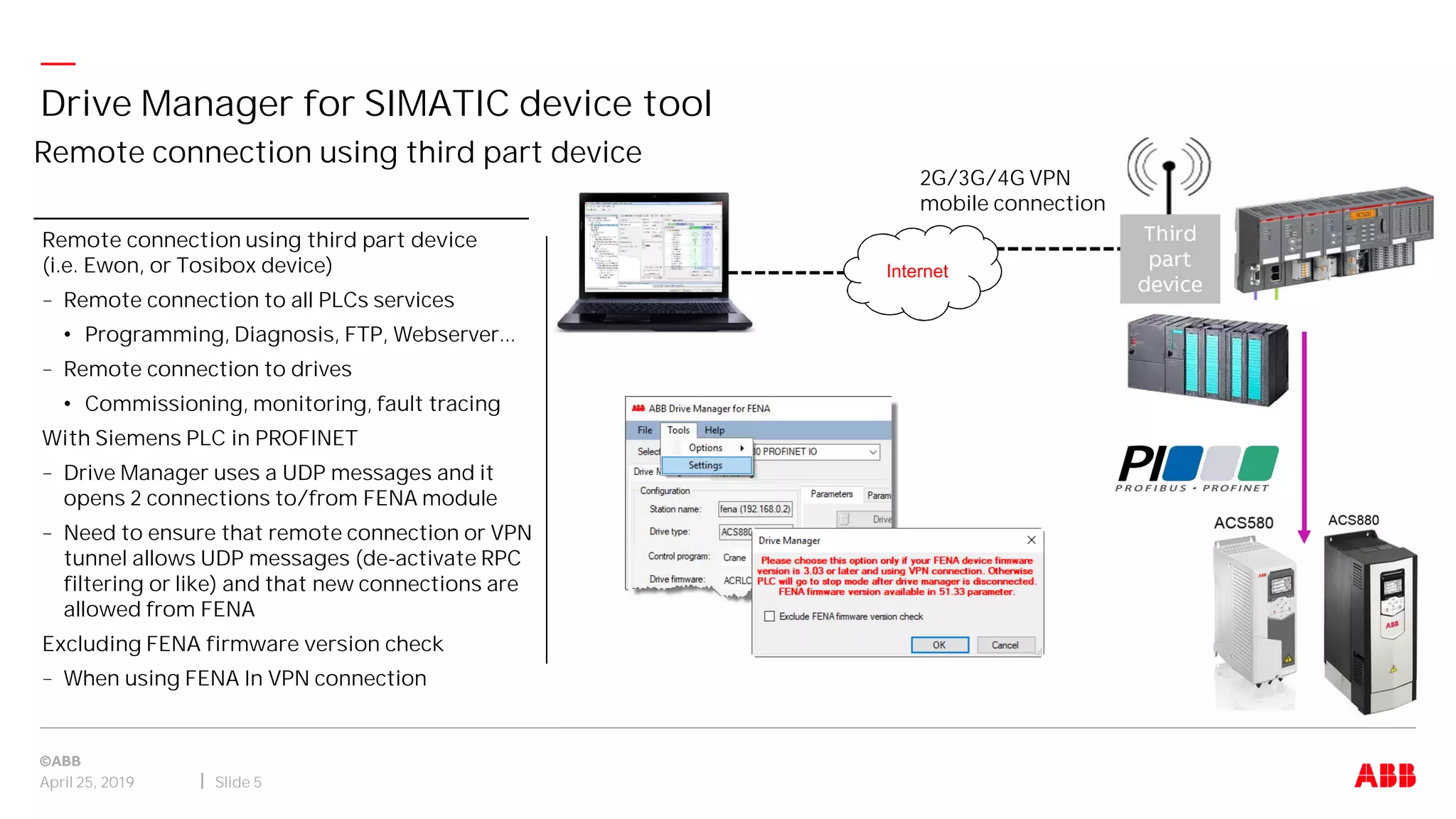
Remote connection using third part device
Drive Manager for SIMATIC device tool
April 25, 2019 Slide 5
Remote connection using third part device
(i.e. Ewon, or Tosibox device)
– Remote connection to all PLCs services
• Programming, Diagnosis, FTP, Webserver...
– Remote connection to drives
• Commissioning, monitoring, fault tracing
With Siemens PLC in PROFINET
– Drive Manager uses a UDP messages and it
opens 2 connections to/from FENA module
– Need to ensure that remote connection or VPN
tunnel allows UDP messages (de-activate RPC
filtering or like) and that new connections are
allowed from FENA
Excluding FENA firmware version check
– When using FENA In VPN connection
Third
part
device
2G/3G/4G VPN
mobile connection
Internet
—
Available for ABB and Siemens PLCs
April 25, 2019 Slide 6
Drive Manager Software Tool
Siemens ABB
System requirements Windows 7 (32 + 64 bit) - Windows XP
- STEP 7 Basic V5.4 or later
- TIA Portal Professional V11 up to V14
Windows 7, 8 and 10 (32 + 64 bit)
- Automation Builder 1.1.0 or later
Software package
DM4S-01 is a plug-in device tool (need to be
installed into the STEP 7 and TIA Portal)
License key
3AXD50000012272
Included in Automation Builder “standard” license,
free option, no installation
CPUs
CPU 300 and 400 series with DPV1,
1200 and 1500 series
AC500 V2 CPUs ( Not for AC500-eCo)
Protocols PROFIBUS DP, PROFINET IO PROFIBUS DP, PROFINET IO
Drives
ACS355, ACS380, ACS480, ACSM1, ACS550*,
ACS580, ACQ310, ACS850, ACS880 and DCS880
ACS355, ACS380, ACS480, ACSM1, ACS550, ACS580,
ACQ310, ACS850, ACS880 and DCS880
*only with PROFIBUS
—
Engineering Drives and PLCs in one environment
– Inside Automation Builder (ABB), or with TCI common tools calling interface (Siemens)
– Same tool and interface for different ABB drives
Simplifies work
– No changes needed to the PLC program and can be used independently
Improves project engineering quality
– Saving drive parameter settings within the PLC project
– Add also the specific application parameters (SPC/Codesys) to standard parameters list
Efficient Drive engineering (1)
April 25, 2019 Slide 7
Drive Manager Software Tool
—
Saves commissioning time cost
– Online and offline configuration of Drives
– Monitoring of Drive actual values
– Graphical monitoring of Drive signals
– Parameter export to/import from the Drive
Less communication cabling
– Parallel communication with PLC master
– One connection point for all Drives in network - Supervisor (PROFINET)
– Class 2 master (PROFIBUS) connections
Efficient Drive engineering (2)
April 25, 2019 Slide 8
Drive Manager Software Tool
—
1. Drive composer entry
2.Drive composer pro
3.Automation Builder
4.DM4S-01 (Siemens)
Comparisons (1)
April 25, 2019 Slide 9
Drive Manager Software Tool
Features
1.
DCE
2.
DCP
3.
AB
4.
DM4S
USB connection to a single drive Yes Yes No No
USB + panel bus connection to multiple drives No Yes No No
Ethernet Tool Network connection to multiple drives (dedicated network i.e. “two-wire” or shared with
Ethernet-based fieldbus i.e. “one-wire”, local connection only
No Yes No No
Connection over PROFIBUS / PROFINET through PLC to multiple drives (including remote connection) No No Yes Yes
Drive identification available in system level context No No Yes Yes
Parameter value integration to an engineering project No No Yes Yes
Local control of drive Yes Yes No No
Parameter view and edit online Yes Yes Yes * Yes *
Parameter values save to file Yes Yes Yes Yes
Offline parameter file viewing Yes Yes Yes Yes
Offline parameter file editing No Yes * Yes * Yes *
Download offline parameter values from file to drive No Yes Yes Yes
Parameter value printing Yes Yes No No
Parameter value comparison between drives or offline files No Yes Yes Yes
* Excluding some dynamic parameters
(e.g. I/O extensions and encoder settings)
** Available through parameters
—
1. Drive composer entry
2.Drive composer pro
3.Automation Builder
4.DM4S-01 (Siemens)
Comparisons (2)
April 25, 2019 Slide 10
Drive Manager Software Tool
* Excluding some dynamic parameters
(e.g. I/O extensions and encoder settings)
** Available through parameters
Features
1.
DCE
2.
DCP
3.
AB
4.
DM4S
Event logger view (faults, warnings) Yes Yes No ** No **
System info view (FW version, modules, application) Yes Yes No ** No **
Simple monitoring via parameter interface No No Yes Yes
Basic monitoring up to 8 synchronized signals and 100ms sample rate Yes Yes No No
Advanced monitoring up to 26 synchronized signals and 1ms sample rate No Yes No No
Drive backup / restore Yes Yes No No
Multiple drive backup over network No Yes No No
Support package creation Yes Yes No No
Manage data logger (configure, view) No Yes No No
Configuration of FSO modules No Yes No No
Control diagrams No Yes No No
Adaptive programming Yes Yes No No
Combined PLC / Drive process data management No No Yes No
User interface in multiple languages Yes Yes Yes Yes
—
ABB Drive Manager Tool
Used with Siemens PLCs
April 25, 2019Slide 11
—
Used with Siemens PLCs
April 25, 2019 Slide 12
ABB Drive Manager Tool
—
Add on tool easily previously installed into the Siemens Engineering tools
It will be started from the network (HW diagram) and Start device tool menu.
It can save the Drive parameter settings within the Step 7 project.
Integrated to engineering tool (1) – SIMATIC Manager
April 25, 2019 Slide 13
Drive Manager for SIMATIC device Tool
—
Add on tool easily previously installed into the Siemens Engineering tools
It will be started from the Network view tab and Start device tool menu
It can save the Drive parameter settings within the Step 7 project
Integrated to engineering tool (2) – TIA Portal
April 25, 2019 Slide 14
Drive Manager for SIMATIC device Tool
—
ABB Drive Manager window displays
April 25, 2019 Slide 15
Drive Manager for SIMATIC device Tool
—
ABB Drive Manager Tool
Used with ABB AC500 PLCs
April 25, 2019Slide 16
—
Used with ABB AC500 PLCs
April 25, 2019 Slide 17
ABB Drive Manager Tool
http://new.abb.com/plc/automationbuilder
—
Complete Automation Solution from ABB
April 25, 2019 Slide 18
Automation Builder
RobotsMotors &
Transmission Motion
Control
Drives SafetyHMIPLC
Common engineering environment
Packages and solutions
Open Connectivity and Communication
Advanced services
3rd party
products
—
Complete Automation Solution from ABB
April 25, 2019 Slide 19
Automation Builder
—
ABB Drive Manager Tool
Overview – Parametrization & Monitoring
April 25, 2019Slide 20
—
Drive Parametrization
April 25, 2019 Slide 21
ABB Drive Manager Tool
Monitor Drive firmware
version, rating, properties
Monitor Drive status
Running, stopped,
direction, speed value…
Drive analog input settings
for current/voltage configuration
Save parameters
Changes are not
persistent, need manual
action
Drives parameters locking
Select option for motor or/and fieldbus
Parameters view
3 option views:
• From drive
connected
• Save in project
• Compare between
drive & project
Export to file
Store drive or project
parameters in file
(format .dsp, .dwp…)
Import values
Write from computer
to project (file format
.dsp, .dwp…)
Copy parameter(s)
Allow to write from drive to
project or project to drive
—
Drives Monitoring
April 25, 2019 Slide 22
ABB Drive Manager Tool
Graphical monitoring of the drives parameters
– Select maximum 12 signals
– Configure properties of signals:
• Color, visible, auto scale, min, max,
• Low, High limits
– Start and control monitoring
• Scan time 250ms
– Save data in CSV format to file
—
ABB Drive Manager Tool
New Features in version V1.2.0
April 25, 2019Slide 23
—
ACS880 crane firmware’s are supported
Drive Manager for SIMATIC device tool
April 25, 2019 Slide 24
Selection of control program for ACS880 drives
– ACS880 Firmware grouping based on
application type
• Primary Control
• Crane Control
According to selection of Control Program
– The drive firmware list is updated
automatically in the Drive firmware selection
– And the specific parameters groups
associated are available for handling
—
Auto update selected firmware in Drive Manager while connecting to drive device
Drive Manager for SIMATIC device tool
April 25, 2019 Slide 25
Automatic detection of firmware version
– If the selected drive firmware version is
different from the actual drive firmware
• The connection will be established…
• and warning message will indicate the
difference and the actual drive firmware
version
Auto update selected firmware
– While connecting to drive device, Drive
Manager is updated with the actual firmware
version, if the configured firmware version is
different
Suppress warning message option
– Firmware mismatch warnings
– Enable again messages by using settings
menu
—
Import/Export of firmware’s to / from Drive Manager tool
Drive Manager for SIMATIC device tool
April 25, 2019 Slide 26
Drive Manager Upgrade functionality
Only supported by ACS880, ACS850, ACSM1
– Import from Drive Manager backup
• Backup file .dmbak
• Selection of firmware's supported
– Import from parameter backup
• Backup file .dcparambak or .dsp
• Selection of firmware's supported
– Export custom Drive Manager backup
• Selection of firmware's supported
• Save in backup file .dmbak
—
ABB Drive Manager Tool
Documentation & Installation package
April 25, 2019Slide 27
—
Documentation & Installation package & Ordering reference
Drive Manager for SIMATIC device tool
April 25, 2019 Slide 28
Documentation in ABB Library
– Quick start-up guide
– Product flyer
– Software updates
Plastic box containing
– USB stick
– Quick installation guide
– End User License Agreement (EULA)
– License code ( on the back side…)
Ordering reference
– DM4S-01
– 3AXD5000001227
http://new.abb.com/drives/software-tools/drive-manager-for-simatic
Software Version: Drive Manager for SIMATIC update package DM4S 1.2.0
—
Quick Start-up Guide and Online Help
Drive Manager for SIMATIC device tool
April 25, 2019 Slide 29
https://search.abb.com/library/Download/DocumentID=3AXD50000012364
Comprehensive instructions on installation and usage of the tool
Guides to set-up a project both for TIA Portal and SIMATIC Manager
—
Installation and registration – New user registration process
Drive Manager for SIMATIC device tool
April 25, 2019 Slide 30
Prerequisites: Need already SIMATIC Manager (STEP 7) or TIA Portal installed on computer before to launch
installation of ABB Drive manager tool
The application can run in trial version for a specific period of 30 days
Or activate the licensing mechanism for online or offline registration
New user registration process
– ABB is fully committed to protecting the
privacy and respecting the rights to
control how the personal data is used
– An information during installation
explain why and how ABB collects and
uses the personal data and the rights
that user have in relation to that data
—
Product Flyer (Brochure)
Drive Manager for SIMATIC device tool
April 25, 2019 Slide 31
Document available in ABB Library:
https://search.abb.com/library/Download/DocumentID=3AUA0000156999
http://new.abb.com/drives
ABB DRIVE MANAGER TOOL REV-4

ABB DRIVE MANAGER TOOL REV-4

  • 1.
    —JANUARY 2019 ABB Drives– Software Tool Drive Manager tool for ABB or Siemens engineering environnent
  • 2.
    — Drive Manager Tool– Short introduction ‒ Used with Siemens S7 PLCs ‒ Used with ABB AC500 PLCs Drive Manager Tool ‒ Parametrization & Monitoring ‒ New features in version V1.2.0 ‒ Documentation & Installation package April 25, 2019 Slide 2 Drive Manager Tool for ABB drives Agenda
  • 3.
    — Drive Manager Tool Shortintroduction April 25, 2019Slide 3
  • 4.
    — Available for ABBand Siemens PLCs April 25, 2019 Slide 4 Drive Manager Software Tool – Single access point for all Drives and PLC in network via PROFIBUS DP or PROFINET IO protocols – Engineering online and offline modes – Downloading Drive configuration, monitoring of Drive values, Backup of the whole project in one project archive USB, Serial, LAN, WAN, 2G/3G/4G ACS380 ACS480 DCS880
  • 5.
    — Remote connection usingthird part device Drive Manager for SIMATIC device tool April 25, 2019 Slide 5 Remote connection using third part device (i.e. Ewon, or Tosibox device) – Remote connection to all PLCs services • Programming, Diagnosis, FTP, Webserver... – Remote connection to drives • Commissioning, monitoring, fault tracing With Siemens PLC in PROFINET – Drive Manager uses a UDP messages and it opens 2 connections to/from FENA module – Need to ensure that remote connection or VPN tunnel allows UDP messages (de-activate RPC filtering or like) and that new connections are allowed from FENA Excluding FENA firmware version check – When using FENA In VPN connection Third part device 2G/3G/4G VPN mobile connection Internet
  • 6.
    — Available for ABBand Siemens PLCs April 25, 2019 Slide 6 Drive Manager Software Tool Siemens ABB System requirements Windows 7 (32 + 64 bit) - Windows XP - STEP 7 Basic V5.4 or later - TIA Portal Professional V11 up to V14 Windows 7, 8 and 10 (32 + 64 bit) - Automation Builder 1.1.0 or later Software package DM4S-01 is a plug-in device tool (need to be installed into the STEP 7 and TIA Portal) License key 3AXD50000012272 Included in Automation Builder “standard” license, free option, no installation CPUs CPU 300 and 400 series with DPV1, 1200 and 1500 series AC500 V2 CPUs ( Not for AC500-eCo) Protocols PROFIBUS DP, PROFINET IO PROFIBUS DP, PROFINET IO Drives ACS355, ACS380, ACS480, ACSM1, ACS550*, ACS580, ACQ310, ACS850, ACS880 and DCS880 ACS355, ACS380, ACS480, ACSM1, ACS550, ACS580, ACQ310, ACS850, ACS880 and DCS880 *only with PROFIBUS
  • 7.
    — Engineering Drives andPLCs in one environment – Inside Automation Builder (ABB), or with TCI common tools calling interface (Siemens) – Same tool and interface for different ABB drives Simplifies work – No changes needed to the PLC program and can be used independently Improves project engineering quality – Saving drive parameter settings within the PLC project – Add also the specific application parameters (SPC/Codesys) to standard parameters list Efficient Drive engineering (1) April 25, 2019 Slide 7 Drive Manager Software Tool
  • 8.
    — Saves commissioning timecost – Online and offline configuration of Drives – Monitoring of Drive actual values – Graphical monitoring of Drive signals – Parameter export to/import from the Drive Less communication cabling – Parallel communication with PLC master – One connection point for all Drives in network - Supervisor (PROFINET) – Class 2 master (PROFIBUS) connections Efficient Drive engineering (2) April 25, 2019 Slide 8 Drive Manager Software Tool
  • 9.
    — 1. Drive composerentry 2.Drive composer pro 3.Automation Builder 4.DM4S-01 (Siemens) Comparisons (1) April 25, 2019 Slide 9 Drive Manager Software Tool Features 1. DCE 2. DCP 3. AB 4. DM4S USB connection to a single drive Yes Yes No No USB + panel bus connection to multiple drives No Yes No No Ethernet Tool Network connection to multiple drives (dedicated network i.e. “two-wire” or shared with Ethernet-based fieldbus i.e. “one-wire”, local connection only No Yes No No Connection over PROFIBUS / PROFINET through PLC to multiple drives (including remote connection) No No Yes Yes Drive identification available in system level context No No Yes Yes Parameter value integration to an engineering project No No Yes Yes Local control of drive Yes Yes No No Parameter view and edit online Yes Yes Yes * Yes * Parameter values save to file Yes Yes Yes Yes Offline parameter file viewing Yes Yes Yes Yes Offline parameter file editing No Yes * Yes * Yes * Download offline parameter values from file to drive No Yes Yes Yes Parameter value printing Yes Yes No No Parameter value comparison between drives or offline files No Yes Yes Yes * Excluding some dynamic parameters (e.g. I/O extensions and encoder settings) ** Available through parameters
  • 10.
    — 1. Drive composerentry 2.Drive composer pro 3.Automation Builder 4.DM4S-01 (Siemens) Comparisons (2) April 25, 2019 Slide 10 Drive Manager Software Tool * Excluding some dynamic parameters (e.g. I/O extensions and encoder settings) ** Available through parameters Features 1. DCE 2. DCP 3. AB 4. DM4S Event logger view (faults, warnings) Yes Yes No ** No ** System info view (FW version, modules, application) Yes Yes No ** No ** Simple monitoring via parameter interface No No Yes Yes Basic monitoring up to 8 synchronized signals and 100ms sample rate Yes Yes No No Advanced monitoring up to 26 synchronized signals and 1ms sample rate No Yes No No Drive backup / restore Yes Yes No No Multiple drive backup over network No Yes No No Support package creation Yes Yes No No Manage data logger (configure, view) No Yes No No Configuration of FSO modules No Yes No No Control diagrams No Yes No No Adaptive programming Yes Yes No No Combined PLC / Drive process data management No No Yes No User interface in multiple languages Yes Yes Yes Yes
  • 11.
    — ABB Drive ManagerTool Used with Siemens PLCs April 25, 2019Slide 11
  • 12.
    — Used with SiemensPLCs April 25, 2019 Slide 12 ABB Drive Manager Tool
  • 13.
    — Add on tooleasily previously installed into the Siemens Engineering tools It will be started from the network (HW diagram) and Start device tool menu. It can save the Drive parameter settings within the Step 7 project. Integrated to engineering tool (1) – SIMATIC Manager April 25, 2019 Slide 13 Drive Manager for SIMATIC device Tool
  • 14.
    — Add on tooleasily previously installed into the Siemens Engineering tools It will be started from the Network view tab and Start device tool menu It can save the Drive parameter settings within the Step 7 project Integrated to engineering tool (2) – TIA Portal April 25, 2019 Slide 14 Drive Manager for SIMATIC device Tool
  • 15.
    — ABB Drive Managerwindow displays April 25, 2019 Slide 15 Drive Manager for SIMATIC device Tool
  • 16.
    — ABB Drive ManagerTool Used with ABB AC500 PLCs April 25, 2019Slide 16
  • 17.
    — Used with ABBAC500 PLCs April 25, 2019 Slide 17 ABB Drive Manager Tool http://new.abb.com/plc/automationbuilder
  • 18.
    — Complete Automation Solutionfrom ABB April 25, 2019 Slide 18 Automation Builder RobotsMotors & Transmission Motion Control Drives SafetyHMIPLC Common engineering environment Packages and solutions Open Connectivity and Communication Advanced services 3rd party products
  • 19.
    — Complete Automation Solutionfrom ABB April 25, 2019 Slide 19 Automation Builder
  • 20.
    — ABB Drive ManagerTool Overview – Parametrization & Monitoring April 25, 2019Slide 20
  • 21.
    — Drive Parametrization April 25,2019 Slide 21 ABB Drive Manager Tool Monitor Drive firmware version, rating, properties Monitor Drive status Running, stopped, direction, speed value… Drive analog input settings for current/voltage configuration Save parameters Changes are not persistent, need manual action Drives parameters locking Select option for motor or/and fieldbus Parameters view 3 option views: • From drive connected • Save in project • Compare between drive & project Export to file Store drive or project parameters in file (format .dsp, .dwp…) Import values Write from computer to project (file format .dsp, .dwp…) Copy parameter(s) Allow to write from drive to project or project to drive
  • 22.
    — Drives Monitoring April 25,2019 Slide 22 ABB Drive Manager Tool Graphical monitoring of the drives parameters – Select maximum 12 signals – Configure properties of signals: • Color, visible, auto scale, min, max, • Low, High limits – Start and control monitoring • Scan time 250ms – Save data in CSV format to file
  • 23.
    — ABB Drive ManagerTool New Features in version V1.2.0 April 25, 2019Slide 23
  • 24.
    — ACS880 crane firmware’sare supported Drive Manager for SIMATIC device tool April 25, 2019 Slide 24 Selection of control program for ACS880 drives – ACS880 Firmware grouping based on application type • Primary Control • Crane Control According to selection of Control Program – The drive firmware list is updated automatically in the Drive firmware selection – And the specific parameters groups associated are available for handling
  • 25.
    — Auto update selectedfirmware in Drive Manager while connecting to drive device Drive Manager for SIMATIC device tool April 25, 2019 Slide 25 Automatic detection of firmware version – If the selected drive firmware version is different from the actual drive firmware • The connection will be established… • and warning message will indicate the difference and the actual drive firmware version Auto update selected firmware – While connecting to drive device, Drive Manager is updated with the actual firmware version, if the configured firmware version is different Suppress warning message option – Firmware mismatch warnings – Enable again messages by using settings menu
  • 26.
    — Import/Export of firmware’sto / from Drive Manager tool Drive Manager for SIMATIC device tool April 25, 2019 Slide 26 Drive Manager Upgrade functionality Only supported by ACS880, ACS850, ACSM1 – Import from Drive Manager backup • Backup file .dmbak • Selection of firmware's supported – Import from parameter backup • Backup file .dcparambak or .dsp • Selection of firmware's supported – Export custom Drive Manager backup • Selection of firmware's supported • Save in backup file .dmbak
  • 27.
    — ABB Drive ManagerTool Documentation & Installation package April 25, 2019Slide 27
  • 28.
    — Documentation & Installationpackage & Ordering reference Drive Manager for SIMATIC device tool April 25, 2019 Slide 28 Documentation in ABB Library – Quick start-up guide – Product flyer – Software updates Plastic box containing – USB stick – Quick installation guide – End User License Agreement (EULA) – License code ( on the back side…) Ordering reference – DM4S-01 – 3AXD5000001227 http://new.abb.com/drives/software-tools/drive-manager-for-simatic Software Version: Drive Manager for SIMATIC update package DM4S 1.2.0
  • 29.
    — Quick Start-up Guideand Online Help Drive Manager for SIMATIC device tool April 25, 2019 Slide 29 https://search.abb.com/library/Download/DocumentID=3AXD50000012364 Comprehensive instructions on installation and usage of the tool Guides to set-up a project both for TIA Portal and SIMATIC Manager
  • 30.
    — Installation and registration– New user registration process Drive Manager for SIMATIC device tool April 25, 2019 Slide 30 Prerequisites: Need already SIMATIC Manager (STEP 7) or TIA Portal installed on computer before to launch installation of ABB Drive manager tool The application can run in trial version for a specific period of 30 days Or activate the licensing mechanism for online or offline registration New user registration process – ABB is fully committed to protecting the privacy and respecting the rights to control how the personal data is used – An information during installation explain why and how ABB collects and uses the personal data and the rights that user have in relation to that data
  • 31.
    — Product Flyer (Brochure) DriveManager for SIMATIC device tool April 25, 2019 Slide 31 Document available in ABB Library: https://search.abb.com/library/Download/DocumentID=3AUA0000156999
  • 32.