Date: 22.04.14
File: MultiClient_Server.1
SIMATIC HMI
Siemens AG 2003. All rights reserved.©
SITRAIN Training for
Automation and Drives
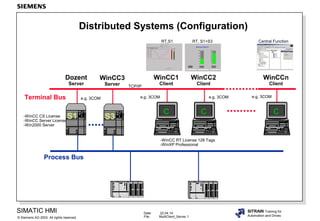
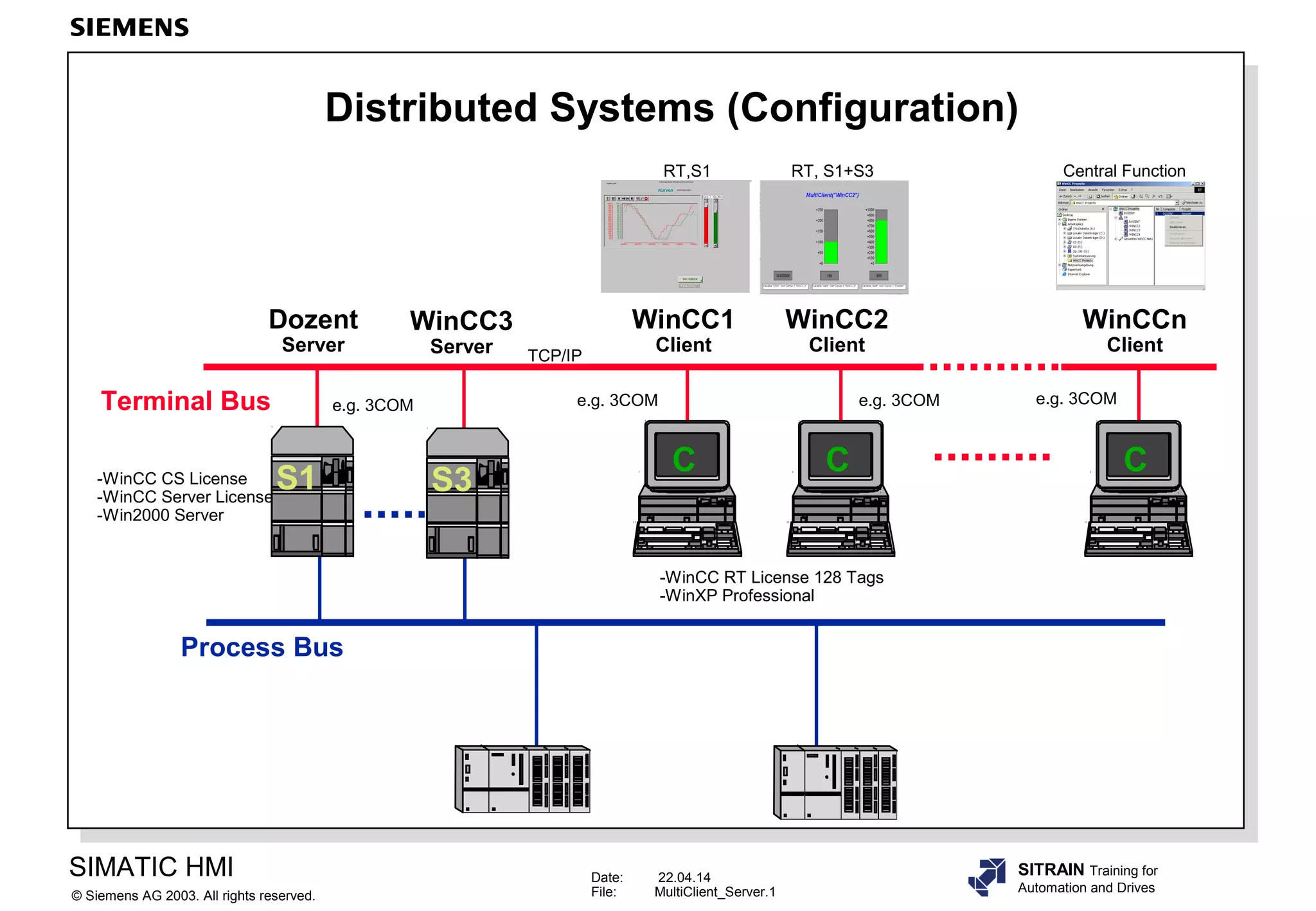
Distributed Systems (Configuration)
Dozent
Server
WinCC1
Client
Process Bus
C
WinCC2
Client
C
S1
WinCCn
Client
C
Terminal Bus
-WinCC CS License
-WinCC Server License
-Win2000 Server
-WinCC RT License 128 Tags
-WinXP Professional
e.g. 3COM e.g. 3COM e.g. 3COM e.g. 3COM
TCP/IP
RT, S1+S3RT,S1 Central Function
S3
WinCC3
Server
Date: 22.04.14
File: MultiClient_Server.2
SIMATIC HMI
Siemens AG 2003. All rights reserved.©
SITRAIN Training for
Automation and Drives
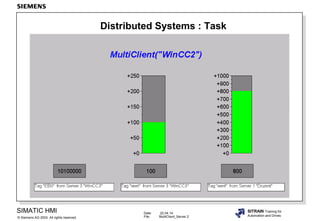
Distributed Systems : Task
Date: 22.04.14
File: MultiClient_Server.3
SIMATIC HMI
Siemens AG 2003. All rights reserved.©
SITRAIN Training for
Automation and Drives
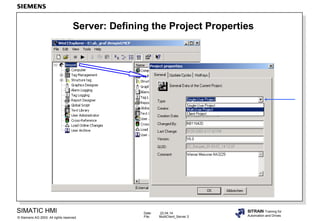
Server: Defining the Project Properties
Date: 22.04.14
File: MultiClient_Server.4
SIMATIC HMI
Siemens AG 2003. All rights reserved.©
SITRAIN Training for
Automation and Drives
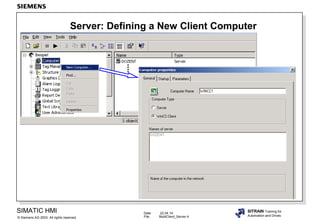
Server: Defining a New Client Computer
Date: 22.04.14
File: MultiClient_Server.5
SIMATIC HMI
Siemens AG 2003. All rights reserved.©
SITRAIN Training for
Automation and Drives
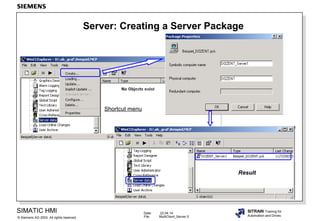
Server: Creating a Server Package
Shortcut menu
Result
Date: 22.04.14
File: MultiClient_Server.6
SIMATIC HMI
Siemens AG 2003. All rights reserved.©
SITRAIN Training for
Automation and Drives
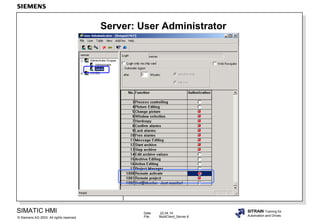
Server: User Administrator
Date: 22.04.14
File: MultiClient_Server.7
SIMATIC HMI
Siemens AG 2003. All rights reserved.©
SITRAIN Training for
Automation and Drives
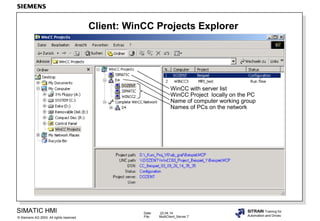
Client: WinCC Projects Explorer
WinCC with server list
WinCC Project locally on the PC
Name of computer working group
Names of PCs on the network
Date: 22.04.14
File: MultiClient_Server.8
SIMATIC HMI
Siemens AG 2003. All rights reserved.©
SITRAIN Training for
Automation and Drives
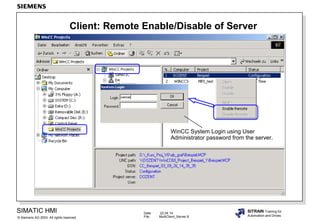
Client: Remote Enable/Disable of Server
WinCC System Login using User
Administrator password from the server.
Date: 22.04.14
File: MultiClient_Server.9
SIMATIC HMI
Siemens AG 2003. All rights reserved.©
SITRAIN Training for
Automation and Drives
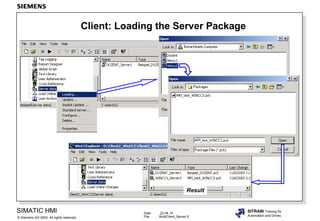
Client: Loading the Server Package
Result
Date: 22.04.14
File: MultiClient_Server.10
SIMATIC HMI
Siemens AG 2003. All rights reserved.©
SITRAIN Training for
Automation and Drives
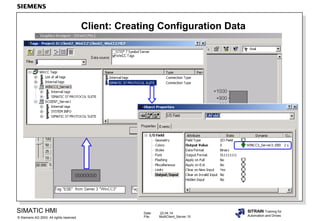
Client: Creating Configuration Data
Date: 22.04.14
File: MultiClient_Server.11
SIMATIC HMI
Siemens AG 2003. All rights reserved.©
SITRAIN Training for
Automation and Drives
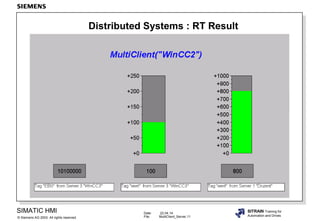
Distributed Systems : RT Result

E multiclient server_wincc60engl

Editor's Notes

  • #2 General InformationA client configuration is only required if you configure a distributed system in which clients can display views from several servers. If you configure a multi-user system in which clients only display data from exactly one server, a separate client configuration is not necessary. The clients receive all their data and their Runtime environment from the server project. The distributed system in WinCC contains one or more WinCC servers running with Windows 2000 Server and WinCC clients that can run either with Windows 2000 or Windows XP Professional. 1st. Step: Configure PCs and Windows -set up a PC network.-select computer names.-install TCP/IP network with unique addresses or NetBEUI network.-enable drive on the Server.-user does not need to have Administrator authorization. 2nd. Step:Automation components-install and configure communication hardware/software.-install WinCC and options.-WinCC configuration. 3rd. Step:Make the Server settings. 4th. Step:Make the Client settings. NoteThe WinCC Server Option is necessary to set up a WinCC station with Win2000 Server as server for a WinCC multi-user system. Licenses on the Server Server: WinCC CS, for example, 64K Tags Licenses on the WinCC RT 128 Tags Client:
  • #4 NoteAfter you change the type to Multi-User Project (Server), WinCC has to be restarted.
  • #5 What to DoEnter the computer name of your client computer. This step has to be repeated for all clients that want to access the server.
  • #6 PrinciplePackages are data packages with all current configuration data (tags, messages, archives etc.), that are made available to all connected clients in a distributed system. The packages are created on the server and are loaded onto the clients. What to DoCreate a package on every server. To do so, select "Server data" in the navigation window and open the shortcut menu. Select the menu item "Create...".
  • #7 What to Do In the "User Administrator" Editor, create a user who may operate this client. This user requires the authorization "1001 Remote project", in order to be able to open the server project. If you want to activate the server project with the same user, then he also requires the authorization "1000 Remote activate".
  • #8 FunctionWith remote access from the client, the server can be centrally activated and deactivated (enabled and disabled).
  • #9 FunctionWith this function, the server can be centrally controlled after a system login. What to DoUser-dependent login with the rights from the WinCC User Administrator from the selected server.
  • #10 PrinciplePackages are data packages with all current configuration data (tags, messages, archives etc.), that are made available to all connected clients in a distributed system. The packages are created on the server and are loaded onto the clients. What to DoIn the WinCC Explorer, select the entry "Server data" and from the shortcut menu choose "Loading...". The "Open" screen appears.If you want to update already loaded packages, choose the command "Update...". NoteAll tags configured on the server that were transferred to the client in a package are available on the client in the Tags selection screen.
  • #11 PrincipleYou configure a graphic screen of the client in a distributed system and all of the objects contained in it directly on the client. In every screen you can access the data of several servers, such as:+an output field for the process value from Server1 that monitors the system part A, an output field for the process value from Server2 that monitors another part of the system.+trend displays that comparatively display the data of different system parts/ servers.+message windows that display the messages of several servers.