Date: 22.04.14
System_Databases_9.1
SIMATIC HMI
Siemens AG 2002. All rights reserved.
SITRAIN Training for
Automation and Drives
Storing Archives in ODBC Databases
(not for Windows CE devices)
Date: 22.04.14
System_Databases_9.2
SIMATIC HMI
Siemens AG 2002. All rights reserved.
SITRAIN Training for
Automation and Drives
Topics in this Chapter
• Making settings for storing
message archives in
MS Access
Date: 22.04.14
System_Databases_9.3
SIMATIC HMI
Siemens AG 2002. All rights reserved.
SITRAIN Training for
Automation and Drives
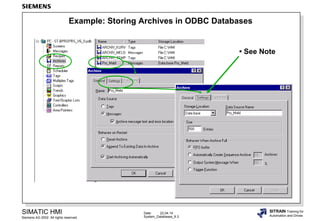
Example: Storing Archives in ODBC Databases
• See Note
Date: 22.04.14
System_Databases_9.4
SIMATIC HMI
Siemens AG 2002. All rights reserved.
SITRAIN Training for
Automation and Drives
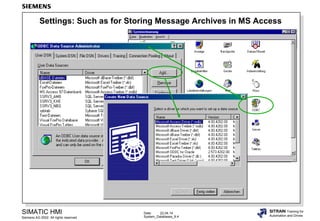
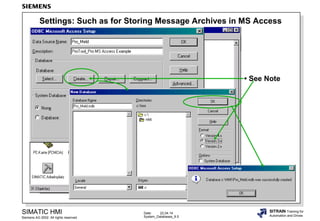
Settings: Such as for Storing Message Archives in MS Access
Date: 22.04.14
System_Databases_9.5
SIMATIC HMI
Siemens AG 2002. All rights reserved.
SITRAIN Training for
Automation and Drives
Settings: Such as for Storing Message Archives in MS Access
• See Note
Date: 22.04.14
System_Databases_9.6
SIMATIC HMI
Siemens AG 2002. All rights reserved.
SITRAIN Training for
Automation and Drives
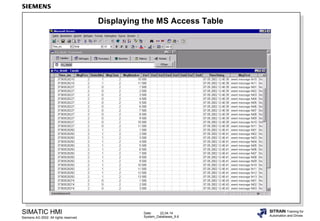
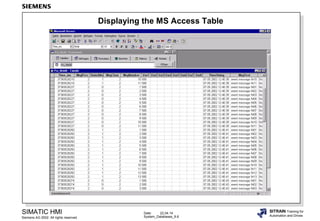
Displaying the MS Access Table
Date: 22.04.14
System_Databases_9.6
SIMATIC HMI
Siemens AG 2002. All rights reserved.
SITRAIN Training for
Automation and Drives
Displaying the MS Access Table

Ae09 system storing_archives

Editor's Notes

  • #2 ContentsPage Topics in this Chapter ...........................................................................................................................2 Example: Storing Archives in ODBC Databases ..................................................................................3 Settings: Such as for Storing Message Archives in MS Access ...........................................................4 Settings: Such as for Storing Message Archives in MS Access ...........................................................5 Displaying the MS Access Table ..........................................................................................................6
  • #3 Participants should:• Learn how to make the driver settings for storing archives in ODBC databases (such as MS Access).
  • #4 GeneralThe database software is not included with ProTool/Pro.A database is a system of tables, forms, queries, reports, macros and modules. This chapter only deals with the installation of the drivers.You can learn about working with databases (creation, display, linking tables) in special courses. • MS Data Engine 97 and 2000• MS Access 97 and 2000 All the necessary drivers for storing data are installed by ProTool/Pro. For user-friendly archive analysis, MS Access should be installed on the target computer.• MS SQL-Server 6.5/7.0 and 2000 You must install the database system on the target computer before you can store data. NoteTo store archive data you must specify the database name (not the name of a directory). The data source name (DSN) defines the database and its storage location.In our example:Data source name (DSN): Pro_Meld Database name: Pro_Meld
  • #5 NoteHow to configure the data source on the ProTool/Pro computer:1Start the ODBC32 configuration program from the control panel.2Create a new data source administrator (Data_Source).3Select the database driver you want.
  • #6 NoteThis dialog is specific to your database.Version 3x..........Access 97Version 4x..........Access 2000 If you are using MS Access you don't need to make any other settings.For other databases you need to make further settings.
  • #7 Note:Information on message archive printouts is given in the chapter "Message Display, Message Archiving".