SPP 2089 data management
Time table
2
• 9:00 – 12 -- Basics
• 12:00 – 13:00 -- Lunch
• 13:00 – 15:00 -- Advanced
• 15:00 – 15:30 -- Break
• 15:30 – 16:00 -- Q/A
• Homework (required for certification)
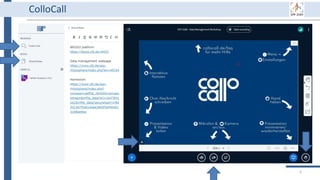
ColloCall
3
SPP 2089 data management
Part I
Basic information
5
Part I: Basic information
• Introduction (Doris)
• Accounts (Susanne)
• Labeling (Susanne)
• Break
• Research data management
• Store data: upload data
• Use data: download data
• Share data: data security
6
Part I: Basic information
• Introduction (Doris)
• Accounts (Susanne)
• Labeling (Susanne)
• Break
• Research data management
• Store data: upload data
• Use data: download data
• Share data: data security
7
Part I: Basic information
• Introduction (Doris)
• Accounts (Susanne)
• Labeling (Susanne)
• Break
• Research data management
• Store data: upload data
• Use data: download data
• Share data: data security
8
ACCOUNTS • SPP 2089 website
• UFZ account
• BEXIS2 platform
9
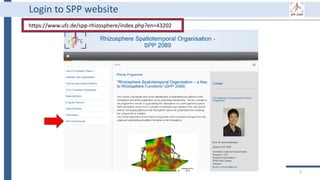
Login to SPP website
https://www.ufz.de/spp-rhizosphere/index.php?en=43202
10
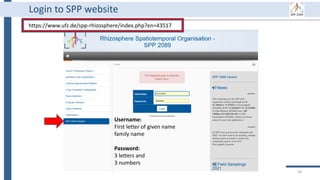
Login to SPP website
https://www.ufz.de/spp-rhizosphere/index.php?en=43517
Username:
First letter of given name
family name
Password:
3 letters and
3 numbers
11
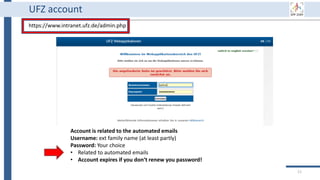
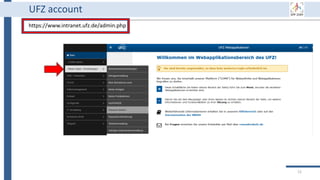
UFZ account
https://www.intranet.ufz.de/admin.php
Account is related to the automated emails
Username: ext family name (at least partly)
Password: Your choice
• Related to automated emails
• Account expires if you don‘t renew you password!
12
UFZ account
https://www.intranet.ufz.de/admin.php
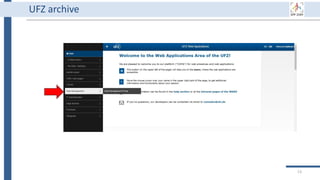
UFZ archive
13
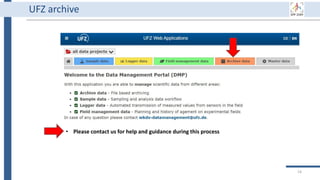
UFZ archive
• Please contact us for help and guidance during this process
14
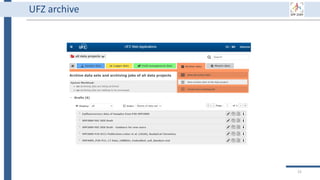
UFZ archive
15
16
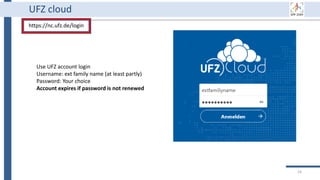
UFZ cloud
https://nc.ufz.de/login
Use UFZ account login
Username: ext family name (at least partly)
Password: Your choice
Account expires if password is not renewed
17
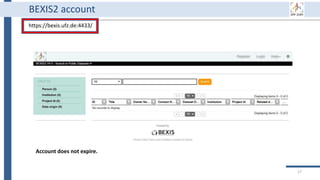
BEXIS2 account
https://bexis.ufz.de:4433/
Account does not expire.
18
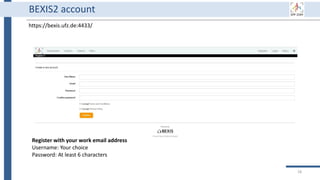
BEXIS2 account
https://bexis.ufz.de:4433/
Register with your work email address
Username: Your choice
Password: At least 6 characters
19
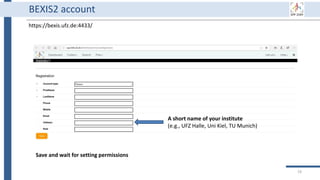
BEXIS2 account
https://bexis.ufz.de:4433/
A short name of your institute
(e.g., UFZ Halle, Uni Kiel, TU Munich)
Save and wait for setting permissions
20
Part I: Basic information
• Introduction (Doris)
• Accounts (Susanne)
• Labeling (Susanne)
• Break
• Research data management
• Store data: upload data
• Use data: download data
• Share data: data security
21
Labeling • Labeling samples
• Field site
• Column experiments
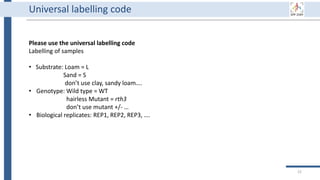
Universal labelling code
Please use the universal labelling code
Labelling of samples
• Substrate: Loam = L
Sand = S
don’t use clay, sandy loam….
• Genotype: Wild type = WT
hairless Mutant = rth3
don’t use mutant +/- …
• Biological replicates: REP1, REP2, REP3, ….
22
Universal labelling code
• Labelling of soil column experiments
[projectnumber_SCE#_C#];
• Soil colum expriment = SCE01,…
• Column in the experiment = C01
• example: P21_SCE01_C01
• Labelling of sampling campaigns in soil plot experiment
[projectnumber_SPE_sampling date_FP#_type of sample#];
• Field plot = FP01, FP02..
• Depth 0-20 cm = D00_20
• Sampling of several points within each plot = a, b, c
• example: P21_SPE_20181105_FP01_UC#
• You may extend the name by providing further details if required
(i.e. bulk/rhizosphere/rhizoplane)…
• If you extend the details, communicate that to your cooperation partners
23
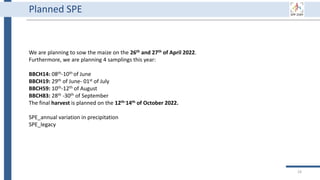
Planned SPE
We are planning to sow the maize on the 26th and 27th of April 2022.
Furthermore, we are planning 4 samplings this year:
BBCH14: 08th-10th of June
BBCH19: 29th of June- 01st of July
BBCH59: 10th-12th of August
BBCH83: 28th -30th of September
The final harvest is planned on the 12th-14th of October 2022.
SPE_annual variation in precipitation
SPE_legacy
24
Planned SCE
Please provide date and description that other projects can join
SCE_drought P7, P3, P6
SCE_drought-long P3, P6
SCE_compaction P21
SCE_contact
SCE_biopore
SCE_decay P19, P21
SCE_mucilage P4
SCE_nutrient deficiency P7
25
New members of staff
Please provide the following information for each new member of staff
• Name
• Email address
• Postal address
• Position (PhD, PostDoc, PI…)
• Photo
Please inform the coordination if a member of staff
• is leaving the project permanently or for a longer period of time
• move to a new institute
• changes of names or email addresses
26
27
Questions?!
28
Part I: Basic information
• Welcome (Doris)
• Accounts (Susanne)
• Labeling (Susanne)
• Break
• Research data management
• Store data: upload data
• Use data: download data
• Share data: data security
29
Part I: Basic information
• Introduction (Doris)
• Accounts (Susanne)
• Labeling (Susanne)
• Break
• Research data management
• Store data: upload data
• Use data: download data
• Share data: data security
30
It is data collected or produced in the course of scientific research activities and
used as evidence in the research process, or commonly accepted in the research
community as necessary to validate research findings and results (European open
science cloud [1]).
Research data might include measurement data, laboratory values, audiovisual
information, texts, survey data, objects from collections, or samples that were
created, developed or evaluated during scientific work. Methodical forms of
testing such as questionnaires, software and simulations may also produce
important results for scientific research and should therefore also be categorized
as research data (DFG Guidelines on the Handling of Research Data [2]).
Research data
Generate
Store
Use
Share
Archive
Destroy
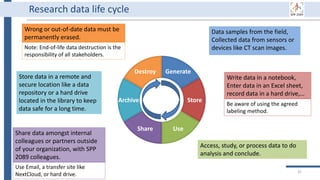
31
Wrong or out-of-date data must be
permanently erased.
Note: End-of-life data destruction is the
responsibility of all stakeholders.
Research data life cycle
Data samples from the field,
Collected data from sensors or
devices like CT scan images.
Store data in a remote and
secure location like a data
repository or a hard drive
located in the library to keep
data safe for a long time.
Access, study, or process data to do
analysis and conclude.
Write data in a notebook,
Enter data in an Excel sheet,
record data in a hard drive,…
Be aware of using the agreed
labeling method.
Share data amongst internal
colleagues or partners outside
of your organization, with SPP
2089 colleagues.
Use Email, a transfer site like
NextCloud, or hard drive.
32
Why using a data management platform (DMP)
1. DMP supports data throughout its life cycle.
2. All components of the research process must be available to ensure
transparency, reproducibility, and reusability [3].
3. A DMP gathers research data in one place and keeps it usable for a
long time.
4. A DMP has to deal with security and privacy concerns due to
collecting private data.
5. Using a data management system is a DFG requirement, and it is
mentioned in the SPP 2089 bylaws.
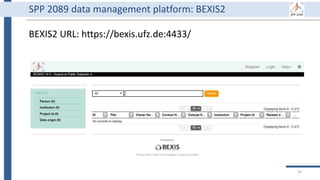
BEXIS2 URL: https://bexis.ufz.de:4433/
33
SPP 2089 data management platform: BEXIS2
Generate
Store
Use
Share
Archive
Destroy
34
BEXIS2 administrator can remove
incorrect or useless data forever.
Of course, it requires special
permission from the data owner.
BEXIS2 is a free and open source
software supporting researchers in
managing their data throughout
the data life cycle from data storing
to sharing research data [4].
BEXIS2 keeps track of the
evolution of a dataset and returns
to any previous version if needed.
Start to store data in BEXIS2
at this point of your work.
Data security is a major
concern for BEXIS2. It specify
fine grained data permissions
on who can view, access, or
update a dataset.
Why using BEXIS2?
BEXIS2 can be used for long-
term data archiving even as
the publication requirement.
In the near future, you can
get DOI for each dataset.
35
Questions?! Generate
Store
Use
Share
Archive
Destroy
36
Part I: Basic information
• Introduction (Doris)
• Accounts (Susanne)
• Labeling (Susanne)
• Break
• Research data management
• Store data: upload data
• Use data: download data
• Share data: data security
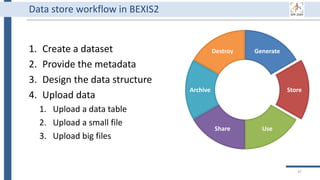
Generate
Store
Use
Share
Archive
Destroy
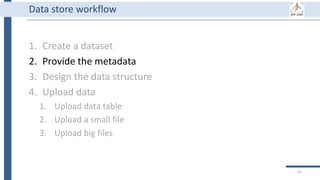
1. Create a dataset
2. Provide the metadata
3. Design the data structure
4. Upload data
1. Upload a data table
2. Upload a small file
3. Upload big files
37
Data store workflow in BEXIS2
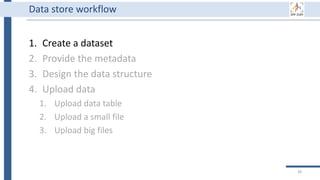
1. Create a dataset
2. Provide the metadata
3. Design the data structure
4. Upload data
1. Upload data table
2. Upload a small file
3. Upload big files
38
Data store workflow
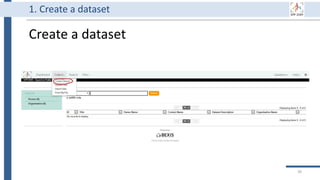
Create a dataset
39
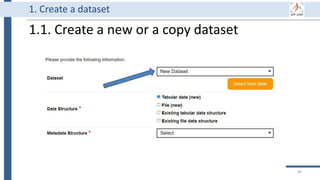
1. Create a dataset
1.1. Create a new or a copy dataset
40
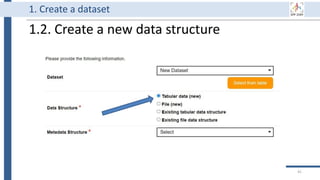
1. Create a dataset
1.2. Create a new data structure
41
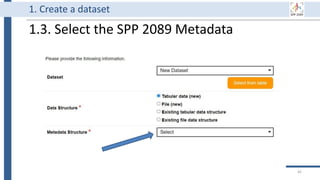
1. Create a dataset
1.3. Select the SPP 2089 Metadata
42
1. Create a dataset
1. Create a dataset
2. Provide the metadata
3. Design the data structure
4. Upload data
1. Upload data table
2. Upload a small file
3. Upload big files
43
Data store workflow
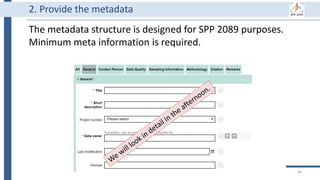
The metadata structure is designed for SPP 2089 purposes.
Minimum meta information is required.
44
2. Provide the metadata
45
Questions?!
1. Create a dataset
2. Provide the metadata
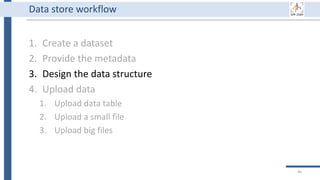
3. Design the data structure
4. Upload data
1. Upload data table
2. Upload a small file
3. Upload big files
46
Data store workflow
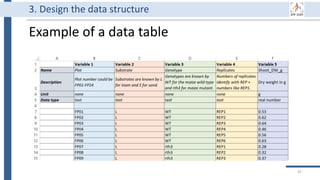
Example of a data table
47
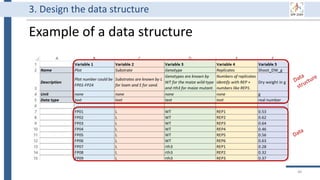
3. Design the data structure
Example of a data structure
48
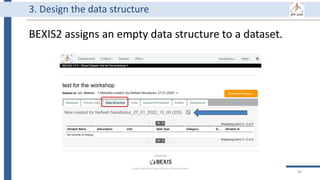
3. Design the data structure
BEXIS2 assigns an empty data structure to a dataset.
49
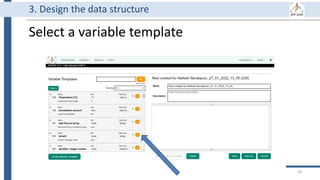
3. Design the data structure
Select a variable template
50
3. Design the data structure
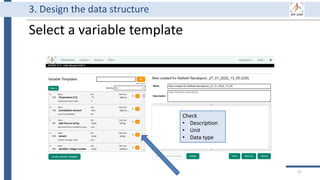
Select a variable template
51
3. Design the data structure
Check
• Description
• Unit
• Data type
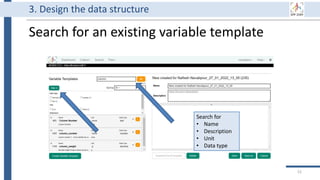
Search for an existing variable template
52
3. Design the data structure
Search for
• Name
• Description
• Unit
• Data type
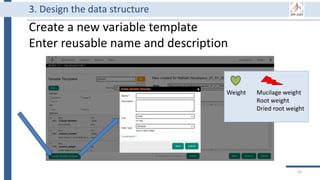
Create a new variable template
Enter reusable name and description
53
3. Design the data structure
Weight Mucilage weight
Root weight
Dried root weight
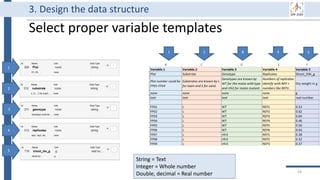
Select proper variable templates
54
3. Design the data structure
1
1 2 3 4
String = Text
Integer = Whole number
Double, decimal = Real number
5
2
3
4
5
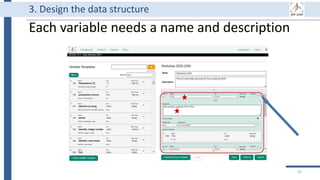
Each variable needs a name and description
55
3. Design the data structure
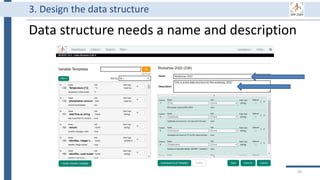
Data structure needs a name and description
56
3. Design the data structure
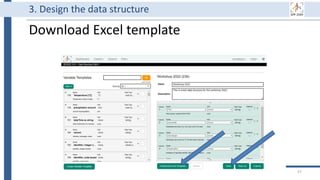
Download Excel template
57
3. Design the data structure
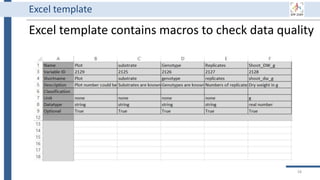
Excel template contains macros to check data quality
58
Excel template
59
1
2
3
4
5
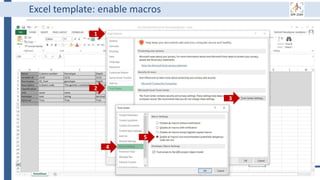
Excel template: enable macros
60
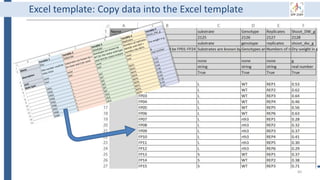
Excel template: Copy data into the Excel template
61
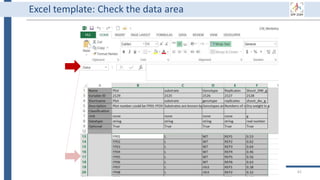
Excel template: Check the data area
62
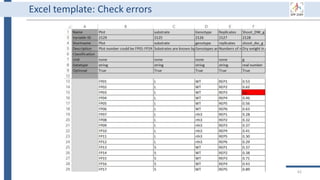
Excel template: Check errors
63
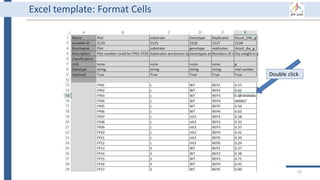
Excel template: Format Cells
Double click
64
Questions?!
1. Create a dataset
2. Provide the metadata
3. Design the data structure
4. Upload data
1. Upload data table
2. Upload a small file
3. Upload big files
65
Data store workflow
66
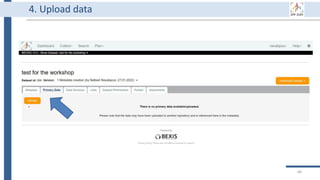
4. Upload data
67
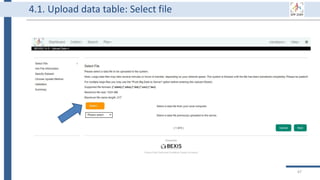
4.1. Upload data table: Select file
68
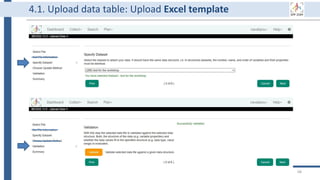
4.1. Upload data table: Upload Excel template
69
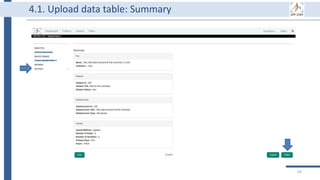
4.1. Upload data table: Summary
1. Create a dataset
2. Provide the metadata
3. Design the data structure
4. Upload data
1. Upload data table
2. Upload a small file
3. Upload big files
70
Data store workflow
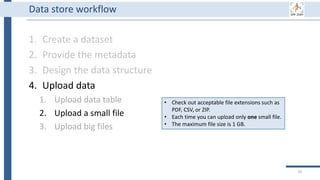
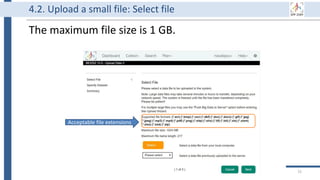
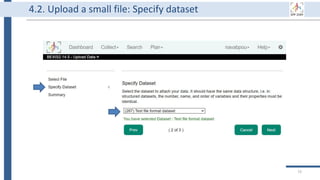
• Check out acceptable file extensions such as
PDF, CSV, or ZIP.
• Each time you can upload only one small file.
• The maximum file size is 1 GB.
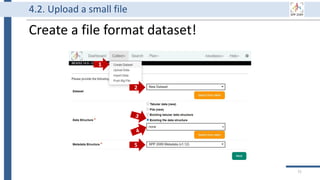
Create a file format dataset!
71
4.2. Upload a small file
1
2
5
The maximum file size is 1 GB.
72
4.2. Upload a small file: Select file
Acceptable file extensions
73
4.2. Upload a small file: Specify dataset
74
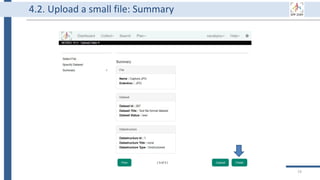
4.2. Upload a small file: Summary
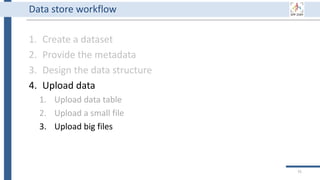
1. Create a dataset
2. Provide the metadata
3. Design the data structure
4. Upload data
1. Upload data table
2. Upload a small file
3. Upload big files
75
Data store workflow
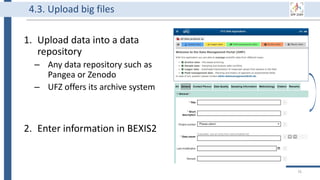
1. Upload data into a data
repository
– Any data repository such as
Pangea or Zenodo
– UFZ offers its archive system
2. Enter information in BEXIS2
76
4.3. Upload big files
77
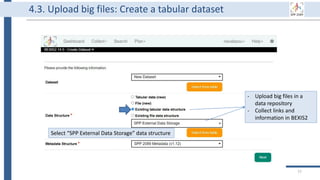
4.3. Upload big files: Create a tabular dataset
- Upload big files in a
data repository
- Collect links and
information in BEXIS2
Select “SPP External Data Storage” data structure
78
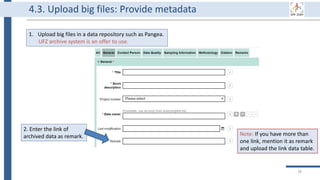
Note: If you have more than
one link, mention it as remark
and upload the link data table.
2. Enter the link of
archived data as remark.
1. Upload big files in a data repository such as Pangea.
UFZ archive system is an offer to use.
4.3. Upload big files: Provide metadata
79
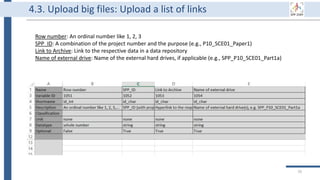
Row number: An ordinal number like 1, 2, 3
SPP_ID: A combination of the project number and the purpose (e.g., P10_SCE01_Paper1)
Link to Archive: Link to the respective data in a data repository
Name of external drive: Name of the external hard drives, if applicable (e.g., SPP_P10_SCE01_Part1a)
4.3. Upload big files: Upload a list of links
80
Questions?!
81
Part I: Basic information
• Introduction (Doris)
• Accounts (Susanne)
• Labeling (Susanne)
• Break
• Research data management
• Store data: upload data
• Use data: download data
• Share data: data security
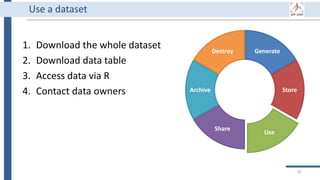
Generate
Store
Use
Share
Archive
Destroy
1. Download the whole dataset
2. Download data table
3. Access data via R
4. Contact data owners
82
Use a dataset
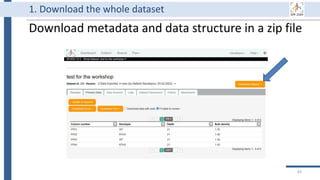
Download metadata and data structure in a zip file
83
1. Download the whole dataset
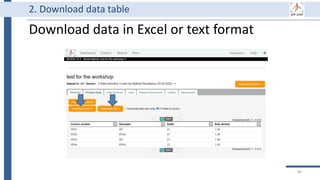
Download data in Excel or text format
84
2. Download data table
3. Access data via R
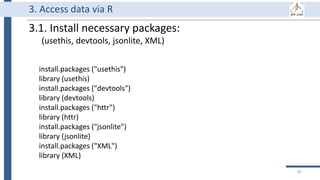
install.packages ("usethis")
library (usethis)
install.packages ("devtools")
library (devtools)
install.packages ("httr")
library (httr)
install.packages ("jsonlite")
library (jsonlite)
install.packages ("XML")
library (XML)
3.1. Install necessary packages:
(usethis, devtools, jsonlite, XML)
85
3. Access data via R
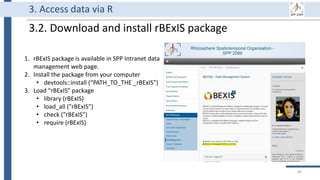
3.2. Download and install rBExIS package
1. rBExIS package is available in SPP Intranet data
management web page.
2. Install the package from your computer
• devtools::install (“PATH_TO_THE _rBExIS”)
3. Load “rBExIS” package
• library (rBExIS)
• load_all ("rBExIS")
• check ("rBExIS")
• require (rBExIS)
86
3. Access data via R
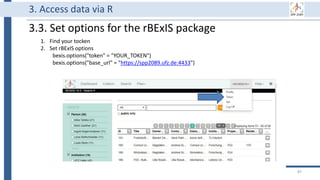
3.3. Set options for the rBExIS package
1. Find your tocken
2. Set rBExIS options
bexis.options("token" = "YOUR_TOKEN")
bexis.options("base_url" = "https://spp2089.ufz.de:4433")
87
3. Access data via R
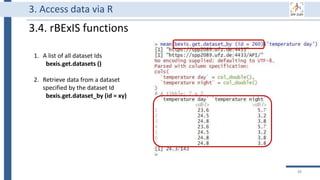
3.4. rBExIS functions
1. A list of all dataset Ids
bexis.get.datasets ()
2. Retrieve data from a dataset
specified by the dataset Id
bexis.get.dataset_by (id = xy)
88
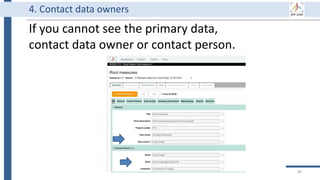
If you cannot see the primary data,
contact data owner or contact person.
89
4. Contact data owners
90
Questions?!
91
Part I: Basic information
• Introduction (Doris)
• Accounts (Susanne)
• Labeling (Susanne)
• Break
• Research data management
• Store data: upload data
• Use data: download data
• Share data: data security
Generate
Store
Use
Share
Archive
Destroy
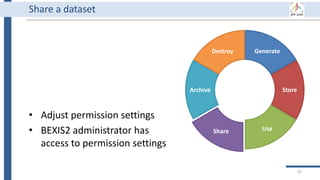
• Adjust permission settings
• BEXIS2 administrator has
access to permission settings
92
Share a dataset
93
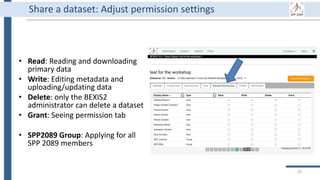
Share a dataset: Adjust permission settings
• Read: Reading and downloading
primary data
• Write: Editing metadata and
uploading/updating data
• Delete: only the BEXIS2
administrator can delete a dataset
• Grant: Seeing permission tab
• SPP2089 Group: Applying for all
SPP 2089 members
94
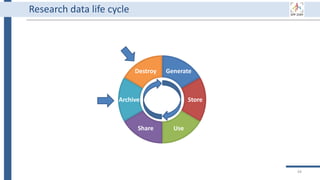
Generate
Store
Use
Share
Archive
Destroy
Research data life cycle
Generate
Store
Use
Share
Archive
Destroy
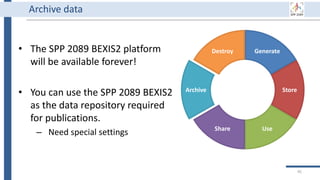
• The SPP 2089 BEXIS2 platform
will be available forever!
• You can use the SPP 2089 BEXIS2
as the data repository required
for publications.
– Need special settings
95
Archive data
Generate
Store
Use
Share
Archive
Destroy
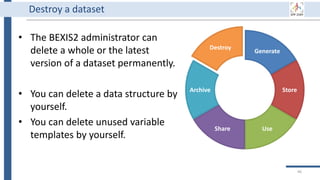
• The BEXIS2 administrator can
delete a whole or the latest
version of a dataset permanently.
• You can delete a data structure by
yourself.
• You can delete unused variable
templates by yourself.
96
Destroy a dataset
97
Questions?!
98
The End of the Part I
Thank you for your attention!
We will start Part II at 1 p.m.
99
[1] EOSC glossary: https://eosc-portal.eu/glossary
[2] DFG Guidelines on the Handling of Research Data:
https://www.dfg.de/download/pdf/foerderung/grundlagen_dfg_foerderung/forschungsdaten/g
uidelines_research_data.pdf
[3] Wilkinson, M. D. et al. (2016). https://www.nature.com/articles/sdata201618
[4] BEXIS Research Data Management: https://fusion.cs.uni-jena.de/bpp/
References

BEXIS2 Workshop - Part1

  • 1.
    SPP 2089 datamanagement
  • 2.
    Time table 2 • 9:00– 12 -- Basics • 12:00 – 13:00 -- Lunch • 13:00 – 15:00 -- Advanced • 15:00 – 15:30 -- Break • 15:30 – 16:00 -- Q/A • Homework (required for certification)
  • 3.
  • 4.
    SPP 2089 datamanagement Part I Basic information
  • 5.
    5 Part I: Basicinformation • Introduction (Doris) • Accounts (Susanne) • Labeling (Susanne) • Break • Research data management • Store data: upload data • Use data: download data • Share data: data security
  • 6.
    6 Part I: Basicinformation • Introduction (Doris) • Accounts (Susanne) • Labeling (Susanne) • Break • Research data management • Store data: upload data • Use data: download data • Share data: data security
  • 7.
    7 Part I: Basicinformation • Introduction (Doris) • Accounts (Susanne) • Labeling (Susanne) • Break • Research data management • Store data: upload data • Use data: download data • Share data: data security
  • 8.
    8 ACCOUNTS • SPP2089 website • UFZ account • BEXIS2 platform
  • 9.
    9 Login to SPPwebsite https://www.ufz.de/spp-rhizosphere/index.php?en=43202
  • 10.
    10 Login to SPPwebsite https://www.ufz.de/spp-rhizosphere/index.php?en=43517 Username: First letter of given name family name Password: 3 letters and 3 numbers
  • 11.
    11 UFZ account https://www.intranet.ufz.de/admin.php Account isrelated to the automated emails Username: ext family name (at least partly) Password: Your choice • Related to automated emails • Account expires if you don‘t renew you password!
  • 12.
  • 13.
  • 14.
    UFZ archive • Pleasecontact us for help and guidance during this process 14
  • 15.
  • 16.
    16 UFZ cloud https://nc.ufz.de/login Use UFZaccount login Username: ext family name (at least partly) Password: Your choice Account expires if password is not renewed
  • 17.
  • 18.
    18 BEXIS2 account https://bexis.ufz.de:4433/ Register withyour work email address Username: Your choice Password: At least 6 characters
  • 19.
    19 BEXIS2 account https://bexis.ufz.de:4433/ A shortname of your institute (e.g., UFZ Halle, Uni Kiel, TU Munich) Save and wait for setting permissions
  • 20.
    20 Part I: Basicinformation • Introduction (Doris) • Accounts (Susanne) • Labeling (Susanne) • Break • Research data management • Store data: upload data • Use data: download data • Share data: data security
  • 21.
    21 Labeling • Labelingsamples • Field site • Column experiments
  • 22.
    Universal labelling code Pleaseuse the universal labelling code Labelling of samples • Substrate: Loam = L Sand = S don’t use clay, sandy loam…. • Genotype: Wild type = WT hairless Mutant = rth3 don’t use mutant +/- … • Biological replicates: REP1, REP2, REP3, …. 22
  • 23.
    Universal labelling code •Labelling of soil column experiments [projectnumber_SCE#_C#]; • Soil colum expriment = SCE01,… • Column in the experiment = C01 • example: P21_SCE01_C01 • Labelling of sampling campaigns in soil plot experiment [projectnumber_SPE_sampling date_FP#_type of sample#]; • Field plot = FP01, FP02.. • Depth 0-20 cm = D00_20 • Sampling of several points within each plot = a, b, c • example: P21_SPE_20181105_FP01_UC# • You may extend the name by providing further details if required (i.e. bulk/rhizosphere/rhizoplane)… • If you extend the details, communicate that to your cooperation partners 23
  • 24.
    Planned SPE We areplanning to sow the maize on the 26th and 27th of April 2022. Furthermore, we are planning 4 samplings this year: BBCH14: 08th-10th of June BBCH19: 29th of June- 01st of July BBCH59: 10th-12th of August BBCH83: 28th -30th of September The final harvest is planned on the 12th-14th of October 2022. SPE_annual variation in precipitation SPE_legacy 24
  • 25.
    Planned SCE Please providedate and description that other projects can join SCE_drought P7, P3, P6 SCE_drought-long P3, P6 SCE_compaction P21 SCE_contact SCE_biopore SCE_decay P19, P21 SCE_mucilage P4 SCE_nutrient deficiency P7 25
  • 26.
    New members ofstaff Please provide the following information for each new member of staff • Name • Email address • Postal address • Position (PhD, PostDoc, PI…) • Photo Please inform the coordination if a member of staff • is leaving the project permanently or for a longer period of time • move to a new institute • changes of names or email addresses 26
  • 27.
  • 28.
    28 Part I: Basicinformation • Welcome (Doris) • Accounts (Susanne) • Labeling (Susanne) • Break • Research data management • Store data: upload data • Use data: download data • Share data: data security
  • 29.
    29 Part I: Basicinformation • Introduction (Doris) • Accounts (Susanne) • Labeling (Susanne) • Break • Research data management • Store data: upload data • Use data: download data • Share data: data security
  • 30.
    30 It is datacollected or produced in the course of scientific research activities and used as evidence in the research process, or commonly accepted in the research community as necessary to validate research findings and results (European open science cloud [1]). Research data might include measurement data, laboratory values, audiovisual information, texts, survey data, objects from collections, or samples that were created, developed or evaluated during scientific work. Methodical forms of testing such as questionnaires, software and simulations may also produce important results for scientific research and should therefore also be categorized as research data (DFG Guidelines on the Handling of Research Data [2]). Research data
  • 31.
    Generate Store Use Share Archive Destroy 31 Wrong or out-of-datedata must be permanently erased. Note: End-of-life data destruction is the responsibility of all stakeholders. Research data life cycle Data samples from the field, Collected data from sensors or devices like CT scan images. Store data in a remote and secure location like a data repository or a hard drive located in the library to keep data safe for a long time. Access, study, or process data to do analysis and conclude. Write data in a notebook, Enter data in an Excel sheet, record data in a hard drive,… Be aware of using the agreed labeling method. Share data amongst internal colleagues or partners outside of your organization, with SPP 2089 colleagues. Use Email, a transfer site like NextCloud, or hard drive.
  • 32.
    32 Why using adata management platform (DMP) 1. DMP supports data throughout its life cycle. 2. All components of the research process must be available to ensure transparency, reproducibility, and reusability [3]. 3. A DMP gathers research data in one place and keeps it usable for a long time. 4. A DMP has to deal with security and privacy concerns due to collecting private data. 5. Using a data management system is a DFG requirement, and it is mentioned in the SPP 2089 bylaws.
  • 33.
    BEXIS2 URL: https://bexis.ufz.de:4433/ 33 SPP2089 data management platform: BEXIS2
  • 34.
    Generate Store Use Share Archive Destroy 34 BEXIS2 administrator canremove incorrect or useless data forever. Of course, it requires special permission from the data owner. BEXIS2 is a free and open source software supporting researchers in managing their data throughout the data life cycle from data storing to sharing research data [4]. BEXIS2 keeps track of the evolution of a dataset and returns to any previous version if needed. Start to store data in BEXIS2 at this point of your work. Data security is a major concern for BEXIS2. It specify fine grained data permissions on who can view, access, or update a dataset. Why using BEXIS2? BEXIS2 can be used for long- term data archiving even as the publication requirement. In the near future, you can get DOI for each dataset.
  • 35.
  • 36.
    36 Part I: Basicinformation • Introduction (Doris) • Accounts (Susanne) • Labeling (Susanne) • Break • Research data management • Store data: upload data • Use data: download data • Share data: data security
  • 37.
    Generate Store Use Share Archive Destroy 1. Create adataset 2. Provide the metadata 3. Design the data structure 4. Upload data 1. Upload a data table 2. Upload a small file 3. Upload big files 37 Data store workflow in BEXIS2
  • 38.
    1. Create adataset 2. Provide the metadata 3. Design the data structure 4. Upload data 1. Upload data table 2. Upload a small file 3. Upload big files 38 Data store workflow
  • 39.
    Create a dataset 39 1.Create a dataset
  • 40.
    1.1. Create anew or a copy dataset 40 1. Create a dataset
  • 41.
    1.2. Create anew data structure 41 1. Create a dataset
  • 42.
    1.3. Select theSPP 2089 Metadata 42 1. Create a dataset
  • 43.
    1. Create adataset 2. Provide the metadata 3. Design the data structure 4. Upload data 1. Upload data table 2. Upload a small file 3. Upload big files 43 Data store workflow
  • 44.
    The metadata structureis designed for SPP 2089 purposes. Minimum meta information is required. 44 2. Provide the metadata
  • 45.
  • 46.
    1. Create adataset 2. Provide the metadata 3. Design the data structure 4. Upload data 1. Upload data table 2. Upload a small file 3. Upload big files 46 Data store workflow
  • 47.
    Example of adata table 47 3. Design the data structure
  • 48.
    Example of adata structure 48 3. Design the data structure
  • 49.
    BEXIS2 assigns anempty data structure to a dataset. 49 3. Design the data structure
  • 50.
    Select a variabletemplate 50 3. Design the data structure
  • 51.
    Select a variabletemplate 51 3. Design the data structure Check • Description • Unit • Data type
  • 52.
    Search for anexisting variable template 52 3. Design the data structure Search for • Name • Description • Unit • Data type
  • 53.
    Create a newvariable template Enter reusable name and description 53 3. Design the data structure Weight Mucilage weight Root weight Dried root weight
  • 54.
    Select proper variabletemplates 54 3. Design the data structure 1 1 2 3 4 String = Text Integer = Whole number Double, decimal = Real number 5 2 3 4 5
  • 55.
    Each variable needsa name and description 55 3. Design the data structure
  • 56.
    Data structure needsa name and description 56 3. Design the data structure
  • 57.
    Download Excel template 57 3.Design the data structure
  • 58.
    Excel template containsmacros to check data quality 58 Excel template
  • 59.
  • 60.
    60 Excel template: Copydata into the Excel template
  • 61.
  • 62.
  • 63.
    63 Excel template: FormatCells Double click
  • 64.
  • 65.
    1. Create adataset 2. Provide the metadata 3. Design the data structure 4. Upload data 1. Upload data table 2. Upload a small file 3. Upload big files 65 Data store workflow
  • 66.
  • 67.
    67 4.1. Upload datatable: Select file
  • 68.
    68 4.1. Upload datatable: Upload Excel template
  • 69.
    69 4.1. Upload datatable: Summary
  • 70.
    1. Create adataset 2. Provide the metadata 3. Design the data structure 4. Upload data 1. Upload data table 2. Upload a small file 3. Upload big files 70 Data store workflow • Check out acceptable file extensions such as PDF, CSV, or ZIP. • Each time you can upload only one small file. • The maximum file size is 1 GB.
  • 71.
    Create a fileformat dataset! 71 4.2. Upload a small file 1 2 5
  • 72.
    The maximum filesize is 1 GB. 72 4.2. Upload a small file: Select file Acceptable file extensions
  • 73.
    73 4.2. Upload asmall file: Specify dataset
  • 74.
    74 4.2. Upload asmall file: Summary
  • 75.
    1. Create adataset 2. Provide the metadata 3. Design the data structure 4. Upload data 1. Upload data table 2. Upload a small file 3. Upload big files 75 Data store workflow
  • 76.
    1. Upload datainto a data repository – Any data repository such as Pangea or Zenodo – UFZ offers its archive system 2. Enter information in BEXIS2 76 4.3. Upload big files
  • 77.
    77 4.3. Upload bigfiles: Create a tabular dataset - Upload big files in a data repository - Collect links and information in BEXIS2 Select “SPP External Data Storage” data structure
  • 78.
    78 Note: If youhave more than one link, mention it as remark and upload the link data table. 2. Enter the link of archived data as remark. 1. Upload big files in a data repository such as Pangea. UFZ archive system is an offer to use. 4.3. Upload big files: Provide metadata
  • 79.
    79 Row number: Anordinal number like 1, 2, 3 SPP_ID: A combination of the project number and the purpose (e.g., P10_SCE01_Paper1) Link to Archive: Link to the respective data in a data repository Name of external drive: Name of the external hard drives, if applicable (e.g., SPP_P10_SCE01_Part1a) 4.3. Upload big files: Upload a list of links
  • 80.
  • 81.
    81 Part I: Basicinformation • Introduction (Doris) • Accounts (Susanne) • Labeling (Susanne) • Break • Research data management • Store data: upload data • Use data: download data • Share data: data security
  • 82.
    Generate Store Use Share Archive Destroy 1. Download thewhole dataset 2. Download data table 3. Access data via R 4. Contact data owners 82 Use a dataset
  • 83.
    Download metadata anddata structure in a zip file 83 1. Download the whole dataset
  • 84.
    Download data inExcel or text format 84 2. Download data table
  • 85.
    3. Access datavia R install.packages ("usethis") library (usethis) install.packages ("devtools") library (devtools) install.packages ("httr") library (httr) install.packages ("jsonlite") library (jsonlite) install.packages ("XML") library (XML) 3.1. Install necessary packages: (usethis, devtools, jsonlite, XML) 85
  • 86.
    3. Access datavia R 3.2. Download and install rBExIS package 1. rBExIS package is available in SPP Intranet data management web page. 2. Install the package from your computer • devtools::install (“PATH_TO_THE _rBExIS”) 3. Load “rBExIS” package • library (rBExIS) • load_all ("rBExIS") • check ("rBExIS") • require (rBExIS) 86
  • 87.
    3. Access datavia R 3.3. Set options for the rBExIS package 1. Find your tocken 2. Set rBExIS options bexis.options("token" = "YOUR_TOKEN") bexis.options("base_url" = "https://spp2089.ufz.de:4433") 87
  • 88.
    3. Access datavia R 3.4. rBExIS functions 1. A list of all dataset Ids bexis.get.datasets () 2. Retrieve data from a dataset specified by the dataset Id bexis.get.dataset_by (id = xy) 88
  • 89.
    If you cannotsee the primary data, contact data owner or contact person. 89 4. Contact data owners
  • 90.
  • 91.
    91 Part I: Basicinformation • Introduction (Doris) • Accounts (Susanne) • Labeling (Susanne) • Break • Research data management • Store data: upload data • Use data: download data • Share data: data security
  • 92.
    Generate Store Use Share Archive Destroy • Adjust permissionsettings • BEXIS2 administrator has access to permission settings 92 Share a dataset
  • 93.
    93 Share a dataset:Adjust permission settings • Read: Reading and downloading primary data • Write: Editing metadata and uploading/updating data • Delete: only the BEXIS2 administrator can delete a dataset • Grant: Seeing permission tab • SPP2089 Group: Applying for all SPP 2089 members
  • 94.
  • 95.
    Generate Store Use Share Archive Destroy • The SPP2089 BEXIS2 platform will be available forever! • You can use the SPP 2089 BEXIS2 as the data repository required for publications. – Need special settings 95 Archive data
  • 96.
    Generate Store Use Share Archive Destroy • The BEXIS2administrator can delete a whole or the latest version of a dataset permanently. • You can delete a data structure by yourself. • You can delete unused variable templates by yourself. 96 Destroy a dataset
  • 97.
  • 98.
    98 The End ofthe Part I Thank you for your attention! We will start Part II at 1 p.m.
  • 99.
    99 [1] EOSC glossary:https://eosc-portal.eu/glossary [2] DFG Guidelines on the Handling of Research Data: https://www.dfg.de/download/pdf/foerderung/grundlagen_dfg_foerderung/forschungsdaten/g uidelines_research_data.pdf [3] Wilkinson, M. D. et al. (2016). https://www.nature.com/articles/sdata201618 [4] BEXIS Research Data Management: https://fusion.cs.uni-jena.de/bpp/ References