A basic course on Research data management
part 4: caring for your data, or
making data reusable
PROOF course Information Literacy and
Research Data Management
TU/e, 24-01-2017
l.osinski@tue.nl, TU/e IEC/Library
Available under CC BY-SA license, which permits copying
and redistributing the material in any medium or format &
adapting the material for any purpose, provided the original
author and source are credited & you distribute the
adapted material under the same license as the original
Research data management
 Sharing your data, or making your data findable and accessible
with good data practices
+ protecting your data: back up, access control; file naming, organizing
data, versioning
+ sharing your data via collaboration platforms and archives
→ Caring for your data, or making your data reusable and
interoperable with good data practices
+ metadata, tidy data, licenses
Research data management
what was it again
Before data can be reusable, it has first to be usable
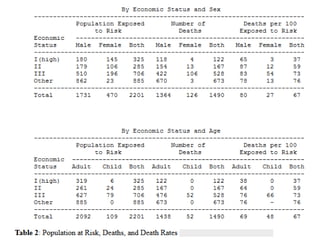
What is the nature of the “unusual episode” to which this table refers?
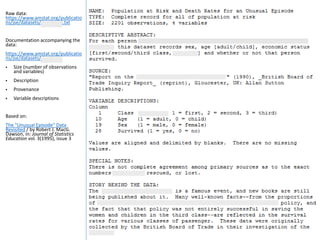
Raw data:
https://www.amstat.org/publicatio
ns/jse/datasets/titanic.dat.txt
Documentation accompanying the
data:
https://www.amstat.org/publicatio
ns/jse/datasets/titanic.txt
 Size (number of observations
and variables)
 Description
 Provenance
 Variable descriptions
Based on:
The "Unusual Episode" Data
Revisited / by Robert J. MacG.
Dawson, in: Journal of Statistics
Education vol. 3(1995), issue 3
1. Morphological
Measurements of Galapagos
Finches
http://dx.doi.org/10.5061/dry
ad.152
 Use of standard names
(taxonomy, species)
 Variable names clear
enough? WingL must be
wing length but what is
N.Ubkl?
 Units of measurement?
Based on:
Looking after datasets / by
Antony Unwin, 01-09-2015,
http://blog.revolutionanalytics
.com/2015/09/looking-after-
datasets.html
2. Collaborative FAIR data
sharing / by Henry Rzepa
The welfare consequences… /
by Jonathan J. Cooper et. al.,
http://dx.doi.org/10.1371/jou
rnal.pone.0102722
 Word.doc
These data are findable
and accessible – but
usable?
Lessons learned
table structure [ tidy data ]
To allow your data to be easily:
 imported by data management systems;
 analyzed by analysis software, and ;
 combined with other data (interoperability)
make sure that:
 each row represents a single observation (record)
 each column represents a single variable (parameter) or type of measurement
(field)
 every cell contains only one piece of information (no highlighting of cells)
 there is only one table for each type of information (no multiple worksheets)
Cross-tab structure / contingency table: different columns contain measurements of
the same variable: easier to read but difficult to add data (columns) to the records
(rows). See Titanic table versus Titanic raw data
“The problem is that people like to view data in a totally different way than a computer
likes to process it.” (Kien Leong)
Lessons learned
table metadata: variables (columns) and observations/records (rows)
 include a row at the top of each table that contains full column (variable)
names (no hard to understand abbreviations)
 columns: use clear, descriptive variable names, avoid special characters (can
cause problems with some software)
 rows: if possible, use standard names within cells (derived from a taxonomy
for example, standard species name, standard date formats, …)
 try to avoid coding categorical or ordinal data as numbers
 missing data / null values: best option: use a blank
Lessons learned
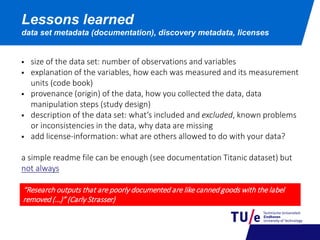
data set metadata (documentation), discovery metadata, licenses
 size of the data set: number of observations and variables
 explanation of the variables, how each was measured and its measurement
units (code book)
 provenance (origin) of the data, how you collected the data, data
manipulation steps (study design)
 description of the data set: what’s included and excluded, known problems
or inconsistencies in the data, why data are missing
 add license-information: what are others allowed to do with your data?
a simple readme file can be enough (see documentation Titanic dataset) but
not always
“Research outputs that are poorly documented are like canned goods with the label
removed (…)” (Carly Strasser)
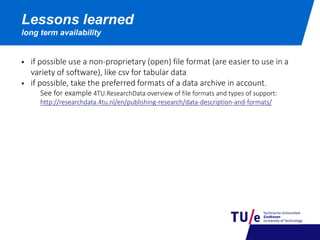
Lessons learned
long term availability
 if possible use a non-proprietary (open) file format (are easier to use in a
variety of software), like csv for tabular data
 if possible, take the preferred formats of a data archive in account.
See for example 4TU.ResearchData overview of file formats and types of support:
http://researchdata.4tu.nl/en/publishing-research/data-description-and-formats/
Tools
for working with messy data
Excel vs scripting based software tools
 Excel: data provenance and documentation of data processing with a graphical user
interface is bad because it doesn’t leaves a record
 use a scripted language (R (free), Matlab, SAS…) to process data, run the analysis
and to produce final outputs
OpenRefine
 runs on your computer (not in the cloud), inside the Firefox browser (not in IE), no
web connection is needed
 working with OpenRefine: http://www.datacarpentry.org/OpenRefine-ecology/01-
working-with-openrefine.html
 captures all steps done to your raw data ; original dataset is not modified ; steps are
easily reversed ;
Tabula
 “… tool for liberating data tables locked inside PDF files.”
A reproducible workflow (bartomeuslab)
Data Coach [ website ]
TU/e data librarians (datacoach@tue.nl)
Leon Osinski, Sjef Öllers
Recommended reading
Van den Eynden, Veerle e.a. (2011), Managing and sharing data: best
practice for researchers, UK Data Archive
Strasser, Carly (2015), Research data management, NISO
Recommended online course
Essentials 4 data support [English & Dutch]
Support
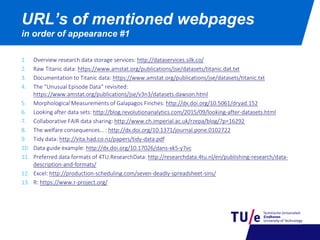
1. Overview research data storage services: http://dataservices.silk.co/
2. Raw Titanic data: https://www.amstat.org/publications/jse/datasets/titanic.dat.txt
3. Documentation to Titanic data: https://www.amstat.org/publications/jse/datasets/titanic.txt
4. The “Unusual Episode Data“ revisited:
https://www.amstat.org/publications/jse/v3n3/datasets.dawson.html
5. Morphological Measurements of Galapagos Finches: http://dx.doi.org/10.5061/dryad.152
6. Looking after data sets: http://blog.revolutionanalytics.com/2015/09/looking-after-datasets.html
7. Collaborative FAIR data sharing: http://www.ch.imperial.ac.uk/rzepa/blog/?p=16292
8. The welfare consequences… : http://dx.doi.org/10.1371/journal.pone.0102722
9. Tidy data: http://vita.had.co.nz/papers/tidy-data.pdf
10. Data guide example: http://dx.doi.org/10.17026/dans-xk5-y7vc
11. Preferred data formats of 4TU.ResearchData: http://researchdata.4tu.nl/en/publishing-research/data-
description-and-formats/
12. Excel: http://production-scheduling.com/seven-deadly-spreadsheet-sins/
13. R: https://www.r-project.org/
URL’s of mentioned webpages
in order of appearance #1
14. Bartolomeuslab, A reproducible workflow: https://youtu.be/s3JldKoA0zw
15. OpenRefine: http://openrefine.org/
16. Working with OpenRefine: http://www.datacarpentry.org/OpenRefine-ecology/01-working-with-
openrefine.html
16. TU/e Data Coach: http://www.tue.nl/datacoach
17. Carly Strasser, Research data management:
http://www.niso.org/apps/group_public/download.php/15375/PrimerRDM-2015-0727.pdf
18. Online course ‘Essentials for data support’: http://datasupport.researchdata.nl/en/
URL’s of mentioned webpages
in order of appearance #2

A basic course on Research data management, part 4: caring for your data, or making data reusable

  • 1.
    A basic courseon Research data management part 4: caring for your data, or making data reusable PROOF course Information Literacy and Research Data Management TU/e, 24-01-2017 l.osinski@tue.nl, TU/e IEC/Library Available under CC BY-SA license, which permits copying and redistributing the material in any medium or format & adapting the material for any purpose, provided the original author and source are credited & you distribute the adapted material under the same license as the original
  • 2.
    Research data management Sharing your data, or making your data findable and accessible with good data practices + protecting your data: back up, access control; file naming, organizing data, versioning + sharing your data via collaboration platforms and archives → Caring for your data, or making your data reusable and interoperable with good data practices + metadata, tidy data, licenses Research data management what was it again Before data can be reusable, it has first to be usable
  • 3.
    What is thenature of the “unusual episode” to which this table refers?
  • 5.
    Raw data: https://www.amstat.org/publicatio ns/jse/datasets/titanic.dat.txt Documentation accompanyingthe data: https://www.amstat.org/publicatio ns/jse/datasets/titanic.txt  Size (number of observations and variables)  Description  Provenance  Variable descriptions Based on: The "Unusual Episode" Data Revisited / by Robert J. MacG. Dawson, in: Journal of Statistics Education vol. 3(1995), issue 3
  • 6.
    1. Morphological Measurements ofGalapagos Finches http://dx.doi.org/10.5061/dry ad.152  Use of standard names (taxonomy, species)  Variable names clear enough? WingL must be wing length but what is N.Ubkl?  Units of measurement? Based on: Looking after datasets / by Antony Unwin, 01-09-2015, http://blog.revolutionanalytics .com/2015/09/looking-after- datasets.html 2. Collaborative FAIR data sharing / by Henry Rzepa
  • 7.
    The welfare consequences…/ by Jonathan J. Cooper et. al., http://dx.doi.org/10.1371/jou rnal.pone.0102722  Word.doc These data are findable and accessible – but usable?
  • 8.
    Lessons learned table structure[ tidy data ] To allow your data to be easily:  imported by data management systems;  analyzed by analysis software, and ;  combined with other data (interoperability) make sure that:  each row represents a single observation (record)  each column represents a single variable (parameter) or type of measurement (field)  every cell contains only one piece of information (no highlighting of cells)  there is only one table for each type of information (no multiple worksheets) Cross-tab structure / contingency table: different columns contain measurements of the same variable: easier to read but difficult to add data (columns) to the records (rows). See Titanic table versus Titanic raw data “The problem is that people like to view data in a totally different way than a computer likes to process it.” (Kien Leong)
  • 9.
    Lessons learned table metadata:variables (columns) and observations/records (rows)  include a row at the top of each table that contains full column (variable) names (no hard to understand abbreviations)  columns: use clear, descriptive variable names, avoid special characters (can cause problems with some software)  rows: if possible, use standard names within cells (derived from a taxonomy for example, standard species name, standard date formats, …)  try to avoid coding categorical or ordinal data as numbers  missing data / null values: best option: use a blank
  • 10.
    Lessons learned data setmetadata (documentation), discovery metadata, licenses  size of the data set: number of observations and variables  explanation of the variables, how each was measured and its measurement units (code book)  provenance (origin) of the data, how you collected the data, data manipulation steps (study design)  description of the data set: what’s included and excluded, known problems or inconsistencies in the data, why data are missing  add license-information: what are others allowed to do with your data? a simple readme file can be enough (see documentation Titanic dataset) but not always “Research outputs that are poorly documented are like canned goods with the label removed (…)” (Carly Strasser)
  • 11.
    Lessons learned long termavailability  if possible use a non-proprietary (open) file format (are easier to use in a variety of software), like csv for tabular data  if possible, take the preferred formats of a data archive in account. See for example 4TU.ResearchData overview of file formats and types of support: http://researchdata.4tu.nl/en/publishing-research/data-description-and-formats/
  • 12.
    Tools for working withmessy data Excel vs scripting based software tools  Excel: data provenance and documentation of data processing with a graphical user interface is bad because it doesn’t leaves a record  use a scripted language (R (free), Matlab, SAS…) to process data, run the analysis and to produce final outputs OpenRefine  runs on your computer (not in the cloud), inside the Firefox browser (not in IE), no web connection is needed  working with OpenRefine: http://www.datacarpentry.org/OpenRefine-ecology/01- working-with-openrefine.html  captures all steps done to your raw data ; original dataset is not modified ; steps are easily reversed ; Tabula  “… tool for liberating data tables locked inside PDF files.” A reproducible workflow (bartomeuslab)
  • 13.
    Data Coach [website ] TU/e data librarians (datacoach@tue.nl) Leon Osinski, Sjef Öllers Recommended reading Van den Eynden, Veerle e.a. (2011), Managing and sharing data: best practice for researchers, UK Data Archive Strasser, Carly (2015), Research data management, NISO Recommended online course Essentials 4 data support [English & Dutch] Support
  • 14.
    1. Overview researchdata storage services: http://dataservices.silk.co/ 2. Raw Titanic data: https://www.amstat.org/publications/jse/datasets/titanic.dat.txt 3. Documentation to Titanic data: https://www.amstat.org/publications/jse/datasets/titanic.txt 4. The “Unusual Episode Data“ revisited: https://www.amstat.org/publications/jse/v3n3/datasets.dawson.html 5. Morphological Measurements of Galapagos Finches: http://dx.doi.org/10.5061/dryad.152 6. Looking after data sets: http://blog.revolutionanalytics.com/2015/09/looking-after-datasets.html 7. Collaborative FAIR data sharing: http://www.ch.imperial.ac.uk/rzepa/blog/?p=16292 8. The welfare consequences… : http://dx.doi.org/10.1371/journal.pone.0102722 9. Tidy data: http://vita.had.co.nz/papers/tidy-data.pdf 10. Data guide example: http://dx.doi.org/10.17026/dans-xk5-y7vc 11. Preferred data formats of 4TU.ResearchData: http://researchdata.4tu.nl/en/publishing-research/data- description-and-formats/ 12. Excel: http://production-scheduling.com/seven-deadly-spreadsheet-sins/ 13. R: https://www.r-project.org/ URL’s of mentioned webpages in order of appearance #1
  • 15.
    14. Bartolomeuslab, Areproducible workflow: https://youtu.be/s3JldKoA0zw 15. OpenRefine: http://openrefine.org/ 16. Working with OpenRefine: http://www.datacarpentry.org/OpenRefine-ecology/01-working-with- openrefine.html 16. TU/e Data Coach: http://www.tue.nl/datacoach 17. Carly Strasser, Research data management: http://www.niso.org/apps/group_public/download.php/15375/PrimerRDM-2015-0727.pdf 18. Online course ‘Essentials for data support’: http://datasupport.researchdata.nl/en/ URL’s of mentioned webpages in order of appearance #2