Research data management
PROOF Advanced course Information Literacy and
Research Data Management
TU/e, 12-11-2015
l.osinski@tue.nl, TU/e IEC/Library
Available under CC BY-SA license, which permits copying
and redistributing the material in any medium or format &
adapting the material for any purpose, provided the
original author and source are credited & you distribute
the adapted material under the same license as the
original
Topics part Research data management
1. Usable data (tabular data)
2. Accessible data (DataverseNL)
Topic #1
1. Usable data (tabular data)
2. Accessible data (DataverseNL)
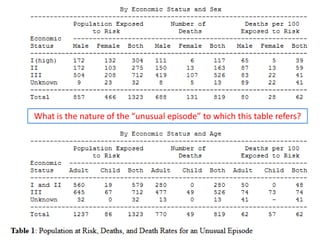
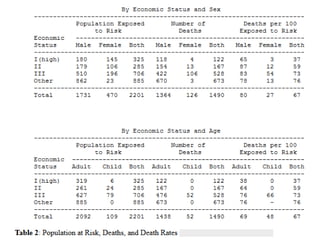
What is the nature of the “unusual episode” to which this table refers?
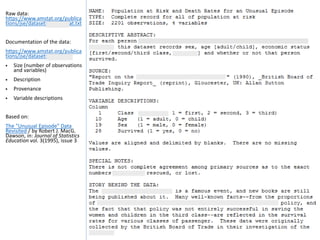
Raw data:
https://www.amstat.org/publica
tions/jse/datasets/titanic.dat.txt
Documentation of the data:
https://www.amstat.org/publica
tions/jse/datasets/titanic.txt
 Size (number of observations
and variables)
 Description
 Provenance
 Variable descriptions
Based on:
The "Unusual Episode" Data
Revisited / by Robert J. MacG.
Dawson, in: Journal of Statistics
Education vol. 3(1995), issue 3
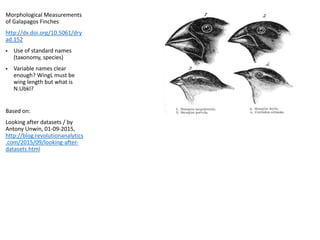
Morphological Measurements
of Galapagos Finches
http://dx.doi.org/10.5061/dry
ad.152
 Use of standard names
(taxonomy, species)
 Variable names clear
enough? WingL must be
wing length but what is
N.Ubkl?
Based on:
Looking after datasets / by
Antony Unwin, 01-09-2015,
http://blog.revolutionanalytics
.com/2015/09/looking-after-
datasets.html
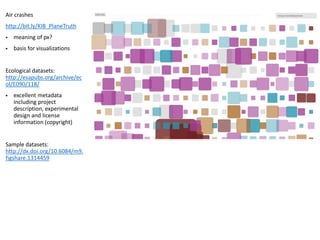
Air crashes
http://bit.ly/KIB_PlaneTruth
 meaning of px?
 basis for visualizations
Ecological datasets:
http://esapubs.org/archive/ec
ol/E090/118/
 excellent metadata
including project
description, experimental
design and license
information (copyright)
Sample datasets:
http://dx.doi.org/10.6084/m9.
figshare.1314459
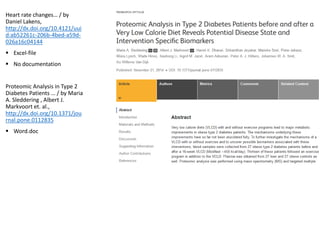
Heart rate changes… / by
Daniel Lakens,
http://dx.doi.org/10.4121/uui
d:ab52261c-206b-4bed-a59d-
026a16c04144
 Excel-file
 No documentation
Proteomic Analysis in Type 2
Diabetes Patients … / by Maria
A. Sleddering , Albert J.
Markvoort et. al.,
http://dx.doi.org/10.1371/jou
rnal.pone.0112835
 Word.doc
to allow your data to be easily:
 imported by data management systems;
 analyzed by analysis software, and ;
 combined with other data (interoperability)
make sure that:
 each row represents a single observation (record) and each column a single
variable or type of measurement (field)
 every cell should contain only a single value
 there should be only one column for each type of information
Cross-tab structure / contingency table: different columns contain measurements
of the same variable: easier to read but difficult to add data (columns) to the
records (rows). See Titanic table versus Titanic raw data
Lessons learned
table structure
 columns: use clear, descriptive variable names, avoid special characters (can
cause problems with some software)
 rows: if possible, use standard names within cells (derived from a taxonomy for
example)
 missing data / null values: best option: use a blank
Lessons learned
columns (variables) and rows (records)
 size of the data set: number of observations and variables
 explanation of the variables
 description of the data: what’s included and excluded, known problems or
inconsistencies in the data, units of measurement
 provenance (origin) of the data, data manipulation steps
a simple readme file can be enough (see documentation titanic dataset)
Lessons learned
intelligibility: documentation
 if possible use a non-proprietary (open) file format (are easier to use in a variety
of software), like csv for tabular data
 if possible, take the preferred formats of a data archive in account
http://datacentrum.3tu.nl/fileadmin/editor_upload/File_formats/Digital_Preser
vation_Support_levels.pdf
Lessons learned
long term availability
Excel
 data provenance and documentation of data processing is bad
OpenRefine
 runs on your computer (not in the cloud), inside the Firefox browser (not in IE),
no web connection is needed
 working with OpenRefine: http://www.datacarpentry.org/OpenRefine-
ecology/01-working-with-openrefine.html
 captures all steps done to your raw data ; original dataset is not modified ; steps
are easily reversed ;
Tools
for working with messy data
Topic #2
1. Usable data (tabular data)
2. Accessible data (DataverseNL)
 Test environment: Go to: https://act.dataverse.nl/
 [ Actual website: https://www.dataverse.nl ]
 Click ‘Log in’ (at the top right)
 Select SURFconext in the Please select your institution list and click Continue.
 Select Eindhoven University of Technology and log on with your TU/e username
and password
 When asked for it, give permission to share your data by answering Yes or click
this Tab
 When asked to create an account, answer Yes or click this Tab.
 When you succeeded to create an account, your username is: @[prefix of your
email address]
DataverseNL
log in | creating an account
Storage and backup of data through DANS [Dutch Archiving and Networking
Services]
 Data transfer: up to 2 Gb per dataset
 Via 3TU.Datacentrum: up to 50 Gb free
DataverseNL
storage and backup of data
 Organization of data in Dataverse  [Dataverse]  Dataset  (Data)file
 Before uploading, you have to describe your data (‘metadata’)
+ Discovery metadata
+ Formal metadata (for citation)
+ Substantial metadata (for discovery)
+ Metadata on data collection and methodology
+ …
 Version control of datasets, not of (data) files!
DataverseNL
organization and description of your data
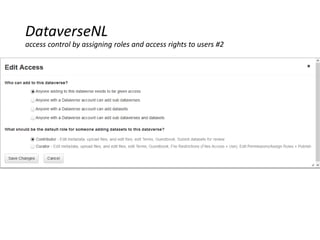
Read-, edit- and access rights by assigning roles to registered users
A role defines the permissions you have
 Access restricted site: reading rights only (downloading datafiles)
 Contributor: the previous plus creating and editing own Studies
 Contributor +: all the previous plus editing all Studies in a Dataverse
 Curator: all the previous plus publishing (‘releasing’) Studies & assigning access rights to
Studies
 Admin: all the previous plus assigning roles to users in a Dataverse & creating external user
accounts
Access rights to specified groups at Dataverse, Study and data file level
 ‘Unreleashed’ Study; only visible to persons who have access rights to that Study
 ‘Released’ Study: default Public ; after that access can be restricted (‘restricted access’)
 Access rights = 1reading/downloading data files ; 2edit rights = editing metadata, adding or
deleting data files [defined by a role]
DataverseNL
access control by assigning roles and access rights to users #1
DataverseNL
access control by assigning roles and access rights to users #2
DataverseNL
recognition for and collaborating on your data
 Persistent identifier (DOI)
 Assigning roles (with edit-rights) to users
 [ Jointly / online analysis of data (Stata, SPSS, GraphML) ]
 Registering via SURFconext
+ At start you only have a user account ( your email address)  then Curator
may assign you reading rights or Admin a particular role (with rights)
+ ‘External’ persons can use DataverseNL but cannot create an account
themselves  Admin has to do this
 A Dataverse or Study that has not been released, is only visible to persons that
have rights to that Dataverse or Study
 A Dataverse or Study that has been released with full restriction of access, is still
accessible to persons that have rights to that Dataverse or Study
 Non released Studies do not have version control
 Contributor cannot release own Studies / assigning access rights  Admin or
Curator has to do this after a request
 When assigning rights (Permissions), do not forget to Save changes
DataverseNL
practical
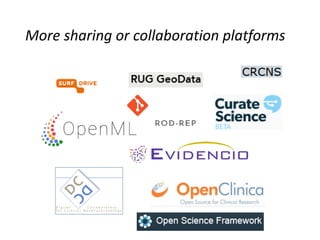
More sharing or collaboration platforms

Research data management

  • 1.
    Research data management PROOFAdvanced course Information Literacy and Research Data Management TU/e, 12-11-2015 l.osinski@tue.nl, TU/e IEC/Library Available under CC BY-SA license, which permits copying and redistributing the material in any medium or format & adapting the material for any purpose, provided the original author and source are credited & you distribute the adapted material under the same license as the original
  • 2.
    Topics part Researchdata management 1. Usable data (tabular data) 2. Accessible data (DataverseNL)
  • 3.
    Topic #1 1. Usabledata (tabular data) 2. Accessible data (DataverseNL)
  • 4.
    What is thenature of the “unusual episode” to which this table refers?
  • 6.
    Raw data: https://www.amstat.org/publica tions/jse/datasets/titanic.dat.txt Documentation ofthe data: https://www.amstat.org/publica tions/jse/datasets/titanic.txt  Size (number of observations and variables)  Description  Provenance  Variable descriptions Based on: The "Unusual Episode" Data Revisited / by Robert J. MacG. Dawson, in: Journal of Statistics Education vol. 3(1995), issue 3
  • 7.
    Morphological Measurements of GalapagosFinches http://dx.doi.org/10.5061/dry ad.152  Use of standard names (taxonomy, species)  Variable names clear enough? WingL must be wing length but what is N.Ubkl? Based on: Looking after datasets / by Antony Unwin, 01-09-2015, http://blog.revolutionanalytics .com/2015/09/looking-after- datasets.html
  • 8.
    Air crashes http://bit.ly/KIB_PlaneTruth  meaningof px?  basis for visualizations Ecological datasets: http://esapubs.org/archive/ec ol/E090/118/  excellent metadata including project description, experimental design and license information (copyright) Sample datasets: http://dx.doi.org/10.6084/m9. figshare.1314459
  • 9.
    Heart rate changes…/ by Daniel Lakens, http://dx.doi.org/10.4121/uui d:ab52261c-206b-4bed-a59d- 026a16c04144  Excel-file  No documentation Proteomic Analysis in Type 2 Diabetes Patients … / by Maria A. Sleddering , Albert J. Markvoort et. al., http://dx.doi.org/10.1371/jou rnal.pone.0112835  Word.doc
  • 10.
    to allow yourdata to be easily:  imported by data management systems;  analyzed by analysis software, and ;  combined with other data (interoperability) make sure that:  each row represents a single observation (record) and each column a single variable or type of measurement (field)  every cell should contain only a single value  there should be only one column for each type of information Cross-tab structure / contingency table: different columns contain measurements of the same variable: easier to read but difficult to add data (columns) to the records (rows). See Titanic table versus Titanic raw data Lessons learned table structure
  • 11.
     columns: useclear, descriptive variable names, avoid special characters (can cause problems with some software)  rows: if possible, use standard names within cells (derived from a taxonomy for example)  missing data / null values: best option: use a blank Lessons learned columns (variables) and rows (records)
  • 12.
     size ofthe data set: number of observations and variables  explanation of the variables  description of the data: what’s included and excluded, known problems or inconsistencies in the data, units of measurement  provenance (origin) of the data, data manipulation steps a simple readme file can be enough (see documentation titanic dataset) Lessons learned intelligibility: documentation
  • 13.
     if possibleuse a non-proprietary (open) file format (are easier to use in a variety of software), like csv for tabular data  if possible, take the preferred formats of a data archive in account http://datacentrum.3tu.nl/fileadmin/editor_upload/File_formats/Digital_Preser vation_Support_levels.pdf Lessons learned long term availability
  • 14.
    Excel  data provenanceand documentation of data processing is bad OpenRefine  runs on your computer (not in the cloud), inside the Firefox browser (not in IE), no web connection is needed  working with OpenRefine: http://www.datacarpentry.org/OpenRefine- ecology/01-working-with-openrefine.html  captures all steps done to your raw data ; original dataset is not modified ; steps are easily reversed ; Tools for working with messy data
  • 15.
    Topic #2 1. Usabledata (tabular data) 2. Accessible data (DataverseNL)
  • 16.
     Test environment:Go to: https://act.dataverse.nl/  [ Actual website: https://www.dataverse.nl ]  Click ‘Log in’ (at the top right)  Select SURFconext in the Please select your institution list and click Continue.  Select Eindhoven University of Technology and log on with your TU/e username and password  When asked for it, give permission to share your data by answering Yes or click this Tab  When asked to create an account, answer Yes or click this Tab.  When you succeeded to create an account, your username is: @[prefix of your email address] DataverseNL log in | creating an account
  • 17.
    Storage and backupof data through DANS [Dutch Archiving and Networking Services]  Data transfer: up to 2 Gb per dataset  Via 3TU.Datacentrum: up to 50 Gb free DataverseNL storage and backup of data
  • 18.
     Organization ofdata in Dataverse  [Dataverse]  Dataset  (Data)file  Before uploading, you have to describe your data (‘metadata’) + Discovery metadata + Formal metadata (for citation) + Substantial metadata (for discovery) + Metadata on data collection and methodology + …  Version control of datasets, not of (data) files! DataverseNL organization and description of your data
  • 19.
    Read-, edit- andaccess rights by assigning roles to registered users A role defines the permissions you have  Access restricted site: reading rights only (downloading datafiles)  Contributor: the previous plus creating and editing own Studies  Contributor +: all the previous plus editing all Studies in a Dataverse  Curator: all the previous plus publishing (‘releasing’) Studies & assigning access rights to Studies  Admin: all the previous plus assigning roles to users in a Dataverse & creating external user accounts Access rights to specified groups at Dataverse, Study and data file level  ‘Unreleashed’ Study; only visible to persons who have access rights to that Study  ‘Released’ Study: default Public ; after that access can be restricted (‘restricted access’)  Access rights = 1reading/downloading data files ; 2edit rights = editing metadata, adding or deleting data files [defined by a role] DataverseNL access control by assigning roles and access rights to users #1
  • 20.
    DataverseNL access control byassigning roles and access rights to users #2
  • 21.
    DataverseNL recognition for andcollaborating on your data  Persistent identifier (DOI)  Assigning roles (with edit-rights) to users  [ Jointly / online analysis of data (Stata, SPSS, GraphML) ]
  • 22.
     Registering viaSURFconext + At start you only have a user account ( your email address)  then Curator may assign you reading rights or Admin a particular role (with rights) + ‘External’ persons can use DataverseNL but cannot create an account themselves  Admin has to do this  A Dataverse or Study that has not been released, is only visible to persons that have rights to that Dataverse or Study  A Dataverse or Study that has been released with full restriction of access, is still accessible to persons that have rights to that Dataverse or Study  Non released Studies do not have version control  Contributor cannot release own Studies / assigning access rights  Admin or Curator has to do this after a request  When assigning rights (Permissions), do not forget to Save changes DataverseNL practical
  • 23.
    More sharing orcollaboration platforms