Topics
1-Record blocking
2-File Management of
Secondary Memory
3-Reallocation and
Dynamic allocations
By: Noor Mustafa Soomro
1 Record Blocking
Record:
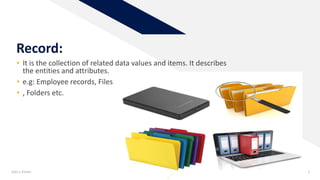
• It is the collection of related data values and items. It describes
the entities and attributes.
• e.g: Employee records, Files
• , Folders etc.
Add a footer 3
Add a footer 4
Block:
• A block sometimes called a physical record.
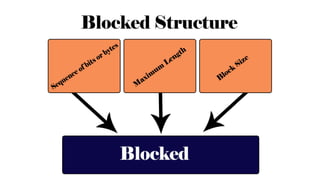
• It is the sequence of bytes or bits , usually containing whole numbers of
records, having max length, a block size.
• Data thus structures are said to be blocked.
• The Process of putting data into blocks is called blocking.
• While deblocking is the process of extracting data from blocks.
• Blocked Data is normally stored in a data buffer and read written a whole
at a time.
Add a footer 7
Three methods of blocking:
•Fixed blocking
•Variable-length spanned blocking
•Variable length un-spanned blocking
Add a footer 8
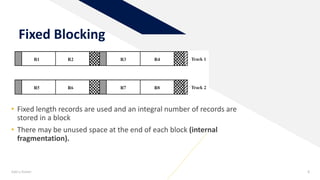
Fixed Blocking
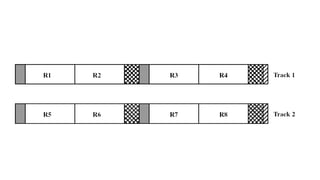
• Fixed length records are used and an integral number of records are
stored in a block
• There may be unused space at the end of each block (internal
fragmentation).
Add a footer 9
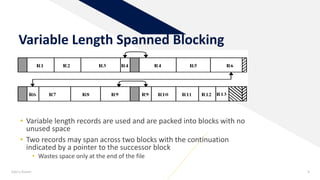
Variable Length Spanned Blocking
• Variable length records are used and are packed into blocks with no
unused space
• Two records may span across two blocks with the continuation
indicated by a pointer to the successor block
• Wastes space only at the end of the file
Add a footer 10
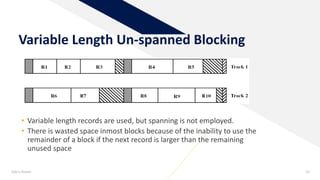
Variable Length Un-spanned Blocking
• Variable length records are used, but spanning is not employed.
• There is wasted space inmost blocks because of the inability to use the
remainder of a block if the next record is larger than the remaining
unused space
2 File Management of
Secondary Memory
FR
A file issequenceof logical records i.e. a sequence of bits and
bytes.
What is File?
Add a footer 12
FileAttributes:
A file hasvariousattributes like nam e, type, location, size,
protection, time and data of creation, user informationetc.
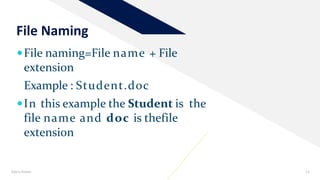
File naming=File name + File
extension
Example : Student.doc
In this example the Student is the
file name and doc is thefile
extension
File Naming
Add a footer 13
FR
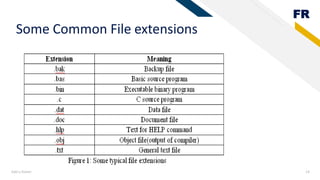
Some Common File extensions
Add a footer 14
FR
Add a footer 15
File Attributes
 A file has a nameand data.
Otherthan this, it contains information likedate
and time of file creation, file’s current size etc.
witha file . These are knownas attributes of afile.
FR
Add a footer 16
Operations that can be performed on
files are:
1. CREATE: A blank file iscreated.
2. DELETE: The purposeof this system call is todelete this file
3. OPEN: Opena fileeither forreading orwriting.
4. CLOSE: When a file is no longeraccessed.
===============================================================
 READ: When a file isonly to beread.
 Write: Towrite some dataon file.
 Append: Toadd somedata totheend of the file.
 Rename: Torename thefile.
• Note: A file can be made read-only, hidden, system-file, and so-on by setting its read onlyflag to 1, its
hidden flag to 1, itssystem flag to 1 and so on.
FR
Add a footer 17
File Access Methods
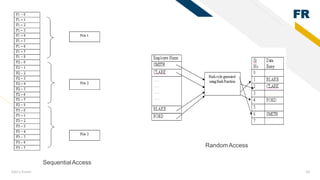
 Sequential Access: in this access method, data records are
retrieved in the same order in which they have been stored on the
disk. E.g data stored on magneticdisk.
 Random Access: In case of random access the record is searched
from thedisk based on its direct address information. The
technique used is Hashing. In hashing every record is associated
with a key number to preprocess the address calculation. Hash
function is used to obtain absolute address of a particularrecord.
FR
Add a footer 18
SequentialAccess
RandomAccess
FR
Add a footer 19
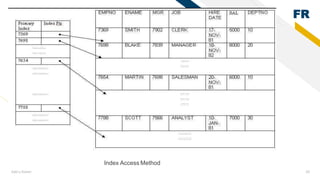
Index Access method:
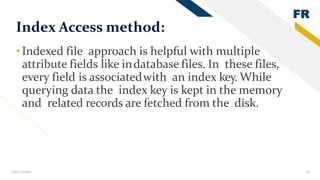
•Indexed file approach is helpful with multiple
attribute fields like indatabase files. In these files,
every field is associatedwith an index key. While
querying data the index key is kept in the memory
and related records are fetched from the disk.
FR
Add a footer 20
Index Access Method
FR
Add a footer 21
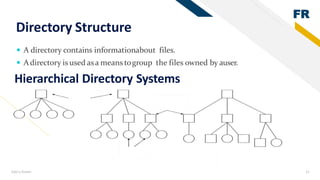
Directory Structure
 A directory contains informationabout files.
 Adirectory is used asa means togroup the files owned by auser.
Hierarchical Directory Systems
FR
Add a footer 22
Access paths
• Two possible methods for access path are:
• It is a listing of the directories and files from the root directory to the intended
file. For example, the path‘c:/windows/programs/spss.exe’ means that the
root directory contains a subdirectory ‘windows’, which furthercontains a
subdirectory
• ‘programs’, that contains an executable“spss.exe”.
1. Absolute path name:
FR
Add a footer 23
2. Relative path name:
• This uses theconcept of current directory (also known asworking directory).
A user can specify a particular directory as his current working directory
and all the path names instead of being specified from the root directory are
specified relative to theworking directory. For example, if the current
working directory is ‘usercurr’, then the file whose absolute path is
‘usercurrstudent’ can be referred simply as‘student’.
FR
Add a footer 24
Directory Operations
 CREATE: A directory iscreated.
 DELETE: A directory isdeleted.
 OPENDIR: Directories can be opened forreading it.
 CLOSEDIR: When a directory has been read, it should beclosed to free up
internal table space in main memory.
 RENAME: Directories can be renamed justlike files.
FR
Add a footer 25
File Protection
File systems often contain information that is highly
valuable to theirusers.
Protecting this information againstunauthorized
usage is therefore, a major concern of all the file
systems.
FR
Add a footer 26
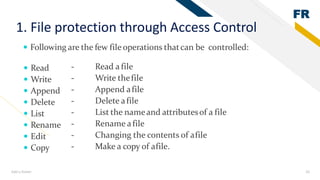
1. File protection through Access Control
 Following are the few file operations thatcan be controlled:
 Read
 Write
 Append
 Delete
 List
 Rename
 Edit
 Copy
- Read a file
- Write thefile
- Append afile
- Delete afile
- List the nameand attributesof a file
- Rename afile
- Changing the contents of afile
- Make a copy of afile.
FR
Add a footer 27
Access control list
 This list may contain the user name and the types of access allowed foreach
user. The operating system checks this access control list (associated with a file)
whenevera userrequestsan access toa particular file.
• Butone limitationof Accesscontrol list is their length, sowe
creategroups.
FR
Add a footer 28
• Classify the usersof a file into three types:
1. Owner - The userwho created the file.
2.Group - A setof userswhoaresharing the fileand need similaraccess.
3. Universe - All remaining users in thesystem constitute universe
FR
Add a footer 29
2. File protection through password
•Files can be protected bya password . The
owner of a file can control its access by
assigning a password. Thus, only those users
who know the password, can access a particular
file.
FR
Add a footer 30
File System Implementation
• There are 3 ways of File system implementation. They are thefollowing:
1. Contiguousallocation
2. Linked listallocation
3. Linked list allocation using anindex
FR
Add a footer 31
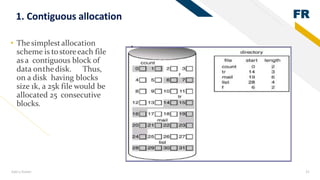
1. Contiguous allocation
• Thesimplestallocation
scheme is tostoreeach file
as a contiguous block of
data onthedisk. Thus,
on a disk having blocks
size 1k, a 25k file would be
allocated 25 consecutive
blocks.
FR
Add a footer 32
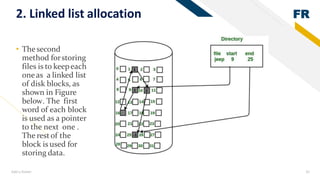
2. Linked list allocation
• Thesecond
method forstoring
files is to keepeach
oneas a linked list
of disk blocks, as
shown in Figure
below. The first
word of each block
is used as a pointer
to the next one .
The restof the
block is used for
storing data.
FR
Add a footer 33
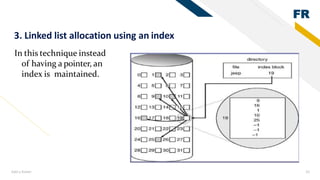
In this technique instead
of having a pointer, an
index is maintained.
3. Linked list allocation using an index
FR
Add a footer 34
Free Space Management
• Freespace management is used to reuse thedisk space created after deleting the
files.
• Wehave 4 techniques for Free space management, Which are the
following:
1. Bit map
2. Linked list
3. Grouping
4. Counting
FR
Add a footer 35
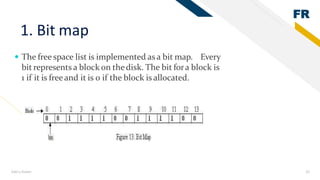
1. Bit map
 The free space list is implemented as a bit map. Every
bit represents a block on thedisk. The bit fora block is
1 if it is freeand it is 0 if the block is allocated.
FR
Add a footer 36
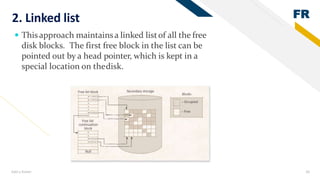
2. Linked list
 Thisapproach maintainsa linked listof all the free
disk blocks. The first free block in the list can be
pointed out by a head pointer, which is kept in a
special location on thedisk.
FR
Add a footer 37
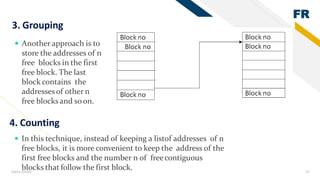
3. Grouping
 Another approach is to
store the addresses of n
free blocks in the first
free block. The last
block contains the
addressesof other n
free blocksand soon.
4. Counting
 In this technique, instead of keeping a listof addresses of n
free blocks, it is more convenient to keep the address of the
first free blocks and the number n of freecontiguous
blocks that follow the first block.
3 Static allocation and
Dynamic allocations
Memory allocation
• The placement of blocks of information in a memory
system is called memory allocation.
• To allocate memory it is necessary to keep in information
of available memory in the system
• If sufficient memory is not available, swapping of blocks is
done.
Add a footer 39
Types of memory allocation
•There are two (2) types of memory allocation
•Static memory allocation
•Dynamic memory allocation
Add a footer 40
Static memory allocation
• In static memory allocation, size of the memory is required
for the calculation that must be required for the calculation
that must be define before loading and executing the
program
Add a footer 41
Example:
int[] arr =new int[6];
Dynamic Memory Allocation
• In static memory allocation, size of the memory is required
for the calculation that must be required for the calculation
that must be define before loading and executing the
program
Add a footer 43
Dynamic Memory Allocation
• Dynamic Memory Management/Allocation Dynamic Memory
Allocation is sometimes called as Manual Memory Management
• In DMA the memory is allocated at run time.
• It is allocated whenever program, application, data, variable
demands with required amount of bytes.
• We are going present, manual memory allocation
using ‘C ’ programming language because it will very easy
to show allocation and de -allocation.
The programmer has direct access to memory at run time to
control over memory using DMA
Dynamic Memory Allocations Functions
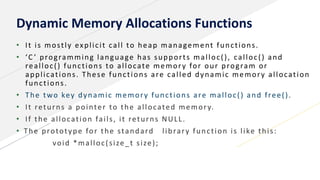
• It is mostly explicit call to heap management functions.
• ‘C ’ programming language has supports malloc(), calloc() and
realloc() functions to allocate memory for our program or
applications. These functions are called dynamic memory allocation
functions.
• The two key dynamic memory functions are malloc() and free().
• It returns a pointer to the allocated memory.
• If the allocation fails, it returns NULL.
• The prototype for the standard library function is like this:
void *malloc(size_t size);
Dynamic Memory Allocations Functions
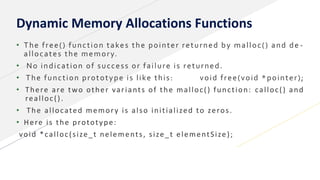
• The free() function takes the pointer returned by malloc() and de -
allocates the memory.
• No indication of success or failure is returned.
• The function prototype is like this: void free(void *pointer);
• There are two other variants of the malloc() function: calloc() and
realloc().
• The allocated memory is also initialized to zeros.
• Here is the prototype:
void *calloc(size_t nelements, size_t elementSize);
Dynamic Memory Allocations Functions
• The realloc() function resizes a memory allocation previously made
by malloc().
• It takes as parameters a pointer to the memory area and the new size
that is required.
• If the size is reduced, data may be lost.
• If the size is increased and the function is unable to extend the
existing allocation, it will automatically allocate a new memory area
and copy data across.
• In any case, it returns a pointer to the allocated memory.
• Here is the prototype:
• void *realloc(void *pointer, size_t size);
Thank You.

Report blocking ,management of files in secondry memory , static vs dynamic allocation

  • 1.
    Topics 1-Record blocking 2-File Managementof Secondary Memory 3-Reallocation and Dynamic allocations By: Noor Mustafa Soomro
  • 2.
  • 3.
    Record: • It isthe collection of related data values and items. It describes the entities and attributes. • e.g: Employee records, Files • , Folders etc. Add a footer 3
  • 4.
    Add a footer4 Block: • A block sometimes called a physical record. • It is the sequence of bytes or bits , usually containing whole numbers of records, having max length, a block size. • Data thus structures are said to be blocked. • The Process of putting data into blocks is called blocking. • While deblocking is the process of extracting data from blocks. • Blocked Data is normally stored in a data buffer and read written a whole at a time.
  • 7.
    Add a footer7 Three methods of blocking: •Fixed blocking •Variable-length spanned blocking •Variable length un-spanned blocking
  • 8.
    Add a footer8 Fixed Blocking • Fixed length records are used and an integral number of records are stored in a block • There may be unused space at the end of each block (internal fragmentation).
  • 9.
    Add a footer9 Variable Length Spanned Blocking • Variable length records are used and are packed into blocks with no unused space • Two records may span across two blocks with the continuation indicated by a pointer to the successor block • Wastes space only at the end of the file
  • 10.
    Add a footer10 Variable Length Un-spanned Blocking • Variable length records are used, but spanning is not employed. • There is wasted space inmost blocks because of the inability to use the remainder of a block if the next record is larger than the remaining unused space
  • 11.
    2 File Managementof Secondary Memory
  • 12.
    FR A file issequenceoflogical records i.e. a sequence of bits and bytes. What is File? Add a footer 12 FileAttributes: A file hasvariousattributes like nam e, type, location, size, protection, time and data of creation, user informationetc.
  • 13.
    File naming=File name+ File extension Example : Student.doc In this example the Student is the file name and doc is thefile extension File Naming Add a footer 13
  • 14.
    FR Some Common Fileextensions Add a footer 14
  • 15.
    FR Add a footer15 File Attributes  A file has a nameand data. Otherthan this, it contains information likedate and time of file creation, file’s current size etc. witha file . These are knownas attributes of afile.
  • 16.
    FR Add a footer16 Operations that can be performed on files are: 1. CREATE: A blank file iscreated. 2. DELETE: The purposeof this system call is todelete this file 3. OPEN: Opena fileeither forreading orwriting. 4. CLOSE: When a file is no longeraccessed. ===============================================================  READ: When a file isonly to beread.  Write: Towrite some dataon file.  Append: Toadd somedata totheend of the file.  Rename: Torename thefile. • Note: A file can be made read-only, hidden, system-file, and so-on by setting its read onlyflag to 1, its hidden flag to 1, itssystem flag to 1 and so on.
  • 17.
    FR Add a footer17 File Access Methods  Sequential Access: in this access method, data records are retrieved in the same order in which they have been stored on the disk. E.g data stored on magneticdisk.  Random Access: In case of random access the record is searched from thedisk based on its direct address information. The technique used is Hashing. In hashing every record is associated with a key number to preprocess the address calculation. Hash function is used to obtain absolute address of a particularrecord.
  • 18.
    FR Add a footer18 SequentialAccess RandomAccess
  • 19.
    FR Add a footer19 Index Access method: •Indexed file approach is helpful with multiple attribute fields like indatabase files. In these files, every field is associatedwith an index key. While querying data the index key is kept in the memory and related records are fetched from the disk.
  • 20.
    FR Add a footer20 Index Access Method
  • 21.
    FR Add a footer21 Directory Structure  A directory contains informationabout files.  Adirectory is used asa means togroup the files owned by auser. Hierarchical Directory Systems
  • 22.
    FR Add a footer22 Access paths • Two possible methods for access path are: • It is a listing of the directories and files from the root directory to the intended file. For example, the path‘c:/windows/programs/spss.exe’ means that the root directory contains a subdirectory ‘windows’, which furthercontains a subdirectory • ‘programs’, that contains an executable“spss.exe”. 1. Absolute path name:
  • 23.
    FR Add a footer23 2. Relative path name: • This uses theconcept of current directory (also known asworking directory). A user can specify a particular directory as his current working directory and all the path names instead of being specified from the root directory are specified relative to theworking directory. For example, if the current working directory is ‘usercurr’, then the file whose absolute path is ‘usercurrstudent’ can be referred simply as‘student’.
  • 24.
    FR Add a footer24 Directory Operations  CREATE: A directory iscreated.  DELETE: A directory isdeleted.  OPENDIR: Directories can be opened forreading it.  CLOSEDIR: When a directory has been read, it should beclosed to free up internal table space in main memory.  RENAME: Directories can be renamed justlike files.
  • 25.
    FR Add a footer25 File Protection File systems often contain information that is highly valuable to theirusers. Protecting this information againstunauthorized usage is therefore, a major concern of all the file systems.
  • 26.
    FR Add a footer26 1. File protection through Access Control  Following are the few file operations thatcan be controlled:  Read  Write  Append  Delete  List  Rename  Edit  Copy - Read a file - Write thefile - Append afile - Delete afile - List the nameand attributesof a file - Rename afile - Changing the contents of afile - Make a copy of afile.
  • 27.
    FR Add a footer27 Access control list  This list may contain the user name and the types of access allowed foreach user. The operating system checks this access control list (associated with a file) whenevera userrequestsan access toa particular file. • Butone limitationof Accesscontrol list is their length, sowe creategroups.
  • 28.
    FR Add a footer28 • Classify the usersof a file into three types: 1. Owner - The userwho created the file. 2.Group - A setof userswhoaresharing the fileand need similaraccess. 3. Universe - All remaining users in thesystem constitute universe
  • 29.
    FR Add a footer29 2. File protection through password •Files can be protected bya password . The owner of a file can control its access by assigning a password. Thus, only those users who know the password, can access a particular file.
  • 30.
    FR Add a footer30 File System Implementation • There are 3 ways of File system implementation. They are thefollowing: 1. Contiguousallocation 2. Linked listallocation 3. Linked list allocation using anindex
  • 31.
    FR Add a footer31 1. Contiguous allocation • Thesimplestallocation scheme is tostoreeach file as a contiguous block of data onthedisk. Thus, on a disk having blocks size 1k, a 25k file would be allocated 25 consecutive blocks.
  • 32.
    FR Add a footer32 2. Linked list allocation • Thesecond method forstoring files is to keepeach oneas a linked list of disk blocks, as shown in Figure below. The first word of each block is used as a pointer to the next one . The restof the block is used for storing data.
  • 33.
    FR Add a footer33 In this technique instead of having a pointer, an index is maintained. 3. Linked list allocation using an index
  • 34.
    FR Add a footer34 Free Space Management • Freespace management is used to reuse thedisk space created after deleting the files. • Wehave 4 techniques for Free space management, Which are the following: 1. Bit map 2. Linked list 3. Grouping 4. Counting
  • 35.
    FR Add a footer35 1. Bit map  The free space list is implemented as a bit map. Every bit represents a block on thedisk. The bit fora block is 1 if it is freeand it is 0 if the block is allocated.
  • 36.
    FR Add a footer36 2. Linked list  Thisapproach maintainsa linked listof all the free disk blocks. The first free block in the list can be pointed out by a head pointer, which is kept in a special location on thedisk.
  • 37.
    FR Add a footer37 3. Grouping  Another approach is to store the addresses of n free blocks in the first free block. The last block contains the addressesof other n free blocksand soon. 4. Counting  In this technique, instead of keeping a listof addresses of n free blocks, it is more convenient to keep the address of the first free blocks and the number n of freecontiguous blocks that follow the first block.
  • 38.
    3 Static allocationand Dynamic allocations
  • 39.
    Memory allocation • Theplacement of blocks of information in a memory system is called memory allocation. • To allocate memory it is necessary to keep in information of available memory in the system • If sufficient memory is not available, swapping of blocks is done. Add a footer 39
  • 40.
    Types of memoryallocation •There are two (2) types of memory allocation •Static memory allocation •Dynamic memory allocation Add a footer 40
  • 41.
    Static memory allocation •In static memory allocation, size of the memory is required for the calculation that must be required for the calculation that must be define before loading and executing the program Add a footer 41
  • 42.
  • 43.
    Dynamic Memory Allocation •In static memory allocation, size of the memory is required for the calculation that must be required for the calculation that must be define before loading and executing the program Add a footer 43
  • 44.
    Dynamic Memory Allocation •Dynamic Memory Management/Allocation Dynamic Memory Allocation is sometimes called as Manual Memory Management • In DMA the memory is allocated at run time. • It is allocated whenever program, application, data, variable demands with required amount of bytes. • We are going present, manual memory allocation using ‘C ’ programming language because it will very easy to show allocation and de -allocation. The programmer has direct access to memory at run time to control over memory using DMA
  • 45.
    Dynamic Memory AllocationsFunctions • It is mostly explicit call to heap management functions. • ‘C ’ programming language has supports malloc(), calloc() and realloc() functions to allocate memory for our program or applications. These functions are called dynamic memory allocation functions. • The two key dynamic memory functions are malloc() and free(). • It returns a pointer to the allocated memory. • If the allocation fails, it returns NULL. • The prototype for the standard library function is like this: void *malloc(size_t size);
  • 46.
    Dynamic Memory AllocationsFunctions • The free() function takes the pointer returned by malloc() and de - allocates the memory. • No indication of success or failure is returned. • The function prototype is like this: void free(void *pointer); • There are two other variants of the malloc() function: calloc() and realloc(). • The allocated memory is also initialized to zeros. • Here is the prototype: void *calloc(size_t nelements, size_t elementSize);
  • 47.
    Dynamic Memory AllocationsFunctions • The realloc() function resizes a memory allocation previously made by malloc(). • It takes as parameters a pointer to the memory area and the new size that is required. • If the size is reduced, data may be lost. • If the size is increased and the function is unable to extend the existing allocation, it will automatically allocate a new memory area and copy data across. • In any case, it returns a pointer to the allocated memory. • Here is the prototype: • void *realloc(void *pointer, size_t size);
  • 48.