+

Automatic RDB2RDF

Mariano Rodriguez-Muro,
Free University of Bozen-Bolzano
+

Disclaimer


License


This work is licensed under a
Creative Commons Attribution-Share Alike 3.0 License
(http://creativecommons.org/licenses/by-sa/3.0/)
+

Reading material/sources


Direct Mapping specifications
W3C
http://www.w3.org/TR/rdb-direct-mapping/



Direct Mapping test cases
W3C
http://www.w3.org/2001/sw/rdb2rdf/test-cases/
+
Combining Information
+

Combining Information


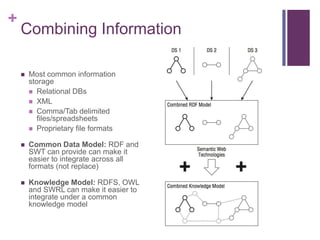
Most common information
storage
 Relational DBs
 XML
 Comma/Tab delimited
files/spreadsheets
 Proprietary file formats



Common Data Model: RDF and
SWT can provide can make it
easier to integrate across all
formats (not replace)



Knowledge Model: RDFS, OWL
and SWRL can make it easier to
integrate under a common
knowledge model
+

Combining Information
Tools and techniques for different data sources. In particular:


Relational DBMS


R2RML and Direct Mapping



ontop, D2RQ Server



Java Objects as RDF



XML and XML feeds (web services) as RDF
+

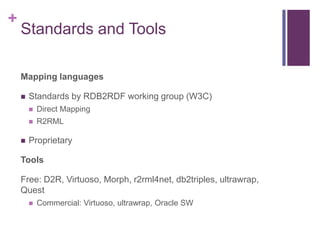
Standards and Tools
Mapping languages


Standards by RDB2RDF working group (W3C)





Direct Mapping
R2RML

Proprietary

Tools
Free: D2R, Virtuoso, Morph, r2rml4net, db2triples, ultrawrap,
Quest


Commercial: Virtuoso, ultrawrap, Oracle SW
+
Direct Mapping
Automatic standard mappings
+

RDF2RF: Direct Mapping

“The direct mapping defines a simple transformation, providing a basis
for defining and comparing more intricate transformations. It can also
be used to materialize RDF graphs or define
virtual graphs, which can be queried by SPARQL or traversed by an
RDF graph API.”
+

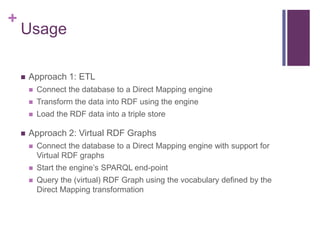
Usage


Approach 1: ETL



Transform the data into RDF using the engine





Connect the database to a Direct Mapping engine
Load the RDF data into a triple store

Approach 2: Virtual RDF Graphs


Connect the database to a Direct Mapping engine with support for
Virtual RDF graphs



Start the engine’s SPARQL end-point



Query the (virtual) RDF Graph using the vocabulary defined by the
Direct Mapping transformation
+

Example

People

PK

Addresses
PK

ID

fname

addr

ID

City

State

7

Bob

18

18

Cambridge

Ma

8

Sue

NULL

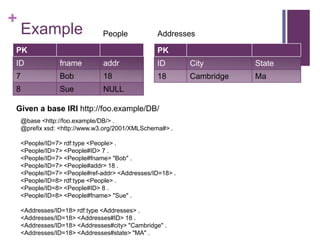
Given a base IRI http://foo.example/DB/
@base <http://foo.example/DB/> .
@prefix xsd: <http://www.w3.org/2001/XMLSchema#> .
<People/ID=7> rdf:type <People> .
<People/ID=7> <People#ID> 7 .
<People/ID=7> <People#fname> "Bob" .
<People/ID=7> <People#addr> 18 .
<People/ID=7> <People#ref-addr> <Addresses/ID=18> .
<People/ID=8> rdf:type <People> .
<People/ID=8> <People#ID> 8 .
<People/ID=8> <People#fname> "Sue" .
<Addresses/ID=18> rdf:type <Addresses> .
<Addresses/ID=18> <Addresses#ID> 18 .
<Addresses/ID=18> <Addresses#city> "Cambridge" .
<Addresses/ID=18> <Addresses#state> "MA" .
+

Tables with Primary Keys


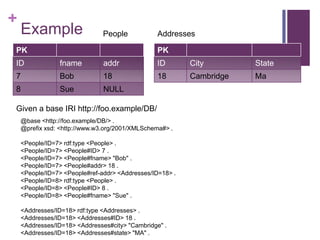
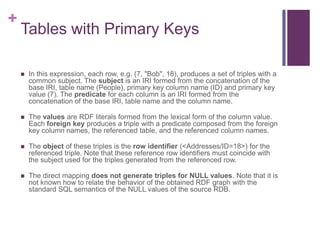
In this expression, each row, e.g. (7, "Bob", 18), produces a set of triples with a
common subject. The subject is an IRI formed from the concatenation of the
base IRI, table name (People), primary key column name (ID) and primary key
value (7). The predicate for each column is an IRI formed from the
concatenation of the base IRI, table name and the column name.



The values are RDF literals formed from the lexical form of the column value.
Each foreign key produces a triple with a predicate composed from the foreign
key column names, the referenced table, and the referenced column names.



The object of these triples is the row identifier (<Addresses/ID=18>) for the
referenced triple. Note that these reference row identifiers must coincide with
the subject used for the triples generated from the referenced row.



The direct mapping does not generate triples for NULL values. Note that it is
not known how to relate the behavior of the obtained RDF graph with the
standard SQL semantics of the NULL values of the source RDB.
+

Example

People

PK

Addresses
PK

ID

fname

addr

ID

City

State

7

Bob

18

18

Cambridge

Ma

8

Sue

NULL

Given a base IRI http://foo.example/DB/
@base <http://foo.example/DB/> .
@prefix xsd: <http://www.w3.org/2001/XMLSchema#> .
<People/ID=7> rdf:type <People> .
<People/ID=7> <People#ID> 7 .
<People/ID=7> <People#fname> "Bob" .
<People/ID=7> <People#addr> 18 .
<People/ID=7> <People#ref-addr> <Addresses/ID=18> .
<People/ID=8> rdf:type <People> .
<People/ID=8> <People#ID> 8 .
<People/ID=8> <People#fname> "Sue" .
<Addresses/ID=18> rdf:type <Addresses> .
<Addresses/ID=18> <Addresses#ID> 18 .
<Addresses/ID=18> <Addresses#city> "Cambridge" .
<Addresses/ID=18> <Addresses#state> "MA" .
+

Foreign keys / candidate keys
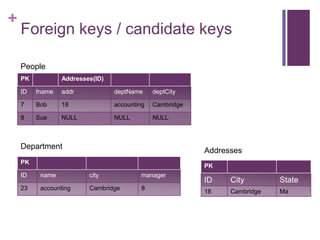
People
PK

Addresses(ID)

ID

fname

addr

deptName

deptCity

7

Bob

18

accounting

Cambridge

8

Sue

NULL

NULL

NULL

Department

Addresses

PK

PK

ID

name

city

manager

23

accounting

Cambridge

8

ID

City

State

18

Cambridge

Ma
+

RDF
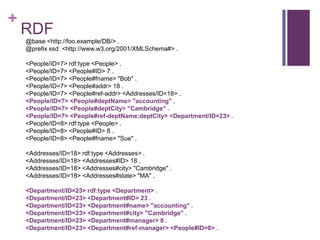
@base <http://foo.example/DB/> .
@prefix xsd: <http://www.w3.org/2001/XMLSchema#> .
<People/ID=7> rdf:type <People> .
<People/ID=7> <People#ID> 7 .
<People/ID=7> <People#fname> "Bob" .
<People/ID=7> <People#addr> 18 .
<People/ID=7> <People#ref-addr> <Addresses/ID=18> .
<People/ID=7> <People#deptName> "accounting" .
<People/ID=7> <People#deptCity> "Cambridge" .
<People/ID=7> <People#ref-deptName;deptCity> <Department/ID=23> .
<People/ID=8> rdf:type <People> .
<People/ID=8> <People#ID> 8 .
<People/ID=8> <People#fname> "Sue" .
<Addresses/ID=18> rdf:type <Addresses> .
<Addresses/ID=18> <Addresses#ID> 18 .
<Addresses/ID=18> <Addresses#city> "Cambridge" .
<Addresses/ID=18> <Addresses#state> "MA" .
<Department/ID=23> rdf:type <Department> .
<Department/ID=23> <Department#ID> 23 .
<Department/ID=23> <Department#name> "accounting" .
<Department/ID=23> <Department#city> "Cambridge" .
<Department/ID=23> <Department#manager> 8 .
<Department/ID=23> <Department#ref-manager> <People#ID=8> .
+

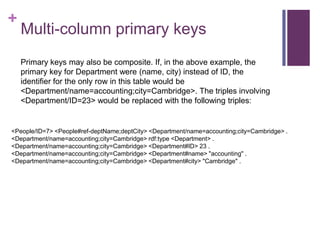
Multi-column primary keys
Primary keys may also be composite. If, in the above example, the
primary key for Department were (name, city) instead of ID, the
identifier for the only row in this table would be
<Department/name=accounting;city=Cambridge>. The triples involving
<Department/ID=23> would be replaced with the following triples:

<People/ID=7> <People#ref-deptName;deptCity> <Department/name=accounting;city=Cambridge> .
<Department/name=accounting;city=Cambridge> rdf:type <Department> .
<Department/name=accounting;city=Cambridge> <Department#ID> 23 .
<Department/name=accounting;city=Cambridge> <Department#name> "accounting" .
<Department/name=accounting;city=Cambridge> <Department#city> "Cambridge" .
+

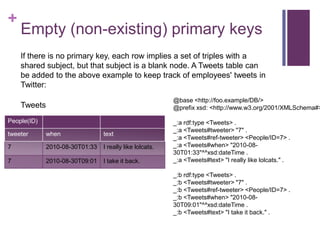
Empty (non-existing) primary keys
If there is no primary key, each row implies a set of triples with a
shared subject, but that subject is a blank node. A Tweets table can
be added to the above example to keep track of employees' tweets in
Twitter:

@base <http://foo.example/DB/>
@prefix xsd: <http://www.w3.org/2001/XMLSchema#>

Tweets
People(ID)
tweeter

when

text

7

2010-08-30T01:33

I really like lolcats.

7

2010-08-30T09:01

I take it back.

_:a rdf:type <Tweets> .
_:a <Tweets#tweeter> "7" .
_:a <Tweets#ref-tweeter> <People/ID=7> .
_:a <Tweets#when> "2010-0830T01:33"^^xsd:dateTime .
_:a <Tweets#text> "I really like lolcats." .

_:b rdf:type <Tweets> .
_:b <Tweets#tweeter> "7" .
_:b <Tweets#ref-tweeter> <People/ID=7> .
_:b <Tweets#when> "2010-0830T09:01"^^xsd:dateTime .
_:b <Tweets#text> "I take it back." .
+

Row nodes
Definition row node:


If the table has a primary key, the row node is a relative IRI obtained by
concatenating:






the percent-encoded form of the table name,
the SOLIDUS character '/',
for each column in the primary key, in order:
 the percent-encoded form of the column name,
 a EQUALS SIGN character '=',
 the percent-encoded lexical form of the canonical RDF literal representation of
the column value as defined in R2RML section 10.2 Natural Mapping of SQL
Values [R2RML],
 if it is not the last column in the primary key, a SEMICOLON character ';'

If the table has no primary key, the row node is a fresh blank node that is
unique to this row.
+

Referencing tables with empty
primary keys


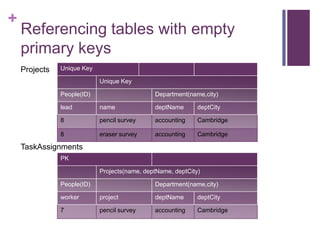
Rows in tables with no primary key may still be referenced by
foreign keys. (Relational database theory tells us that these
rows must be unique as foreign keys reference candidate keys
and candidate keys are unique across all the rows in a table.)
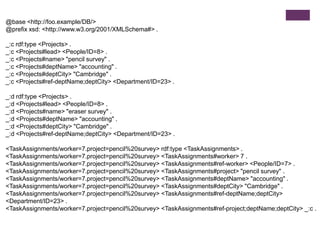
References to rows in tables with no primary key are expressed
as RDF triples with blank nodes for objects, where that blank
node is the same node used for the subject in the referenced
row.
+

Referencing tables with empty
primary keys
Projects

Unique Key
Unique Key
People(ID)

Department(name,city)

lead

name

deptName

deptCity

8

pencil survey

accounting

Cambridge

8

eraser survey

accounting

Cambridge

TaskAssignments
PK
Projects(name, deptName, deptCity)
People(ID)

Department(name,city)

worker

project

deptName

deptCity

7

pencil survey

accounting

Cambridge
@base <http://foo.example/DB/>
@prefix xsd: <http://www.w3.org/2001/XMLSchema#> .
_:c rdf:type <Projects> .
_:c <Projects#lead> <People/ID=8> .
_:c <Projects#name> "pencil survey" .
_:c <Projects#deptName> "accounting" .
_:c <Projects#deptCity> "Cambridge" .
_:c <Projects#ref-deptName;deptCity> <Department/ID=23> .
_:d rdf:type <Projects> .
_:d <Projects#lead> <People/ID=8> .
_:d <Projects#name> "eraser survey" .
_:d <Projects#deptName> "accounting" .
_:d <Projects#deptCity> "Cambridge" .
_:d <Projects#ref-deptName;deptCity> <Department/ID=23> .
<TaskAssignments/worker=7.project=pencil%20survey> rdf:type <TaskAssignments> .
<TaskAssignments/worker=7.project=pencil%20survey> <TaskAssignments#worker> 7 .
<TaskAssignments/worker=7.project=pencil%20survey> <TaskAssignments#ref-worker> <People/ID=7> .
<TaskAssignments/worker=7.project=pencil%20survey> <TaskAssignments#project> "pencil survey" .
<TaskAssignments/worker=7.project=pencil%20survey> <TaskAssignments#deptName> "accounting" .
<TaskAssignments/worker=7.project=pencil%20survey> <TaskAssignments#deptCity> "Cambridge" .
<TaskAssignments/worker=7.project=pencil%20survey> <TaskAssignments#ref-deptName;deptCity>
<Department/ID=23> .
<TaskAssignments/worker=7.project=pencil%20survey> <TaskAssignments#ref-project;deptName;deptCity> _:c .
+

Percent Encoding
Definition percent-encode:


Replace the string with the IRI-safe form per section 7.3 of
[R2RML].

String
42
Hello World!
2011-08-23T22:17:00Z
~A_17.1-2
葉篤正

IRI-safe version
42
Hello%20World%21
2011-08-23T22%3A17%3A00Z
~A_17.1-2
葉篤正
+
Test
+

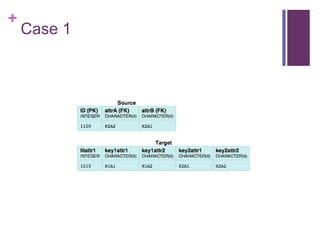
Case 1
+

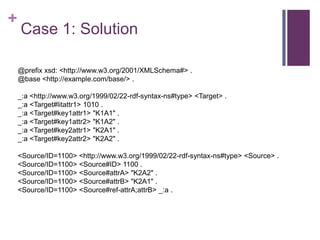
Case 1: Solution
@prefix xsd: <http://www.w3.org/2001/XMLSchema#> .
@base <http://example.com/base/> .
_:a <http://www.w3.org/1999/02/22-rdf-syntax-ns#type> <Target> .
_:a <Target#litattr1> 1010 .
_:a <Target#key1attr1> "K1A1" .
_:a <Target#key1attr2> "K1A2" .
_:a <Target#key2attr1> "K2A1" .
_:a <Target#key2attr2> "K2A2" .
<Source/ID=1100> <http://www.w3.org/1999/02/22-rdf-syntax-ns#type> <Source> .
<Source/ID=1100> <Source#ID> 1100 .
<Source/ID=1100> <Source#attrA> "K2A2" .
<Source/ID=1100> <Source#attrB> "K2A1" .
<Source/ID=1100> <Source#ref-attrA;attrB> _:a .
+

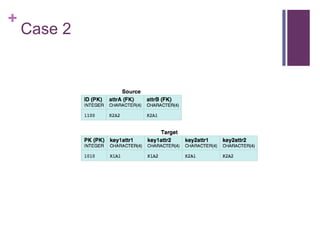
Case 2
+

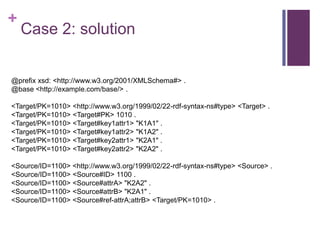
Case 2: solution

@prefix xsd: <http://www.w3.org/2001/XMLSchema#> .
@base <http://example.com/base/> .
<Target/PK=1010> <http://www.w3.org/1999/02/22-rdf-syntax-ns#type> <Target> .
<Target/PK=1010> <Target#PK> 1010 .
<Target/PK=1010> <Target#key1attr1> "K1A1" .
<Target/PK=1010> <Target#key1attr2> "K1A2" .
<Target/PK=1010> <Target#key2attr1> "K2A1" .
<Target/PK=1010> <Target#key2attr2> "K2A2" .
<Source/ID=1100> <http://www.w3.org/1999/02/22-rdf-syntax-ns#type> <Source> .
<Source/ID=1100> <Source#ID> 1100 .
<Source/ID=1100> <Source#attrA> "K2A2" .
<Source/ID=1100> <Source#attrB> "K2A1" .
<Source/ID=1100> <Source#ref-attrA;attrB> <Target/PK=1010> .
+

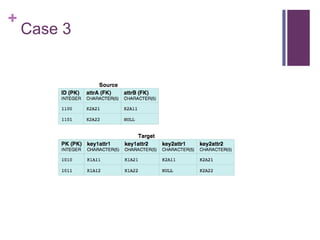
Case 3
+

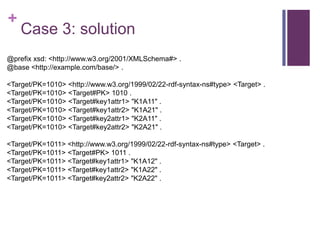
Case 3: solution

@prefix xsd: <http://www.w3.org/2001/XMLSchema#> .
@base <http://example.com/base/> .

<Target/PK=1010> <http://www.w3.org/1999/02/22-rdf-syntax-ns#type> <Target> .
<Target/PK=1010> <Target#PK> 1010 .
<Target/PK=1010> <Target#key1attr1> "K1A11" .
<Target/PK=1010> <Target#key1attr2> "K1A21" .
<Target/PK=1010> <Target#key2attr1> "K2A11" .
<Target/PK=1010> <Target#key2attr2> "K2A21" .
<Target/PK=1011> <http://www.w3.org/1999/02/22-rdf-syntax-ns#type> <Target> .
<Target/PK=1011> <Target#PK> 1011 .
<Target/PK=1011> <Target#key1attr1> "K1A12" .
<Target/PK=1011> <Target#key1attr2> "K1A22" .
<Target/PK=1011> <Target#key2attr2> "K2A22" .
+

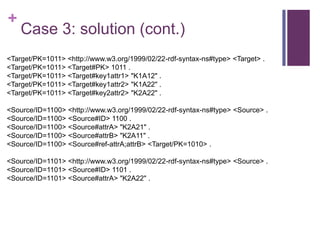
Case 3: solution (cont.)

<Target/PK=1011> <http://www.w3.org/1999/02/22-rdf-syntax-ns#type> <Target> .
<Target/PK=1011> <Target#PK> 1011 .
<Target/PK=1011> <Target#key1attr1> "K1A12" .
<Target/PK=1011> <Target#key1attr2> "K1A22" .
<Target/PK=1011> <Target#key2attr2> "K2A22" .
<Source/ID=1100> <http://www.w3.org/1999/02/22-rdf-syntax-ns#type> <Source> .
<Source/ID=1100> <Source#ID> 1100 .
<Source/ID=1100> <Source#attrA> "K2A21" .
<Source/ID=1100> <Source#attrB> "K2A11" .
<Source/ID=1100> <Source#ref-attrA;attrB> <Target/PK=1010> .
<Source/ID=1101> <http://www.w3.org/1999/02/22-rdf-syntax-ns#type> <Source> .
<Source/ID=1101> <Source#ID> 1101 .
<Source/ID=1101> <Source#attrA> "K2A22" .
+
Usage
+

Using a Mapping (revisited)


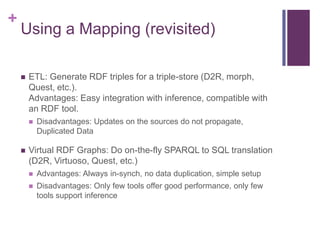
ETL: Generate RDF triples for a triple-store (D2R, morph,
Quest, etc.).
Advantages: Easy integration with inference, compatible with
an RDF tool.




Disadvantages: Updates on the sources do not propagate,
Duplicated Data

Virtual RDF Graphs: Do on-the-fly SPARQL to SQL translation
(D2R, Virtuoso, Quest, etc.)


Advantages: Always in-synch, no data duplication, simple setup



Disadvantages: Only few tools offer good performance, only few
tools support inference
+

D2RQ


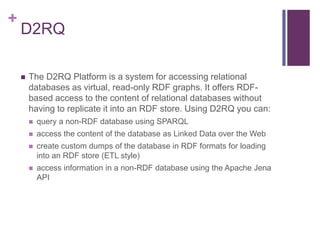
The D2RQ Platform is a system for accessing relational
databases as virtual, read-only RDF graphs. It offers RDFbased access to the content of relational databases without
having to replicate it into an RDF store. Using D2RQ you can:


query a non-RDF database using SPARQL



access the content of the database as Linked Data over the Web



create custom dumps of the database in RDF formats for loading
into an RDF store (ETL style)



access information in a non-RDF database using the Apache Jena
API

SWT Lecture Session 9 - RDB2RDF direct mapping

  • 1.
  • 2.
    + Disclaimer  License  This work islicensed under a Creative Commons Attribution-Share Alike 3.0 License (http://creativecommons.org/licenses/by-sa/3.0/)
  • 3.
    + Reading material/sources  Direct Mappingspecifications W3C http://www.w3.org/TR/rdb-direct-mapping/  Direct Mapping test cases W3C http://www.w3.org/2001/sw/rdb2rdf/test-cases/
  • 4.
  • 5.
    + Combining Information  Most commoninformation storage  Relational DBs  XML  Comma/Tab delimited files/spreadsheets  Proprietary file formats  Common Data Model: RDF and SWT can provide can make it easier to integrate across all formats (not replace)  Knowledge Model: RDFS, OWL and SWRL can make it easier to integrate under a common knowledge model
  • 6.
    + Combining Information Tools andtechniques for different data sources. In particular:  Relational DBMS  R2RML and Direct Mapping  ontop, D2RQ Server  Java Objects as RDF  XML and XML feeds (web services) as RDF
  • 7.
    + Standards and Tools Mappinglanguages  Standards by RDB2RDF working group (W3C)    Direct Mapping R2RML Proprietary Tools Free: D2R, Virtuoso, Morph, r2rml4net, db2triples, ultrawrap, Quest  Commercial: Virtuoso, ultrawrap, Oracle SW
  • 8.
  • 9.
    + RDF2RF: Direct Mapping “Thedirect mapping defines a simple transformation, providing a basis for defining and comparing more intricate transformations. It can also be used to materialize RDF graphs or define virtual graphs, which can be queried by SPARQL or traversed by an RDF graph API.”
  • 10.
    + Usage  Approach 1: ETL   Transformthe data into RDF using the engine   Connect the database to a Direct Mapping engine Load the RDF data into a triple store Approach 2: Virtual RDF Graphs  Connect the database to a Direct Mapping engine with support for Virtual RDF graphs  Start the engine’s SPARQL end-point  Query the (virtual) RDF Graph using the vocabulary defined by the Direct Mapping transformation
  • 11.
    + Example People PK Addresses PK ID fname addr ID City State 7 Bob 18 18 Cambridge Ma 8 Sue NULL Given a baseIRI http://foo.example/DB/ @base <http://foo.example/DB/> . @prefix xsd: <http://www.w3.org/2001/XMLSchema#> . <People/ID=7> rdf:type <People> . <People/ID=7> <People#ID> 7 . <People/ID=7> <People#fname> "Bob" . <People/ID=7> <People#addr> 18 . <People/ID=7> <People#ref-addr> <Addresses/ID=18> . <People/ID=8> rdf:type <People> . <People/ID=8> <People#ID> 8 . <People/ID=8> <People#fname> "Sue" . <Addresses/ID=18> rdf:type <Addresses> . <Addresses/ID=18> <Addresses#ID> 18 . <Addresses/ID=18> <Addresses#city> "Cambridge" . <Addresses/ID=18> <Addresses#state> "MA" .
  • 12.
    + Tables with PrimaryKeys  In this expression, each row, e.g. (7, "Bob", 18), produces a set of triples with a common subject. The subject is an IRI formed from the concatenation of the base IRI, table name (People), primary key column name (ID) and primary key value (7). The predicate for each column is an IRI formed from the concatenation of the base IRI, table name and the column name.  The values are RDF literals formed from the lexical form of the column value. Each foreign key produces a triple with a predicate composed from the foreign key column names, the referenced table, and the referenced column names.  The object of these triples is the row identifier (<Addresses/ID=18>) for the referenced triple. Note that these reference row identifiers must coincide with the subject used for the triples generated from the referenced row.  The direct mapping does not generate triples for NULL values. Note that it is not known how to relate the behavior of the obtained RDF graph with the standard SQL semantics of the NULL values of the source RDB.
  • 13.
    + Example People PK Addresses PK ID fname addr ID City State 7 Bob 18 18 Cambridge Ma 8 Sue NULL Given a baseIRI http://foo.example/DB/ @base <http://foo.example/DB/> . @prefix xsd: <http://www.w3.org/2001/XMLSchema#> . <People/ID=7> rdf:type <People> . <People/ID=7> <People#ID> 7 . <People/ID=7> <People#fname> "Bob" . <People/ID=7> <People#addr> 18 . <People/ID=7> <People#ref-addr> <Addresses/ID=18> . <People/ID=8> rdf:type <People> . <People/ID=8> <People#ID> 8 . <People/ID=8> <People#fname> "Sue" . <Addresses/ID=18> rdf:type <Addresses> . <Addresses/ID=18> <Addresses#ID> 18 . <Addresses/ID=18> <Addresses#city> "Cambridge" . <Addresses/ID=18> <Addresses#state> "MA" .
  • 14.
    + Foreign keys /candidate keys People PK Addresses(ID) ID fname addr deptName deptCity 7 Bob 18 accounting Cambridge 8 Sue NULL NULL NULL Department Addresses PK PK ID name city manager 23 accounting Cambridge 8 ID City State 18 Cambridge Ma
  • 15.
    + RDF @base <http://foo.example/DB/> . @prefixxsd: <http://www.w3.org/2001/XMLSchema#> . <People/ID=7> rdf:type <People> . <People/ID=7> <People#ID> 7 . <People/ID=7> <People#fname> "Bob" . <People/ID=7> <People#addr> 18 . <People/ID=7> <People#ref-addr> <Addresses/ID=18> . <People/ID=7> <People#deptName> "accounting" . <People/ID=7> <People#deptCity> "Cambridge" . <People/ID=7> <People#ref-deptName;deptCity> <Department/ID=23> . <People/ID=8> rdf:type <People> . <People/ID=8> <People#ID> 8 . <People/ID=8> <People#fname> "Sue" . <Addresses/ID=18> rdf:type <Addresses> . <Addresses/ID=18> <Addresses#ID> 18 . <Addresses/ID=18> <Addresses#city> "Cambridge" . <Addresses/ID=18> <Addresses#state> "MA" . <Department/ID=23> rdf:type <Department> . <Department/ID=23> <Department#ID> 23 . <Department/ID=23> <Department#name> "accounting" . <Department/ID=23> <Department#city> "Cambridge" . <Department/ID=23> <Department#manager> 8 . <Department/ID=23> <Department#ref-manager> <People#ID=8> .
  • 16.
    + Multi-column primary keys Primarykeys may also be composite. If, in the above example, the primary key for Department were (name, city) instead of ID, the identifier for the only row in this table would be <Department/name=accounting;city=Cambridge>. The triples involving <Department/ID=23> would be replaced with the following triples: <People/ID=7> <People#ref-deptName;deptCity> <Department/name=accounting;city=Cambridge> . <Department/name=accounting;city=Cambridge> rdf:type <Department> . <Department/name=accounting;city=Cambridge> <Department#ID> 23 . <Department/name=accounting;city=Cambridge> <Department#name> "accounting" . <Department/name=accounting;city=Cambridge> <Department#city> "Cambridge" .
  • 17.
    + Empty (non-existing) primarykeys If there is no primary key, each row implies a set of triples with a shared subject, but that subject is a blank node. A Tweets table can be added to the above example to keep track of employees' tweets in Twitter: @base <http://foo.example/DB/> @prefix xsd: <http://www.w3.org/2001/XMLSchema#> Tweets People(ID) tweeter when text 7 2010-08-30T01:33 I really like lolcats. 7 2010-08-30T09:01 I take it back. _:a rdf:type <Tweets> . _:a <Tweets#tweeter> "7" . _:a <Tweets#ref-tweeter> <People/ID=7> . _:a <Tweets#when> "2010-0830T01:33"^^xsd:dateTime . _:a <Tweets#text> "I really like lolcats." . _:b rdf:type <Tweets> . _:b <Tweets#tweeter> "7" . _:b <Tweets#ref-tweeter> <People/ID=7> . _:b <Tweets#when> "2010-0830T09:01"^^xsd:dateTime . _:b <Tweets#text> "I take it back." .
  • 18.
    + Row nodes Definition rownode:  If the table has a primary key, the row node is a relative IRI obtained by concatenating:     the percent-encoded form of the table name, the SOLIDUS character '/', for each column in the primary key, in order:  the percent-encoded form of the column name,  a EQUALS SIGN character '=',  the percent-encoded lexical form of the canonical RDF literal representation of the column value as defined in R2RML section 10.2 Natural Mapping of SQL Values [R2RML],  if it is not the last column in the primary key, a SEMICOLON character ';' If the table has no primary key, the row node is a fresh blank node that is unique to this row.
  • 19.
    + Referencing tables withempty primary keys  Rows in tables with no primary key may still be referenced by foreign keys. (Relational database theory tells us that these rows must be unique as foreign keys reference candidate keys and candidate keys are unique across all the rows in a table.) References to rows in tables with no primary key are expressed as RDF triples with blank nodes for objects, where that blank node is the same node used for the subject in the referenced row.
  • 20.
    + Referencing tables withempty primary keys Projects Unique Key Unique Key People(ID) Department(name,city) lead name deptName deptCity 8 pencil survey accounting Cambridge 8 eraser survey accounting Cambridge TaskAssignments PK Projects(name, deptName, deptCity) People(ID) Department(name,city) worker project deptName deptCity 7 pencil survey accounting Cambridge
  • 21.
    @base <http://foo.example/DB/> @prefix xsd:<http://www.w3.org/2001/XMLSchema#> . _:c rdf:type <Projects> . _:c <Projects#lead> <People/ID=8> . _:c <Projects#name> "pencil survey" . _:c <Projects#deptName> "accounting" . _:c <Projects#deptCity> "Cambridge" . _:c <Projects#ref-deptName;deptCity> <Department/ID=23> . _:d rdf:type <Projects> . _:d <Projects#lead> <People/ID=8> . _:d <Projects#name> "eraser survey" . _:d <Projects#deptName> "accounting" . _:d <Projects#deptCity> "Cambridge" . _:d <Projects#ref-deptName;deptCity> <Department/ID=23> . <TaskAssignments/worker=7.project=pencil%20survey> rdf:type <TaskAssignments> . <TaskAssignments/worker=7.project=pencil%20survey> <TaskAssignments#worker> 7 . <TaskAssignments/worker=7.project=pencil%20survey> <TaskAssignments#ref-worker> <People/ID=7> . <TaskAssignments/worker=7.project=pencil%20survey> <TaskAssignments#project> "pencil survey" . <TaskAssignments/worker=7.project=pencil%20survey> <TaskAssignments#deptName> "accounting" . <TaskAssignments/worker=7.project=pencil%20survey> <TaskAssignments#deptCity> "Cambridge" . <TaskAssignments/worker=7.project=pencil%20survey> <TaskAssignments#ref-deptName;deptCity> <Department/ID=23> . <TaskAssignments/worker=7.project=pencil%20survey> <TaskAssignments#ref-project;deptName;deptCity> _:c .
  • 22.
    + Percent Encoding Definition percent-encode:  Replacethe string with the IRI-safe form per section 7.3 of [R2RML]. String 42 Hello World! 2011-08-23T22:17:00Z ~A_17.1-2 葉篤正 IRI-safe version 42 Hello%20World%21 2011-08-23T22%3A17%3A00Z ~A_17.1-2 葉篤正
  • 23.
  • 24.
  • 25.
    + Case 1: Solution @prefixxsd: <http://www.w3.org/2001/XMLSchema#> . @base <http://example.com/base/> . _:a <http://www.w3.org/1999/02/22-rdf-syntax-ns#type> <Target> . _:a <Target#litattr1> 1010 . _:a <Target#key1attr1> "K1A1" . _:a <Target#key1attr2> "K1A2" . _:a <Target#key2attr1> "K2A1" . _:a <Target#key2attr2> "K2A2" . <Source/ID=1100> <http://www.w3.org/1999/02/22-rdf-syntax-ns#type> <Source> . <Source/ID=1100> <Source#ID> 1100 . <Source/ID=1100> <Source#attrA> "K2A2" . <Source/ID=1100> <Source#attrB> "K2A1" . <Source/ID=1100> <Source#ref-attrA;attrB> _:a .
  • 26.
  • 27.
    + Case 2: solution @prefixxsd: <http://www.w3.org/2001/XMLSchema#> . @base <http://example.com/base/> . <Target/PK=1010> <http://www.w3.org/1999/02/22-rdf-syntax-ns#type> <Target> . <Target/PK=1010> <Target#PK> 1010 . <Target/PK=1010> <Target#key1attr1> "K1A1" . <Target/PK=1010> <Target#key1attr2> "K1A2" . <Target/PK=1010> <Target#key2attr1> "K2A1" . <Target/PK=1010> <Target#key2attr2> "K2A2" . <Source/ID=1100> <http://www.w3.org/1999/02/22-rdf-syntax-ns#type> <Source> . <Source/ID=1100> <Source#ID> 1100 . <Source/ID=1100> <Source#attrA> "K2A2" . <Source/ID=1100> <Source#attrB> "K2A1" . <Source/ID=1100> <Source#ref-attrA;attrB> <Target/PK=1010> .
  • 28.
  • 29.
    + Case 3: solution @prefixxsd: <http://www.w3.org/2001/XMLSchema#> . @base <http://example.com/base/> . <Target/PK=1010> <http://www.w3.org/1999/02/22-rdf-syntax-ns#type> <Target> . <Target/PK=1010> <Target#PK> 1010 . <Target/PK=1010> <Target#key1attr1> "K1A11" . <Target/PK=1010> <Target#key1attr2> "K1A21" . <Target/PK=1010> <Target#key2attr1> "K2A11" . <Target/PK=1010> <Target#key2attr2> "K2A21" . <Target/PK=1011> <http://www.w3.org/1999/02/22-rdf-syntax-ns#type> <Target> . <Target/PK=1011> <Target#PK> 1011 . <Target/PK=1011> <Target#key1attr1> "K1A12" . <Target/PK=1011> <Target#key1attr2> "K1A22" . <Target/PK=1011> <Target#key2attr2> "K2A22" .
  • 30.
    + Case 3: solution(cont.) <Target/PK=1011> <http://www.w3.org/1999/02/22-rdf-syntax-ns#type> <Target> . <Target/PK=1011> <Target#PK> 1011 . <Target/PK=1011> <Target#key1attr1> "K1A12" . <Target/PK=1011> <Target#key1attr2> "K1A22" . <Target/PK=1011> <Target#key2attr2> "K2A22" . <Source/ID=1100> <http://www.w3.org/1999/02/22-rdf-syntax-ns#type> <Source> . <Source/ID=1100> <Source#ID> 1100 . <Source/ID=1100> <Source#attrA> "K2A21" . <Source/ID=1100> <Source#attrB> "K2A11" . <Source/ID=1100> <Source#ref-attrA;attrB> <Target/PK=1010> . <Source/ID=1101> <http://www.w3.org/1999/02/22-rdf-syntax-ns#type> <Source> . <Source/ID=1101> <Source#ID> 1101 . <Source/ID=1101> <Source#attrA> "K2A22" .
  • 31.
  • 32.
    + Using a Mapping(revisited)  ETL: Generate RDF triples for a triple-store (D2R, morph, Quest, etc.). Advantages: Easy integration with inference, compatible with an RDF tool.   Disadvantages: Updates on the sources do not propagate, Duplicated Data Virtual RDF Graphs: Do on-the-fly SPARQL to SQL translation (D2R, Virtuoso, Quest, etc.)  Advantages: Always in-synch, no data duplication, simple setup  Disadvantages: Only few tools offer good performance, only few tools support inference
  • 33.
    + D2RQ  The D2RQ Platformis a system for accessing relational databases as virtual, read-only RDF graphs. It offers RDFbased access to the content of relational databases without having to replicate it into an RDF store. Using D2RQ you can:  query a non-RDF database using SPARQL  access the content of the database as Linked Data over the Web  create custom dumps of the database in RDF formats for loading into an RDF store (ETL style)  access information in a non-RDF database using the Apache Jena API