
What’s in a structured value? Andy Powell UKOLN, University of Bath
Background for some time DC has had a slightly fuzzy notion of things called ‘structured values’ DCSV recommendation, complex data-structures in RDF/XML, use of vCard, use of things like DC.Creator.Address, etc. with the exception of RDF/XML, these tend to be fairly ad hoc attempts to squeeze ‘structured’ information into DC records
Simple DC model a  simple DC record  is made up of one or more  properties  and their associated  values   each  property  is an attribute of the  resource  being described  each  property  must be one of the 15 DCMES elements  properties  may be repeated  each  value  is a string  each string  value  may have an associated language (e.g. en-GB)
Qualified DC model a  qualified DC record  is made up of one or more  properties  and their associated  values   each  property  is an attribute of the  resource  being described  each  property  must be either:  one of the elements recommended by the DCMI (i.e. the 15 DC elements and audience),  one of the DCMI  element refinements
Qualified DC model (2) properties  may be repeated  each  value  is a string  each  value  may have an associated  encoding scheme   each  encoding scheme  has a  URI   each string  value  may have an associated language (e.g. en-GB)
But… qualified DC model too simple w.r.t RDF not able to support requirements coming out of DC Agents WG sometimes the value string isn’t just a string… sometimes it is a string that contains some structure i.e. sometimes it is a ‘structured value’
Types of structured values labelled strings DCSV (DC Box, …), OpenURL, vCard unlabelled strings W3CDTF markup HTML markup (various flavours), XML-based markup (CML, MathML, …), or non-XML markup such as TeX related resource descriptions full vCard, DC.Creator.Address, RDF
Definitions a “structured value” is a string that contains machine-parsable component parts (and which has an associated “syntax encoding scheme” that indicates how the component parts are encoded within the string) a string value that includes some markup a description of a related resource
Name and identifiers as values dc:creator, dc:contributor, dc:publisher, dc:relation, dc:source name or identify a related resource identifiers typically in the form of a URI names typically in the form of person or organisation name (sometimes with the addition of extra information)
Linking/embedding requirement in the case of these 5 elements, there appears to be a requirement to form linkage between description of resource and description of one or more related resources i.e. between the resource being described and the resource that is named or identified by the element achieved by embedding or linking
Example 1 – dc:creator <?xml version=&quot;1.0&quot;?> <rdf:RDF xmlns:rdf=http://www…. xmlns:rdfs=http://www.w3.org/… xmlns:dc=http://purl.org/dc/… xmlns:my=&quot;http://purl.org…&quot;> <rdf:Description> <dc:creator> <rdf:Description> <rdf:value> Andy Powell </rdf:value> <my:email> [email_address] </my:email> </rdf:Description> </dc:creator> </rdf:Description> </rdf:RDF> Example RDF description using dc:creator…
Example 1 – dc:creator dc:creator Andy Powell… my:affiliation a.powell@uko… my:email … and the RDF model it represents. UKOLN, Univ… a.powell@uko… Andy Po… rdfs:label my:name <?xml version=&quot;1.0&quot;?> <rdf:RDF xmlns:rdf=http://www…. xmlns:rdfs=http://www.w3.org/… xmlns:dc=http://purl.org/dc/… xmlns:my=&quot;http://purl.org…&quot;> <rdf:Description> <dc:creator> <rdf:Description> <rdf:value> Andy Powell </rdf:value> <my:email> [email_address] </my:email> </rdf:Description> </dc:creator> </rdf:Description> </rdf:RDF>
Example 1 – dc:creator dc:creator Andy Powell… my:affiliation a.powell@uko… my:email UKOLN, Univ… a.powell@uko… Andy Po… rdfs:label my:name But… we don’t want to embed all this information into every instance metadata record do we? relatedMetadata <?xml version=&quot;1.0&quot;?> <rdf:RDF xmlns:rdf=http://www…. xmlns:rdfs=http://www.w3.org/… xmlns:dc=http://purl.org/dc/… xmlns:my=&quot;http://purl.org…&quot;> <rdf:Description> <dc:creator> <rdf:Description> <rdf:value> Andy Powell </rdf:value> <my:email> [email_address] </my:email> </rdf:Description> </dc:creator> </rdf:Description> </rdf:RDF>
Example 1 – dc:creator dc:creator Andy Powell… rdfs:label my:affiliation a.powell@uko… my:email UKOLN, Univ… a.powell@uko… Andy Po… my:name Need to separate part of the information out and store it in a single place – in this case in a directory service… <?xml version=&quot;1.0&quot;?> <rdf:RDF xmlns:rdf=http://www…. xmlns:rdfs=http://www.w3.org/… xmlns:dc=http://purl.org/dc/… xmlns:my=&quot;http://purl.org…&quot;> <rdf:Description> <dc:creator> <rdf:Description> <rdf:value> Andy Powell </rdf:value> </rdf:Description> </dc:creator> </rdf:Description> </rdf:RDF> <?xml version=&quot;1.0&quot;?> <rdf:RDF xmlns:rdf=http://www…. xmlns:rdfs=http://www.w3.org/… xmlns:dc=http://purl.org/dc/… xmlns:my=&quot;http://purl.org…&quot;> <rdf:Description> <my:name> Andy Powell </my:name> <my:email> [email_address] </my:email> </rdf:Description> </rdf:RDF>
Example 1 – dc:creator valueURI dc:creator Andy Powell… rdfs:label valueURI my:affiliation a.powell@uko… my:email UKOLN, Univ… a.powell@uko… Andy Po… my:name To do this we need to assign a URI (the ‘valueURI’) to the anonymous ‘value’ node… <?xml version=&quot;1.0&quot;?> <rdf:RDF xmlns:rdf=http://www…. xmlns:rdfs=http://www.w3.org/… xmlns:dc=http://purl.org/dc/… xmlns:my=&quot;http://purl.org…&quot;> <rdf:Description> <dc:creator> <rdf:Description> <rdf:value> Andy Powell </rdf:value> </rdf:Description> </dc:creator> </rdf:Description> </rdf:RDF> <?xml version=&quot;1.0&quot;?> <rdf:RDF xmlns:rdf=http://www…. xmlns:rdfs=http://www.w3.org/… xmlns:dc=http://purl.org/dc/… xmlns:my=&quot;http://purl.org…&quot;> <rdf:Description> <my:name> Andy Powell </my:name> <my:email> [email_address] </my:email> </rdf:Description> </rdf:RDF>
Example 1 – dc:creator valueURI dc:creator Andy Powell… rdfs:label valueURI my:affiliation a.powell@uko… my:email UKOLN, Univ… a.powell@uko… Andy Po… my:name relatedMetadataURI The document containing this information is itself an RDF resource (the ‘relatedMetadata’) and has a URI <?xml version=&quot;1.0&quot;?> <rdf:RDF xmlns:rdf=http://www…. xmlns:rdfs=http://www.w3.org/… xmlns:dc=http://purl.org/dc/… xmlns:my=&quot;http://purl.org…&quot;> <rdf:Description> <dc:creator> <rdf:Description> <rdf:value> Andy Powell </rdf:value> </rdf:Description> </dc:creator> </rdf:Description> </rdf:RDF> <?xml version=&quot;1.0&quot;?> <rdf:RDF xmlns:rdf=http://www…. xmlns:rdfs=http://www.w3.org/… xmlns:dc=http://purl.org/dc/… xmlns:my=&quot;http://purl.org…&quot;> <rdf:Description> <my:name> Andy Powell </my:name> <my:email> [email_address] </my:email> </rdf:Description> </rdf:RDF>
Example 1 – dc:creator valueURI dc:creator Andy Powell… rdfs:label valueURI my:affiliation a.powell@uko… my:email UKOLN, Univ… a.powell@uko… Andy Po… my:name relatedMetadataURI rdfs:seeAlso Use rdf:seeAlso to form linkage between description and relatedMetadata… <?xml version=&quot;1.0&quot;?> <rdf:RDF xmlns:rdf=http://www…. xmlns:rdfs=http://www.w3.org/… xmlns:dc=http://purl.org/dc/… xmlns:my=&quot;http://purl.org…&quot;> <rdf:Description> <dc:creator> <rdf:Description> <rdf:value> Andy Powell </rdf:value> <my:email> [email_address] </my:email> </rdf:Description> </dc:creator> </rdf:Description> </rdf:RDF> <?xml version=&quot;1.0&quot;?> <rdf:RDF xmlns:rdf=http://www…. xmlns:rdfs=http://www.w3.org/… xmlns:dc=http://purl.org/dc/… xmlns:my=&quot;http://purl.org…&quot;> <rdf:Description> <dc:creator> <rdf:Description> <rdf:value> Andy Powell </rdf:value> <my:email> [email_address] </my:email> </rdf:Description> </dc:creator> </rdf:Description> </rdf:RDF>
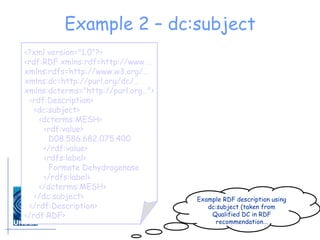
Example 2 – dc:subject <?xml version=&quot;1.0&quot;?> <rdf:RDF xmlns:rdf=http://www…. xmlns:rdfs=http://www.w3.org/… xmlns:dc=http://purl.org/dc/… xmlns:dcterms=&quot;http://purl.org…&quot;> <rdf:Description> <dc:subject> <dcterms:MESH> <rdf:value> D08.586.682.075.400 </rdf:value> <rdfs:label> Formate Dehydrogenase </rdfs:label> </dcterms:MESH> </dc:subject> </rdf:Description> </rdf:RDF> Example RDF description using dc:subject (taken from Qualified DC in RDF recommendation…
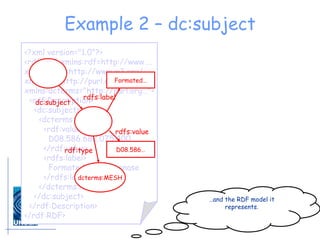
Example 2 – dc:subject <?xml version=&quot;1.0&quot;?> <rdf:RDF xmlns:rdf=http://www…. xmlns:rdfs=http://www.w3.org/… xmlns:dc=http://purl.org/dc/… xmlns:dcterms=&quot;http://purl.org…&quot;> <rdf:Description> <dc:subject> <dcterms:MESH> <rdf:value> D08.586.682.075.400 </rdf:value> <rdfs:label> Formate Dehydrogenase </rdfs:label> </dcterms:MESH> </dc:subject> </rdf:Description> </rdf:RDF> dcterms:MESH dc:subject rdf:type D08.586… rdf:type rdfs:label Formated… rdfs:value … and the RDF model it represents.
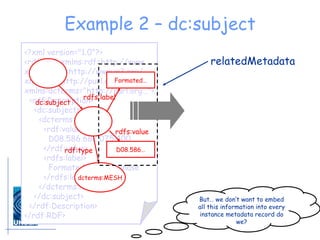
Example 2 – dc:subject <?xml version=&quot;1.0&quot;?> <rdf:RDF xmlns:rdf=http://www…. xmlns:rdfs=http://www.w3.org/… xmlns:dc=http://purl.org/dc/… xmlns:dcterms=&quot;http://purl.org…&quot;> <rdf:Description> <dc:subject> <dcterms:MESH> <rdf:value> D08.586.682.075.400 </rdf:value> <rdfs:label> Formate Dehydrogenase </rdfs:label> </dcterms:MESH> </dc:subject> </rdf:Description> </rdf:RDF> dcterms:MESH dc:subject rdf:type rdf:type But… we don’t want to embed all this information into every instance metadata record do we? relatedMetadata D08.586… rdfs:label Formated… rdfs:value
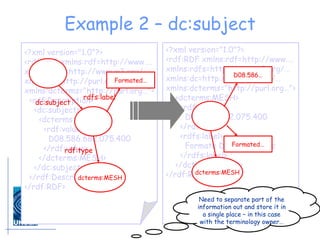
Example 2 – dc:subject <?xml version=&quot;1.0&quot;?> <rdf:RDF xmlns:rdf=http://www…. xmlns:rdfs=http://www.w3.org/… xmlns:dc=http://purl.org/dc/… xmlns:dcterms=&quot;http://purl.org…&quot;> <rdf:Description> <dc:subject> <dcterms:MESH> <rdf:value> D08.586.682.075.400 </rdf:value> </dcterms:MESH> </dc:subject> </rdf:Description> </rdf:RDF> dcterms:MESH dc:subject rdf:type rdf:type <?xml version=&quot;1.0&quot;?> <rdf:RDF xmlns:rdf=http://www…. xmlns:rdfs=http://www.w3.org/… xmlns:dc=http://purl.org/dc/… xmlns:dcterms=&quot;http://purl.org…&quot;> <dcterms:MESH> <rdf:value> D08.586.682.075.400 </rdf:value> <rdfs:label> Formate Dehydrogenase </rdfs:label> </dcterms:MESH> </rdf:RDF> dcterms:MESH D08.586… Formated… Need to separate part of the information out and store it in a single place – in this case with the terminology owner… rdfs:label Formated…
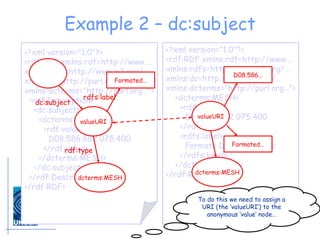
Example 2 – dc:subject <?xml version=&quot;1.0&quot;?> <rdf:RDF xmlns:rdf=http://www…. xmlns:rdfs=http://www.w3.org/… xmlns:dc=http://purl.org/dc/… xmlns:dcterms=&quot;http://purl.org…&quot;> <rdf:Description> <dc:subject> <dcterms:MESH> <rdf:value> D08.586.682.075.400 </rdf:value> </dcterms:MESH> </dc:subject> </rdf:Description> </rdf:RDF> valueURI dcterms:MESH dc:subject rdf:type rdf:type <?xml version=&quot;1.0&quot;?> <rdf:RDF xmlns:rdf=http://www…. xmlns:rdfs=http://www.w3.org/… xmlns:dc=http://purl.org/dc/… xmlns:dcterms=&quot;http://purl.org…&quot;> <dcterms:MESH> <rdf:value> D08.586.682.075.400 </rdf:value> <rdfs:label> Formate Dehydrogenase </rdfs:label> </dcterms:MESH> </rdf:RDF> valueURI dcterms:MESH D08.586… Formated… To do this we need to assign a URI (the ‘valueURI’) to the anonymous ‘value’ node… rdfs:label Formated…
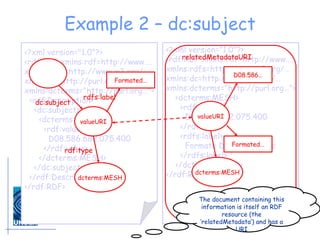
Example 2 – dc:subject <?xml version=&quot;1.0&quot;?> <rdf:RDF xmlns:rdf=http://www…. xmlns:rdfs=http://www.w3.org/… xmlns:dc=http://purl.org/dc/… xmlns:dcterms=&quot;http://purl.org…&quot;> <rdf:Description> <dc:subject> <dcterms:MESH> <rdf:value> D08.586.682.075.400 </rdf:value> </dcterms:MESH> </dc:subject> </rdf:Description> </rdf:RDF> valueURI dcterms:MESH dc:subject rdf:type rdf:type <?xml version=&quot;1.0&quot;?> <rdf:RDF xmlns:rdf=http://www…. xmlns:rdfs=http://www.w3.org/… xmlns:dc=http://purl.org/dc/… xmlns:dcterms=&quot;http://purl.org…&quot;> <dcterms:MESH> <rdf:value> D08.586.682.075.400 </rdf:value> <rdfs:label> Formate Dehydrogenase </rdfs:label> </dcterms:MESH> </rdf:RDF> valueURI dcterms:MESH D08.586… Formated… relatedMetadataURI The document containing this information is itself an RDF resource (the ‘relatedMetadata’) and has a URI rdfs:label Formated…
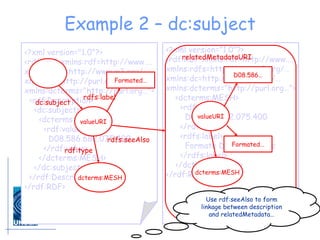
Example 2 – dc:subject <?xml version=&quot;1.0&quot;?> <rdf:RDF xmlns:rdf=http://www…. xmlns:rdfs=http://www.w3.org/… xmlns:dc=http://purl.org/dc/… xmlns:dcterms=&quot;http://purl.org…&quot;> <rdf:Description> <dc:subject> <dcterms:MESH> <rdf:value> D08.586.682.075.400 </rdf:value> </dcterms:MESH> </dc:subject> </rdf:Description> </rdf:RDF> valueURI dcterms:MESH dc:subject rdf:type rdf:type <?xml version=&quot;1.0&quot;?> <rdf:RDF xmlns:rdf=http://www…. xmlns:rdfs=http://www.w3.org/… xmlns:dc=http://purl.org/dc/… xmlns:dcterms=&quot;http://purl.org…&quot;> <dcterms:MESH> <rdf:value> D08.586.682.075.400 </rdf:value> <rdfs:label> Formate Dehydrogenase </rdfs:label> </dcterms:MESH> </rdf:RDF> valueURI dcterms:MESH D08.586… Formated… relatedMetadataURI rdfs:seeAlso Use rdf:seeAlso to form linkage between description and relatedMetadata… rdfs:label Formated…
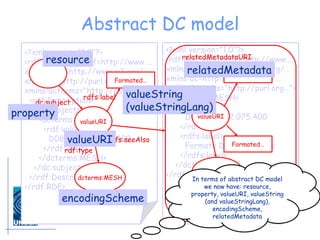
Abstract DC model <?xml version=&quot;1.0&quot;?> <rdf:RDF xmlns:rdf=http://www…. xmlns:rdfs=http://www.w3.org/… xmlns:dc=http://purl.org/dc/… xmlns:dcterms=&quot;http://purl.org…&quot;> <rdf:Description> <dc:subject> <dcterms:MESH> <rdf:value> D08.586.682.075.400 </rdf:value> </dcterms:MESH> </dc:subject> </rdf:Description> </rdf:RDF> valueURI dcterms:MESH dc:subject rdf:type rdf:type <?xml version=&quot;1.0&quot;?> <rdf:RDF xmlns:rdf=http://www…. xmlns:rdfs=http://www.w3.org/… xmlns:dc=http://purl.org/dc/… xmlns:dcterms=&quot;http://purl.org…&quot;> <dcterms:MESH> <rdf:value> D08.586.682.075.400 </rdf:value> <rdfs:label> Formate Dehydrogenase </rdfs:label> </dcterms:MESH> </rdf:RDF> valueURI dcterms:MESH D08.586… Formated… relatedMetadataURI rdfs:seeAlso resource property valueURI valueString In terms of abstract DC model we now have: resource, property, valueURI, valueString (and valueStringLang), encodingScheme, relatedMetadata resource property valueURI relatedMetadata encodingScheme rdfs:label Formated… valueString (valueStringLang)
Need to extend abstract model each [DCMI property] ‘value’ has a ‘valueURI’ each ‘value’ has a ‘valueString’ each ‘valueString’ may have an ‘encoding scheme’ each ‘encoding scheme’ has a URI each ‘valueString’ may have a ‘language’ each ‘value’ may have a linked or embedded ‘complexValue’ (markup or related resource description)
relatedMetadata related resource description known as ‘relatedMetadata’ particular encoding syntaxes may support instantiation of relatedMetadata by embedding explicit link using ‘relatedMetadataURI’ both
Qualified DC model a  qualified DC record  is made up of one or more  properties  and their associated  values   each  property  is an attribute of the  resource  being described  each  property  must be either:  one of the elements recommended by the DCMI (i.e. the 15 DC elements and audience),  one of the DCMI  element refinements properties  may be repeated
Qualified DC model (2) each  value  may have a  valueURI each  value  may have a  valueString   each  valueString  may have an associated  encoding scheme   each  encoding scheme  has a  URI   each  valueString  may have an associated language (e.g. en-GB) each  value  may have a linked or embedded  complexValue  ( markup  or  relatedMetadata )

What’s in a structured value?

  • 1.
    What’s in astructured value? Andy Powell UKOLN, University of Bath
  • 2.
    Background for sometime DC has had a slightly fuzzy notion of things called ‘structured values’ DCSV recommendation, complex data-structures in RDF/XML, use of vCard, use of things like DC.Creator.Address, etc. with the exception of RDF/XML, these tend to be fairly ad hoc attempts to squeeze ‘structured’ information into DC records
  • 3.
    Simple DC modela simple DC record is made up of one or more properties and their associated values each property is an attribute of the resource being described each property must be one of the 15 DCMES elements properties may be repeated each value is a string each string value may have an associated language (e.g. en-GB)
  • 4.
    Qualified DC modela qualified DC record is made up of one or more properties and their associated values each property is an attribute of the resource being described each property must be either: one of the elements recommended by the DCMI (i.e. the 15 DC elements and audience), one of the DCMI element refinements
  • 5.
    Qualified DC model(2) properties may be repeated each value is a string each value may have an associated encoding scheme each encoding scheme has a URI each string value may have an associated language (e.g. en-GB)
  • 6.
    But… qualified DCmodel too simple w.r.t RDF not able to support requirements coming out of DC Agents WG sometimes the value string isn’t just a string… sometimes it is a string that contains some structure i.e. sometimes it is a ‘structured value’
  • 7.
    Types of structuredvalues labelled strings DCSV (DC Box, …), OpenURL, vCard unlabelled strings W3CDTF markup HTML markup (various flavours), XML-based markup (CML, MathML, …), or non-XML markup such as TeX related resource descriptions full vCard, DC.Creator.Address, RDF
  • 8.
    Definitions a “structuredvalue” is a string that contains machine-parsable component parts (and which has an associated “syntax encoding scheme” that indicates how the component parts are encoded within the string) a string value that includes some markup a description of a related resource
  • 9.
    Name and identifiersas values dc:creator, dc:contributor, dc:publisher, dc:relation, dc:source name or identify a related resource identifiers typically in the form of a URI names typically in the form of person or organisation name (sometimes with the addition of extra information)
  • 10.
    Linking/embedding requirement inthe case of these 5 elements, there appears to be a requirement to form linkage between description of resource and description of one or more related resources i.e. between the resource being described and the resource that is named or identified by the element achieved by embedding or linking
  • 11.
    Example 1 –dc:creator <?xml version=&quot;1.0&quot;?> <rdf:RDF xmlns:rdf=http://www…. xmlns:rdfs=http://www.w3.org/… xmlns:dc=http://purl.org/dc/… xmlns:my=&quot;http://purl.org…&quot;> <rdf:Description> <dc:creator> <rdf:Description> <rdf:value> Andy Powell </rdf:value> <my:email> [email_address] </my:email> </rdf:Description> </dc:creator> </rdf:Description> </rdf:RDF> Example RDF description using dc:creator…
  • 12.
    Example 1 –dc:creator dc:creator Andy Powell… my:affiliation a.powell@uko… my:email … and the RDF model it represents. UKOLN, Univ… a.powell@uko… Andy Po… rdfs:label my:name <?xml version=&quot;1.0&quot;?> <rdf:RDF xmlns:rdf=http://www…. xmlns:rdfs=http://www.w3.org/… xmlns:dc=http://purl.org/dc/… xmlns:my=&quot;http://purl.org…&quot;> <rdf:Description> <dc:creator> <rdf:Description> <rdf:value> Andy Powell </rdf:value> <my:email> [email_address] </my:email> </rdf:Description> </dc:creator> </rdf:Description> </rdf:RDF>
  • 13.
    Example 1 –dc:creator dc:creator Andy Powell… my:affiliation a.powell@uko… my:email UKOLN, Univ… a.powell@uko… Andy Po… rdfs:label my:name But… we don’t want to embed all this information into every instance metadata record do we? relatedMetadata <?xml version=&quot;1.0&quot;?> <rdf:RDF xmlns:rdf=http://www…. xmlns:rdfs=http://www.w3.org/… xmlns:dc=http://purl.org/dc/… xmlns:my=&quot;http://purl.org…&quot;> <rdf:Description> <dc:creator> <rdf:Description> <rdf:value> Andy Powell </rdf:value> <my:email> [email_address] </my:email> </rdf:Description> </dc:creator> </rdf:Description> </rdf:RDF>
  • 14.
    Example 1 –dc:creator dc:creator Andy Powell… rdfs:label my:affiliation a.powell@uko… my:email UKOLN, Univ… a.powell@uko… Andy Po… my:name Need to separate part of the information out and store it in a single place – in this case in a directory service… <?xml version=&quot;1.0&quot;?> <rdf:RDF xmlns:rdf=http://www…. xmlns:rdfs=http://www.w3.org/… xmlns:dc=http://purl.org/dc/… xmlns:my=&quot;http://purl.org…&quot;> <rdf:Description> <dc:creator> <rdf:Description> <rdf:value> Andy Powell </rdf:value> </rdf:Description> </dc:creator> </rdf:Description> </rdf:RDF> <?xml version=&quot;1.0&quot;?> <rdf:RDF xmlns:rdf=http://www…. xmlns:rdfs=http://www.w3.org/… xmlns:dc=http://purl.org/dc/… xmlns:my=&quot;http://purl.org…&quot;> <rdf:Description> <my:name> Andy Powell </my:name> <my:email> [email_address] </my:email> </rdf:Description> </rdf:RDF>
  • 15.
    Example 1 –dc:creator valueURI dc:creator Andy Powell… rdfs:label valueURI my:affiliation a.powell@uko… my:email UKOLN, Univ… a.powell@uko… Andy Po… my:name To do this we need to assign a URI (the ‘valueURI’) to the anonymous ‘value’ node… <?xml version=&quot;1.0&quot;?> <rdf:RDF xmlns:rdf=http://www…. xmlns:rdfs=http://www.w3.org/… xmlns:dc=http://purl.org/dc/… xmlns:my=&quot;http://purl.org…&quot;> <rdf:Description> <dc:creator> <rdf:Description> <rdf:value> Andy Powell </rdf:value> </rdf:Description> </dc:creator> </rdf:Description> </rdf:RDF> <?xml version=&quot;1.0&quot;?> <rdf:RDF xmlns:rdf=http://www…. xmlns:rdfs=http://www.w3.org/… xmlns:dc=http://purl.org/dc/… xmlns:my=&quot;http://purl.org…&quot;> <rdf:Description> <my:name> Andy Powell </my:name> <my:email> [email_address] </my:email> </rdf:Description> </rdf:RDF>
  • 16.
    Example 1 –dc:creator valueURI dc:creator Andy Powell… rdfs:label valueURI my:affiliation a.powell@uko… my:email UKOLN, Univ… a.powell@uko… Andy Po… my:name relatedMetadataURI The document containing this information is itself an RDF resource (the ‘relatedMetadata’) and has a URI <?xml version=&quot;1.0&quot;?> <rdf:RDF xmlns:rdf=http://www…. xmlns:rdfs=http://www.w3.org/… xmlns:dc=http://purl.org/dc/… xmlns:my=&quot;http://purl.org…&quot;> <rdf:Description> <dc:creator> <rdf:Description> <rdf:value> Andy Powell </rdf:value> </rdf:Description> </dc:creator> </rdf:Description> </rdf:RDF> <?xml version=&quot;1.0&quot;?> <rdf:RDF xmlns:rdf=http://www…. xmlns:rdfs=http://www.w3.org/… xmlns:dc=http://purl.org/dc/… xmlns:my=&quot;http://purl.org…&quot;> <rdf:Description> <my:name> Andy Powell </my:name> <my:email> [email_address] </my:email> </rdf:Description> </rdf:RDF>
  • 17.
    Example 1 –dc:creator valueURI dc:creator Andy Powell… rdfs:label valueURI my:affiliation a.powell@uko… my:email UKOLN, Univ… a.powell@uko… Andy Po… my:name relatedMetadataURI rdfs:seeAlso Use rdf:seeAlso to form linkage between description and relatedMetadata… <?xml version=&quot;1.0&quot;?> <rdf:RDF xmlns:rdf=http://www…. xmlns:rdfs=http://www.w3.org/… xmlns:dc=http://purl.org/dc/… xmlns:my=&quot;http://purl.org…&quot;> <rdf:Description> <dc:creator> <rdf:Description> <rdf:value> Andy Powell </rdf:value> <my:email> [email_address] </my:email> </rdf:Description> </dc:creator> </rdf:Description> </rdf:RDF> <?xml version=&quot;1.0&quot;?> <rdf:RDF xmlns:rdf=http://www…. xmlns:rdfs=http://www.w3.org/… xmlns:dc=http://purl.org/dc/… xmlns:my=&quot;http://purl.org…&quot;> <rdf:Description> <dc:creator> <rdf:Description> <rdf:value> Andy Powell </rdf:value> <my:email> [email_address] </my:email> </rdf:Description> </dc:creator> </rdf:Description> </rdf:RDF>
  • 18.
    Example 2 –dc:subject <?xml version=&quot;1.0&quot;?> <rdf:RDF xmlns:rdf=http://www…. xmlns:rdfs=http://www.w3.org/… xmlns:dc=http://purl.org/dc/… xmlns:dcterms=&quot;http://purl.org…&quot;> <rdf:Description> <dc:subject> <dcterms:MESH> <rdf:value> D08.586.682.075.400 </rdf:value> <rdfs:label> Formate Dehydrogenase </rdfs:label> </dcterms:MESH> </dc:subject> </rdf:Description> </rdf:RDF> Example RDF description using dc:subject (taken from Qualified DC in RDF recommendation…
  • 19.
    Example 2 –dc:subject <?xml version=&quot;1.0&quot;?> <rdf:RDF xmlns:rdf=http://www…. xmlns:rdfs=http://www.w3.org/… xmlns:dc=http://purl.org/dc/… xmlns:dcterms=&quot;http://purl.org…&quot;> <rdf:Description> <dc:subject> <dcterms:MESH> <rdf:value> D08.586.682.075.400 </rdf:value> <rdfs:label> Formate Dehydrogenase </rdfs:label> </dcterms:MESH> </dc:subject> </rdf:Description> </rdf:RDF> dcterms:MESH dc:subject rdf:type D08.586… rdf:type rdfs:label Formated… rdfs:value … and the RDF model it represents.
  • 20.
    Example 2 –dc:subject <?xml version=&quot;1.0&quot;?> <rdf:RDF xmlns:rdf=http://www…. xmlns:rdfs=http://www.w3.org/… xmlns:dc=http://purl.org/dc/… xmlns:dcterms=&quot;http://purl.org…&quot;> <rdf:Description> <dc:subject> <dcterms:MESH> <rdf:value> D08.586.682.075.400 </rdf:value> <rdfs:label> Formate Dehydrogenase </rdfs:label> </dcterms:MESH> </dc:subject> </rdf:Description> </rdf:RDF> dcterms:MESH dc:subject rdf:type rdf:type But… we don’t want to embed all this information into every instance metadata record do we? relatedMetadata D08.586… rdfs:label Formated… rdfs:value
  • 21.
    Example 2 –dc:subject <?xml version=&quot;1.0&quot;?> <rdf:RDF xmlns:rdf=http://www…. xmlns:rdfs=http://www.w3.org/… xmlns:dc=http://purl.org/dc/… xmlns:dcterms=&quot;http://purl.org…&quot;> <rdf:Description> <dc:subject> <dcterms:MESH> <rdf:value> D08.586.682.075.400 </rdf:value> </dcterms:MESH> </dc:subject> </rdf:Description> </rdf:RDF> dcterms:MESH dc:subject rdf:type rdf:type <?xml version=&quot;1.0&quot;?> <rdf:RDF xmlns:rdf=http://www…. xmlns:rdfs=http://www.w3.org/… xmlns:dc=http://purl.org/dc/… xmlns:dcterms=&quot;http://purl.org…&quot;> <dcterms:MESH> <rdf:value> D08.586.682.075.400 </rdf:value> <rdfs:label> Formate Dehydrogenase </rdfs:label> </dcterms:MESH> </rdf:RDF> dcterms:MESH D08.586… Formated… Need to separate part of the information out and store it in a single place – in this case with the terminology owner… rdfs:label Formated…
  • 22.
    Example 2 –dc:subject <?xml version=&quot;1.0&quot;?> <rdf:RDF xmlns:rdf=http://www…. xmlns:rdfs=http://www.w3.org/… xmlns:dc=http://purl.org/dc/… xmlns:dcterms=&quot;http://purl.org…&quot;> <rdf:Description> <dc:subject> <dcterms:MESH> <rdf:value> D08.586.682.075.400 </rdf:value> </dcterms:MESH> </dc:subject> </rdf:Description> </rdf:RDF> valueURI dcterms:MESH dc:subject rdf:type rdf:type <?xml version=&quot;1.0&quot;?> <rdf:RDF xmlns:rdf=http://www…. xmlns:rdfs=http://www.w3.org/… xmlns:dc=http://purl.org/dc/… xmlns:dcterms=&quot;http://purl.org…&quot;> <dcterms:MESH> <rdf:value> D08.586.682.075.400 </rdf:value> <rdfs:label> Formate Dehydrogenase </rdfs:label> </dcterms:MESH> </rdf:RDF> valueURI dcterms:MESH D08.586… Formated… To do this we need to assign a URI (the ‘valueURI’) to the anonymous ‘value’ node… rdfs:label Formated…
  • 23.
    Example 2 –dc:subject <?xml version=&quot;1.0&quot;?> <rdf:RDF xmlns:rdf=http://www…. xmlns:rdfs=http://www.w3.org/… xmlns:dc=http://purl.org/dc/… xmlns:dcterms=&quot;http://purl.org…&quot;> <rdf:Description> <dc:subject> <dcterms:MESH> <rdf:value> D08.586.682.075.400 </rdf:value> </dcterms:MESH> </dc:subject> </rdf:Description> </rdf:RDF> valueURI dcterms:MESH dc:subject rdf:type rdf:type <?xml version=&quot;1.0&quot;?> <rdf:RDF xmlns:rdf=http://www…. xmlns:rdfs=http://www.w3.org/… xmlns:dc=http://purl.org/dc/… xmlns:dcterms=&quot;http://purl.org…&quot;> <dcterms:MESH> <rdf:value> D08.586.682.075.400 </rdf:value> <rdfs:label> Formate Dehydrogenase </rdfs:label> </dcterms:MESH> </rdf:RDF> valueURI dcterms:MESH D08.586… Formated… relatedMetadataURI The document containing this information is itself an RDF resource (the ‘relatedMetadata’) and has a URI rdfs:label Formated…
  • 24.
    Example 2 –dc:subject <?xml version=&quot;1.0&quot;?> <rdf:RDF xmlns:rdf=http://www…. xmlns:rdfs=http://www.w3.org/… xmlns:dc=http://purl.org/dc/… xmlns:dcterms=&quot;http://purl.org…&quot;> <rdf:Description> <dc:subject> <dcterms:MESH> <rdf:value> D08.586.682.075.400 </rdf:value> </dcterms:MESH> </dc:subject> </rdf:Description> </rdf:RDF> valueURI dcterms:MESH dc:subject rdf:type rdf:type <?xml version=&quot;1.0&quot;?> <rdf:RDF xmlns:rdf=http://www…. xmlns:rdfs=http://www.w3.org/… xmlns:dc=http://purl.org/dc/… xmlns:dcterms=&quot;http://purl.org…&quot;> <dcterms:MESH> <rdf:value> D08.586.682.075.400 </rdf:value> <rdfs:label> Formate Dehydrogenase </rdfs:label> </dcterms:MESH> </rdf:RDF> valueURI dcterms:MESH D08.586… Formated… relatedMetadataURI rdfs:seeAlso Use rdf:seeAlso to form linkage between description and relatedMetadata… rdfs:label Formated…
  • 25.
    Abstract DC model<?xml version=&quot;1.0&quot;?> <rdf:RDF xmlns:rdf=http://www…. xmlns:rdfs=http://www.w3.org/… xmlns:dc=http://purl.org/dc/… xmlns:dcterms=&quot;http://purl.org…&quot;> <rdf:Description> <dc:subject> <dcterms:MESH> <rdf:value> D08.586.682.075.400 </rdf:value> </dcterms:MESH> </dc:subject> </rdf:Description> </rdf:RDF> valueURI dcterms:MESH dc:subject rdf:type rdf:type <?xml version=&quot;1.0&quot;?> <rdf:RDF xmlns:rdf=http://www…. xmlns:rdfs=http://www.w3.org/… xmlns:dc=http://purl.org/dc/… xmlns:dcterms=&quot;http://purl.org…&quot;> <dcterms:MESH> <rdf:value> D08.586.682.075.400 </rdf:value> <rdfs:label> Formate Dehydrogenase </rdfs:label> </dcterms:MESH> </rdf:RDF> valueURI dcterms:MESH D08.586… Formated… relatedMetadataURI rdfs:seeAlso resource property valueURI valueString In terms of abstract DC model we now have: resource, property, valueURI, valueString (and valueStringLang), encodingScheme, relatedMetadata resource property valueURI relatedMetadata encodingScheme rdfs:label Formated… valueString (valueStringLang)
  • 26.
    Need to extendabstract model each [DCMI property] ‘value’ has a ‘valueURI’ each ‘value’ has a ‘valueString’ each ‘valueString’ may have an ‘encoding scheme’ each ‘encoding scheme’ has a URI each ‘valueString’ may have a ‘language’ each ‘value’ may have a linked or embedded ‘complexValue’ (markup or related resource description)
  • 27.
    relatedMetadata related resourcedescription known as ‘relatedMetadata’ particular encoding syntaxes may support instantiation of relatedMetadata by embedding explicit link using ‘relatedMetadataURI’ both
  • 28.
    Qualified DC modela qualified DC record is made up of one or more properties and their associated values each property is an attribute of the resource being described each property must be either: one of the elements recommended by the DCMI (i.e. the 15 DC elements and audience), one of the DCMI element refinements properties may be repeated
  • 29.
    Qualified DC model(2) each value may have a valueURI each value may have a valueString each valueString may have an associated encoding scheme each encoding scheme has a URI each valueString may have an associated language (e.g. en-GB) each value may have a linked or embedded complexValue ( markup or relatedMetadata )