+

Sesame

Mariano Rodriguez-Muro,
Free University of Bozen-Bolzano
+

Disclaimer


License




This work is licensed under a
Creative Commons Attribution-Share Alike 3.0 License
(http://creativecommons.org/licenses/by-sa/3.0/)

Material for these slides has been taken from


Programming the Semantic Web (Chapter 8)



Sesame’s documentation
+

Reading material


Programming the Semantic Web Chapter 8



Sesame user guide http://www.openrdf.org/doc/sesame2/users/



See also Jetty 8
http://download.eclipse.org/jetty/stable-8/dist/
+
Overview
+

Overview


Sesame


History



Overview



Repository API


Creating a Repository



Repository connections



Sesame Console



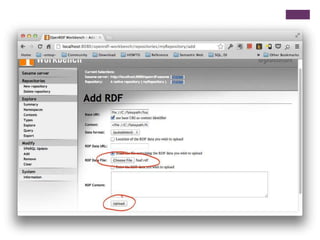
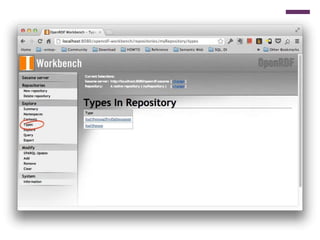
Sesame workbench
+

Overview and History


Open source Java for storage
and querying RDF



By Aduna for the On-ToKnowledge EU project



RDF inference





RDF IO (all file formats)

Now developed by Nlnet
foundation, Ontotext and
community volunteers



JDBC-like user API



Available at
www.openrdf.org



RESTful HTTP interface



SPARQL Protocol support



Easy learning curve, great
management features
+

Sesame components



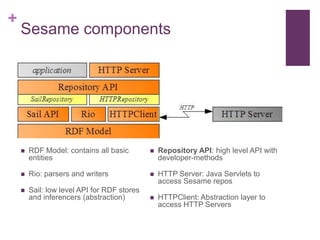
RDF Model: contains all basic
entities



Repository API: high level API with
developer-methods



Rio: parsers and writers



HTTP Server: Java Servlets to
access Sesame repos



Sail: low level API for RDF stores
and inferencers (abstraction)



HTTPClient: Abstraction layer to
access HTTP Servers
+
Repository API
+

Repository API


Developer-focused API



In contrast with Jena, in Sesame RDF models are not handled
by the user (normally), instead we use Repositories.



Vendors provide triple stores as Repository implementations



Sesame provides the following repository implementations:






Main memory
Native RDF repository
Remote repository (HTTP proxy)

To use Sesame repositories, these must be stacked in Sails,
i.e., stacks of layered behavior
+

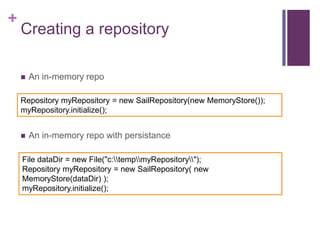
Creating a repository


An in-memory repo

Repository myRepository = new SailRepository(new MemoryStore());
myRepository.initialize();


An in-memory repo with persistance

File dataDir = new File("c:tempmyRepository");
Repository myRepository = new SailRepository( new
MemoryStore(dataDir) );
myRepository.initialize();
+

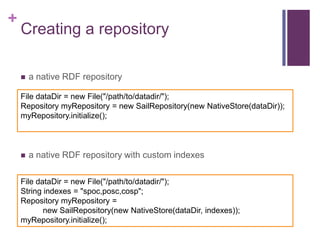
Creating a repository


a native RDF repository

File dataDir = new File("/path/to/datadir/");
Repository myRepository = new SailRepository(new NativeStore(dataDir));
myRepository.initialize();



a native RDF repository with custom indexes

File dataDir = new File("/path/to/datadir/");
String indexes = "spoc,posc,cosp";
Repository myRepository =
new SailRepository(new NativeStore(dataDir, indexes));
myRepository.initialize();
+

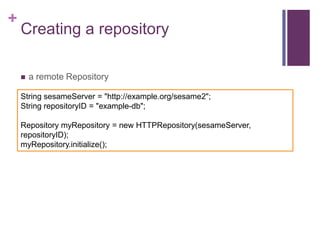
Creating a repository


a remote Repository

String sesameServer = "http://example.org/sesame2";
String repositoryID = "example-db";
Repository myRepository = new HTTPRepository(sesameServer,
repositoryID);
myRepository.initialize();
+

Using a repository:
RepositoryConnection


JDBC like-interface



Operations
 add triples by file, URI,
Statement
 query using SPARQL
SELECT, ASK or Construct
queries
 create, retrieve, remove
individual statements
 prepared queries



Transaction support
 commit(), rollback()
+

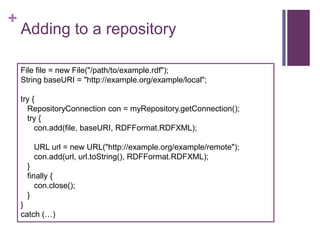
Adding to a repository
File file = new File("/path/to/example.rdf");
String baseURI = "http://example.org/example/local";

try {
RepositoryConnection con = myRepository.getConnection();
try {
con.add(file, baseURI, RDFFormat.RDFXML);
URL url = new URL("http://example.org/example/remote");
con.add(url, url.toString(), RDFFormat.RDFXML);
}
finally {
con.close();
}

}
catch (…)
+

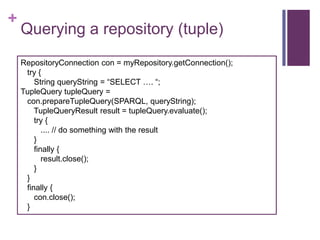
Querying a repository (tuple)
RepositoryConnection con = myRepository.getConnection();
try {
String queryString = “SELECT …. “;
TupleQuery tupleQuery =
con.prepareTupleQuery(SPARQL, queryString);
TupleQueryResult result = tupleQuery.evaluate();
try {
.... // do something with the result
}
finally {
result.close();
}
}
finally {
con.close();
}
+

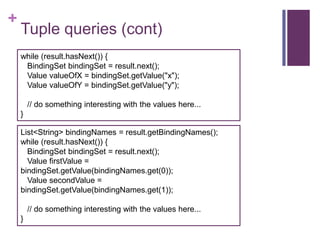
Tuple queries (cont)
while (result.hasNext()) {
BindingSet bindingSet = result.next();
Value valueOfX = bindingSet.getValue("x");
Value valueOfY = bindingSet.getValue("y");
// do something interesting with the values here...
}
List<String> bindingNames = result.getBindingNames();
while (result.hasNext()) {
BindingSet bindingSet = result.next();
Value firstValue =
bindingSet.getValue(bindingNames.get(0));
Value secondValue =
bindingSet.getValue(bindingNames.get(1));
// do something interesting with the values here...
}
+

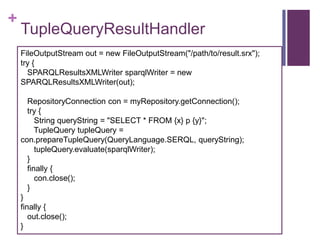
TupleQueryResultHandler
FileOutputStream out = new FileOutputStream("/path/to/result.srx");
try {
SPARQLResultsXMLWriter sparqlWriter = new
SPARQLResultsXMLWriter(out);
RepositoryConnection con = myRepository.getConnection();
try {
String queryString = "SELECT * FROM {x} p {y}";
TupleQuery tupleQuery =
con.prepareTupleQuery(QueryLanguage.SERQL, queryString);
tupleQuery.evaluate(sparqlWriter);
}
finally {
con.close();
}
}
finally {
out.close();
}
+

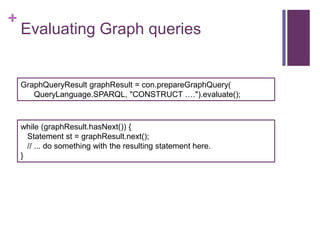
Evaluating Graph queries

GraphQueryResult graphResult = con.prepareGraphQuery(
QueryLanguage.SPARQL, "CONSTRUCT ….").evaluate();

while (graphResult.hasNext()) {
Statement st = graphResult.next();
// ... do something with the resulting statement here.
}
+

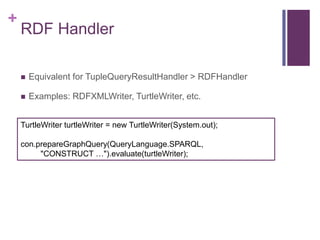
RDF Handler


Equivalent for TupleQueryResultHandler > RDFHandler



Examples: RDFXMLWriter, TurtleWriter, etc.

TurtleWriter turtleWriter = new TurtleWriter(System.out);
con.prepareGraphQuery(QueryLanguage.SPARQL,
"CONSTRUCT …").evaluate(turtleWriter);
+

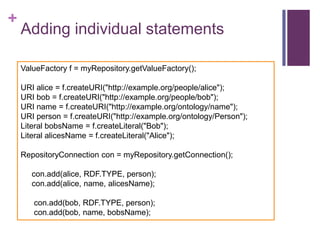
Adding individual statements
ValueFactory f = myRepository.getValueFactory();

URI alice = f.createURI("http://example.org/people/alice");
URI bob = f.createURI("http://example.org/people/bob");
URI name = f.createURI("http://example.org/ontology/name");
URI person = f.createURI("http://example.org/ontology/Person");
Literal bobsName = f.createLiteral("Bob");
Literal alicesName = f.createLiteral("Alice");
RepositoryConnection con = myRepository.getConnection();
con.add(alice, RDF.TYPE, person);
con.add(alice, name, alicesName);
con.add(bob, RDF.TYPE, person);
con.add(bob, name, bobsName);
+

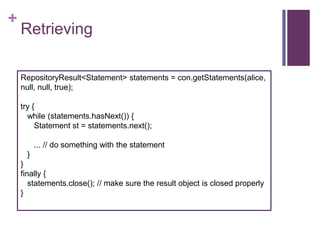
Retrieving
RepositoryResult<Statement> statements = con.getStatements(alice,
null, null, true);
try {
while (statements.hasNext()) {
Statement st = statements.next();

... // do something with the statement
}
}
finally {
statements.close(); // make sure the result object is closed properly
}
+

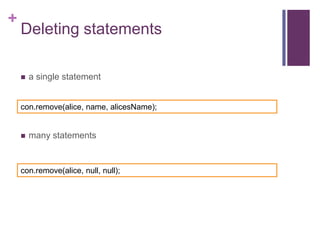
Deleting statements


a single statement

con.remove(alice, name, alicesName);



many statements

con.remove(alice, null, null);
+

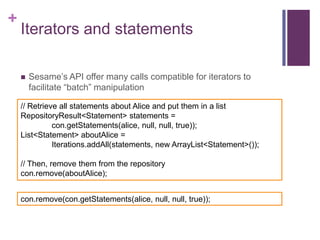
Iterators and statements


Sesame’s API offer many calls compatible for iterators to
facilitate “batch” manipulation

// Retrieve all statements about Alice and put them in a list
RepositoryResult<Statement> statements =
con.getStatements(alice, null, null, true));
List<Statement> aboutAlice =
Iterations.addAll(statements, new ArrayList<Statement>());
// Then, remove them from the repository
con.remove(aboutAlice);
con.remove(con.getStatements(alice, null, null, true));
+

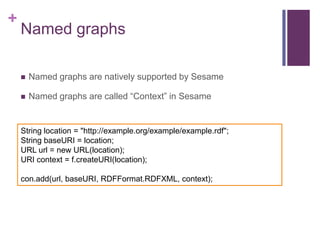
Named graphs


Named graphs are natively supported by Sesame



Named graphs are called “Context” in Sesame

String location = "http://example.org/example/example.rdf";
String baseURI = location;
URL url = new URL(location);
URI context = f.createURI(location);
con.add(url, baseURI, RDFFormat.RDFXML, context);
+

Transactions


SQL-like transactions



Treat a “block” of operations as a single update



Failures can be “rolled back”
+

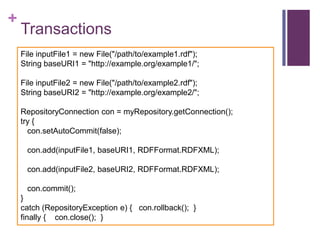
Transactions
File inputFile1 = new File("/path/to/example1.rdf");
String baseURI1 = "http://example.org/example1/";
File inputFile2 = new File("/path/to/example2.rdf");
String baseURI2 = "http://example.org/example2/";
RepositoryConnection con = myRepository.getConnection();
try {
con.setAutoCommit(false);
con.add(inputFile1, baseURI1, RDFFormat.RDFXML);
con.add(inputFile2, baseURI2, RDFFormat.RDFXML);

con.commit();
}
catch (RepositoryException e) { con.rollback(); }
finally { con.close(); }
+
Sesame Console
+

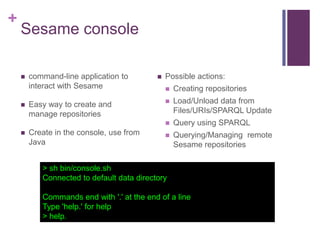
Sesame console


command-line application to
interact with Sesame



Possible actions:



Easy way to create and
manage repositories
Create in the console, use from
Java

Creating repositories



Load/Unload data from
Files/URIs/SPARQL Update







Query using SPARQL



Querying/Managing remote
Sesame repositories

> sh bin/console.sh
Connected to default data directory
Commands end with '.' at the end of a line
Type 'help.' for help
> help.
+


Repository types

memory,memory-rdfs
a memory based RDF repository
(optionaly with RDFS inference)

Please specify values for the following variables:
Repository ID [native]: myRepo
Repository title [Native store]: My repository
Triple indexes [spoc,posc]:
Repository created
 pgsql, mysql
> show repositories.
a repository that stores data in a
> +---------PostgreSQL (mysql) database
> |SYSTEM
> |myRepo(”My repository")
 remote -- a repository that serves as > +---------

native, native-rdfs
a repository that uses on-disk data
structure (optional RDFS inference)

a proxy for a repository on a Sesame
Server
+
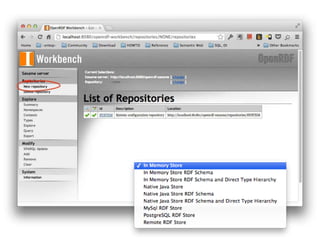
Sesame Workbench
Repository Manager and SPARQL end-points with Sesame
+

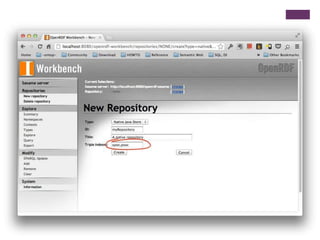
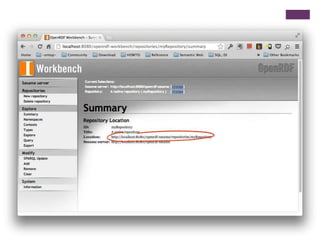
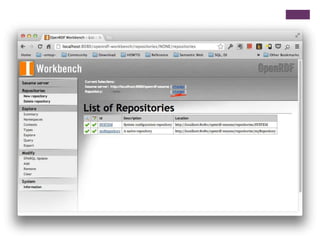
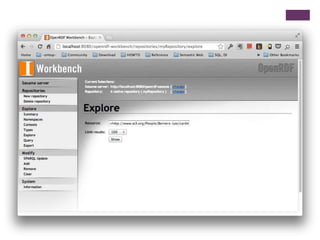
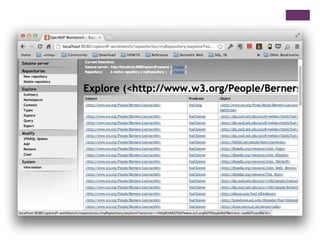
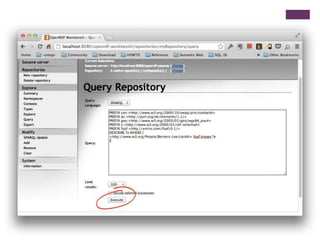
Sesame workbench


SPARQL Protocol
implementation (sparqlendpoint) for Sesame
repositories



Web based management
console for Sesame
repositories



Web based query interface for
repositories.
+

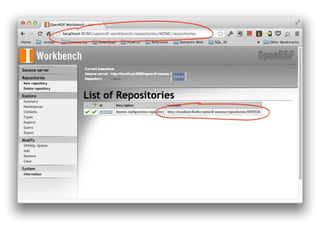
Setup


Requires a JSP server, e.g.,
Tomcat or Jetty 8



Drop the 2 .war files from the
/war folder of the sesame .zip
into your webapps folder



Start the JSP server
If you are using Jetty, do:
jetty.sh/bat start
in the command line
4 sesame
4 sesame
4 sesame
4 sesame
4 sesame
4 sesame
4 sesame
4 sesame
4 sesame
4 sesame
4 sesame

4 sesame

  • 1.
  • 2.
    + Disclaimer  License   This work islicensed under a Creative Commons Attribution-Share Alike 3.0 License (http://creativecommons.org/licenses/by-sa/3.0/) Material for these slides has been taken from  Programming the Semantic Web (Chapter 8)  Sesame’s documentation
  • 3.
    + Reading material  Programming theSemantic Web Chapter 8  Sesame user guide http://www.openrdf.org/doc/sesame2/users/  See also Jetty 8 http://download.eclipse.org/jetty/stable-8/dist/
  • 4.
  • 5.
    + Overview  Sesame  History  Overview  Repository API  Creating aRepository  Repository connections  Sesame Console  Sesame workbench
  • 6.
    + Overview and History  Opensource Java for storage and querying RDF  By Aduna for the On-ToKnowledge EU project  RDF inference   RDF IO (all file formats) Now developed by Nlnet foundation, Ontotext and community volunteers  JDBC-like user API  Available at www.openrdf.org  RESTful HTTP interface  SPARQL Protocol support  Easy learning curve, great management features
  • 7.
    + Sesame components  RDF Model:contains all basic entities  Repository API: high level API with developer-methods  Rio: parsers and writers  HTTP Server: Java Servlets to access Sesame repos  Sail: low level API for RDF stores and inferencers (abstraction)  HTTPClient: Abstraction layer to access HTTP Servers
  • 8.
  • 9.
    + Repository API  Developer-focused API  Incontrast with Jena, in Sesame RDF models are not handled by the user (normally), instead we use Repositories.  Vendors provide triple stores as Repository implementations  Sesame provides the following repository implementations:     Main memory Native RDF repository Remote repository (HTTP proxy) To use Sesame repositories, these must be stacked in Sails, i.e., stacks of layered behavior
  • 10.
    + Creating a repository  Anin-memory repo Repository myRepository = new SailRepository(new MemoryStore()); myRepository.initialize();  An in-memory repo with persistance File dataDir = new File("c:tempmyRepository"); Repository myRepository = new SailRepository( new MemoryStore(dataDir) ); myRepository.initialize();
  • 11.
    + Creating a repository  anative RDF repository File dataDir = new File("/path/to/datadir/"); Repository myRepository = new SailRepository(new NativeStore(dataDir)); myRepository.initialize();  a native RDF repository with custom indexes File dataDir = new File("/path/to/datadir/"); String indexes = "spoc,posc,cosp"; Repository myRepository = new SailRepository(new NativeStore(dataDir, indexes)); myRepository.initialize();
  • 12.
    + Creating a repository  aremote Repository String sesameServer = "http://example.org/sesame2"; String repositoryID = "example-db"; Repository myRepository = new HTTPRepository(sesameServer, repositoryID); myRepository.initialize();
  • 13.
    + Using a repository: RepositoryConnection  JDBClike-interface  Operations  add triples by file, URI, Statement  query using SPARQL SELECT, ASK or Construct queries  create, retrieve, remove individual statements  prepared queries  Transaction support  commit(), rollback()
  • 14.
    + Adding to arepository File file = new File("/path/to/example.rdf"); String baseURI = "http://example.org/example/local"; try { RepositoryConnection con = myRepository.getConnection(); try { con.add(file, baseURI, RDFFormat.RDFXML); URL url = new URL("http://example.org/example/remote"); con.add(url, url.toString(), RDFFormat.RDFXML); } finally { con.close(); } } catch (…)
  • 15.
    + Querying a repository(tuple) RepositoryConnection con = myRepository.getConnection(); try { String queryString = “SELECT …. “; TupleQuery tupleQuery = con.prepareTupleQuery(SPARQL, queryString); TupleQueryResult result = tupleQuery.evaluate(); try { .... // do something with the result } finally { result.close(); } } finally { con.close(); }
  • 16.
    + Tuple queries (cont) while(result.hasNext()) { BindingSet bindingSet = result.next(); Value valueOfX = bindingSet.getValue("x"); Value valueOfY = bindingSet.getValue("y"); // do something interesting with the values here... } List<String> bindingNames = result.getBindingNames(); while (result.hasNext()) { BindingSet bindingSet = result.next(); Value firstValue = bindingSet.getValue(bindingNames.get(0)); Value secondValue = bindingSet.getValue(bindingNames.get(1)); // do something interesting with the values here... }
  • 17.
    + TupleQueryResultHandler FileOutputStream out =new FileOutputStream("/path/to/result.srx"); try { SPARQLResultsXMLWriter sparqlWriter = new SPARQLResultsXMLWriter(out); RepositoryConnection con = myRepository.getConnection(); try { String queryString = "SELECT * FROM {x} p {y}"; TupleQuery tupleQuery = con.prepareTupleQuery(QueryLanguage.SERQL, queryString); tupleQuery.evaluate(sparqlWriter); } finally { con.close(); } } finally { out.close(); }
  • 18.
    + Evaluating Graph queries GraphQueryResultgraphResult = con.prepareGraphQuery( QueryLanguage.SPARQL, "CONSTRUCT ….").evaluate(); while (graphResult.hasNext()) { Statement st = graphResult.next(); // ... do something with the resulting statement here. }
  • 19.
    + RDF Handler  Equivalent forTupleQueryResultHandler > RDFHandler  Examples: RDFXMLWriter, TurtleWriter, etc. TurtleWriter turtleWriter = new TurtleWriter(System.out); con.prepareGraphQuery(QueryLanguage.SPARQL, "CONSTRUCT …").evaluate(turtleWriter);
  • 20.
    + Adding individual statements ValueFactoryf = myRepository.getValueFactory(); URI alice = f.createURI("http://example.org/people/alice"); URI bob = f.createURI("http://example.org/people/bob"); URI name = f.createURI("http://example.org/ontology/name"); URI person = f.createURI("http://example.org/ontology/Person"); Literal bobsName = f.createLiteral("Bob"); Literal alicesName = f.createLiteral("Alice"); RepositoryConnection con = myRepository.getConnection(); con.add(alice, RDF.TYPE, person); con.add(alice, name, alicesName); con.add(bob, RDF.TYPE, person); con.add(bob, name, bobsName);
  • 21.
    + Retrieving RepositoryResult<Statement> statements =con.getStatements(alice, null, null, true); try { while (statements.hasNext()) { Statement st = statements.next(); ... // do something with the statement } } finally { statements.close(); // make sure the result object is closed properly }
  • 22.
    + Deleting statements  a singlestatement con.remove(alice, name, alicesName);  many statements con.remove(alice, null, null);
  • 23.
    + Iterators and statements  Sesame’sAPI offer many calls compatible for iterators to facilitate “batch” manipulation // Retrieve all statements about Alice and put them in a list RepositoryResult<Statement> statements = con.getStatements(alice, null, null, true)); List<Statement> aboutAlice = Iterations.addAll(statements, new ArrayList<Statement>()); // Then, remove them from the repository con.remove(aboutAlice); con.remove(con.getStatements(alice, null, null, true));
  • 24.
    + Named graphs  Named graphsare natively supported by Sesame  Named graphs are called “Context” in Sesame String location = "http://example.org/example/example.rdf"; String baseURI = location; URL url = new URL(location); URI context = f.createURI(location); con.add(url, baseURI, RDFFormat.RDFXML, context);
  • 25.
    + Transactions  SQL-like transactions  Treat a“block” of operations as a single update  Failures can be “rolled back”
  • 26.
    + Transactions File inputFile1 =new File("/path/to/example1.rdf"); String baseURI1 = "http://example.org/example1/"; File inputFile2 = new File("/path/to/example2.rdf"); String baseURI2 = "http://example.org/example2/"; RepositoryConnection con = myRepository.getConnection(); try { con.setAutoCommit(false); con.add(inputFile1, baseURI1, RDFFormat.RDFXML); con.add(inputFile2, baseURI2, RDFFormat.RDFXML); con.commit(); } catch (RepositoryException e) { con.rollback(); } finally { con.close(); }
  • 27.
  • 28.
    + Sesame console  command-line applicationto interact with Sesame  Possible actions:  Easy way to create and manage repositories Create in the console, use from Java Creating repositories  Load/Unload data from Files/URIs/SPARQL Update    Query using SPARQL  Querying/Managing remote Sesame repositories > sh bin/console.sh Connected to default data directory Commands end with '.' at the end of a line Type 'help.' for help > help.
  • 29.
    +  Repository types memory,memory-rdfs a memorybased RDF repository (optionaly with RDFS inference) Please specify values for the following variables: Repository ID [native]: myRepo Repository title [Native store]: My repository Triple indexes [spoc,posc]: Repository created  pgsql, mysql > show repositories. a repository that stores data in a > +---------PostgreSQL (mysql) database > |SYSTEM > |myRepo(”My repository")  remote -- a repository that serves as > +--------- native, native-rdfs a repository that uses on-disk data structure (optional RDFS inference) a proxy for a repository on a Sesame Server
  • 30.
    + Sesame Workbench Repository Managerand SPARQL end-points with Sesame
  • 31.
    + Sesame workbench  SPARQL Protocol implementation(sparqlendpoint) for Sesame repositories  Web based management console for Sesame repositories  Web based query interface for repositories.
  • 32.
    + Setup  Requires a JSPserver, e.g., Tomcat or Jetty 8  Drop the 2 .war files from the /war folder of the sesame .zip into your webapps folder  Start the JSP server If you are using Jetty, do: jetty.sh/bat start in the command line