+

RDF

Mariano Rodriguez-Muro,
Free University of Bozen-Bolzano
+

Disclaimer

License

This work is licensed under the
Creative Commons Attribution-Share Alike 3.0 License
http://creativecommons.org/licenses/by-sa/3.0/
+

Background



The Data Model



In-Detail



Syntax: Turtle, N-triple



RDF



Tools



Syntax: XML
+
RDF
Background
+

URI, URL and IRI


URI = Uniform Resource Identifier
URL = Uniform Resource Locator (has a location on the WWW)
IRI = Internationalized Resource Identifier (uses Unicode)



Used for identifying resources (web, local, etc.)



Resources can be anything that has an identity in the context of
an application (books, locations, humans, abstract
concepts, etc.)



Analogous to, e.g., ISBN for books
URLs ⊆ URIs ⊆ IRIs
+

URI, URL and IRI
scheme:[//authority]path[?query][#fragment]


scheme: type of URI, e.g. http, ftp, mailto, file, irc



authority: typically a domain name



path: e.g. /etc/passwd/



query: optional; provides non-hierarchical information. Usually
for parameters, e.g. for a web service



fragment: optional; often used to address part of a retrieved
resource, e.g. section of a HTML file.
Good IRI design is important
for semantic applications.
More later.
+

QNames


Used in RDF as shorthand for long URIs
If prefix “foo” is bound to http://example.com/



Then foo:bar expands to



http://example.com/bar



Not quite the same as XML namespaces Mostly the same as
CURIEs



Practically relevant due to IO restrictions
Necessary to fit any example on a page! Simple
string concatenation
+
RDF
The Data Model
+

RDF is…

Resource Description Framework
+

RDF is…

The data model of Semantic Technologies
and of the Semantic Web.
+

RDF is…

A schema-less data model that features
unambiguous identifiers and named
relations between pairs of resources.
+

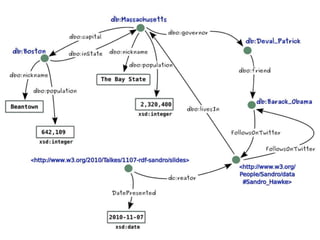
Unambiguous Names


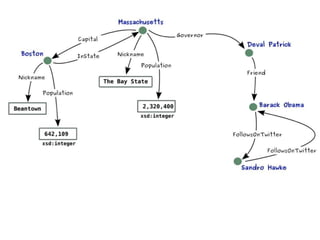
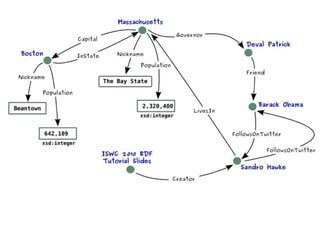
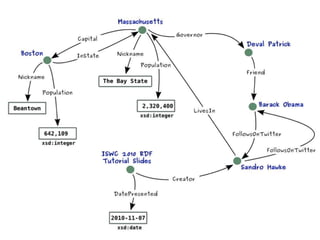
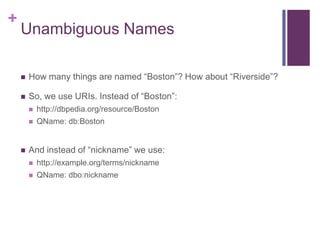
How many things are named “Boston”? How about “Riverside”?



So, we use URIs. Instead of “Boston”:





http://dbpedia.org/resource/Boston
QName: db:Boston

And instead of “nickname” we use:


http://example.org/terms/nickname



QName: dbo:nickname
+

Why RDF? What‟s different here?


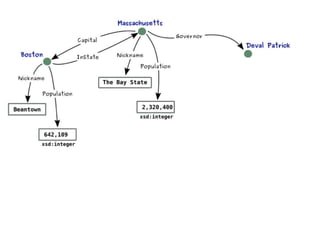
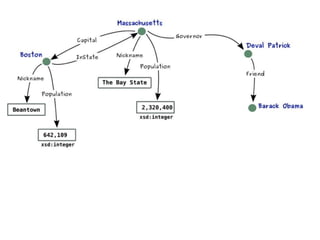
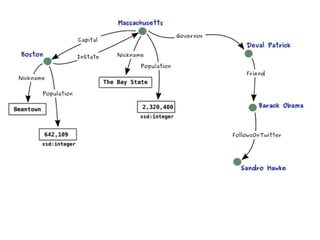
The graph data structure makes merging data with shared
identifiers trivial (as we saw earlier)



Triples act as a least common denominator for expressing data



URIs for naming remove ambiguity


…the same identifier means the same thing
+
RDF
In-Detail
+

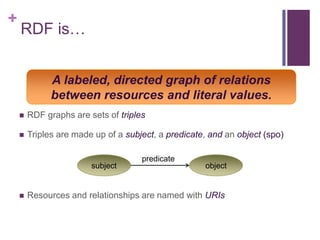
RDF is…
A labeled, directed graph of relations
between resources and literal values.


RDF graphs are sets of triples



Triples are made up of a subject, a predicate, and an object (spo)

subject



predicate

object

Resources and relationships are named with URIs
+

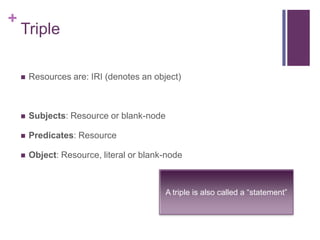
Triple


Resources are: IRI (denotes an object)



Subjects: Resource or blank-node



Predicates: Resource



Object: Resource, literal or blank-node

A triple is also called a “statement”
+

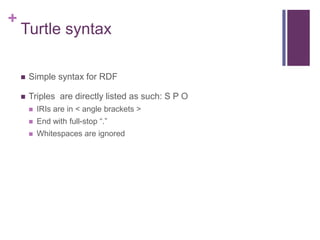
Turtle syntax


Simple syntax for RDF



Triples are directly listed as such: S P O


IRIs are in < angle brackets >



End with full-stop “.”



Whitespaces are ignored
+

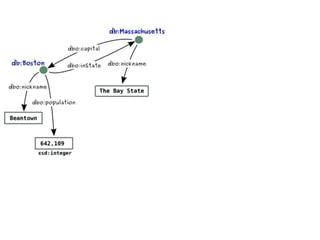
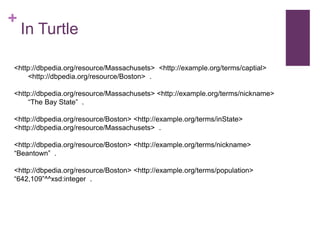
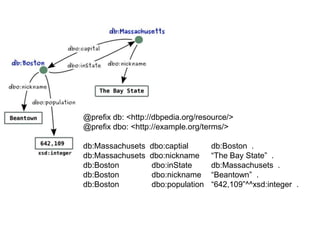
In Turtle

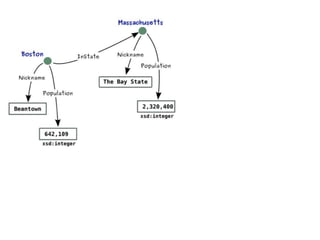
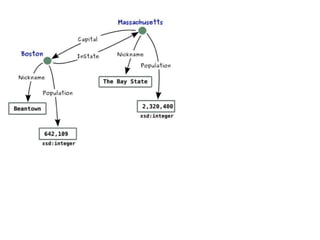
<http://dbpedia.org/resource/Massachusets> <http://example.org/terms/captial>
<http://dbpedia.org/resource/Boston> .
<http://dbpedia.org/resource/Massachusets> <http://example.org/terms/nickname>
“The Bay State” .
<http://dbpedia.org/resource/Boston> <http://example.org/terms/inState>
<http://dbpedia.org/resource/Massachusets> .
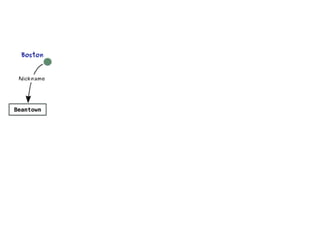
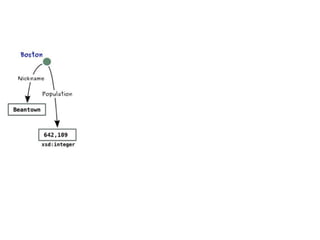
<http://dbpedia.org/resource/Boston> <http://example.org/terms/nickname>
“Beantown” .

<http://dbpedia.org/resource/Boston> <http://example.org/terms/population>
“642,109”^^xsd:integer .
+

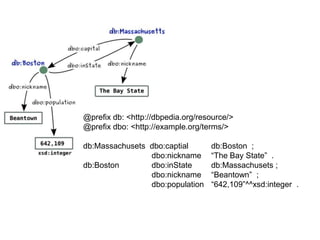
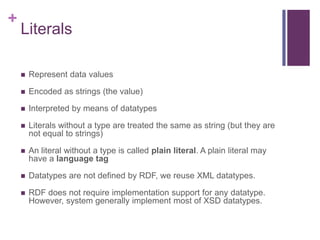
Shortcuts


Prefixes (simple string concatenation)



Grouping of triples with the same subject using semi-colon „;‟



Grouping of triples with the same subject and predicate using
comma „,‟
@prefix db: <http://dbpedia.org/resource/>
@prefix dbo: <http://example.org/terms/>
db:Massachusets
db:Massachusets
db:Boston
db:Boston
db:Boston

dbo:captial
dbo:nickname
dbo:inState
dbo:nickname
dbo:population

db:Boston .
“The Bay State” .
db:Massachusets .
“Beantown” .
“642,109”^^xsd:integer .
@prefix db: <http://dbpedia.org/resource/>
@prefix dbo: <http://example.org/terms/>
db:Massachusets dbo:captial
dbo:nickname
db:Boston
dbo:inState
dbo:nickname
dbo:population

db:Boston ;
“The Bay State” .
db:Massachusets ;
“Beantown” ;
“642,109”^^xsd:integer .
+

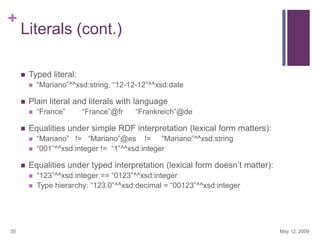
Literals


Represent data values



Encoded as strings (the value)



Interpreted by means of datatypes



Literals without a type are treated the same as string (but they are
not equal to strings)



An literal without a type is called plain literal. A plain literal may
have a language tag



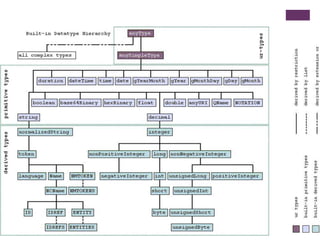
Datatypes are not defined by RDF, we reuse XML datatypes.



RDF does not require implementation support for any datatype.
However, system generally implement most of XSD datatypes.
+

Literals (cont.)


Typed literal:




Plain literal and literals with language






“France”@fr

“Frankreich”@de

“Mariano” != “Mariano”@es != “Mariano”^^xsd:string
“001”^^xsd:integer != “1”^^xsd:integer

Equalities under typed interpretation (lexical form doesn‟t matter):



35

“France”

Equalities under simple RDF interpretation (lexical form matters):




“Mariano”^^xsd:string, “12-12-12”^^xsd:date

“123”^^xsd:integer == “0123”^^xsd:integer
Type hierarchy: “123.0”^^xsd:decimal = “00123”^^xsd:integer

May 12, 2009
+

Type definition


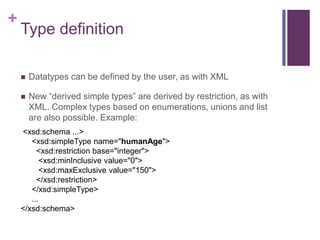
Datatypes can be defined by the user, as with XML



New “derived simple types” are derived by restriction, as with
XML. Complex types based on enumerations, unions and list
are also possible. Example:

<xsd:schema ...>
<xsd:simpleType name="humanAge">
<xsd:restriction base="integer">
<xsd:minInclusive value="0">
<xsd:maxExclusive value="150">
</xsd:restriction>
</xsd:simpleType>
...
</xsd:schema>
+

Modeling with RDF


Lets revisit our motivational examples and do some modeling in
RDF ourselves.



Given the following relational data, generate an RDF graph
+

39

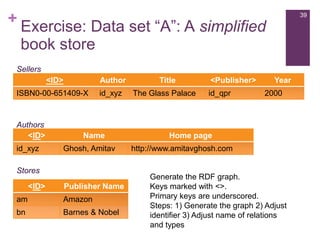
Exercise: Data set “A”: A simplified
book store

Sellers
<ID>

Author

ISBN0-00-651409-X

id_xyz

Authors
<ID>
id_xyz

Name
Ghosh, Amitav

Stores
<ID>

Publisher Name

am

Amazon

bn

Barnes & Nobel

Title
The Glass Palace

<Publisher>
id_qpr

Year
2000

Home page
http://www.amitavghosh.com

Generate the RDF graph.
Keys marked with <>.
Primary keys are underscored.
Steps: 1) Generate the graph 2) Adjust
identifier 3) Adjust name of relations
and types
+

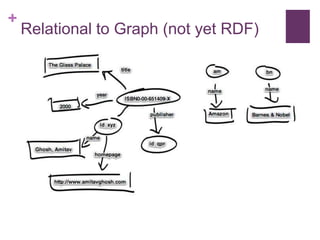
Relational to Graph (not yet RDF)
+

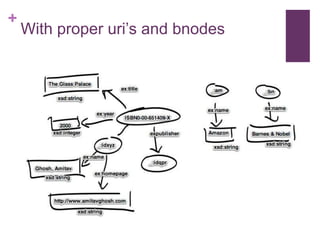
With proper uri‟s and bnodes
+

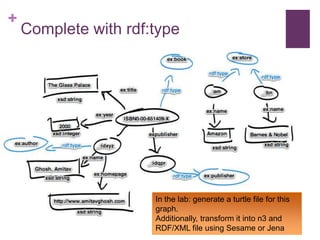
Complete with rdf:type

In the lab: generate a turtle file for this
graph.
Additionally, transform it into n3 and
RDF/XML file using Sesame or Jena
+
Tools
Systems and Frameworks
+

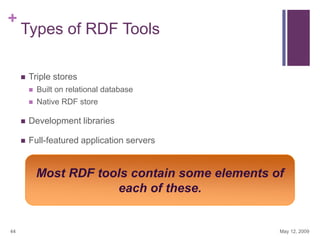
Types of RDF Tools


Triple stores


Built on relational database



Native RDF store



Development libraries



Full-featured application servers

Most RDF tools contain some elements of
each of these.

44

May 12, 2009
+

Finding RDF Tools


Community-maintained lists




Emphasis on large triple stores




http://esw.w3.org/topic/LargeTripleStores

Michael Bergman‟s Sweet Tools searchable list:


45

http://esw.w3.org/topic/SemanticWebTools

http://www.mkbergman.com/?page_id=325

May 12, 2009
+

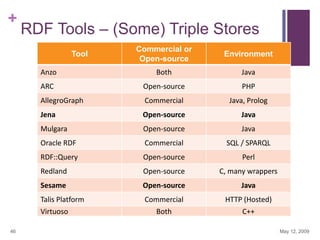
RDF Tools – (Some) Triple Stores
Commercial or
Open-source

Environment

Anzo

Both

Java

ARC

Open-source

PHP

AllegroGraph

Commercial

Java, Prolog

Jena

Open-source

Java

Mulgara

Open-source

Java

Oracle RDF

Commercial

SQL / SPARQL

RDF::Query

Open-source

Perl

Redland

Open-source

C, many wrappers

Sesame

Open-source

Java

Talis Platform

Commercial

HTTP (Hosted)

Both

C++

Tool

Virtuoso
46

May 12, 2009
+
Jena
+

Jena


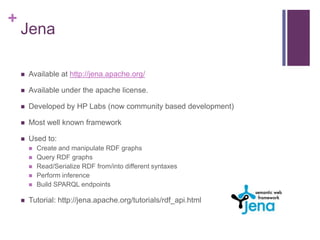
Available at http://jena.apache.org/



Available under the apache license.



Developed by HP Labs (now community based development)



Most well known framework



Used to:








Create and manipulate RDF graphs
Query RDF graphs
Read/Serialize RDF from/into different syntaxes
Perform inference
Build SPARQL endpoints

Tutorial: http://jena.apache.org/tutorials/rdf_api.html
+

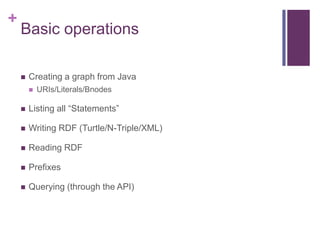
Basic operations


Creating a graph from Java


URIs/Literals/Bnodes



Listing all “Statements”



Writing RDF (Turtle/N-Triple/XML)



Reading RDF



Prefixes



Querying (through the API)
+

Creating a basic graph
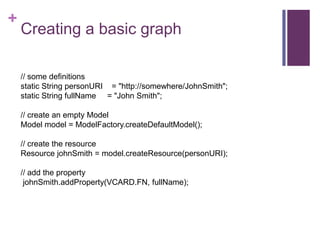
// some definitions
static String personURI = "http://somewhere/JohnSmith";
static String fullName = "John Smith";

// create an empty Model
Model model = ModelFactory.createDefaultModel();
// create the resource
Resource johnSmith = model.createResource(personURI);

// add the property
johnSmith.addProperty(VCARD.FN, fullName);
+

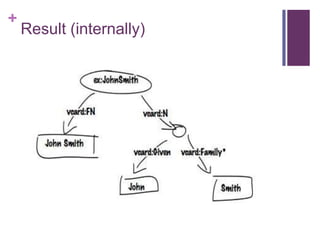
Creating a basic graph
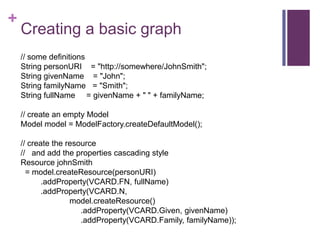
// some definitions
String personURI = "http://somewhere/JohnSmith";
String givenName = "John";
String familyName = "Smith";
String fullName = givenName + " " + familyName;
// create an empty Model
Model model = ModelFactory.createDefaultModel();

// create the resource
// and add the properties cascading style
Resource johnSmith
= model.createResource(personURI)
.addProperty(VCARD.FN, fullName)
.addProperty(VCARD.N,
model.createResource()
.addProperty(VCARD.Given, givenName)
.addProperty(VCARD.Family, familyName));
+

Result (internally)
+

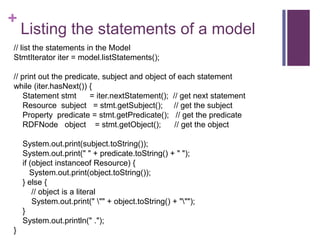
Listing the statements of a model

// list the statements in the Model
StmtIterator iter = model.listStatements();
// print out the predicate, subject and object of each statement
while (iter.hasNext()) {
Statement stmt
= iter.nextStatement(); // get next statement
Resource subject = stmt.getSubject(); // get the subject
Property predicate = stmt.getPredicate(); // get the predicate
RDFNode object = stmt.getObject();
// get the object
System.out.print(subject.toString());
System.out.print(" " + predicate.toString() + " ");
if (object instanceof Resource) {
System.out.print(object.toString());
} else {
// object is a literal
System.out.print(" "" + object.toString() + """);
}
System.out.println(" .");
}
+

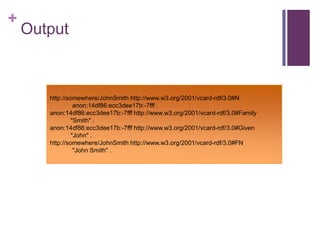
Output

http://somewhere/JohnSmith http://www.w3.org/2001/vcard-rdf/3.0#N
anon:14df86:ecc3dee17b:-7fff .
anon:14df86:ecc3dee17b:-7fff http://www.w3.org/2001/vcard-rdf/3.0#Family
"Smith" .
anon:14df86:ecc3dee17b:-7fff http://www.w3.org/2001/vcard-rdf/3.0#Given
"John" .
http://somewhere/JohnSmith http://www.w3.org/2001/vcard-rdf/3.0#FN
"John Smith" .
+

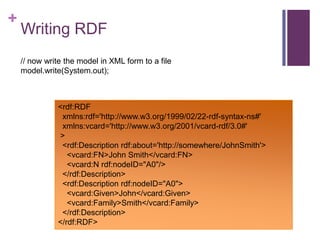
Writing RDF


Use the model.write(OutputStream s) method


Any output stream is valid



By default it will write in RDF/XML format



Change format by specifying the format with:




model.write(OutputStream s, String format)
Possible format strings:
 RDF/XML-ABBREV
 N-TRIPLE
 RDF/XML
 TURTLE
 TTL
 N3
+

Writing RDF
// now write the model in XML form to a file
model.write(System.out);

<rdf:RDF
xmlns:rdf='http://www.w3.org/1999/02/22-rdf-syntax-ns#'
xmlns:vcard='http://www.w3.org/2001/vcard-rdf/3.0#'
>
<rdf:Description rdf:about='http://somewhere/JohnSmith'>
<vcard:FN>John Smith</vcard:FN>
<vcard:N rdf:nodeID="A0"/>
</rdf:Description>
<rdf:Description rdf:nodeID="A0">
<vcard:Given>John</vcard:Given>
<vcard:Family>Smith</vcard:Family>
</rdf:Description>
</rdf:RDF>
+

Reading RDF


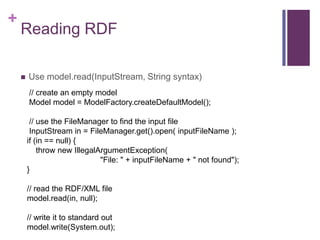
Use model.read(InputStream, String syntax)
// create an empty model
Model model = ModelFactory.createDefaultModel();
// use the FileManager to find the input file
InputStream in = FileManager.get().open( inputFileName );
if (in == null) {
throw new IllegalArgumentException(
"File: " + inputFileName + " not found");
}
// read the RDF/XML file
model.read(in, null);
// write it to standard out
model.write(System.out);
+

Prefixes


Prefixes are used in Turtle/RDF and other syntaxes



Define prefixes prior to writing to obtain a “short” rendering
+

Example
Model m = ModelFactory.createDefaultModel();
String nsA = "http://somewhere/else#";
String nsB = "http://nowhere/else#";
Resource root = m.createResource( nsA + "root" );
Property P = m.createProperty( nsA + "P" );
Property Q = m.createProperty( nsB + "Q" );
Resource x = m.createResource( nsA + "x" );
Resource y = m.createResource( nsA + "y" );
Resource z = m.createResource( nsA + "z" );
m.add( root, P, x ).add( root, P, y ).add( y, Q, z );
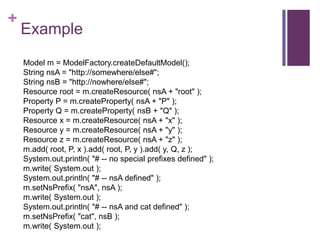
System.out.println( "# -- no special prefixes defined" );
m.write( System.out );
System.out.println( "# -- nsA defined" );
m.setNsPrefix( "nsA", nsA );
m.write( System.out );
System.out.println( "# -- nsA and cat defined" );
m.setNsPrefix( "cat", nsB );
m.write( System.out );
+

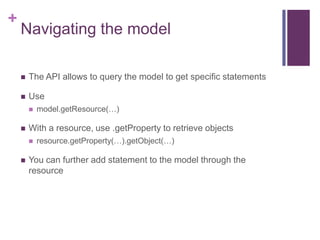
Navigating the model


The API allows to query the model to get specific statements



Use




With a resource, use .getProperty to retrieve objects




model.getResource(…)

resource.getProperty(…).getObject(…)

You can further add statement to the model through the
resource
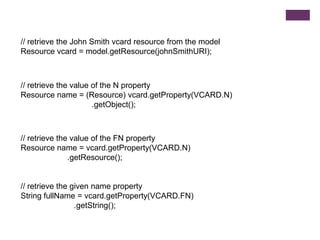
// retrieve the John Smith vcard resource from the model
Resource vcard = model.getResource(johnSmithURI);

// retrieve the value of the N property
Resource name = (Resource) vcard.getProperty(VCARD.N)
.getObject();

// retrieve the value of the FN property
Resource name = vcard.getProperty(VCARD.N)
.getResource();

// retrieve the given name property
String fullName = vcard.getProperty(VCARD.FN)
.getString();
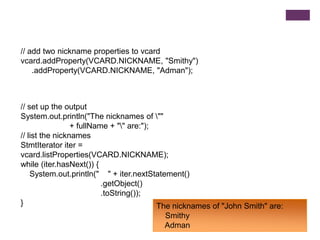
// add two nickname properties to vcard
vcard.addProperty(VCARD.NICKNAME, "Smithy")
.addProperty(VCARD.NICKNAME, "Adman");

// set up the output
System.out.println("The nicknames of ""
+ fullName + "" are:");
// list the nicknames
StmtIterator iter =
vcard.listProperties(VCARD.NICKNAME);
while (iter.hasNext()) {
System.out.println(" " + iter.nextStatement()
.getObject()
.toString());
}
The nicknames of "John Smith" are:
Smithy
Adman
+

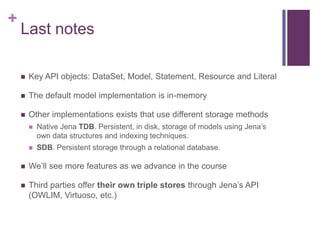
Last notes


Key API objects: DataSet, Model, Statement, Resource and Literal



The default model implementation is in-memory



Other implementations exists that use different storage methods


Native Jena TDB. Persistent, in disk, storage of models using Jena‟s
own data structures and indexing techniques.



SDB. Persistent storage through a relational database.



We‟ll see more features as we advance in the course



Third parties offer their own triple stores through Jena‟s API
(OWLIM, Virtuoso, etc.)
+
Advanced RDF features
n-ary relations, reification, containers
+

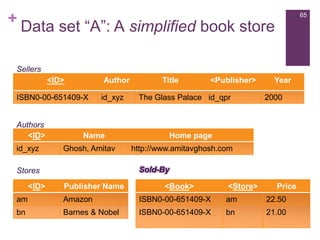
65

Data set “A”: A simplified book store

Sellers
<ID>

Author

ISBN0-00-651409-X

Authors
<ID>
id_xyz

id_xyz

Name
Ghosh, Amitav

<Publisher>

The Glass Palace id_qpr

Year
2000

Home page
http://www.amitavghosh.com
Sold-By

Stores
<ID>

Title

Publisher Name

<Book>

<Store>

Price

am

Amazon

ISBN0-00-651409-X

am

22.50

bn

Barnes & Nobel

ISBN0-00-651409-X

bn

21.00
+

N-ary relations


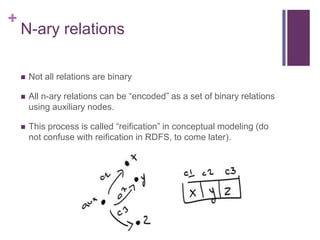
Not all relations are binary



All n-ary relations can be “encoded” as a set of binary relations
using auxiliary nodes.



This process is called “reification” in conceptual modeling (do
not confuse with reification in RDFS, to come later).
+

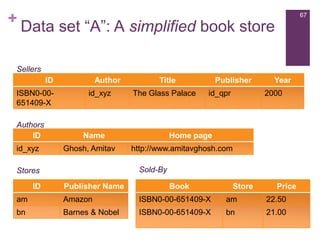
67

Data set “A”: A simplified book store

Sellers
ID
ISBN0-00651409-X
Authors
ID
id_xyz

Author
id_xyz

The Glass Palace

Name
Ghosh, Amitav

Publisher
id_qpr

Year
2000

Home page
http://www.amitavghosh.com
Sold-By

Stores
ID

Title

Publisher Name

Book

Store

Price

am

Amazon

ISBN0-00-651409-X

am

22.50

bn

Barnes & Nobel

ISBN0-00-651409-X

bn

21.00
+

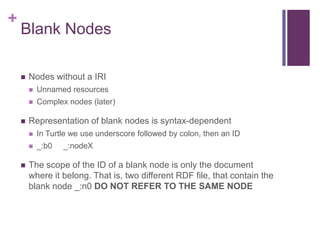
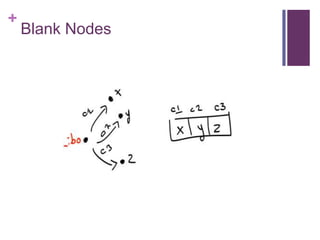
Blank Nodes


Nodes without a IRI





Unnamed resources
Complex nodes (later)

Representation of blank nodes is syntax-dependent





In Turtle we use underscore followed by colon, then an ID
_:b0

_:nodeX

The scope of the ID of a blank node is only the document
where it belong. That is, two different RDF file, that contain the
blank node _:n0 DO NOT REFER TO THE SAME NODE
+

Blank Nodes
+

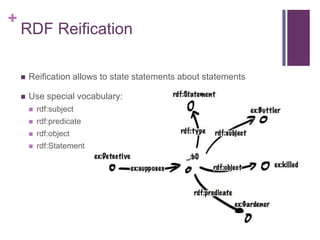
RDF Reification


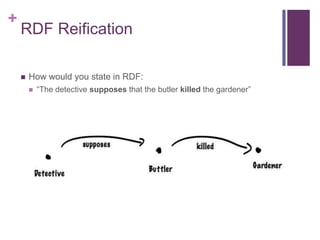
How would you state in RDF:


“The detective supposes that the butler killed the gardener”
+

RDF Reification


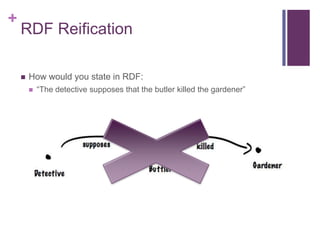
How would you state in RDF:


“The detective supposes that the butler killed the gardener”
+

RDF Reification


Reification allows to state statements about statements



Use special vocabulary:


rdf:subject



rdf:predicate



rdf:object



rdf:Statement
+

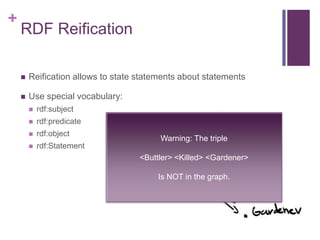
RDF Reification


Reification allows to state statements about statements



Use special vocabulary:


rdf:subject



rdf:predicate



rdf:object



rdf:Statement

Warning: The triple
<Buttler> <Killed> <Gardener>
Is NOT in the graph.
+

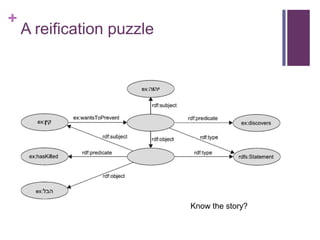
A reification puzzle

Know the story?
+

Exercise


Express the following natural language sentences as a graph:


Maria saw Eric eating ice cream



The professor explained that the scientific community regards
evolution theory as the truth
+

Containers


Groups of resources


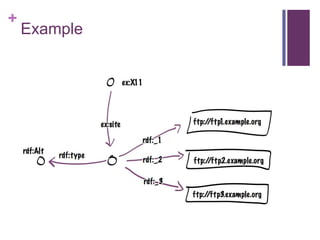
rdf:Bag. Group, possibly with duplicates, no order.



rdf:Seq. Group, possibly with duplicates, order matters.



rdf:Alt. Group, indicates alternatives



Use rdf:type to indicate one type of container.



Use container membership properties to enumerate:


rdf:_1, rdf:_2, rdf:_3, …, rdf:_n
+

Example
+

Collections (closed containers)


Containers are open. No way to “close them”. Imposible to say
“no other member exists”. Consider merging datasets.



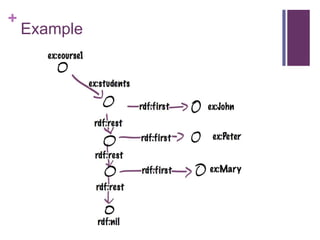
Group of things represented as a linked list structure



The list is defined using the RDF vocabulary:
rdf:List, rdf:first, rdf:rest and rdf:nil



Each member of the list is of type rdf:List (implicitly)
+

Example
+
Syntax
Turtle and N-Triple
+

Turtle


We already covered ALMOST the nuts and bolts



Missing: Blank nodes, Containers
+

Blank nodes


Use square brackets to define a blank node

ex:book1
ex:title "RDF/XML Syntax
Specification (Revised)";
ex:editor [
ex:fullName "Dave Beckett";
ex:homePage
<http://purl.org/net/dajobe/>
].
+

Containers



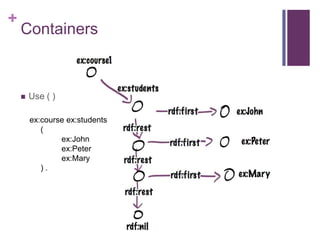
Use ( )
ex:course ex:students
(
ex:John
ex:Peter
ex:Mary
).
+

Turtle


Advantages and uses:


Easy to read and write manually or programmatically



Good performance for IO, supported by many tools



Turtle is not a W3C recommendation YET
+

N-Triples


Turtle minus:


No prefix definitions are allowed



No reference shortcuts (semi-colon, comma)



Every other shortcut 



Very simple to parse/generate (even through scripts)



Supported by most tools



VERY verbose. Wastes space/IO (problem is reduced with
compression)
+

RDF/XML


W3C Standard since 1999, revised in 2004



Used to be the only standard



Standard XML (works with any XML tools)



Different semantics than XML!

SWT Lecture Session 2 - RDF

  • 1.
  • 2.
    + Disclaimer License This work islicensed under the Creative Commons Attribution-Share Alike 3.0 License http://creativecommons.org/licenses/by-sa/3.0/
  • 3.
    + Background  The Data Model  In-Detail  Syntax:Turtle, N-triple  RDF  Tools  Syntax: XML
  • 4.
  • 5.
    + URI, URL andIRI  URI = Uniform Resource Identifier URL = Uniform Resource Locator (has a location on the WWW) IRI = Internationalized Resource Identifier (uses Unicode)  Used for identifying resources (web, local, etc.)  Resources can be anything that has an identity in the context of an application (books, locations, humans, abstract concepts, etc.)  Analogous to, e.g., ISBN for books URLs ⊆ URIs ⊆ IRIs
  • 6.
    + URI, URL andIRI scheme:[//authority]path[?query][#fragment]  scheme: type of URI, e.g. http, ftp, mailto, file, irc  authority: typically a domain name  path: e.g. /etc/passwd/  query: optional; provides non-hierarchical information. Usually for parameters, e.g. for a web service  fragment: optional; often used to address part of a retrieved resource, e.g. section of a HTML file. Good IRI design is important for semantic applications. More later.
  • 7.
    + QNames  Used in RDFas shorthand for long URIs If prefix “foo” is bound to http://example.com/  Then foo:bar expands to  http://example.com/bar  Not quite the same as XML namespaces Mostly the same as CURIEs  Practically relevant due to IO restrictions Necessary to fit any example on a page! Simple string concatenation
  • 8.
  • 9.
  • 10.
    + RDF is… The datamodel of Semantic Technologies and of the Semantic Web.
  • 11.
    + RDF is… A schema-lessdata model that features unambiguous identifiers and named relations between pairs of resources.
  • 22.
    + Unambiguous Names  How manythings are named “Boston”? How about “Riverside”?  So, we use URIs. Instead of “Boston”:    http://dbpedia.org/resource/Boston QName: db:Boston And instead of “nickname” we use:  http://example.org/terms/nickname  QName: dbo:nickname
  • 24.
    + Why RDF? What‟sdifferent here?  The graph data structure makes merging data with shared identifiers trivial (as we saw earlier)  Triples act as a least common denominator for expressing data  URIs for naming remove ambiguity  …the same identifier means the same thing
  • 25.
  • 26.
    + RDF is… A labeled,directed graph of relations between resources and literal values.  RDF graphs are sets of triples  Triples are made up of a subject, a predicate, and an object (spo) subject  predicate object Resources and relationships are named with URIs
  • 27.
    + Triple  Resources are: IRI(denotes an object)  Subjects: Resource or blank-node  Predicates: Resource  Object: Resource, literal or blank-node A triple is also called a “statement”
  • 28.
    + Turtle syntax  Simple syntaxfor RDF  Triples are directly listed as such: S P O  IRIs are in < angle brackets >  End with full-stop “.”  Whitespaces are ignored
  • 30.
    + In Turtle <http://dbpedia.org/resource/Massachusets> <http://example.org/terms/captial> <http://dbpedia.org/resource/Boston>. <http://dbpedia.org/resource/Massachusets> <http://example.org/terms/nickname> “The Bay State” . <http://dbpedia.org/resource/Boston> <http://example.org/terms/inState> <http://dbpedia.org/resource/Massachusets> . <http://dbpedia.org/resource/Boston> <http://example.org/terms/nickname> “Beantown” . <http://dbpedia.org/resource/Boston> <http://example.org/terms/population> “642,109”^^xsd:integer .
  • 31.
    + Shortcuts  Prefixes (simple stringconcatenation)  Grouping of triples with the same subject using semi-colon „;‟  Grouping of triples with the same subject and predicate using comma „,‟
  • 32.
    @prefix db: <http://dbpedia.org/resource/> @prefixdbo: <http://example.org/terms/> db:Massachusets db:Massachusets db:Boston db:Boston db:Boston dbo:captial dbo:nickname dbo:inState dbo:nickname dbo:population db:Boston . “The Bay State” . db:Massachusets . “Beantown” . “642,109”^^xsd:integer .
  • 33.
    @prefix db: <http://dbpedia.org/resource/> @prefixdbo: <http://example.org/terms/> db:Massachusets dbo:captial dbo:nickname db:Boston dbo:inState dbo:nickname dbo:population db:Boston ; “The Bay State” . db:Massachusets ; “Beantown” ; “642,109”^^xsd:integer .
  • 34.
    + Literals  Represent data values  Encodedas strings (the value)  Interpreted by means of datatypes  Literals without a type are treated the same as string (but they are not equal to strings)  An literal without a type is called plain literal. A plain literal may have a language tag  Datatypes are not defined by RDF, we reuse XML datatypes.  RDF does not require implementation support for any datatype. However, system generally implement most of XSD datatypes.
  • 35.
    + Literals (cont.)  Typed literal:   Plainliteral and literals with language    “France”@fr “Frankreich”@de “Mariano” != “Mariano”@es != “Mariano”^^xsd:string “001”^^xsd:integer != “1”^^xsd:integer Equalities under typed interpretation (lexical form doesn‟t matter):   35 “France” Equalities under simple RDF interpretation (lexical form matters):   “Mariano”^^xsd:string, “12-12-12”^^xsd:date “123”^^xsd:integer == “0123”^^xsd:integer Type hierarchy: “123.0”^^xsd:decimal = “00123”^^xsd:integer May 12, 2009
  • 37.
    + Type definition  Datatypes canbe defined by the user, as with XML  New “derived simple types” are derived by restriction, as with XML. Complex types based on enumerations, unions and list are also possible. Example: <xsd:schema ...> <xsd:simpleType name="humanAge"> <xsd:restriction base="integer"> <xsd:minInclusive value="0"> <xsd:maxExclusive value="150"> </xsd:restriction> </xsd:simpleType> ... </xsd:schema>
  • 38.
    + Modeling with RDF  Letsrevisit our motivational examples and do some modeling in RDF ourselves.  Given the following relational data, generate an RDF graph
  • 39.
    + 39 Exercise: Data set“A”: A simplified book store Sellers <ID> Author ISBN0-00-651409-X id_xyz Authors <ID> id_xyz Name Ghosh, Amitav Stores <ID> Publisher Name am Amazon bn Barnes & Nobel Title The Glass Palace <Publisher> id_qpr Year 2000 Home page http://www.amitavghosh.com Generate the RDF graph. Keys marked with <>. Primary keys are underscored. Steps: 1) Generate the graph 2) Adjust identifier 3) Adjust name of relations and types
  • 40.
    + Relational to Graph(not yet RDF)
  • 41.
  • 42.
    + Complete with rdf:type Inthe lab: generate a turtle file for this graph. Additionally, transform it into n3 and RDF/XML file using Sesame or Jena
  • 43.
  • 44.
    + Types of RDFTools  Triple stores  Built on relational database  Native RDF store  Development libraries  Full-featured application servers Most RDF tools contain some elements of each of these. 44 May 12, 2009
  • 45.
    + Finding RDF Tools  Community-maintainedlists   Emphasis on large triple stores   http://esw.w3.org/topic/LargeTripleStores Michael Bergman‟s Sweet Tools searchable list:  45 http://esw.w3.org/topic/SemanticWebTools http://www.mkbergman.com/?page_id=325 May 12, 2009
  • 46.
    + RDF Tools –(Some) Triple Stores Commercial or Open-source Environment Anzo Both Java ARC Open-source PHP AllegroGraph Commercial Java, Prolog Jena Open-source Java Mulgara Open-source Java Oracle RDF Commercial SQL / SPARQL RDF::Query Open-source Perl Redland Open-source C, many wrappers Sesame Open-source Java Talis Platform Commercial HTTP (Hosted) Both C++ Tool Virtuoso 46 May 12, 2009
  • 47.
  • 48.
    + Jena  Available at http://jena.apache.org/  Availableunder the apache license.  Developed by HP Labs (now community based development)  Most well known framework  Used to:       Create and manipulate RDF graphs Query RDF graphs Read/Serialize RDF from/into different syntaxes Perform inference Build SPARQL endpoints Tutorial: http://jena.apache.org/tutorials/rdf_api.html
  • 49.
    + Basic operations  Creating agraph from Java  URIs/Literals/Bnodes  Listing all “Statements”  Writing RDF (Turtle/N-Triple/XML)  Reading RDF  Prefixes  Querying (through the API)
  • 50.
    + Creating a basicgraph // some definitions static String personURI = "http://somewhere/JohnSmith"; static String fullName = "John Smith"; // create an empty Model Model model = ModelFactory.createDefaultModel(); // create the resource Resource johnSmith = model.createResource(personURI); // add the property johnSmith.addProperty(VCARD.FN, fullName);
  • 51.
    + Creating a basicgraph // some definitions String personURI = "http://somewhere/JohnSmith"; String givenName = "John"; String familyName = "Smith"; String fullName = givenName + " " + familyName; // create an empty Model Model model = ModelFactory.createDefaultModel(); // create the resource // and add the properties cascading style Resource johnSmith = model.createResource(personURI) .addProperty(VCARD.FN, fullName) .addProperty(VCARD.N, model.createResource() .addProperty(VCARD.Given, givenName) .addProperty(VCARD.Family, familyName));
  • 52.
  • 53.
    + Listing the statementsof a model // list the statements in the Model StmtIterator iter = model.listStatements(); // print out the predicate, subject and object of each statement while (iter.hasNext()) { Statement stmt = iter.nextStatement(); // get next statement Resource subject = stmt.getSubject(); // get the subject Property predicate = stmt.getPredicate(); // get the predicate RDFNode object = stmt.getObject(); // get the object System.out.print(subject.toString()); System.out.print(" " + predicate.toString() + " "); if (object instanceof Resource) { System.out.print(object.toString()); } else { // object is a literal System.out.print(" "" + object.toString() + """); } System.out.println(" ."); }
  • 54.
    + Output http://somewhere/JohnSmith http://www.w3.org/2001/vcard-rdf/3.0#N anon:14df86:ecc3dee17b:-7fff . anon:14df86:ecc3dee17b:-7fffhttp://www.w3.org/2001/vcard-rdf/3.0#Family "Smith" . anon:14df86:ecc3dee17b:-7fff http://www.w3.org/2001/vcard-rdf/3.0#Given "John" . http://somewhere/JohnSmith http://www.w3.org/2001/vcard-rdf/3.0#FN "John Smith" .
  • 55.
    + Writing RDF  Use themodel.write(OutputStream s) method  Any output stream is valid  By default it will write in RDF/XML format  Change format by specifying the format with:   model.write(OutputStream s, String format) Possible format strings:  RDF/XML-ABBREV  N-TRIPLE  RDF/XML  TURTLE  TTL  N3
  • 56.
    + Writing RDF // nowwrite the model in XML form to a file model.write(System.out); <rdf:RDF xmlns:rdf='http://www.w3.org/1999/02/22-rdf-syntax-ns#' xmlns:vcard='http://www.w3.org/2001/vcard-rdf/3.0#' > <rdf:Description rdf:about='http://somewhere/JohnSmith'> <vcard:FN>John Smith</vcard:FN> <vcard:N rdf:nodeID="A0"/> </rdf:Description> <rdf:Description rdf:nodeID="A0"> <vcard:Given>John</vcard:Given> <vcard:Family>Smith</vcard:Family> </rdf:Description> </rdf:RDF>
  • 57.
    + Reading RDF  Use model.read(InputStream,String syntax) // create an empty model Model model = ModelFactory.createDefaultModel(); // use the FileManager to find the input file InputStream in = FileManager.get().open( inputFileName ); if (in == null) { throw new IllegalArgumentException( "File: " + inputFileName + " not found"); } // read the RDF/XML file model.read(in, null); // write it to standard out model.write(System.out);
  • 58.
    + Prefixes  Prefixes are usedin Turtle/RDF and other syntaxes  Define prefixes prior to writing to obtain a “short” rendering
  • 59.
    + Example Model m =ModelFactory.createDefaultModel(); String nsA = "http://somewhere/else#"; String nsB = "http://nowhere/else#"; Resource root = m.createResource( nsA + "root" ); Property P = m.createProperty( nsA + "P" ); Property Q = m.createProperty( nsB + "Q" ); Resource x = m.createResource( nsA + "x" ); Resource y = m.createResource( nsA + "y" ); Resource z = m.createResource( nsA + "z" ); m.add( root, P, x ).add( root, P, y ).add( y, Q, z ); System.out.println( "# -- no special prefixes defined" ); m.write( System.out ); System.out.println( "# -- nsA defined" ); m.setNsPrefix( "nsA", nsA ); m.write( System.out ); System.out.println( "# -- nsA and cat defined" ); m.setNsPrefix( "cat", nsB ); m.write( System.out );
  • 60.
    + Navigating the model  TheAPI allows to query the model to get specific statements  Use   With a resource, use .getProperty to retrieve objects   model.getResource(…) resource.getProperty(…).getObject(…) You can further add statement to the model through the resource
  • 61.
    // retrieve theJohn Smith vcard resource from the model Resource vcard = model.getResource(johnSmithURI); // retrieve the value of the N property Resource name = (Resource) vcard.getProperty(VCARD.N) .getObject(); // retrieve the value of the FN property Resource name = vcard.getProperty(VCARD.N) .getResource(); // retrieve the given name property String fullName = vcard.getProperty(VCARD.FN) .getString();
  • 62.
    // add twonickname properties to vcard vcard.addProperty(VCARD.NICKNAME, "Smithy") .addProperty(VCARD.NICKNAME, "Adman"); // set up the output System.out.println("The nicknames of "" + fullName + "" are:"); // list the nicknames StmtIterator iter = vcard.listProperties(VCARD.NICKNAME); while (iter.hasNext()) { System.out.println(" " + iter.nextStatement() .getObject() .toString()); } The nicknames of "John Smith" are: Smithy Adman
  • 63.
    + Last notes  Key APIobjects: DataSet, Model, Statement, Resource and Literal  The default model implementation is in-memory  Other implementations exists that use different storage methods  Native Jena TDB. Persistent, in disk, storage of models using Jena‟s own data structures and indexing techniques.  SDB. Persistent storage through a relational database.  We‟ll see more features as we advance in the course  Third parties offer their own triple stores through Jena‟s API (OWLIM, Virtuoso, etc.)
  • 64.
    + Advanced RDF features n-aryrelations, reification, containers
  • 65.
    + 65 Data set “A”:A simplified book store Sellers <ID> Author ISBN0-00-651409-X Authors <ID> id_xyz id_xyz Name Ghosh, Amitav <Publisher> The Glass Palace id_qpr Year 2000 Home page http://www.amitavghosh.com Sold-By Stores <ID> Title Publisher Name <Book> <Store> Price am Amazon ISBN0-00-651409-X am 22.50 bn Barnes & Nobel ISBN0-00-651409-X bn 21.00
  • 66.
    + N-ary relations  Not allrelations are binary  All n-ary relations can be “encoded” as a set of binary relations using auxiliary nodes.  This process is called “reification” in conceptual modeling (do not confuse with reification in RDFS, to come later).
  • 67.
    + 67 Data set “A”:A simplified book store Sellers ID ISBN0-00651409-X Authors ID id_xyz Author id_xyz The Glass Palace Name Ghosh, Amitav Publisher id_qpr Year 2000 Home page http://www.amitavghosh.com Sold-By Stores ID Title Publisher Name Book Store Price am Amazon ISBN0-00-651409-X am 22.50 bn Barnes & Nobel ISBN0-00-651409-X bn 21.00
  • 68.
    + Blank Nodes  Nodes withouta IRI    Unnamed resources Complex nodes (later) Representation of blank nodes is syntax-dependent    In Turtle we use underscore followed by colon, then an ID _:b0 _:nodeX The scope of the ID of a blank node is only the document where it belong. That is, two different RDF file, that contain the blank node _:n0 DO NOT REFER TO THE SAME NODE
  • 69.
  • 70.
    + RDF Reification  How wouldyou state in RDF:  “The detective supposes that the butler killed the gardener”
  • 71.
    + RDF Reification  How wouldyou state in RDF:  “The detective supposes that the butler killed the gardener”
  • 72.
    + RDF Reification  Reification allowsto state statements about statements  Use special vocabulary:  rdf:subject  rdf:predicate  rdf:object  rdf:Statement
  • 73.
    + RDF Reification  Reification allowsto state statements about statements  Use special vocabulary:  rdf:subject  rdf:predicate  rdf:object  rdf:Statement Warning: The triple <Buttler> <Killed> <Gardener> Is NOT in the graph.
  • 74.
  • 75.
    + Exercise  Express the followingnatural language sentences as a graph:  Maria saw Eric eating ice cream  The professor explained that the scientific community regards evolution theory as the truth
  • 76.
    + Containers  Groups of resources  rdf:Bag.Group, possibly with duplicates, no order.  rdf:Seq. Group, possibly with duplicates, order matters.  rdf:Alt. Group, indicates alternatives  Use rdf:type to indicate one type of container.  Use container membership properties to enumerate:  rdf:_1, rdf:_2, rdf:_3, …, rdf:_n
  • 77.
  • 78.
    + Collections (closed containers)  Containersare open. No way to “close them”. Imposible to say “no other member exists”. Consider merging datasets.  Group of things represented as a linked list structure  The list is defined using the RDF vocabulary: rdf:List, rdf:first, rdf:rest and rdf:nil  Each member of the list is of type rdf:List (implicitly)
  • 79.
  • 80.
  • 81.
    + Turtle  We already coveredALMOST the nuts and bolts  Missing: Blank nodes, Containers
  • 82.
    + Blank nodes  Use squarebrackets to define a blank node ex:book1 ex:title "RDF/XML Syntax Specification (Revised)"; ex:editor [ ex:fullName "Dave Beckett"; ex:homePage <http://purl.org/net/dajobe/> ].
  • 83.
    + Containers  Use ( ) ex:courseex:students ( ex:John ex:Peter ex:Mary ).
  • 84.
    + Turtle  Advantages and uses:  Easyto read and write manually or programmatically  Good performance for IO, supported by many tools  Turtle is not a W3C recommendation YET
  • 85.
    + N-Triples  Turtle minus:  No prefixdefinitions are allowed  No reference shortcuts (semi-colon, comma)  Every other shortcut   Very simple to parse/generate (even through scripts)  Supported by most tools  VERY verbose. Wastes space/IO (problem is reduced with compression)
  • 86.
    + RDF/XML  W3C Standard since1999, revised in 2004  Used to be the only standard  Standard XML (works with any XML tools)  Different semantics than XML!

Editor's Notes

  • #3 http://creativecommons.org/licenses/by-sa/3.0/You are free:to Share — to copy, distribute and transmit the workto Remix — to adapt the workto make commercial use of the workUnder the following conditions:Attribution — You must attribute the work in the manner specified by the author or licensor (but not in any way that suggests that they endorse you or your use of the work).Share Alike — If you alter, transform, or build upon this work, you may distribute the resulting work only under the same or similar license to this one.With the understanding that:Waiver — Any of the above conditions can be waived if you get permission from the copyright holder.Public Domain — Where the work or any of its elements is in the public domain under applicable law, that status is in no way affected by the license.Other Rights — In no way are any of the following rights affected by the license:Your fair dealing or fair use rights, or other applicable copyright exceptions and limitations;The author&apos;s moral rights;Rights other persons may have either in the work itself or in how the work is used, such as publicity or privacy rights.Notice — For any reuse or distribution, you must make clear to others the license terms of this work. The best way to do this is with a link to this web page.
  • #10 Definition.
  • #11 Prescriptive.
  • #12 Descriptive.
  • #25 The first is as opposed to relational tables or XML schemas where the schema needs to be explicitly adjusted to accommodate whatever data is being merged.The second is due to the expressivity of the model – can handle lists, trees, n-ary relations, etc.The third is as opposed to table &amp; column identifiers or XML attribute names.
  • #27 Formal.
  • #28 The first is as opposed to relational tables or XML schemas where the schema needs to be explicitly adjusted to accommodate whatever data is being merged.The second is due to the expressivity of the model – can handle lists, trees, n-ary relations, etc.The third is as opposed to table &amp; column identifiers or XML attribute names.
  • #35 The first is as opposed to relational tables or XML schemas where the schema needs to be explicitly adjusted to accommodate whatever data is being merged.The second is due to the expressivity of the model – can handle lists, trees, n-ary relations, etc.The third is as opposed to table &amp; column identifiers or XML attribute names.
  • #36 The first is as opposed to relational tables or XML schemas where the schema needs to be explicitly adjusted to accommodate whatever data is being merged.The second is due to the expressivity of the model – can handle lists, trees, n-ary relations, etc.The third is as opposed to table &amp; column identifiers or XML attribute names.
  • #39 Request for volunteers
  • #41 Missing in this model, properuris/bnodes/relation names
  • #42 missing in this m model,talbe names, table names have information about type. This can also be added to the RDF data with rdf:type edges/properties.