Basic SQL Presentation


                         1
   DBMS and RDBMS
   SQL
   Keys
   SQL DML ,DDL , DCL Statements
   Constrains
   Cardinality
   Basic SQL coding
   Joins


                                    2
   DBMS stores data but not in the form of tables. i.e it does not have any tables and there
    is no relationship between the data. Where as RDBMS is a Relational Data Base
    Management System This adds the additional condition that the system supports a
    tabular structure for the data, with enforced relationships between the tables. This
    excludes the databases that don't support a tabular structure or don't enforce
    relationships between tables.

   DBMS is for small organizations where RDBMS is for large amount of data and for
    large Organization.

   DBMS is a single user system where as RDBMS is a multiuser system.

   DBMS does not impose any constraints or security with regard to data manipulation
    where as RDNMS does.

   In DBMS there is no concept of PRIMARY KEY and FOREIGN KEY but it is included
    in RDBMS. DBMS contains only flat data whereas in RDBMS there will be some
    relation between the entities.

                    DBMS example:- Sysbase , Foxpro
                     RDBMS example:- SQL Server, Oracle, MY-SQLSERVER.
                                                                                                3
   SQL (Structured Query Language) is a database computer language designed for managing
    data in relational database management systems (RDBMS), and originally based upon
    Relational Algebra .

   To extract data from SQL server database, we use SQL coding.

   In RDBMS , data is stored in the form of Table. Table(Entity) is divided into Rows(Tuples)
    and Columns(Attributes).

    What is a Table
    A table is a 2D representation of interrelated data, split up into columns and rows. A table is
    where our data that we collect will be stored and accessed through queries.


                                                                                                      4
ER Relationship:- A detailed,
logical representation of the
entities, associations and data
elements for an organization or
business


 vinod reddy                      5
   Primary key: A table typically has a column or combination of columns that
    contain values that uniquely identify each row in the table. This column, or
    columns, is called the primary key (PK) of the table and enforces the entity
    integrity of the table. When you specify a PRIMARY KEY constraint for a table,
    the Database Engine enforces data uniqueness by creating a unique index for the
    primary key columns.

   Foreign key: It is a field in a relational database records that point to a key field in
    another table, FK implement a many-to-one relationship with another table or with
    itself. Foreign keys need not to be unique within the table. The purpose of the
    foreign key is to ensure referential integrity of the data. (In other words, only
    values that are supposed to appear in the database are permitted.) There is no limit
    on no of foreign keys on a table but recommended no is 253. A foreign key can
    contain duplicate and NULL values.

   Unique key: In a table typically has a column or combination of columns that
    contain values that uniquely identify each row in the table. This column, or
    columns, is called as Unique key and it enforces the entity integrity of the table.
    When we specify a UNIQUE KEY constraint for a table, the Database Engine
    creates a unique non clustered index . It can have one NULL.


                                                              vinod reddy                      6
   Composite Key:-A composite key is a combination of more than one column to
    identify a unique row in a table

   Candidate Key :-A candidate key is one that can identify each row of a table
    uniquely. Generally a candidate key becomes the primary key of the table. If the
    table has more than one candidate key, one of them will become the primary key,
    and the rest are called alternate keys.

   Alternate Key :- Candidate key which is not a primary key is called a Candidate
    key.


                                                          vinod reddy                  7
DDL ( Data Definition Language ) :- statements are used to define the database structure or
  schema. Some examples:
 CREATE - to create objects in the database

 ALTER - alters the structure of the database

 DROP - delete objects from the database

 TRUNCATE - remove all records from a table, including all spaces allocated for the records
  are removed
 COMMENT - add comments to the data dictionary

 RENAME - rename an object


DML (Data Manipulation Language ) :- statements are used for managing data within schema
  objects. Some examples:
 SELECT - retrieve data from the a database

 INSERT - insert data into a table

 UPDATE - updates existing data within a table

 DELETE - deletes all records from a table, the space for the records remain

 MERGE - UPSERT operation (insert or update)


                                                              vinod reddy                      8
DCL(Data Control Language ) is used for the control of data. That is a user can access any data
  based on the privileges given to him. This is done through DATA CONTROL LANGUAGE.
  Some examples:
 GRANT - gives user's access privileges to database

 REVOKE - withdraw access privileges given with the GRANT command


TCL(Transaction Control ) is used to manage the changes made by DML statements. It allows
  statements to be grouped together into logical transactions. Some Example :
 COMMIT - save work done

 SAVEPOINT - identify a point in a transaction to which you can later roll back

 ROLLBACK - restore database to original since the last COMMIT

 SET TRANSACTION - Change transaction options like isolation level and what rollback
  segment to use


                                                               vinod reddy                        9
What is a Cardinality:- Relationship between the tables is called Cardinality.

What are the types of Cardinalities

   One-to-one relationships occur when there is exactly one record in the first table
    that corresponds to exactly one record in the related table.

   One-to-many relationships occur when each record in Table A may have many
    linked records in Table B but each record in Table B may have only one
    corresponding record in Table A.

   Many-to-many relationships occur when each record in Table A may have many
    linked records in Table B and vice-versa.


                                                          vinod reddy                    10
vinod reddy   11
   Varchar
   Varbinary
   Char
   Int
   Double
   Table / UniqueIdentifier / XML


                                     vinod reddy   12
Cont (Data types)..

Varchar :-
 Variable length character expression, but the definition has to be defined with a
  maximum length.
 Blank spaces are not stored with a varchar.

 Can be specified with MAX as the length. MAX represents a value that can be 2GB in
  size
 Ex: name varchar(25)


   Char:-
   Char is fixed length of character data.
   Blank spaces are stored within a char field.
   Maximum length can be no greater than 8000.

   Binary :-
   Fixed Length binary data
   Must be specified with a maximum length value up to 8000


                                                         vinod reddy                   13
Cont (Data types)..

    Integer:-
   BigInt – 8 bytes
    (+- 9,223,372,036,854,775,807)
   Int – 4 bytes (+- 2,147,483,647)
   SmallInt – 2 bytes (+- 32,767)
   TinyInt – 1 bytes (0 to 255)


    DateTime
   January 1, 1753, through December 31, 9999
   8 bytes of storage

   Small datetime
   January 1, 1900, through June 6, 2079
   4 bytes of storage
   New datetime data types in 2008


                                                 vinod reddy   14
Syntax for “Create Table”   Example:-

CREATE TABLE table_name     CREATE TABLE Persons
(                           (
column_name1 data_type,     P_Id int,
column_name2 data_type,     LastName varchar(255),
column_name3 data_type,     FirstName varchar(255),
....                        Address varchar(255),
)                           City varchar(255)
                            )


                                        vinod reddy   15
Syntax for “INSERT ”

INSERT INTO table_name
VALUES (value1, value2, value3,...)
                Or
INSERT INTO table_name (column1, column2, column3,...)
VALUES (value1, value2, value3,...)


Eg:- INSERT INTO Persons
VALUES (4,'Nilsen', 'Johan', 'Bakken 2', 'Stavanger')


                                                vinod reddy   16
Syntax For “Select”

SELECT column_name(s)
FROM table_name
       or
SELECT * FROM table_name


Eg:- SELECT LastName,FirstName FROM Persons


                                      vinod reddy   17
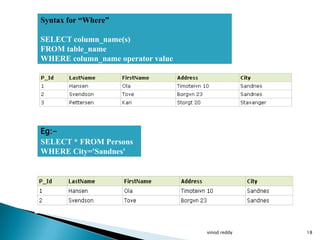
Syntax for “Where”

SELECT column_name(s)
FROM table_name
WHERE column_name operator value


Eg:-
SELECT * FROM Persons
WHERE City='Sandnes'


                                   vinod reddy   18
Syntax for “IN” :-
SELECT column_name(s)                      The IN operator allows
FROM table_name                            you to specify multiple
WHERE column_name IN (value1,value2,...)   values in a WHERE clause


 Example:-
 SELECT * FROM Persons
 WHERE LastName IN
 ('Hansen','Pettersen')


                                           vinod reddy                19
The AND operator displays a record if both the first condition and the second condition
 is true.
 The OR operator displays a record if either the first condition or the second condition is
 true.


Example for “AND”:-
SELECT * FROM Persons
WHERE FirstName='Tove'
AND LastName='Svendson'


Example for “OR”:-
SELECT * FROM Persons
WHERE FirstName='Tove'
OR FirstName='Ola'

                                                             vinod reddy                      20
The ORDER BY keyword is used to sort the result-set by a specified column. The
ORDER BY keyword sort the records in ascending order by default. If you want to
sort the records in a descending order, you can use the DESC keyword.

 Syntax for “ORDER” -
 SELECT column_name(s)
 FROM table_name
 ORDER BY column_name(s) ASC|DESC


 Ex for “ORDER BY”:-
 SELECT * FROM Persons
 ORDER BY LastName


                                                         vinod reddy              21
Example for “ORDER BY”:-
SELECT * FROM Persons
ORDER BY LastName DESC


                           vinod reddy   22
   The GROUP BY statement is used in conjunction with the aggregate functions to
    group the result set by one or more columns.
   Aggregate functions
    ◦ Sum, avg, count, min, max, bigcount


    Syntax for “GROUPBY” :-

    SELECT column_name, aggregate_function(column_name)
    FROM table_name
    WHERE column_name operator value
    GROUP BY column_name


                                                       vinod reddy                  23
Cont (Group by)


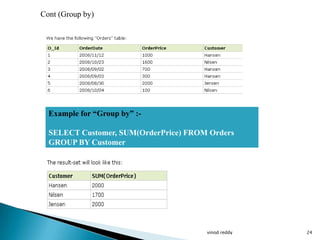
  Example for “Group by” :-

  SELECT Customer, SUM(OrderPrice) FROM Orders
  GROUP BY Customer


                                       vinod reddy   24
Cont (Group by)

  EG:-
 SELECT Customer, SUM(OrderPrice) FROM Orders


Explanation of why the above SELECT statement cannot be used: The
SELECT statement above has two columns specified (Customer and
SUM(OrderPrice). The "SUM(OrderPrice)" returns a single value (that is the total
sum of the "OrderPrice" column), while "Customer" returns 6 values (one value for
each row in the "Orders" table). This will therefore not give us the correct result.
However, you have seen that the GROUP BY statement solves this problem.

We can use more than two columns in Group by clause

SELECT Customer, OrderDate, SUM(OrderPrice) FROM Orders
GROUP BY Customer, OrderDate


                                                          vinod reddy                  25
   The HAVING clause was added to SQL because the WHERE keyword could not be
    used with aggregate functions.


    Syntax for “HAVING”

    SELECT column_name, aggregate_function(column_name)
    FROM table_name
    WHERE column_name operator value
    GROUP BY column_name
    HAVING aggregate_function(column_name) operator value


                                                  vinod reddy                   26
Cont (Having)


     Example for “Having”:-

     SELECT Customer, SUM(OrderPrice)
     FROM Orders
     GROUP BY Customer
     HAVING SUM(OrderPrice) < 2000


                                        vinod reddy   27
Cont (Having)


Example for “Having” with “Where ” clause:-

SELECT Customer, SUM(OrderPrice) FROM Orders
WHERE Customer='Hansen' OR Customer='Jensen'
GROUP BY Customer
HAVING SUM(OrderPrice)>1500


                                              vinod reddy   28
The UPDATE statement is used to update existing records in a table.

              Syntax for “UPDATE “:-

              UPDATE table_name
              SET column1=value, column2=value2,...
              WHERE some_column=some_value


  Note: Notice the WHERE clause in the UPDATE syntax. The WHERE
  clause specifies which record or records that should be updated. If you omit
  the WHERE clause, all records will be updated!


                                                       vinod reddy               29
UPADTE Example:-
UPDATE Persons
SET Address='Nissestien 67', City='Sandnes'
WHERE LastName='Tjessem' AND FirstName='Jakob'


What happen if WHERE is not used in UPDATE

UPDATE Persons
SET Address='Nissestien 67', City='Sandnes'


                                              vinod reddy   30
Syntax for “DELETE”: -

              DELETE FROM table_name
              WHERE some_column=some_value

The WHERE clause in the DELETE syntax. The WHERE clause specifies which
record or records that should be deleted. If you omit the WHERE clause, all records
will be deleted!


                                                          vinod reddy                 31
Example for “Delete”:-

DELETE FROM Persons
WHERE LastName='Tjessem' AND
FirstName='Jakob'


DELETE FROM table_name
or
DELETE * FROM table_name


                               vinod reddy   32
   Sub query or the inner query or nested query is a query in a query . A sub query is
    usually added in the WHERE clause of the SQL statements. Most of the times a
    Sub query is used when you know how to search for a value using a SELECT
    statement , but do not know the exact value.
   Sub queries are an alternate way of returning data from multiple tables.

    Example :-      Select id, first_name,
                    From student_details
                    Where first_name IN ( Select First_name
                    From Student_details
                    Where Subjects=„science‟);

                    Select product_name from product
                    Where product_id = (select product_id From
                    Order_item where item_id= 1050);


                                                           vinod reddy                    33
JOINS

    vinod reddy   34
   The JOIN keyword is used in an SQL statement to query data from two or more
      tables, based on a relationship between certain columns in these tables.


Notice that the relationship between the two tables above is the "P_Id" column.


                                                                                    35
   INNER JOIN: Return rows when there is at least one match in both tables
   LEFT JOIN: Return all rows from the left table, even if there are no matches in
    the right table
   RIGHT JOIN: Return all rows from the right table, even if there are no matches in
    the left table
   FULL JOIN: Return rows when there is a match in one of the tables
   SELF JOIN
   CROSS JOIN


                                                                                        36
This query will return all of the records in the left table (table A) that have a
matching record in the right table (table B). This Join is written as follows:


Syntax for “Inner Join”:-

SELECT column_name(s)
FROM table_name1
INNER JOIN table_name2
ON table_name1.column_name=table_name2.column_name.

                                                                                    37
Example of “Inner Join”:-


SELECT Persons.LastName, Persons.FirstName, Orders.OrderNo
FROM Persons
INNER JOIN Orders
ON Persons.P_Id=Orders.P_Id
ORDER BY Persons.LastName


                                                             38
Cont (Inner join)


                    39
will return all of the records in the left table (table A) regardless if any of those
records have a match in the right table (table B). It will also return any matching
records from the right table.


 Syntax for “LEFT JOIN”:-

 SELECT column_name(s)
 FROM table_name1
 LEFT JOIN table_name2
 ON table_name1.column_name=table_name2.column_name

                                                                                        40
Cont (Left Join)
 In some databases LEFT JOIN is called LEFT OUTER JOIN.

  Example:-


  SELECT Persons.LastName, Persons.FirstName, Orders.OrderNo
  FROM Persons
  LEFT JOIN Orders
  ON Persons.P_Id=Orders.P_Id
  ORDER BY Persons.LastName


                                                               41
SELECT Persons.LastName, Persons.FirstName, Orders.OrderNo
FROM Persons
LEFT JOIN Orders
ON Persons.P_Id=Orders.P_Id
ORDER BY Persons.LastName


 The LEFT JOIN keyword returns all the rows from the left table
 (Persons), even if there are no matches in the right table (Orders).


                                                                        42
This query will return all of the records in the right table (table B) regardless if
any of those records have a match in the left table (table A). It will also return any
matching records from the left table.

Syntax for “Right join” :-

SELECT column_name(s)
FROM table_name1
RIGHT JOIN table_name2
ON table_name1.column_name=table_name2.column_name


                                                                                         43
Cont (right join)


 Example:-
 SELECT Persons.LastName, Persons.FirstName, Orders.OrderNo
 FROM Persons
 RIGHT JOIN Orders
 ON Persons.P_Id=Orders.P_Id
 ORDER BY Persons.LastName


                                                              44
Cont (Right join)


The RIGHT JOIN keyword returns all the rows from the right table (Orders),
even if there are no matches in the left table (Persons).


                                                                             45
his Join can also be referred to as a FULL OUTER JOIN or a FULL JOIN. This query will
return all of the records from both tables, joining records from the left table (table A) that
match records from the right table (table B).

        Syntax for “Full Join”:-

        SELECT column_name(s)
        FROM table_name1
        FULL JOIN table_name2
        ON table_name1.column_name=table_name2.column_name

                                                                                                 46
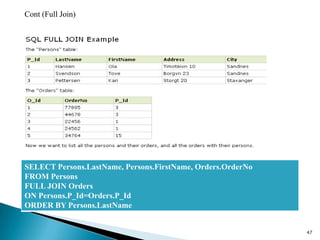
Cont (Full Join)


SELECT Persons.LastName, Persons.FirstName, Orders.OrderNo
FROM Persons
FULL JOIN Orders
ON Persons.P_Id=Orders.P_Id
ORDER BY Persons.LastName


                                                             47
Cont (Full Join)


The FULL JOIN keyword returns all the rows from the left table (Persons), and all the
rows from the right table (Orders). If there are rows in "Persons" that do not have
matches in "Orders", or if there are rows in "Orders" that do not have matches in
"Persons", those rows will be listed as well.


                                                                                        48
Left Excluding Join
                        This query will return all of the records in the left table
                        (table A) that do not match any records in the right table
                        (table B).

                          SELECT <select_list> FROM Table_A A
                          LEFT JOIN Table_B B ON A.Key = B.Key
                          WHERE B.Key IS NULL


 Right Excluding join


                          This query will return all of the records in the right
                          table (table B) that do not match any records in the
                          left table (table A).

                           SELECT <select_list> FROM Table_A A RIGHT
                           JOIN Table_B B ON A.Key = B.Key
                           WHERE A.Key IS NULL

                                                                                      49
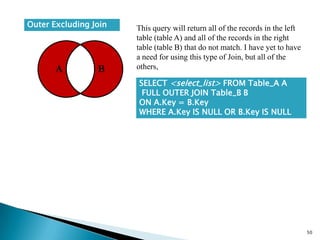
Outer Excluding Join   This query will return all of the records in the left
                       table (table A) and all of the records in the right
                       table (table B) that do not match. I have yet to have
                       a need for using this type of Join, but all of the
                       others,

                       SELECT <select_list> FROM Table_A A
                        FULL OUTER JOIN Table_B B
                       ON A.Key = B.Key
                       WHERE A.Key IS NULL OR B.Key IS NULL


                                                                               50
   Reference:-
   http://www.allinterview.com/showanswers/56803.html
   http://www.ntchosting.com/databases/structured-query-language.html
   http://www.excelsoftware.com/richdatamodel.html
   http://www.orafaq.com/faq/what_are_the_difference_between_ddl_dml_and_dcl_commands
   http://www.w3schools.com/sql/sql_create_table.asp


                                                                                         51
NO QUESTIONS


               52

Sql

  • 1.
  • 2.
    DBMS and RDBMS  SQL  Keys  SQL DML ,DDL , DCL Statements  Constrains  Cardinality  Basic SQL coding  Joins 2
  • 3.
    DBMS stores data but not in the form of tables. i.e it does not have any tables and there is no relationship between the data. Where as RDBMS is a Relational Data Base Management System This adds the additional condition that the system supports a tabular structure for the data, with enforced relationships between the tables. This excludes the databases that don't support a tabular structure or don't enforce relationships between tables.  DBMS is for small organizations where RDBMS is for large amount of data and for large Organization.  DBMS is a single user system where as RDBMS is a multiuser system.  DBMS does not impose any constraints or security with regard to data manipulation where as RDNMS does.  In DBMS there is no concept of PRIMARY KEY and FOREIGN KEY but it is included in RDBMS. DBMS contains only flat data whereas in RDBMS there will be some relation between the entities.  DBMS example:- Sysbase , Foxpro RDBMS example:- SQL Server, Oracle, MY-SQLSERVER. 3
  • 4.
    SQL (Structured Query Language) is a database computer language designed for managing data in relational database management systems (RDBMS), and originally based upon Relational Algebra .  To extract data from SQL server database, we use SQL coding.  In RDBMS , data is stored in the form of Table. Table(Entity) is divided into Rows(Tuples) and Columns(Attributes). What is a Table A table is a 2D representation of interrelated data, split up into columns and rows. A table is where our data that we collect will be stored and accessed through queries. 4
  • 5.
    ER Relationship:- Adetailed, logical representation of the entities, associations and data elements for an organization or business vinod reddy 5
  • 6.
    Primary key: A table typically has a column or combination of columns that contain values that uniquely identify each row in the table. This column, or columns, is called the primary key (PK) of the table and enforces the entity integrity of the table. When you specify a PRIMARY KEY constraint for a table, the Database Engine enforces data uniqueness by creating a unique index for the primary key columns.  Foreign key: It is a field in a relational database records that point to a key field in another table, FK implement a many-to-one relationship with another table or with itself. Foreign keys need not to be unique within the table. The purpose of the foreign key is to ensure referential integrity of the data. (In other words, only values that are supposed to appear in the database are permitted.) There is no limit on no of foreign keys on a table but recommended no is 253. A foreign key can contain duplicate and NULL values.  Unique key: In a table typically has a column or combination of columns that contain values that uniquely identify each row in the table. This column, or columns, is called as Unique key and it enforces the entity integrity of the table. When we specify a UNIQUE KEY constraint for a table, the Database Engine creates a unique non clustered index . It can have one NULL. vinod reddy 6
  • 7.
    Composite Key:-A composite key is a combination of more than one column to identify a unique row in a table  Candidate Key :-A candidate key is one that can identify each row of a table uniquely. Generally a candidate key becomes the primary key of the table. If the table has more than one candidate key, one of them will become the primary key, and the rest are called alternate keys.  Alternate Key :- Candidate key which is not a primary key is called a Candidate key. vinod reddy 7
  • 8.
    DDL ( DataDefinition Language ) :- statements are used to define the database structure or schema. Some examples:  CREATE - to create objects in the database  ALTER - alters the structure of the database  DROP - delete objects from the database  TRUNCATE - remove all records from a table, including all spaces allocated for the records are removed  COMMENT - add comments to the data dictionary  RENAME - rename an object DML (Data Manipulation Language ) :- statements are used for managing data within schema objects. Some examples:  SELECT - retrieve data from the a database  INSERT - insert data into a table  UPDATE - updates existing data within a table  DELETE - deletes all records from a table, the space for the records remain  MERGE - UPSERT operation (insert or update) vinod reddy 8
  • 9.
    DCL(Data Control Language) is used for the control of data. That is a user can access any data based on the privileges given to him. This is done through DATA CONTROL LANGUAGE. Some examples:  GRANT - gives user's access privileges to database  REVOKE - withdraw access privileges given with the GRANT command TCL(Transaction Control ) is used to manage the changes made by DML statements. It allows statements to be grouped together into logical transactions. Some Example :  COMMIT - save work done  SAVEPOINT - identify a point in a transaction to which you can later roll back  ROLLBACK - restore database to original since the last COMMIT  SET TRANSACTION - Change transaction options like isolation level and what rollback segment to use vinod reddy 9
  • 10.
    What is aCardinality:- Relationship between the tables is called Cardinality. What are the types of Cardinalities  One-to-one relationships occur when there is exactly one record in the first table that corresponds to exactly one record in the related table.  One-to-many relationships occur when each record in Table A may have many linked records in Table B but each record in Table B may have only one corresponding record in Table A.  Many-to-many relationships occur when each record in Table A may have many linked records in Table B and vice-versa. vinod reddy 10
  • 11.
  • 12.
    Varchar  Varbinary  Char  Int  Double  Table / UniqueIdentifier / XML vinod reddy 12
  • 13.
    Cont (Data types).. Varchar:-  Variable length character expression, but the definition has to be defined with a maximum length.  Blank spaces are not stored with a varchar.  Can be specified with MAX as the length. MAX represents a value that can be 2GB in size  Ex: name varchar(25)  Char:-  Char is fixed length of character data.  Blank spaces are stored within a char field.  Maximum length can be no greater than 8000.  Binary :-  Fixed Length binary data  Must be specified with a maximum length value up to 8000 vinod reddy 13
  • 14.
    Cont (Data types).. Integer:-  BigInt – 8 bytes (+- 9,223,372,036,854,775,807)  Int – 4 bytes (+- 2,147,483,647)  SmallInt – 2 bytes (+- 32,767)  TinyInt – 1 bytes (0 to 255) DateTime  January 1, 1753, through December 31, 9999  8 bytes of storage  Small datetime  January 1, 1900, through June 6, 2079  4 bytes of storage  New datetime data types in 2008 vinod reddy 14
  • 15.
    Syntax for “CreateTable” Example:- CREATE TABLE table_name CREATE TABLE Persons ( ( column_name1 data_type, P_Id int, column_name2 data_type, LastName varchar(255), column_name3 data_type, FirstName varchar(255), .... Address varchar(255), ) City varchar(255) ) vinod reddy 15
  • 16.
    Syntax for “INSERT” INSERT INTO table_name VALUES (value1, value2, value3,...) Or INSERT INTO table_name (column1, column2, column3,...) VALUES (value1, value2, value3,...) Eg:- INSERT INTO Persons VALUES (4,'Nilsen', 'Johan', 'Bakken 2', 'Stavanger') vinod reddy 16
  • 17.
    Syntax For “Select” SELECTcolumn_name(s) FROM table_name or SELECT * FROM table_name Eg:- SELECT LastName,FirstName FROM Persons vinod reddy 17
  • 18.
    Syntax for “Where” SELECTcolumn_name(s) FROM table_name WHERE column_name operator value Eg:- SELECT * FROM Persons WHERE City='Sandnes' vinod reddy 18
  • 19.
    Syntax for “IN”:- SELECT column_name(s) The IN operator allows FROM table_name you to specify multiple WHERE column_name IN (value1,value2,...) values in a WHERE clause Example:- SELECT * FROM Persons WHERE LastName IN ('Hansen','Pettersen') vinod reddy 19
  • 20.
    The AND operatordisplays a record if both the first condition and the second condition is true. The OR operator displays a record if either the first condition or the second condition is true. Example for “AND”:- SELECT * FROM Persons WHERE FirstName='Tove' AND LastName='Svendson' Example for “OR”:- SELECT * FROM Persons WHERE FirstName='Tove' OR FirstName='Ola' vinod reddy 20
  • 21.
    The ORDER BYkeyword is used to sort the result-set by a specified column. The ORDER BY keyword sort the records in ascending order by default. If you want to sort the records in a descending order, you can use the DESC keyword. Syntax for “ORDER” - SELECT column_name(s) FROM table_name ORDER BY column_name(s) ASC|DESC Ex for “ORDER BY”:- SELECT * FROM Persons ORDER BY LastName vinod reddy 21
  • 22.
    Example for “ORDERBY”:- SELECT * FROM Persons ORDER BY LastName DESC vinod reddy 22
  • 23.
    The GROUP BY statement is used in conjunction with the aggregate functions to group the result set by one or more columns.  Aggregate functions ◦ Sum, avg, count, min, max, bigcount Syntax for “GROUPBY” :- SELECT column_name, aggregate_function(column_name) FROM table_name WHERE column_name operator value GROUP BY column_name vinod reddy 23
  • 24.
    Cont (Group by) Example for “Group by” :- SELECT Customer, SUM(OrderPrice) FROM Orders GROUP BY Customer vinod reddy 24
  • 25.
    Cont (Group by) EG:- SELECT Customer, SUM(OrderPrice) FROM Orders Explanation of why the above SELECT statement cannot be used: The SELECT statement above has two columns specified (Customer and SUM(OrderPrice). The "SUM(OrderPrice)" returns a single value (that is the total sum of the "OrderPrice" column), while "Customer" returns 6 values (one value for each row in the "Orders" table). This will therefore not give us the correct result. However, you have seen that the GROUP BY statement solves this problem. We can use more than two columns in Group by clause SELECT Customer, OrderDate, SUM(OrderPrice) FROM Orders GROUP BY Customer, OrderDate vinod reddy 25
  • 26.
    The HAVING clause was added to SQL because the WHERE keyword could not be used with aggregate functions. Syntax for “HAVING” SELECT column_name, aggregate_function(column_name) FROM table_name WHERE column_name operator value GROUP BY column_name HAVING aggregate_function(column_name) operator value vinod reddy 26
  • 27.
    Cont (Having) Example for “Having”:- SELECT Customer, SUM(OrderPrice) FROM Orders GROUP BY Customer HAVING SUM(OrderPrice) < 2000 vinod reddy 27
  • 28.
    Cont (Having) Example for“Having” with “Where ” clause:- SELECT Customer, SUM(OrderPrice) FROM Orders WHERE Customer='Hansen' OR Customer='Jensen' GROUP BY Customer HAVING SUM(OrderPrice)>1500 vinod reddy 28
  • 29.
    The UPDATE statementis used to update existing records in a table. Syntax for “UPDATE “:- UPDATE table_name SET column1=value, column2=value2,... WHERE some_column=some_value Note: Notice the WHERE clause in the UPDATE syntax. The WHERE clause specifies which record or records that should be updated. If you omit the WHERE clause, all records will be updated! vinod reddy 29
  • 30.
    UPADTE Example:- UPDATE Persons SETAddress='Nissestien 67', City='Sandnes' WHERE LastName='Tjessem' AND FirstName='Jakob' What happen if WHERE is not used in UPDATE UPDATE Persons SET Address='Nissestien 67', City='Sandnes' vinod reddy 30
  • 31.
    Syntax for “DELETE”:- DELETE FROM table_name WHERE some_column=some_value The WHERE clause in the DELETE syntax. The WHERE clause specifies which record or records that should be deleted. If you omit the WHERE clause, all records will be deleted! vinod reddy 31
  • 32.
    Example for “Delete”:- DELETEFROM Persons WHERE LastName='Tjessem' AND FirstName='Jakob' DELETE FROM table_name or DELETE * FROM table_name vinod reddy 32
  • 33.
    Sub query or the inner query or nested query is a query in a query . A sub query is usually added in the WHERE clause of the SQL statements. Most of the times a Sub query is used when you know how to search for a value using a SELECT statement , but do not know the exact value.  Sub queries are an alternate way of returning data from multiple tables. Example :- Select id, first_name, From student_details Where first_name IN ( Select First_name From Student_details Where Subjects=„science‟); Select product_name from product Where product_id = (select product_id From Order_item where item_id= 1050); vinod reddy 33
  • 34.
    JOINS vinod reddy 34
  • 35.
    The JOIN keyword is used in an SQL statement to query data from two or more tables, based on a relationship between certain columns in these tables. Notice that the relationship between the two tables above is the "P_Id" column. 35
  • 36.
    INNER JOIN: Return rows when there is at least one match in both tables  LEFT JOIN: Return all rows from the left table, even if there are no matches in the right table  RIGHT JOIN: Return all rows from the right table, even if there are no matches in the left table  FULL JOIN: Return rows when there is a match in one of the tables  SELF JOIN  CROSS JOIN 36
  • 37.
    This query willreturn all of the records in the left table (table A) that have a matching record in the right table (table B). This Join is written as follows: Syntax for “Inner Join”:- SELECT column_name(s) FROM table_name1 INNER JOIN table_name2 ON table_name1.column_name=table_name2.column_name. 37
  • 38.
    Example of “InnerJoin”:- SELECT Persons.LastName, Persons.FirstName, Orders.OrderNo FROM Persons INNER JOIN Orders ON Persons.P_Id=Orders.P_Id ORDER BY Persons.LastName 38
  • 39.
  • 40.
    will return allof the records in the left table (table A) regardless if any of those records have a match in the right table (table B). It will also return any matching records from the right table. Syntax for “LEFT JOIN”:- SELECT column_name(s) FROM table_name1 LEFT JOIN table_name2 ON table_name1.column_name=table_name2.column_name 40
  • 41.
    Cont (Left Join) In some databases LEFT JOIN is called LEFT OUTER JOIN. Example:- SELECT Persons.LastName, Persons.FirstName, Orders.OrderNo FROM Persons LEFT JOIN Orders ON Persons.P_Id=Orders.P_Id ORDER BY Persons.LastName 41
  • 42.
    SELECT Persons.LastName, Persons.FirstName,Orders.OrderNo FROM Persons LEFT JOIN Orders ON Persons.P_Id=Orders.P_Id ORDER BY Persons.LastName The LEFT JOIN keyword returns all the rows from the left table (Persons), even if there are no matches in the right table (Orders). 42
  • 43.
    This query willreturn all of the records in the right table (table B) regardless if any of those records have a match in the left table (table A). It will also return any matching records from the left table. Syntax for “Right join” :- SELECT column_name(s) FROM table_name1 RIGHT JOIN table_name2 ON table_name1.column_name=table_name2.column_name 43
  • 44.
    Cont (right join) Example:- SELECT Persons.LastName, Persons.FirstName, Orders.OrderNo FROM Persons RIGHT JOIN Orders ON Persons.P_Id=Orders.P_Id ORDER BY Persons.LastName 44
  • 45.
    Cont (Right join) TheRIGHT JOIN keyword returns all the rows from the right table (Orders), even if there are no matches in the left table (Persons). 45
  • 46.
    his Join canalso be referred to as a FULL OUTER JOIN or a FULL JOIN. This query will return all of the records from both tables, joining records from the left table (table A) that match records from the right table (table B). Syntax for “Full Join”:- SELECT column_name(s) FROM table_name1 FULL JOIN table_name2 ON table_name1.column_name=table_name2.column_name 46
  • 47.
    Cont (Full Join) SELECTPersons.LastName, Persons.FirstName, Orders.OrderNo FROM Persons FULL JOIN Orders ON Persons.P_Id=Orders.P_Id ORDER BY Persons.LastName 47
  • 48.
    Cont (Full Join) TheFULL JOIN keyword returns all the rows from the left table (Persons), and all the rows from the right table (Orders). If there are rows in "Persons" that do not have matches in "Orders", or if there are rows in "Orders" that do not have matches in "Persons", those rows will be listed as well. 48
  • 49.
    Left Excluding Join This query will return all of the records in the left table (table A) that do not match any records in the right table (table B). SELECT <select_list> FROM Table_A A LEFT JOIN Table_B B ON A.Key = B.Key WHERE B.Key IS NULL Right Excluding join This query will return all of the records in the right table (table B) that do not match any records in the left table (table A). SELECT <select_list> FROM Table_A A RIGHT JOIN Table_B B ON A.Key = B.Key WHERE A.Key IS NULL 49
  • 50.
    Outer Excluding Join This query will return all of the records in the left table (table A) and all of the records in the right table (table B) that do not match. I have yet to have a need for using this type of Join, but all of the others, SELECT <select_list> FROM Table_A A FULL OUTER JOIN Table_B B ON A.Key = B.Key WHERE A.Key IS NULL OR B.Key IS NULL 50
  • 51.
    Reference:-  http://www.allinterview.com/showanswers/56803.html  http://www.ntchosting.com/databases/structured-query-language.html  http://www.excelsoftware.com/richdatamodel.html  http://www.orafaq.com/faq/what_are_the_difference_between_ddl_dml_and_dcl_commands  http://www.w3schools.com/sql/sql_create_table.asp 51
  • 52.