Department of Electrical and Electronic
Engineering
Khulna University of Engineering & Technology
Khulna-9203
Course code : EE 3214
Sessional on
Microprocessors, Micro-controllers and
Peripherals
Presented By
Amit Kumer Podder
Experiment No. 03
7/3/2020Amit Kumer Podder 1
Experiment Name
(a)Introduction to 8255 programmable
peripheral interface (PPI)
(b)Data transfer using PPI for simple I/O mode
of operation Mode 0
(c)Bit set/reset (BSR) mode of operation of
8255 PPI
7/3/2020Amit Kumer Podder 2
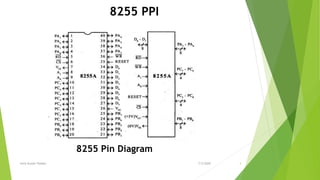
8255 PPI
8255 Pin Diagram
7/3/2020Amit Kumer Podder 3
 The Intel 8255 (or i8255) Programmable Peripheral Interface (PPI) chip was
developed and manufactured by Intel in the first half of the 1970s for the Intel 8080
microprocessor.
 The INTEL 8255 is a 40 pin IC having total 24 I/O pins.
 consisting of 3 numbers of 8 –bit parallel I/O ports (i.e. PORT A, PORT B,PORT C).
 The ports can be programmed to function either as a input port or as a output
port in different operating modes.
 Its main functions are to interface peripheral devices to the microprocessor.
Basically used for parallel data transfer.
***Operational modes of 8255
 Bit Set Reset Mode (BSR Mode).
 I/O Mode.
8255 PPI
7/3/2020Amit Kumer Podder 4
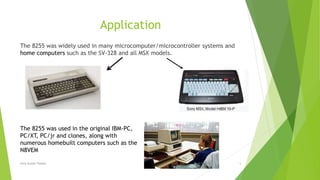
Application
The 8255 was widely used in many microcomputer/microcontroller systems and
home computers such as the SV-328 and all MSX models.
The 8255 was used in the original IBM-PC,
PC/XT, PC/jr and clones, along with
numerous homebuilt computers such as the
N8VEM
7/3/2020Amit Kumer Podder 5
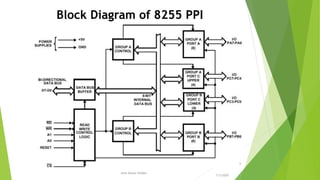
Block Diagram of 8255 PPI
7/3/2020
Amit Kumer Podder
6
Function of Blocks
Data Bus Buffer:
It is a 8 bit buffer used to interface the chip to the system data bus. Data is
transmitted or received by the buffer upon execution of input or output instructions
by the CPU. Control words and status information are also transferred through the
data bus buffer.
Read/Write and Logic Control
The function of this block is to control the internal operation of the device and to
control the transfer of data and control or status words.
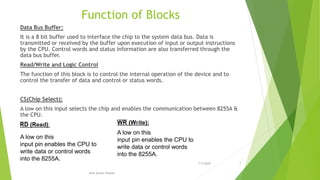
CS(Chip Select):
A low on this input selects the chip and enables the communication between 8255A &
the CPU.
A low on this
input pin enables the CPU to
write data or control words
into the 8255A.
A low on this
input pin enables the CPU to
write data or control words
into the 8255A.
7/3/2020 7
Amit Kumer Podder
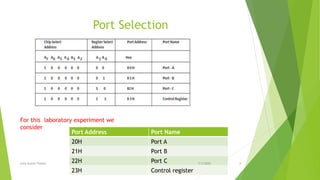
Port Selection
For this laboratory experiment we
consider
Port Address Port Name
20H Port A
21H Port B
22H Port C
23H Control register
7/3/2020Amit Kumer Podder 8
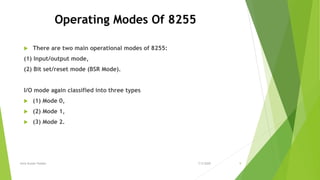
Operating Modes Of 8255
 There are two main operational modes of 8255:
(1) Input/output mode,
(2) Bit set/reset mode (BSR Mode).
I/O mode again classified into three types
 (1) Mode 0,
 (2) Mode 1,
 (3) Mode 2.
7/3/2020Amit Kumer Podder 9
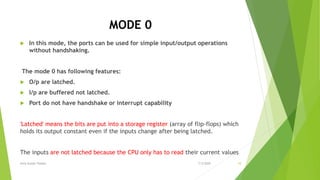
MODE 0
 In this mode, the ports can be used for simple input/output operations
without handshaking.
The mode 0 has following features:
 O/p are latched.
 I/p are buffered not latched.
 Port do not have handshake or interrupt capability
'Latched' means the bits are put into a storage register (array of flip-flops) which
holds its output constant even if the inputs change after being latched.
The inputs are not latched because the CPU only has to read their current values
7/3/2020Amit Kumer Podder 10
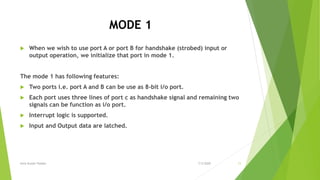
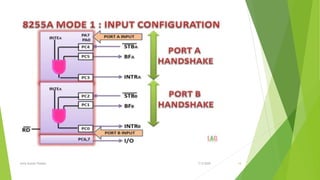
MODE 1
 When we wish to use port A or port B for handshake (strobed) input or
output operation, we initialize that port in mode 1.
The mode 1 has following features:
 Two ports i.e. port A and B can be use as 8-bit i/o port.
 Each port uses three lines of port c as handshake signal and remaining two
signals can be function as i/o port.
 Interrupt logic is supported.
 Input and Output data are latched.
7/3/2020Amit Kumer Podder 11
MODE 2
 Only group A can be initialized in this mode.
 Port A can be used for bidirectional handshake data transfer. This
means that data can be input or output on the same eight lines
(PA0 - PA7).
 Pins PC3 - PC7 are used as handshake lines for port A.
 The remaining pins of port C (PC0 - PC2) can be used as
input/output lines if group B is initialized in mode 0.
 In this mode, the 8255 may be used to extend the system bus to a
slave microprocessor.
7/3/2020Amit Kumer Podder 12
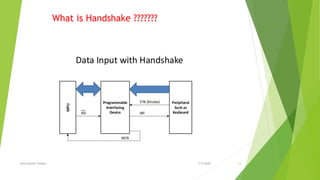
What is Handshake ???????
7/3/2020Amit Kumer Podder 13
7/3/2020Amit Kumer Podder 14
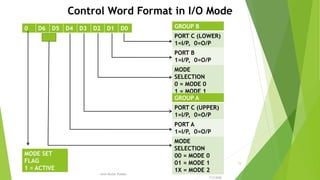
0 D6 D5 D4 D3 D2 D1 D0 GROUP B
PORT C (LOWER)
1=I/P, 0=O/P
PORT B
1=I/P, 0=O/P
MODE
SELECTION
0 = MODE 0
1 = MODE 1
GROUP A
PORT C (UPPER)
1=I/P, 0=O/P
PORT A
1=I/P, 0=O/P
MODE
SELECTION
00 = MODE 0
01 = MODE 1
1X = MODE 2
MODE SET
FLAG
1 = ACTIVE
Control Word Format in I/O Mode
7/3/2020
Amit Kumer Podder
15
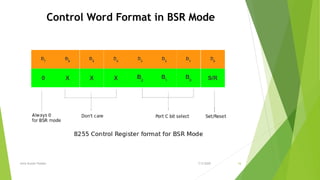
Control Word Format in BSR Mode
7/3/2020Amit Kumer Podder 16
Instruction
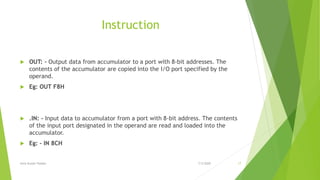
 OUT: - Output data from accumulator to a port with 8-bit addresses. The
contents of the accumulator are copied into the I/O port specified by the
operand.
 Eg: OUT F8H
 .IN: - Input data to accumulator from a port with 8-bit address. The contents
of the input port designated in the operand are read and loaded into the
accumulator.
 Eg: - IN 8CH
7/3/2020Amit Kumer Podder 17
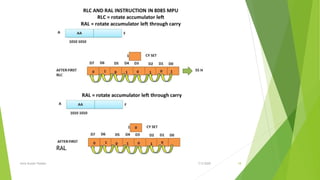
RAL
7/3/2020Amit Kumer Podder 18
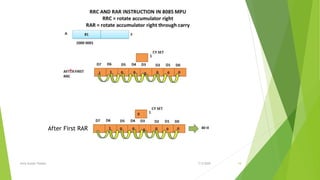
After First RAR
7/3/2020Amit Kumer Podder 19
Now Programming
7/3/2020Amit Kumer Podder 20
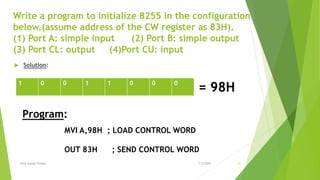
Write a program to initialize 8255 in the configuration
below.(assume address of the CW register as 83H).
(1) Port A: simple input (2) Port B: simple output
(3) Port CL: output (4)Port CU: input
 Solution:
1 0 0 1 1 0 0 0
= 98H
Program:
MVI A,98H ; LOAD CONTROL WORD
OUT 83H ; SEND CONTROL WORD
7/3/2020Amit Kumer Podder 21
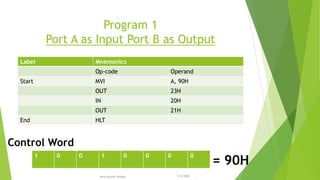
Program 1
Port A as Input Port B as Output
Label Mnemonics
Op-code Operand
Start MVI A, 90H
OUT 23H
IN 20H
OUT 21H
End HLT
1 0 0 1 0 0 0 0
= 90H
Control Word
7/3/2020Amit Kumer Podder
22
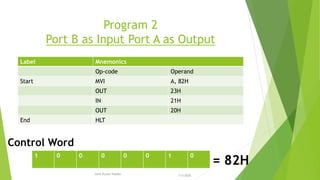
Program 2
Port B as Input Port A as Output
Label Mnemonics
Op-code Operand
Start MVI A, 82H
OUT 23H
IN 21H
OUT 20H
End HLT
1 0 0 0 0 0 1 0
= 82H
Control Word
7/3/2020Amit Kumer Podder
23
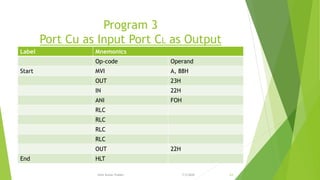
Program 3
Port Cu as Input Port CL as Output
Label Mnemonics
Op-code Operand
Start MVI A, 88H
OUT 23H
IN 22H
ANI FOH
RLC
RLC
RLC
RLC
OUT 22H
End HLT
7/3/2020Amit Kumer Podder 24
Program 4
Port CL as Input Port CU as Output
Do yourself
7/3/2020Amit Kumer Podder 25

8255 Programmble Peripheral Interface

  • 1.
    Department of Electricaland Electronic Engineering Khulna University of Engineering & Technology Khulna-9203 Course code : EE 3214 Sessional on Microprocessors, Micro-controllers and Peripherals Presented By Amit Kumer Podder Experiment No. 03 7/3/2020Amit Kumer Podder 1
  • 2.
    Experiment Name (a)Introduction to8255 programmable peripheral interface (PPI) (b)Data transfer using PPI for simple I/O mode of operation Mode 0 (c)Bit set/reset (BSR) mode of operation of 8255 PPI 7/3/2020Amit Kumer Podder 2
  • 3.
    8255 PPI 8255 PinDiagram 7/3/2020Amit Kumer Podder 3
  • 4.
     The Intel8255 (or i8255) Programmable Peripheral Interface (PPI) chip was developed and manufactured by Intel in the first half of the 1970s for the Intel 8080 microprocessor.  The INTEL 8255 is a 40 pin IC having total 24 I/O pins.  consisting of 3 numbers of 8 –bit parallel I/O ports (i.e. PORT A, PORT B,PORT C).  The ports can be programmed to function either as a input port or as a output port in different operating modes.  Its main functions are to interface peripheral devices to the microprocessor. Basically used for parallel data transfer. ***Operational modes of 8255  Bit Set Reset Mode (BSR Mode).  I/O Mode. 8255 PPI 7/3/2020Amit Kumer Podder 4
  • 5.
    Application The 8255 waswidely used in many microcomputer/microcontroller systems and home computers such as the SV-328 and all MSX models. The 8255 was used in the original IBM-PC, PC/XT, PC/jr and clones, along with numerous homebuilt computers such as the N8VEM 7/3/2020Amit Kumer Podder 5
  • 6.
    Block Diagram of8255 PPI 7/3/2020 Amit Kumer Podder 6
  • 7.
    Function of Blocks DataBus Buffer: It is a 8 bit buffer used to interface the chip to the system data bus. Data is transmitted or received by the buffer upon execution of input or output instructions by the CPU. Control words and status information are also transferred through the data bus buffer. Read/Write and Logic Control The function of this block is to control the internal operation of the device and to control the transfer of data and control or status words. CS(Chip Select): A low on this input selects the chip and enables the communication between 8255A & the CPU. A low on this input pin enables the CPU to write data or control words into the 8255A. A low on this input pin enables the CPU to write data or control words into the 8255A. 7/3/2020 7 Amit Kumer Podder
  • 8.
    Port Selection For thislaboratory experiment we consider Port Address Port Name 20H Port A 21H Port B 22H Port C 23H Control register 7/3/2020Amit Kumer Podder 8
  • 9.
    Operating Modes Of8255  There are two main operational modes of 8255: (1) Input/output mode, (2) Bit set/reset mode (BSR Mode). I/O mode again classified into three types  (1) Mode 0,  (2) Mode 1,  (3) Mode 2. 7/3/2020Amit Kumer Podder 9
  • 10.
    MODE 0  Inthis mode, the ports can be used for simple input/output operations without handshaking. The mode 0 has following features:  O/p are latched.  I/p are buffered not latched.  Port do not have handshake or interrupt capability 'Latched' means the bits are put into a storage register (array of flip-flops) which holds its output constant even if the inputs change after being latched. The inputs are not latched because the CPU only has to read their current values 7/3/2020Amit Kumer Podder 10
  • 11.
    MODE 1  Whenwe wish to use port A or port B for handshake (strobed) input or output operation, we initialize that port in mode 1. The mode 1 has following features:  Two ports i.e. port A and B can be use as 8-bit i/o port.  Each port uses three lines of port c as handshake signal and remaining two signals can be function as i/o port.  Interrupt logic is supported.  Input and Output data are latched. 7/3/2020Amit Kumer Podder 11
  • 12.
    MODE 2  Onlygroup A can be initialized in this mode.  Port A can be used for bidirectional handshake data transfer. This means that data can be input or output on the same eight lines (PA0 - PA7).  Pins PC3 - PC7 are used as handshake lines for port A.  The remaining pins of port C (PC0 - PC2) can be used as input/output lines if group B is initialized in mode 0.  In this mode, the 8255 may be used to extend the system bus to a slave microprocessor. 7/3/2020Amit Kumer Podder 12
  • 13.
    What is Handshake??????? 7/3/2020Amit Kumer Podder 13
  • 14.
  • 15.
    0 D6 D5D4 D3 D2 D1 D0 GROUP B PORT C (LOWER) 1=I/P, 0=O/P PORT B 1=I/P, 0=O/P MODE SELECTION 0 = MODE 0 1 = MODE 1 GROUP A PORT C (UPPER) 1=I/P, 0=O/P PORT A 1=I/P, 0=O/P MODE SELECTION 00 = MODE 0 01 = MODE 1 1X = MODE 2 MODE SET FLAG 1 = ACTIVE Control Word Format in I/O Mode 7/3/2020 Amit Kumer Podder 15
  • 16.
    Control Word Formatin BSR Mode 7/3/2020Amit Kumer Podder 16
  • 17.
    Instruction  OUT: -Output data from accumulator to a port with 8-bit addresses. The contents of the accumulator are copied into the I/O port specified by the operand.  Eg: OUT F8H  .IN: - Input data to accumulator from a port with 8-bit address. The contents of the input port designated in the operand are read and loaded into the accumulator.  Eg: - IN 8CH 7/3/2020Amit Kumer Podder 17
  • 18.
  • 19.
  • 20.
  • 21.
    Write a programto initialize 8255 in the configuration below.(assume address of the CW register as 83H). (1) Port A: simple input (2) Port B: simple output (3) Port CL: output (4)Port CU: input  Solution: 1 0 0 1 1 0 0 0 = 98H Program: MVI A,98H ; LOAD CONTROL WORD OUT 83H ; SEND CONTROL WORD 7/3/2020Amit Kumer Podder 21
  • 22.
    Program 1 Port Aas Input Port B as Output Label Mnemonics Op-code Operand Start MVI A, 90H OUT 23H IN 20H OUT 21H End HLT 1 0 0 1 0 0 0 0 = 90H Control Word 7/3/2020Amit Kumer Podder 22
  • 23.
    Program 2 Port Bas Input Port A as Output Label Mnemonics Op-code Operand Start MVI A, 82H OUT 23H IN 21H OUT 20H End HLT 1 0 0 0 0 0 1 0 = 82H Control Word 7/3/2020Amit Kumer Podder 23
  • 24.
    Program 3 Port Cuas Input Port CL as Output Label Mnemonics Op-code Operand Start MVI A, 88H OUT 23H IN 22H ANI FOH RLC RLC RLC RLC OUT 22H End HLT 7/3/2020Amit Kumer Podder 24
  • 25.
    Program 4 Port CLas Input Port CU as Output Do yourself 7/3/2020Amit Kumer Podder 25