8.12WORDPRESS ON TABLET
Wordpress can post from Tablet or Smartphone.
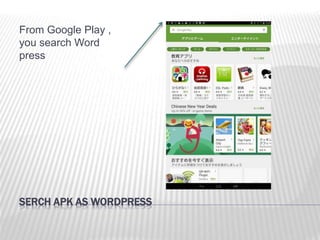
SERCH APK AS WORDPRESS
From Google Play ,
you search Word
press
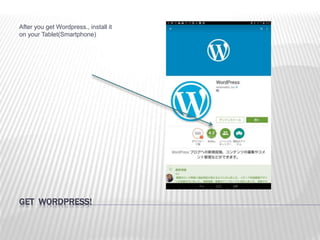
GET WORDPRESS!
After you get Wordpress., install it
on your Tablet(Smartphone)
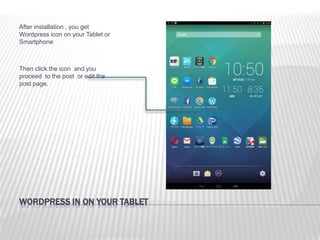
WORDPRESS IN ON YOUR TABLET
After installation , you get
Wordpress icon on your Tablet or
Smartphone
Then click the icon and you
proceed to the post or edit the
post page.
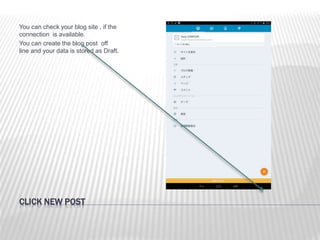
CLICK NEW POST
You can check your blog site , if the
connection is available.
You can create the blog post off
line and your data is stored as Draft.
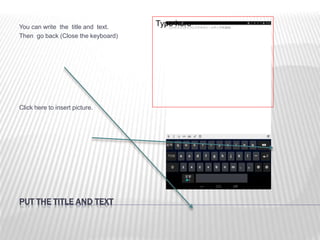
PUT THE TITLE AND TEXT
You can write the title and text.
Then go back (Close the keyboard)
Click here to insert picture.
Type here
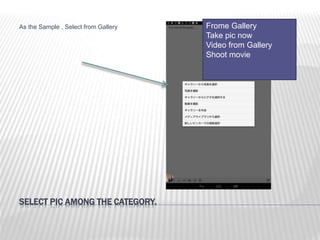
SELECT PIC AMONG THE CATEGORY.
As the Sample , Select from Gallery Frome Gallery
Take pic now
Video from Gallery
Shoot movie
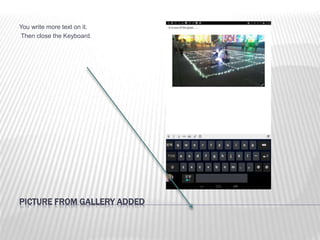
PICTURE FROM GALLERY ADDED
You write more text on it.
Then close the Keyboard.
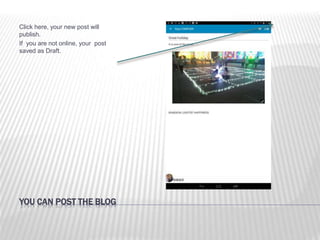
YOU CAN POST THE BLOG
Click here, your new post will
publish.
If you are not online, your post
saved as Draft.
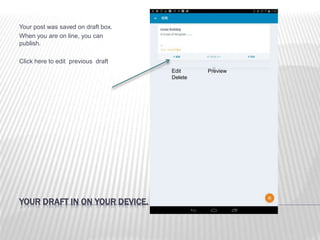
YOUR DRAFT IN ON YOUR DEVICE.
Your post was saved on draft box.
When you are on line, you can
publish.
Click here to edit previous draft
Edit Preview
Delete

812 wordpress tablet

  • 1.
    8.12WORDPRESS ON TABLET Wordpresscan post from Tablet or Smartphone.
  • 2.
    SERCH APK ASWORDPRESS From Google Play , you search Word press
  • 3.
    GET WORDPRESS! After youget Wordpress., install it on your Tablet(Smartphone)
  • 4.
    WORDPRESS IN ONYOUR TABLET After installation , you get Wordpress icon on your Tablet or Smartphone Then click the icon and you proceed to the post or edit the post page.
  • 5.
    CLICK NEW POST Youcan check your blog site , if the connection is available. You can create the blog post off line and your data is stored as Draft.
  • 6.
    PUT THE TITLEAND TEXT You can write the title and text. Then go back (Close the keyboard) Click here to insert picture. Type here
  • 7.
    SELECT PIC AMONGTHE CATEGORY. As the Sample , Select from Gallery Frome Gallery Take pic now Video from Gallery Shoot movie
  • 8.
    PICTURE FROM GALLERYADDED You write more text on it. Then close the Keyboard.
  • 9.
    YOU CAN POSTTHE BLOG Click here, your new post will publish. If you are not online, your post saved as Draft.
  • 10.
    YOUR DRAFT INON YOUR DEVICE. Your post was saved on draft box. When you are on line, you can publish. Click here to edit previous draft Edit Preview Delete