LESSON 04 STTP2020
CLOUD COMPUTING
Author: By S.Hoshiba
What is the cloud and what is the cloud computing.
We learn about Cloud in this chapter.
CLOUD COMPUTING
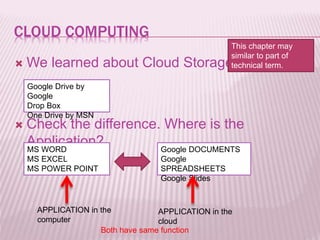
 We learned about Cloud Storage.
 Check the difference. Where is the
Application?
Google Drive by
Google
Drop Box
One Drive by MSN
MS WORD
MS EXCEL
MS POWER POINT
Google DOCUMENTS
Google
SPREADSHEETS
Google Slides
APPLICATION in the
computer
APPLICATION in the
cloud
Both have same function
This chapter may
similar to part of
technical term.
ANOTHER APPLICATION BY GOOGLE
 Google Photo and Editor
 Google My maps
 Google Calendar
 Blogger by Google
 YouTube Video Editor
These are Online application by Google
ADVANTAGE OF ONLINE APPLICATION
 You don’t need to install program on your computer.
 You don’t need update program.
 Data will be save on the cloud.
 If you lose your computer, you can continue your
task.
 You need faster internet connection.
DISADVANTAGE OF ONLINE APPLICATION
OTHER ONLINE APPLICATION
 Online PDF maker
 Logo Creator
 Online file converter
 WordPress for website editing
Note:
 Some application is not free.
 Some has trial Version for particular period.
 Some has option for more facility with
payment
TRIAL
 Open Google Documents and create your
document. (Your Bio data)
 Open Google spreadsheets and price list of
your shop.
 Convert your word document into PDF with
file converter.
 Save your picture on Google Photo and edit
the picture.

04 cloud computing sttp2020

  • 1.
    LESSON 04 STTP2020 CLOUDCOMPUTING Author: By S.Hoshiba What is the cloud and what is the cloud computing. We learn about Cloud in this chapter.
  • 2.
    CLOUD COMPUTING  Welearned about Cloud Storage.  Check the difference. Where is the Application? Google Drive by Google Drop Box One Drive by MSN MS WORD MS EXCEL MS POWER POINT Google DOCUMENTS Google SPREADSHEETS Google Slides APPLICATION in the computer APPLICATION in the cloud Both have same function This chapter may similar to part of technical term.
  • 3.
    ANOTHER APPLICATION BYGOOGLE  Google Photo and Editor  Google My maps  Google Calendar  Blogger by Google  YouTube Video Editor These are Online application by Google
  • 4.
    ADVANTAGE OF ONLINEAPPLICATION  You don’t need to install program on your computer.  You don’t need update program.  Data will be save on the cloud.  If you lose your computer, you can continue your task.  You need faster internet connection. DISADVANTAGE OF ONLINE APPLICATION
  • 5.
    OTHER ONLINE APPLICATION Online PDF maker  Logo Creator  Online file converter  WordPress for website editing Note:  Some application is not free.  Some has trial Version for particular period.  Some has option for more facility with payment
  • 6.
    TRIAL  Open GoogleDocuments and create your document. (Your Bio data)  Open Google spreadsheets and price list of your shop.  Convert your word document into PDF with file converter.  Save your picture on Google Photo and edit the picture.