



Visual Make your blog ! Teachers can blog!
Images Help readers   visualize   ideas  !
In the New Post dashboard, click the Image tool. Click the Browse button to locate an image saved on your computer.
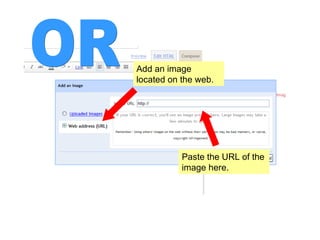
Add an image located on the web. Paste the URL of the image here. OR
To find an image URL, right-click the image and select  Properties . Copy the URL from the address line.
Don’t monkey around with copyrighted images! Careful
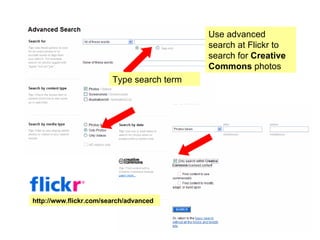
You can now see the video you embedded. Finish your post as you normally would, and publish. Use advanced search at Flickr to search for  Creative Commons  photos http://www.flickr.com/search/advanced Type search term
Not familiar with Creative Commons? Visit creativecommons.com
Images bring   life to   ideas  !
This tutorial created by All clipart is from  Animation Factory . Lisa Huff .   http://justread.wordpress.com blog2teach!

Embed Images in Blog Post

  • 1.
    Visual Make yourblog ! Teachers can blog!
  • 2.
    Images Help readers visualize ideas !
  • 3.
    In the NewPost dashboard, click the Image tool. Click the Browse button to locate an image saved on your computer.
  • 4.
    Add an imagelocated on the web. Paste the URL of the image here. OR
  • 5.
    To find animage URL, right-click the image and select Properties . Copy the URL from the address line.
  • 6.
    Don’t monkey aroundwith copyrighted images! Careful
  • 7.
    You can nowsee the video you embedded. Finish your post as you normally would, and publish. Use advanced search at Flickr to search for Creative Commons photos http://www.flickr.com/search/advanced Type search term
  • 8.
    Not familiar withCreative Commons? Visit creativecommons.com
  • 9.
    Images bring life to ideas !
  • 10.
    This tutorial createdby All clipart is from Animation Factory . Lisa Huff . http://justread.wordpress.com blog2teach!