Switch-ийн тохиргоо


© 2004, Cisco Systems, Inc. All rights reserved.   1
Starting the Switch


 Switches:
 • Хостын холбоход зориулагдсан хэд хэдэн
   оролттой
 • Мөн тусгай зориулалтын оролттой
 • Тохиргоо хийлгэхдээ удирдуулахаас гадна
   шууд холболтын console port-той
 • Цахилгаанд залгаагүй тохиолдолд switch нь
   унтраастай буюу холбогдоогүй байна

        © 2004, Cisco Systems, Inc. All rights reserved.   3
Catalyst 2950 series Switches Features


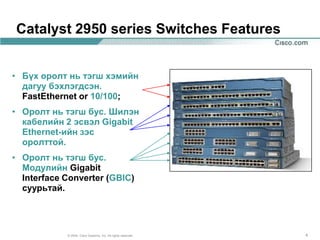
• Бүх оролт нь тэгш хэмийн
  дагуу бэхлэгдсэн.
  FastEthernet or 10/100;
• Оролт нь тэгш бус. Шилэн
  кабелийн 2 эсвэл Gigabit
  Ethernet-ийн зэс
  оролттой.
• Оролт нь тэгш бус.
  Модулийн Gigabit
  Interface Converter (GBIC)
  суурьтай.


            © 2004, Cisco Systems, Inc. All rights reserved.   4
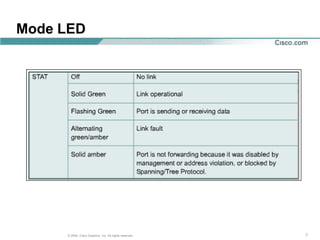
LEDs-гэрэлүүд


 Light-emitting diodes (LEDs)
 • Дэлгэцэн дээр системийн үйл ажиллагаа ба
   гүйцэтгэлийг харуулна.
 • Switch дээр байрлах гэрлүүд:
      - System LED
      - Remote Power Supply (RPS) LED
      - Port Mode LEDs
      - Port Status LEDs


      © 2004, Cisco Systems, Inc. All rights reserved.   5
Mode LED


     © 2004, Cisco Systems, Inc. All rights reserved.   7
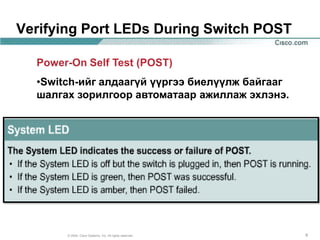
Verifying Port LEDs During Switch POST

  Power-On Self Test (POST)
  •Switch-ийг алдаагүй үүргээ биелүүлж байгааг
  шалгах зорилгоор автоматаар ажиллаж эхлэнэ.


       © 2004, Cisco Systems, Inc. All rights reserved.   8
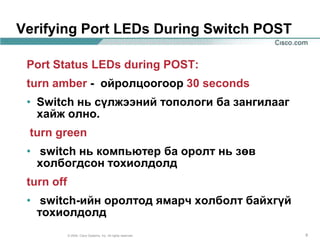
Verifying Port LEDs During Switch POST

 Port Status LEDs during POST:
 turn amber - ойролцоогоор 30 seconds
 • Switch нь сүлжээний топологи ба зангилааг
   хайж олно.
 turn green
 • switch нь компьютер ба оролт нь зөв
   холбогдсон тохиолдолд
 turn off
 • switch-ийн оролтод ямарч холболт байхгүй
   тохиолдолд
            © 2004, Cisco Systems, Inc. All rights reserved.   9
Switch-ээс PC рүү холбох


  © 2004, Cisco Systems, Inc. All rights reserved.   10
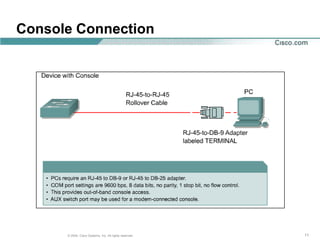
Console Connection


      © 2004, Cisco Systems, Inc. All rights reserved.   11
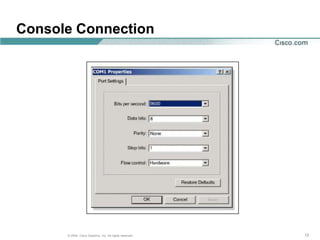
Console Connection


      © 2004, Cisco Systems, Inc. All rights reserved.   12
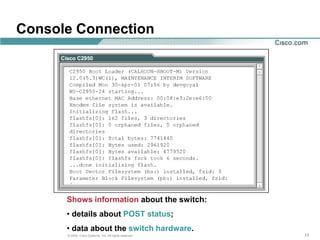
Console Connection


      Shows information about the switch:
      • details about POST status;
      • data about the switch hardware.
      © 2004, Cisco Systems, Inc. All rights reserved.   13
Switch CLI


© 2004, Cisco Systems, Inc. All rights reserved.   14
Command-Line Interface (CLI) командын
мөрийн интерпайс


 Command-line interface (CLI) Cisco-ийн
  switch-үүд хэрэглэнэ.
 • энэ CLI дээр командууд нь Cisco-ийн
   router-үүд дээр хийгдэх командтай их
   адилхан.


      © 2004, Cisco Systems, Inc. All rights reserved.   15
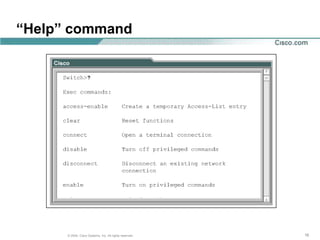
“Help” command


      © 2004, Cisco Systems, Inc. All rights reserved.   16
Command Modes


    • User EXEC (хэрэглэгчийн)
    • Privileged EXEC (давуу эрхтэй)


      © 2004, Cisco Systems, Inc. All rights reserved.   17
User EXEC mode


  User EXEC mode
  • Өөрчлөх горим;
  • Зөвшөөрөгдсөн командуудын хязгаар:
      - Терминалын тохиргоог өөрчлөх;
      - үндсэн текстийг гүйцэтгэх;
      - дэлгэцэн дээр системийн
           мэдээллийг гаргах.

      © 2004, Cisco Systems, Inc. All rights reserved.   18
Privileged EXEC mode


Privileged EXEC mode
• enable command-ийг өгч хэрэглэчийн EXEC горим
  ажиллагаанд бэлэн болно
• Үүний дараа нэрийн ард (#) тэмдэглэгээтэй болно
• Командуудын хэрэглээ нээлттэй болно.
• Зөвшөөрөлгүй хэрэглэгчийн хандалтаас сэргийлж
  нууц үг хийж хамгаалж болно.
• нууц үг нь дэлгэц нь дээр харагдахгүй


        © 2004, Cisco Systems, Inc. All rights reserved.   19
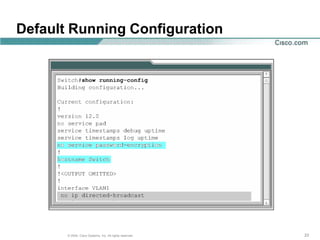
Default Running Configuration


   © 2004, Cisco Systems, Inc. All rights reserved.   20
Default Running Configuration
  Default Running Configuration
  • Дөнгөж ажиллуулж эхлэхэд switch нь
    ямар нэгэн өгөгдөлгүй тохиргоо хийхэд
    бэлэн байна.
  • Switch-ийн нэрийг өөрчлөх боломжтой.
  • Ямар ч нууц үггүй байх ба нууц үгийг
    цогцоор нь хийж болно. Console эсвэл
    virtual terminal (vty) lines
  • Switch нь IP address хаяггүй.
  (IP address for management purposes is configured on
    the virtual interface VLAN 1)
        © 2004, Cisco Systems, Inc. All rights reserved.   21
Verifying the Catalyst Switch Default
Configuration


               • show running-config
               • show interface
               • show vlan
               • show flash
               • show version


       © 2004, Cisco Systems, Inc. All rights reserved.   22
Default Running Configuration


       © 2004, Cisco Systems, Inc. All rights reserved.   23
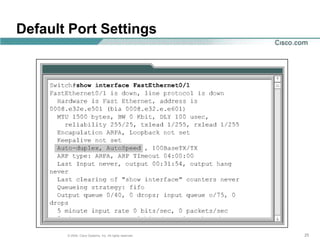
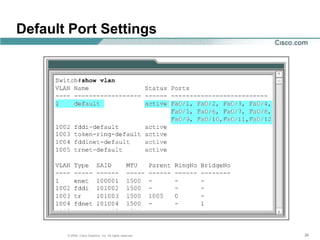
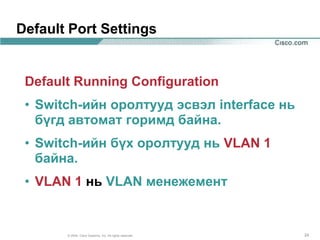
Default Port Settings


 Default Running Configuration
 • Switch-ийн оролтууд эсвэл interface нь
   бүгд автомат горимд байна.
 • Switch-ийн бүх оролтууд нь VLAN 1
   байна.
 • VLAN 1 нь VLAN менежемент


       © 2004, Cisco Systems, Inc. All rights reserved.   24
Default Port Settings


       © 2004, Cisco Systems, Inc. All rights reserved.   25
Default Port Settings


       © 2004, Cisco Systems, Inc. All rights reserved.   26
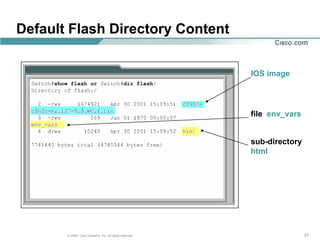
Default Flash Directory Content

                                                          IOS image


                                                          file env_vars


                                                          sub-directory
                                                          html


       © 2004, Cisco Systems, Inc. All rights reserved.                   27
Default Flash Directory Content

 Default Running Configuration
 • by default flash directory агуулна:
      - IOS image;
      - file env_vars;
      - sub-directory html.
 • flash directory агуулахгүй:
      - config.text – switch configuration file;
      - vlan.dat - VLAN database file.
        © 2004, Cisco Systems, Inc. All rights reserved.   28
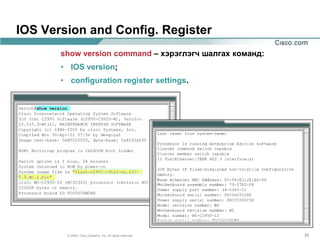
IOS Version and Config. Register
       show version command – хэрэглэгч шалгах команд:
       • IOS version;
       • configuration register settings.


        © 2004, Cisco Systems, Inc. All rights reserved.   29
Configuring the Switch


© 2004, Cisco Systems, Inc. All rights reserved.   30
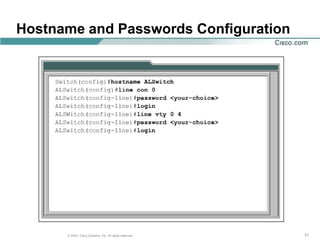
Hostname and Passwords Configuration


      © 2004, Cisco Systems, Inc. All rights reserved.   31
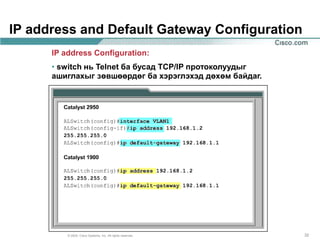
IP address and Default Gateway Configuration
      IP address Configuration:
      • switch нь Telnet ба бусад TCP/IP протоколуудыг
      ашиглахыг зөвшөөрдөг ба хэрэглэхэд дөхөм байдаг.


          © 2004, Cisco Systems, Inc. All rights reserved.   32
VLAN1

Management VLAN:
• by default, VLAN 1 is the management
  VLAN;
• Интернетэд холбогдон ажиллаж байгаа
  бүх төхөөрөмжүүд нь менежемент
  VLAN-тай байна.
• Менежементтай workstation нь бусад
  төхөөрөмжүүдрүү хандах, тохиргоо
  хийх, эзэмших эрхтэй.
        © 2004, Cisco Systems, Inc. All rights reserved.   33
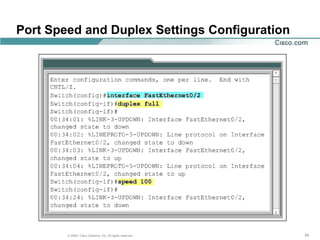
Port Speed and Duplex Settings Configuration


        © 2004, Cisco Systems, Inc. All rights reserved.   34
Port Speed and Duplex Settings Configuration


   Fast Ethernet switch ports:
   •by default set to auto-speed and auto-
   duplex (allows the interfaces to
   negotiate these settings);
   •Network administrators can manually
   configure the interface speed and
   duplex values


        © 2004, Cisco Systems, Inc. All rights reserved.   35
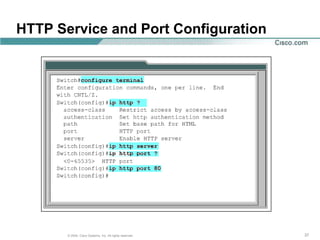
HTTP Service and Port Configuration

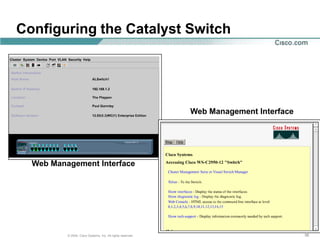
• Intelligent network devices can provide a web-based
  interface for configuration and management
  purposes;
• Once a switch is configured with an IP address and
  gateway, it can be accessed by a web-based
  interface;
HTTP services:
• can be access by a web browser using:
     - IP address;
     - port 80 - the default port for http.
• can be turned on or off, and the port address for the
  service can be chosen.
         © 2004, Cisco Systems, Inc. All rights reserved.   36
HTTP Service and Port Configuration


       © 2004, Cisco Systems, Inc. All rights reserved.   37
Configuring the Catalyst Switch


                                                             Web Management Interface


  Web Management Interface


          © 2004, Cisco Systems, Inc. All rights reserved.                              38
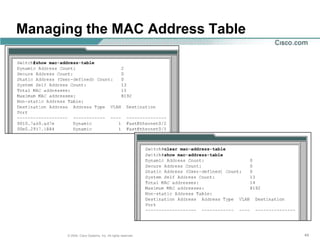
Managing the MAC Address Table


     © 2004, Cisco Systems, Inc. All rights reserved.   39
MAC Address Table


Switches
• examine the source address of frames that
  are received on the ports;
• learn the MAC addresses of PCs or
  workstations that are connected to their
  switch ports;
• record learned MAC addresses in a MAC
  address table.
       © 2004, Cisco Systems, Inc. All rights reserved.   40
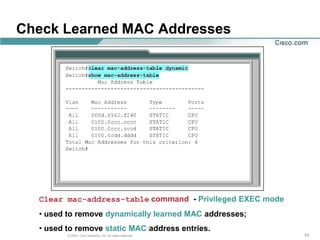
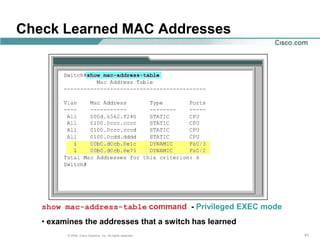
Check Learned MAC Addresses


   show mac-address-table command - Privileged EXEC mode
   • examines the addresses that a switch has learned
         © 2004, Cisco Systems, Inc. All rights reserved.   41
MAC Address Table

Switches:
• dynamically learn and maintain thousands
  of MAC addresses;
• learned entries may be discarded from the
  MAC address table (to preserve memory and
  for optimal operation) ;
• the MAC address entry is automatically
  discarded or aged out after 300 seconds (if
 no frames are seen with a previously learned
 address).
       © 2004, Cisco Systems, Inc. All rights reserved.   42
Check Learned MAC Addresses


  Clear mac-address-table command - Privileged EXEC mode
  • used to remove dynamically learned MAC addresses;
  • used to remove static MAC address entries.
         © 2004, Cisco Systems, Inc. All rights reserved.   43
Managing the MAC Address Table


      © 2004, Cisco Systems, Inc. All rights reserved.   44
Static MAC Addresses


Static MAC address:
• permanently assigned to an interface;
Reasons for use a Static MAC address:
• will not be aged out automatically by the switch;
• a specific server or user workstation must be
  attached to the port and the MAC address is
  known;
• Security is enhanced.
        © 2004, Cisco Systems, Inc. All rights reserved.   45
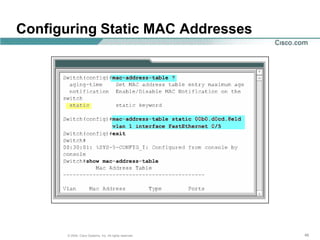
Configuring Static MAC Addresses


      © 2004, Cisco Systems, Inc. All rights reserved.   46
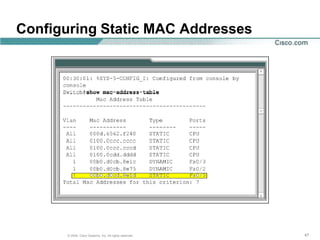
Configuring Static MAC Addresses


      © 2004, Cisco Systems, Inc. All rights reserved.   47
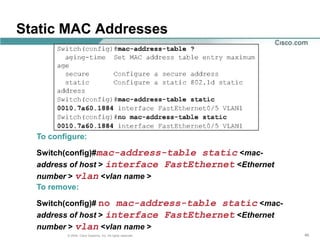
Static MAC Addresses


  To configure:

  Switch(config)#mac-address-table static <mac-
  address of host > interface FastEthernet <Ethernet
  number > vlan <vlan name >
  To remove:

  Switch(config)# no mac-address-table static <mac-
  address of host > interface FastEthernet <Ethernet
  number > vlan <vlan name >
          © 2004, Cisco Systems, Inc. All rights reserved.   48
Port Security


© 2004, Cisco Systems, Inc. All rights reserved.   49
Port Security

  Port Security
  • It is possible to limit the number of
    addresses that can be learned on an
    interface;
  • the number of MAC addresses per port
    can be limited to 1;
  • the first address dynamically learned by
    the switch becomes the secure address.

       © 2004, Cisco Systems, Inc. All rights reserved.   50
Port Security Configuration


       © 2004, Cisco Systems, Inc. All rights reserved.   51
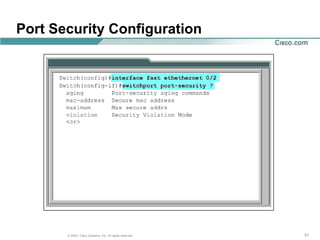
Configuring Port Security

Catalyst 2950 Series

 wg_sw_2950(config-if)#switchport port-security [mac-address
 mac-address] | [maximum value] | [violation {protect
 |restrict | shutdown}]


wg_sw_2950(config)#interface fa0/1
wg_sw_2950(config-if)#switchport mode access
wg_sw_2950(config-if)#switchport port-security
wg_sw_2950(config-if)#switchport port-security maximum 1
wg_sw_2950(config-if)#switchport port-security mac-address 0008.eeee.eeee
wg_sw_2950(config-if)#switchport port-security violation shutdown


            © 2004, Cisco Systems, Inc. All rights reserved.                52
Verifying Port Security
on the Catalyst 2950 Series

 wg_sw_2950#show port-security [interface interface-id] [address] [ |
 {begin | exclude | include} expression]


   wg_sw_2950#show port-security interface fastethernet 0/5
   Port Security              : Enabled
   Port Status                : Secure-up
   Violation Mode             : Shutdown
   Aging Time                 : 20 mins
   Aging Type                 : Absolute
   SecureStatic Address Aging : Disabled
   Maximum MAC Addresses      : 1
   Total MAC Addresses        : 1
   Configured MAC Addresses   : 0
   Sticky MAC Addresses       : 0
   Last Source Address        : 0000.0000.0000
   Security Violation Count   : 0


           © 2004, Cisco Systems, Inc. All rights reserved.             53
Verifying Port Security
on the Catalyst 2950 Series (Cont.)


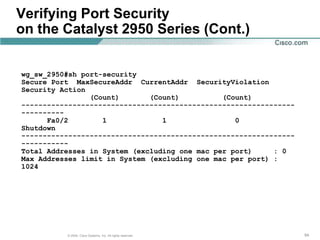
wg_sw_2950#sh port-security
Secure Port MaxSecureAddr CurrentAddr SecurityViolation
Security Action
                (Count)       (Count)          (Count)
----------------------------------------------------------------
----------
      Fa0/2        1             1                0
Shutdown
----------------------------------------------------------------
-----------
Total Addresses in System (excluding one mac per port)     : 0
Max Addresses limit in System (excluding one mac per port) :
1024


          © 2004, Cisco Systems, Inc. All rights reserved.         54
Port Security


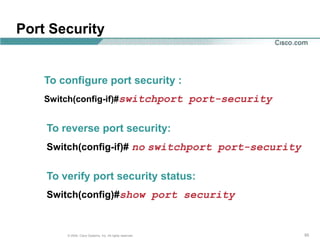
    To configure port security :
    Switch(config-if)#switchport port-security


    To reverse port security:
    Switch(config-if)# no switchport port-security


    To verify port security status:
    Switch(config)#show port security


        © 2004, Cisco Systems, Inc. All rights reserved.   55
Adding and Moving Switches
      to the Network


   © 2004, Cisco Systems, Inc. All rights reserved.   56
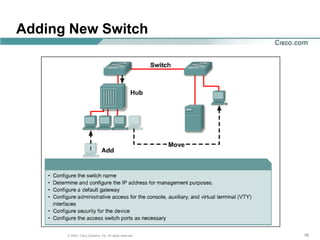
Adding New Switch

     Adding New Switch
     Must be configured:
     • Switch name;
     • IP address for the switch in the
       management VLAN;
     • a default gateway;
     • Line passwords.

      © 2004, Cisco Systems, Inc. All rights reserved.   57
Adding New Switch


      © 2004, Cisco Systems, Inc. All rights reserved.   58
Moving a Switch


Host is moved:
• from one port or switch to another;
• configurations that can cause unexpected
  behavior should be removed;
• configuration that is required can then be
  added.


       © 2004, Cisco Systems, Inc. All rights reserved.   59

Лекц 8

  • 1.
    Switch-ийн тохиргоо © 2004,Cisco Systems, Inc. All rights reserved. 1
  • 2.
    Starting the Switch Switches: • Хостын холбоход зориулагдсан хэд хэдэн оролттой • Мөн тусгай зориулалтын оролттой • Тохиргоо хийлгэхдээ удирдуулахаас гадна шууд холболтын console port-той • Цахилгаанд залгаагүй тохиолдолд switch нь унтраастай буюу холбогдоогүй байна © 2004, Cisco Systems, Inc. All rights reserved. 3
  • 3.
    Catalyst 2950 seriesSwitches Features • Бүх оролт нь тэгш хэмийн дагуу бэхлэгдсэн. FastEthernet or 10/100; • Оролт нь тэгш бус. Шилэн кабелийн 2 эсвэл Gigabit Ethernet-ийн зэс оролттой. • Оролт нь тэгш бус. Модулийн Gigabit Interface Converter (GBIC) суурьтай. © 2004, Cisco Systems, Inc. All rights reserved. 4
  • 4.
    LEDs-гэрэлүүд Light-emitting diodes(LEDs) • Дэлгэцэн дээр системийн үйл ажиллагаа ба гүйцэтгэлийг харуулна. • Switch дээр байрлах гэрлүүд: - System LED - Remote Power Supply (RPS) LED - Port Mode LEDs - Port Status LEDs © 2004, Cisco Systems, Inc. All rights reserved. 5
  • 5.
    Mode LED © 2004, Cisco Systems, Inc. All rights reserved. 7
  • 6.
    Verifying Port LEDsDuring Switch POST Power-On Self Test (POST) •Switch-ийг алдаагүй үүргээ биелүүлж байгааг шалгах зорилгоор автоматаар ажиллаж эхлэнэ. © 2004, Cisco Systems, Inc. All rights reserved. 8
  • 7.
    Verifying Port LEDsDuring Switch POST Port Status LEDs during POST: turn amber - ойролцоогоор 30 seconds • Switch нь сүлжээний топологи ба зангилааг хайж олно. turn green • switch нь компьютер ба оролт нь зөв холбогдсон тохиолдолд turn off • switch-ийн оролтод ямарч холболт байхгүй тохиолдолд © 2004, Cisco Systems, Inc. All rights reserved. 9
  • 8.
    Switch-ээс PC рүүхолбох © 2004, Cisco Systems, Inc. All rights reserved. 10
  • 9.
    Console Connection © 2004, Cisco Systems, Inc. All rights reserved. 11
  • 10.
    Console Connection © 2004, Cisco Systems, Inc. All rights reserved. 12
  • 11.
    Console Connection Shows information about the switch: • details about POST status; • data about the switch hardware. © 2004, Cisco Systems, Inc. All rights reserved. 13
  • 12.
    Switch CLI © 2004,Cisco Systems, Inc. All rights reserved. 14
  • 13.
    Command-Line Interface (CLI)командын мөрийн интерпайс Command-line interface (CLI) Cisco-ийн switch-үүд хэрэглэнэ. • энэ CLI дээр командууд нь Cisco-ийн router-үүд дээр хийгдэх командтай их адилхан. © 2004, Cisco Systems, Inc. All rights reserved. 15
  • 14.
    “Help” command © 2004, Cisco Systems, Inc. All rights reserved. 16
  • 15.
    Command Modes • User EXEC (хэрэглэгчийн) • Privileged EXEC (давуу эрхтэй) © 2004, Cisco Systems, Inc. All rights reserved. 17
  • 16.
    User EXEC mode User EXEC mode • Өөрчлөх горим; • Зөвшөөрөгдсөн командуудын хязгаар: - Терминалын тохиргоог өөрчлөх; - үндсэн текстийг гүйцэтгэх; - дэлгэцэн дээр системийн мэдээллийг гаргах. © 2004, Cisco Systems, Inc. All rights reserved. 18
  • 17.
    Privileged EXEC mode PrivilegedEXEC mode • enable command-ийг өгч хэрэглэчийн EXEC горим ажиллагаанд бэлэн болно • Үүний дараа нэрийн ард (#) тэмдэглэгээтэй болно • Командуудын хэрэглээ нээлттэй болно. • Зөвшөөрөлгүй хэрэглэгчийн хандалтаас сэргийлж нууц үг хийж хамгаалж болно. • нууц үг нь дэлгэц нь дээр харагдахгүй © 2004, Cisco Systems, Inc. All rights reserved. 19
  • 18.
    Default Running Configuration © 2004, Cisco Systems, Inc. All rights reserved. 20
  • 19.
    Default Running Configuration Default Running Configuration • Дөнгөж ажиллуулж эхлэхэд switch нь ямар нэгэн өгөгдөлгүй тохиргоо хийхэд бэлэн байна. • Switch-ийн нэрийг өөрчлөх боломжтой. • Ямар ч нууц үггүй байх ба нууц үгийг цогцоор нь хийж болно. Console эсвэл virtual terminal (vty) lines • Switch нь IP address хаяггүй. (IP address for management purposes is configured on the virtual interface VLAN 1) © 2004, Cisco Systems, Inc. All rights reserved. 21
  • 20.
    Verifying the CatalystSwitch Default Configuration • show running-config • show interface • show vlan • show flash • show version © 2004, Cisco Systems, Inc. All rights reserved. 22
  • 21.
    Default Running Configuration © 2004, Cisco Systems, Inc. All rights reserved. 23
  • 22.
    Default Port Settings Default Running Configuration • Switch-ийн оролтууд эсвэл interface нь бүгд автомат горимд байна. • Switch-ийн бүх оролтууд нь VLAN 1 байна. • VLAN 1 нь VLAN менежемент © 2004, Cisco Systems, Inc. All rights reserved. 24
  • 23.
    Default Port Settings © 2004, Cisco Systems, Inc. All rights reserved. 25
  • 24.
    Default Port Settings © 2004, Cisco Systems, Inc. All rights reserved. 26
  • 25.
    Default Flash DirectoryContent IOS image file env_vars sub-directory html © 2004, Cisco Systems, Inc. All rights reserved. 27
  • 26.
    Default Flash DirectoryContent Default Running Configuration • by default flash directory агуулна: - IOS image; - file env_vars; - sub-directory html. • flash directory агуулахгүй: - config.text – switch configuration file; - vlan.dat - VLAN database file. © 2004, Cisco Systems, Inc. All rights reserved. 28
  • 27.
    IOS Version andConfig. Register show version command – хэрэглэгч шалгах команд: • IOS version; • configuration register settings. © 2004, Cisco Systems, Inc. All rights reserved. 29
  • 28.
    Configuring the Switch ©2004, Cisco Systems, Inc. All rights reserved. 30
  • 29.
    Hostname and PasswordsConfiguration © 2004, Cisco Systems, Inc. All rights reserved. 31
  • 30.
    IP address andDefault Gateway Configuration IP address Configuration: • switch нь Telnet ба бусад TCP/IP протоколуудыг ашиглахыг зөвшөөрдөг ба хэрэглэхэд дөхөм байдаг. © 2004, Cisco Systems, Inc. All rights reserved. 32
  • 31.
    VLAN1 Management VLAN: • bydefault, VLAN 1 is the management VLAN; • Интернетэд холбогдон ажиллаж байгаа бүх төхөөрөмжүүд нь менежемент VLAN-тай байна. • Менежементтай workstation нь бусад төхөөрөмжүүдрүү хандах, тохиргоо хийх, эзэмших эрхтэй. © 2004, Cisco Systems, Inc. All rights reserved. 33
  • 32.
    Port Speed andDuplex Settings Configuration © 2004, Cisco Systems, Inc. All rights reserved. 34
  • 33.
    Port Speed andDuplex Settings Configuration Fast Ethernet switch ports: •by default set to auto-speed and auto- duplex (allows the interfaces to negotiate these settings); •Network administrators can manually configure the interface speed and duplex values © 2004, Cisco Systems, Inc. All rights reserved. 35
  • 34.
    HTTP Service andPort Configuration • Intelligent network devices can provide a web-based interface for configuration and management purposes; • Once a switch is configured with an IP address and gateway, it can be accessed by a web-based interface; HTTP services: • can be access by a web browser using: - IP address; - port 80 - the default port for http. • can be turned on or off, and the port address for the service can be chosen. © 2004, Cisco Systems, Inc. All rights reserved. 36
  • 35.
    HTTP Service andPort Configuration © 2004, Cisco Systems, Inc. All rights reserved. 37
  • 36.
    Configuring the CatalystSwitch Web Management Interface Web Management Interface © 2004, Cisco Systems, Inc. All rights reserved. 38
  • 37.
    Managing the MACAddress Table © 2004, Cisco Systems, Inc. All rights reserved. 39
  • 38.
    MAC Address Table Switches •examine the source address of frames that are received on the ports; • learn the MAC addresses of PCs or workstations that are connected to their switch ports; • record learned MAC addresses in a MAC address table. © 2004, Cisco Systems, Inc. All rights reserved. 40
  • 39.
    Check Learned MACAddresses show mac-address-table command - Privileged EXEC mode • examines the addresses that a switch has learned © 2004, Cisco Systems, Inc. All rights reserved. 41
  • 40.
    MAC Address Table Switches: •dynamically learn and maintain thousands of MAC addresses; • learned entries may be discarded from the MAC address table (to preserve memory and for optimal operation) ; • the MAC address entry is automatically discarded or aged out after 300 seconds (if no frames are seen with a previously learned address). © 2004, Cisco Systems, Inc. All rights reserved. 42
  • 41.
    Check Learned MACAddresses Clear mac-address-table command - Privileged EXEC mode • used to remove dynamically learned MAC addresses; • used to remove static MAC address entries. © 2004, Cisco Systems, Inc. All rights reserved. 43
  • 42.
    Managing the MACAddress Table © 2004, Cisco Systems, Inc. All rights reserved. 44
  • 43.
    Static MAC Addresses StaticMAC address: • permanently assigned to an interface; Reasons for use a Static MAC address: • will not be aged out automatically by the switch; • a specific server or user workstation must be attached to the port and the MAC address is known; • Security is enhanced. © 2004, Cisco Systems, Inc. All rights reserved. 45
  • 44.
    Configuring Static MACAddresses © 2004, Cisco Systems, Inc. All rights reserved. 46
  • 45.
    Configuring Static MACAddresses © 2004, Cisco Systems, Inc. All rights reserved. 47
  • 46.
    Static MAC Addresses To configure: Switch(config)#mac-address-table static <mac- address of host > interface FastEthernet <Ethernet number > vlan <vlan name > To remove: Switch(config)# no mac-address-table static <mac- address of host > interface FastEthernet <Ethernet number > vlan <vlan name > © 2004, Cisco Systems, Inc. All rights reserved. 48
  • 47.
    Port Security © 2004,Cisco Systems, Inc. All rights reserved. 49
  • 48.
    Port Security Port Security • It is possible to limit the number of addresses that can be learned on an interface; • the number of MAC addresses per port can be limited to 1; • the first address dynamically learned by the switch becomes the secure address. © 2004, Cisco Systems, Inc. All rights reserved. 50
  • 49.
    Port Security Configuration © 2004, Cisco Systems, Inc. All rights reserved. 51
  • 50.
    Configuring Port Security Catalyst2950 Series wg_sw_2950(config-if)#switchport port-security [mac-address mac-address] | [maximum value] | [violation {protect |restrict | shutdown}] wg_sw_2950(config)#interface fa0/1 wg_sw_2950(config-if)#switchport mode access wg_sw_2950(config-if)#switchport port-security wg_sw_2950(config-if)#switchport port-security maximum 1 wg_sw_2950(config-if)#switchport port-security mac-address 0008.eeee.eeee wg_sw_2950(config-if)#switchport port-security violation shutdown © 2004, Cisco Systems, Inc. All rights reserved. 52
  • 51.
    Verifying Port Security onthe Catalyst 2950 Series wg_sw_2950#show port-security [interface interface-id] [address] [ | {begin | exclude | include} expression] wg_sw_2950#show port-security interface fastethernet 0/5 Port Security : Enabled Port Status : Secure-up Violation Mode : Shutdown Aging Time : 20 mins Aging Type : Absolute SecureStatic Address Aging : Disabled Maximum MAC Addresses : 1 Total MAC Addresses : 1 Configured MAC Addresses : 0 Sticky MAC Addresses : 0 Last Source Address : 0000.0000.0000 Security Violation Count : 0 © 2004, Cisco Systems, Inc. All rights reserved. 53
  • 52.
    Verifying Port Security onthe Catalyst 2950 Series (Cont.) wg_sw_2950#sh port-security Secure Port MaxSecureAddr CurrentAddr SecurityViolation Security Action (Count) (Count) (Count) ---------------------------------------------------------------- ---------- Fa0/2 1 1 0 Shutdown ---------------------------------------------------------------- ----------- Total Addresses in System (excluding one mac per port) : 0 Max Addresses limit in System (excluding one mac per port) : 1024 © 2004, Cisco Systems, Inc. All rights reserved. 54
  • 53.
    Port Security To configure port security : Switch(config-if)#switchport port-security To reverse port security: Switch(config-if)# no switchport port-security To verify port security status: Switch(config)#show port security © 2004, Cisco Systems, Inc. All rights reserved. 55
  • 54.
    Adding and MovingSwitches to the Network © 2004, Cisco Systems, Inc. All rights reserved. 56
  • 55.
    Adding New Switch Adding New Switch Must be configured: • Switch name; • IP address for the switch in the management VLAN; • a default gateway; • Line passwords. © 2004, Cisco Systems, Inc. All rights reserved. 57
  • 56.
    Adding New Switch © 2004, Cisco Systems, Inc. All rights reserved. 58
  • 57.
    Moving a Switch Hostis moved: • from one port or switch to another; • configurations that can cause unexpected behavior should be removed; • configuration that is required can then be added. © 2004, Cisco Systems, Inc. All rights reserved. 59