
Router Configurations part1
2nd semester 1436-1437
Outline
 Accessing a router for configuration
 Command-Line Interface (CLI)
 IOS CLI modes
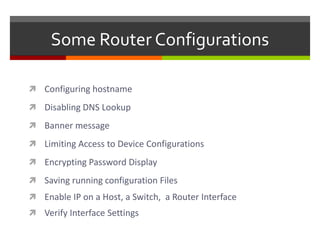
 Some Router Configurations
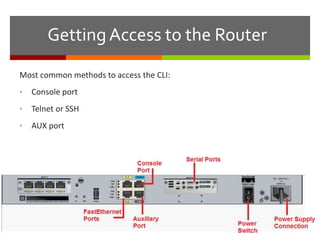
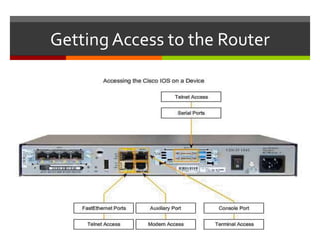
Getting Access to the Router
Most common methods to access the CLI:
• Console port
• Telnet or SSH
• AUX port
Getting Access to the Router
Command-Line Interface
 CLI is the acronym used by Cisco to denote the command-line
interface of the IOS.
 CLI is the primary interface used to configure, manage, and
troubleshoot Cisco devices.
 This user interface enables you to directly execute IOS
commands, and it can be accessed through a console, modem,
or Telnet connection.
 Access by any of these methods is generally referred to as an
EXEC session
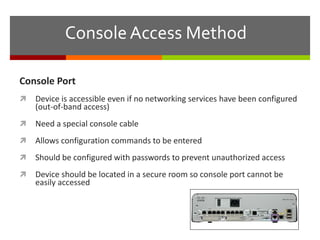
Console Access Method
Console Port
 Device is accessible even if no networking services have been configured
(out-of-band access)
 Need a special console cable
 Allows configuration commands to be entered
 Should be configured with passwords to prevent unauthorized access
 Device should be located in a secure room so console port cannot be
easily accessed
Telnet, SSH, and AUX Access Methods
Telnet
 Method for remotely accessing the CLI over a network
 Require active networking services and one active interface that is
configured
Secure Shell (SSH)
 Remote login similar to Telnet, but utilizes more security
 Stronger password authentication
 Uses encryption when transporting data
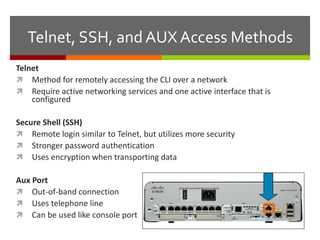
Aux Port
 Out-of-band connection
 Uses telephone line
 Can be used like console port
EXEC Levels or Modes
 Two different EXEC sessions exist:
 User EXEC level
 Privileged EXEC level.
 Each level provides a different amount of access to the commands within the
IOS.
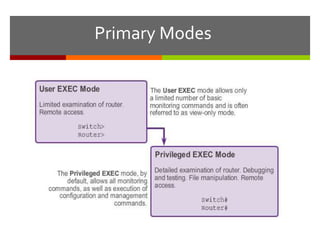
 User EXEC provides access to a limited number of commands that allow basic
troubleshooting and monitoring of the router.
 Privileged EXEC level allows access to all router commands, such as
configuration and management settings.
 Password protection to the privileged EXEC level is highly recommended to
prevent unauthorized configuration changes from being made to the router.
Primary Modes
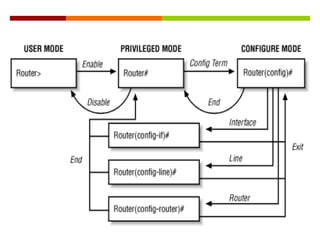
IOS CLI Hierarchy
 Cisco IOS software is structured in a hierarchical manner
 It is important to understand this structure to successfully navigate
within Cisco IOS software.
 As mentioned previously, there are two EXEC modes: user EXEC and
privileged EXEC.
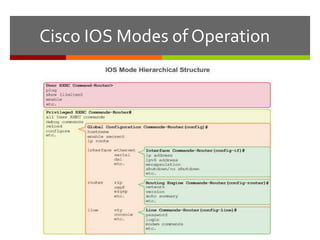
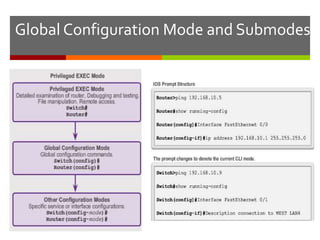
 Privileged EXEC mode is composed of various configuration modes:
 Global configuration mode
 Interface configuration mode
 Router configuration mode
 Line configuration mode
Cisco IOS Modes of Operation
Global Configuration Mode and Submodes
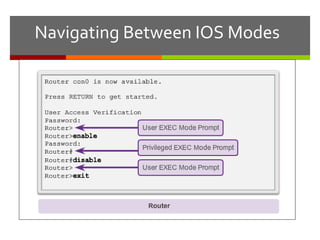
Navigating Between IOS Modes
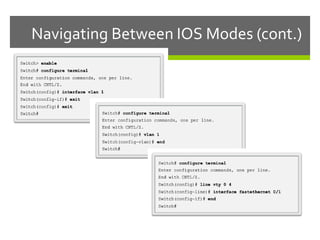
Navigating Between IOS Modes (cont.)
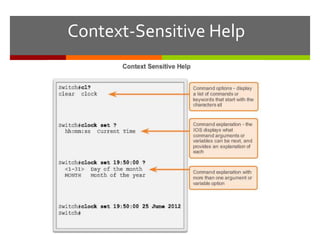
Context-Sensitive Help
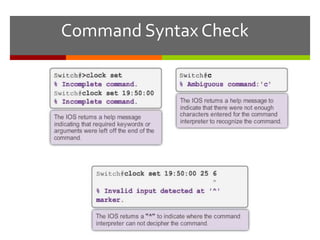
Command Syntax Check
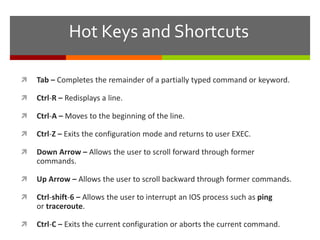
Hot Keys and Shortcuts
 Tab – Completes the remainder of a partially typed command or keyword.
 Ctrl-R – Redisplays a line.
 Ctrl-A – Moves to the beginning of the line.
 Ctrl-Z – Exits the configuration mode and returns to user EXEC.
 Down Arrow – Allows the user to scroll forward through former
commands.
 Up Arrow – Allows the user to scroll backward through former commands.
 Ctrl-shift-6 – Allows the user to interrupt an IOS process such as ping
or traceroute.
 Ctrl-C – Exits the current configuration or aborts the current command.
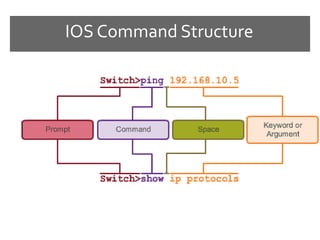
IOS Command Structure
Some Router Configurations
 Configuring hostname
 Disabling DNS Lookup
 Banner message
 Limiting Access to Device Configurations
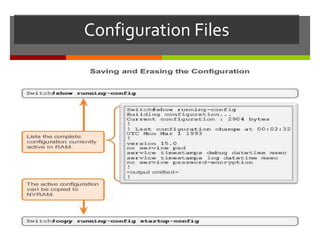
 Encrypting Password Display
 Saving running configuration Files
 Enable IP on a Host, a Switch, a Router Interface
 Verify Interface Settings
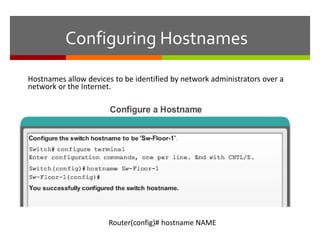
Configuring Hostnames
Hostnames allow devices to be identified by network administrators over a
network or the Internet.
Router(config)# hostname NAME
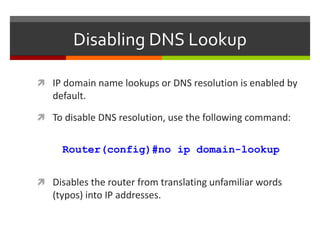
Disabling DNS Lookup
 IP domain name lookups or DNS resolution is enabled by
default.
 To disable DNS resolution, use the following command:
Router(config)#no ip domain-lookup
 Disables the router from translating unfamiliar words
(typos) into IP addresses.
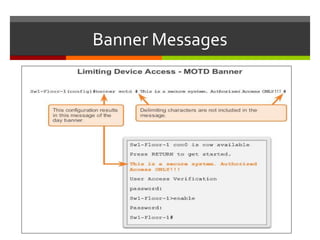
Banner Messages
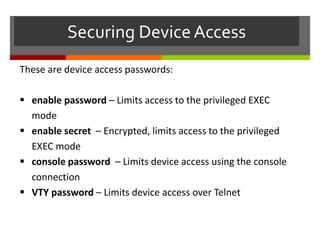
Securing DeviceAccess
These are device access passwords:
 enable password – Limits access to the privileged EXEC
mode
 enable secret – Encrypted, limits access to the privileged
EXEC mode
 console password – Limits device access using the console
connection
 VTY password – Limits device access over Telnet
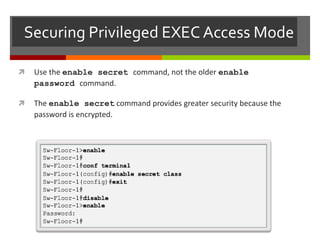
Securing Privileged EXEC Access Mode
 Use the enable secret command, not the older enable
password command.
 The enable secret command provides greater security because the
password is encrypted.
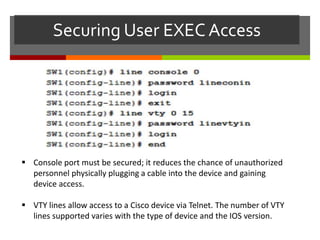
Securing User EXEC Access
 Console port must be secured; it reduces the chance of unauthorized
personnel physically plugging a cable into the device and gaining
device access.
 VTY lines allow access to a Cisco device via Telnet. The number of VTY
lines supported varies with the type of device and the IOS version.
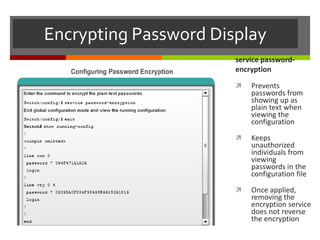
Encrypting Password Display
service password-
encryption
 Prevents
passwords from
showing up as
plain text when
viewing the
configuration
 Keeps
unauthorized
individuals from
viewing
passwords in the
configuration file
 Once applied,
removing the
encryption service
does not reverse
the encryption
Configuration Files
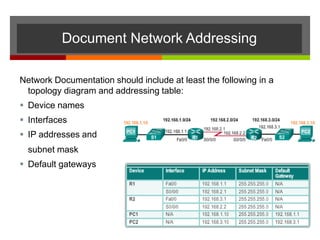
Network Documentation should include at least the following in a
topology diagram and addressing table:
 Device names
 Interfaces
 IP addresses and
subnet mask
 Default gateways
Document Network Addressing
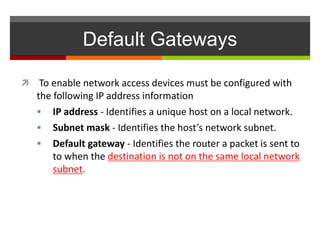
Default Gateways
 To enable network access devices must be configured with
the following IP address information
 IP address - Identifies a unique host on a local network.
 Subnet mask - Identifies the host’s network subnet.
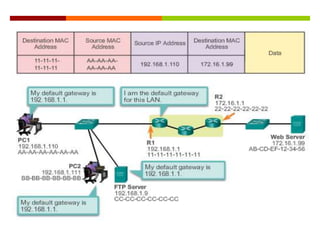
 Default gateway - Identifies the router a packet is sent to
to when the destination is not on the same local network
subnet.
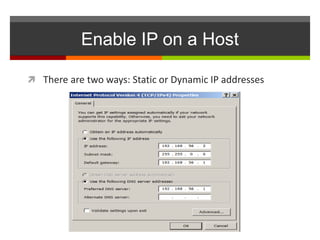
Enable IP on a Host
 There are two ways: Static or Dynamic IP addresses
Enable IP on a Host
 Statically Assigned IP address –
 Host is manually assigned the IP address, subnet mask and default
gateway. DNS server IP address can also be assigned.
 Used to identify specific network resources such as network servers
and printers
 Can be used in very small networks with few hosts.
Enable IP on a Host
 Dynamically Assigned IP Address –
 IP Address information is dynamically assigned by a server using
Dynamic Host Configuration Protocol (DHCP)
 Most hosts acquire their IP address information through DHCP
 DHCP services can be provided by Cisco routers
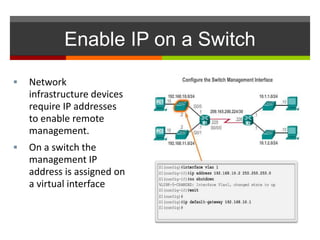
Enable IP on a Switch
 Network
infrastructure devices
require IP addresses
to enable remote
management.
 On a switch the
management IP
address is assigned on
a virtual interface
Enable IP on a Router Interface
 To be available a router interface must be:
 Configured with an address and subnet mask .
 Activated – by default LAN and WAN interfaces are not
activated. Must be activated using no shutdown command.
 Other parameters - serial cable end labeled DCE must be
configured with the clock rate command.
 Optional description can be included.
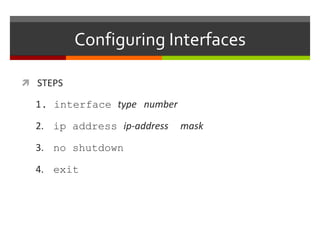
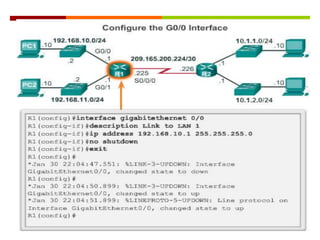
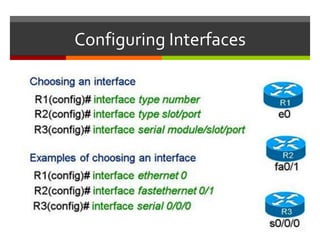
Configuring Interfaces
 STEPS
1. interface type number
2. ip address ip-address mask
3. no shutdown
4. exit
Configuring Interfaces
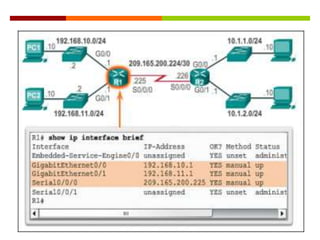
Verify Interface Settings
 Show commands to verify operation and configuration of
interface.
 show ip interfaces brief
 show running-config
Show commands to gather more detailed interface information.
 show interfaces
 show ip interfaces
lab2_2.pptx

lab2_2.pptx

  • 1.
  • 2.
    Outline  Accessing arouter for configuration  Command-Line Interface (CLI)  IOS CLI modes  Some Router Configurations
  • 3.
    Getting Access tothe Router Most common methods to access the CLI: • Console port • Telnet or SSH • AUX port
  • 4.
  • 5.
    Command-Line Interface  CLIis the acronym used by Cisco to denote the command-line interface of the IOS.  CLI is the primary interface used to configure, manage, and troubleshoot Cisco devices.  This user interface enables you to directly execute IOS commands, and it can be accessed through a console, modem, or Telnet connection.  Access by any of these methods is generally referred to as an EXEC session
  • 6.
    Console Access Method ConsolePort  Device is accessible even if no networking services have been configured (out-of-band access)  Need a special console cable  Allows configuration commands to be entered  Should be configured with passwords to prevent unauthorized access  Device should be located in a secure room so console port cannot be easily accessed
  • 7.
    Telnet, SSH, andAUX Access Methods Telnet  Method for remotely accessing the CLI over a network  Require active networking services and one active interface that is configured Secure Shell (SSH)  Remote login similar to Telnet, but utilizes more security  Stronger password authentication  Uses encryption when transporting data Aux Port  Out-of-band connection  Uses telephone line  Can be used like console port
  • 8.
    EXEC Levels orModes  Two different EXEC sessions exist:  User EXEC level  Privileged EXEC level.  Each level provides a different amount of access to the commands within the IOS.  User EXEC provides access to a limited number of commands that allow basic troubleshooting and monitoring of the router.  Privileged EXEC level allows access to all router commands, such as configuration and management settings.  Password protection to the privileged EXEC level is highly recommended to prevent unauthorized configuration changes from being made to the router.
  • 9.
  • 10.
    IOS CLI Hierarchy Cisco IOS software is structured in a hierarchical manner  It is important to understand this structure to successfully navigate within Cisco IOS software.  As mentioned previously, there are two EXEC modes: user EXEC and privileged EXEC.  Privileged EXEC mode is composed of various configuration modes:  Global configuration mode  Interface configuration mode  Router configuration mode  Line configuration mode
  • 11.
    Cisco IOS Modesof Operation
  • 12.
  • 13.
  • 14.
  • 16.
  • 17.
  • 18.
    Hot Keys andShortcuts  Tab – Completes the remainder of a partially typed command or keyword.  Ctrl-R – Redisplays a line.  Ctrl-A – Moves to the beginning of the line.  Ctrl-Z – Exits the configuration mode and returns to user EXEC.  Down Arrow – Allows the user to scroll forward through former commands.  Up Arrow – Allows the user to scroll backward through former commands.  Ctrl-shift-6 – Allows the user to interrupt an IOS process such as ping or traceroute.  Ctrl-C – Exits the current configuration or aborts the current command.
  • 19.
  • 20.
    Some Router Configurations Configuring hostname  Disabling DNS Lookup  Banner message  Limiting Access to Device Configurations  Encrypting Password Display  Saving running configuration Files  Enable IP on a Host, a Switch, a Router Interface  Verify Interface Settings
  • 21.
    Configuring Hostnames Hostnames allowdevices to be identified by network administrators over a network or the Internet. Router(config)# hostname NAME
  • 22.
    Disabling DNS Lookup IP domain name lookups or DNS resolution is enabled by default.  To disable DNS resolution, use the following command: Router(config)#no ip domain-lookup  Disables the router from translating unfamiliar words (typos) into IP addresses.
  • 23.
  • 24.
    Securing DeviceAccess These aredevice access passwords:  enable password – Limits access to the privileged EXEC mode  enable secret – Encrypted, limits access to the privileged EXEC mode  console password – Limits device access using the console connection  VTY password – Limits device access over Telnet
  • 25.
    Securing Privileged EXECAccess Mode  Use the enable secret command, not the older enable password command.  The enable secret command provides greater security because the password is encrypted.
  • 26.
    Securing User EXECAccess  Console port must be secured; it reduces the chance of unauthorized personnel physically plugging a cable into the device and gaining device access.  VTY lines allow access to a Cisco device via Telnet. The number of VTY lines supported varies with the type of device and the IOS version.
  • 27.
    Encrypting Password Display servicepassword- encryption  Prevents passwords from showing up as plain text when viewing the configuration  Keeps unauthorized individuals from viewing passwords in the configuration file  Once applied, removing the encryption service does not reverse the encryption
  • 28.
  • 29.
    Network Documentation shouldinclude at least the following in a topology diagram and addressing table:  Device names  Interfaces  IP addresses and subnet mask  Default gateways Document Network Addressing
  • 30.
    Default Gateways  Toenable network access devices must be configured with the following IP address information  IP address - Identifies a unique host on a local network.  Subnet mask - Identifies the host’s network subnet.  Default gateway - Identifies the router a packet is sent to to when the destination is not on the same local network subnet.
  • 32.
    Enable IP ona Host  There are two ways: Static or Dynamic IP addresses
  • 33.
    Enable IP ona Host  Statically Assigned IP address –  Host is manually assigned the IP address, subnet mask and default gateway. DNS server IP address can also be assigned.  Used to identify specific network resources such as network servers and printers  Can be used in very small networks with few hosts.
  • 34.
    Enable IP ona Host  Dynamically Assigned IP Address –  IP Address information is dynamically assigned by a server using Dynamic Host Configuration Protocol (DHCP)  Most hosts acquire their IP address information through DHCP  DHCP services can be provided by Cisco routers
  • 35.
    Enable IP ona Switch  Network infrastructure devices require IP addresses to enable remote management.  On a switch the management IP address is assigned on a virtual interface
  • 36.
    Enable IP ona Router Interface  To be available a router interface must be:  Configured with an address and subnet mask .  Activated – by default LAN and WAN interfaces are not activated. Must be activated using no shutdown command.  Other parameters - serial cable end labeled DCE must be configured with the clock rate command.  Optional description can be included.
  • 37.
    Configuring Interfaces  STEPS 1.interface type number 2. ip address ip-address mask 3. no shutdown 4. exit
  • 38.
  • 40.
    Verify Interface Settings Show commands to verify operation and configuration of interface.  show ip interfaces brief  show running-config Show commands to gather more detailed interface information.  show interfaces  show ip interfaces