Chapter 5: Switch
Configuration
CCNA Routing and Switching
Routing and Switching
Essentials v6.0
2
© 2016 Cisco and/or its affiliates. All rights reserved. Cisco Confidential
 5.1 Basic Switch Configuration
• Configure basic switch settings to meet network requirements.
• Configure initial settings on a Cisco switch.
• Configure switch ports to meet network requirements.
 5.2 Basic Device Configuration
• Configure a switch using security best practices in a small to medium-sized business
network.
• Configure the management virtual interface on a switch.
• Configure the port security feature to restrict network access.
Chapter 5 - Sections & Objectives
3
© 2016 Cisco and/or its affiliates. All rights reserved. Cisco Confidential
5.1 Configure a Switch with
Initial Settings
4
© 2016 Cisco and/or its affiliates. All rights reserved. Cisco Confidential
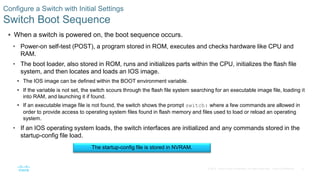
 When a switch is powered on, the boot sequence occurs.
• Power-on self-test (POST), a program stored in ROM, executes and checks hardware like CPU and
RAM.
• The boot loader, also stored in ROM, runs and initializes parts within the CPU, initializes the flash file
system, and then locates and loads an IOS image.
• The IOS image can be defined within the BOOT environment variable.
• If the variable is not set, the switch scours through the flash file system searching for an executable image file, loading it
into RAM, and launching it if found.
• If an executable image file is not found, the switch shows the prompt switch: where a few commands are allowed in
order to provide access to operating system files found in flash memory and files used to load or reload an operating
system.
• If an IOS operating system loads, the switch interfaces are initialized and any commands stored in the
startup-config file load.
Configure a Switch with Initial Settings
Switch Boot Sequence
The startup-config file is stored in NVRAM.
5
© 2016 Cisco and/or its affiliates. All rights reserved. Cisco Confidential
 The boot system command is use to set the BOOT environment variable.
Configure a Switch with Initial Settings
Switch Boot Sequence (Cont.)
6
© 2016 Cisco and/or its affiliates. All rights reserved. Cisco Confidential
 The boot loader prompt can be accessed through a console connection to the switch:
1. Cable the PC to the switch console port.
2. Configure the terminal emulation software on the PC.
3. Unplug the switch power cord.
4. Reconnect the power cord and at the same time or within 15 seconds, press and hold the Mode button
on the front of the switch until the System LED turns an amber color briefly and then turns a solid green.
 The boot loader command prompt is switch: (instead of Switch>).
• The commands available through the boot loader command prompt are limited.
• Use the help command to display the available commands.
Configure a Switch with Initial Settings
Recovering From a System Crash
7
© 2016 Cisco and/or its affiliates. All rights reserved. Cisco Confidential
Configure a Switch with Initial Settings
Switch LED Indicators
 System LED shows if the switch has
power applied.
 Port LED states:
• Off – no link or shut down
• Green – link is present
• Blinking green – data activity
• Alternating green and amber – link fault
• Amber – port is not sending data;
common for first 30 seconds of
connectivity or activation
• Blinking amber – port is blocking to
prevent a switch loop
8
© 2016 Cisco and/or its affiliates. All rights reserved. Cisco Confidential
Configure a Switch with Initial Settings
Preparing for Basic Switch Management
 To configure a switch for remote access,
the switch must be configured with an IP
address, subnet mask, and default
gateway.
 One particular switch virtual interface
(SVI) is used to manage the switch:
• A switch IP address is assigned to an SVI.
• By default the management SVI is
controlled and configured through VLAN 1.
• The management SVI is commonly called
the management VLAN.
 For security reasons, it is best practice to
use a VLAN other than VLAN 1 for the
management VLAN.
Remember that the switch console port is on the back of the switch.
9
© 2016 Cisco and/or its affiliates. All rights reserved. Cisco Confidential
Configure a Switch with Initial Settings
Configuring Basic Switch Management Access with IPv4
exit
Important Concept
The default gateway is the
router address and is used by
the switch to communicate with
other networks.
10
© 2016 Cisco and/or its affiliates. All rights reserved. Cisco Confidential
Configure a Switch with Initial Settings
Basic Switch Configuration
11
© 2016 Cisco and/or its affiliates. All rights reserved. Cisco Confidential
 Gigabit Ethernet and 10Gb Ethernet NICs require full-duplex connections to operate.
Configure Switch Ports
Duplex Communication
Bidirectional
communication
Unidirectional
communication
12
© 2016 Cisco and/or its affiliates. All rights reserved. Cisco Confidential
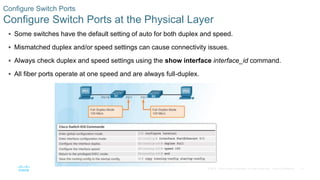
 Some switches have the default setting of auto for both duplex and speed.
 Mismatched duplex and/or speed settings can cause connectivity issues.
 Always check duplex and speed settings using the show interface interface_id command.
 All fiber ports operate at one speed and are always full-duplex.
Configure Switch Ports
Configure Switch Ports at the Physical Layer
13
© 2016 Cisco and/or its affiliates. All rights reserved. Cisco Confidential
 Some switches have the automatic medium-dependent interface crossover (auto-MDIX) feature
that allows an interface to detect the required cable connection type (straight-through or crossover)
and configure the connection appropriately.
Configure Switch Ports
Auto-MDIX
14
© 2016 Cisco and/or its affiliates. All rights reserved. Cisco Confidential
 Use the show controllers Ethernet-controller command to verify auto-MDIX settings.
Configure Switch Ports
Auto-MDIX (Cont.)
15
© 2016 Cisco and/or its affiliates. All rights reserved. Cisco Confidential
Configure Switch Ports
Verifying Switch Port Configuration
16
© 2016 Cisco and/or its affiliates. All rights reserved. Cisco Confidential
Configure Switch Ports
Verifying Switch Port Configuration (Cont.)
17
© 2016 Cisco and/or its affiliates. All rights reserved. Cisco Confidential
Configure Switch Ports
Verifying Switch Port Configuration (Cont.)
Layer 1
OK
Layer 2
OK
18
© 2016 Cisco and/or its affiliates. All rights reserved. Cisco Confidential
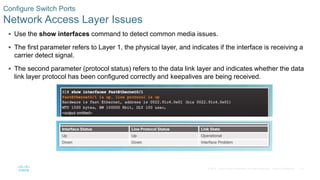
 Use the show interfaces command to detect common media issues.
 The first parameter refers to Layer 1, the physical layer, and indicates if the interface is receiving a
carrier detect signal.
 The second parameter (protocol status) refers to the data link layer and indicates whether the data
link layer protocol has been configured correctly and keepalives are being received.
Configure Switch Ports
Network Access Layer Issues
19
© 2016 Cisco and/or its affiliates. All rights reserved. Cisco Confidential
Configure Switch Ports
Network Access Layer Issues (Cont.)
20
© 2016 Cisco and/or its affiliates. All rights reserved. Cisco Confidential
Configure Switch Ports
Troubleshooting Network Access Layer Issues
21
© 2016 Cisco and/or its affiliates. All rights reserved. Cisco Confidential
5.2 Switch Security
22
© 2016 Cisco and/or its affiliates. All rights reserved. Cisco Confidential
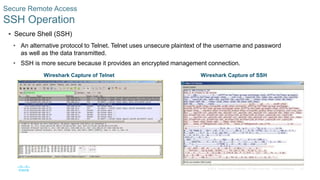
 Secure Shell (SSH)
• An alternative protocol to Telnet. Telnet uses unsecure plaintext of the username and password
as well as the data transmitted.
• SSH is more secure because it provides an encrypted management connection.
Secure Remote Access
SSH Operation
Wireshark Capture of Telnet Wireshark Capture of SSH
23
© 2016 Cisco and/or its affiliates. All rights reserved. Cisco Confidential
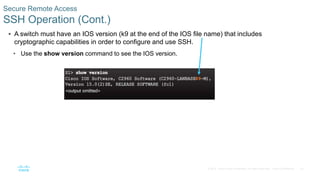
 A switch must have an IOS version (k9 at the end of the IOS file name) that includes
cryptographic capabilities in order to configure and use SSH.
• Use the show version command to see the IOS version.
Secure Remote Access
SSH Operation (Cont.)
24
© 2016 Cisco and/or its affiliates. All rights reserved. Cisco Confidential
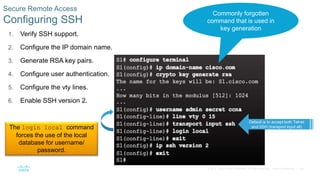
1. Verify SSH support.
2. Configure the IP domain name.
3. Generate RSA key pairs.
4. Configure user authentication.
5. Configure the vty lines.
6. Enable SSH version 2.
Secure Remote Access
Configuring SSH
Commonly forgotten
command that is used in
key generation
Default is to accept both Telnet
and SSH (transport input all)
The login local command
forces the use of the local
database for username/
password.
25
© 2016 Cisco and/or its affiliates. All rights reserved. Cisco Confidential
 On the PC, connect to the switch using SSH.
Secure Remote Access
Verifying SSH
The PC is using SSH to communicate and issue
commands on the switch.
26
© 2016 Cisco and/or its affiliates. All rights reserved. Cisco Confidential
Secure Remote Access
Packet Tracer – Configuring SSH
27
© 2016 Cisco and/or its affiliates. All rights reserved. Cisco Confidential
Switch Port Security
Secure Unused Ports
The interface range command
can be used to apply a configuration
to several switch ports at one time.
28
© 2016 Cisco and/or its affiliates. All rights reserved. Cisco Confidential
 Port security limits the number of valid MAC addresses allowed to transmit data through a switch
port.
• If a port has port security enabled and an unknown MAC address sends data, the switch presents a
security violation.
• Default number of secure MAC addresses allowed is 1.
 Methods use to configure MAC addresses within port security:
• Static secure MAC addresses – manually configure
switchport port-security mac-address mac-address
• Dynamic secure MAC addresses – dynamically learned and removed if the switch restarts
• Sticky secure MAC addresses – dynamically learned and added to the running configuration (which can
later be saved to the startup-config to permanently retain the MAC addresses)
switchport port-security mac-address sticky mac-address
Note: Disabling sticky learning converts sticky MAC addresses to dynamic secure addresses and removes
them from the running-config.
Switch Port Security
Port Security: Operation
29
© 2016 Cisco and/or its affiliates. All rights reserved. Cisco Confidential
 Protect – data from unknown source MAC addresses are dropped; a security notification IS NOT presented
by the switch
 Restrict - data from unknown source MAC addresses are dropped; a security notification IS presented by
the switch and the violation counter increments.
 Shutdown – (default mode) interface becomes error-disabled and port LED turns off. The violation counter
increments. Issues the shutdown and then the no shutdown command on the interface to bring it out of the
error-disabled state.
Switch Port Security
Port Security: Violation Modes
30
© 2016 Cisco and/or its affiliates. All rights reserved. Cisco Confidential
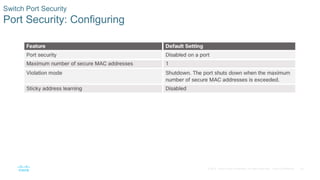
Switch Port Security
Port Security: Configuring
31
© 2016 Cisco and/or its affiliates. All rights reserved. Cisco Confidential
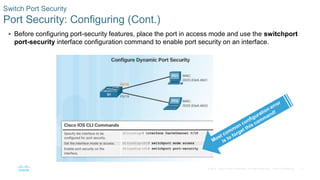
 Before configuring port-security features, place the port in access mode and use the switchport
port-security interface configuration command to enable port security on an interface.
Switch Port Security
Port Security: Configuring (Cont.)
32
© 2016 Cisco and/or its affiliates. All rights reserved. Cisco Confidential
Switch Port Security
Port Security: Configuring (Cont.)
33
© 2016 Cisco and/or its affiliates. All rights reserved. Cisco Confidential
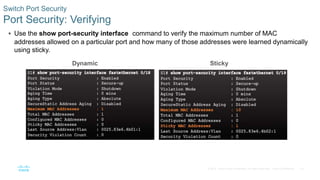
 Use the show port-security interface command to verify the maximum number of MAC
addresses allowed on a particular port and how many of those addresses were learned dynamically
using sticky.
Switch Port Security
Port Security: Verifying
Dynamic Sticky
34
© 2016 Cisco and/or its affiliates. All rights reserved. Cisco Confidential
 Use the show running-config command to see learned MAC addresses added to the
configuration.
 The show port-security address command shows how MAC addresses were learned on a
particular port.
Switch Port Security
Port Security: Verifying (Cont.)
35
© 2016 Cisco and/or its affiliates. All rights reserved. Cisco Confidential
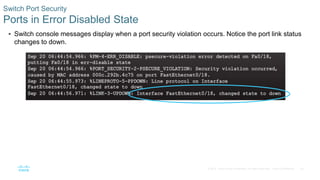
 Switch console messages display when a port security violation occurs. Notice the port link status
changes to down.
Switch Port Security
Ports in Error Disabled State
36
© 2016 Cisco and/or its affiliates. All rights reserved. Cisco Confidential
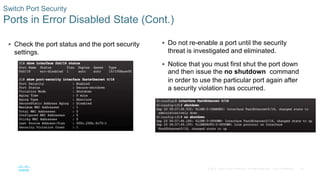
 Check the port status and the port security
settings.
Switch Port Security
Ports in Error Disabled State (Cont.)
 Do not re-enable a port until the security
threat is investigated and eliminated.
 Notice that you must first shut the port down
and then issue the no shutdown command
in order to use the particular port again after
a security violation has occurred.
37
© 2016 Cisco and/or its affiliates. All rights reserved. Cisco Confidential
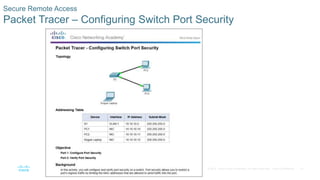
Secure Remote Access
Packet Tracer – Configuring Switch Port Security
38
© 2016 Cisco and/or its affiliates. All rights reserved. Cisco Confidential
Secure Remote Access
Packet Tracer – Troubleshooting Switch Port Security
39
© 2016 Cisco and/or its affiliates. All rights reserved. Cisco Confidential
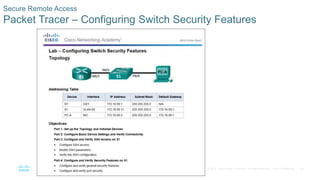
Secure Remote Access
Packet Tracer – Configuring Switch Security Features
40
© 2016 Cisco and/or its affiliates. All rights reserved. Cisco Confidential
5.3 Chapter Summary
41
© 2016 Cisco and/or its affiliates. All rights reserved. Cisco Confidential
Conclusion
Packet Tracer - Skills Integration Challenge
42
© 2016 Cisco and/or its affiliates. All rights reserved. Cisco Confidential
 Configure basic switch settings to meet network requirements.
 Configure a switch using security best practices in a small to medium-sized business network.
Conclusion
Chapter 5: Switch Configuration
PC LEESOON 6.pptx

PC LEESOON 6.pptx

  • 1.
    Chapter 5: Switch Configuration CCNARouting and Switching Routing and Switching Essentials v6.0
  • 2.
    2 © 2016 Ciscoand/or its affiliates. All rights reserved. Cisco Confidential  5.1 Basic Switch Configuration • Configure basic switch settings to meet network requirements. • Configure initial settings on a Cisco switch. • Configure switch ports to meet network requirements.  5.2 Basic Device Configuration • Configure a switch using security best practices in a small to medium-sized business network. • Configure the management virtual interface on a switch. • Configure the port security feature to restrict network access. Chapter 5 - Sections & Objectives
  • 3.
    3 © 2016 Ciscoand/or its affiliates. All rights reserved. Cisco Confidential 5.1 Configure a Switch with Initial Settings
  • 4.
    4 © 2016 Ciscoand/or its affiliates. All rights reserved. Cisco Confidential  When a switch is powered on, the boot sequence occurs. • Power-on self-test (POST), a program stored in ROM, executes and checks hardware like CPU and RAM. • The boot loader, also stored in ROM, runs and initializes parts within the CPU, initializes the flash file system, and then locates and loads an IOS image. • The IOS image can be defined within the BOOT environment variable. • If the variable is not set, the switch scours through the flash file system searching for an executable image file, loading it into RAM, and launching it if found. • If an executable image file is not found, the switch shows the prompt switch: where a few commands are allowed in order to provide access to operating system files found in flash memory and files used to load or reload an operating system. • If an IOS operating system loads, the switch interfaces are initialized and any commands stored in the startup-config file load. Configure a Switch with Initial Settings Switch Boot Sequence The startup-config file is stored in NVRAM.
  • 5.
    5 © 2016 Ciscoand/or its affiliates. All rights reserved. Cisco Confidential  The boot system command is use to set the BOOT environment variable. Configure a Switch with Initial Settings Switch Boot Sequence (Cont.)
  • 6.
    6 © 2016 Ciscoand/or its affiliates. All rights reserved. Cisco Confidential  The boot loader prompt can be accessed through a console connection to the switch: 1. Cable the PC to the switch console port. 2. Configure the terminal emulation software on the PC. 3. Unplug the switch power cord. 4. Reconnect the power cord and at the same time or within 15 seconds, press and hold the Mode button on the front of the switch until the System LED turns an amber color briefly and then turns a solid green.  The boot loader command prompt is switch: (instead of Switch>). • The commands available through the boot loader command prompt are limited. • Use the help command to display the available commands. Configure a Switch with Initial Settings Recovering From a System Crash
  • 7.
    7 © 2016 Ciscoand/or its affiliates. All rights reserved. Cisco Confidential Configure a Switch with Initial Settings Switch LED Indicators  System LED shows if the switch has power applied.  Port LED states: • Off – no link or shut down • Green – link is present • Blinking green – data activity • Alternating green and amber – link fault • Amber – port is not sending data; common for first 30 seconds of connectivity or activation • Blinking amber – port is blocking to prevent a switch loop
  • 8.
    8 © 2016 Ciscoand/or its affiliates. All rights reserved. Cisco Confidential Configure a Switch with Initial Settings Preparing for Basic Switch Management  To configure a switch for remote access, the switch must be configured with an IP address, subnet mask, and default gateway.  One particular switch virtual interface (SVI) is used to manage the switch: • A switch IP address is assigned to an SVI. • By default the management SVI is controlled and configured through VLAN 1. • The management SVI is commonly called the management VLAN.  For security reasons, it is best practice to use a VLAN other than VLAN 1 for the management VLAN. Remember that the switch console port is on the back of the switch.
  • 9.
    9 © 2016 Ciscoand/or its affiliates. All rights reserved. Cisco Confidential Configure a Switch with Initial Settings Configuring Basic Switch Management Access with IPv4 exit Important Concept The default gateway is the router address and is used by the switch to communicate with other networks.
  • 10.
    10 © 2016 Ciscoand/or its affiliates. All rights reserved. Cisco Confidential Configure a Switch with Initial Settings Basic Switch Configuration
  • 11.
    11 © 2016 Ciscoand/or its affiliates. All rights reserved. Cisco Confidential  Gigabit Ethernet and 10Gb Ethernet NICs require full-duplex connections to operate. Configure Switch Ports Duplex Communication Bidirectional communication Unidirectional communication
  • 12.
    12 © 2016 Ciscoand/or its affiliates. All rights reserved. Cisco Confidential  Some switches have the default setting of auto for both duplex and speed.  Mismatched duplex and/or speed settings can cause connectivity issues.  Always check duplex and speed settings using the show interface interface_id command.  All fiber ports operate at one speed and are always full-duplex. Configure Switch Ports Configure Switch Ports at the Physical Layer
  • 13.
    13 © 2016 Ciscoand/or its affiliates. All rights reserved. Cisco Confidential  Some switches have the automatic medium-dependent interface crossover (auto-MDIX) feature that allows an interface to detect the required cable connection type (straight-through or crossover) and configure the connection appropriately. Configure Switch Ports Auto-MDIX
  • 14.
    14 © 2016 Ciscoand/or its affiliates. All rights reserved. Cisco Confidential  Use the show controllers Ethernet-controller command to verify auto-MDIX settings. Configure Switch Ports Auto-MDIX (Cont.)
  • 15.
    15 © 2016 Ciscoand/or its affiliates. All rights reserved. Cisco Confidential Configure Switch Ports Verifying Switch Port Configuration
  • 16.
    16 © 2016 Ciscoand/or its affiliates. All rights reserved. Cisco Confidential Configure Switch Ports Verifying Switch Port Configuration (Cont.)
  • 17.
    17 © 2016 Ciscoand/or its affiliates. All rights reserved. Cisco Confidential Configure Switch Ports Verifying Switch Port Configuration (Cont.) Layer 1 OK Layer 2 OK
  • 18.
    18 © 2016 Ciscoand/or its affiliates. All rights reserved. Cisco Confidential  Use the show interfaces command to detect common media issues.  The first parameter refers to Layer 1, the physical layer, and indicates if the interface is receiving a carrier detect signal.  The second parameter (protocol status) refers to the data link layer and indicates whether the data link layer protocol has been configured correctly and keepalives are being received. Configure Switch Ports Network Access Layer Issues
  • 19.
    19 © 2016 Ciscoand/or its affiliates. All rights reserved. Cisco Confidential Configure Switch Ports Network Access Layer Issues (Cont.)
  • 20.
    20 © 2016 Ciscoand/or its affiliates. All rights reserved. Cisco Confidential Configure Switch Ports Troubleshooting Network Access Layer Issues
  • 21.
    21 © 2016 Ciscoand/or its affiliates. All rights reserved. Cisco Confidential 5.2 Switch Security
  • 22.
    22 © 2016 Ciscoand/or its affiliates. All rights reserved. Cisco Confidential  Secure Shell (SSH) • An alternative protocol to Telnet. Telnet uses unsecure plaintext of the username and password as well as the data transmitted. • SSH is more secure because it provides an encrypted management connection. Secure Remote Access SSH Operation Wireshark Capture of Telnet Wireshark Capture of SSH
  • 23.
    23 © 2016 Ciscoand/or its affiliates. All rights reserved. Cisco Confidential  A switch must have an IOS version (k9 at the end of the IOS file name) that includes cryptographic capabilities in order to configure and use SSH. • Use the show version command to see the IOS version. Secure Remote Access SSH Operation (Cont.)
  • 24.
    24 © 2016 Ciscoand/or its affiliates. All rights reserved. Cisco Confidential 1. Verify SSH support. 2. Configure the IP domain name. 3. Generate RSA key pairs. 4. Configure user authentication. 5. Configure the vty lines. 6. Enable SSH version 2. Secure Remote Access Configuring SSH Commonly forgotten command that is used in key generation Default is to accept both Telnet and SSH (transport input all) The login local command forces the use of the local database for username/ password.
  • 25.
    25 © 2016 Ciscoand/or its affiliates. All rights reserved. Cisco Confidential  On the PC, connect to the switch using SSH. Secure Remote Access Verifying SSH The PC is using SSH to communicate and issue commands on the switch.
  • 26.
    26 © 2016 Ciscoand/or its affiliates. All rights reserved. Cisco Confidential Secure Remote Access Packet Tracer – Configuring SSH
  • 27.
    27 © 2016 Ciscoand/or its affiliates. All rights reserved. Cisco Confidential Switch Port Security Secure Unused Ports The interface range command can be used to apply a configuration to several switch ports at one time.
  • 28.
    28 © 2016 Ciscoand/or its affiliates. All rights reserved. Cisco Confidential  Port security limits the number of valid MAC addresses allowed to transmit data through a switch port. • If a port has port security enabled and an unknown MAC address sends data, the switch presents a security violation. • Default number of secure MAC addresses allowed is 1.  Methods use to configure MAC addresses within port security: • Static secure MAC addresses – manually configure switchport port-security mac-address mac-address • Dynamic secure MAC addresses – dynamically learned and removed if the switch restarts • Sticky secure MAC addresses – dynamically learned and added to the running configuration (which can later be saved to the startup-config to permanently retain the MAC addresses) switchport port-security mac-address sticky mac-address Note: Disabling sticky learning converts sticky MAC addresses to dynamic secure addresses and removes them from the running-config. Switch Port Security Port Security: Operation
  • 29.
    29 © 2016 Ciscoand/or its affiliates. All rights reserved. Cisco Confidential  Protect – data from unknown source MAC addresses are dropped; a security notification IS NOT presented by the switch  Restrict - data from unknown source MAC addresses are dropped; a security notification IS presented by the switch and the violation counter increments.  Shutdown – (default mode) interface becomes error-disabled and port LED turns off. The violation counter increments. Issues the shutdown and then the no shutdown command on the interface to bring it out of the error-disabled state. Switch Port Security Port Security: Violation Modes
  • 30.
    30 © 2016 Ciscoand/or its affiliates. All rights reserved. Cisco Confidential Switch Port Security Port Security: Configuring
  • 31.
    31 © 2016 Ciscoand/or its affiliates. All rights reserved. Cisco Confidential  Before configuring port-security features, place the port in access mode and use the switchport port-security interface configuration command to enable port security on an interface. Switch Port Security Port Security: Configuring (Cont.)
  • 32.
    32 © 2016 Ciscoand/or its affiliates. All rights reserved. Cisco Confidential Switch Port Security Port Security: Configuring (Cont.)
  • 33.
    33 © 2016 Ciscoand/or its affiliates. All rights reserved. Cisco Confidential  Use the show port-security interface command to verify the maximum number of MAC addresses allowed on a particular port and how many of those addresses were learned dynamically using sticky. Switch Port Security Port Security: Verifying Dynamic Sticky
  • 34.
    34 © 2016 Ciscoand/or its affiliates. All rights reserved. Cisco Confidential  Use the show running-config command to see learned MAC addresses added to the configuration.  The show port-security address command shows how MAC addresses were learned on a particular port. Switch Port Security Port Security: Verifying (Cont.)
  • 35.
    35 © 2016 Ciscoand/or its affiliates. All rights reserved. Cisco Confidential  Switch console messages display when a port security violation occurs. Notice the port link status changes to down. Switch Port Security Ports in Error Disabled State
  • 36.
    36 © 2016 Ciscoand/or its affiliates. All rights reserved. Cisco Confidential  Check the port status and the port security settings. Switch Port Security Ports in Error Disabled State (Cont.)  Do not re-enable a port until the security threat is investigated and eliminated.  Notice that you must first shut the port down and then issue the no shutdown command in order to use the particular port again after a security violation has occurred.
  • 37.
    37 © 2016 Ciscoand/or its affiliates. All rights reserved. Cisco Confidential Secure Remote Access Packet Tracer – Configuring Switch Port Security
  • 38.
    38 © 2016 Ciscoand/or its affiliates. All rights reserved. Cisco Confidential Secure Remote Access Packet Tracer – Troubleshooting Switch Port Security
  • 39.
    39 © 2016 Ciscoand/or its affiliates. All rights reserved. Cisco Confidential Secure Remote Access Packet Tracer – Configuring Switch Security Features
  • 40.
    40 © 2016 Ciscoand/or its affiliates. All rights reserved. Cisco Confidential 5.3 Chapter Summary
  • 41.
    41 © 2016 Ciscoand/or its affiliates. All rights reserved. Cisco Confidential Conclusion Packet Tracer - Skills Integration Challenge
  • 42.
    42 © 2016 Ciscoand/or its affiliates. All rights reserved. Cisco Confidential  Configure basic switch settings to meet network requirements.  Configure a switch using security best practices in a small to medium-sized business network. Conclusion Chapter 5: Switch Configuration