© 2008 Cisco Systems, Inc. All rights reserved. Cisco ConfidentialPresentation_ID 1
Instructor Materials
Chapter 2: Configure a
Network Operating
System
CCNA Routing and Switching
Introduction to Networks v6.0
© 2008 Cisco Systems, Inc. All rights reserved. Cisco ConfidentialPresentation_ID 10
Chapter 2: Configure a
Network Operating System
Introduction to Networks v6.0
© 2008 Cisco Systems, Inc. All rights reserved. Cisco ConfidentialPresentation_ID 11
2.1 IOS Bootcamp
Presentation_ID 12© 2008 Cisco Systems, Inc. All rights reserved. Cisco Confidential
IOS Bootcamp
Cisco IOS
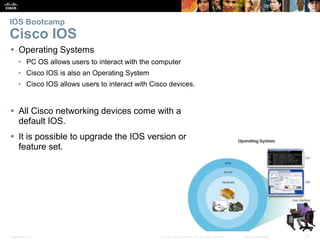
 Operating Systems
• PC OS allows users to interact with the computer
• Cisco IOS is also an Operating System
• Cisco IOS allows users to interact with Cisco devices.
 All Cisco networking devices come with a
default IOS.
 It is possible to upgrade the IOS version or
feature set.
Presentation_ID 13© 2008 Cisco Systems, Inc. All rights reserved. Cisco Confidential
IOS Bootcamp
Cisco IOS Access
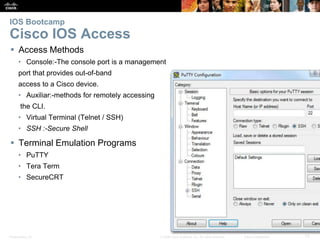
 Access Methods
• Console:-The console port is a management
port that provides out-of-band
access to a Cisco device.
• Auxiliar:-methods for remotely accessing
the CLI.
• Virtual Terminal (Telnet / SSH)
• SSH :-Secure Shell
 Terminal Emulation Programs
• PuTTY
• Tera Term
• SecureCRT
Presentation_ID 14© 2008 Cisco Systems, Inc. All rights reserved. Cisco Confidential
IOS Bootcamp
Navigate the IOS Cisco IOS Modes of Operation
• Initial configuration must be done via console connection
• Configuration is then done via various CLI command modes.
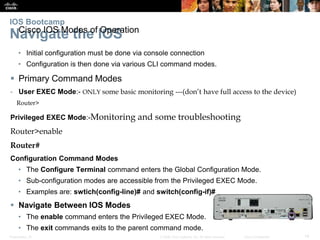
 Primary Command Modes
- User EXEC Mode:- ONLY some basic monitoring ---(don’t have full access to the device)
Router>
Privileged EXEC Mode:-Monitoring and some troubleshooting
Router>enable
Router#
Configuration Command Modes
• The Configure Terminal command enters the Global Configuration Mode.
• Sub-configuration modes are accessible from the Privileged EXEC Mode.
• Examples are: swtich(config-line)# and switch(config-if)#
 Navigate Between IOS Modes
• The enable command enters the Privileged EXEC Mode.
• The exit commands exits to the parent command mode.
© 2008 Cisco Systems, Inc. All rights reserved. Cisco ConfidentialPresentation_ID 15
2.2 Basic Device
Configuration
Presentation_ID 16© 2008 Cisco Systems, Inc. All rights reserved. Cisco Confidential
Basic Device Configuration
Hostnames
 Device Names
• Hostnames allow devices to be identified by network administrators over a
network or the Internet.
• Very important and should also be displayed in the topology.
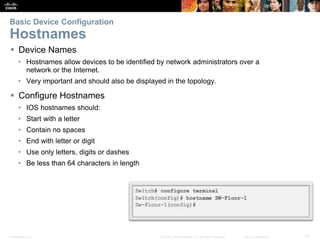
 Configure Hostnames
• IOS hostnames should:
• Start with a letter
• Contain no spaces
• End with letter or digit
• Use only letters, digits or dashes
• Be less than 64 characters in length
Presentation_ID 17© 2008 Cisco Systems, Inc. All rights reserved. Cisco Confidential
Basic Device Configuration
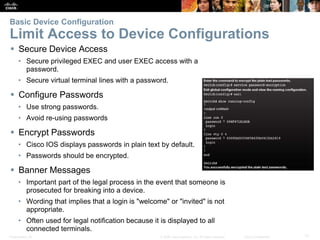
Limit Access to Device Configurations
 Secure Device Access
• Secure privileged EXEC and user EXEC access with a
password.
• Secure virtual terminal lines with a password.
 Configure Passwords
• Use strong passwords.
• Avoid re-using passwords
 Encrypt Passwords
• Cisco IOS displays passwords in plain text by default.
• Passwords should be encrypted.
 Banner Messages
• Important part of the legal process in the event that someone is
prosecuted for breaking into a device.
• Wording that implies that a login is "welcome" or "invited" is not
appropriate.
• Often used for legal notification because it is displayed to all
connected terminals.
Presentation_ID 18© 2008 Cisco Systems, Inc. All rights reserved. Cisco Confidential
Basic Device Configuration
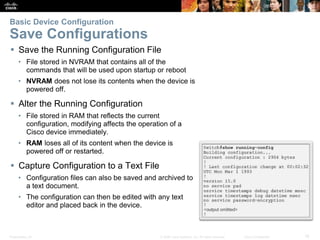
Save Configurations
 Save the Running Configuration File
• File stored in NVRAM that contains all of the
commands that will be used upon startup or reboot
• NVRAM does not lose its contents when the device is
powered off.
 Alter the Running Configuration
• File stored in RAM that reflects the current
configuration, modifying affects the operation of a
Cisco device immediately.
• RAM loses all of its content when the device is
powered off or restarted.
 Capture Configuration to a Text File
• Configuration files can also be saved and archived to
a text document.
• The configuration can then be edited with any text
editor and placed back in the device.
© 2008 Cisco Systems, Inc. All rights reserved. Cisco ConfidentialPresentation_ID 19
2.3 Address Schemes
Presentation_ID 20© 2008 Cisco Systems, Inc. All rights reserved. Cisco Confidential
Address Schemes
Ports and Addresses
 IP Addresses:is a numerical label assigned to each
device connected to a computer network that uses the
Internet Protocol for communication
• Each end device on a network must be configured with an
IP address.
• Enable devices to establish end-to-end communication on
the Internet.
• The structure of an IPv4 address is called dotted decimal
notation and is represented by four decimal numbers
between 0 and 255.
• IPv6 is the most recent version of IP and the replacement
for the more common IPv4.
 Interface and Ports
• Network communications depend on interfaces and the
cables that connect them.
• Different types of network media have different features
and benefits.
• Ethernet is the most common local area network (LAN)
technology.
• SVI provides a means to remotely manage a switch over a
Presentation_ID 21© 2008 Cisco Systems, Inc. All rights reserved. Cisco Confidential
Address Schemes
Configure IP Addressing
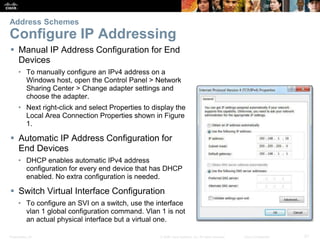
 Manual IP Address Configuration for End
Devices
• To manually configure an IPv4 address on a
Windows host, open the Control Panel > Network
Sharing Center > Change adapter settings and
choose the adapter.
• Next right-click and select Properties to display the
Local Area Connection Properties shown in Figure
1.
 Automatic IP Address Configuration for
End Devices
• DHCP enables automatic IPv4 address
configuration for every end device that has DHCP
enabled. No extra configuration is needed.
 Switch Virtual Interface Configuration
• To configure an SVI on a switch, use the interface
vlan 1 global configuration command. Vlan 1 is not
an actual physical interface but a virtual one.
Presentation_ID 22© 2008 Cisco Systems, Inc. All rights reserved. Cisco Confidential
Address Schemes
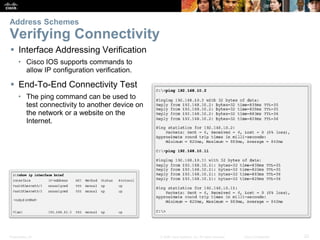
Verifying Connectivity
 Interface Addressing Verification
• Cisco IOS supports commands to
allow IP configuration verification.
 End-To-End Connectivity Test
• The ping command can be used to
test connectivity to another device on
the network or a website on the
Internet.
© 2008 Cisco Systems, Inc. All rights reserved. Cisco ConfidentialPresentation_ID 23
2.4 Chapter Summary
Presentation_ID 24© 2008 Cisco Systems, Inc. All rights reserved. Cisco Confidential
 Explain the features and functions of Cisco IOS Software.
 Configure initial settings on a network device using the Cisco IOS software.
 Given an IP addressing scheme, configure IP address parameters on end devices to
provide end-to-end connectivity in a small to medium-sized business network.
Chapter Summary
Summary
Presentation_ID 28© 2008 Cisco Systems, Inc. All rights reserved. Cisco Confidential
Presentation_ID 29© 2008 Cisco Systems, Inc. All rights reserved. Cisco Confidential

Itn6 instructor materials_chapter2

  • 1.
    © 2008 CiscoSystems, Inc. All rights reserved. Cisco ConfidentialPresentation_ID 1 Instructor Materials Chapter 2: Configure a Network Operating System CCNA Routing and Switching Introduction to Networks v6.0
  • 2.
    © 2008 CiscoSystems, Inc. All rights reserved. Cisco ConfidentialPresentation_ID 10 Chapter 2: Configure a Network Operating System Introduction to Networks v6.0
  • 3.
    © 2008 CiscoSystems, Inc. All rights reserved. Cisco ConfidentialPresentation_ID 11 2.1 IOS Bootcamp
  • 4.
    Presentation_ID 12© 2008Cisco Systems, Inc. All rights reserved. Cisco Confidential IOS Bootcamp Cisco IOS  Operating Systems • PC OS allows users to interact with the computer • Cisco IOS is also an Operating System • Cisco IOS allows users to interact with Cisco devices.  All Cisco networking devices come with a default IOS.  It is possible to upgrade the IOS version or feature set.
  • 5.
    Presentation_ID 13© 2008Cisco Systems, Inc. All rights reserved. Cisco Confidential IOS Bootcamp Cisco IOS Access  Access Methods • Console:-The console port is a management port that provides out-of-band access to a Cisco device. • Auxiliar:-methods for remotely accessing the CLI. • Virtual Terminal (Telnet / SSH) • SSH :-Secure Shell  Terminal Emulation Programs • PuTTY • Tera Term • SecureCRT
  • 6.
    Presentation_ID 14© 2008Cisco Systems, Inc. All rights reserved. Cisco Confidential IOS Bootcamp Navigate the IOS Cisco IOS Modes of Operation • Initial configuration must be done via console connection • Configuration is then done via various CLI command modes.  Primary Command Modes - User EXEC Mode:- ONLY some basic monitoring ---(don’t have full access to the device) Router> Privileged EXEC Mode:-Monitoring and some troubleshooting Router>enable Router# Configuration Command Modes • The Configure Terminal command enters the Global Configuration Mode. • Sub-configuration modes are accessible from the Privileged EXEC Mode. • Examples are: swtich(config-line)# and switch(config-if)#  Navigate Between IOS Modes • The enable command enters the Privileged EXEC Mode. • The exit commands exits to the parent command mode.
  • 7.
    © 2008 CiscoSystems, Inc. All rights reserved. Cisco ConfidentialPresentation_ID 15 2.2 Basic Device Configuration
  • 8.
    Presentation_ID 16© 2008Cisco Systems, Inc. All rights reserved. Cisco Confidential Basic Device Configuration Hostnames  Device Names • Hostnames allow devices to be identified by network administrators over a network or the Internet. • Very important and should also be displayed in the topology.  Configure Hostnames • IOS hostnames should: • Start with a letter • Contain no spaces • End with letter or digit • Use only letters, digits or dashes • Be less than 64 characters in length
  • 9.
    Presentation_ID 17© 2008Cisco Systems, Inc. All rights reserved. Cisco Confidential Basic Device Configuration Limit Access to Device Configurations  Secure Device Access • Secure privileged EXEC and user EXEC access with a password. • Secure virtual terminal lines with a password.  Configure Passwords • Use strong passwords. • Avoid re-using passwords  Encrypt Passwords • Cisco IOS displays passwords in plain text by default. • Passwords should be encrypted.  Banner Messages • Important part of the legal process in the event that someone is prosecuted for breaking into a device. • Wording that implies that a login is "welcome" or "invited" is not appropriate. • Often used for legal notification because it is displayed to all connected terminals.
  • 10.
    Presentation_ID 18© 2008Cisco Systems, Inc. All rights reserved. Cisco Confidential Basic Device Configuration Save Configurations  Save the Running Configuration File • File stored in NVRAM that contains all of the commands that will be used upon startup or reboot • NVRAM does not lose its contents when the device is powered off.  Alter the Running Configuration • File stored in RAM that reflects the current configuration, modifying affects the operation of a Cisco device immediately. • RAM loses all of its content when the device is powered off or restarted.  Capture Configuration to a Text File • Configuration files can also be saved and archived to a text document. • The configuration can then be edited with any text editor and placed back in the device.
  • 11.
    © 2008 CiscoSystems, Inc. All rights reserved. Cisco ConfidentialPresentation_ID 19 2.3 Address Schemes
  • 12.
    Presentation_ID 20© 2008Cisco Systems, Inc. All rights reserved. Cisco Confidential Address Schemes Ports and Addresses  IP Addresses:is a numerical label assigned to each device connected to a computer network that uses the Internet Protocol for communication • Each end device on a network must be configured with an IP address. • Enable devices to establish end-to-end communication on the Internet. • The structure of an IPv4 address is called dotted decimal notation and is represented by four decimal numbers between 0 and 255. • IPv6 is the most recent version of IP and the replacement for the more common IPv4.  Interface and Ports • Network communications depend on interfaces and the cables that connect them. • Different types of network media have different features and benefits. • Ethernet is the most common local area network (LAN) technology. • SVI provides a means to remotely manage a switch over a
  • 13.
    Presentation_ID 21© 2008Cisco Systems, Inc. All rights reserved. Cisco Confidential Address Schemes Configure IP Addressing  Manual IP Address Configuration for End Devices • To manually configure an IPv4 address on a Windows host, open the Control Panel > Network Sharing Center > Change adapter settings and choose the adapter. • Next right-click and select Properties to display the Local Area Connection Properties shown in Figure 1.  Automatic IP Address Configuration for End Devices • DHCP enables automatic IPv4 address configuration for every end device that has DHCP enabled. No extra configuration is needed.  Switch Virtual Interface Configuration • To configure an SVI on a switch, use the interface vlan 1 global configuration command. Vlan 1 is not an actual physical interface but a virtual one.
  • 14.
    Presentation_ID 22© 2008Cisco Systems, Inc. All rights reserved. Cisco Confidential Address Schemes Verifying Connectivity  Interface Addressing Verification • Cisco IOS supports commands to allow IP configuration verification.  End-To-End Connectivity Test • The ping command can be used to test connectivity to another device on the network or a website on the Internet.
  • 15.
    © 2008 CiscoSystems, Inc. All rights reserved. Cisco ConfidentialPresentation_ID 23 2.4 Chapter Summary
  • 16.
    Presentation_ID 24© 2008Cisco Systems, Inc. All rights reserved. Cisco Confidential  Explain the features and functions of Cisco IOS Software.  Configure initial settings on a network device using the Cisco IOS software.  Given an IP addressing scheme, configure IP address parameters on end devices to provide end-to-end connectivity in a small to medium-sized business network. Chapter Summary Summary
  • 17.
    Presentation_ID 28© 2008Cisco Systems, Inc. All rights reserved. Cisco Confidential
  • 18.
    Presentation_ID 29© 2008Cisco Systems, Inc. All rights reserved. Cisco Confidential