Using the Command-Line
Interface
This topic is very important before you configure or verify the cisco
router and switches.
CLI – Command Line Interface
No specific exam topics included in this chapter.
WWW.NETWORKRHINOS.COM | VISHNU | +91-9790901210
Accessing the Cisco Catalyst Switch CLI
• CLI – Command Line Interface:
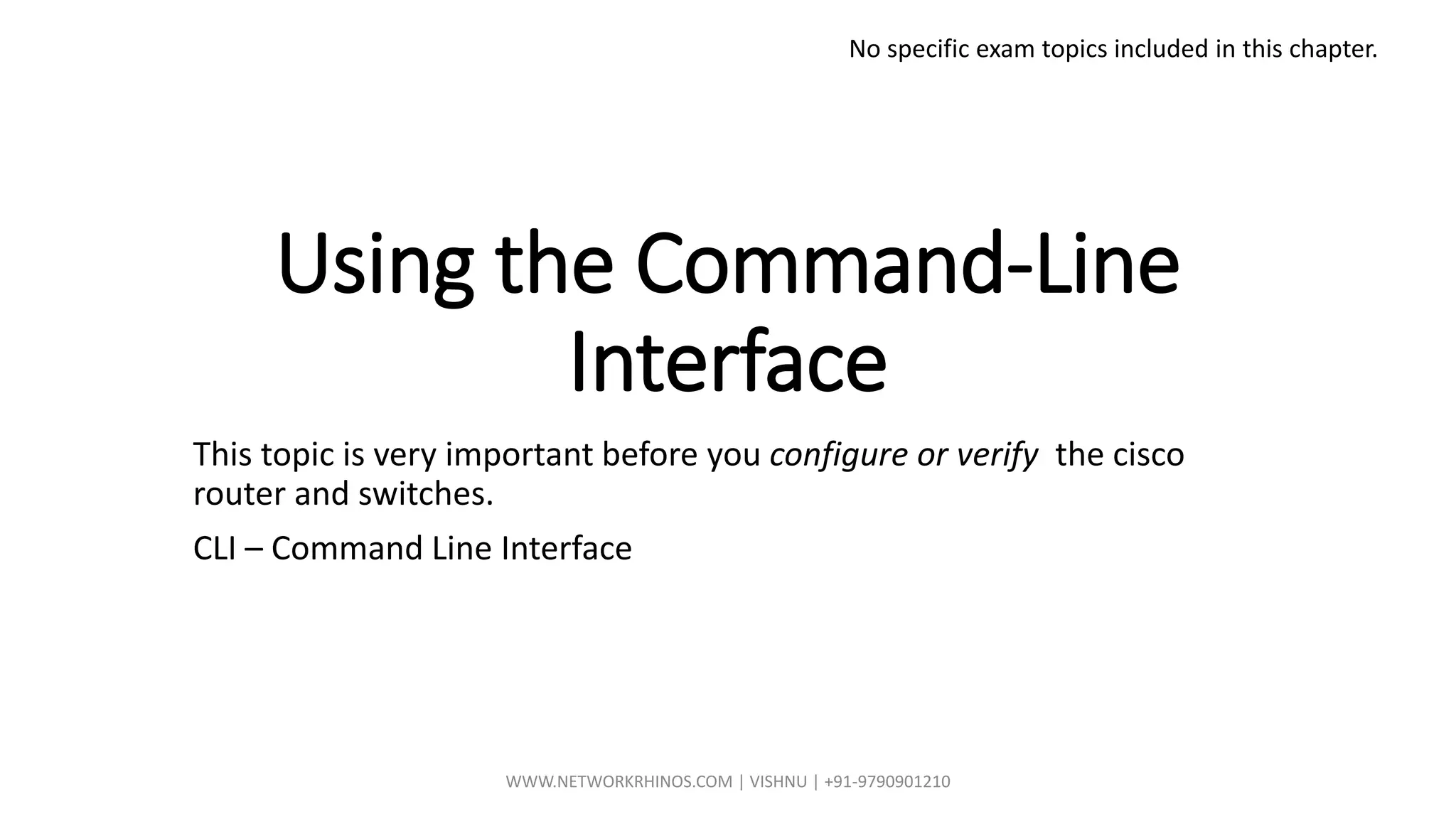
• The CLI is a text-based interface in which the user, typically a network engineer, enters a text
command and presses Enter.
• Pressing Enter send a command to the brain of the device i.e., Control Plane, to do something.
WWW.NETWORKRHINOS.COM | VISHNU | +91-9790901210
Cisco Catalyst Switches
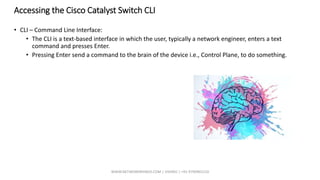
• 2960-XR model is the leading switch manufactured by Cisco
• Cisco refers to a switch’s physical connectors as either interfaces or ports.
• Normally called as Ethernet, Fast Ethernet, Gigabit Ethernet – 10 , 100 ,1000.
• Namings :
• Its always good to name them with Fa Slot/Port ex., Fa 0/1 or Fa0/2 sometimes Fa FPC/Slot/Port
Slot 0
Slot 1
WWW.NETWORKRHINOS.COM | VISHNU | +91-9790901210
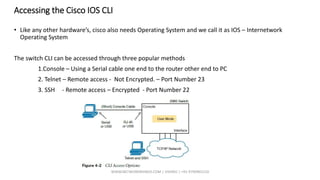
Accessing the Cisco IOS CLI
• Like any other hardware’s, cisco also needs Operating System and we call it as IOS – Internetwork
Operating System
The switch CLI can be accessed through three popular methods
1.Console – Using a Serial cable one end to the router other end to PC
2. Telnet – Remote access - Not Encrypted. – Port Number 23
3. SSH - Remote access – Encrypted - Port Number 22
WWW.NETWORKRHINOS.COM | VISHNU | +91-9790901210
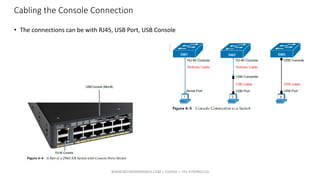
Cabling the Console Connection
• The connections can be with RJ45, USB Port, USB Console
WWW.NETWORKRHINOS.COM | VISHNU | +91-9790901210
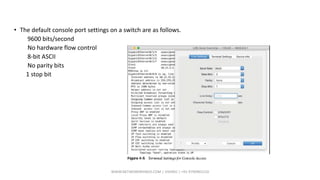
• The default console port settings on a switch are as follows.
9600 bits/second
No hardware flow control
8-bit ASCII
No parity bits
1 stop bit
WWW.NETWORKRHINOS.COM | VISHNU | +91-9790901210
Accessing the CLI with Telnet and SSH
• Telnet uses the concept of a Telnet client (the terminal application) and a Telnet server (the switch in this
case).
• SSH encrypts the contents of all messages, including the passwords, avoiding the possibility of someone
capturing packets in the network and stealing the password to network devices.
WWW.NETWORKRHINOS.COM | VISHNU | +91-9790901210
User and Enable (Privileged) Modes
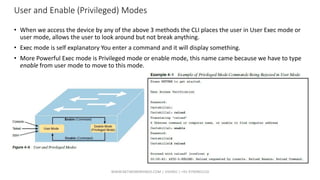
• When we access the device by any of the above 3 methods the CLI places the user in User Exec mode or
user mode, allows the user to look around but not break anything.
• Exec mode is self explanatory You enter a command and it will display something.
• More Powerful Exec mode is Privileged mode or enable mode, this name came because we have to type
enable from user mode to move to this mode.
WWW.NETWORKRHINOS.COM | VISHNU | +91-9790901210
Password Security for CLI Access from the Console
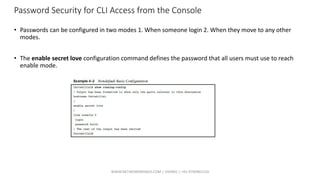
• Passwords can be configured in two modes 1. When someone login 2. When they move to any other
modes.
• The enable secret love configuration command defines the password that all users must use to reach
enable mode.
WWW.NETWORKRHINOS.COM | VISHNU | +91-9790901210
Practical Demo Rec 4
WWW.NETWORKRHINOS.COM | VISHNU | +91-9790901210
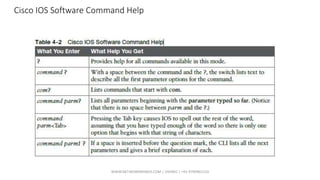
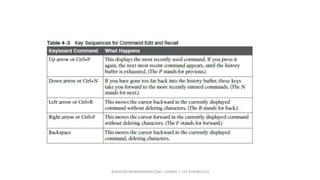
Cisco IOS Software Command Help
WWW.NETWORKRHINOS.COM | VISHNU | +91-9790901210
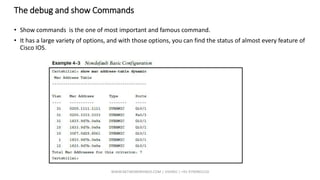
The debug and show Commands
• Show commands is the one of most important and famous command.
• It has a large variety of options, and with those options, you can find the status of almost every feature of
Cisco IOS.
WWW.NETWORKRHINOS.COM | VISHNU | +91-9790901210
Configuring Cisco IOS Software
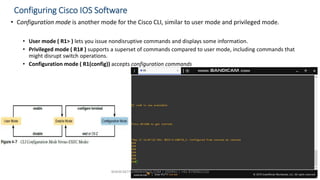
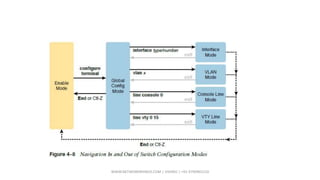
• Configuration mode is another mode for the Cisco CLI, similar to user mode and privileged mode.
• User mode ( R1> ) lets you issue nondisruptive commands and displays some information.
• Privileged mode ( R1# ) supports a superset of commands compared to user mode, including commands that
might disrupt switch operations.
• Configuration mode ( R1(config)) accepts configuration commands
WWW.NETWORKRHINOS.COM | VISHNU | +91-9790901210
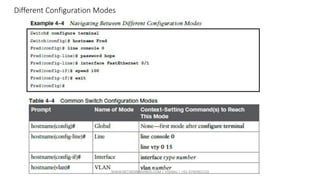
Different Configuration Modes
WWW.NETWORKRHINOS.COM | VISHNU | +91-9790901210
Storing Switch Configuration Files
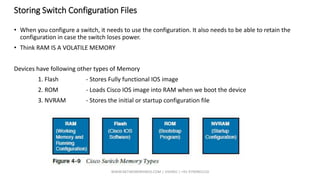
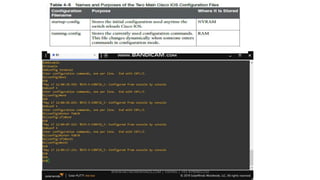
• When you configure a switch, it needs to use the configuration. It also needs to be able to retain the
configuration in case the switch loses power.
• Think RAM IS A VOLATILE MEMORY
Devices have following other types of Memory
1. Flash - Stores Fully functional IOS image
2. ROM - Loads Cisco IOS image into RAM when we boot the device
3. NVRAM - Stores the initial or startup configuration file
WWW.NETWORKRHINOS.COM | VISHNU | +91-9790901210
Erase Startup config
• You can erase the entire startup config by using below command.
R1#erase startup-config
WWW.NETWORKRHINOS.COM | VISHNU | +91-9790901210
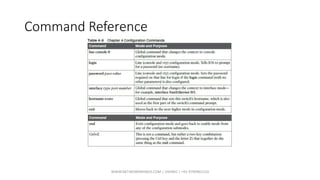
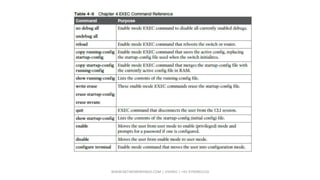
Command Reference
WWW.NETWORKRHINOS.COM | VISHNU | +91-9790901210

Chapter 4. using the command line interface

  • 1.
    Using the Command-Line Interface Thistopic is very important before you configure or verify the cisco router and switches. CLI – Command Line Interface No specific exam topics included in this chapter. WWW.NETWORKRHINOS.COM | VISHNU | +91-9790901210
  • 2.
    Accessing the CiscoCatalyst Switch CLI • CLI – Command Line Interface: • The CLI is a text-based interface in which the user, typically a network engineer, enters a text command and presses Enter. • Pressing Enter send a command to the brain of the device i.e., Control Plane, to do something. WWW.NETWORKRHINOS.COM | VISHNU | +91-9790901210
  • 3.
    Cisco Catalyst Switches •2960-XR model is the leading switch manufactured by Cisco • Cisco refers to a switch’s physical connectors as either interfaces or ports. • Normally called as Ethernet, Fast Ethernet, Gigabit Ethernet – 10 , 100 ,1000. • Namings : • Its always good to name them with Fa Slot/Port ex., Fa 0/1 or Fa0/2 sometimes Fa FPC/Slot/Port Slot 0 Slot 1 WWW.NETWORKRHINOS.COM | VISHNU | +91-9790901210
  • 4.
    Accessing the CiscoIOS CLI • Like any other hardware’s, cisco also needs Operating System and we call it as IOS – Internetwork Operating System The switch CLI can be accessed through three popular methods 1.Console – Using a Serial cable one end to the router other end to PC 2. Telnet – Remote access - Not Encrypted. – Port Number 23 3. SSH - Remote access – Encrypted - Port Number 22 WWW.NETWORKRHINOS.COM | VISHNU | +91-9790901210
  • 5.
    Cabling the ConsoleConnection • The connections can be with RJ45, USB Port, USB Console WWW.NETWORKRHINOS.COM | VISHNU | +91-9790901210
  • 6.
    • The defaultconsole port settings on a switch are as follows. 9600 bits/second No hardware flow control 8-bit ASCII No parity bits 1 stop bit WWW.NETWORKRHINOS.COM | VISHNU | +91-9790901210
  • 7.
    Accessing the CLIwith Telnet and SSH • Telnet uses the concept of a Telnet client (the terminal application) and a Telnet server (the switch in this case). • SSH encrypts the contents of all messages, including the passwords, avoiding the possibility of someone capturing packets in the network and stealing the password to network devices. WWW.NETWORKRHINOS.COM | VISHNU | +91-9790901210
  • 8.
    User and Enable(Privileged) Modes • When we access the device by any of the above 3 methods the CLI places the user in User Exec mode or user mode, allows the user to look around but not break anything. • Exec mode is self explanatory You enter a command and it will display something. • More Powerful Exec mode is Privileged mode or enable mode, this name came because we have to type enable from user mode to move to this mode. WWW.NETWORKRHINOS.COM | VISHNU | +91-9790901210
  • 9.
    Password Security forCLI Access from the Console • Passwords can be configured in two modes 1. When someone login 2. When they move to any other modes. • The enable secret love configuration command defines the password that all users must use to reach enable mode. WWW.NETWORKRHINOS.COM | VISHNU | +91-9790901210
  • 10.
    Practical Demo Rec4 WWW.NETWORKRHINOS.COM | VISHNU | +91-9790901210
  • 11.
    Cisco IOS SoftwareCommand Help WWW.NETWORKRHINOS.COM | VISHNU | +91-9790901210
  • 12.
  • 13.
    The debug andshow Commands • Show commands is the one of most important and famous command. • It has a large variety of options, and with those options, you can find the status of almost every feature of Cisco IOS. WWW.NETWORKRHINOS.COM | VISHNU | +91-9790901210
  • 14.
    Configuring Cisco IOSSoftware • Configuration mode is another mode for the Cisco CLI, similar to user mode and privileged mode. • User mode ( R1> ) lets you issue nondisruptive commands and displays some information. • Privileged mode ( R1# ) supports a superset of commands compared to user mode, including commands that might disrupt switch operations. • Configuration mode ( R1(config)) accepts configuration commands WWW.NETWORKRHINOS.COM | VISHNU | +91-9790901210
  • 15.
  • 16.
  • 17.
    Storing Switch ConfigurationFiles • When you configure a switch, it needs to use the configuration. It also needs to be able to retain the configuration in case the switch loses power. • Think RAM IS A VOLATILE MEMORY Devices have following other types of Memory 1. Flash - Stores Fully functional IOS image 2. ROM - Loads Cisco IOS image into RAM when we boot the device 3. NVRAM - Stores the initial or startup configuration file WWW.NETWORKRHINOS.COM | VISHNU | +91-9790901210
  • 18.
  • 19.
    Erase Startup config •You can erase the entire startup config by using below command. R1#erase startup-config WWW.NETWORKRHINOS.COM | VISHNU | +91-9790901210
  • 20.
  • 21.