Pre-Production
Jack Hickman
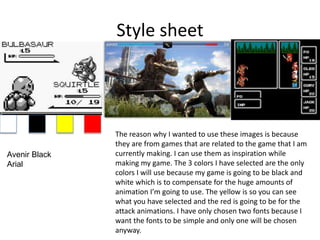
Style sheet
Avenir Black
Arial
The reason why I wanted to use these images is because
they are from games that are related to the game that I am
currently making. I can use them as inspiration while
making my game. The 3 colors I have selected are the only
colors I will use because my game is going to be black and
white which is to compensate for the huge amounts of
animation I’m going to use. The yellow is so you can see
what you have selected and the red is going to be for the
attack animations. I have only chosen two fonts because I
want the fonts to be simple and only one will be chosen
anyway.
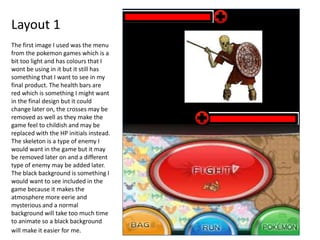
Layout 1
The first image I used was the menu
from the pokemon games which is a
bit too light and has colours that I
wont be using in it but it still has
something that I want to see in my
final product. The health bars are
red which is something I might want
in the final design but it could
change later on, the crosses may be
removed as well as they make the
game feel to childish and may be
replaced with the HP initials instead.
The skeleton is a type of enemy I
would want in the game but it may
be removed later on and a different
type of enemy may be added later.
The black background is something I
would want to see included in the
game because it makes the
atmosphere more eerie and
mysterious and a normal
background will take too much time
to animate so a black background
will make it easier for me.
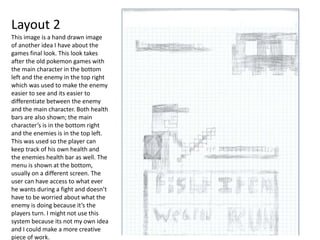
Layout 2
This image is a hand drawn image
of another idea I have about the
games final look. This look takes
after the old pokemon games with
the main character in the bottom
left and the enemy in the top right
which was used to make the enemy
easier to see and its easier to
differentiate between the enemy
and the main character. Both health
bars are also shown; the main
character’s is in the bottom right
and the enemies is in the top left.
This was used so the player can
keep track of his own health and
the enemies health bar as well. The
menu is shown at the bottom,
usually on a different screen. The
user can have access to what ever
he wants during a fight and doesn’t
have to be worried about what the
enemy is doing because it’s the
players turn. I might not use this
system because its not my own idea
and I could make a more creative
piece of work.
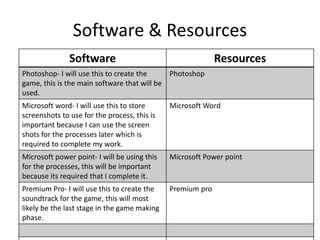
Software & Resources
Software Resources
Photoshop- I will use this to create the
game, this is the main software that will be
used.
Photoshop
Microsoft word- I will use this to store
screenshots to use for the process, this is
important because I can use the screen
shots for the processes later which is
required to complete my work.
Microsoft Word
Microsoft power point- I will be using this
for the processes, this will be important
because its required that I complete it.
Microsoft Power point
Premium Pro- I will use this to create the
soundtrack for the game, this will most
likely be the last stage in the game making
phase.
Premium pro
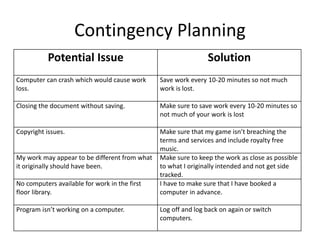
Contingency Planning
Potential Issue Solution
Computer can crash which would cause work
loss.
Save work every 10-20 minutes so not much
work is lost.
Closing the document without saving. Make sure to save work every 10-20 minutes so
not much of your work is lost
Copyright issues. Make sure that my game isn’t breaching the
terms and services and include royalty free
music.
My work may appear to be different from what
it originally should have been.
Make sure to keep the work as close as possible
to what I originally intended and not get side
tracked.
No computers available for work in the first
floor library.
I have to make sure that I have booked a
computer in advance.
Program isn’t working on a computer. Log off and log back on again or switch
computers.
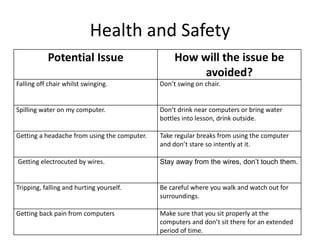
Health and Safety
Potential Issue How will the issue be
avoided?
Falling off chair whilst swinging. Don’t swing on chair.
Spilling water on my computer. Don’t drink near computers or bring water
bottles into lesson, drink outside.
Getting a headache from using the computer. Take regular breaks from using the computer
and don’t stare so intently at it.
Getting electrocuted by wires. Stay away from the wires, don’t touch them.
Tripping, falling and hurting yourself. Be careful where you walk and watch out for
surroundings.
Getting back pain from computers Make sure that you sit properly at the
computers and don’t sit there for an extended
period of time.
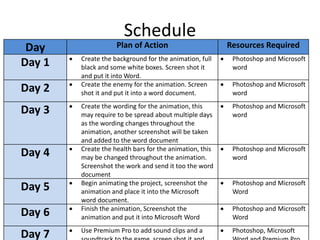
Schedule
Day Plan of Action Resources Required
Day 1  Create the background for the animation, full
black and some white boxes. Screen shot it
and put it into Word.
 Photoshop and Microsoft
word
Day 2  Create the enemy for the animation. Screen
shot it and put it into a word document.
 Photoshop and Microsoft
word
Day 3  Create the wording for the animation, this
may require to be spread about multiple days
as the wording changes throughout the
animation, another screenshot will be taken
and added to the word document
 Photoshop and Microsoft
word
Day 4  Create the health bars for the animation, this
may be changed throughout the animation.
Screenshot the work and send it too the word
document
 Photoshop and Microsoft
word
Day 5  Begin animating the project, screenshot the
animation and place it into the Microsoft
word document.
 Photoshop and Microsoft
Word
Day 6  Finish the animation, Screenshot the
animation and put it into Microsoft Word
 Photoshop and Microsoft
Word
Day 7  Use Premium Pro to add sound clips and a  Photoshop, Microsoft

5. pre production(2)

  • 1.
  • 2.
    Style sheet Avenir Black Arial Thereason why I wanted to use these images is because they are from games that are related to the game that I am currently making. I can use them as inspiration while making my game. The 3 colors I have selected are the only colors I will use because my game is going to be black and white which is to compensate for the huge amounts of animation I’m going to use. The yellow is so you can see what you have selected and the red is going to be for the attack animations. I have only chosen two fonts because I want the fonts to be simple and only one will be chosen anyway.
  • 3.
    Layout 1 The firstimage I used was the menu from the pokemon games which is a bit too light and has colours that I wont be using in it but it still has something that I want to see in my final product. The health bars are red which is something I might want in the final design but it could change later on, the crosses may be removed as well as they make the game feel to childish and may be replaced with the HP initials instead. The skeleton is a type of enemy I would want in the game but it may be removed later on and a different type of enemy may be added later. The black background is something I would want to see included in the game because it makes the atmosphere more eerie and mysterious and a normal background will take too much time to animate so a black background will make it easier for me.
  • 4.
    Layout 2 This imageis a hand drawn image of another idea I have about the games final look. This look takes after the old pokemon games with the main character in the bottom left and the enemy in the top right which was used to make the enemy easier to see and its easier to differentiate between the enemy and the main character. Both health bars are also shown; the main character’s is in the bottom right and the enemies is in the top left. This was used so the player can keep track of his own health and the enemies health bar as well. The menu is shown at the bottom, usually on a different screen. The user can have access to what ever he wants during a fight and doesn’t have to be worried about what the enemy is doing because it’s the players turn. I might not use this system because its not my own idea and I could make a more creative piece of work.
  • 5.
    Software & Resources SoftwareResources Photoshop- I will use this to create the game, this is the main software that will be used. Photoshop Microsoft word- I will use this to store screenshots to use for the process, this is important because I can use the screen shots for the processes later which is required to complete my work. Microsoft Word Microsoft power point- I will be using this for the processes, this will be important because its required that I complete it. Microsoft Power point Premium Pro- I will use this to create the soundtrack for the game, this will most likely be the last stage in the game making phase. Premium pro
  • 6.
    Contingency Planning Potential IssueSolution Computer can crash which would cause work loss. Save work every 10-20 minutes so not much work is lost. Closing the document without saving. Make sure to save work every 10-20 minutes so not much of your work is lost Copyright issues. Make sure that my game isn’t breaching the terms and services and include royalty free music. My work may appear to be different from what it originally should have been. Make sure to keep the work as close as possible to what I originally intended and not get side tracked. No computers available for work in the first floor library. I have to make sure that I have booked a computer in advance. Program isn’t working on a computer. Log off and log back on again or switch computers.
  • 7.
    Health and Safety PotentialIssue How will the issue be avoided? Falling off chair whilst swinging. Don’t swing on chair. Spilling water on my computer. Don’t drink near computers or bring water bottles into lesson, drink outside. Getting a headache from using the computer. Take regular breaks from using the computer and don’t stare so intently at it. Getting electrocuted by wires. Stay away from the wires, don’t touch them. Tripping, falling and hurting yourself. Be careful where you walk and watch out for surroundings. Getting back pain from computers Make sure that you sit properly at the computers and don’t sit there for an extended period of time.
  • 8.
    Schedule Day Plan ofAction Resources Required Day 1  Create the background for the animation, full black and some white boxes. Screen shot it and put it into Word.  Photoshop and Microsoft word Day 2  Create the enemy for the animation. Screen shot it and put it into a word document.  Photoshop and Microsoft word Day 3  Create the wording for the animation, this may require to be spread about multiple days as the wording changes throughout the animation, another screenshot will be taken and added to the word document  Photoshop and Microsoft word Day 4  Create the health bars for the animation, this may be changed throughout the animation. Screenshot the work and send it too the word document  Photoshop and Microsoft word Day 5  Begin animating the project, screenshot the animation and place it into the Microsoft word document.  Photoshop and Microsoft Word Day 6  Finish the animation, Screenshot the animation and put it into Microsoft Word  Photoshop and Microsoft Word Day 7  Use Premium Pro to add sound clips and a  Photoshop, Microsoft

Editor's Notes

  • #3 Explore colours, fonts and image styles similar to what you want to produce. Discuss all three elements in relation to why you chose them and where you may use them in your project. Go over as many pages as you need to
  • #4 Mock up of a potential design using the colours and fonts established in your style sheet and sourced images
  • #5 Mock up of a potential design using the colours and fonts established in your style sheet and sourced images