Pre-Production
Callum-Burton
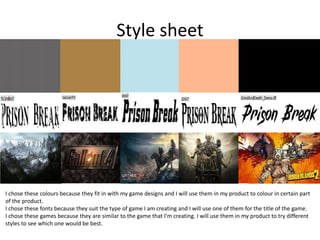
Style sheet
I chose these colours because they fit in with my game designs and I will use them in my product to colour in certain part
of the product.
I chose these fonts because they suit the type of game I am creating and I will use one of them for the title of the game.
I chose these games because they are similar to the game that I’m creating. I will use them in my product to try different
styles to see which one would be best.
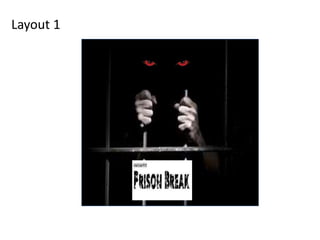
Layout 1
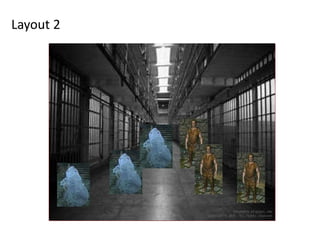
Layout 2
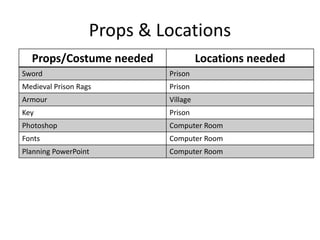
Props & Locations
Props/Costume needed Locations needed
Sword Prison
Medieval Prison Rags Prison
Armour Village
Key Prison
Photoshop Computer Room
Fonts Computer Room
Planning PowerPoint Computer Room
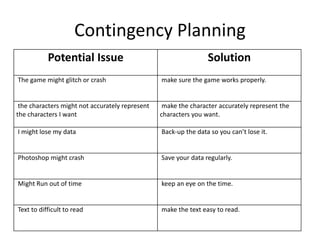
Contingency Planning
Potential Issue Solution
The game might glitch or crash make sure the game works properly.
the characters might not accurately represent
the characters I want
make the character accurately represent the
characters you want.
I might lose my data Back-up the data so you can’t lose it.
Photoshop might crash Save your data regularly.
Might Run out of time keep an eye on the time.
Text to difficult to read make the text easy to read.
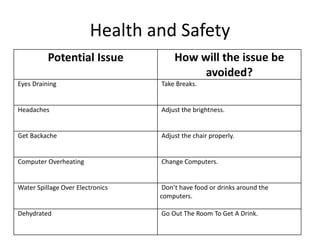
Health and Safety
Potential Issue How will the issue be
avoided?
Eyes Draining Take Breaks.
Headaches Adjust the brightness.
Get Backache Adjust the chair properly.
Computer Overheating Change Computers.
Water Spillage Over Electronics Don’t have food or drinks around the
computers.
Dehydrated Go Out The Room To Get A Drink.
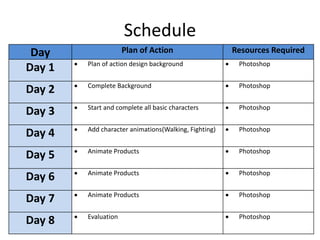
Schedule
Day Plan of Action Resources Required
Day 1  Plan of action design background  Photoshop
Day 2  Complete Background  Photoshop
Day 3  Start and complete all basic characters  Photoshop
Day 4  Add character animations(Walking, Fighting)  Photoshop
Day 5  Animate Products  Photoshop
Day 6  Animate Products  Photoshop
Day 7  Animate Products  Photoshop
Day 8  Evaluation  Photoshop

5. pre production(2)

  • 1.
  • 2.
    Style sheet I chosethese colours because they fit in with my game designs and I will use them in my product to colour in certain part of the product. I chose these fonts because they suit the type of game I am creating and I will use one of them for the title of the game. I chose these games because they are similar to the game that I’m creating. I will use them in my product to try different styles to see which one would be best.
  • 3.
  • 4.
  • 5.
    Props & Locations Props/Costumeneeded Locations needed Sword Prison Medieval Prison Rags Prison Armour Village Key Prison Photoshop Computer Room Fonts Computer Room Planning PowerPoint Computer Room
  • 6.
    Contingency Planning Potential IssueSolution The game might glitch or crash make sure the game works properly. the characters might not accurately represent the characters I want make the character accurately represent the characters you want. I might lose my data Back-up the data so you can’t lose it. Photoshop might crash Save your data regularly. Might Run out of time keep an eye on the time. Text to difficult to read make the text easy to read.
  • 7.
    Health and Safety PotentialIssue How will the issue be avoided? Eyes Draining Take Breaks. Headaches Adjust the brightness. Get Backache Adjust the chair properly. Computer Overheating Change Computers. Water Spillage Over Electronics Don’t have food or drinks around the computers. Dehydrated Go Out The Room To Get A Drink.
  • 8.
    Schedule Day Plan ofAction Resources Required Day 1  Plan of action design background  Photoshop Day 2  Complete Background  Photoshop Day 3  Start and complete all basic characters  Photoshop Day 4  Add character animations(Walking, Fighting)  Photoshop Day 5  Animate Products  Photoshop Day 6  Animate Products  Photoshop Day 7  Animate Products  Photoshop Day 8  Evaluation  Photoshop

Editor's Notes

  • #3 Explore colours, fonts and image styles similar to what you want to produce. Discuss all three elements in relation to why you chose them and where you may use them in your project. Go over as many pages as you need to
  • #4 Mock up of a potential design using the colours and fonts established in your style sheet and sourced images
  • #5 Mock up of a potential design using the colours and fonts established in your style sheet and sourced images