Professional Portfolios Electronic Portfolio System Carla Piper, Ed. D [email_address]
Electronic Portfolio and Themes of Education Reform Teacher accountability to professional certification  STANDARDS Authentic  ASSESSMENT   through portfolios demonstrating achievement of  teaching and student learning objectives Develop skills with  TECHNOLOGY  by creating portfolio electronically
Teacher Accountability What should 21 st  century teachers know and be able to do? STANDARDS How can teachers show evidence of knowledge, skills, and dispositions? ASSESSMENT
Teaching Portfolios Document evidence of teacher competencies Guide long-term professional development Competencies may be locally defined or linked to national teaching standards Barrett, 2000 “ A portfolio is NOT a haphazard collection of artifacts (i.e., a scrapbook) but rather a reflective tool which demonstrates growth over time.”
Technology “ As we move to more standards-based teacher performance assessment, we need new tools to record and organize evidence of successful teaching, for both practicing professionals and student teachers.”  Barrett (2000)   “ Likely solution” for collecting, storing, and managing text, graphics, sound, and video.  Lankes (1995)
A Richer Picture Digital Student Portfolio Project Coalition of Essential Schools (1993) Proposed that we create a tool using computer technology that allows us to create a richer picture of what a student (teacher) can know and do Drawbacks of traditional paper portfolios Performance evidence may not be on paper  The materials for presentation may not be easily manageable . "What are we going to do with ALL THIS STUFF?"  “ Logistical nightmare of thousands of papers turning brittle and collecting dust“ Niguidula (1993)
Why Use Technology? Documents are generally created with a computer anyway.  Hypertext links allow clear connections between standards and portfolio artifacts.  Can develop skills in using multimedia technologies.  Electronic portfolios are fun and it is easier to manage the process, especially storage, presentation, and duplication.  Electronic portfolios make student work replayable, portable, examinable, reviewable, and widely distributable.  Barrett, 1998
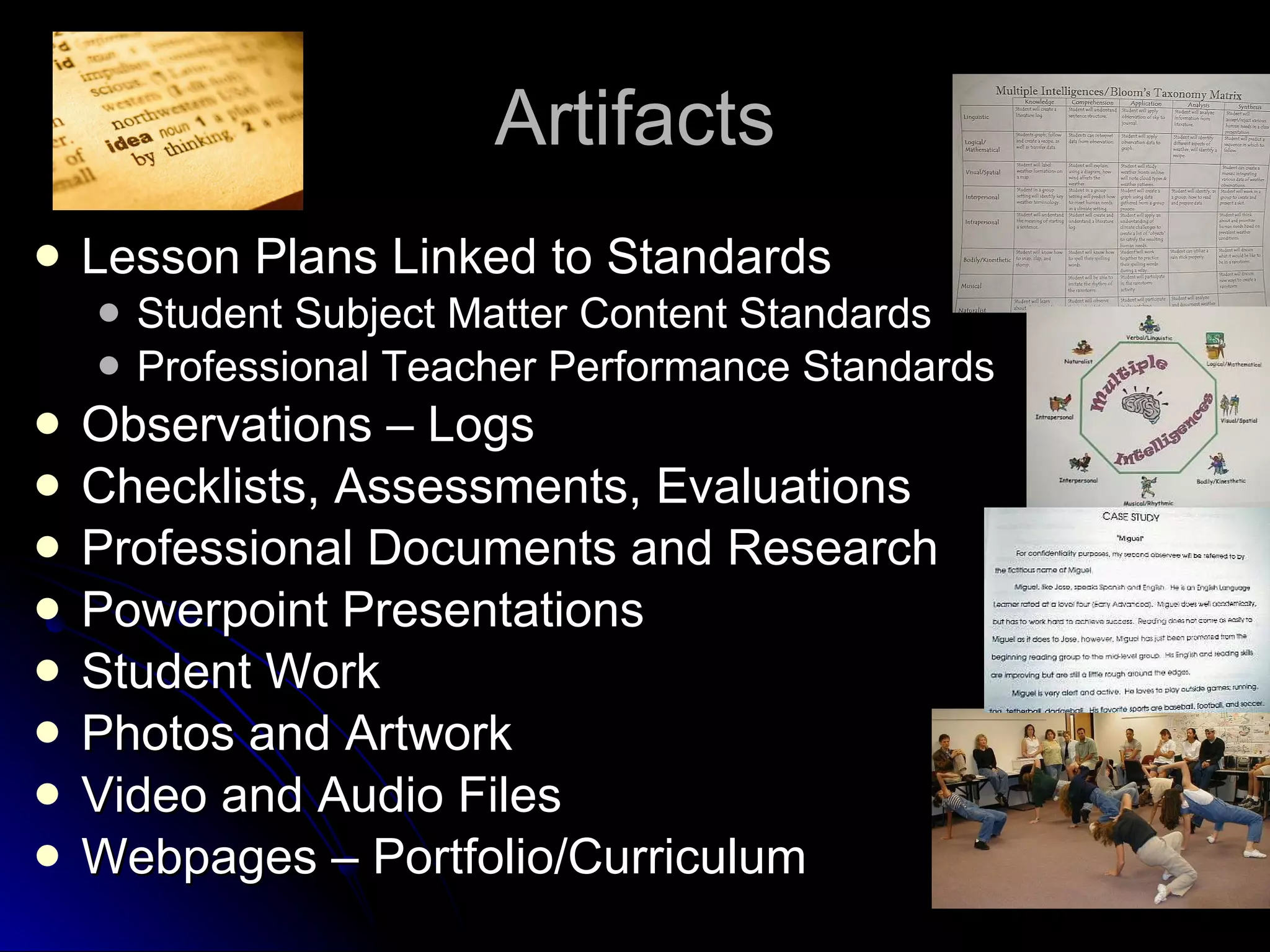
Artifacts Lesson Plans Linked to Standards Student Subject Matter Content Standards Professional Teacher Performance Standards Observations – Logs Checklists, Assessments, Evaluations Professional Documents and Research Powerpoint Presentations Student Work Photos and Artwork Video and Audio Files Webpages – Portfolio/Curriculum
Reflection Written reflections, evaluations, email messages, critiques, recommendations, congratulatory messages, etc. Peer Coaching and Evaluations Collaboration, Dialogues, Self Assessment Case Study Responses Audio/Video statements/reflections Teaching video segments/interviews
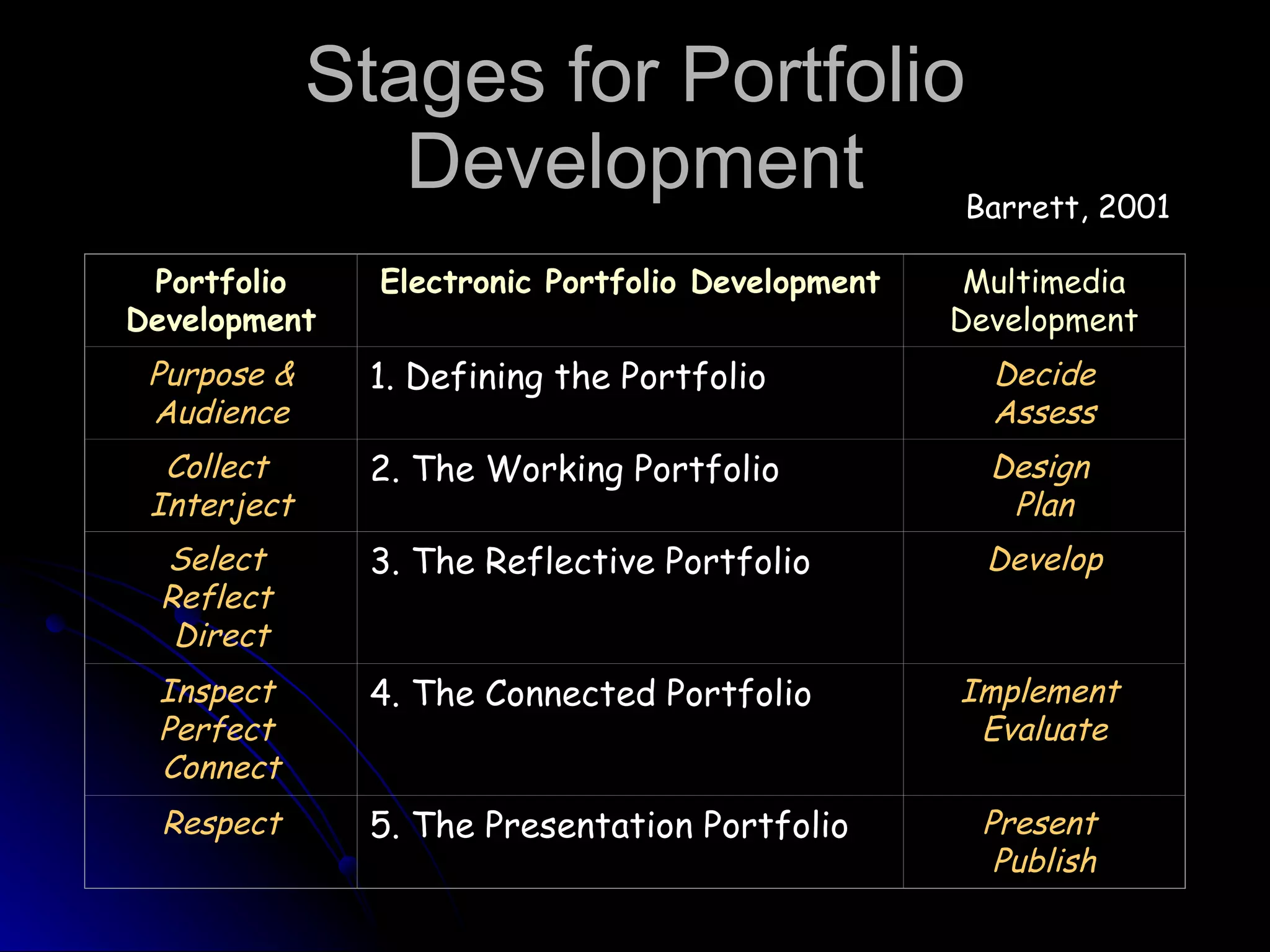
Stages for Portfolio Development Barrett, 2001 Portfolio Development Electronic Portfolio   Development Multimedia Development Purpose &   Audience 1. Defining the Portfolio   Decide   Assess Collect   Interject 2. The Working Portfolio Design   Plan Select   Reflect   Direct 3. The Reflective Portfolio Develop Inspect   Perfect   Connect 4. The Connected Portfolio Implement   Evaluate Respect 5. The Presentation Portfolio Present   Publish
The Electronic Portfolio Multimedia Development Web authoring and other multimedia software applications  Need emphasis on teaching and learning,  NOT  technology Use Documents from Word, Excel, Powerpoint, Frontpage or Web Editors Photo Scanning and Editing Create links to Standards, Artifacts, Assessments, etc.
What should I do now? Brainstorm  possible artifacts as evidence for each of the technology leadership standards. Gather previous technology assignments Gather evidence of technology involvement as a teacher leader in your local school setting Create a portfolio folder on your computer. Collect  all possible text, graphic, and multimedia artifacts in your portfolio folder. Scan documents, photos, etc. Take photos with digital camera (or have them developed on CD) Save photos as jpeg (jpg) or gif files. Save document files as web pages (html) or Acrobat Reader files (pdf)
Suggested Previous  Technology Artifacts EDUU551 – Educational Applications of Computers Web Page Portfolio Based on CSTP/TPEs Teacher Productivity – Word, Desktop Publishing, Excel Spreadsheets, Gradebook Calculations, Charts and Graphs Lesson Planning Teaching with Technology – Powerpoint, Scavenger Hunt Lesson Planning Research – ERIC and Philosophy of Ed Technology Paper
More Technology Artifacts EDUU552 – Using Technological Tools in Teaching Lesson Planning Integrating Technology – Primary Sources, Essential Question, Student Research Multimedia presentations – Powerpoint Portfolio, Curriculum/Instructional Design Spreadsheets and Databases – Data-driven Assessment Assistive Technologies Curriculum Webpages Technology Planning – Acceptable Use Policies
Advanced Technology: EDUU563 EDUU563 – Curriculum, Leadership, Instructional Technology District or Department Technology Plan and Presentation Web Site Lesson Based on Standards Research Journal Blog Reviews from Course Wiki: Technology Tools and Instructional Strategies Multimedia Podcast, Video, Audio Online course module Instructional Design, Goals, Objectives, Evaluation Lecture, Presentations, Resources, Assessments, Discussion Prompts
Advanced Technology: EDUU564 EDUU564 – Social Implications of Educational Technology Research – Literature Review Digital Equity Innovative Practices for Infusing Technology into Teaching and Learning Research on Demographics and Equal Access Professional Development Presentations Needs Assessment, Surveys, Observations, Interviews Online Delivery of Professional Development
Technology Facilitation (TF) Standards Prepare candidates to serve as building/campus-level technology facilitators who will:  exhibit knowledge, skills, and dispositions equipping them to teach technology applications demonstrate effective use of technology to support student learning of content  provide professional development, mentoring, and basic technical assistance for other teachers who require support in their efforts to apply technology to support student learning .  http ://www.iste.org/Content/NavigationMenu/NETS/ForTechnologyFacilitatorsandLeaders/Technology_Facilitation_Standards.htm
ISTE/NCATE Technology Facilitation/Leadership Standards  TL-I. Technology Operations and Concepts.  TL-II. Planning and Designing Learning Environments and Experiences TL-III. Teaching, Learning, and the Curriculum  TL-IV. Assessment and Evaluation  TL-V. Productivity and Professional Practice  TL-VI. Social, Ethical, Legal, and Human Issues  TL-VII. Procedures, Policies, Planning, and Budgeting for Technology Environments  TL-VIII. Leadership and Vision Click Here
Web-based Portfolios Determine which web authoring program you are most comfortable with: Free Open Source Web Editors Sea Monkey –  http://www.seamonkey-project.org/    Nvu -  http://www.nvu.com/   Frontpage  (part of old Microsoft Office) Dreamweaver –  http://www.dreamweaver.com   Avoid Word And Internet Explorer
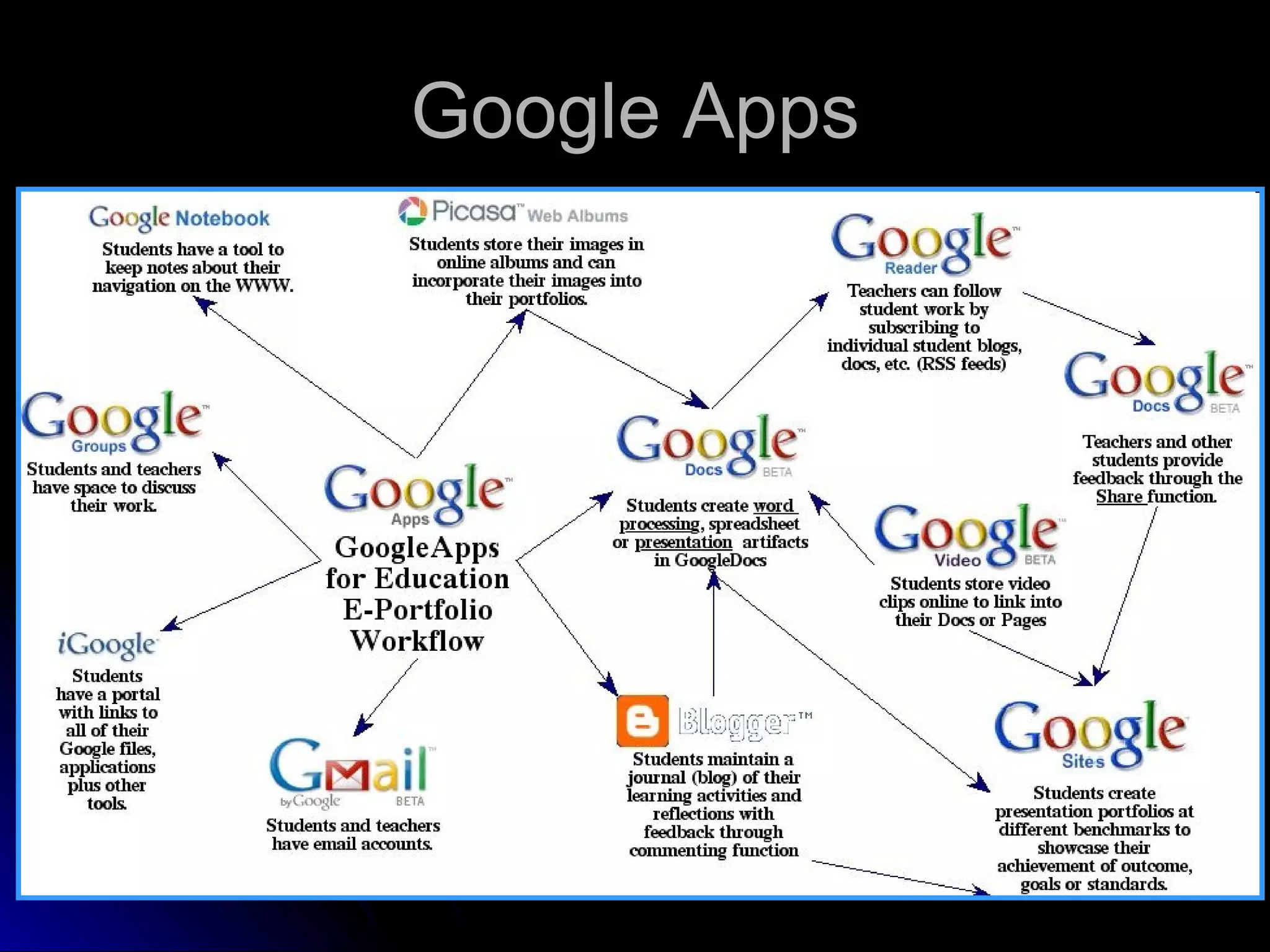
Google Sites Highly Recommended for Final Portfolio Includes wizard for easy creation of webpages Can attach your documents, powerpoints, excel files, pdfs, etc.  Can inteface with Google docs and other Google Apps Web Address -  http://sites.google.com   See Google Overview at:  http://www.google.com/sites/overview.html   See the Google help at:  http://sites.google.com/support/?hl=en   Google Apps -  http://www.google.com/apps/
Google Apps
Dr. Helen Barrett Google Help Google Apps -   http://electronicportfolios.org/google/index.html How to Create an Electronic Portfolio with Google Sites -   http://sites.helenbarrett.net/portfolio/how-to   How to Create an Electronic Portfolio with Google Apps -   http://sites.google.com/site/eportfolios/How-To-Create-ePortfolios-with-GoogleApps Handout -   http://electronicportfolios.org/google/handout.pdf   ePortfolios for Learning -   http://electronicportfolios.org/blog/2008/09/google-sites.html   My Portfolio Presentations-   http://sites.google.com/site/eportfolios/Home/my-portfolio

564port

  • 1.
    Professional Portfolios ElectronicPortfolio System Carla Piper, Ed. D [email_address]
  • 2.
    Electronic Portfolio andThemes of Education Reform Teacher accountability to professional certification STANDARDS Authentic ASSESSMENT through portfolios demonstrating achievement of teaching and student learning objectives Develop skills with TECHNOLOGY by creating portfolio electronically
  • 3.
    Teacher Accountability Whatshould 21 st century teachers know and be able to do? STANDARDS How can teachers show evidence of knowledge, skills, and dispositions? ASSESSMENT
  • 4.
    Teaching Portfolios Documentevidence of teacher competencies Guide long-term professional development Competencies may be locally defined or linked to national teaching standards Barrett, 2000 “ A portfolio is NOT a haphazard collection of artifacts (i.e., a scrapbook) but rather a reflective tool which demonstrates growth over time.”
  • 5.
    Technology “ Aswe move to more standards-based teacher performance assessment, we need new tools to record and organize evidence of successful teaching, for both practicing professionals and student teachers.” Barrett (2000) “ Likely solution” for collecting, storing, and managing text, graphics, sound, and video. Lankes (1995)
  • 6.
    A Richer PictureDigital Student Portfolio Project Coalition of Essential Schools (1993) Proposed that we create a tool using computer technology that allows us to create a richer picture of what a student (teacher) can know and do Drawbacks of traditional paper portfolios Performance evidence may not be on paper The materials for presentation may not be easily manageable . "What are we going to do with ALL THIS STUFF?" “ Logistical nightmare of thousands of papers turning brittle and collecting dust“ Niguidula (1993)
  • 7.
    Why Use Technology?Documents are generally created with a computer anyway. Hypertext links allow clear connections between standards and portfolio artifacts. Can develop skills in using multimedia technologies. Electronic portfolios are fun and it is easier to manage the process, especially storage, presentation, and duplication. Electronic portfolios make student work replayable, portable, examinable, reviewable, and widely distributable. Barrett, 1998
  • 8.
    Artifacts Lesson PlansLinked to Standards Student Subject Matter Content Standards Professional Teacher Performance Standards Observations – Logs Checklists, Assessments, Evaluations Professional Documents and Research Powerpoint Presentations Student Work Photos and Artwork Video and Audio Files Webpages – Portfolio/Curriculum
  • 9.
    Reflection Written reflections,evaluations, email messages, critiques, recommendations, congratulatory messages, etc. Peer Coaching and Evaluations Collaboration, Dialogues, Self Assessment Case Study Responses Audio/Video statements/reflections Teaching video segments/interviews
  • 10.
    Stages for PortfolioDevelopment Barrett, 2001 Portfolio Development Electronic Portfolio Development Multimedia Development Purpose & Audience 1. Defining the Portfolio   Decide Assess Collect Interject 2. The Working Portfolio Design Plan Select Reflect Direct 3. The Reflective Portfolio Develop Inspect Perfect Connect 4. The Connected Portfolio Implement Evaluate Respect 5. The Presentation Portfolio Present Publish
  • 11.
    The Electronic PortfolioMultimedia Development Web authoring and other multimedia software applications Need emphasis on teaching and learning, NOT technology Use Documents from Word, Excel, Powerpoint, Frontpage or Web Editors Photo Scanning and Editing Create links to Standards, Artifacts, Assessments, etc.
  • 12.
    What should Ido now? Brainstorm possible artifacts as evidence for each of the technology leadership standards. Gather previous technology assignments Gather evidence of technology involvement as a teacher leader in your local school setting Create a portfolio folder on your computer. Collect all possible text, graphic, and multimedia artifacts in your portfolio folder. Scan documents, photos, etc. Take photos with digital camera (or have them developed on CD) Save photos as jpeg (jpg) or gif files. Save document files as web pages (html) or Acrobat Reader files (pdf)
  • 13.
    Suggested Previous Technology Artifacts EDUU551 – Educational Applications of Computers Web Page Portfolio Based on CSTP/TPEs Teacher Productivity – Word, Desktop Publishing, Excel Spreadsheets, Gradebook Calculations, Charts and Graphs Lesson Planning Teaching with Technology – Powerpoint, Scavenger Hunt Lesson Planning Research – ERIC and Philosophy of Ed Technology Paper
  • 14.
    More Technology ArtifactsEDUU552 – Using Technological Tools in Teaching Lesson Planning Integrating Technology – Primary Sources, Essential Question, Student Research Multimedia presentations – Powerpoint Portfolio, Curriculum/Instructional Design Spreadsheets and Databases – Data-driven Assessment Assistive Technologies Curriculum Webpages Technology Planning – Acceptable Use Policies
  • 15.
    Advanced Technology: EDUU563EDUU563 – Curriculum, Leadership, Instructional Technology District or Department Technology Plan and Presentation Web Site Lesson Based on Standards Research Journal Blog Reviews from Course Wiki: Technology Tools and Instructional Strategies Multimedia Podcast, Video, Audio Online course module Instructional Design, Goals, Objectives, Evaluation Lecture, Presentations, Resources, Assessments, Discussion Prompts
  • 16.
    Advanced Technology: EDUU564EDUU564 – Social Implications of Educational Technology Research – Literature Review Digital Equity Innovative Practices for Infusing Technology into Teaching and Learning Research on Demographics and Equal Access Professional Development Presentations Needs Assessment, Surveys, Observations, Interviews Online Delivery of Professional Development
  • 17.
    Technology Facilitation (TF)Standards Prepare candidates to serve as building/campus-level technology facilitators who will: exhibit knowledge, skills, and dispositions equipping them to teach technology applications demonstrate effective use of technology to support student learning of content provide professional development, mentoring, and basic technical assistance for other teachers who require support in their efforts to apply technology to support student learning . http ://www.iste.org/Content/NavigationMenu/NETS/ForTechnologyFacilitatorsandLeaders/Technology_Facilitation_Standards.htm
  • 18.
    ISTE/NCATE Technology Facilitation/LeadershipStandards TL-I. Technology Operations and Concepts. TL-II. Planning and Designing Learning Environments and Experiences TL-III. Teaching, Learning, and the Curriculum TL-IV. Assessment and Evaluation TL-V. Productivity and Professional Practice TL-VI. Social, Ethical, Legal, and Human Issues TL-VII. Procedures, Policies, Planning, and Budgeting for Technology Environments TL-VIII. Leadership and Vision Click Here
  • 19.
    Web-based Portfolios Determinewhich web authoring program you are most comfortable with: Free Open Source Web Editors Sea Monkey – http://www.seamonkey-project.org/   Nvu - http://www.nvu.com/ Frontpage (part of old Microsoft Office) Dreamweaver – http://www.dreamweaver.com Avoid Word And Internet Explorer
  • 20.
    Google Sites HighlyRecommended for Final Portfolio Includes wizard for easy creation of webpages Can attach your documents, powerpoints, excel files, pdfs, etc. Can inteface with Google docs and other Google Apps Web Address - http://sites.google.com See Google Overview at: http://www.google.com/sites/overview.html See the Google help at: http://sites.google.com/support/?hl=en Google Apps - http://www.google.com/apps/
  • 21.
  • 22.
    Dr. Helen BarrettGoogle Help Google Apps - http://electronicportfolios.org/google/index.html How to Create an Electronic Portfolio with Google Sites - http://sites.helenbarrett.net/portfolio/how-to How to Create an Electronic Portfolio with Google Apps - http://sites.google.com/site/eportfolios/How-To-Create-ePortfolios-with-GoogleApps Handout - http://electronicportfolios.org/google/handout.pdf ePortfolios for Learning - http://electronicportfolios.org/blog/2008/09/google-sites.html My Portfolio Presentations- http://sites.google.com/site/eportfolios/Home/my-portfolio