Interactive ePortfoliosWeb 2.0 tools toImprove/ShowcaseStudent LearningDr. Helen Barrettelectronicportfolios.orghttp://www.slideshare.net/eportfolios/
Newbie question: What are ePortfolios?e= Using Technology to create…Portfolio = Purposeful Collections of Student Work
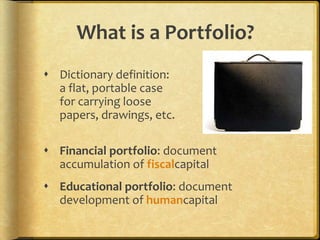
What is a Portfolio?Dictionary definition: a flat, portable case for carrying loose papers, drawings, etc.Financial portfolio: document accumulation of fiscalcapitalEducational portfolio: document development of humancapital
What is a Portfolio in Education?A portfolio is a purposeful collection of student work that exhibits the student's efforts, progress and achievements in oneor more areas[over time].	(Northwest Evaluation Association, 1990)
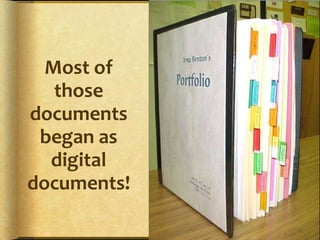
Most of those documents began as digital documents!
What is in an Education Portfolio?The collection must include:student participation in selecting contentsthe criteria for selectionthe criteria for judging meritevidence of student self-reflection(Northwest Evaluation Association, 1990)
Today’s Technology ChoicesSlow Internet Access?Microsoft OfficeWordExcelPowerPointOther Options:Adobe AcrobatApple iLife06 (iDVD, iWeb)Web Page EditorsDreamWeaverFront PagePublish on CD or DVDFast Internet Access?Open Source ToolsMost require a serverCommercial ServicesWeb 2.0 Tools (Free!)BlogsWikisGoogle ToolsInteractivity is KEYPublish online
Today,wewill…Review the philosophy behind ePortfolios and levels/strategies for implementation in a Web 2.0 worldReview a few technology strategies for scaffolding reflectionReview strategies for implementing ePortfolios using a blogging platform (WordPress/EduBlogs) and Google tools
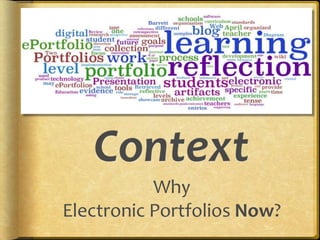
ContextWhy Electronic Portfolios Now?
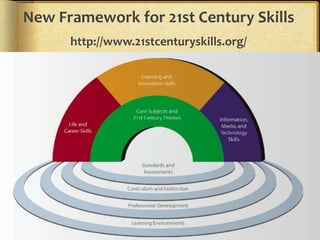
New Framework for 21st Century Skillshttp://www.21stcenturyskills.org/
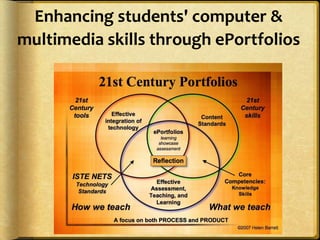
Enhancing students' computer & multimedia skills through ePortfolios
International Trends in ePortfolio DevelopmentPersonalized Learning‘Choice’ and ‘Voice’Self-Directed LearningReflective PracticeConstructing Deep LearningDigital Identity Development & Personal BrandingInteractivity!!!
Student Engagement!CQ + PQ > IQ (Friedman, 2006)[Curiosity + Passion]Learners find their voice and passions through choice and personalization!Portfolio as StoryPositive Digital Identity Development - Branding“Academic MySpace”
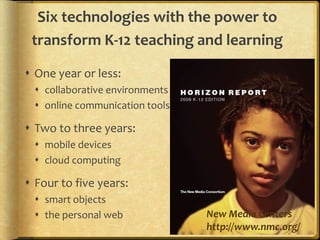
Six technologies with the power to transform K-12 teaching and learningOne year or less:collaborative environmentsonline communication toolsTwo to three years:mobile devicescloud computingFour to five years:smart objectsthe personal web New Media Centershttp://www.nmc.org/
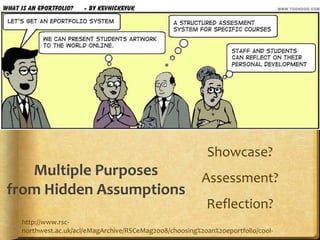
Showcase?Assessment?Reflection?Multiple Purposes from Hidden Assumptionshttp://www.rsc-northwest.ac.uk/acl/eMagArchive/RSCeMag2008/choosing%20an%20eportfolio/cool-cartoon-346082.png
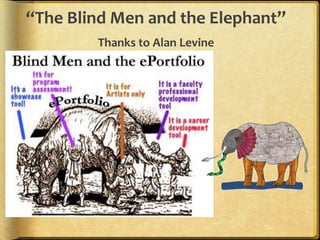
“The Blind Men and the Elephant”Thanks to Alan Levine
QUOTEThe e-portfolio is the central and common point for the student experience… It is a reflection of the student as a person undergoing continuous personal development, not just a store of evidence.-Geoff Rebbeck, e-Learning Coordinator, Thanet College, quoted in JISC, 2008, Effective Practice with e-Portfolios
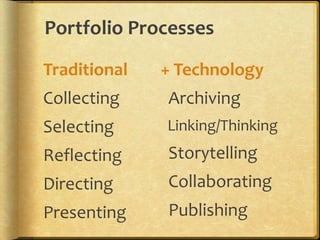
Portfolio ProcessesTraditionalCollectingSelectingReflectingDirectingPresenting+ Technology  Archiving  Linking/Thinking  Storytelling  Collaborating  Publishing
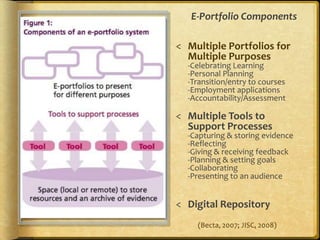
E-Portfolio Components Multiple Portfolios for Multiple Purposes-Celebrating Learning-Personal Planning-Transition/entry to courses-Employment applications-Accountability/Assessment
Multiple Tools to Support Processes-Capturing & storing evidence-Reflecting-Giving & receiving feedback-Planning & setting goals-Collaborating-Presenting to an audience
Digital Repository(Becta, 2007; JISC, 2008)
Reflection… is the “Heart and Soul” of a Portfolio… NOT the Technology!A Reminder…
Technology & ReflectionTwo Themes across the Lifespan with ePortfolio Development
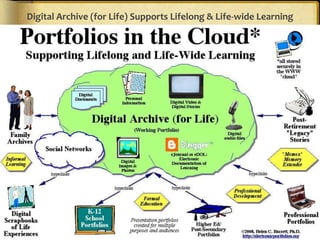
Digital Archive (for Life) Supports Lifelong & Life-wide Learning
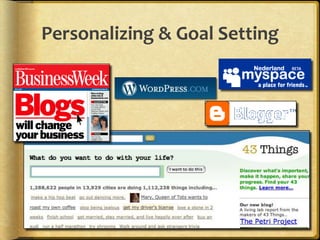
Personalizing & Goal Setting
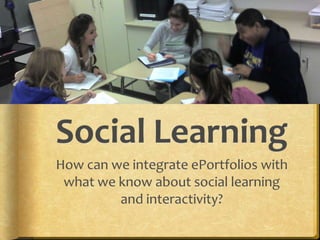
Social LearningHow can we integrate ePortfolios with what we know about social learning and interactivity?
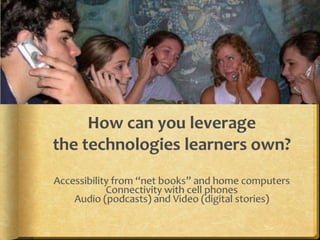
How can you leveragethe technologies learners own?Accessibility from “net books” and home computersConnectivity with cell phonesAudio (podcasts) and Video (digital stories)
How is social networking impacting ePortfolio development?It is having a huge impact on our social and political world!
Think!What are the engagement factors that drive the use of social networks and how can we incorporate those factors into ePortfolios?
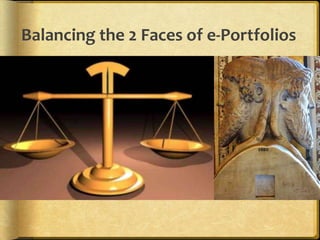
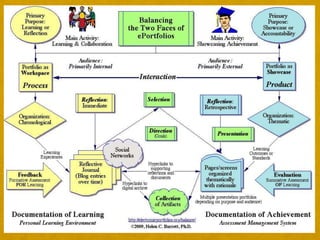
Balancing the 2 Faces of e-Portfolios
Some Basic Concepts“ePortfoliois both process and product”Process: A series of events (time and effort) to produce a result- From Old French proces(“‘journey’”)Product: the outcome/results or “thinginess” of an activity/process- DestinationWiktionary
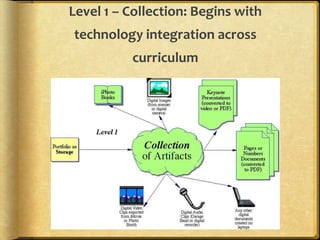
Level 1 – Collection: Begins with technology integration across curriculum
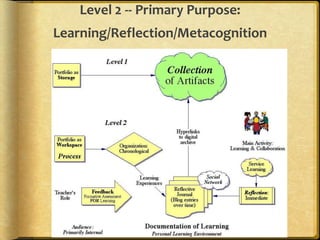
Level 2 -- Primary Purpose: Learning/Reflection/Metacognition
Less abouttellingMore about talking!- Julie Hughes, University of WolverhamptonTake advantage of Web 2.0 strategies in ePortfolio development
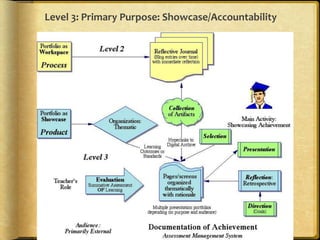
Level 3: Primary Purpose: Showcase/Accountability
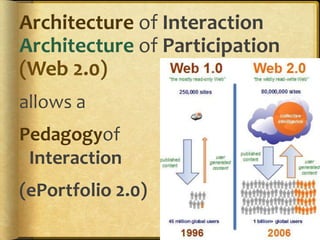
Architecture of InteractionArchitecture of Participation(Web 2.0) allows aPedagogyof Interaction(ePortfolio 2.0)
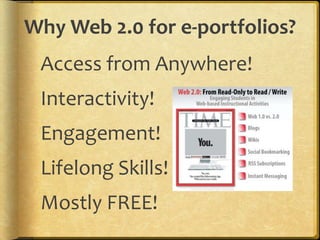
Why Web 2.0 for e-portfolios?Access from Anywhere!Interactivity!Engagement!Lifelong Skills!Mostly FREE!
Web 2.0 TechnologiesAdvantagesFree, often open-source tools on the WWW“Me Publishing (blog and wiki)Shared Writing (GoogleDocs)Web Publishing(Google Sites)DisadvantagesMay require higher technology competencyMostly not secure websites“Small Pieces, Loosely Joined”
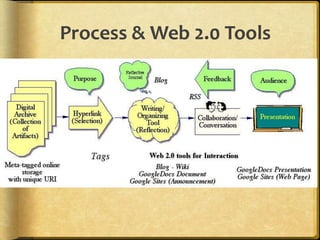
Process & Web 2.0 Tools
All you need is… an <Embed> Code!Hall Davidson
BlogsAdvantagesQuickly, easily create a learning journal, documenting growth over time with entries that are date-stamped. WordPress allows additional pages and sub-pages. Interactivity is maintained through RSS feeds and Comments that can be added.WordPress file limit 3 GB!WordPress blogs can be password-protected (as well as individual entries).DisadvantagesPrescribed order (reverse-chronological) of entries. Does not allow organizing attached files into folders. Limited attachments in Blogger.Blogger does not allow passwords, often blocked in schools
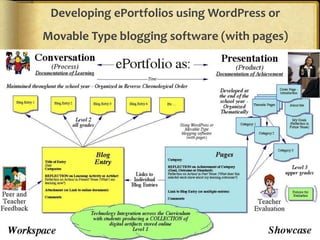
Developing ePortfolios using WordPress or Movable Type blogging software (with pages)
WikisAdvantagesFree (for education) online system. Wikispaces allows 2 GB online storage (PBWiki limits 50 MB). Page can be edited by approved members.Discussion link on top of every page.Saves draft pages and keeps versions. Allows embedding media and building tables on pages.DisadvantagesSet up own system for managing the feedback on student work. Does not allow organizing files into folders. Archived version does not save navigation menu.
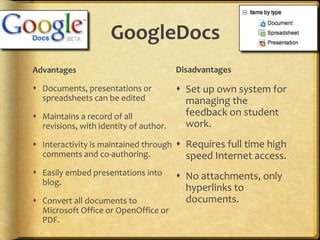
GoogleDocsAdvantagesDocuments, presentations or spreadsheets can be editedMaintains a record of all revisions, with identity of author. Interactivity is maintained through comments and co-authoring. Easily embed presentations into blog. Convert all documents to Microsoft Office or OpenOffice or PDF.DisadvantagesSet up own system for managing the feedback on student work. Requires full time high speed Internet access. No attachments, only hyperlinks to documents.
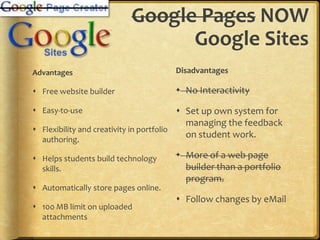
Google Pages NOW Google SitesAdvantagesFree website builderEasy-to-use Flexibility and creativity in portfolio authoring. Helps students build technology skills. Automatically store pages online. 100 MB limit on uploaded attachmentsDisadvantagesNo Interactivity Set up own system for managing the feedback on student work. More of a web page builder than a portfolio program.Follow changes by eMail
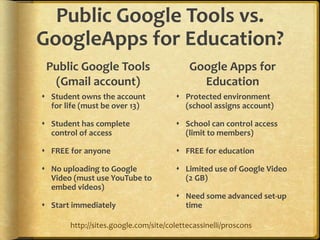
Public Google Tools vs. GoogleApps for Education?Public Google Tools (Gmail account)Student owns the account for life (must be over 13)Student has complete control of accessFREE for anyoneNo uploading to Google Video (must use YouTube to embed videos)Start immediatelyGoogle Apps for EducationProtected environment (school assigns account)School can control access (limit to members)FREE for educationLimited use of Google Video (2 GB)Need some advanced set-up timehttp://sites.google.com/site/colettecassinelli/proscons
Move beyond text-only artifactsEncourage development of multimedia artifactsIntroduce alternative strategies for reflectionDigital storytelling (audio & video)Blogging (including Twitter)
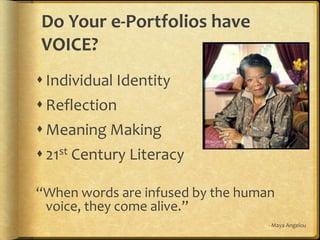
Do Your e-Portfolios have VOICE?Individual IdentityReflection Meaning Making21st Century Literacy“When words are infused by the human voice, they come alive.”- Maya Angelou
Portfolio tells a Story	"A portfolio tells a story. It is the story of knowing. Knowing about things... Knowing oneself... Knowing an audience... Portfolios are students' own stories of what they know, why they believe they know it, and why others should be of the same opinion.” (Paulson & Paulson,  1991, p.2)
Portfolios tell a Story“A portfolio is opinion backed by fact... Students prove what they know with samples of their work.”(Paulson & Paulson,  1991, p.2)
Review Examples of Scaffolding for Reflectionhttp://sites.google.com/site/reflection4learning
Digital Tools for ReflectionDigital Storytelling and Engagement
Invitation to Collaboratehttp://electronicportfolios.org/web2volunteer.htmlHelp me write a book for ISTE on Interactive Portfolios for LearningNeed K-12 teachers familiar with portfolios and comfortable with technologyUse primarily Web 2.0 tools (blog, wiki, GoogleApps)Send me an email
New Google Sitesinvitation for collaboratorsReflection for Learninghttp://sites.google.com/site/reflection4learning ePortfolio Survey Instrumentshttp://sites.google.com/site/eportfoliosurveysAssessment for Learninghttp://sites.google.com/site/assessment4learningCIC Websites due in the fall: Multimedia Records of Practice, Electronic Portfolios & Digital Storytelling
More Learning Resourceshttp://mosep.orgMOre Self-Esteem with my ePortfolio (European Study & Tutorial)
Don’t double your learning!Consider Cognitive Overload!When learning new tools, use familiar tasks;When learning new tasks, use familiar tools.Barrett, 1991

Classroom2.0

  • 1.
    Interactive ePortfoliosWeb 2.0tools toImprove/ShowcaseStudent LearningDr. Helen Barrettelectronicportfolios.orghttp://www.slideshare.net/eportfolios/
  • 2.
    Newbie question: Whatare ePortfolios?e= Using Technology to create…Portfolio = Purposeful Collections of Student Work
  • 3.
    What is aPortfolio?Dictionary definition: a flat, portable case for carrying loose papers, drawings, etc.Financial portfolio: document accumulation of fiscalcapitalEducational portfolio: document development of humancapital
  • 4.
    What is aPortfolio in Education?A portfolio is a purposeful collection of student work that exhibits the student's efforts, progress and achievements in oneor more areas[over time]. (Northwest Evaluation Association, 1990)
  • 5.
    Most of thosedocuments began as digital documents!
  • 6.
    What is inan Education Portfolio?The collection must include:student participation in selecting contentsthe criteria for selectionthe criteria for judging meritevidence of student self-reflection(Northwest Evaluation Association, 1990)
  • 7.
    Today’s Technology ChoicesSlowInternet Access?Microsoft OfficeWordExcelPowerPointOther Options:Adobe AcrobatApple iLife06 (iDVD, iWeb)Web Page EditorsDreamWeaverFront PagePublish on CD or DVDFast Internet Access?Open Source ToolsMost require a serverCommercial ServicesWeb 2.0 Tools (Free!)BlogsWikisGoogle ToolsInteractivity is KEYPublish online
  • 8.
    Today,wewill…Review the philosophybehind ePortfolios and levels/strategies for implementation in a Web 2.0 worldReview a few technology strategies for scaffolding reflectionReview strategies for implementing ePortfolios using a blogging platform (WordPress/EduBlogs) and Google tools
  • 9.
  • 10.
    New Framework for21st Century Skillshttp://www.21stcenturyskills.org/
  • 12.
    Enhancing students' computer& multimedia skills through ePortfolios
  • 13.
    International Trends inePortfolio DevelopmentPersonalized Learning‘Choice’ and ‘Voice’Self-Directed LearningReflective PracticeConstructing Deep LearningDigital Identity Development & Personal BrandingInteractivity!!!
  • 14.
    Student Engagement!CQ +PQ > IQ (Friedman, 2006)[Curiosity + Passion]Learners find their voice and passions through choice and personalization!Portfolio as StoryPositive Digital Identity Development - Branding“Academic MySpace”
  • 15.
    Six technologies withthe power to transform K-12 teaching and learningOne year or less:collaborative environmentsonline communication toolsTwo to three years:mobile devicescloud computingFour to five years:smart objectsthe personal web New Media Centershttp://www.nmc.org/
  • 16.
    Showcase?Assessment?Reflection?Multiple Purposes fromHidden Assumptionshttp://www.rsc-northwest.ac.uk/acl/eMagArchive/RSCeMag2008/choosing%20an%20eportfolio/cool-cartoon-346082.png
  • 17.
    “The Blind Menand the Elephant”Thanks to Alan Levine
  • 18.
    QUOTEThe e-portfolio isthe central and common point for the student experience… It is a reflection of the student as a person undergoing continuous personal development, not just a store of evidence.-Geoff Rebbeck, e-Learning Coordinator, Thanet College, quoted in JISC, 2008, Effective Practice with e-Portfolios
  • 19.
    Portfolio ProcessesTraditionalCollectingSelectingReflectingDirectingPresenting+ Technology Archiving Linking/Thinking Storytelling Collaborating Publishing
  • 20.
    E-Portfolio Components MultiplePortfolios for Multiple Purposes-Celebrating Learning-Personal Planning-Transition/entry to courses-Employment applications-Accountability/Assessment
  • 21.
    Multiple Tools toSupport Processes-Capturing & storing evidence-Reflecting-Giving & receiving feedback-Planning & setting goals-Collaborating-Presenting to an audience
  • 22.
  • 23.
    Reflection… is the“Heart and Soul” of a Portfolio… NOT the Technology!A Reminder…
  • 24.
    Technology & ReflectionTwoThemes across the Lifespan with ePortfolio Development
  • 25.
    Digital Archive (forLife) Supports Lifelong & Life-wide Learning
  • 26.
  • 27.
    Social LearningHow canwe integrate ePortfolios with what we know about social learning and interactivity?
  • 28.
    How can youleveragethe technologies learners own?Accessibility from “net books” and home computersConnectivity with cell phonesAudio (podcasts) and Video (digital stories)
  • 29.
    How is socialnetworking impacting ePortfolio development?It is having a huge impact on our social and political world!
  • 30.
    Think!What are theengagement factors that drive the use of social networks and how can we incorporate those factors into ePortfolios?
  • 31.
    Balancing the 2Faces of e-Portfolios
  • 32.
    Some Basic Concepts“ePortfolioisboth process and product”Process: A series of events (time and effort) to produce a result- From Old French proces(“‘journey’”)Product: the outcome/results or “thinginess” of an activity/process- DestinationWiktionary
  • 34.
    Level 1 –Collection: Begins with technology integration across curriculum
  • 35.
    Level 2 --Primary Purpose: Learning/Reflection/Metacognition
  • 36.
    Less abouttellingMore abouttalking!- Julie Hughes, University of WolverhamptonTake advantage of Web 2.0 strategies in ePortfolio development
  • 37.
    Level 3: PrimaryPurpose: Showcase/Accountability
  • 38.
    Architecture of InteractionArchitectureof Participation(Web 2.0) allows aPedagogyof Interaction(ePortfolio 2.0)
  • 39.
    Why Web 2.0for e-portfolios?Access from Anywhere!Interactivity!Engagement!Lifelong Skills!Mostly FREE!
  • 40.
    Web 2.0 TechnologiesAdvantagesFree,often open-source tools on the WWW“Me Publishing (blog and wiki)Shared Writing (GoogleDocs)Web Publishing(Google Sites)DisadvantagesMay require higher technology competencyMostly not secure websites“Small Pieces, Loosely Joined”
  • 41.
    Process & Web2.0 Tools
  • 42.
    All you needis… an <Embed> Code!Hall Davidson
  • 43.
    BlogsAdvantagesQuickly, easily createa learning journal, documenting growth over time with entries that are date-stamped. WordPress allows additional pages and sub-pages. Interactivity is maintained through RSS feeds and Comments that can be added.WordPress file limit 3 GB!WordPress blogs can be password-protected (as well as individual entries).DisadvantagesPrescribed order (reverse-chronological) of entries. Does not allow organizing attached files into folders. Limited attachments in Blogger.Blogger does not allow passwords, often blocked in schools
  • 44.
    Developing ePortfolios usingWordPress or Movable Type blogging software (with pages)
  • 45.
    WikisAdvantagesFree (for education)online system. Wikispaces allows 2 GB online storage (PBWiki limits 50 MB). Page can be edited by approved members.Discussion link on top of every page.Saves draft pages and keeps versions. Allows embedding media and building tables on pages.DisadvantagesSet up own system for managing the feedback on student work. Does not allow organizing files into folders. Archived version does not save navigation menu.
  • 46.
    GoogleDocsAdvantagesDocuments, presentations orspreadsheets can be editedMaintains a record of all revisions, with identity of author. Interactivity is maintained through comments and co-authoring. Easily embed presentations into blog. Convert all documents to Microsoft Office or OpenOffice or PDF.DisadvantagesSet up own system for managing the feedback on student work. Requires full time high speed Internet access. No attachments, only hyperlinks to documents.
  • 47.
    Google Pages NOWGoogle SitesAdvantagesFree website builderEasy-to-use Flexibility and creativity in portfolio authoring. Helps students build technology skills. Automatically store pages online. 100 MB limit on uploaded attachmentsDisadvantagesNo Interactivity Set up own system for managing the feedback on student work. More of a web page builder than a portfolio program.Follow changes by eMail
  • 48.
    Public Google Toolsvs. GoogleApps for Education?Public Google Tools (Gmail account)Student owns the account for life (must be over 13)Student has complete control of accessFREE for anyoneNo uploading to Google Video (must use YouTube to embed videos)Start immediatelyGoogle Apps for EducationProtected environment (school assigns account)School can control access (limit to members)FREE for educationLimited use of Google Video (2 GB)Need some advanced set-up timehttp://sites.google.com/site/colettecassinelli/proscons
  • 49.
    Move beyond text-onlyartifactsEncourage development of multimedia artifactsIntroduce alternative strategies for reflectionDigital storytelling (audio & video)Blogging (including Twitter)
  • 50.
    Do Your e-Portfolioshave VOICE?Individual IdentityReflection Meaning Making21st Century Literacy“When words are infused by the human voice, they come alive.”- Maya Angelou
  • 51.
    Portfolio tells aStory "A portfolio tells a story. It is the story of knowing. Knowing about things... Knowing oneself... Knowing an audience... Portfolios are students' own stories of what they know, why they believe they know it, and why others should be of the same opinion.” (Paulson & Paulson, 1991, p.2)
  • 52.
    Portfolios tell aStory“A portfolio is opinion backed by fact... Students prove what they know with samples of their work.”(Paulson & Paulson, 1991, p.2)
  • 53.
    Review Examples ofScaffolding for Reflectionhttp://sites.google.com/site/reflection4learning
  • 54.
    Digital Tools forReflectionDigital Storytelling and Engagement
  • 55.
    Invitation to Collaboratehttp://electronicportfolios.org/web2volunteer.htmlHelpme write a book for ISTE on Interactive Portfolios for LearningNeed K-12 teachers familiar with portfolios and comfortable with technologyUse primarily Web 2.0 tools (blog, wiki, GoogleApps)Send me an email
  • 56.
    New Google Sitesinvitationfor collaboratorsReflection for Learninghttp://sites.google.com/site/reflection4learning ePortfolio Survey Instrumentshttp://sites.google.com/site/eportfoliosurveysAssessment for Learninghttp://sites.google.com/site/assessment4learningCIC Websites due in the fall: Multimedia Records of Practice, Electronic Portfolios & Digital Storytelling
  • 57.
    More Learning Resourceshttp://mosep.orgMOreSelf-Esteem with my ePortfolio (European Study & Tutorial)
  • 58.
    Don’t double yourlearning!Consider Cognitive Overload!When learning new tools, use familiar tasks;When learning new tasks, use familiar tools.Barrett, 1991

Editor's Notes

  • #19 It is also not just about alignment with standards.