An immersive introduction to

  e-portfolios
and the Mahara e-portfolio tool


               By Leonard Low
               leonard.low@canberra.edu.au
               Teaching & Learning Centre,
               University of Canberra

              (CC:BY:NC:SA) Creative Commons 2009
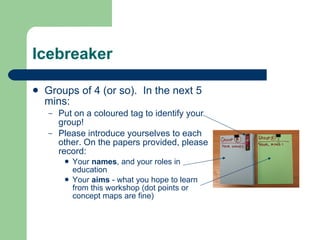
Icebreaker

   Groups of 4 (or so). In the next 5
    mins:
    –   Put on a coloured tag to identify your
        group!
    –   Please introduce yourselves to each
        other. On the papers provided, please
        record:
            Your names, and your roles in
             education
            Your aims - what you hope to learn
             from this workshop (dot points or
             concept maps are fine)
Your Aims – and Mine

   Groups will now introduce themselves and their aims.
   My aims today:
    –   To share some ideas on
            What e-portfolios are
            Strategies for using e-portfolios to support learning, assessment,
             employability, professional development, and lifelong learning
    –   To support you as you try out Mahara, an online e-portfolio tool
            So you experience the strengths of Mahara
            So you understand how Mahara can be used for the e-portfolio
             strategies we discuss above
            So you also understand Mahara’s limitations and areas it needs
             improvement
Defining E-Portfolios

   What is an e-portfolio? In
    the next 5 minutes, in your
    groups, please write down
    your thoughts on how you
    might define an e-portfolio.
   When we’re all finished, we’ll
    share our thoughts, and look
    at some other definitions.
Some Other Definitions

   “An e-portfolio is a learner-driven collection
    of digital objects demonstrating experiences,
    achievements and evidence of learning. E-
    portfolios provide learners with a structured way of recording their
    learning experiences and work history. E-portfolios can be developed
    quickly and easily … to capture live evidence through the use of
    mobile phones and point-of-view devices, and can include a range of
    digital evidence such as audio, video, photographs and blogs.”
                          Miller (2008) - Australian Flexible Learning Framework
Some Other Definitions

“The general characteristics of an e-portfolio are described by the
Centre for Recording Achievement (CRA) as being:
    –   A “repository” for “artefacts”
    –   A means of accessing personal information, perhaps held in
        distributed databases
    –   A means of presenting oneself and ones skills, qualities and
        achievements to others
    –   A means of collecting and selecting assessment evidence
    –   A guidance tool to support review and choice
    –   A means of sharing and collaborating
    –   A means of encouraging a sense of personal identity.”
     Ward & Grant (2007), cited in Hallam et. al. (2008) - ALTC Australian e-Portfolio Project
Some Other Definitions
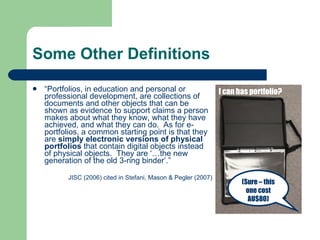
   “Portfolios, in education and personal or                   I can has portfolio?
    professional development, are collections of
    documents and other objects that can be
    shown as evidence to support claims a person
    makes about what they know, what they have
    achieved, and what they can do. As for e-
    portfolios, a common starting point is that they
    are simply electronic versions of physical
    portfolios that contain digital objects instead
    of physical objects. They are ‘…the new
    generation of the old 3-ring binder’.”

          JISC (2006) cited in Stefani, Mason & Pegler (2007)
                                                                       (Sure – this
                                                                        one cost
                                                                         AU$80)
Affordances of E-portfolios

   For the next 5 minutes, in your
    groups, on the large paper
    provided, please brainstorm the
    possible uses of e-portfolios as a
    concept map.
   Your concept maps will be
    shared with, and commented on,
    by the other groups… later!
   Some areas to consider (but
    there may be more!): learning,
    assessment, employability,
    professional development, and
    lifelong learning
Affordances of E-Portfolios (Discuss)

   Over the next 15 minutes, we’ll be discussing some
    of the affordances of e-portfolios that you’ve
    identified in your groups:
    –   Comparison of e-portfolios with “binder” portfolios
    –   E-portfolios of learning
    –   E-portfolios for assessment
    –   E-portfolios for employment
    –   E-portfolios for professional development & lifelong learning
    –   Any others?!
E-Portfolios vs Portfolios (without the Ease!)

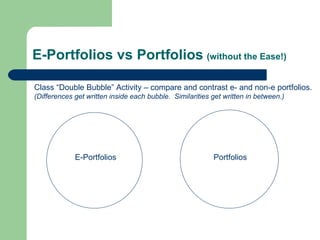
Class “Double Bubble” Activity – compare and contrast e- and non-e portfolios.
(Differences get written inside each bubble. Similarities get written in between.)


             E-Portfolios                                 Portfolios
Affordances: E-Portfolios vs Portfolios

   Can be cheaper and easier to create and maintain for the end
    user
   Do not need to be physically brought, or sent, to viewers (e.g.
    assessors, employers)
   Can be easily shared with multiple people at the same time
   Can present the same “artefacts” in different ways, for different
    purposes/audiences (different “views”)
   Can display media that “binder” portfolios cannot (e.g. film,
    audio)
   Can “link” between artefacts or documents, and to the web
   … and many more! (What are Yours?)
Affordances: E-Portfolios for Learning

   Collecting materials that track learning: achievements,
    successes, and products
   Selecting work based on critical self (or assisted) review and
    design
   Recalling and reflecting on previous work
   Projecting (or Directing): identifying learning gaps or goals
    and developing action or learning plans for the future
   Presenting portfolios to teachers or peers, promoting
    collaborative learning, self and peer evaluation, and setting
    students up for PDP and lifelong learning
                -   Di Biase et al (2002) cited in Stefani, Mason & Pegler (2007)
-   Plus yours! (Let’s Discuss…)
Affordances: E-Portfolios for Assessment

   Learners gather evidence of learning or competency
    into e-portfolio
   E-portfolio serves as basis of self, peer, formative, or
    summative assessment
    –   Consider whether assessment is “for” learning, or “of”
        learning
    –   This may tie in with whether portfolios need to gather
        evidence of process, or simply evidence or production
        (“finished work”)
    –   Process: more reflection vs Product: more presentation
E-Portfolios:
Learning & Assessment Case Study

   Handout: from University of Canberra “Learning With
    Technology (7840)” subject textbook, “Integrating
    Educational Technology into Teaching” by
    Roblyer and Doering (5th Ed. 2009)
   Note that this “blended” approach to e-portfolios also
    incorporates an integrated curriculum strategy
    (across several subject areas, and drawing on
    multiple learner competencies for completion).
Affordances of E-Portfolios for Employment

   Targeted, customised e-portfolios to address
    specific selection criteria
   Public “profile” that can be published web-
    wide to attract job offers
   Can be made available to multiple employers
    simultaneously
   Rich media support, attractive presentation,
    and guided creation
Affordances of E-Portfolios for PD (e.g.
teaching portfolio!)

Link between learning & teaching portfolios:
   –   Teaching portfolio is opportunity for considered reflection on
       one’s teaching objectives and delivery
   –   Provides a formal and verifiable record of teaching
       accomplishment that can be used for variety of vocational
       puposes, e.g. continuation/tenure review, salary review,
       professional development planning
   –   Assists in applying for teaching positions, awards and
       prizes
       Peter Seldin, 1997, “The Teaching Portfolio: A Practical Guide to Improved
                                  Performance and Promotion/Tenure Decisions”
What goes into a teaching portfolio?

   Material from oneself:
     –   A statement on teaching philosophy & goals
     –   Statements of teaching responsibilities
     –   Course/lesson planning guides
     –   Record of professional development activities
     –   Evidence of teaching effectiveness such as summaries of student feedback,
         evaluations
   Material from others:
     –   Feedback from peer review and support
     –   Feedback on course materials
     –   Student evaluation data
     –   Honours or recognitions
   Products of teaching/learning:
     –   Student learning outcomes such as grades & retention rates
     –   Examples of student work and feedback given to students
     –   Record/examples of student achievements
                                                            - Stefani, Mason & Pegler (2007)
E-Portfolios and Lifelong Learning

   Could be created at school or university, and
    referenced for rest of life!
   Continued planning, development, updating
   Alumni connections?
   Promotion of university? (Every time a
    graduate shows their e-portfolio to an
    employer or colleague…)
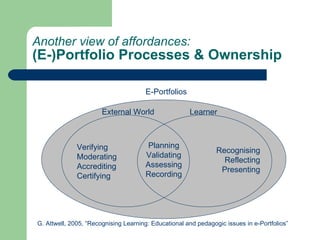
Another view of affordances:
(E-)Portfolio Processes & Ownership

                                      E-Portfolios

                       External World                 Learner


              Verifying                Planning
                                                                Recognising
              Moderating              Validating
                                                                  Reflecting
              Accrediting             Assessing
                                                                 Presenting
              Certifying              Recording


G. Attwell, 2005, “Recognising Learning: Educational and pedagogic issues in e-Portfolios”
A Self-Assessment Activity

In your groups, review your own concept maps
of the Affordances of E-Portfolios, and, with the
extra richness of our discussion, decide how
many “stars” your concept map deserves:
   –   Up to 3 stars for usefulness, quality and
       completeness
   –   Up to 2 stars for creativity and originality
   –   Provide your self-assessment, any comments and
       score, on the Post-It Notes provided
Some Peer Feedback

   In the next 5 minutes, in your groups, look
    at the other groups’ maps, and decide how
    many stars should be awarded to each
    group for their ideas:
     –   Up to 3 stars for usefulness, quality and
         completeness
     –   Up to 2 stars for creativity and originality
     –   Provide your feedback and score, on the
         Post-It Notes provided
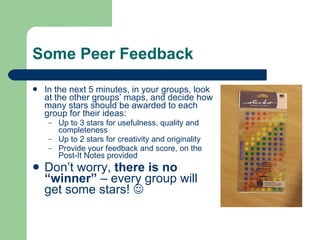
   Don’t worry, there is no
    “winner” – every group will
    get some stars! 
YOUR “Portfolios”.

   We’ll take a break soon.
   When we return, we’ll be looking at Mahara and
    applying a lot of what we’ve just been doing in a
    “real” e-portfolio tool!
   But first, it’s time to assemble your group portfolios.
    We will be using these after the break:
    –   Names & Aims: Profile!
    –   Definitions: Reflection!
    –   Affordances Concept Map: Learning and Assessment!
    –   Stars: Your Group’s “Award” for Achievement!
   Well done! Please come back in 10 mins…

An Introduction to E-Portfolios

  • 1.
    An immersive introductionto e-portfolios and the Mahara e-portfolio tool By Leonard Low leonard.low@canberra.edu.au Teaching & Learning Centre, University of Canberra (CC:BY:NC:SA) Creative Commons 2009
  • 2.
    Icebreaker  Groups of 4 (or so). In the next 5 mins: – Put on a coloured tag to identify your group! – Please introduce yourselves to each other. On the papers provided, please record:  Your names, and your roles in education  Your aims - what you hope to learn from this workshop (dot points or concept maps are fine)
  • 3.
    Your Aims –and Mine  Groups will now introduce themselves and their aims.  My aims today: – To share some ideas on  What e-portfolios are  Strategies for using e-portfolios to support learning, assessment, employability, professional development, and lifelong learning – To support you as you try out Mahara, an online e-portfolio tool  So you experience the strengths of Mahara  So you understand how Mahara can be used for the e-portfolio strategies we discuss above  So you also understand Mahara’s limitations and areas it needs improvement
  • 4.
    Defining E-Portfolios  What is an e-portfolio? In the next 5 minutes, in your groups, please write down your thoughts on how you might define an e-portfolio.  When we’re all finished, we’ll share our thoughts, and look at some other definitions.
  • 5.
    Some Other Definitions  “An e-portfolio is a learner-driven collection of digital objects demonstrating experiences, achievements and evidence of learning. E- portfolios provide learners with a structured way of recording their learning experiences and work history. E-portfolios can be developed quickly and easily … to capture live evidence through the use of mobile phones and point-of-view devices, and can include a range of digital evidence such as audio, video, photographs and blogs.” Miller (2008) - Australian Flexible Learning Framework
  • 6.
    Some Other Definitions “Thegeneral characteristics of an e-portfolio are described by the Centre for Recording Achievement (CRA) as being: – A “repository” for “artefacts” – A means of accessing personal information, perhaps held in distributed databases – A means of presenting oneself and ones skills, qualities and achievements to others – A means of collecting and selecting assessment evidence – A guidance tool to support review and choice – A means of sharing and collaborating – A means of encouraging a sense of personal identity.” Ward & Grant (2007), cited in Hallam et. al. (2008) - ALTC Australian e-Portfolio Project
  • 7.
    Some Other Definitions  “Portfolios, in education and personal or I can has portfolio? professional development, are collections of documents and other objects that can be shown as evidence to support claims a person makes about what they know, what they have achieved, and what they can do. As for e- portfolios, a common starting point is that they are simply electronic versions of physical portfolios that contain digital objects instead of physical objects. They are ‘…the new generation of the old 3-ring binder’.” JISC (2006) cited in Stefani, Mason & Pegler (2007) (Sure – this one cost AU$80)
  • 8.
    Affordances of E-portfolios  For the next 5 minutes, in your groups, on the large paper provided, please brainstorm the possible uses of e-portfolios as a concept map.  Your concept maps will be shared with, and commented on, by the other groups… later!  Some areas to consider (but there may be more!): learning, assessment, employability, professional development, and lifelong learning
  • 9.
    Affordances of E-Portfolios(Discuss)  Over the next 15 minutes, we’ll be discussing some of the affordances of e-portfolios that you’ve identified in your groups: – Comparison of e-portfolios with “binder” portfolios – E-portfolios of learning – E-portfolios for assessment – E-portfolios for employment – E-portfolios for professional development & lifelong learning – Any others?!
  • 10.
    E-Portfolios vs Portfolios(without the Ease!) Class “Double Bubble” Activity – compare and contrast e- and non-e portfolios. (Differences get written inside each bubble. Similarities get written in between.) E-Portfolios Portfolios
  • 11.
    Affordances: E-Portfolios vsPortfolios  Can be cheaper and easier to create and maintain for the end user  Do not need to be physically brought, or sent, to viewers (e.g. assessors, employers)  Can be easily shared with multiple people at the same time  Can present the same “artefacts” in different ways, for different purposes/audiences (different “views”)  Can display media that “binder” portfolios cannot (e.g. film, audio)  Can “link” between artefacts or documents, and to the web  … and many more! (What are Yours?)
  • 12.
    Affordances: E-Portfolios forLearning  Collecting materials that track learning: achievements, successes, and products  Selecting work based on critical self (or assisted) review and design  Recalling and reflecting on previous work  Projecting (or Directing): identifying learning gaps or goals and developing action or learning plans for the future  Presenting portfolios to teachers or peers, promoting collaborative learning, self and peer evaluation, and setting students up for PDP and lifelong learning - Di Biase et al (2002) cited in Stefani, Mason & Pegler (2007) - Plus yours! (Let’s Discuss…)
  • 13.
    Affordances: E-Portfolios forAssessment  Learners gather evidence of learning or competency into e-portfolio  E-portfolio serves as basis of self, peer, formative, or summative assessment – Consider whether assessment is “for” learning, or “of” learning – This may tie in with whether portfolios need to gather evidence of process, or simply evidence or production (“finished work”) – Process: more reflection vs Product: more presentation
  • 14.
    E-Portfolios: Learning & AssessmentCase Study  Handout: from University of Canberra “Learning With Technology (7840)” subject textbook, “Integrating Educational Technology into Teaching” by Roblyer and Doering (5th Ed. 2009)  Note that this “blended” approach to e-portfolios also incorporates an integrated curriculum strategy (across several subject areas, and drawing on multiple learner competencies for completion).
  • 15.
    Affordances of E-Portfoliosfor Employment  Targeted, customised e-portfolios to address specific selection criteria  Public “profile” that can be published web- wide to attract job offers  Can be made available to multiple employers simultaneously  Rich media support, attractive presentation, and guided creation
  • 16.
    Affordances of E-Portfoliosfor PD (e.g. teaching portfolio!) Link between learning & teaching portfolios: – Teaching portfolio is opportunity for considered reflection on one’s teaching objectives and delivery – Provides a formal and verifiable record of teaching accomplishment that can be used for variety of vocational puposes, e.g. continuation/tenure review, salary review, professional development planning – Assists in applying for teaching positions, awards and prizes Peter Seldin, 1997, “The Teaching Portfolio: A Practical Guide to Improved Performance and Promotion/Tenure Decisions”
  • 17.
    What goes intoa teaching portfolio?  Material from oneself: – A statement on teaching philosophy & goals – Statements of teaching responsibilities – Course/lesson planning guides – Record of professional development activities – Evidence of teaching effectiveness such as summaries of student feedback, evaluations  Material from others: – Feedback from peer review and support – Feedback on course materials – Student evaluation data – Honours or recognitions  Products of teaching/learning: – Student learning outcomes such as grades & retention rates – Examples of student work and feedback given to students – Record/examples of student achievements - Stefani, Mason & Pegler (2007)
  • 18.
    E-Portfolios and LifelongLearning  Could be created at school or university, and referenced for rest of life!  Continued planning, development, updating  Alumni connections?  Promotion of university? (Every time a graduate shows their e-portfolio to an employer or colleague…)
  • 19.
    Another view ofaffordances: (E-)Portfolio Processes & Ownership E-Portfolios External World Learner Verifying Planning Recognising Moderating Validating Reflecting Accrediting Assessing Presenting Certifying Recording G. Attwell, 2005, “Recognising Learning: Educational and pedagogic issues in e-Portfolios”
  • 20.
    A Self-Assessment Activity Inyour groups, review your own concept maps of the Affordances of E-Portfolios, and, with the extra richness of our discussion, decide how many “stars” your concept map deserves: – Up to 3 stars for usefulness, quality and completeness – Up to 2 stars for creativity and originality – Provide your self-assessment, any comments and score, on the Post-It Notes provided
  • 21.
    Some Peer Feedback  In the next 5 minutes, in your groups, look at the other groups’ maps, and decide how many stars should be awarded to each group for their ideas: – Up to 3 stars for usefulness, quality and completeness – Up to 2 stars for creativity and originality – Provide your feedback and score, on the Post-It Notes provided  Don’t worry, there is no “winner” – every group will get some stars! 
  • 22.
    YOUR “Portfolios”.  We’ll take a break soon.  When we return, we’ll be looking at Mahara and applying a lot of what we’ve just been doing in a “real” e-portfolio tool!  But first, it’s time to assemble your group portfolios. We will be using these after the break: – Names & Aims: Profile! – Definitions: Reflection! – Affordances Concept Map: Learning and Assessment! – Stars: Your Group’s “Award” for Achievement!  Well done! Please come back in 10 mins…