1 
OObbjjeecctt OOrriieenntteedd DDeessiiggnn 
TToooollss,, UUMMLL
2 
AAnn IInnttrroodduuccttiioonn ttoo 
UUssiinngg tthhee UUnniiffiieedd MMooddeelliinngg 
LLaanngguuaaggee ((UUMMLL))
3 
UUMMLL::OOvveerrvviieeww 
 Use of Models 
 Brief History of UML 
 UML Modeling Diagrams 
 Inside the UML Demo 
 Reference Resources
4 
Purpose of Modeling 
“Modeling captures essential 
parts of the system.” 
Dr. James Rumbaugh 
Visual Modeling is 
modeling 
using standard graphical 
notations
5 
UML: 
Software Modeling Language 
What is UML? 
 UML stands for Unified Modeling Language 
 A standard language notation for visualizing, specifying, 
constructing, and documenting a software design. 
 Unified Modeling Language ("UML") is the industry standard 
"language" for describing, visualizing, and documenting object-oriented 
(OO) systems. 
 Uses concepts from 
 Data Modeling (Entity Relationship Diagrams) 
 Business Modeling (work flow) 
 Object Modeling 
 Component Modeling
6 
UML: 
Software Modeling Language 
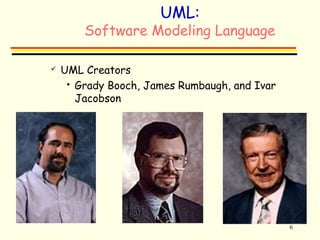
 UML Creators 
 Grady Booch, James Rumbaugh, and Ivar 
Jacobson
7 
What UML is and is not? 
IS IS NOT 
 Standard modeling 
language 
 Defines a semantic 
metamodel 
 Process independent 
 Visual programming 
language 
 A tool interface, 
storage, or run-time 
model 
 A standard process
http://www.vinci.org/uml/history.html 
8 
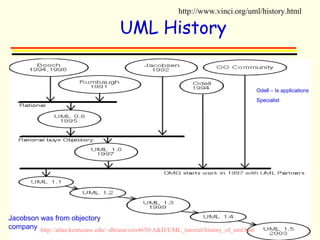
UML History 
Jacobson was from objectory 
company 
Odell – Is applications 
Specialist 
http://atlas.kennesaw.edu/~dbraun/csis4650/A&D/UML_tutorial/history_of_uml.htm
Design Goals for UML 
 Provide users with a ready-to-use, expressive 
visual modeling language so they can develop and 
exchange meaningful models. 
9 
 Provide extensibility and specialization 
mechanisms to extend the core concepts.
10 
Design Goals for UML 
 Be independent of particular programming 
languages and development processes. 
 Provide a formal basis for understanding the 
modeling language. 
 Support higher-level development concepts such as 
collaborations, frameworks, patterns and 
components. 
 Integrate best practices.
11 
UML Diagrams
12 
UML: 
Diagrams 
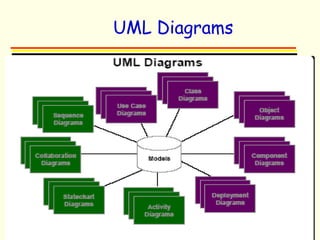
 UML is a collection of a variety of diagrams for 
differing purposes. 
 Each type of diagram models a particular 
aspect of OO design in an easy to understand, 
visual manner. 
 The UML standard specifies exactly how the 
diagrams are to be drawn and what each 
component in the diagram means.
13 
UML Diagrams 
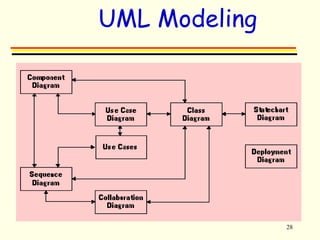
 UML modeling Diagrams are as follows: 
 Use case 
 Interaction 
 Sequence 
 Collaboration 
 Class 
 State Transition 
 Component 
 Deployment
14 
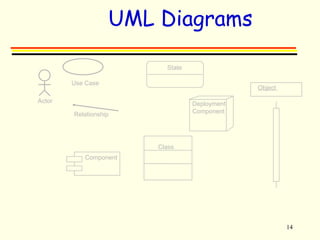
UML Diagrams 
State 
Component 
Class 
Deployment 
Component 
Use Case 
Relationship 
Actor 
Object
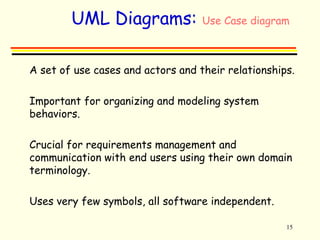
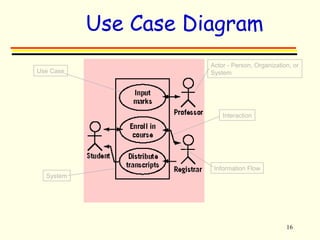
UML Diagrams: Use Case diagram 
 A set of use cases and actors and their relationships. 
15 
 Important for organizing and modeling system 
behaviors. 
 Crucial for requirements management and 
communication with end users using their own domain 
terminology. 
 Uses very few symbols, all software independent.
16 
Use Case Diagram 
Actor - Person, Organization, or 
Use Case System 
System 
Interaction 
Information Flow
17 
UML Diagrams 
Object diagram 
 A set of objects (instances of classes) and their 
relationships. 
 A static snapshot of a dynamic view of the system. 
 Reperesent real or prototypical cases. 
Class Diagram 
 A set of classes, interfaces, collaborations, and 
relationships 
 Reflects the static design of a system.
18 
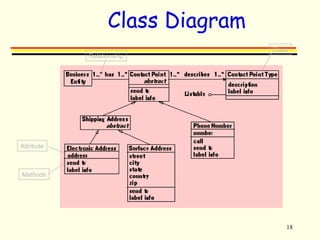
Class Diagram 
Class 
Attribute 
Methods 
Relationship
19 
UML Diagrams 
Sequence & Collaboration 
 Composed of objects and messages dispatched between 
them. 
 Shows a dynamic view of the system. 
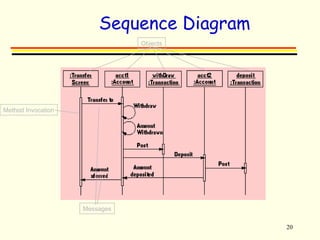
 Sequence Diagram exposes time ordering of messages. 
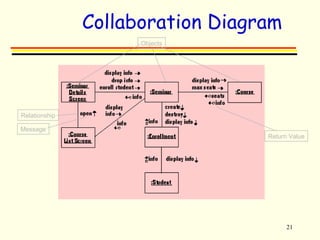
 Collaboration Diagram exposes exposes structural 
organization of messages. 
 In some tools (i.e. Rational Rose), these diagrams can be 
interchanged from the same underlying information.
20 
Sequence Diagram 
Objects 
Method Invocation 
Messages
21 
Collaboration Diagram 
Objects 
Relationship 
Message 
Return Value
22 
UML Diagrams 
State transition or statechart 
 Represents a state machine, composed of states and 
transitions. 
 Addresses the dynamic view of the system. 
 Useful for reactive behaviors. 
 Important for modeling interfaces, classes, or 
collaborations.
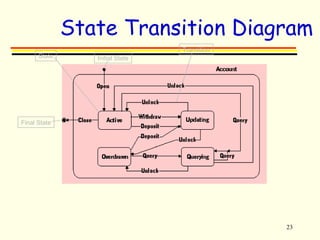
State Transition Diagram 
23 
State 
Final State 
Initial State 
Transition
24 
UML Diagrams 
Activity diagram 
 Addresses a dynamic view of the system. 
 Important for modeling system functions. 
 Emphasizes the flow of objects and synchronization of 
the flow in support of parallel processing. 
 An extension of the old "flow chart" diagram combined 
with Petri nets.
25 
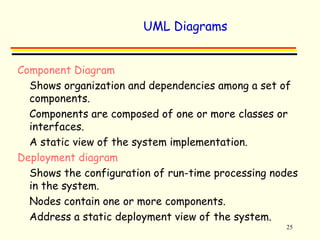
UML Diagrams 
Component Diagram 
 Shows organization and dependencies among a set of 
components. 
 Components are composed of one or more classes or 
interfaces. 
 A static view of the system implementation. 
Deployment diagram 
 Shows the configuration of run-time processing nodes 
in the system. 
 Nodes contain one or more components. 
 Address a static deployment view of the system.
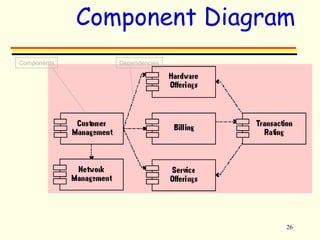
Component Diagram 
26 
Components Dependencies
27 
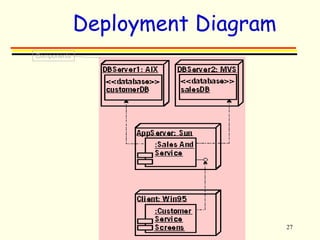
Deployment Diagram 
Components
28 
UML Modeling
29 
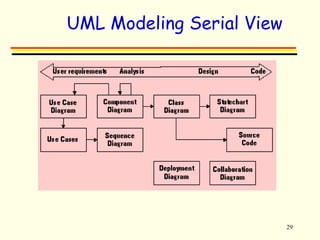
UML Modeling Serial View
30 
Internet UML 
Resources 
 UML Revision Task Force 
 uml.shl.com 
 Object Management Group 
 www.omg.org 
 Rational Software Corp.'s UML Resource Center 
 http://www.rational.com/uml/index.jtmpl 
 Lockheed Martin Advanced Concepts Center 
 http://www.lmco.com/acc/ 
 Addison-Wesley's Object Technology Series 
 http://www.awl.com/cseng/otseries/ 
 Software Development Magazine 
 http://www.sdmagazine.com/uml/ 
 UML resource page 
 http://home.pacbell.net/ckobryn/uml.htm
31 
References 
 Ambler, Scott W, “How the UML Models 
Fit Together” 
 Communications of ACM, Oct 1999 
 The Unified Modeling Language Reference 
Manual 
 Fowler, Martin; Scott Kendall, “UML 
Distilled Second Edition” 
 “UML in a Nutshell”, O’Reilly

4.o o design tools=uml -_lecture 4

  • 1.
    1 OObbjjeecctt OOrriieenntteeddDDeessiiggnn TToooollss,, UUMMLL
  • 2.
    2 AAnn IInnttrroodduuccttiioonnttoo UUssiinngg tthhee UUnniiffiieedd MMooddeelliinngg LLaanngguuaaggee ((UUMMLL))
  • 3.
    3 UUMMLL::OOvveerrvviieeww Use of Models  Brief History of UML  UML Modeling Diagrams  Inside the UML Demo  Reference Resources
  • 4.
    4 Purpose ofModeling “Modeling captures essential parts of the system.” Dr. James Rumbaugh Visual Modeling is modeling using standard graphical notations
  • 5.
    5 UML: SoftwareModeling Language What is UML?  UML stands for Unified Modeling Language  A standard language notation for visualizing, specifying, constructing, and documenting a software design.  Unified Modeling Language ("UML") is the industry standard "language" for describing, visualizing, and documenting object-oriented (OO) systems.  Uses concepts from  Data Modeling (Entity Relationship Diagrams)  Business Modeling (work flow)  Object Modeling  Component Modeling
  • 6.
    6 UML: SoftwareModeling Language  UML Creators  Grady Booch, James Rumbaugh, and Ivar Jacobson
  • 7.
    7 What UMLis and is not? IS IS NOT  Standard modeling language  Defines a semantic metamodel  Process independent  Visual programming language  A tool interface, storage, or run-time model  A standard process
  • 8.
    http://www.vinci.org/uml/history.html 8 UMLHistory Jacobson was from objectory company Odell – Is applications Specialist http://atlas.kennesaw.edu/~dbraun/csis4650/A&D/UML_tutorial/history_of_uml.htm
  • 9.
    Design Goals forUML  Provide users with a ready-to-use, expressive visual modeling language so they can develop and exchange meaningful models. 9  Provide extensibility and specialization mechanisms to extend the core concepts.
  • 10.
    10 Design Goalsfor UML  Be independent of particular programming languages and development processes.  Provide a formal basis for understanding the modeling language.  Support higher-level development concepts such as collaborations, frameworks, patterns and components.  Integrate best practices.
  • 11.
  • 12.
    12 UML: Diagrams  UML is a collection of a variety of diagrams for differing purposes.  Each type of diagram models a particular aspect of OO design in an easy to understand, visual manner.  The UML standard specifies exactly how the diagrams are to be drawn and what each component in the diagram means.
  • 13.
    13 UML Diagrams  UML modeling Diagrams are as follows:  Use case  Interaction  Sequence  Collaboration  Class  State Transition  Component  Deployment
  • 14.
    14 UML Diagrams State Component Class Deployment Component Use Case Relationship Actor Object
  • 15.
    UML Diagrams: UseCase diagram  A set of use cases and actors and their relationships. 15  Important for organizing and modeling system behaviors.  Crucial for requirements management and communication with end users using their own domain terminology.  Uses very few symbols, all software independent.
  • 16.
    16 Use CaseDiagram Actor - Person, Organization, or Use Case System System Interaction Information Flow
  • 17.
    17 UML Diagrams Object diagram  A set of objects (instances of classes) and their relationships.  A static snapshot of a dynamic view of the system.  Reperesent real or prototypical cases. Class Diagram  A set of classes, interfaces, collaborations, and relationships  Reflects the static design of a system.
  • 18.
    18 Class Diagram Class Attribute Methods Relationship
  • 19.
    19 UML Diagrams Sequence & Collaboration  Composed of objects and messages dispatched between them.  Shows a dynamic view of the system.  Sequence Diagram exposes time ordering of messages.  Collaboration Diagram exposes exposes structural organization of messages.  In some tools (i.e. Rational Rose), these diagrams can be interchanged from the same underlying information.
  • 20.
    20 Sequence Diagram Objects Method Invocation Messages
  • 21.
    21 Collaboration Diagram Objects Relationship Message Return Value
  • 22.
    22 UML Diagrams State transition or statechart  Represents a state machine, composed of states and transitions.  Addresses the dynamic view of the system.  Useful for reactive behaviors.  Important for modeling interfaces, classes, or collaborations.
  • 23.
    State Transition Diagram 23 State Final State Initial State Transition
  • 24.
    24 UML Diagrams Activity diagram  Addresses a dynamic view of the system.  Important for modeling system functions.  Emphasizes the flow of objects and synchronization of the flow in support of parallel processing.  An extension of the old "flow chart" diagram combined with Petri nets.
  • 25.
    25 UML Diagrams Component Diagram  Shows organization and dependencies among a set of components.  Components are composed of one or more classes or interfaces.  A static view of the system implementation. Deployment diagram  Shows the configuration of run-time processing nodes in the system.  Nodes contain one or more components.  Address a static deployment view of the system.
  • 26.
    Component Diagram 26 Components Dependencies
  • 27.
  • 28.
  • 29.
    29 UML ModelingSerial View
  • 30.
    30 Internet UML Resources  UML Revision Task Force  uml.shl.com  Object Management Group  www.omg.org  Rational Software Corp.'s UML Resource Center  http://www.rational.com/uml/index.jtmpl  Lockheed Martin Advanced Concepts Center  http://www.lmco.com/acc/  Addison-Wesley's Object Technology Series  http://www.awl.com/cseng/otseries/  Software Development Magazine  http://www.sdmagazine.com/uml/  UML resource page  http://home.pacbell.net/ckobryn/uml.htm
  • 31.
    31 References Ambler, Scott W, “How the UML Models Fit Together”  Communications of ACM, Oct 1999  The Unified Modeling Language Reference Manual  Fowler, Martin; Scott Kendall, “UML Distilled Second Edition”  “UML in a Nutshell”, O’Reilly

Editor's Notes

  • #5 Developing a model for an industrial-strength software system prior to its construction or renovation is as essential as having a blueprint for large building. Good models are essential for communication among project teams and to assure architectural soundness. As the complexity of systems increase, so does the importance of good modeling techniques. There are many additional factors of a project’s success, but having a rigorous modeling language standard is one essential factor.
  • #14 Use case diagrams are created to visualize the relationships between actors and use cases A sequence diagram displays object interactions arranged in a time sequence A collaboration diagram displays object interactions organized around objects and their links to one another A class diagram shows the existence of classes and their relationships in the logical view of a system A class is a collection of objects with common structure, common behavior, common relationships and common semantics A state transition diagram shows The life history of a given class The events that cause a transition from one state to another The actions that result from a state change Component diagrams illustrate the organizations and dependencies among software components The deployment diagram shows the configuration of run-time processing elements and the software processes living on them
  • #15 Use case diagrams are created to visualize the relationships between actors and use cases A sequence diagram displays object interactions arranged in a time sequence A collaboration diagram displays object interactions organized around objects and their links to one another A class diagram shows the existence of classes and their relationships in the logical view of a system A class is a collection of objects with common structure, common behavior, common relationships and common semantics A state transition diagram shows The life history of a given class The events that cause a transition from one state to another The actions that result from a state change Component diagrams illustrate the organizations and dependencies among software components The deployment diagram shows the configuration of run-time processing elements and the software processes living on them
  • #16 Use case diagrams are created to visualize the relationships between actors and use cases A sequence diagram displays object interactions arranged in a time sequence A collaboration diagram displays object interactions organized around objects and their links to one another A class diagram shows the existence of classes and their relationships in the logical view of a system A class is a collection of objects with common structure, common behavior, common relationships and common semantics A state transition diagram shows The life history of a given class The events that cause a transition from one state to another The actions that result from a state change Component diagrams illustrate the organizations and dependencies among software components The deployment diagram shows the configuration of run-time processing elements and the software processes living on them
  • #17 A use case is a description of a scenario that an application may or may not be able to handle. It describes how an “actor” interacts with the application. Use case is a pattern of behavior the system exhibits Each use case is a sequence of related transactions performed by an actor and the system in a dialogue In this example, students are enrolling in courses via the help of the registrars. Professors input and review grades, and registrars authorize the sending out of transcripts to students. Note more than one actor is involved in some use cases and flow of information can be unidirectional or bidirectional. Use case and use case diagram are referred to as use case model
  • #18 Use case diagrams are created to visualize the relationships between actors and use cases A sequence diagram displays object interactions arranged in a time sequence A collaboration diagram displays object interactions organized around objects and their links to one another A class diagram shows the existence of classes and their relationships in the logical view of a system A class is a collection of objects with common structure, common behavior, common relationships and common semantics A state transition diagram shows The life history of a given class The events that cause a transition from one state to another The actions that result from a state change Component diagrams illustrate the organizations and dependencies among software components The deployment diagram shows the configuration of run-time processing elements and the software processes living on them
  • #19 Class diagrams aka object models show the classes of the system and their interrelationships (including inheritance, aggregation, and associations). Association is bi-directional connection between classes aggregation is a stronger form of relationship where the relationship is between a whole and its parts A dependency relationship is a weaker form of relationship showing a relationship between a client and a supplier where the client does not have semantic knowledge of the supplier An example is a Contact Point analysis pattern. Class diagrams show what the system can do (analysis) and how the diagram will be built (design) Classes are documented with a description of what they do, methods are documented with a description of their logic, and attributes are documented by a description of what they contain, their type, and an indication of range of values. Relationship between classes are documented with a description of their purpose and an indication of their cardinality (how many objects are involved in the relationship) and their optionality (whether or not an object must be involved in the relationship)
  • #20 Use case diagrams are created to visualize the relationships between actors and use cases A sequence diagram displays object interactions arranged in a time sequence A collaboration diagram displays object interactions organized around objects and their links to one another A class diagram shows the existence of classes and their relationships in the logical view of a system A class is a collection of objects with common structure, common behavior, common relationships and common semantics A state transition diagram shows The life history of a given class The events that cause a transition from one state to another The actions that result from a state change Component diagrams illustrate the organizations and dependencies among software components The deployment diagram shows the configuration of run-time processing elements and the software processes living on them
  • #21 A sequence diagram (object interaction or event trace diagram) is used to define the logic for a use case scenario. A sequence diagram displays object interactions arranged in a time sequence It is commonly use to validate use cases by walking through the logic of the scenario. The example shows the types of objects involved in the use case, the messages they send to each other, and any return values associated with the messages. Objects are shown underlined to distinguish them from classes. The boxes on the vertical lines are method invocation boxes and they represent the running of a method in an object.
  • #22 A collaboration diagram displays object interactions organized around objects and their links to one another It shows the message flow between objects and the associations between objects An example of a university application, the rectangles are the various objects and roles they take within the application. The lines between the objects are the relationships or associations between them. Messages are show as a label followed by an arrow indicating the flow direction of the message and return values are labels with arrow-circles beside them. Collaboration diagrams are useful in getting the big picture of the system, incorporating the message flow of many use case scenarios.
  • #23 Use case diagrams are created to visualize the relationships between actors and use cases A sequence diagram displays object interactions arranged in a time sequence A collaboration diagram displays object interactions organized around objects and their links to one another A class diagram shows the existence of classes and their relationships in the logical view of a system A class is a collection of objects with common structure, common behavior, common relationships and common semantics A state transition diagram shows The life history of a given class The events that cause a transition from one state to another The actions that result from a state change Component diagrams illustrate the organizations and dependencies among software components The deployment diagram shows the configuration of run-time processing elements and the software processes living on them
  • #24 State diagrams are used to describe how objects work They show: The life history of a given class The events that cause a transition from one state to another The actions that result from a state change An example of a state diagram for a bank account. Rectangles are states that are stages in the behavior of an object States are represented by the attribute values of an object. Arrows represent transitions - progressions from one state to another Initial state - solid circle Final state - outlined circle When an account is active, you can withdraw from it, deposit to it, query it, and close it.
  • #25 Use case diagrams are created to visualize the relationships between actors and use cases A sequence diagram displays object interactions arranged in a time sequence A collaboration diagram displays object interactions organized around objects and their links to one another A class diagram shows the existence of classes and their relationships in the logical view of a system A class is a collection of objects with common structure, common behavior, common relationships and common semantics A state transition diagram shows The life history of a given class The events that cause a transition from one state to another The actions that result from a state change Component diagrams illustrate the organizations and dependencies among software components The deployment diagram shows the configuration of run-time processing elements and the software processes living on them
  • #26 Use case diagrams are created to visualize the relationships between actors and use cases A sequence diagram displays object interactions arranged in a time sequence A collaboration diagram displays object interactions organized around objects and their links to one another A class diagram shows the existence of classes and their relationships in the logical view of a system A class is a collection of objects with common structure, common behavior, common relationships and common semantics A state transition diagram shows The life history of a given class The events that cause a transition from one state to another The actions that result from a state change Component diagrams illustrate the organizations and dependencies among software components The deployment diagram shows the configuration of run-time processing elements and the software processes living on them
  • #27 Component diagrams show the software components that make up a reusable piece of software, their interfaces, and their interrelationships. Component diagrams illustrate the organizations and dependencies among software components A component may be A source code component A run time components or An executable component An example that models the architectural business view of a telecommunication company. The boxes represent components. The dotted lines show dependencies between components. The purpose is to partition a system into cohesive components that have stable interfaces, creating a core that need not change in response to subsystem level changes.
  • #28 Deployment diagrams show the configuration of run-time processing units, including the HW/SW that runs on them. An example that models the configuration of a three-tiered client/server customer service application. Similar notations are used for both deployment and component diagrams. Deployment diagram shows how the HW/SW units will be configured and deployed for an application. Things to consider for each component are applicable technical issues such as network bandwidth, response time, data rates, etc. Each component will be documented by a set of models. (e.g. Database - data model, application server - component diagram, customer service - GUI interface diagram/prototype)
  • #31 UML RTF - UML specification artifacts, UML 1.3 final draft and RTF final report. OMG - Specs for UML and related modeling standards. http://home.pacbell.net/ckobryn/uml.htm