Unified Modeling
Language
Sharda University
Department Of Computer Science And Engineering
School Of Engineering and Technology
Greater Noida, U. P.
Presented By:
Hirra Sultan
CSE-B 2nd Year
Roll No. 120101091
System Id 2012017740
prlhirr@gmail.com
Supervisor: Mr. A. K. Sahoo
Introduction
 The Unified Modeling Language (UML) is a general
purpose visual modeling language that is used to
specify, visualize, construct, and document the
artifacts of a software system.
 It is intended for use with all development methods,
life cycle stages, application domains, and media.
 It captures information about the static structure and
dynamic behavior of a system.
Characteristics
 It is standardized and widely accepted today.
 It is conceptually rich.
 It is extensible in a standardized, controlled way.
 It’s concise.
 It’s comprehensive.
 It’s scalable.
Views
Different UML diagrams provide different
perspectives of the software system to be developed
and facilitate a comprehensive understanding of the
system.
 User’s View: This view defines the functionalities
made available by the system to its users.
 Structural view: The structural view defines the
kinds of objects (classes) important to the
understanding of the working of a system and to its
implementation. It also captures the relationships
among the classes.
 Behavioural view: The behavioural view captures
how objects interact with each other to realize the
system behaviour.
 Implementation view: This view captures the
important components of the system and their
dependencies.
 Environmental view: This view models how the
different components are implemented on different
pieces of hardware
UML Diagrams
Since UML is a collection of different modeling
types, it divides diagrams into two categories:
 Structural diagrams
 Behavioral diagrams
Structural UML diagrams
 Structural diagrams are used to capture the physical
organization of the things in our system i.e., how one
object relates to another.
 They emphasize the things that must be present in the
system being modeled.
 They are used extensively in documenting the
software architecture of software systems.
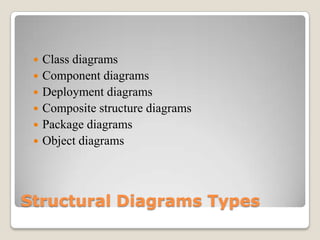
Structural Diagrams Types
 Class diagrams
 Component diagrams
 Deployment diagrams
 Composite structure diagrams
 Package diagrams
 Object diagrams
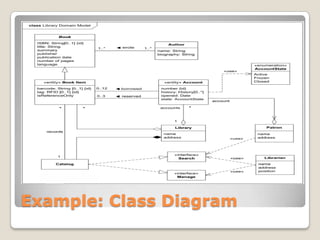
Example: Class Diagram
Behavioral UML Diagrams
 Behavior diagrams emphasize what must happen in
the system being modeled.
 They are used extensively to describe the
functionality of software systems.
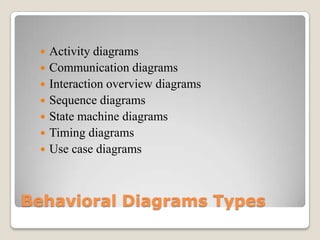
Behavioral Diagrams Types
 Activity diagrams
 Communication diagrams
 Interaction overview diagrams
 Sequence diagrams
 State machine diagrams
 Timing diagrams
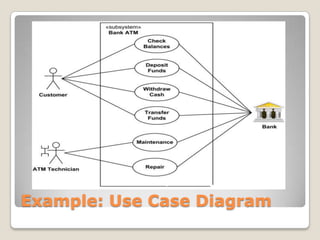
 Use case diagrams
Example: Use Case Diagram
Application Domains
 Banking and investment sectors
 Health care
 Defense
 Distributed computing
 Embedded systems
 Retail sales and supply
Applications Of UML
 Designing software.
 Communicating software or business processes.
 Capturing the details about a system for requirements
or analysis.
 Documenting an existing system, process or
organization.
 UML provides a vocabulary of diagrams and chart
types to describe almost any application in almost
any domain.
Limitations
 UML is very complex and heterogeneous.
 A large part of UML does not yet have precise
semantics.
 Problems in learning and adopting.
Unified modelling language (UML)

Unified modelling language (UML)

  • 1.
    Unified Modeling Language Sharda University DepartmentOf Computer Science And Engineering School Of Engineering and Technology Greater Noida, U. P.
  • 2.
    Presented By: Hirra Sultan CSE-B2nd Year Roll No. 120101091 System Id 2012017740 prlhirr@gmail.com Supervisor: Mr. A. K. Sahoo
  • 3.
    Introduction  The UnifiedModeling Language (UML) is a general purpose visual modeling language that is used to specify, visualize, construct, and document the artifacts of a software system.  It is intended for use with all development methods, life cycle stages, application domains, and media.  It captures information about the static structure and dynamic behavior of a system.
  • 4.
    Characteristics  It isstandardized and widely accepted today.  It is conceptually rich.  It is extensible in a standardized, controlled way.  It’s concise.  It’s comprehensive.  It’s scalable.
  • 5.
    Views Different UML diagramsprovide different perspectives of the software system to be developed and facilitate a comprehensive understanding of the system.
  • 6.
     User’s View:This view defines the functionalities made available by the system to its users.  Structural view: The structural view defines the kinds of objects (classes) important to the understanding of the working of a system and to its implementation. It also captures the relationships among the classes.
  • 7.
     Behavioural view:The behavioural view captures how objects interact with each other to realize the system behaviour.  Implementation view: This view captures the important components of the system and their dependencies.  Environmental view: This view models how the different components are implemented on different pieces of hardware
  • 8.
    UML Diagrams Since UMLis a collection of different modeling types, it divides diagrams into two categories:  Structural diagrams  Behavioral diagrams
  • 9.
    Structural UML diagrams Structural diagrams are used to capture the physical organization of the things in our system i.e., how one object relates to another.  They emphasize the things that must be present in the system being modeled.  They are used extensively in documenting the software architecture of software systems.
  • 10.
    Structural Diagrams Types Class diagrams  Component diagrams  Deployment diagrams  Composite structure diagrams  Package diagrams  Object diagrams
  • 11.
  • 12.
    Behavioral UML Diagrams Behavior diagrams emphasize what must happen in the system being modeled.  They are used extensively to describe the functionality of software systems.
  • 13.
    Behavioral Diagrams Types Activity diagrams  Communication diagrams  Interaction overview diagrams  Sequence diagrams  State machine diagrams  Timing diagrams  Use case diagrams
  • 14.
  • 15.
    Application Domains  Bankingand investment sectors  Health care  Defense  Distributed computing  Embedded systems  Retail sales and supply
  • 16.
    Applications Of UML Designing software.  Communicating software or business processes.  Capturing the details about a system for requirements or analysis.  Documenting an existing system, process or organization.  UML provides a vocabulary of diagrams and chart types to describe almost any application in almost any domain.
  • 17.
    Limitations  UML isvery complex and heterogeneous.  A large part of UML does not yet have precise semantics.  Problems in learning and adopting.

Editor's Notes

  • #4 Why modeling with UML is usedModeling provides structure for problem solving.if we model system, we may find multiple solutions.Modeling helps us manage complexity of system before actually starting working on system.With various diagrams from UML we can show perfect and clear view of system thus reducing time-to-market for business problem solutions.If we model any problem before its development there are less chances that our development plan will go wrong thus decreasing development costs.Modeling reduces the risk of mistakes.