

UML 
Prepared By: MUHAMMAD HAMZA KHAN
What is UML? 
 UML stands for Unified Modeling Language 
 UML is a diagramming language designed for Object- 
Oriented programming 
 UML can be used to describe: 
 the organization of a program 
 how a program executes 
 how a program is used 
 how a program is deployed over a network 
 …and more
Why we use UML? 
 Use graphical notation: more clearly than natural 
language (imprecise) and code (too detailed). 
 Help acquire an overall view of a system. 
 UML is not dependent on any one language or 
technology. 
 UML moves us from breakup to standardization.
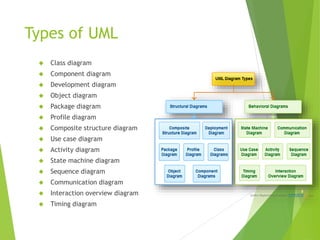
Types of UML 
 Class diagram 
 Component diagram 
 Development diagram 
 Object diagram 
 Package diagram 
 Profile diagram 
 Composite structure diagram 
 Use case diagram 
 Activity diagram 
 State machine diagram 
 Sequence diagram 
 Communication diagram 
 Interaction overview diagram 
 Timing diagram
Structure & Behavioral diagrams 
 Structure diagrams show the things in a system being 
modeled. 
 In a more technical term they show different objects in 
a system. 
 Behavioral diagrams shows what should happen in a 
system. 
 They describe how the objects interact with each other 
to create a functioning system.
Class Diagram 
 A class diagram shows classes, interfaces, and their 
relationships 
 It shows the classes in a system, attributes and operations of 
each class and the relationship between each class. 
 In most modeling tools a class has three parts, name at the top, 
attributes in the middle and operations or methods at the 
bottom 
Name of the class 
Variables [optional] 
Methods
Component Diagram 
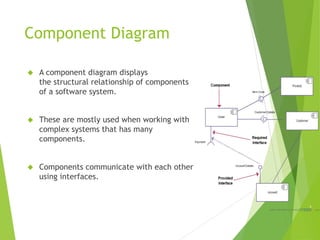
 A component diagram displays 
the structural relationship of components 
of a software system. 
 These are mostly used when working with 
complex systems that has many 
components. 
 Components communicate with each other 
using interfaces.
Deployment Diagram 
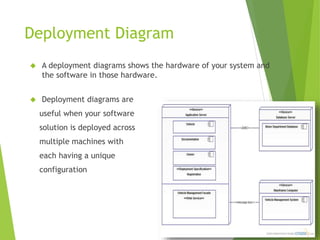
 A deployment diagrams shows the hardware of your system and 
the software in those hardware. 
 Deployment diagrams are 
useful when your software 
solution is deployed across 
multiple machines with 
each having a unique 
configuration
Object Diagram 
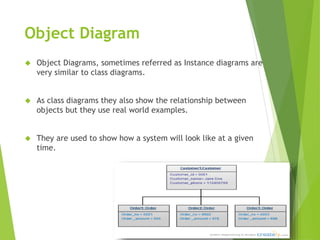
 Object Diagrams, sometimes referred as Instance diagrams are 
very similar to class diagrams. 
 As class diagrams they also show the relationship between 
objects but they use real world examples. 
 They are used to show how a system will look like at a given 
time.
Package Diagram 
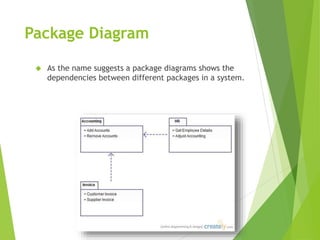
 As the name suggests a package diagrams shows the 
dependencies between different packages in a system.
Profile Diagram 
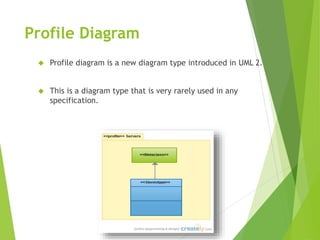
 Profile diagram is a new diagram type introduced in UML 2. 
 This is a diagram type that is very rarely used in any 
specification.
Composite Structure 
Diagram 
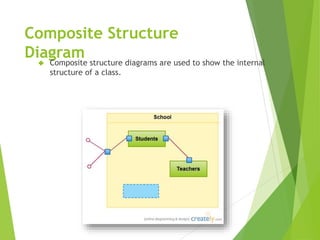
 Composite structure diagrams are used to show the internal 
structure of a class.
Use Case Diagram 
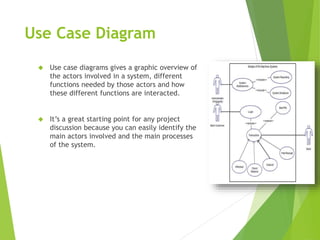
 Use case diagrams gives a graphic overview of 
the actors involved in a system, different 
functions needed by those actors and how 
these different functions are interacted. 
 It’s a great starting point for any project 
discussion because you can easily identify the 
main actors involved and the main processes 
of the system.
Activity Diagram 
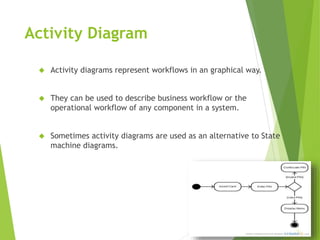
 Activity diagrams represent workflows in an graphical way. 
 They can be used to describe business workflow or the 
operational workflow of any component in a system. 
 Sometimes activity diagrams are used as an alternative to State 
machine diagrams.
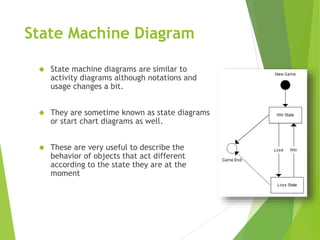
State Machine Diagram 
 State machine diagrams are similar to 
activity diagrams although notations and 
usage changes a bit. 
 They are sometime known as state diagrams 
or start chart diagrams as well. 
 These are very useful to describe the 
behavior of objects that act different 
according to the state they are at the 
moment
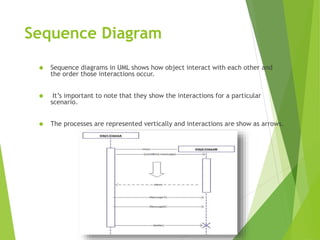
Sequence Diagram 
 Sequence diagrams in UML shows how object interact with each other and 
the order those interactions occur. 
 It’s important to note that they show the interactions for a particular 
scenario. 
 The processes are represented vertically and interactions are show as arrows.
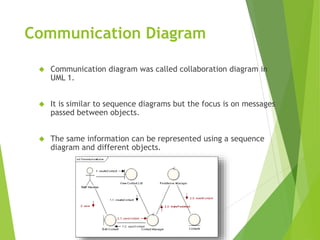
Communication Diagram 
 Communication diagram was called collaboration diagram in 
UML 1. 
 It is similar to sequence diagrams but the focus is on messages 
passed between objects. 
 The same information can be represented using a sequence 
diagram and different objects.
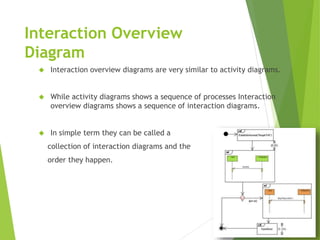
Interaction Overview 
Diagram 
 Interaction overview diagrams are very similar to activity diagrams. 
 While activity diagrams shows a sequence of processes Interaction 
overview diagrams shows a sequence of interaction diagrams. 
 In simple term they can be called a 
collection of interaction diagrams and the 
order they happen.
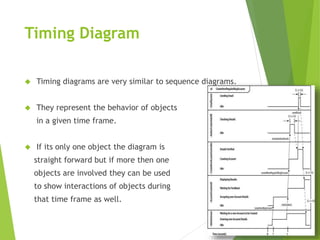
Timing Diagram 
 Timing diagrams are very similar to sequence diagrams. 
 They represent the behavior of objects 
in a given time frame. 
 If its only one object the diagram is 
straight forward but if more then one 
objects are involved they can be used 
to show interactions of objects during 
that time frame as well.
THANK YOU

Uml with detail

  • 1.
    UML Prepared By:MUHAMMAD HAMZA KHAN
  • 2.
    What is UML?  UML stands for Unified Modeling Language  UML is a diagramming language designed for Object- Oriented programming  UML can be used to describe:  the organization of a program  how a program executes  how a program is used  how a program is deployed over a network  …and more
  • 3.
    Why we useUML?  Use graphical notation: more clearly than natural language (imprecise) and code (too detailed).  Help acquire an overall view of a system.  UML is not dependent on any one language or technology.  UML moves us from breakup to standardization.
  • 4.
    Types of UML  Class diagram  Component diagram  Development diagram  Object diagram  Package diagram  Profile diagram  Composite structure diagram  Use case diagram  Activity diagram  State machine diagram  Sequence diagram  Communication diagram  Interaction overview diagram  Timing diagram
  • 5.
    Structure & Behavioraldiagrams  Structure diagrams show the things in a system being modeled.  In a more technical term they show different objects in a system.  Behavioral diagrams shows what should happen in a system.  They describe how the objects interact with each other to create a functioning system.
  • 6.
    Class Diagram A class diagram shows classes, interfaces, and their relationships  It shows the classes in a system, attributes and operations of each class and the relationship between each class.  In most modeling tools a class has three parts, name at the top, attributes in the middle and operations or methods at the bottom Name of the class Variables [optional] Methods
  • 7.
    Component Diagram A component diagram displays the structural relationship of components of a software system.  These are mostly used when working with complex systems that has many components.  Components communicate with each other using interfaces.
  • 8.
    Deployment Diagram A deployment diagrams shows the hardware of your system and the software in those hardware.  Deployment diagrams are useful when your software solution is deployed across multiple machines with each having a unique configuration
  • 9.
    Object Diagram Object Diagrams, sometimes referred as Instance diagrams are very similar to class diagrams.  As class diagrams they also show the relationship between objects but they use real world examples.  They are used to show how a system will look like at a given time.
  • 10.
    Package Diagram As the name suggests a package diagrams shows the dependencies between different packages in a system.
  • 11.
    Profile Diagram Profile diagram is a new diagram type introduced in UML 2.  This is a diagram type that is very rarely used in any specification.
  • 12.
    Composite Structure Diagram  Composite structure diagrams are used to show the internal structure of a class.
  • 13.
    Use Case Diagram  Use case diagrams gives a graphic overview of the actors involved in a system, different functions needed by those actors and how these different functions are interacted.  It’s a great starting point for any project discussion because you can easily identify the main actors involved and the main processes of the system.
  • 14.
    Activity Diagram Activity diagrams represent workflows in an graphical way.  They can be used to describe business workflow or the operational workflow of any component in a system.  Sometimes activity diagrams are used as an alternative to State machine diagrams.
  • 15.
    State Machine Diagram  State machine diagrams are similar to activity diagrams although notations and usage changes a bit.  They are sometime known as state diagrams or start chart diagrams as well.  These are very useful to describe the behavior of objects that act different according to the state they are at the moment
  • 16.
    Sequence Diagram Sequence diagrams in UML shows how object interact with each other and the order those interactions occur.  It’s important to note that they show the interactions for a particular scenario.  The processes are represented vertically and interactions are show as arrows.
  • 17.
    Communication Diagram Communication diagram was called collaboration diagram in UML 1.  It is similar to sequence diagrams but the focus is on messages passed between objects.  The same information can be represented using a sequence diagram and different objects.
  • 18.
    Interaction Overview Diagram  Interaction overview diagrams are very similar to activity diagrams.  While activity diagrams shows a sequence of processes Interaction overview diagrams shows a sequence of interaction diagrams.  In simple term they can be called a collection of interaction diagrams and the order they happen.
  • 19.
    Timing Diagram Timing diagrams are very similar to sequence diagrams.  They represent the behavior of objects in a given time frame.  If its only one object the diagram is straight forward but if more then one objects are involved they can be used to show interactions of objects during that time frame as well.
  • 20.