9.1
Network Layer:
Internet Protocol
Networking Fundamentals
20.2
INTERNETWORKINGINTERNETWORKING
We now discuss internetworking _ connectingWe now discuss internetworking _ connecting
networks together to make an internetwork or annetworks together to make an internetwork or an
internet.internet.
20.3
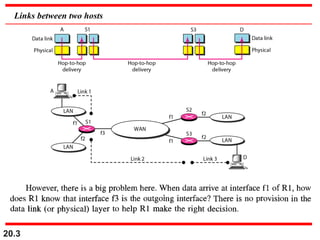
Links between two hosts
20.4
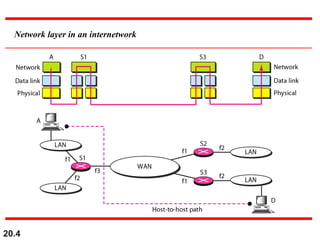
Network layer in an internetwork
20.5
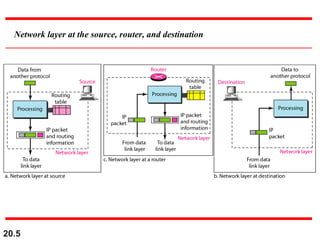
Network layer at the source, router, and destination
20.6
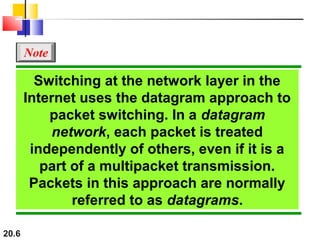
Switching at the network layer in the
Internet uses the datagram approach to
packet switching. In a datagram
network, each packet is treated
independently of others, even if it is a
part of a multipacket transmission.
Packets in this approach are normally
referred to as datagrams.
Note
20.7
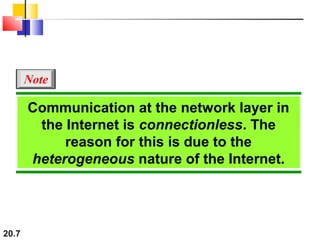
Communication at the network layer in
the Internet is connectionless. The
reason for this is due to the
heterogeneous nature of the Internet.
Note
20.8
IPv4IPv4
• The Internet Protocol version 4 (The Internet Protocol version 4 (IPv4IPv4) is the) is the
delivery mechanism used by the TCP/IP protocols.delivery mechanism used by the TCP/IP protocols.
• It is an unreliable – aIt is an unreliable – a best-effort deliverybest-effort delivery service.service.
• If reliability is important, then it must be pairedIf reliability is important, then it must be paired
withwith TCP.TCP.
20.9
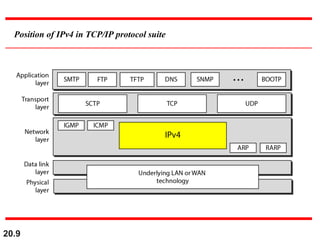
Position of IPv4 in TCP/IP protocol suite
20.10
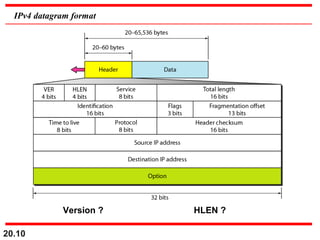
IPv4 datagram format
Version ? HLEN ?
20.11
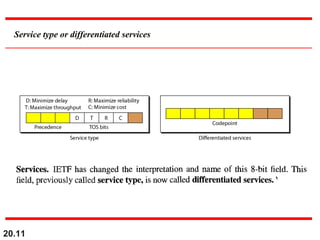
Service type or differentiated services
20.12
• Differentiated Services or DiffServ is a computer
networking architecture that specifies a simple, scalable
and coarse-grained mechanism for classifying, managing
network traffic and providing Quality of Service (QoS)
guarantees on modern IP networks.
• DiffServ can, for example, be used to provide low-
latency, low-loss service to critical network traffic such as
voice or video while providing simple best-effort traffic
guarantees to non-critical services such as web traffic or
file transfers.
• DiffServ uses the 6-bit Differentiated Services Code
Point (DSCP) field in the header of IP packets for packet
classification purposes.
20.13
• In theory, a network could have up to 64 (i.e. 26
)
different traffic classes using different markings in the
DSCP. The DiffServ RFCs recommend, but do not require,
certain encodings.
• This gives a network operator great flexibility in
defining traffic classes. In practice, however, most
networks use the following commonly-defined Per-Hop
Behaviors:
–Default PHB—which is typically best-effort traffic
–Assured Forwarding (AF) PHB— which gives assurance of
delivery under conditions
–Expedited Forwarding (EF) PHB—dedicated to low-loss,
low-latency traffic
20.14
The total length field defines the total
length of the datagram including the
header. Required such that can
differentiate from the padding.
Note
What is this ?
20.15
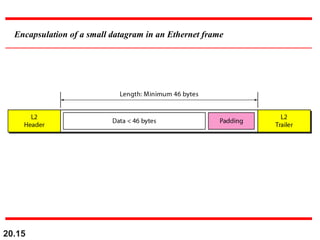
Encapsulation of a small datagram in an Ethernet frame
20.16
• Time to live (TTL) (8 bits) - Limits the number of
routers the datagram can pass through. Usually
set to 32 or 64 (some even recommend 128).
Every time the datagram passes through a router
this value is decremented by a value of one or
more. This is to keep the datagram from circulating
in an infinite loop forever.
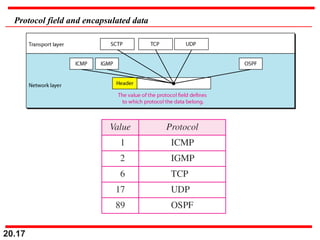
• Protocol (8 bits) - It identifies the protocol
whose data is encapsulated in the datagram.
• Source & Destination IP Address – Self-
explanatory.
20.17
Protocol field and encapsulated data
20.18
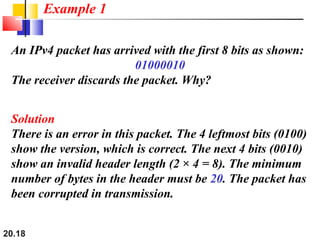
An IPv4 packet has arrived with the first 8 bits as shown:
01000010
The receiver discards the packet. Why?
Solution
There is an error in this packet. The 4 leftmost bits (0100)
show the version, which is correct. The next 4 bits (0010)
show an invalid header length (2 × 4 = 8). The minimum
number of bytes in the header must be 20. The packet has
been corrupted in transmission.
Example 1
20.19
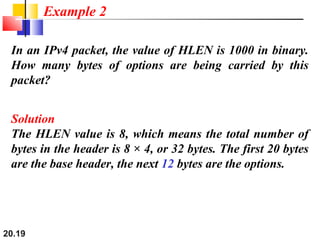
In an IPv4 packet, the value of HLEN is 1000 in binary.
How many bytes of options are being carried by this
packet?
Solution
The HLEN value is 8, which means the total number of
bytes in the header is 8 × 4, or 32 bytes. The first 20 bytes
are the base header, the next 12 bytes are the options.
Example 2
20.20
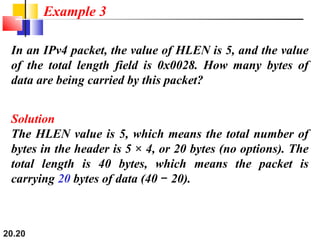
In an IPv4 packet, the value of HLEN is 5, and the value
of the total length field is 0x0028. How many bytes of
data are being carried by this packet?
Solution
The HLEN value is 5, which means the total number of
bytes in the header is 5 × 4, or 20 bytes (no options). The
total length is 40 bytes, which means the packet is
carrying 20 bytes of data (40 20).−
Example 3
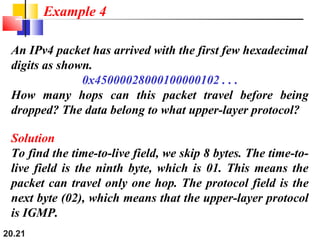
20.21
An IPv4 packet has arrived with the first few hexadecimal
digits as shown.
0x45000028000100000102 . . .
How many hops can this packet travel before being
dropped? The data belong to what upper-layer protocol?
Solution
To find the time-to-live field, we skip 8 bytes. The time-to-
live field is the ninth byte, which is 01. This means the
packet can travel only one hop. The protocol field is the
next byte (02), which means that the upper-layer protocol
is IGMP.
Example 4
20.22
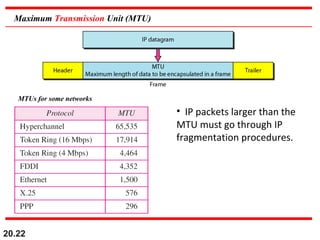
Maximum Transmission Unit (MTU)
• IP packets larger than the
MTU must go through IP
fragmentation procedures.
MTUs for some networks
20.23
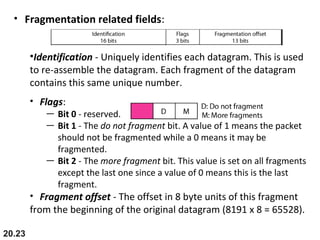
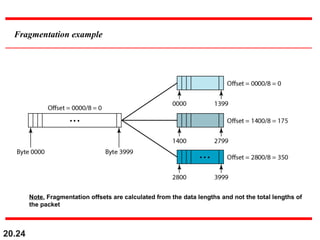
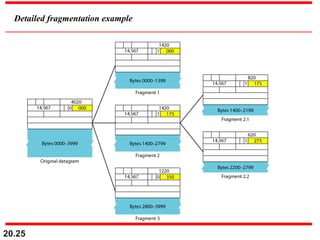
• Fragmentation related fields:
•Identification - Uniquely identifies each datagram. This is used
to re-assemble the datagram. Each fragment of the datagram
contains this same unique number.
• Flags:
— Bit 0 - reserved.
— Bit 1 - The do not fragment bit. A value of 1 means the packet
should not be fragmented while a 0 means it may be
fragmented.
— Bit 2 - The more fragment bit. This value is set on all fragments
except the last one since a value of 0 means this is the last
fragment.
• Fragment offset - The offset in 8 byte units of this fragment
from the beginning of the original datagram (8191 x 8 = 65528).
20.24
Fragmentation example
Note. Fragmentation offsets are calculated from the data lengths and not the total lengths of
the packet
20.25
Detailed fragmentation example
20.26
A packet has arrived with an M bit value of 0. Is this the
first fragment, the last fragment, or a middle fragment?
Do we know if the packet was fragmented?
Solution
If the M bit is 0, it means that there are no more
fragments; the fragment is the last one. However, we
cannot say if the original packet was fragmented or not. A
non-fragmented packet is considered the last fragment.
Example 5
20.27
A packet has arrived with an M bit value of 1. Is this the
first fragment, the last fragment, or a middle fragment?
Do we know if the packet was fragmented?
Solution
If the M bit is 1, it means that there is at least one more
fragment. This fragment can be the first one or a middle
one, but not the last one. We don’t know if it is the first
one or a middle one; we need more information (the
value of the fragmentation offset).
Example 6
20.28
A packet has arrived with an M bit value of 1 and a
fragmentation offset value of 0. Is this the first fragment,
the last fragment, or a middle fragment?
Solution
Because the M bit is 1, it is either the first fragment or a
middle one. Because the offset value is 0, it is the first
fragment.
Example 7
20.29
A packet has arrived in which the offset value is 100.
What is the number of the first byte? Do we know the
number of the last byte?
Solution
To find the number of the first byte, we multiply the offset
value by 8. This means that the first byte number is 800.
We cannot determine the number of the last byte unless
we know the length.
Example 8
20.30
A packet has arrived in which the offset value is 100, the
value of HLEN is 5, and the value of the total length field
is 100. What are the numbers of the first byte and the last
byte?
Solution
The first byte number is 100 × 8 = 800. The total length is
100 bytes, and the header length is 20 bytes (5 × 4), which
means that there are 80 bytes in this datagram. If the first
byte number is 800, the last byte number must be 879.
Example 9
20.31
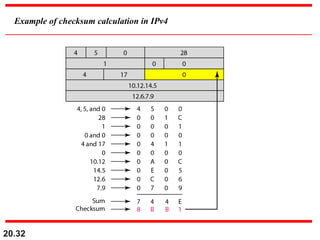
Figure shows an example of a checksum calculation for
an IPv4 header without options. The header is divided
into 16-bit sections. All the sections are added and the
sum is complemented. The result is inserted in the
checksum field.
Example 10
20.32
Example of checksum calculation in IPv4
20.33
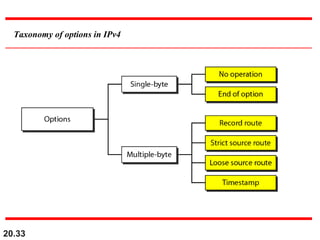
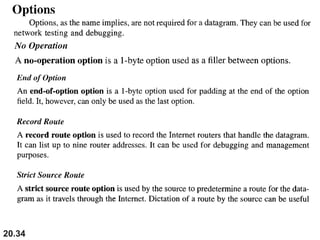
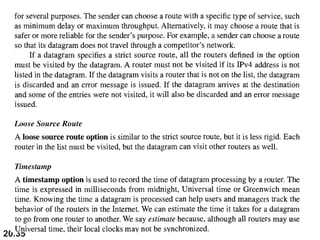
Taxonomy of options in IPv4
20.34
20.35

4b internet protocol

  • 1.
  • 2.
    20.2 INTERNETWORKINGINTERNETWORKING We now discussinternetworking _ connectingWe now discuss internetworking _ connecting networks together to make an internetwork or annetworks together to make an internetwork or an internet.internet.
  • 3.
  • 4.
    20.4 Network layer inan internetwork
  • 5.
    20.5 Network layer atthe source, router, and destination
  • 6.
    20.6 Switching at thenetwork layer in the Internet uses the datagram approach to packet switching. In a datagram network, each packet is treated independently of others, even if it is a part of a multipacket transmission. Packets in this approach are normally referred to as datagrams. Note
  • 7.
    20.7 Communication at thenetwork layer in the Internet is connectionless. The reason for this is due to the heterogeneous nature of the Internet. Note
  • 8.
    20.8 IPv4IPv4 • The InternetProtocol version 4 (The Internet Protocol version 4 (IPv4IPv4) is the) is the delivery mechanism used by the TCP/IP protocols.delivery mechanism used by the TCP/IP protocols. • It is an unreliable – aIt is an unreliable – a best-effort deliverybest-effort delivery service.service. • If reliability is important, then it must be pairedIf reliability is important, then it must be paired withwith TCP.TCP.
  • 9.
    20.9 Position of IPv4in TCP/IP protocol suite
  • 10.
  • 11.
    20.11 Service type ordifferentiated services
  • 12.
    20.12 • Differentiated Servicesor DiffServ is a computer networking architecture that specifies a simple, scalable and coarse-grained mechanism for classifying, managing network traffic and providing Quality of Service (QoS) guarantees on modern IP networks. • DiffServ can, for example, be used to provide low- latency, low-loss service to critical network traffic such as voice or video while providing simple best-effort traffic guarantees to non-critical services such as web traffic or file transfers. • DiffServ uses the 6-bit Differentiated Services Code Point (DSCP) field in the header of IP packets for packet classification purposes.
  • 13.
    20.13 • In theory,a network could have up to 64 (i.e. 26 ) different traffic classes using different markings in the DSCP. The DiffServ RFCs recommend, but do not require, certain encodings. • This gives a network operator great flexibility in defining traffic classes. In practice, however, most networks use the following commonly-defined Per-Hop Behaviors: –Default PHB—which is typically best-effort traffic –Assured Forwarding (AF) PHB— which gives assurance of delivery under conditions –Expedited Forwarding (EF) PHB—dedicated to low-loss, low-latency traffic
  • 14.
    20.14 The total lengthfield defines the total length of the datagram including the header. Required such that can differentiate from the padding. Note What is this ?
  • 15.
    20.15 Encapsulation of asmall datagram in an Ethernet frame
  • 16.
    20.16 • Time tolive (TTL) (8 bits) - Limits the number of routers the datagram can pass through. Usually set to 32 or 64 (some even recommend 128). Every time the datagram passes through a router this value is decremented by a value of one or more. This is to keep the datagram from circulating in an infinite loop forever. • Protocol (8 bits) - It identifies the protocol whose data is encapsulated in the datagram. • Source & Destination IP Address – Self- explanatory.
  • 17.
    20.17 Protocol field andencapsulated data
  • 18.
    20.18 An IPv4 packethas arrived with the first 8 bits as shown: 01000010 The receiver discards the packet. Why? Solution There is an error in this packet. The 4 leftmost bits (0100) show the version, which is correct. The next 4 bits (0010) show an invalid header length (2 × 4 = 8). The minimum number of bytes in the header must be 20. The packet has been corrupted in transmission. Example 1
  • 19.
    20.19 In an IPv4packet, the value of HLEN is 1000 in binary. How many bytes of options are being carried by this packet? Solution The HLEN value is 8, which means the total number of bytes in the header is 8 × 4, or 32 bytes. The first 20 bytes are the base header, the next 12 bytes are the options. Example 2
  • 20.
    20.20 In an IPv4packet, the value of HLEN is 5, and the value of the total length field is 0x0028. How many bytes of data are being carried by this packet? Solution The HLEN value is 5, which means the total number of bytes in the header is 5 × 4, or 20 bytes (no options). The total length is 40 bytes, which means the packet is carrying 20 bytes of data (40 20).− Example 3
  • 21.
    20.21 An IPv4 packethas arrived with the first few hexadecimal digits as shown. 0x45000028000100000102 . . . How many hops can this packet travel before being dropped? The data belong to what upper-layer protocol? Solution To find the time-to-live field, we skip 8 bytes. The time-to- live field is the ninth byte, which is 01. This means the packet can travel only one hop. The protocol field is the next byte (02), which means that the upper-layer protocol is IGMP. Example 4
  • 22.
    20.22 Maximum Transmission Unit(MTU) • IP packets larger than the MTU must go through IP fragmentation procedures. MTUs for some networks
  • 23.
    20.23 • Fragmentation relatedfields: •Identification - Uniquely identifies each datagram. This is used to re-assemble the datagram. Each fragment of the datagram contains this same unique number. • Flags: — Bit 0 - reserved. — Bit 1 - The do not fragment bit. A value of 1 means the packet should not be fragmented while a 0 means it may be fragmented. — Bit 2 - The more fragment bit. This value is set on all fragments except the last one since a value of 0 means this is the last fragment. • Fragment offset - The offset in 8 byte units of this fragment from the beginning of the original datagram (8191 x 8 = 65528).
  • 24.
    20.24 Fragmentation example Note. Fragmentationoffsets are calculated from the data lengths and not the total lengths of the packet
  • 25.
  • 26.
    20.26 A packet hasarrived with an M bit value of 0. Is this the first fragment, the last fragment, or a middle fragment? Do we know if the packet was fragmented? Solution If the M bit is 0, it means that there are no more fragments; the fragment is the last one. However, we cannot say if the original packet was fragmented or not. A non-fragmented packet is considered the last fragment. Example 5
  • 27.
    20.27 A packet hasarrived with an M bit value of 1. Is this the first fragment, the last fragment, or a middle fragment? Do we know if the packet was fragmented? Solution If the M bit is 1, it means that there is at least one more fragment. This fragment can be the first one or a middle one, but not the last one. We don’t know if it is the first one or a middle one; we need more information (the value of the fragmentation offset). Example 6
  • 28.
    20.28 A packet hasarrived with an M bit value of 1 and a fragmentation offset value of 0. Is this the first fragment, the last fragment, or a middle fragment? Solution Because the M bit is 1, it is either the first fragment or a middle one. Because the offset value is 0, it is the first fragment. Example 7
  • 29.
    20.29 A packet hasarrived in which the offset value is 100. What is the number of the first byte? Do we know the number of the last byte? Solution To find the number of the first byte, we multiply the offset value by 8. This means that the first byte number is 800. We cannot determine the number of the last byte unless we know the length. Example 8
  • 30.
    20.30 A packet hasarrived in which the offset value is 100, the value of HLEN is 5, and the value of the total length field is 100. What are the numbers of the first byte and the last byte? Solution The first byte number is 100 × 8 = 800. The total length is 100 bytes, and the header length is 20 bytes (5 × 4), which means that there are 80 bytes in this datagram. If the first byte number is 800, the last byte number must be 879. Example 9
  • 31.
    20.31 Figure shows anexample of a checksum calculation for an IPv4 header without options. The header is divided into 16-bit sections. All the sections are added and the sum is complemented. The result is inserted in the checksum field. Example 10
  • 32.
    20.32 Example of checksumcalculation in IPv4
  • 33.
  • 34.
  • 35.