CChhaapptteerr 88 
IInntteerrnneett PPrroottooccooll 
Objectives 
Upon completion you will be able to: 
• Understand the format and fields of a datagram 
• Understand the need for fragmentation and the fields involved 
• Understand the options available in an IP datagram 
• Be able to perform a checksum calculation 
• Understand the components and interactions of an IP package 
TCP/IP Protocol Suite 1
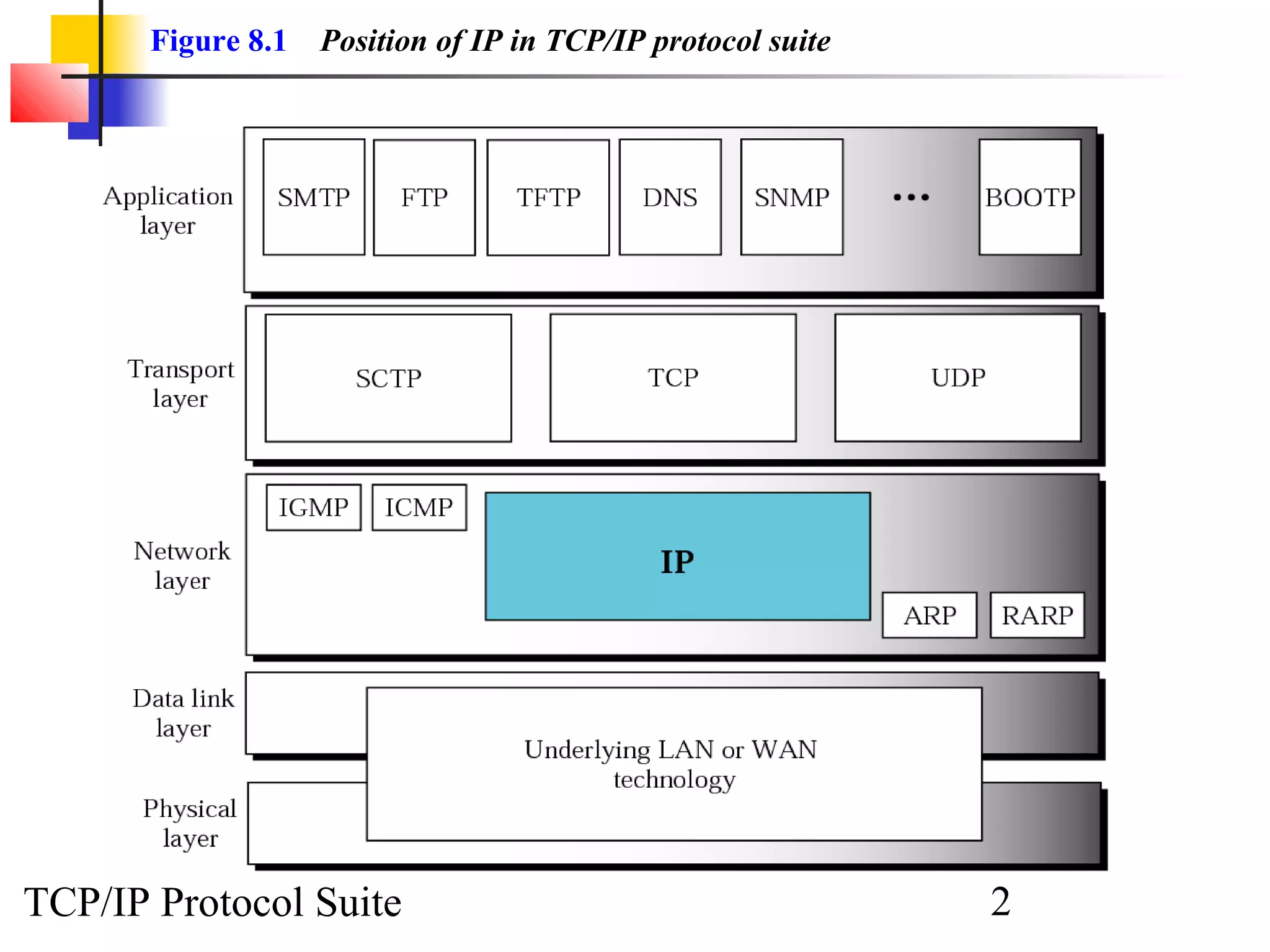
Figure 8.1 Position of IP in TCP/IP protocol suite 
TCP/IP Protocol Suite 2
8.1 DATAGRAM 
A packet in the IP layer is called a datagram, a variable-lleennggtthh ppaacckkeett 
ccoonnssiissttiinngg ooff ttwwoo ppaarrttss:: hheeaaddeerr aanndd ddaattaa.. TThhee hheeaaddeerr iiss 2200 ttoo 6600 bbyytteess iinn 
lleennggtthh aanndd ccoonnttaaiinnss iinnffoorrmmaattiioonn eesssseennttiiaall ttoo rroouuttiinngg aanndd ddeelliivveerryy.. 
TCP/IP Protocol Suite 3
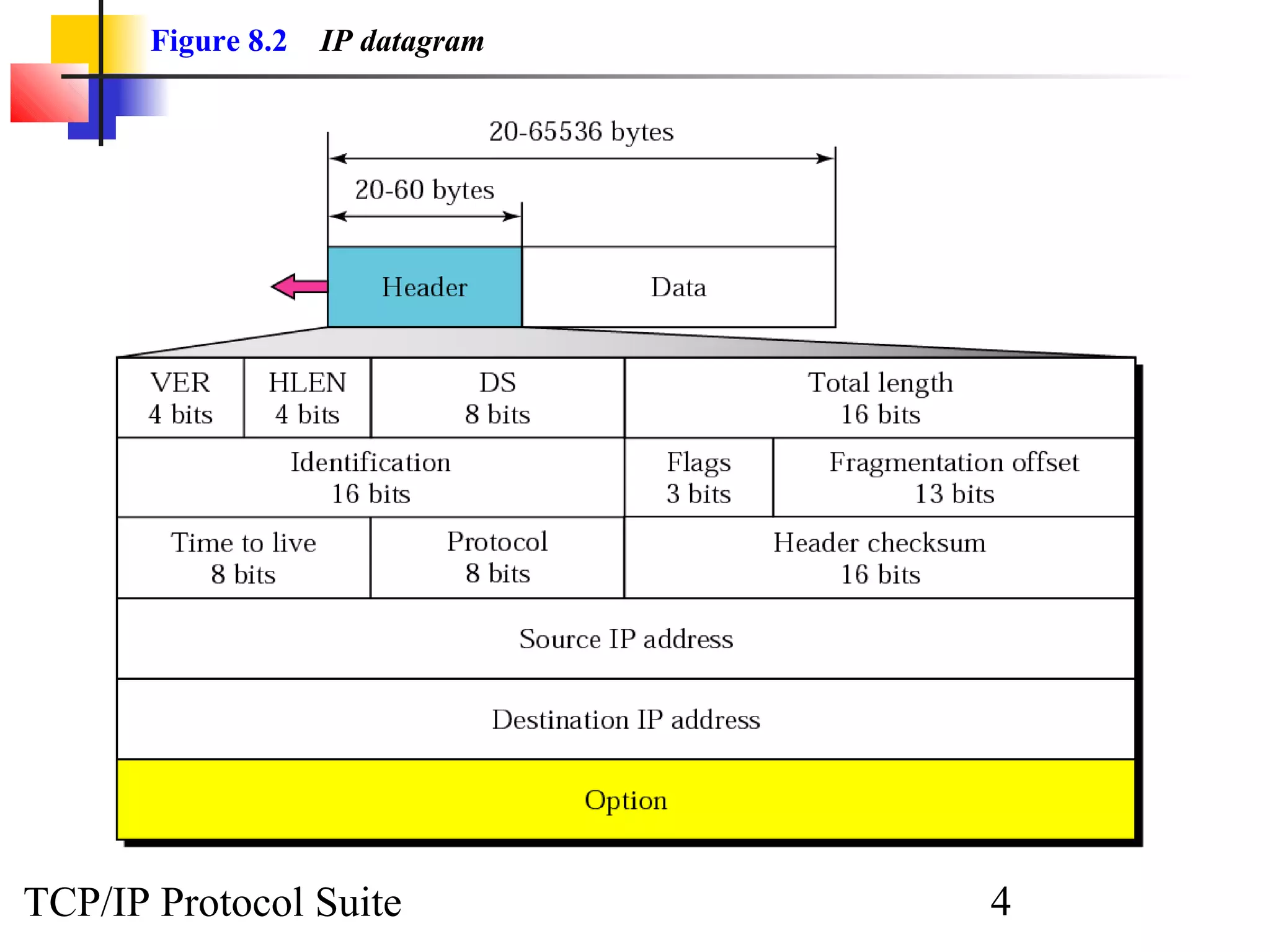
Figure 8.2 IP datagram 
TCP/IP Protocol Suite 4
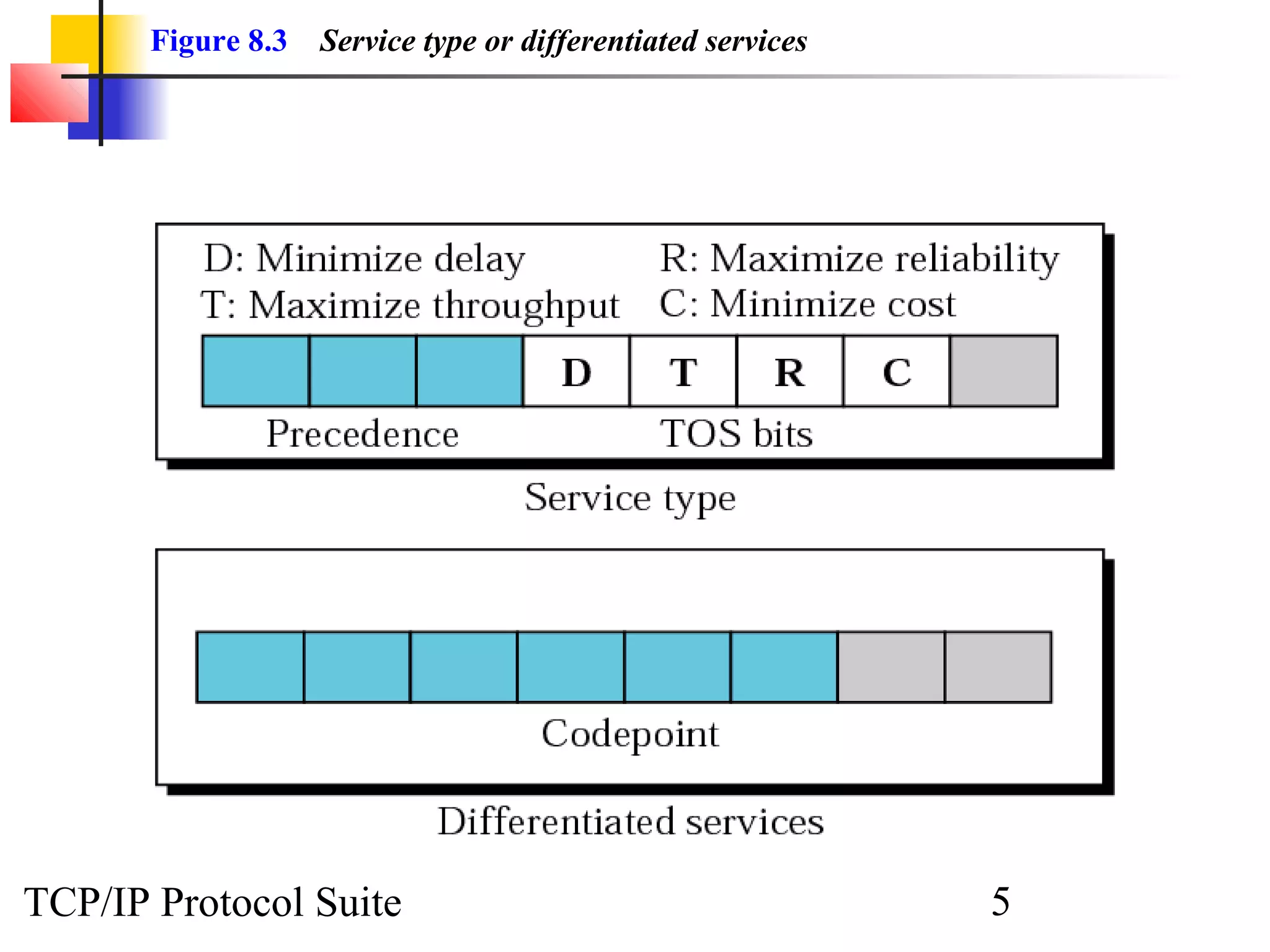
Figure 8.3 Service type or differentiated services 
TCP/IP Protocol Suite 5
NNoottee:: 
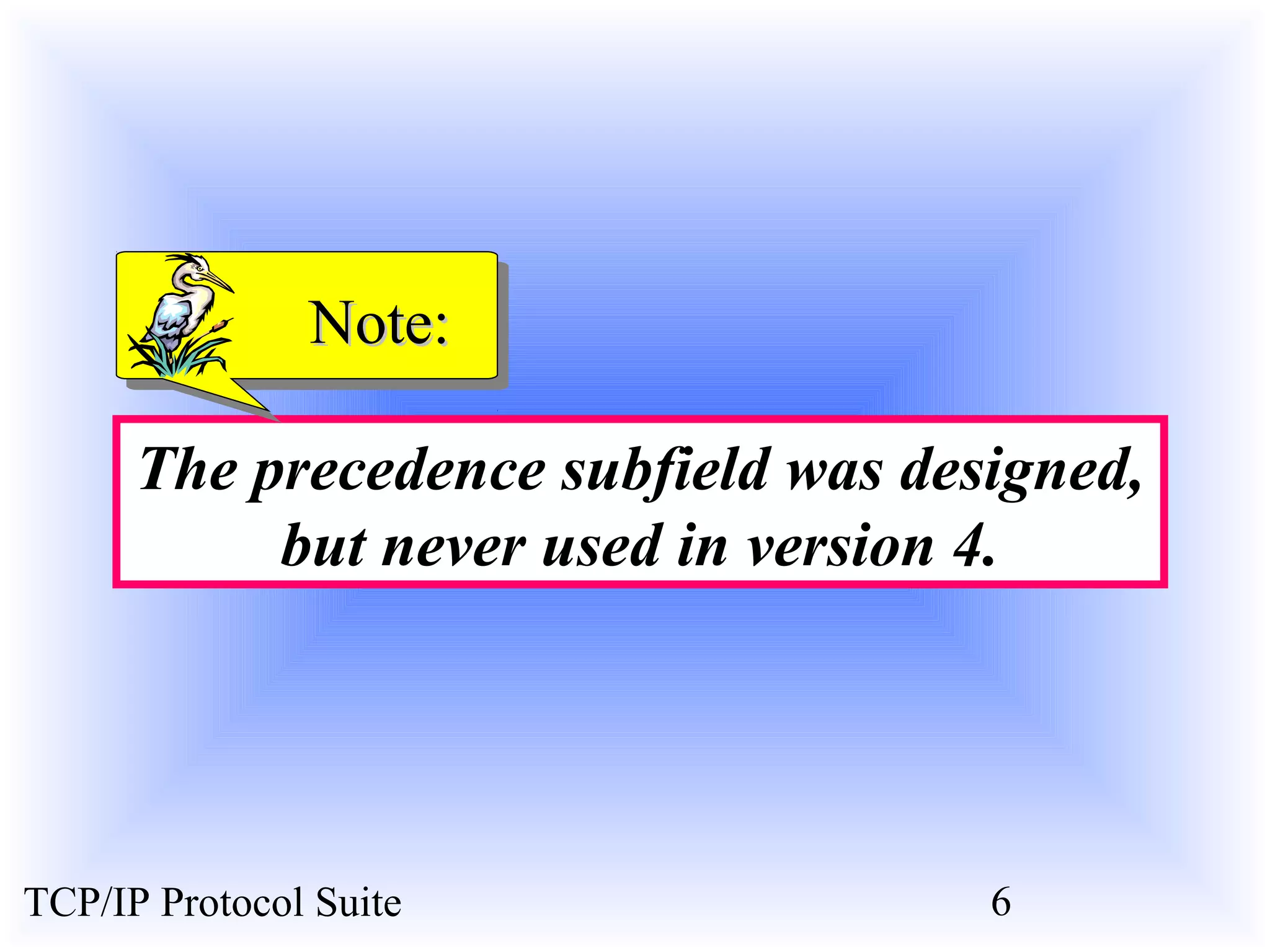
The precedence subfield was designed, 
but never used in version 4. 
TCP/IP Protocol Suite 6
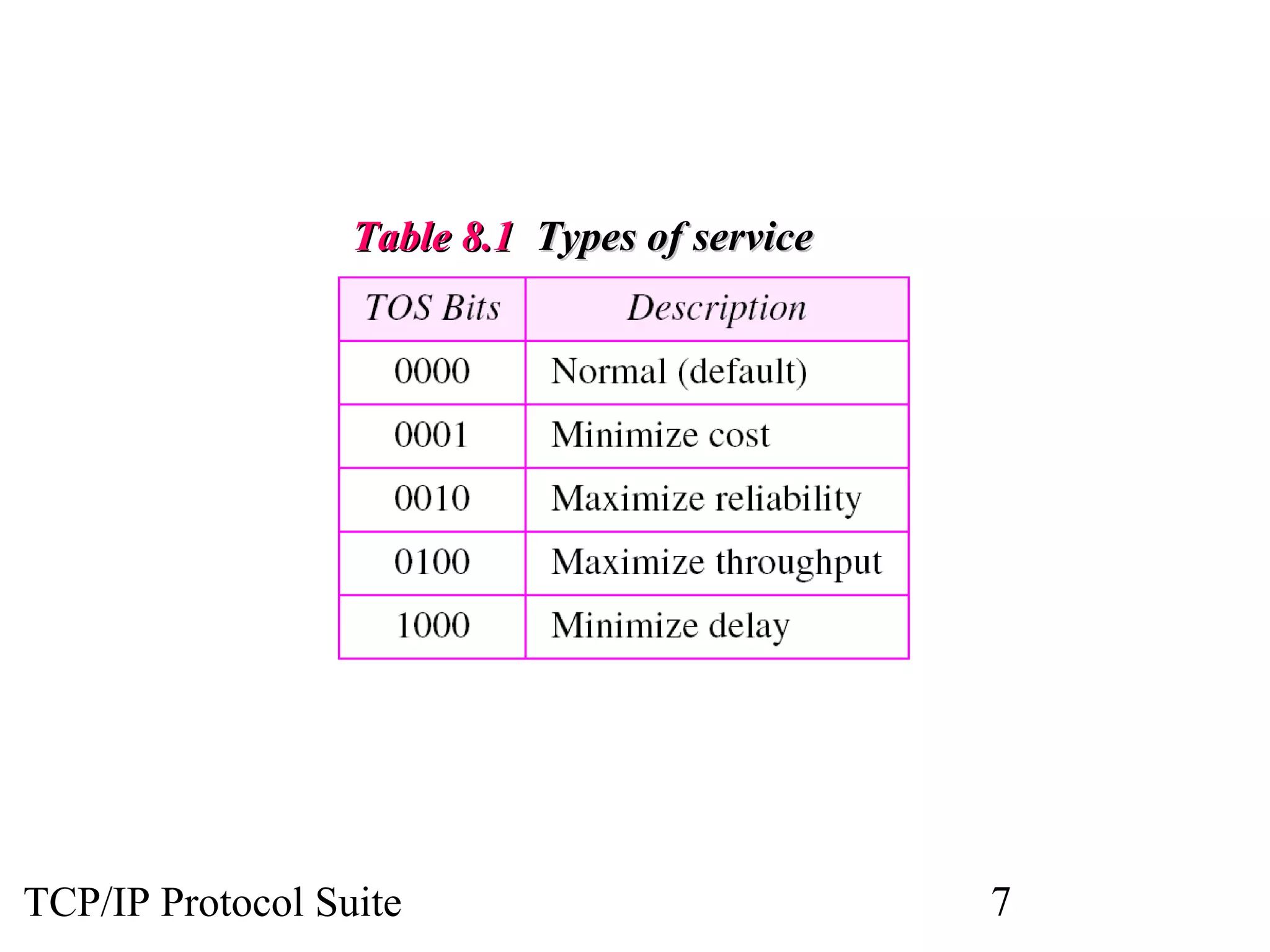
TTaabbllee 88..11 TTyyppeess ooff sseerrvviiccee 
TCP/IP Protocol Suite 7
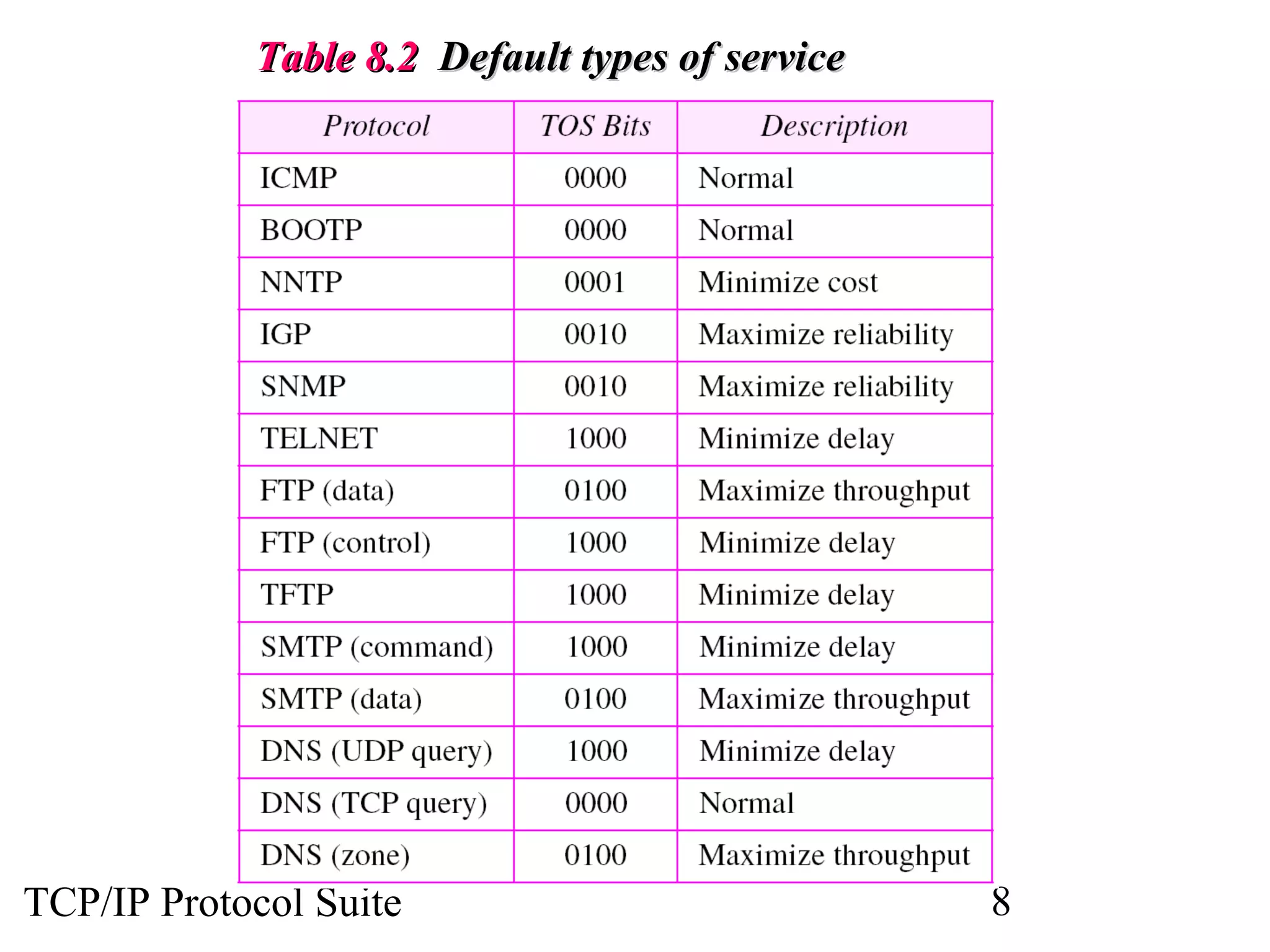
TTaabbllee 88..22 DDeeffaauulltt ttyyppeess ooff sseerrvviiccee 
TCP/IP Protocol Suite 8
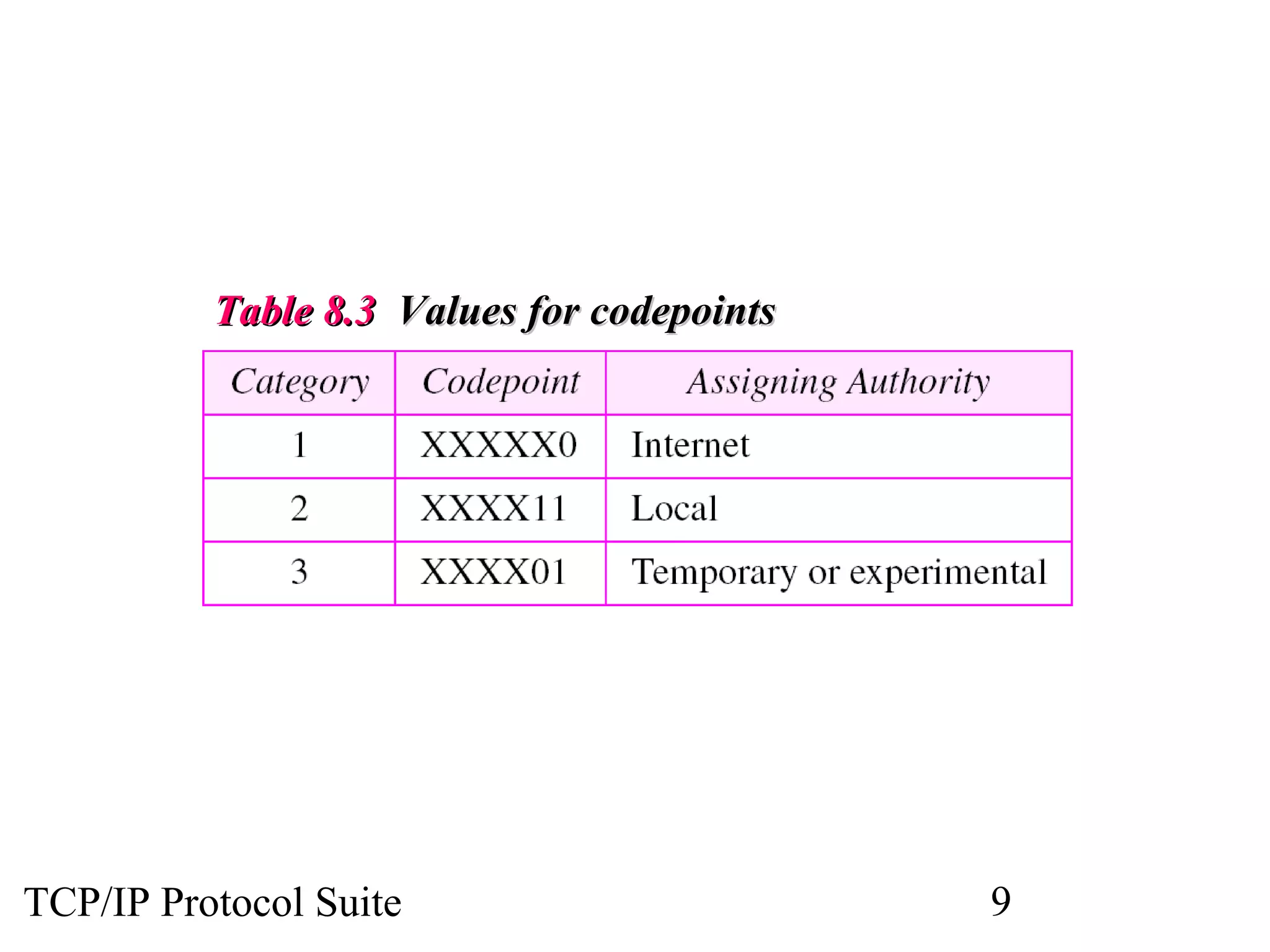
TTaabbllee 88..33 VVaalluueess ffoorr ccooddeeppooiinnttss 
TCP/IP Protocol Suite 9
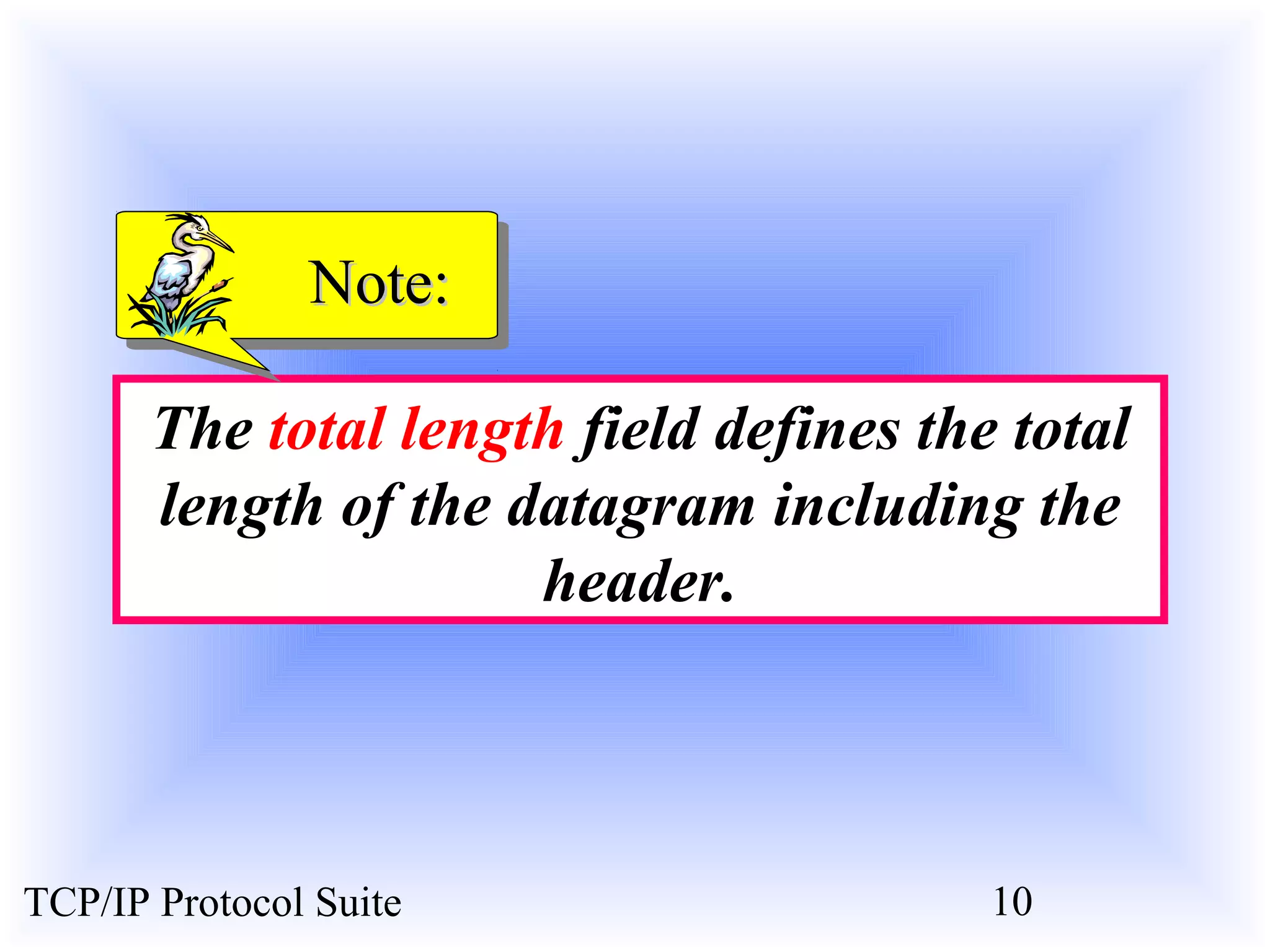
NNoottee:: 
The total length field defines the total 
length of the datagram including the 
header. 
TCP/IP Protocol Suite 10
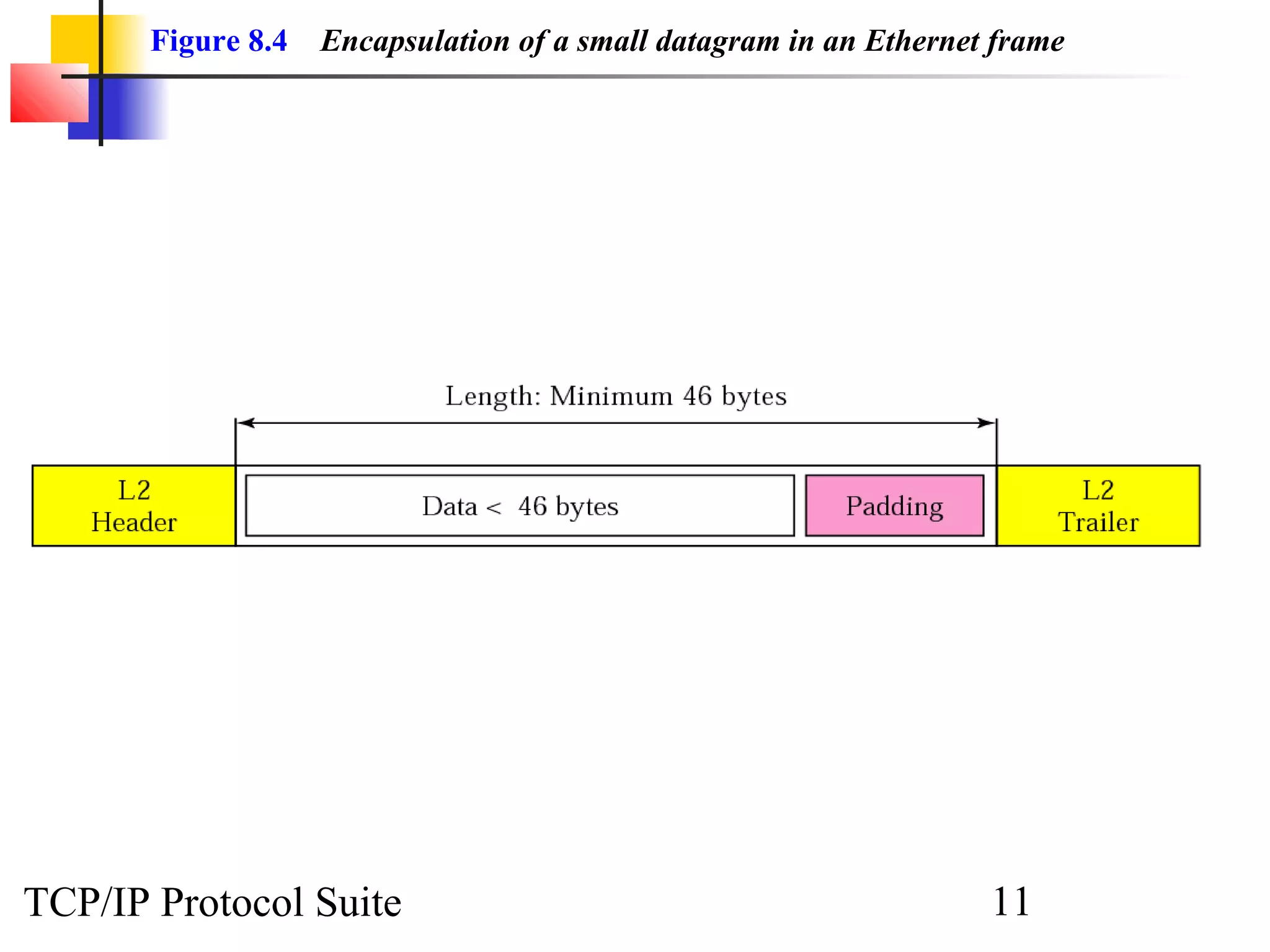
Figure 8.4 Encapsulation of a small datagram in an Ethernet frame 
TCP/IP Protocol Suite 11
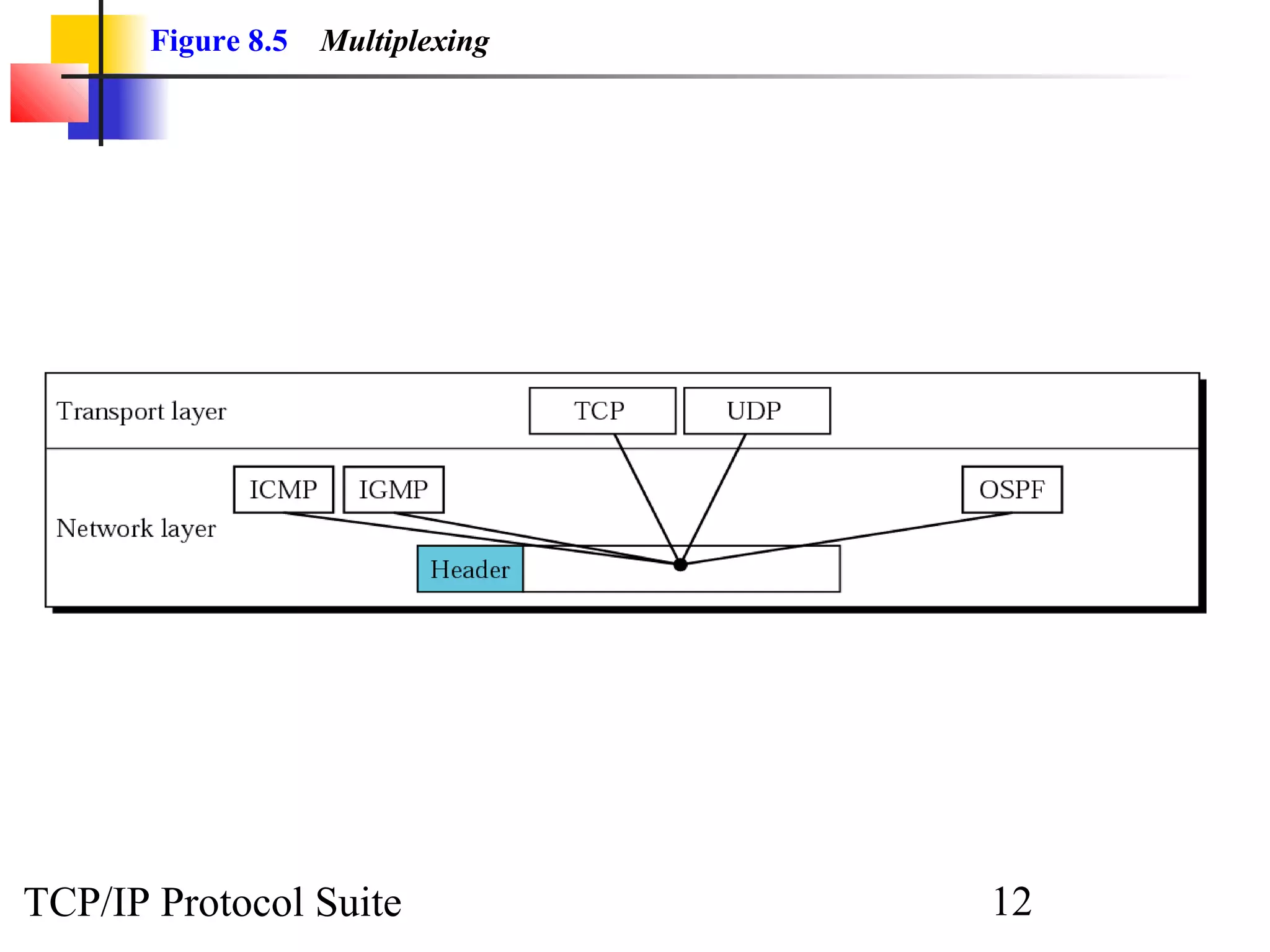
Figure 8.5 Multiplexing 
TCP/IP Protocol Suite 12
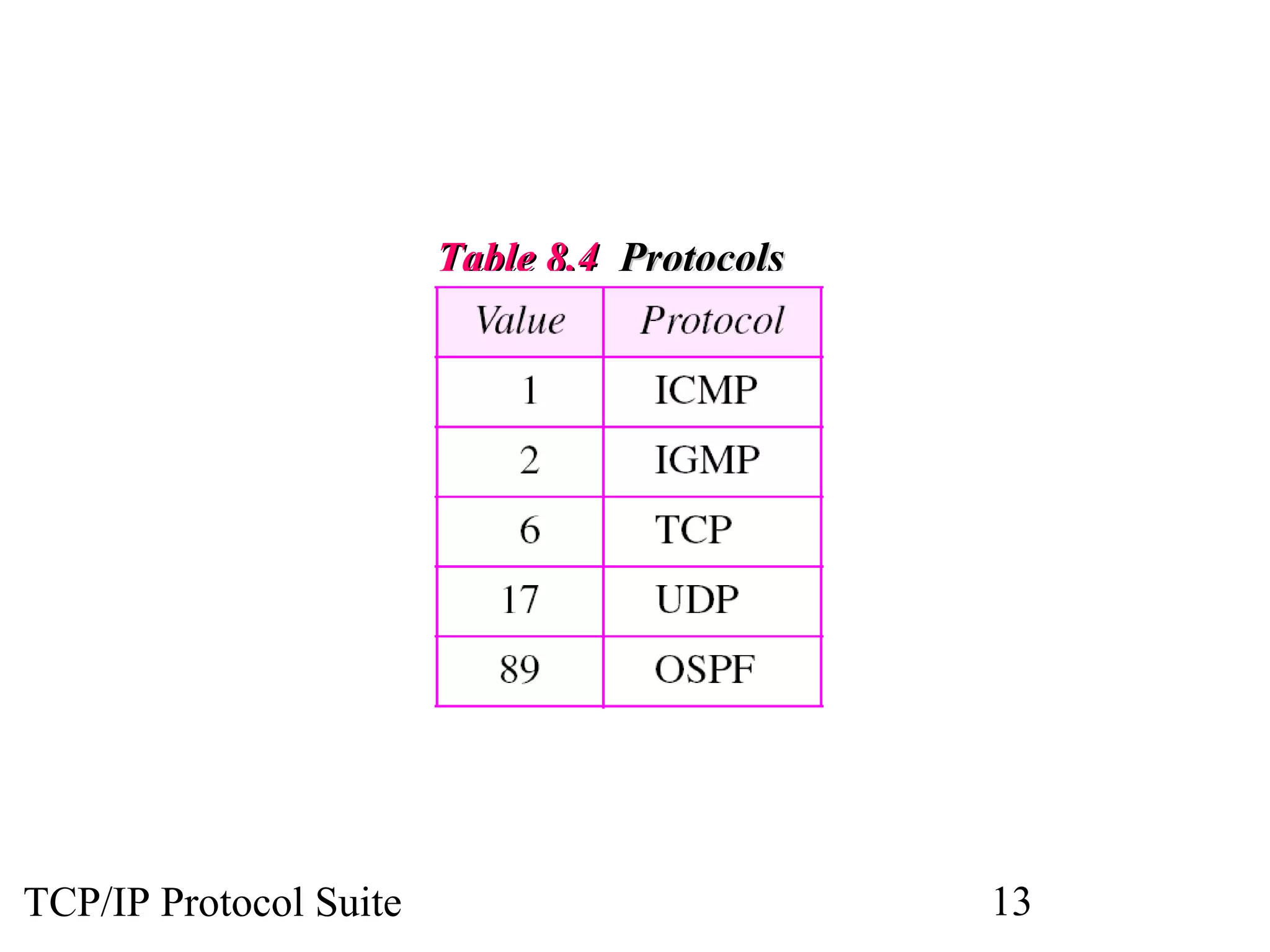
TTaabbllee 88..44 PPrroottooccoollss 
TCP/IP Protocol Suite 13
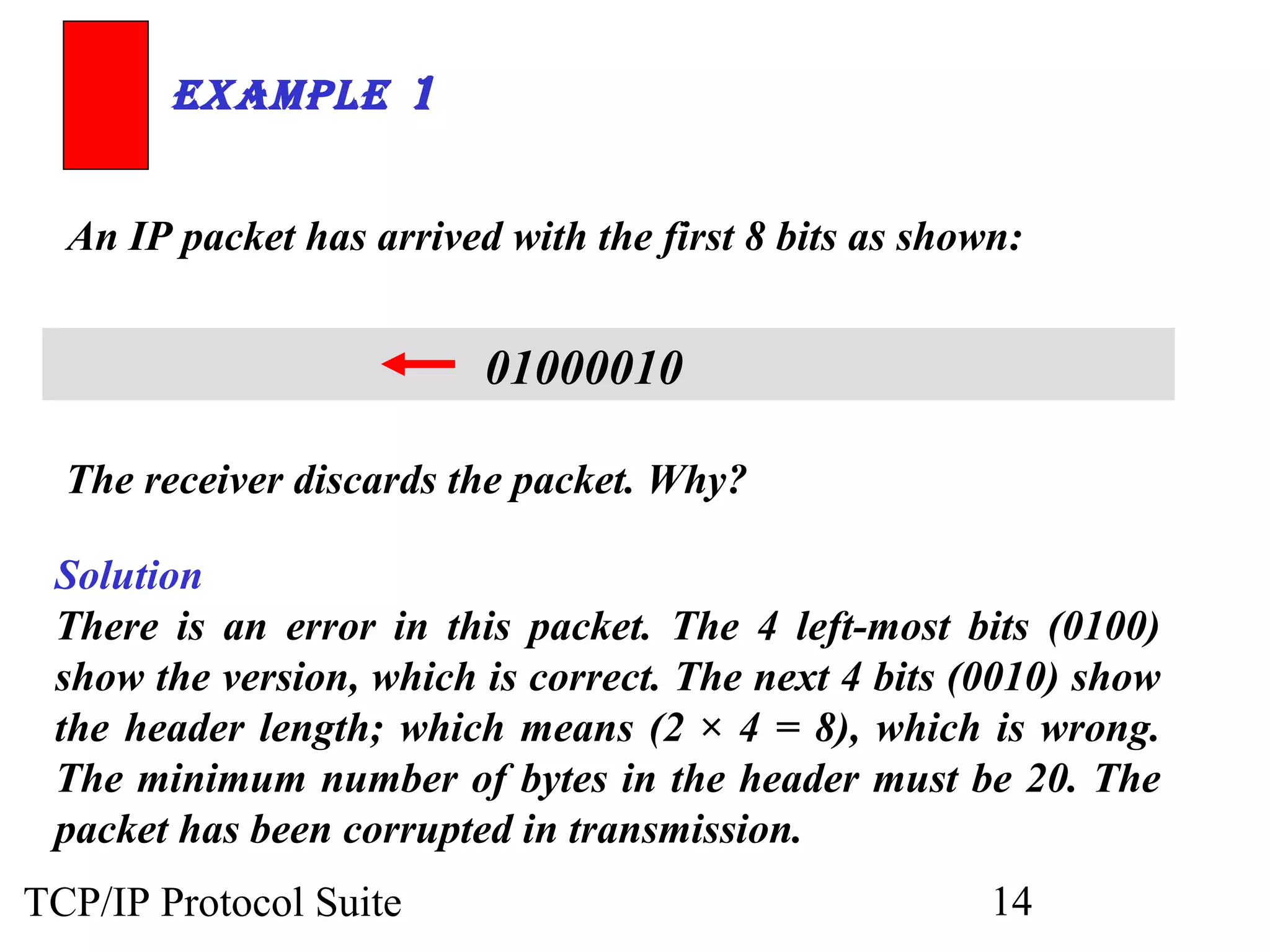
ExamplE 1 
An IP packet has arrived with the first 8 bits as shown: 
01000010 
The receiver discards the packet. Why? 
Solution 
There is an error in this packet. The 4 left-most bits (0100) 
show the version, which is correct. The next 4 bits (0010) show 
the header length; which means (2 × 4 = 8), which is wrong. 
The minimum number of bytes in the header must be 20. The 
packet has been corrupted in transmission. 
TCP/IP Protocol Suite 14
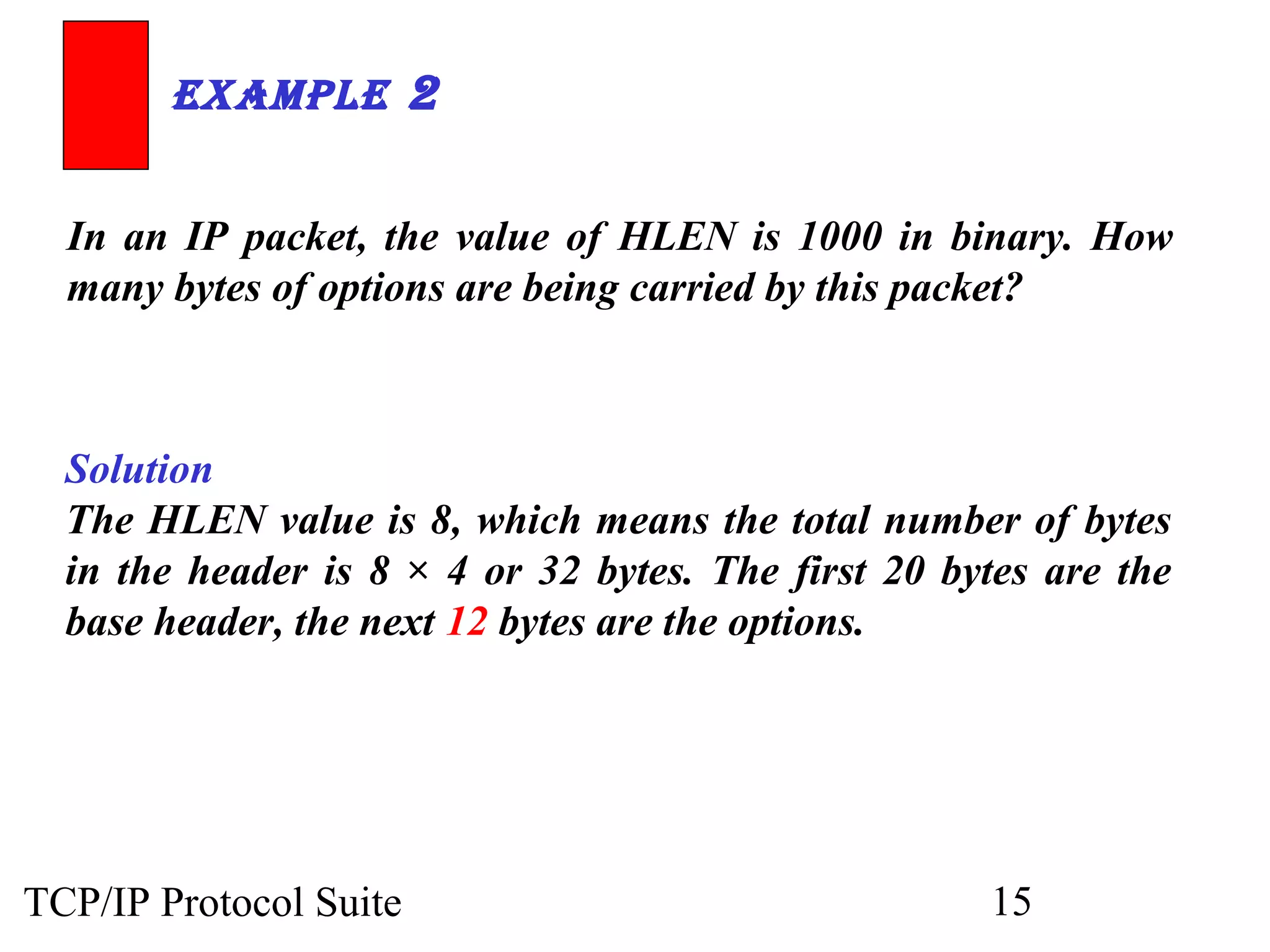
ExamplE 2 
In an IP packet, the value of HLEN is 1000 in binary. How 
many bytes of options are being carried by this packet? 
Solution 
The HLEN value is 8, which means the total number of bytes 
in the header is 8 × 4 or 32 bytes. The first 20 bytes are the 
base header, the next 12 bytes are the options. 
TCP/IP Protocol Suite 15
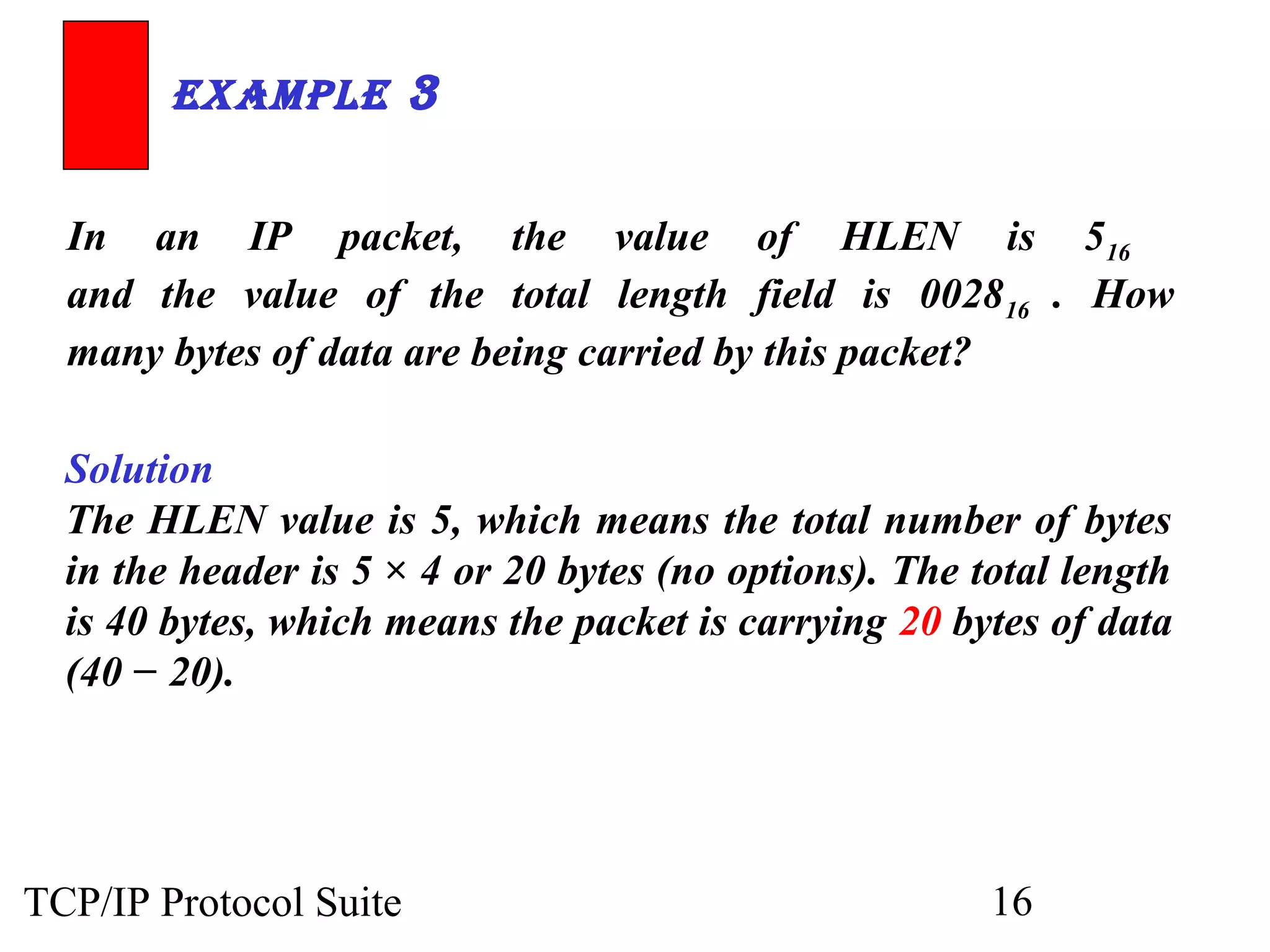
ExamplE 3 
In an IP packet, the value of HLEN is 516 
and the value of the total length field is 002816 . How 
many bytes of data are being carried by this packet? 
Solution 
The HLEN value is 5, which means the total number of bytes 
in the header is 5 × 4 or 20 bytes (no options). The total length 
is 40 bytes, which means the packet is carrying 20 bytes of data 
(40 − 20). 
TCP/IP Protocol Suite 16
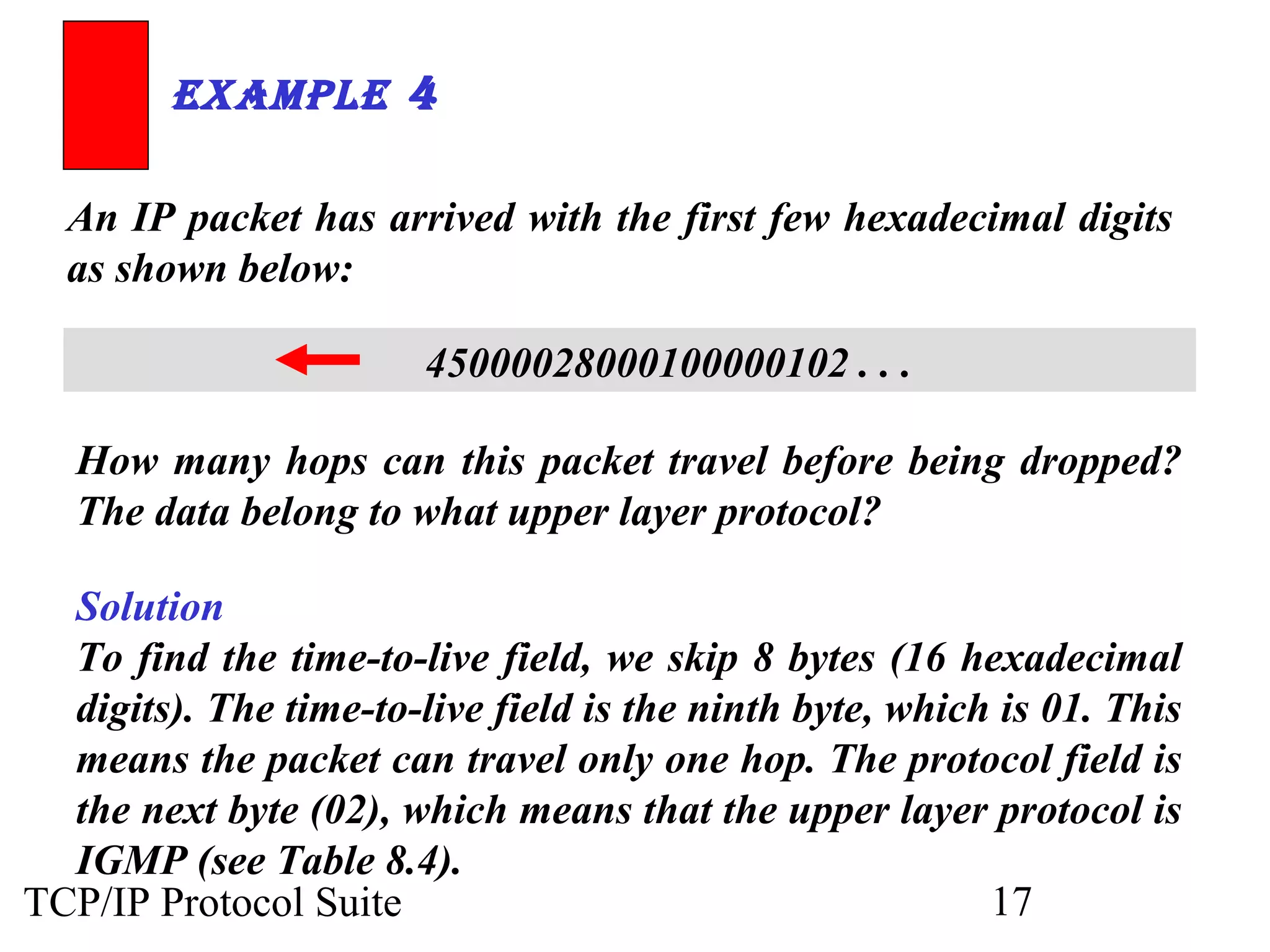
ExamplE 4 
An IP packet has arrived with the first few hexadecimal digits 
as shown below: 
45000028000100000102 . . . 
How many hops can this packet travel before being dropped? 
The data belong to what upper layer protocol? 
Solution 
To find the time-to-live field, we skip 8 bytes (16 hexadecimal 
digits). The time-to-live field is the ninth byte, which is 01. This 
means the packet can travel only one hop. The protocol field is 
the next byte (02), which means that the upper layer protocol is 
IGMP (see Table 8.4). 
TCP/IP Protocol Suite 17
8.2 FRAGMENTATION 
The format and size of a frame depend on the pprroottooccooll uusseedd bbyy tthhee 
pphhyyssiiccaall nneettwwoorrkk.. AA ddaattaaggrraamm mmaayy hhaavvee ttoo bbee ffrraaggmmeenntteedd ttoo ffiitt tthhee 
pprroottooccooll rreegguullaattiioonnss.. 
TThhee ttooppiiccss ddiissccuusssseedd iinn tthhiiss sseeccttiioonn iinncclluuddee:: 
MMaaxxiimmuumm TTrraannssffeerr UUnniitt ((MMTTUU)) 
FFiieellddss RReellaatteedd ttoo FFrraaggmmeennttaattiioonn 
TCP/IP Protocol Suite 18
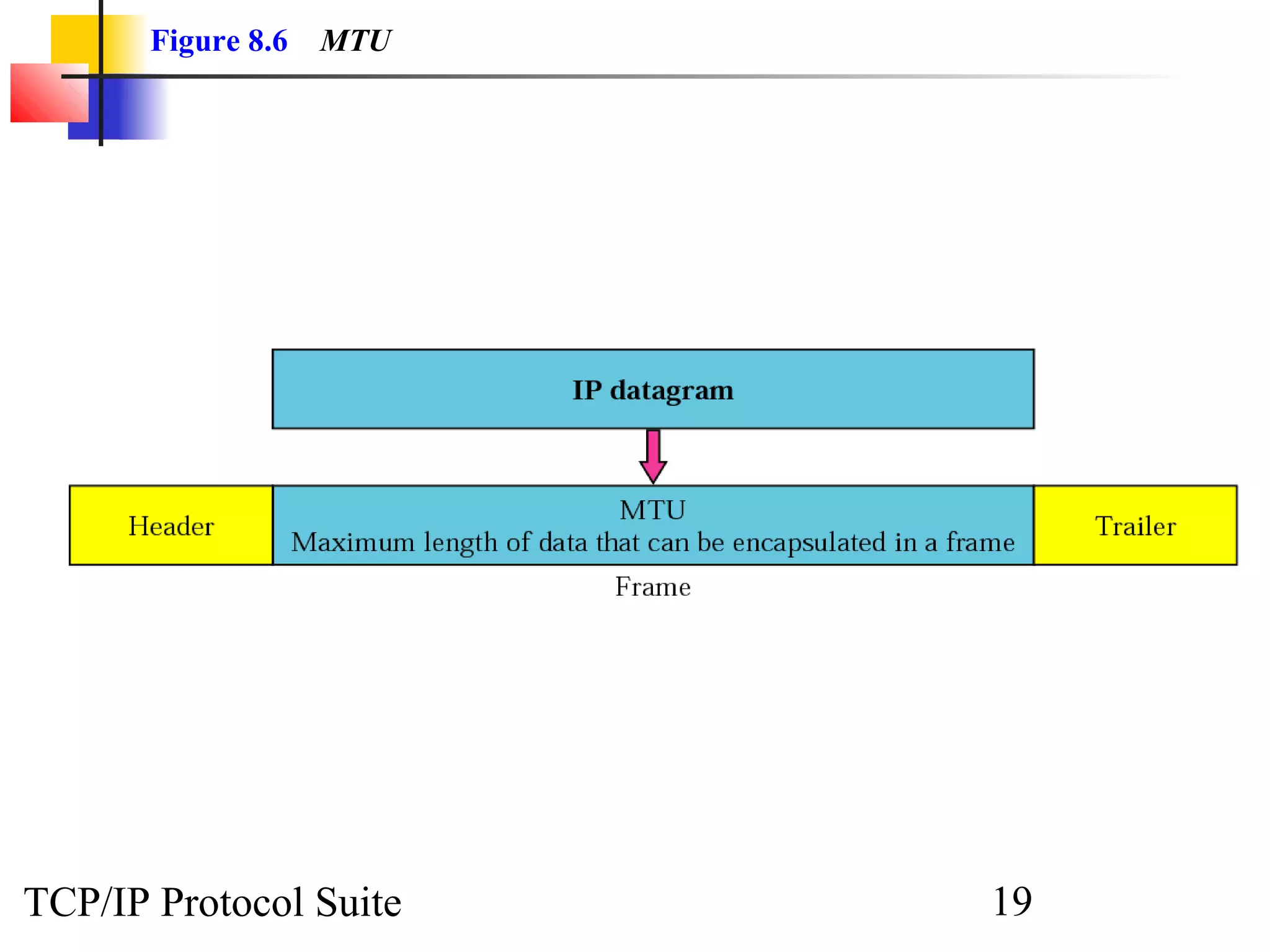
Figure 8.6 MTU 
TCP/IP Protocol Suite 19
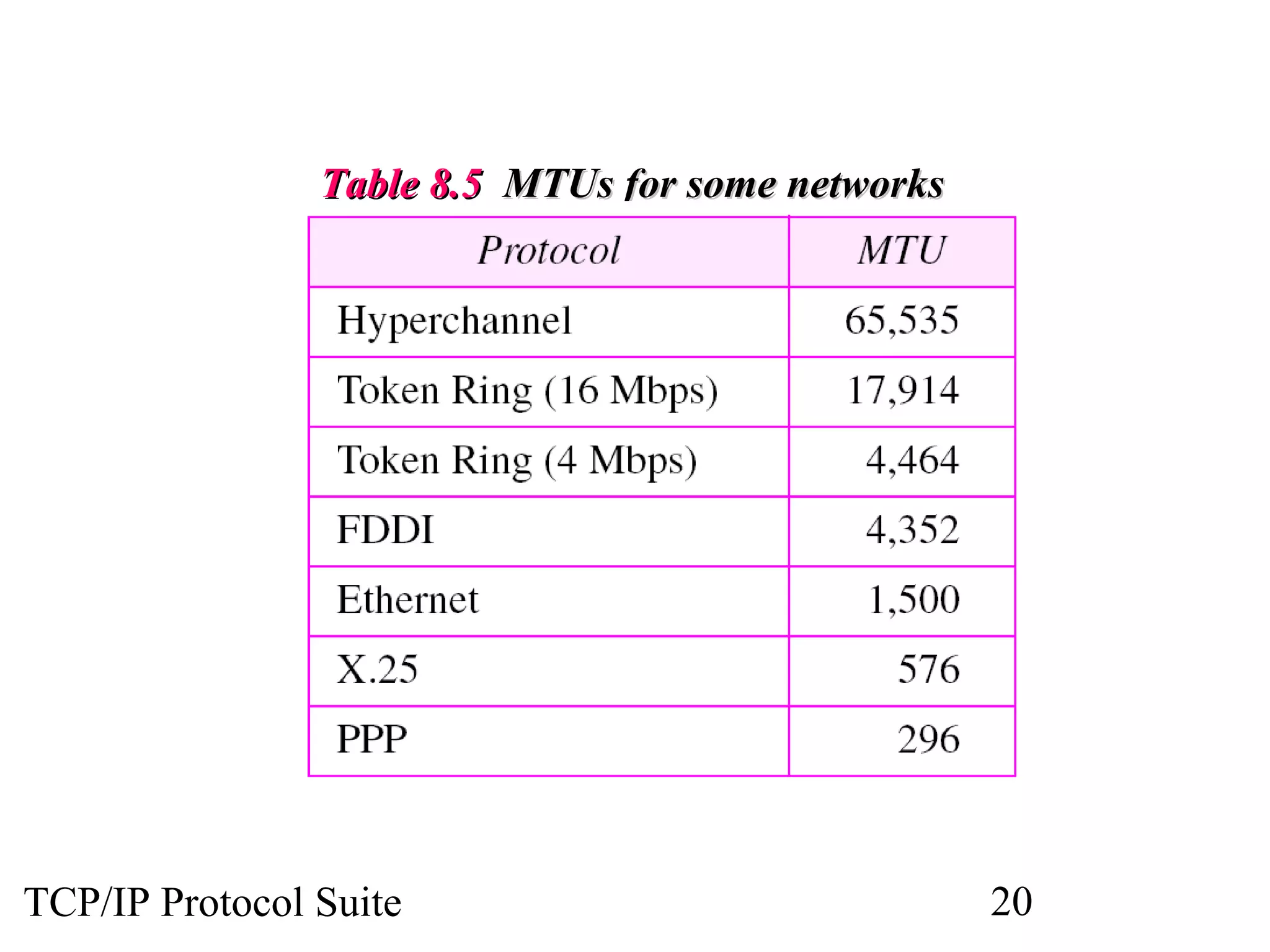
TTaabbllee 88..55 MMTTUUss ffoorr ssoommee nneettwwoorrkkss 
TCP/IP Protocol Suite 20
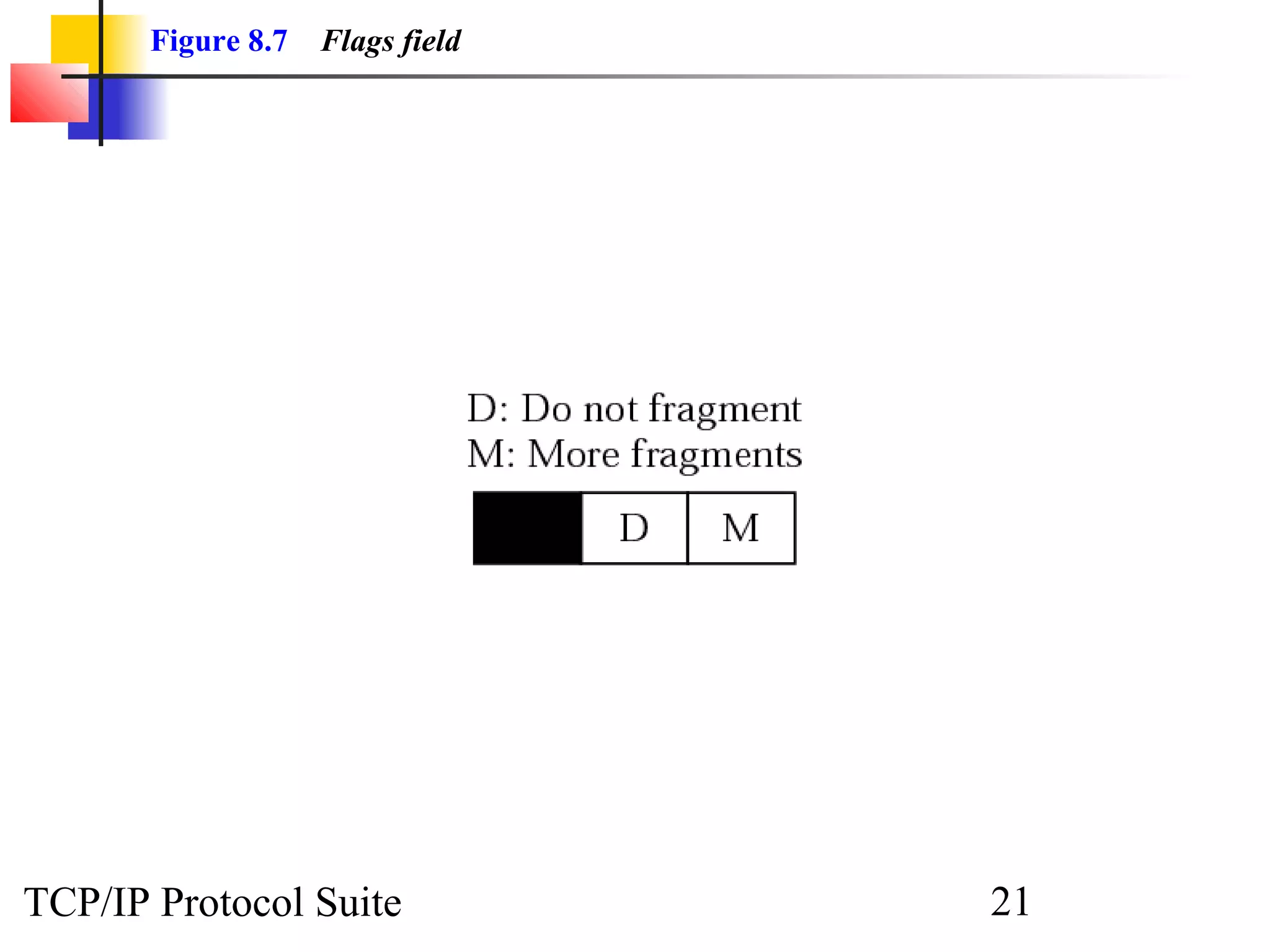
Figure 8.7 Flags field 
TCP/IP Protocol Suite 21
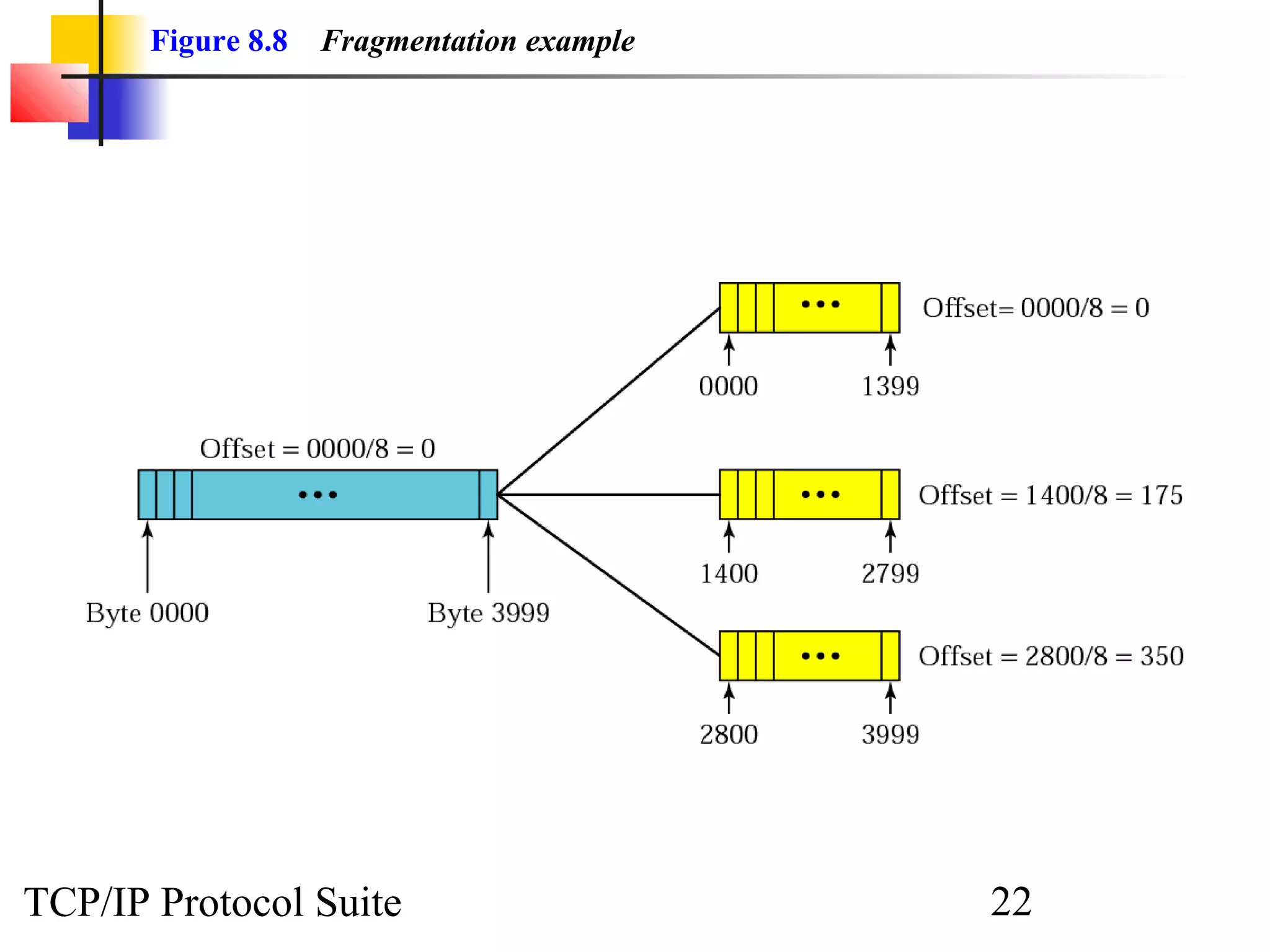
Figure 8.8 Fragmentation example 
TCP/IP Protocol Suite 22
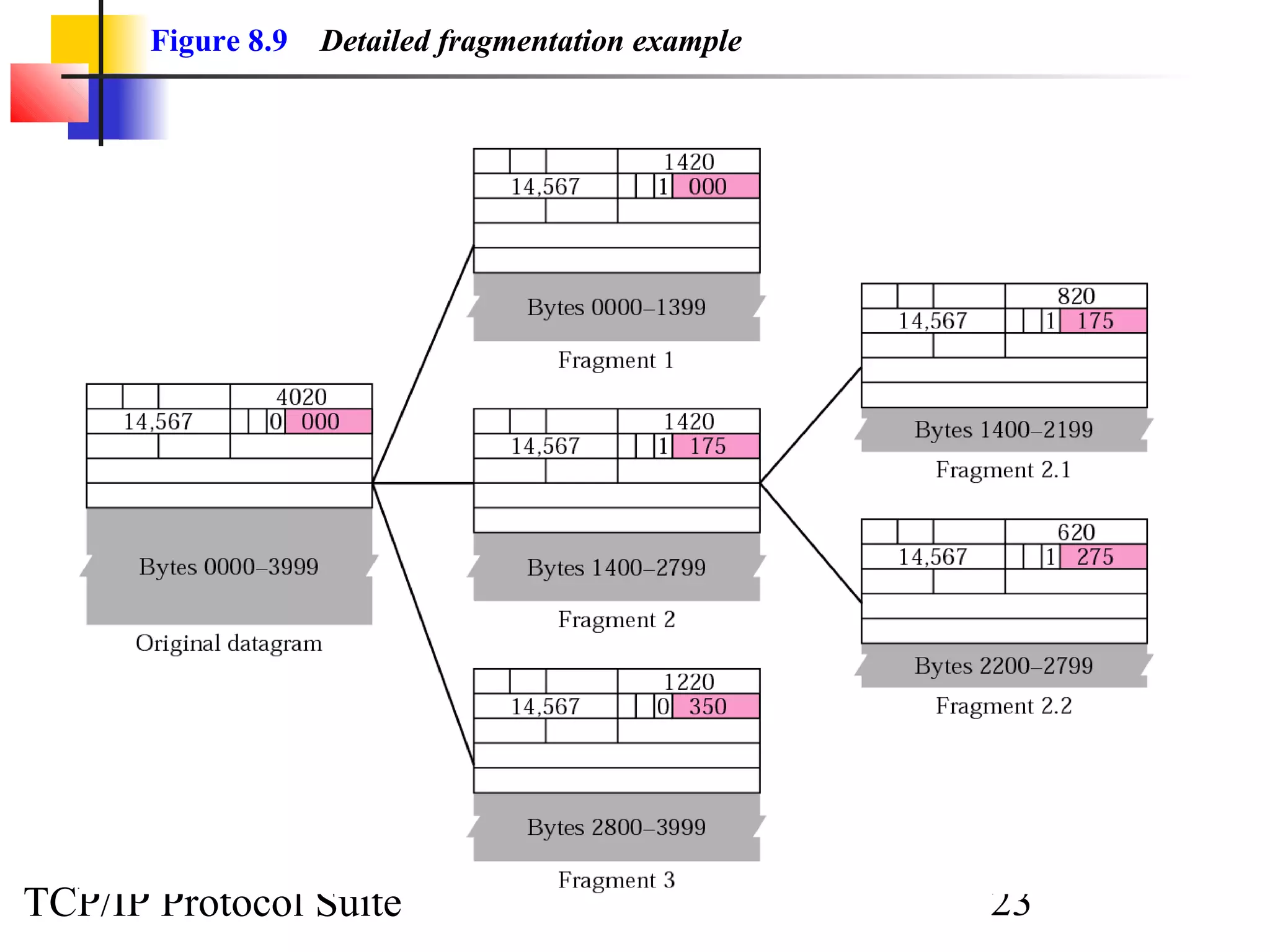
Figure 8.9 Detailed fragmentation example 
TCP/IP Protocol Suite 23
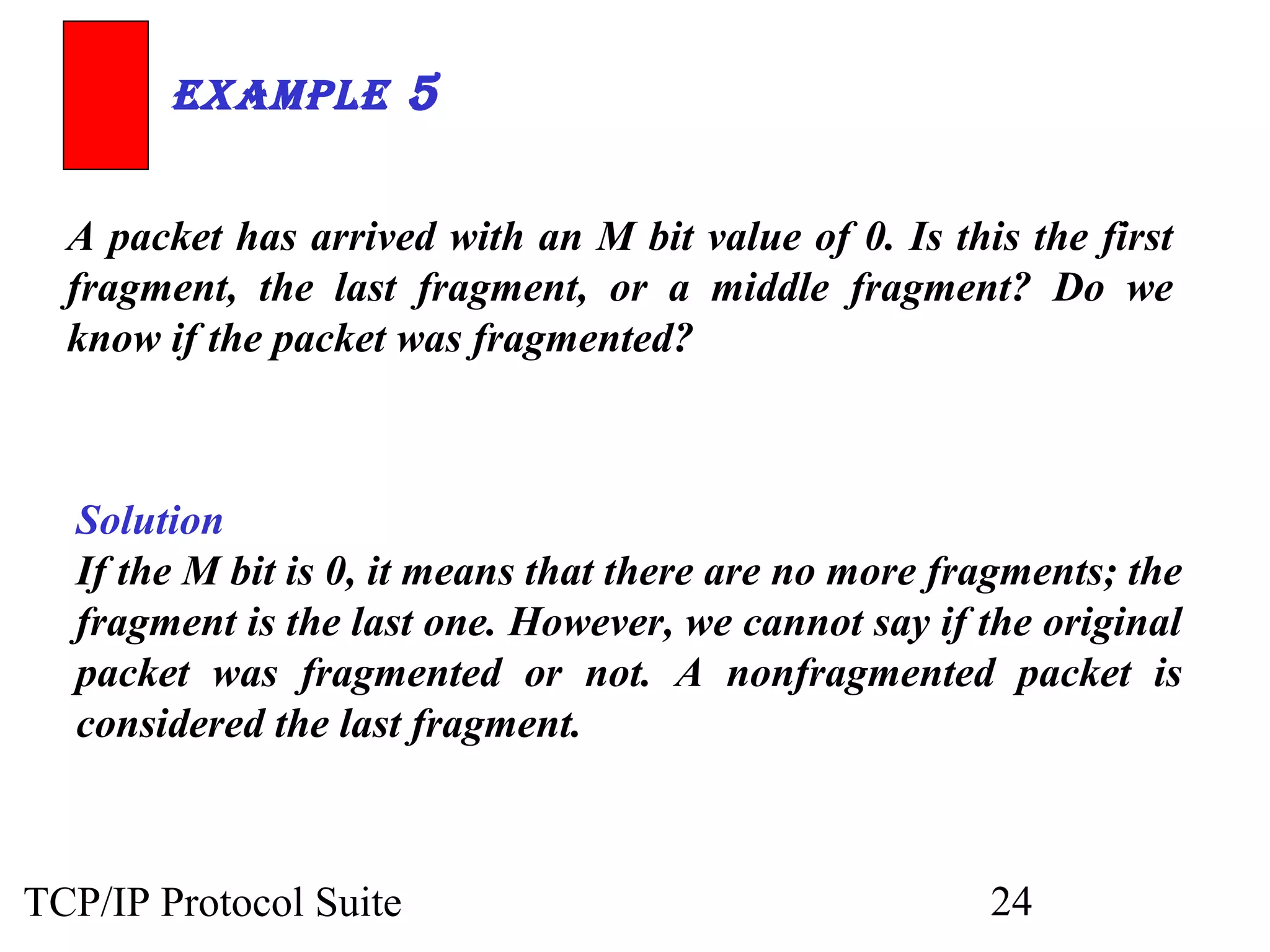
ExamplE 5 
A packet has arrived with an M bit value of 0. Is this the first 
fragment, the last fragment, or a middle fragment? Do we 
know if the packet was fragmented? 
Solution 
If the M bit is 0, it means that there are no more fragments; the 
fragment is the last one. However, we cannot say if the original 
packet was fragmented or not. A nonfragmented packet is 
considered the last fragment. 
TCP/IP Protocol Suite 24
ExamplE 6 
A packet has arrived with an M bit value of 1. Is this the first 
fragment, the last fragment, or a middle fragment? Do we 
know if the packet was fragmented? 
Solution 
If the M bit is 1, it means that there is at least one more 
fragment. This fragment can be the first one or a middle one, 
but not the last one. We don’t know if it is the first one or a 
middle one; we need more information (the value of the 
fragmentation offset). See also the next example. 
TCP/IP Protocol Suite 25
ExamplE 7 
A packet has arrived with an M bit value of 1 and a 
fragmentation offset value of zero. Is this the first fragment, 
the last fragment, or a middle fragment?. 
Solution 
Because the M bit is 1, it is either the first fragment or a middle 
one. Because the offset value is 0, it is the first fragment. 
TCP/IP Protocol Suite 26
ExamplE 8 
A packet has arrived in which the offset value is 100. What is 
the number of the first byte? Do we know the number of the 
last byte? 
Solution 
To find the number of the first byte, we multiply the offset 
value by 8. This means that the first byte number is 800. We 
cannot determine the number of the last byte unless we know 
the length of the data. 
TCP/IP Protocol Suite 27
ExamplE 9 
A packet has arrived in which the offset value is 100, the value 
of HLEN is 5 and the value of the total length field is 100. 
What is the number of the first byte and the last byte? 
Solution 
The first byte number is 100 × 8 = 800. The total length is 100 
bytes and the header length is 20 bytes (5 × 4), which means 
that there are 80 bytes in this datagram. If the first byte 
number is 800, the last byte number must be 879. 
TCP/IP Protocol Suite 28
8.3 OPTIONS 
The header of the IP datagram is made of two parts: aa ffiixxeedd ppaarrtt aanndd aa 
vvaarriiaabbllee ppaarrtt.. TThhee vvaarriiaabbllee ppaarrtt ccoommpprriisseess tthhee ooppttiioonnss tthhaatt ccaann bbee aa 
mmaaxxiimmuumm ooff 4400 bbyytteess.. 
TThhee ttooppiiccss ddiissccuusssseedd iinn tthhiiss sseeccttiioonn iinncclluuddee:: 
FFoorrmmaatt 
OOppttiioonn TTyyppeess 
TCP/IP Protocol Suite 29
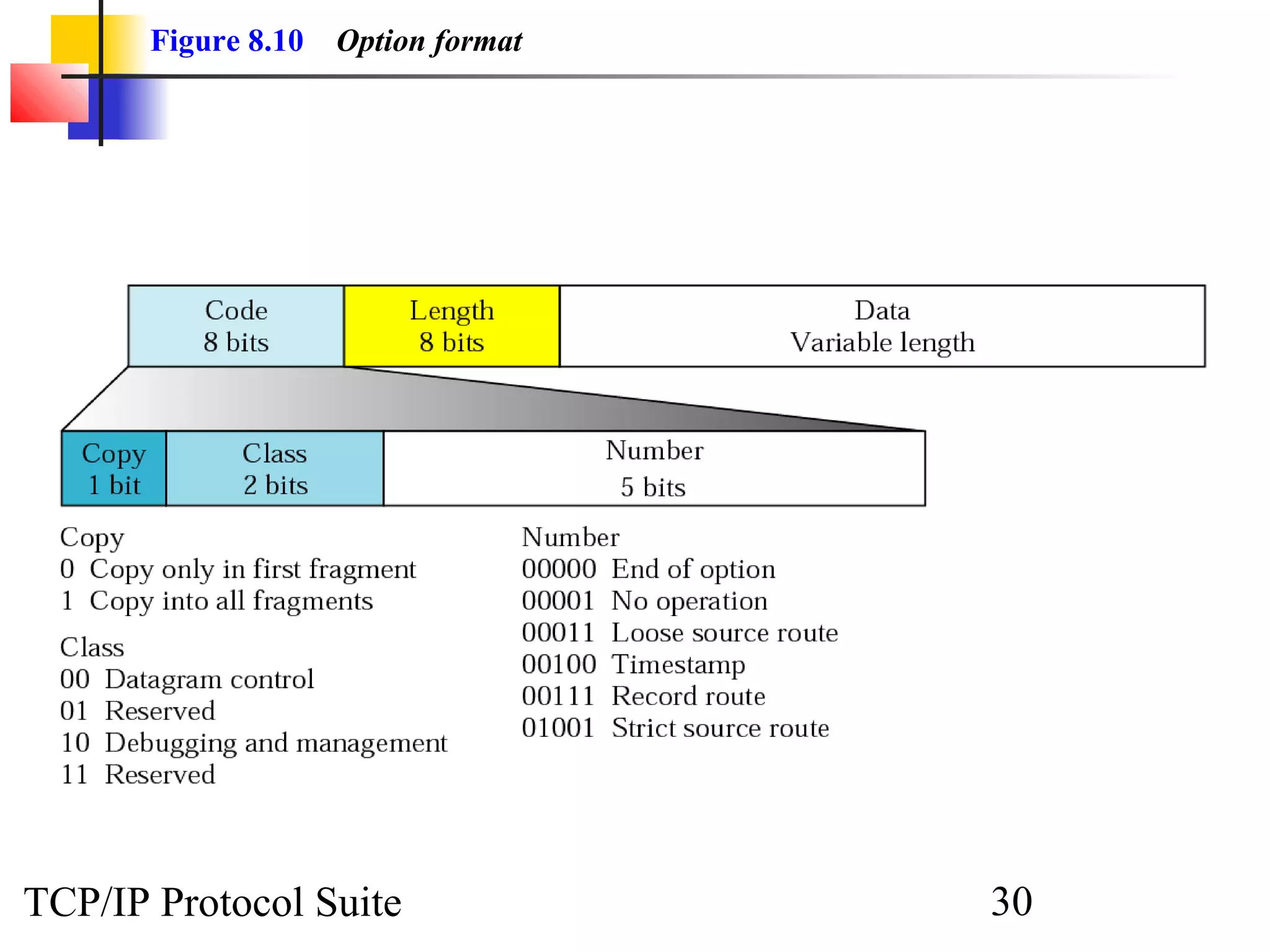
Figure 8.10 Option format 
TCP/IP Protocol Suite 30
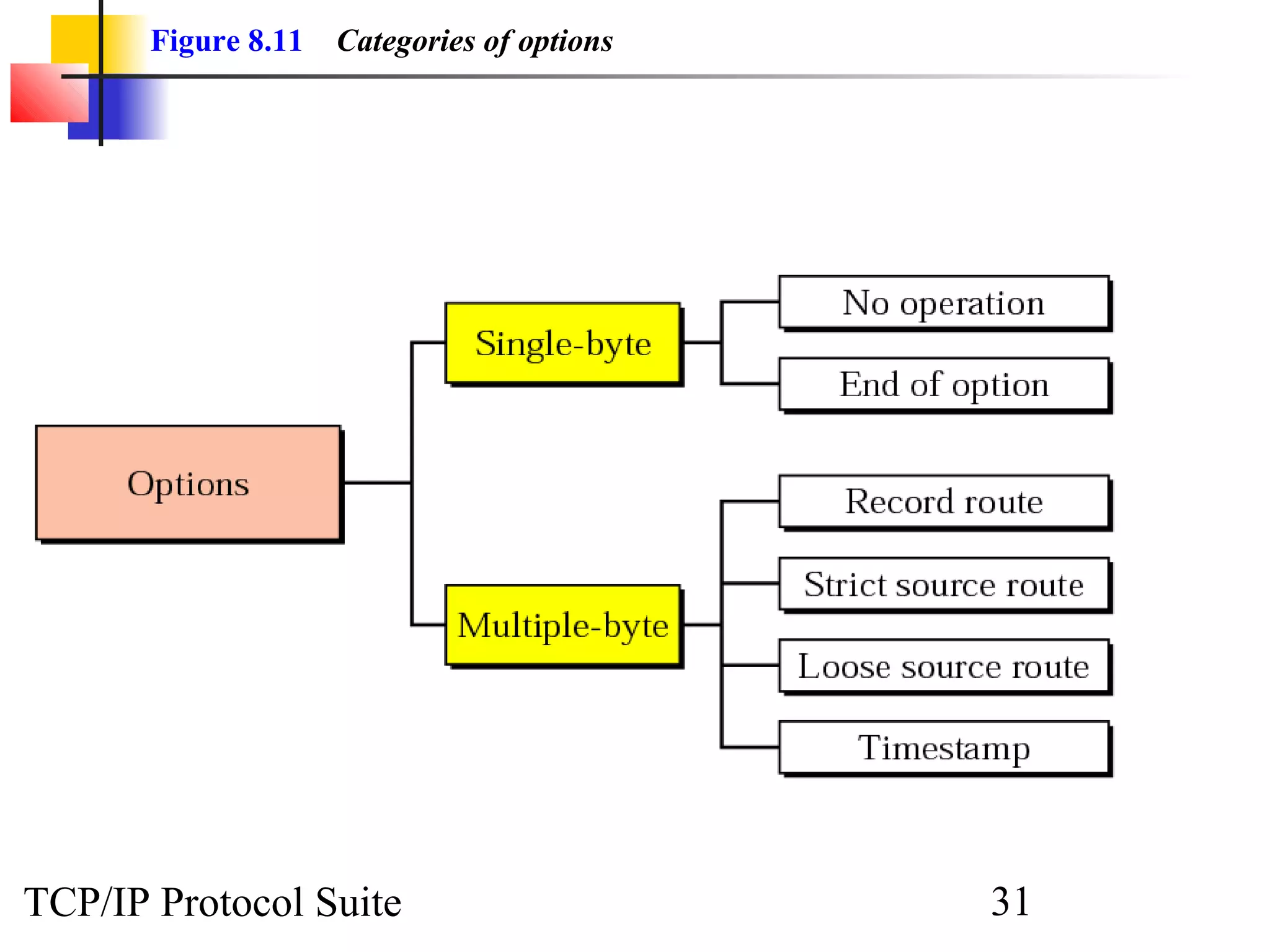
Figure 8.11 Categories of options 
TCP/IP Protocol Suite 31
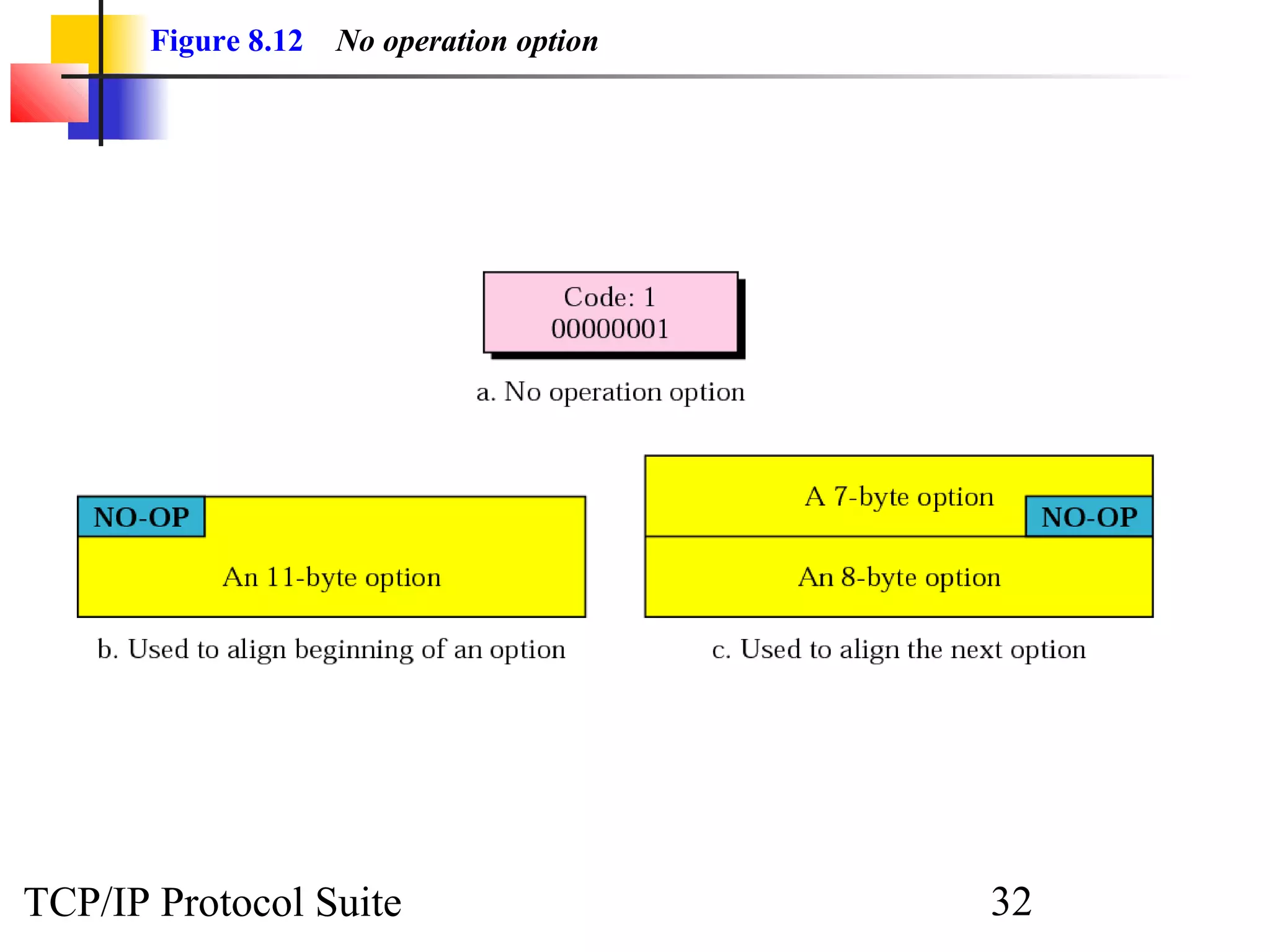
Figure 8.12 No operation option 
TCP/IP Protocol Suite 32
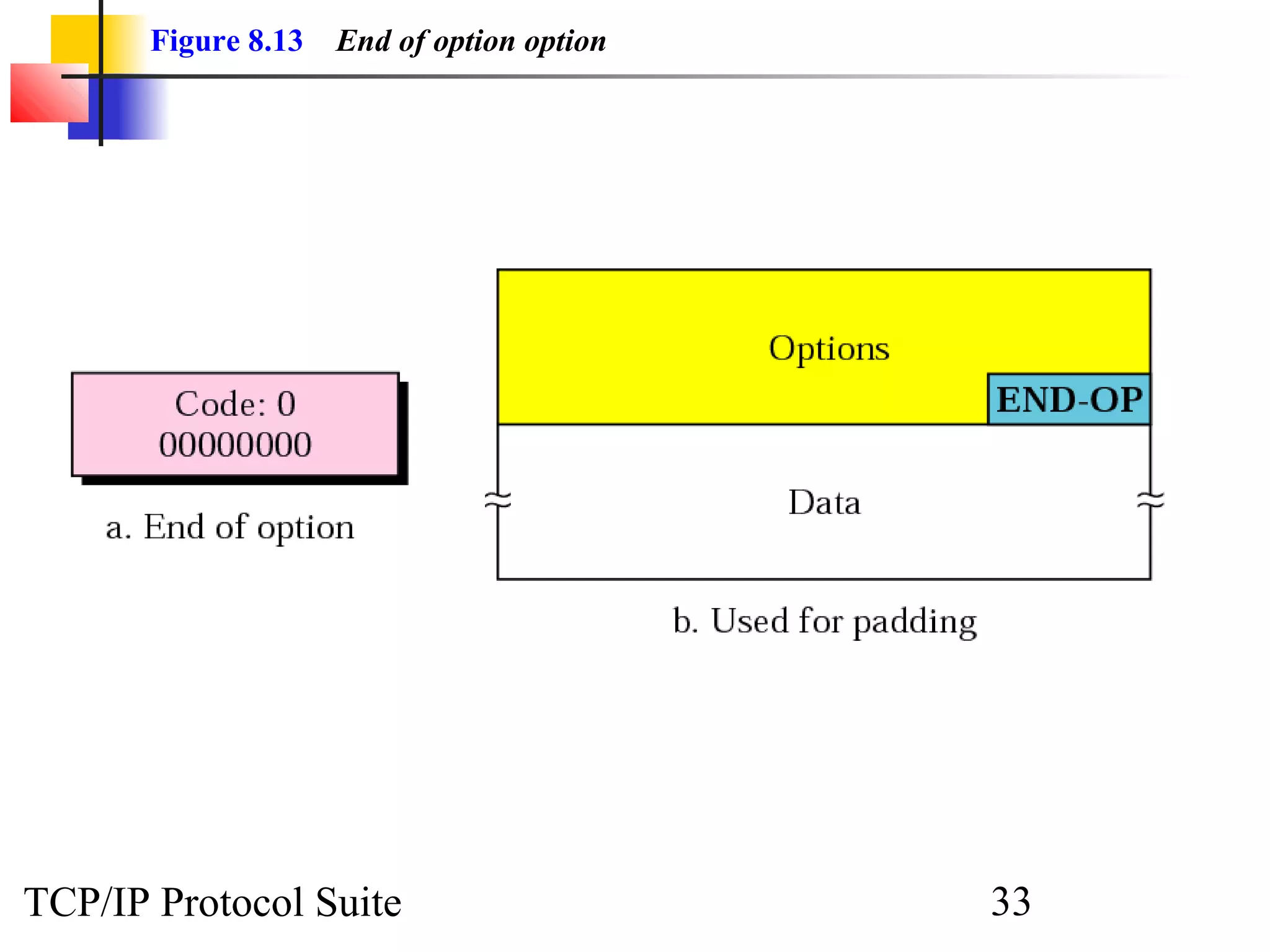
Figure 8.13 End of option option 
TCP/IP Protocol Suite 33
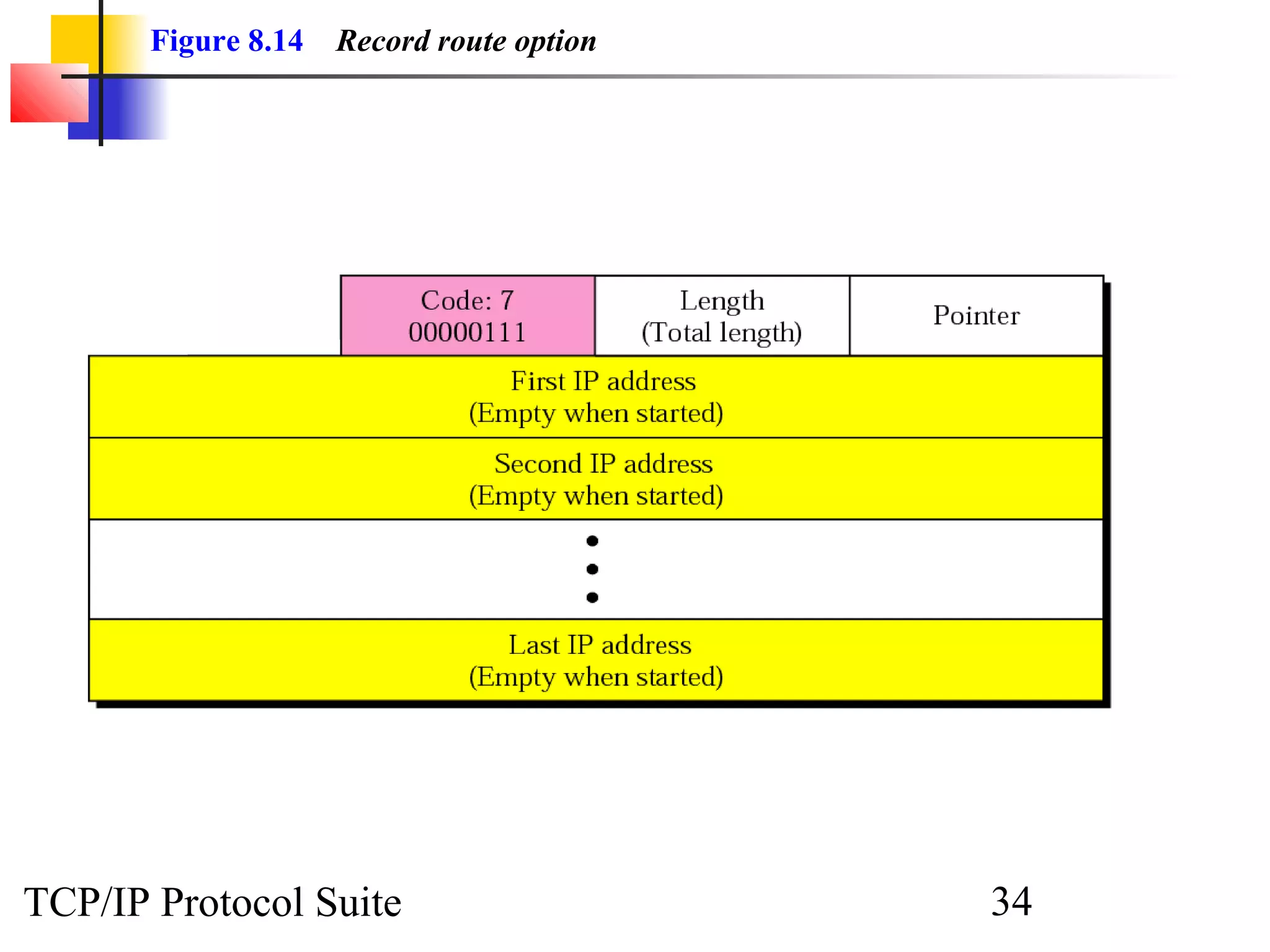
Figure 8.14 Record route option 
TCP/IP Protocol Suite 34
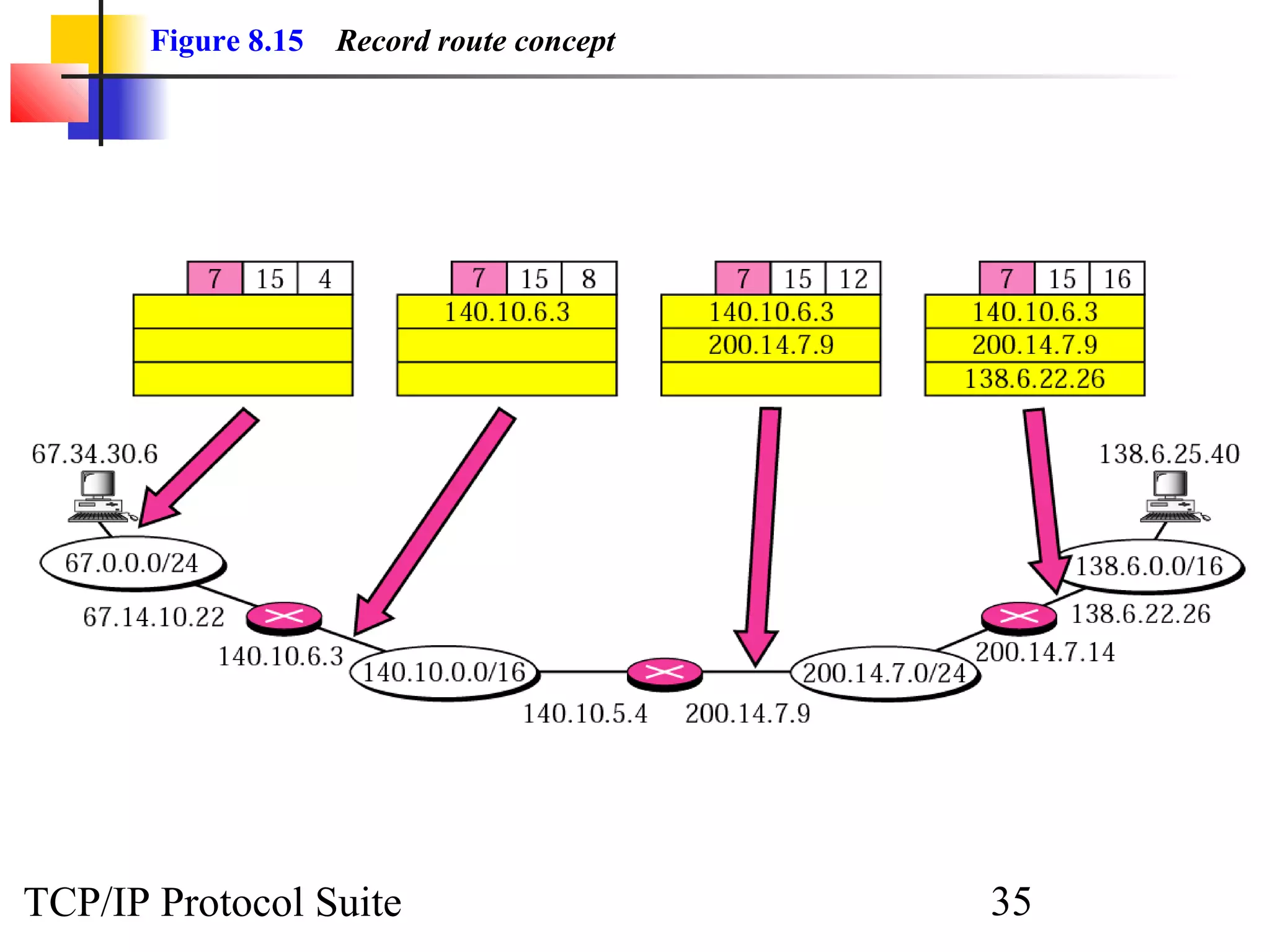
Figure 8.15 Record route concept 
TCP/IP Protocol Suite 35
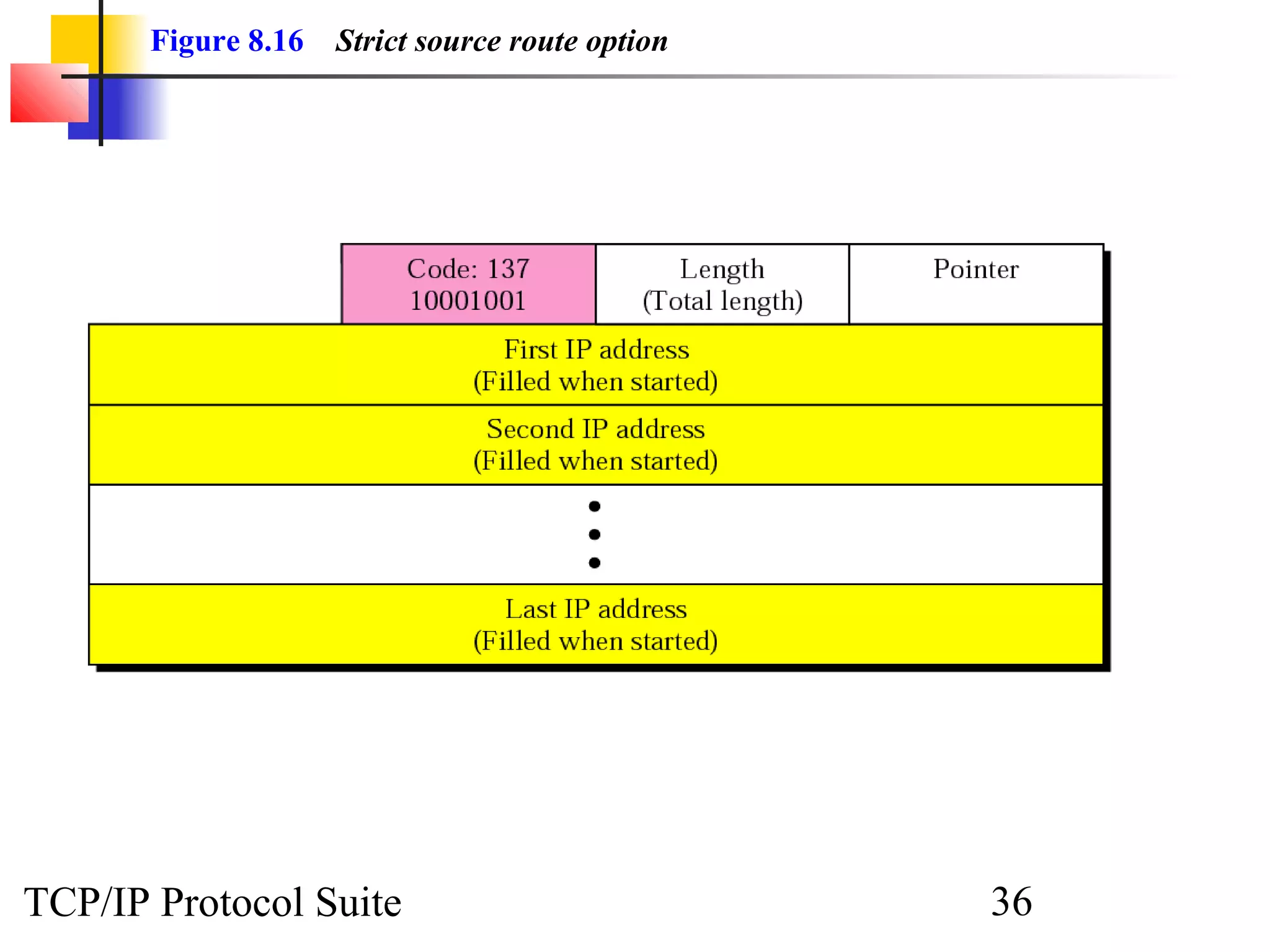
Figure 8.16 Strict source route option 
TCP/IP Protocol Suite 36
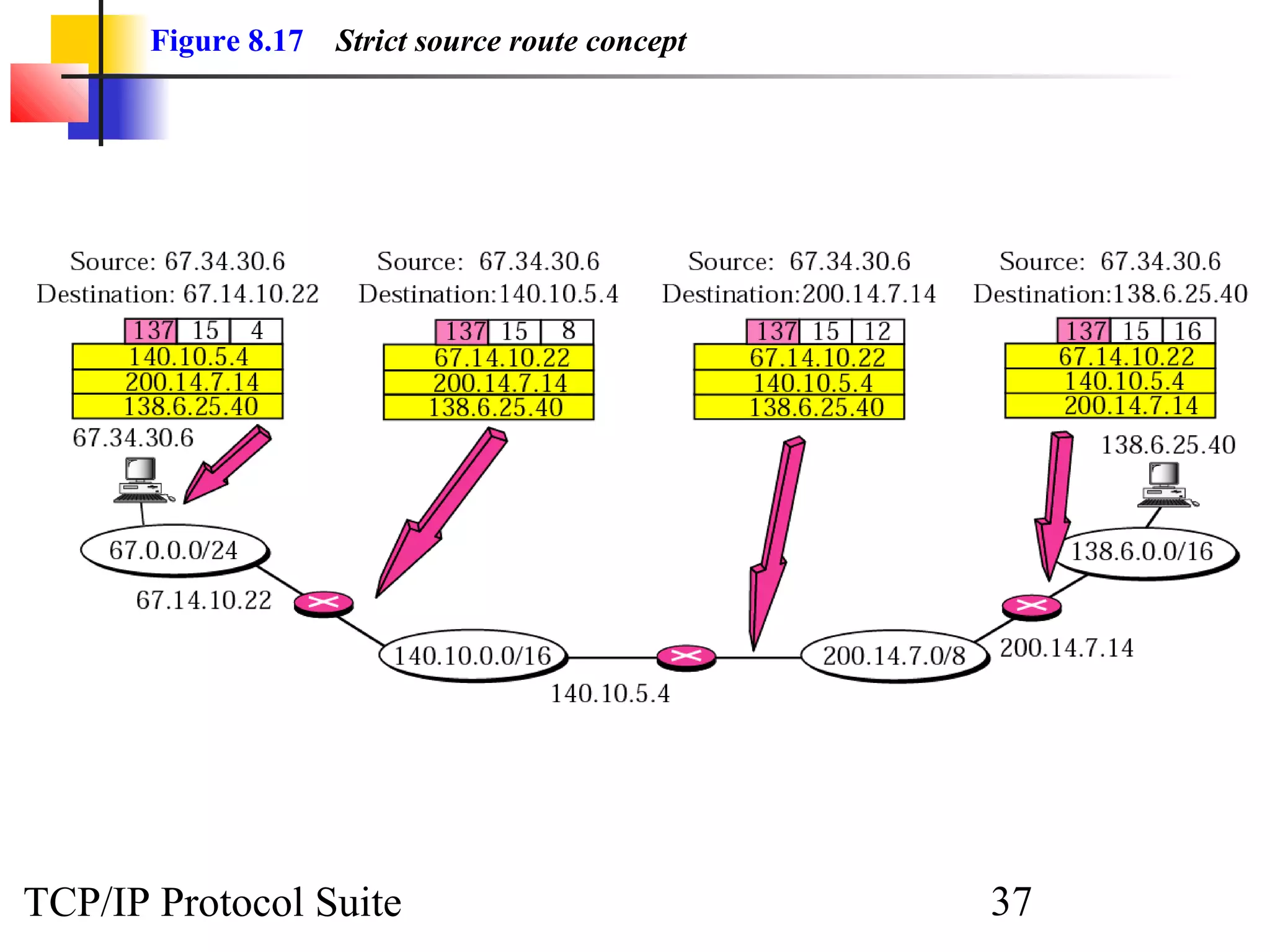
Figure 8.17 Strict source route concept 
TCP/IP Protocol Suite 37
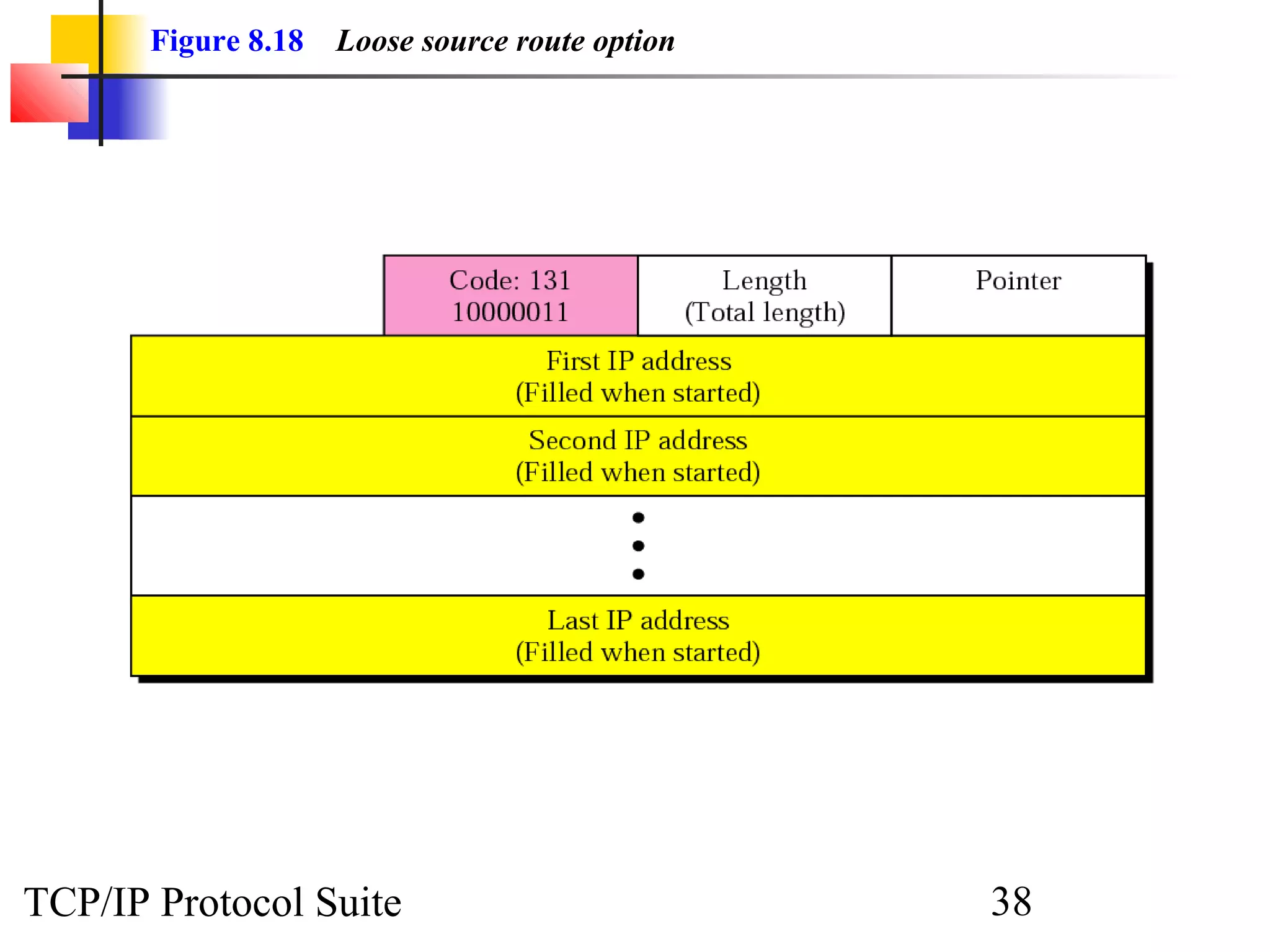
Figure 8.18 Loose source route option 
TCP/IP Protocol Suite 38
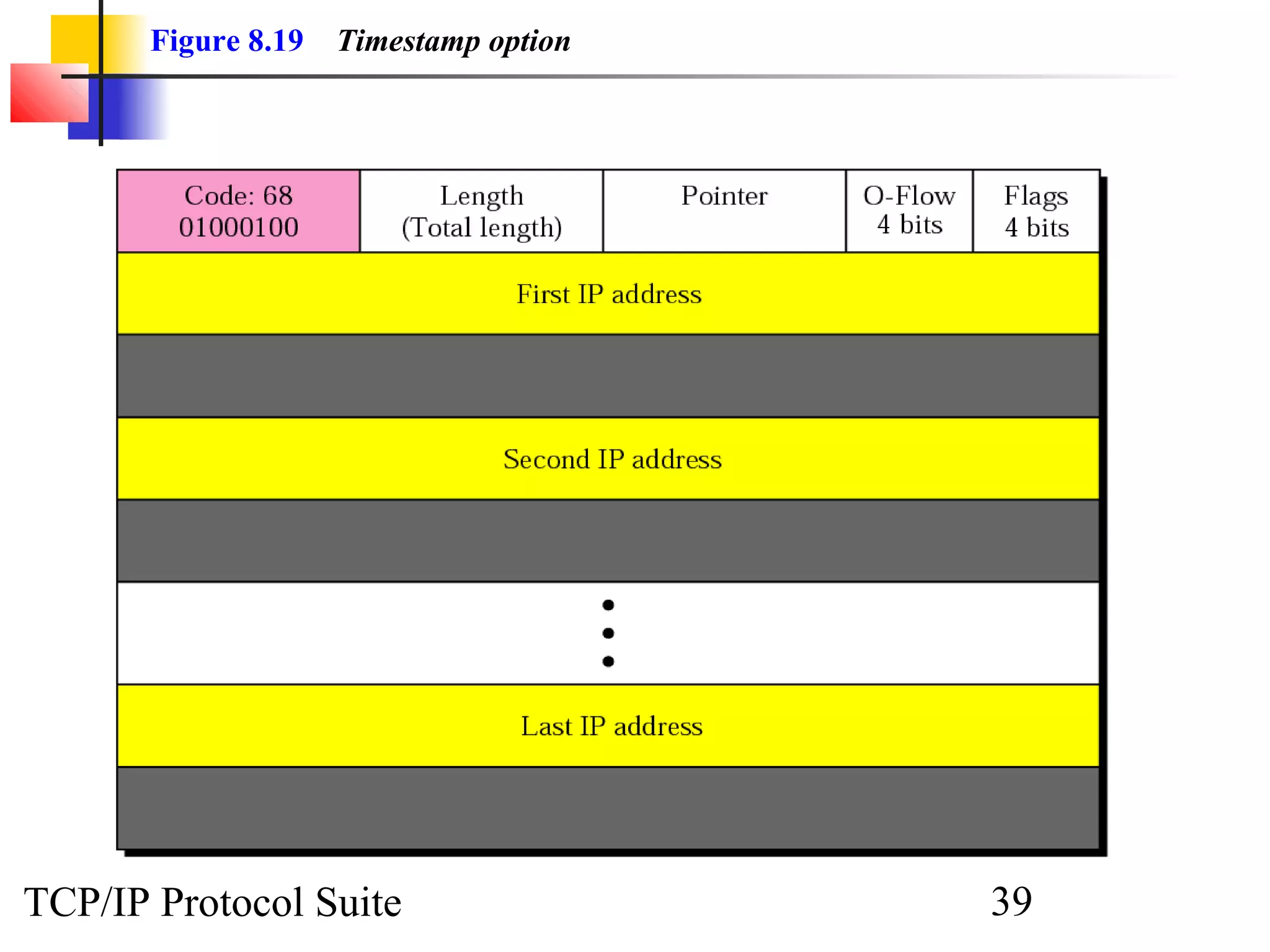
Figure 8.19 Timestamp option 
TCP/IP Protocol Suite 39
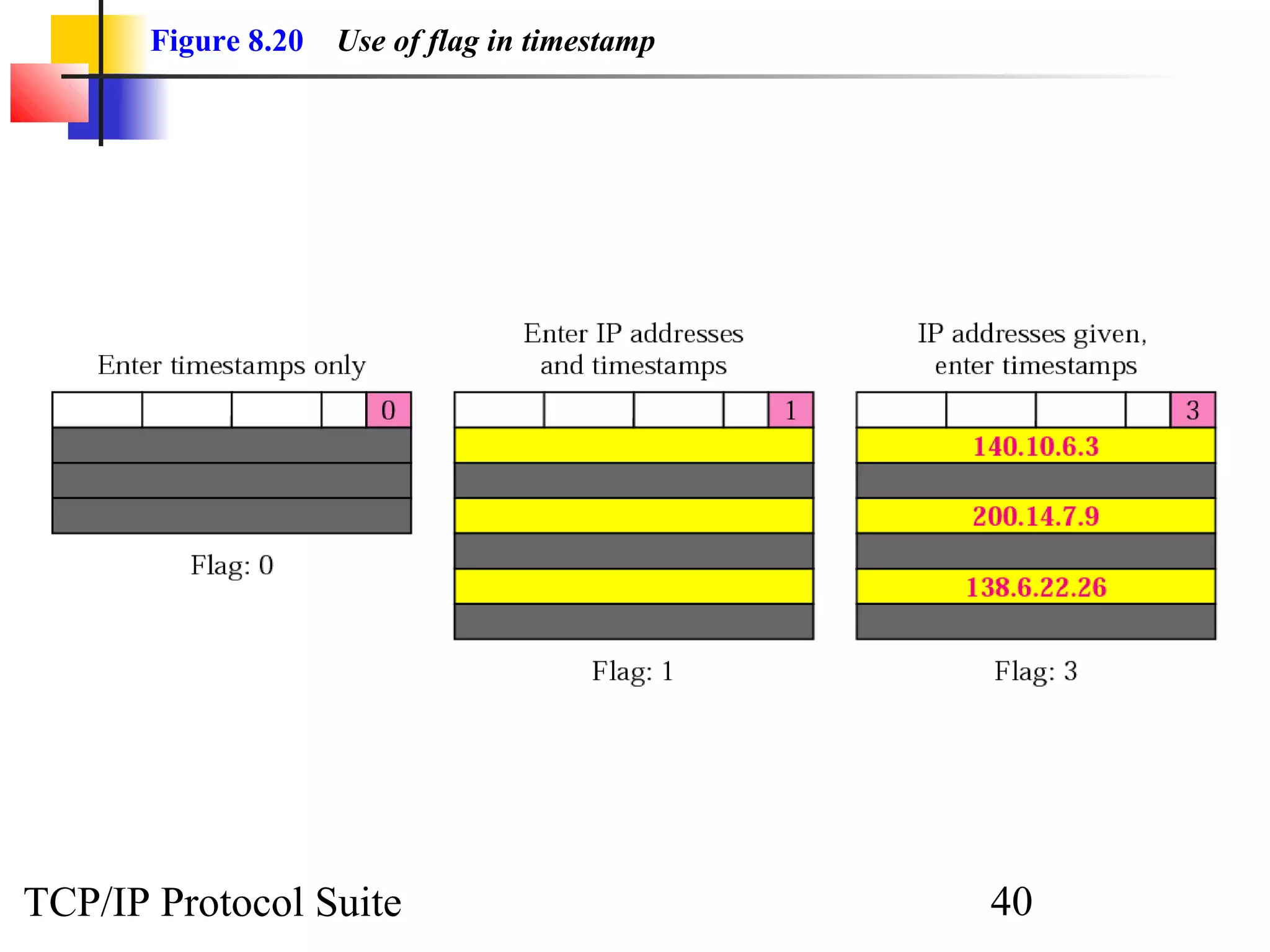
Figure 8.20 Use of flag in timestamp 
TCP/IP Protocol Suite 40
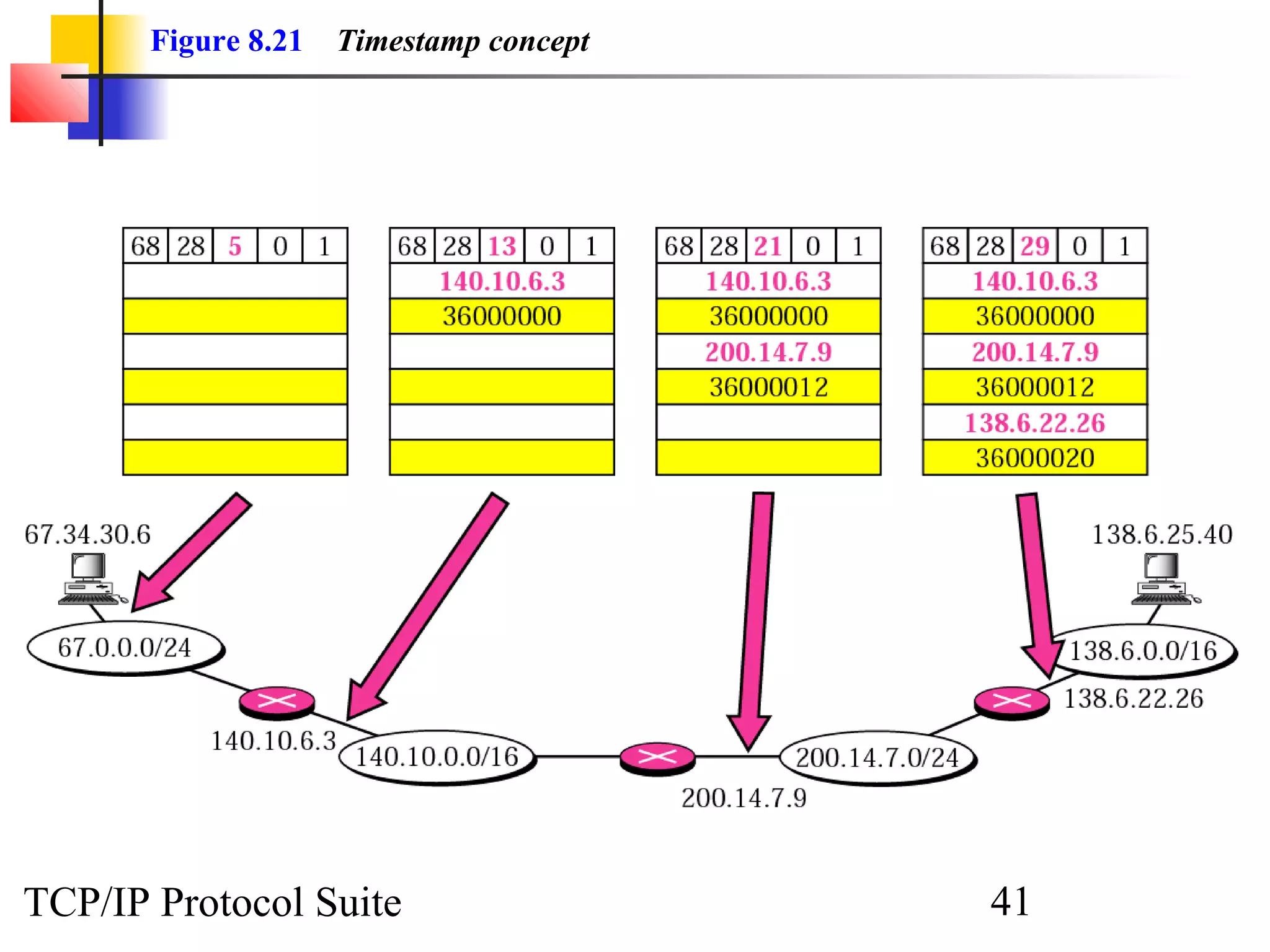
Figure 8.21 Timestamp concept 
TCP/IP Protocol Suite 41
ExamplE 
10 
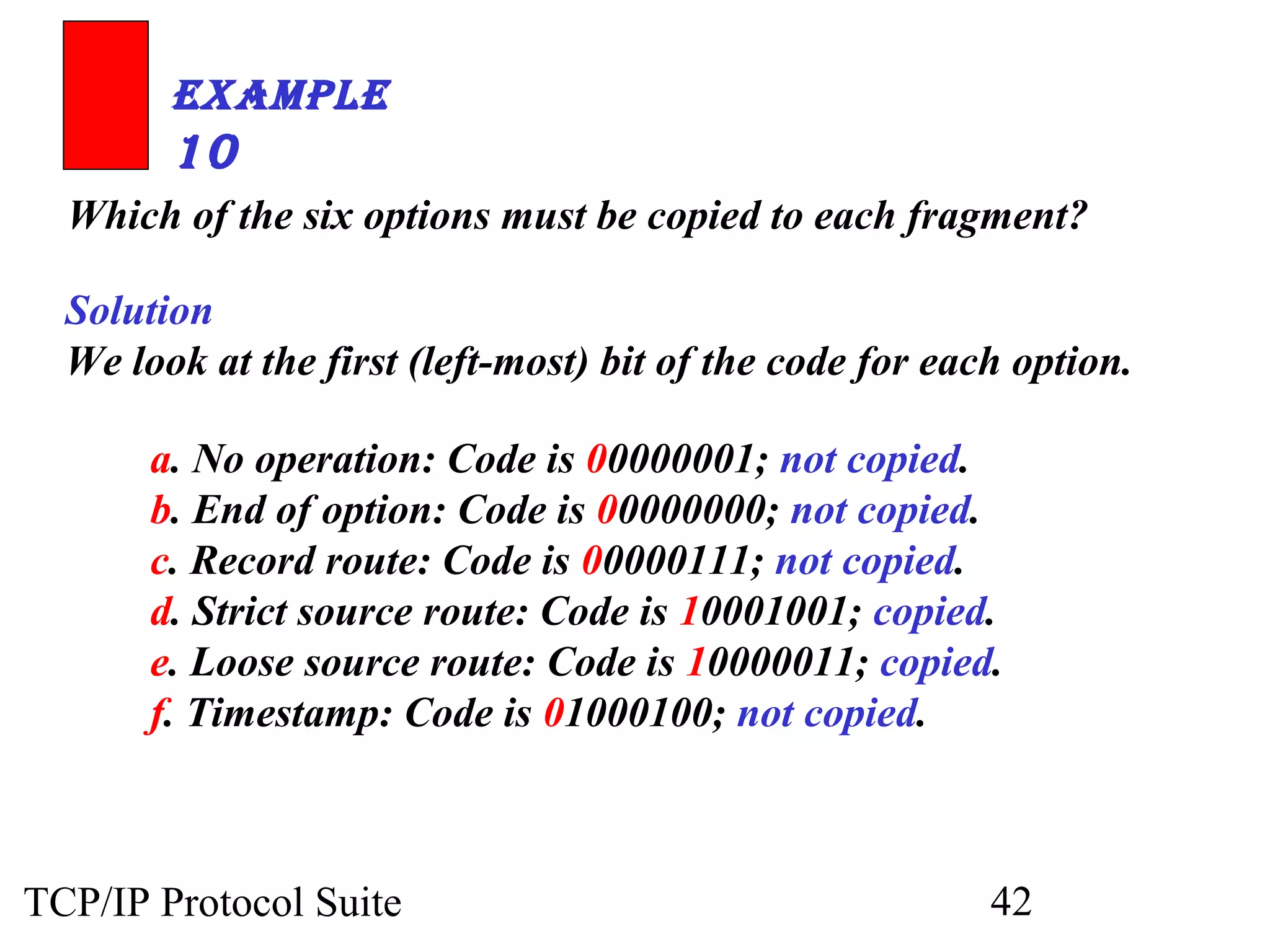
Which of the six options must be copied to each fragment? 
Solution 
We look at the first (left-most) bit of the code for each option. 
a. No operation: Code is 00000001; not copied. 
b. End of option: Code is 00000000; not copied. 
c. Record route: Code is 00000111; not copied. 
d. Strict source route: Code is 10001001; copied. 
e. Loose source route: Code is 10000011; copied. 
f. Timestamp: Code is 01000100; not copied. 
TCP/IP Protocol Suite 42
ExamplE 
11 
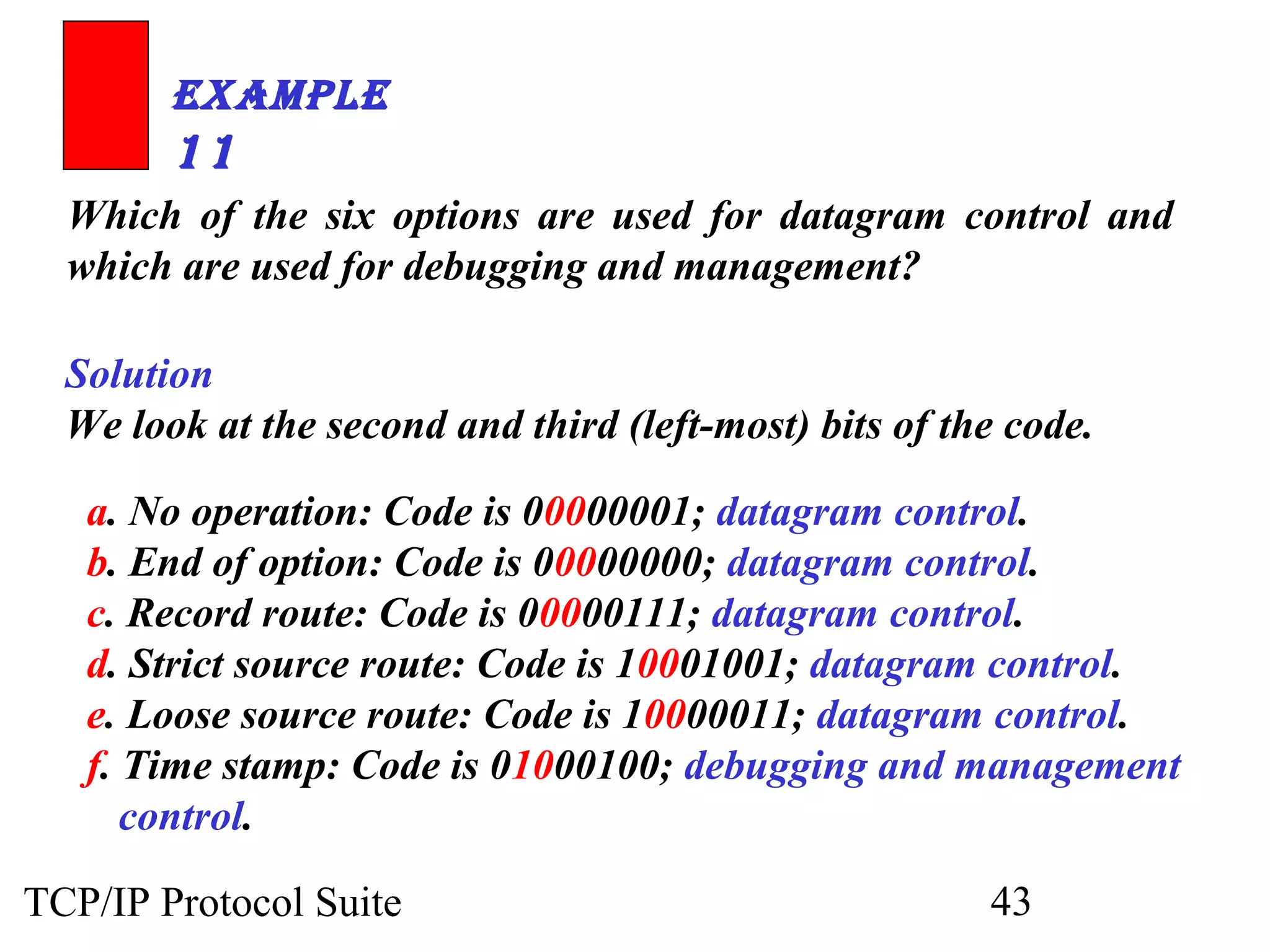
Which of the six options are used for datagram control and 
which are used for debugging and management? 
Solution 
We look at the second and third (left-most) bits of the code. 
a. No operation: Code is 00000001; datagram control. 
b. End of option: Code is 00000000; datagram control. 
c. Record route: Code is 00000111; datagram control. 
d. Strict source route: Code is 10001001; datagram control. 
e. Loose source route: Code is 10000011; datagram control. 
f. Time stamp: Code is 01000100; debugging and management 
control. 
TCP/IP Protocol Suite 43
ExamplE 
12 
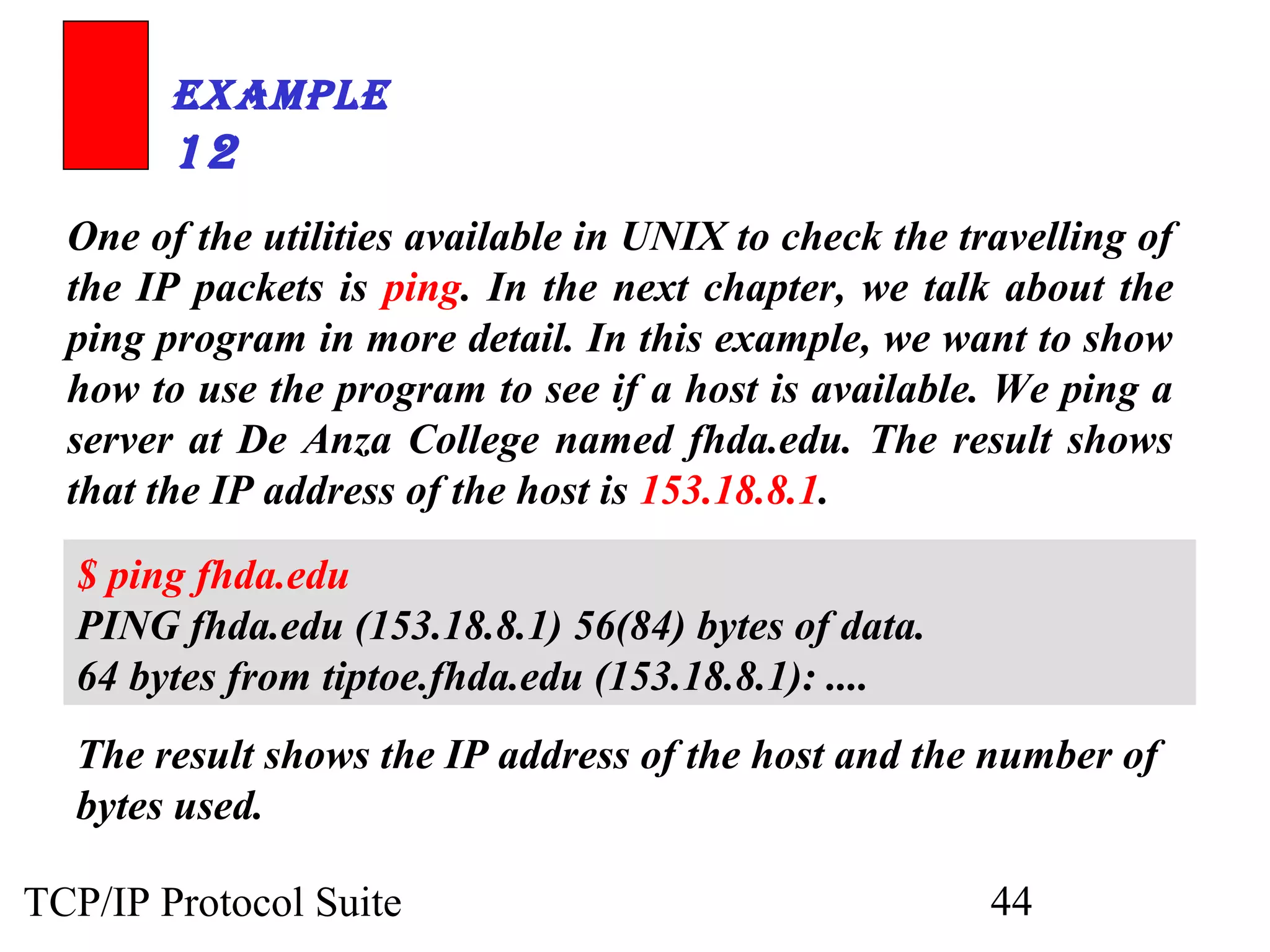
One of the utilities available in UNIX to check the travelling of 
the IP packets is ping. In the next chapter, we talk about the 
ping program in more detail. In this example, we want to show 
how to use the program to see if a host is available. We ping a 
server at De Anza College named fhda.edu. The result shows 
that the IP address of the host is 153.18.8.1. 
$ ping fhda.edu 
PING fhda.edu (153.18.8.1) 56(84) bytes of data. 
64 bytes from tiptoe.fhda.edu (153.18.8.1): .... 
The result shows the IP address of the host and the number of 
bytes used. 
TCP/IP Protocol Suite 44
ExamplE 
13 
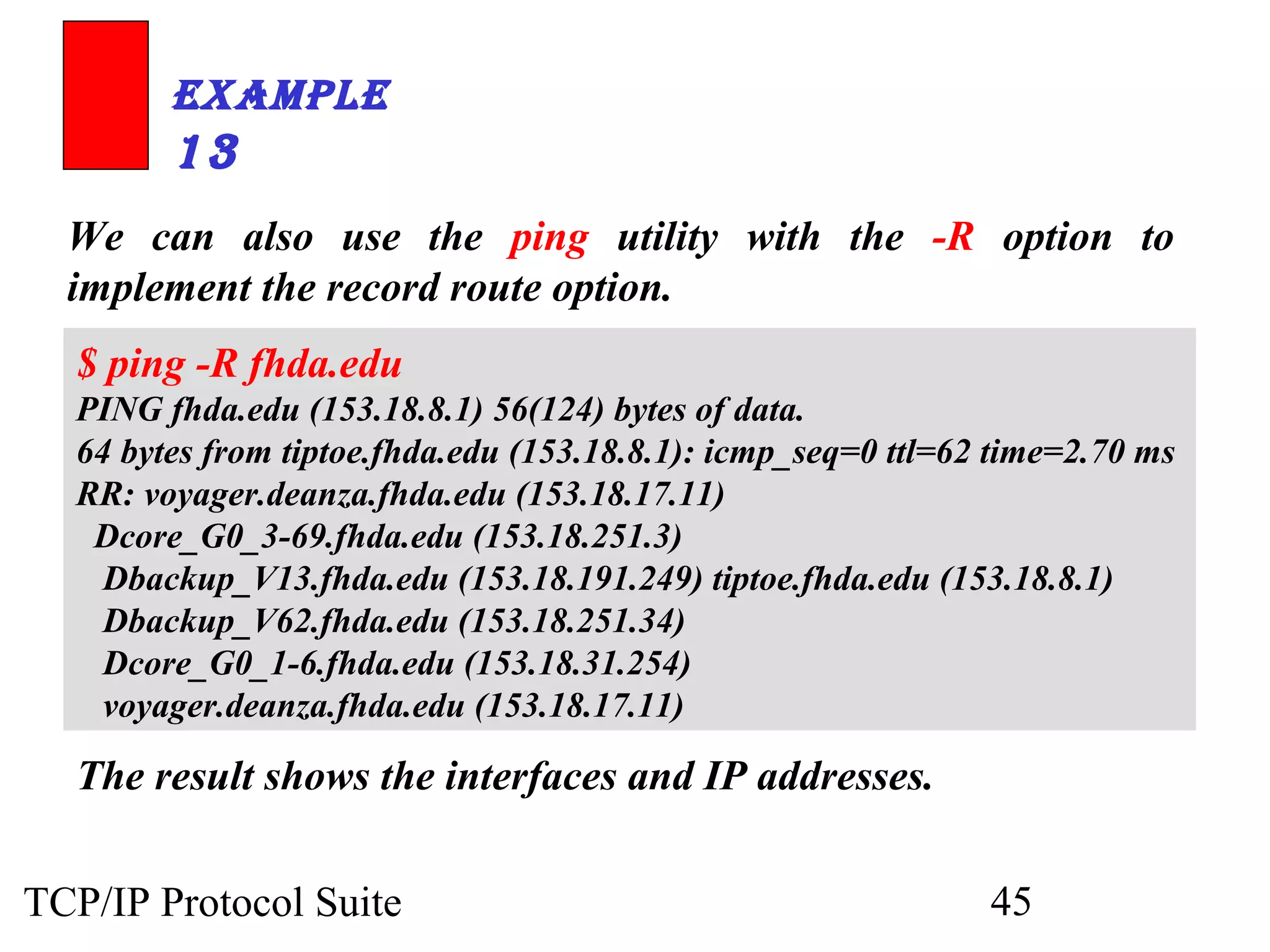
We can also use the ping utility with the -R option to 
implement the record route option. 
$ ping -R fhda.edu 
PING fhda.edu (153.18.8.1) 56(124) bytes of data. 
64 bytes from tiptoe.fhda.edu (153.18.8.1): icmp_seq=0 ttl=62 time=2.70 ms 
RR: voyager.deanza.fhda.edu (153.18.17.11) 
Dcore_G0_3-69.fhda.edu (153.18.251.3) 
Dbackup_V13.fhda.edu (153.18.191.249) tiptoe.fhda.edu (153.18.8.1) 
Dbackup_V62.fhda.edu (153.18.251.34) 
Dcore_G0_1-6.fhda.edu (153.18.31.254) 
voyager.deanza.fhda.edu (153.18.17.11) 
The result shows the interfaces and IP addresses. 
TCP/IP Protocol Suite 45
ExamplE 
14 
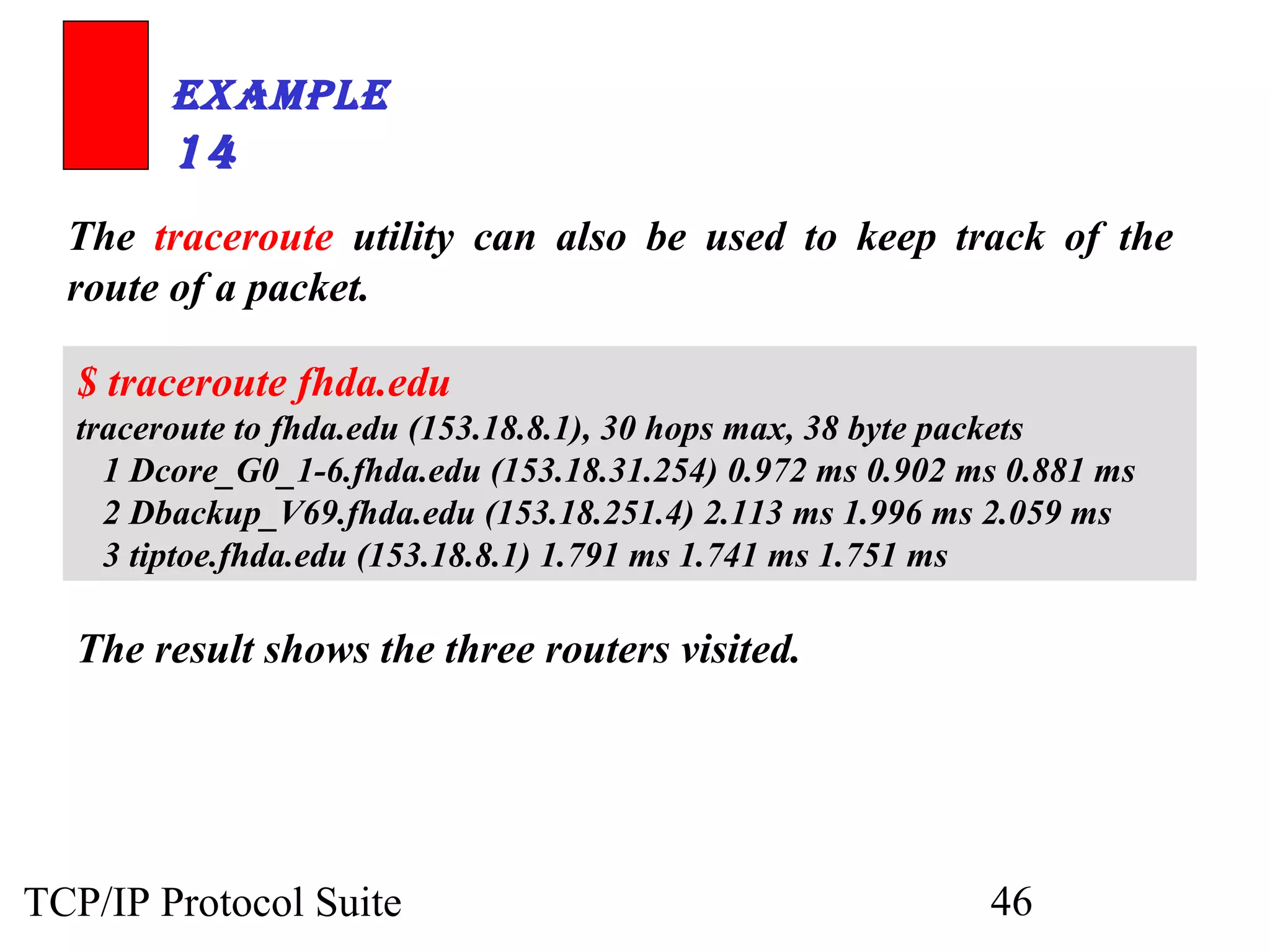
The traceroute utility can also be used to keep track of the 
route of a packet. 
$ traceroute fhda.edu 
traceroute to fhda.edu (153.18.8.1), 30 hops max, 38 byte packets 
1 Dcore_G0_1-6.fhda.edu (153.18.31.254) 0.972 ms 0.902 ms 0.881 ms 
2 Dbackup_V69.fhda.edu (153.18.251.4) 2.113 ms 1.996 ms 2.059 ms 
3 tiptoe.fhda.edu (153.18.8.1) 1.791 ms 1.741 ms 1.751 ms 
The result shows the three routers visited. 
TCP/IP Protocol Suite 46
ExamplE 
15 
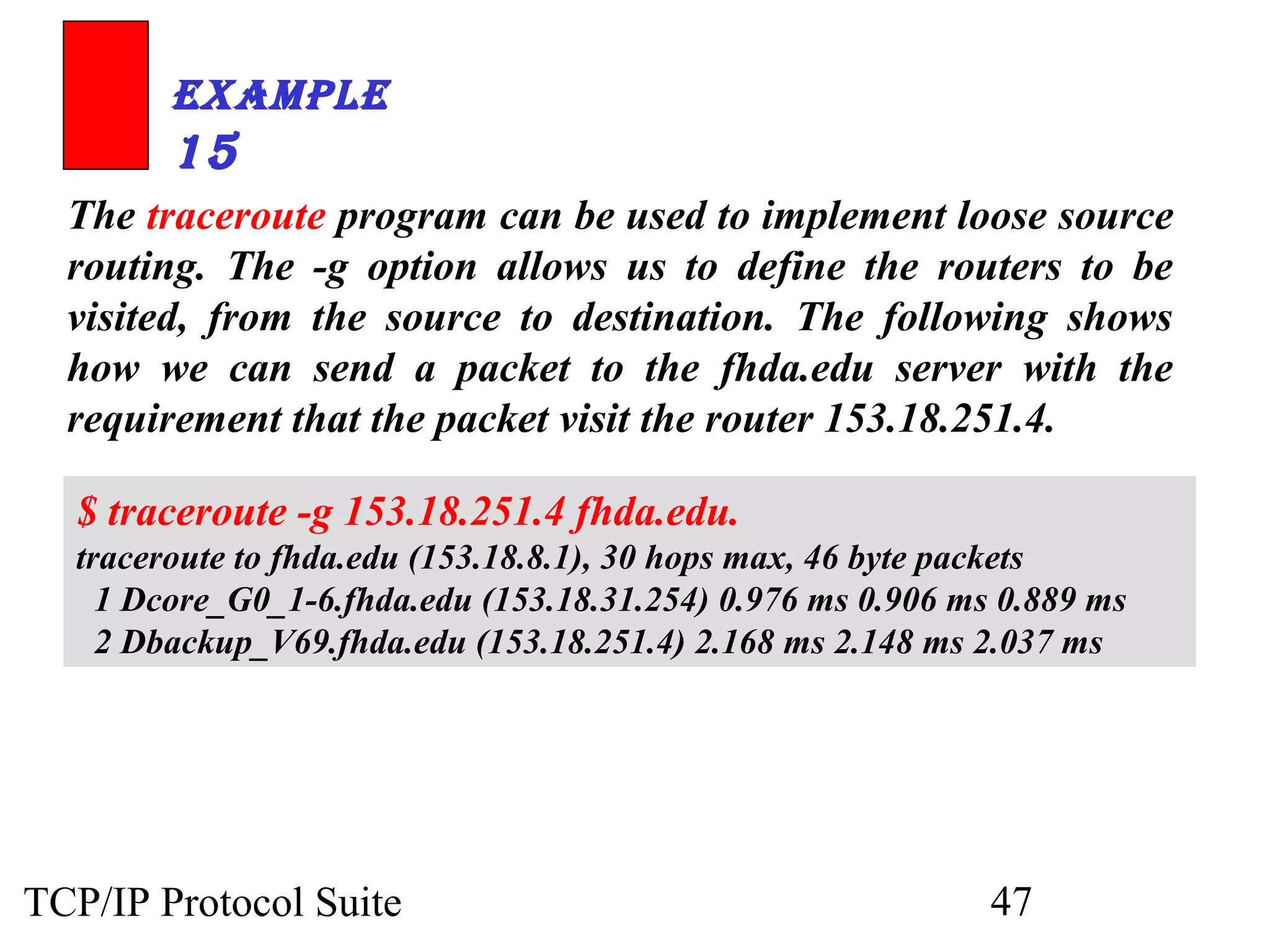
The traceroute program can be used to implement loose source 
routing. The -g option allows us to define the routers to be 
visited, from the source to destination. The following shows 
how we can send a packet to the fhda.edu server with the 
requirement that the packet visit the router 153.18.251.4. 
$ traceroute -g 153.18.251.4 fhda.edu. 
traceroute to fhda.edu (153.18.8.1), 30 hops max, 46 byte packets 
1 Dcore_G0_1-6.fhda.edu (153.18.31.254) 0.976 ms 0.906 ms 0.889 ms 
2 Dbackup_V69.fhda.edu (153.18.251.4) 2.168 ms 2.148 ms 2.037 ms 
TCP/IP Protocol Suite 47
ExamplE 
16 
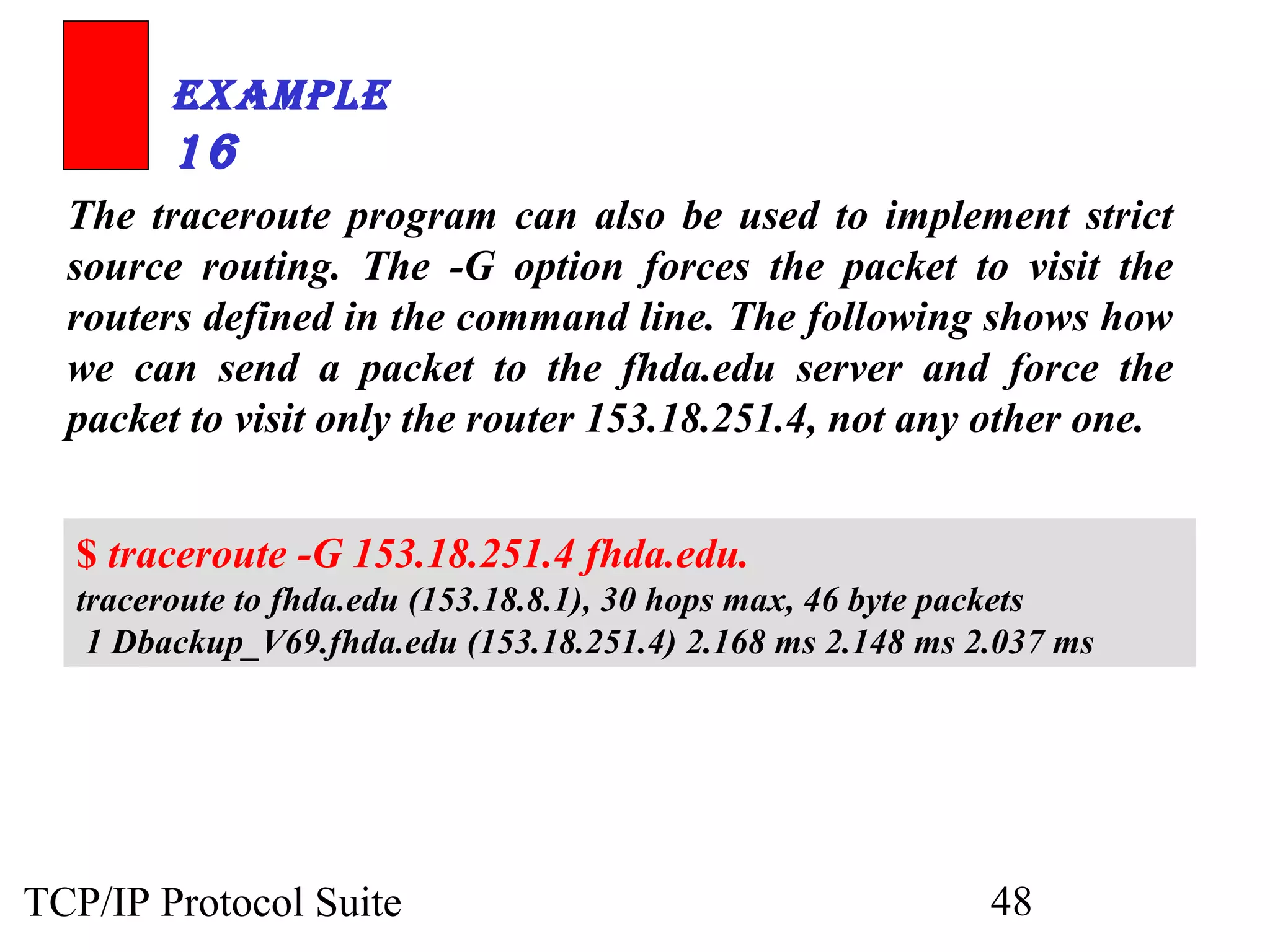
The traceroute program can also be used to implement strict 
source routing. The -G option forces the packet to visit the 
routers defined in the command line. The following shows how 
we can send a packet to the fhda.edu server and force the 
packet to visit only the router 153.18.251.4, not any other one. 
$ traceroute -G 153.18.251.4 fhda.edu. 
traceroute to fhda.edu (153.18.8.1), 30 hops max, 46 byte packets 
1 Dbackup_V69.fhda.edu (153.18.251.4) 2.168 ms 2.148 ms 2.037 ms 
TCP/IP Protocol Suite 48
8.4 CHECKSUM 
The error detection method used by most TCP/IP protocols iiss ccaalllleedd tthhee 
cchheecckkssuumm.. TThhee cchheecckkssuumm pprrootteeccttss aaggaaiinnsstt tthhee ccoorrrruuppttiioonn tthhaatt mmaayy ooccccuurr 
dduurriinngg tthhee ttrraannssmmiissssiioonn ooff aa ppaacckkeett.. IItt iiss rreedduunnddaanntt iinnffoorrmmaattiioonn aaddddeedd 
ttoo tthhee ppaacckkeett.. 
TThhee ttooppiiccss ddiissccuusssseedd iinn tthhiiss sseeccttiioonn iinncclluuddee:: 
CChheecckkssuumm CCaallccuullaattiioonn aatt tthhee SSeennddeerr 
CChheecckkssuumm CCaallccuullaattiioonn aatt tthhee RReecceeiivveerr 
CChheecckkssuumm iinn tthhee IIPP PPaacckkeett 
TCP/IP Protocol Suite 49
NNoottee:: 
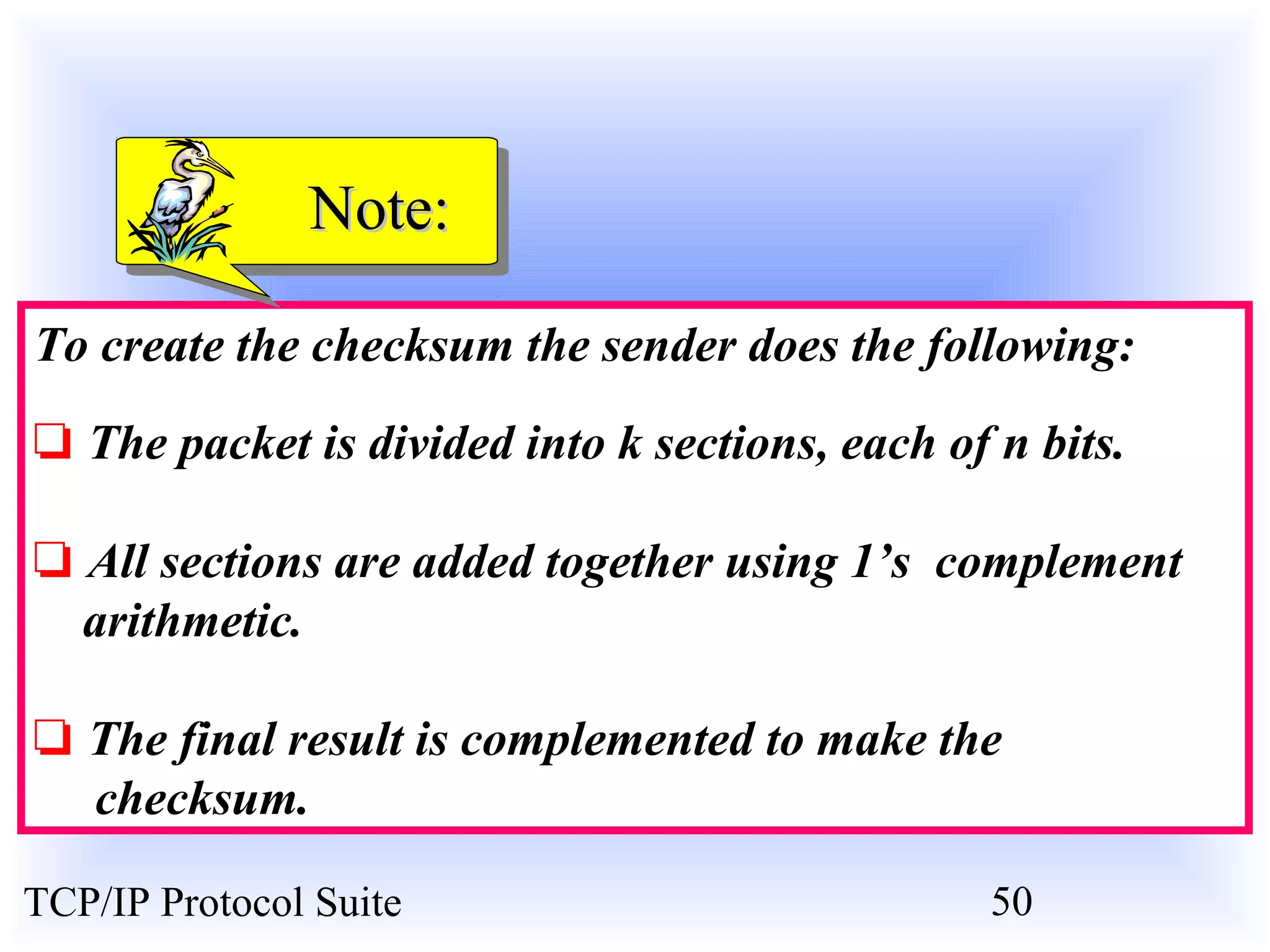
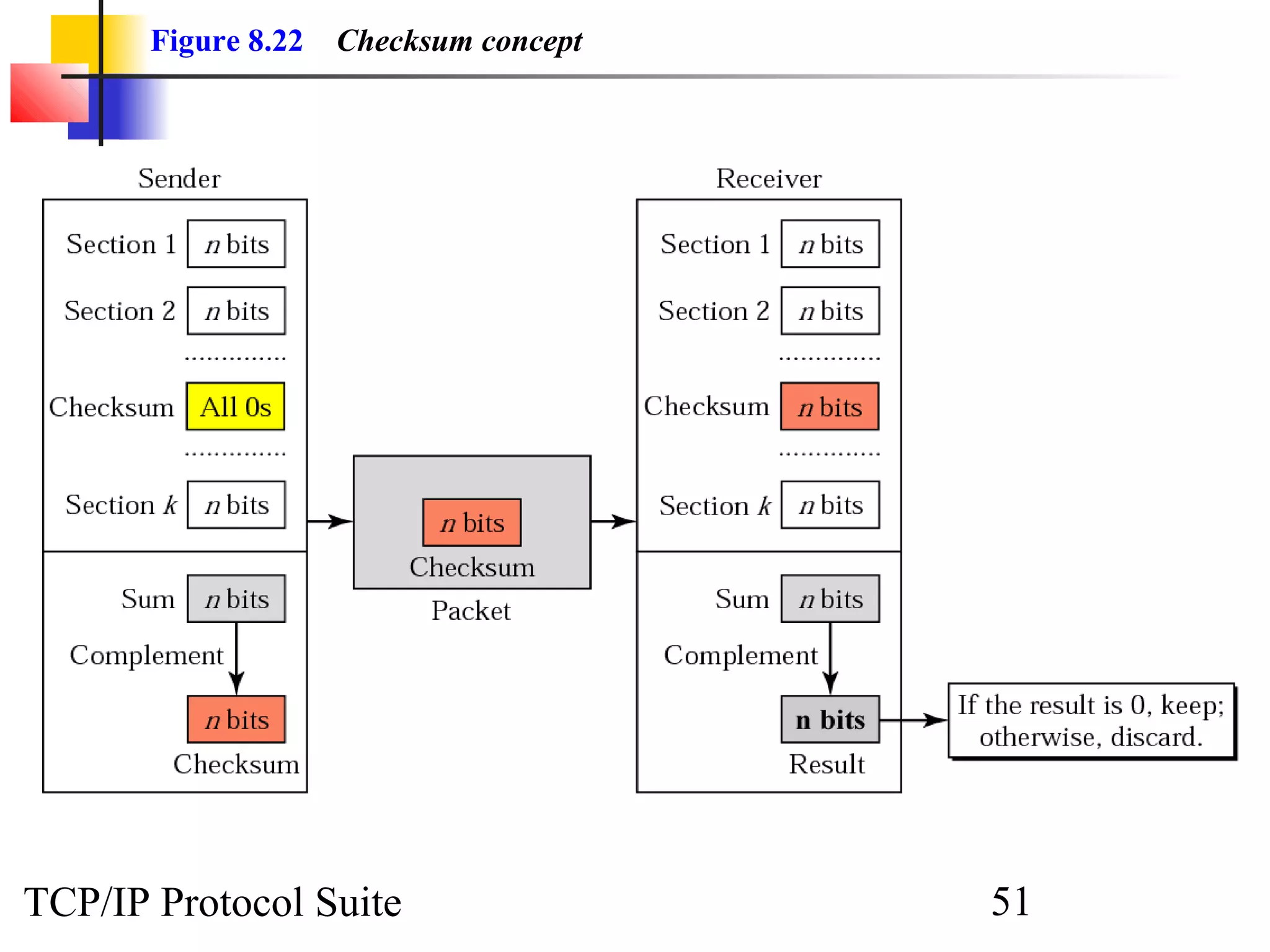
To create the checksum the sender does the following: 
❏ The packet is divided into k sections, each of n bits. 
❏ All sections are added together using 1’s complement 
arithmetic. 
❏ The final result is complemented to make the 
checksum. 
TCP/IP Protocol Suite 50
Figure 8.22 Checksum concept 
TCP/IP Protocol Suite 51
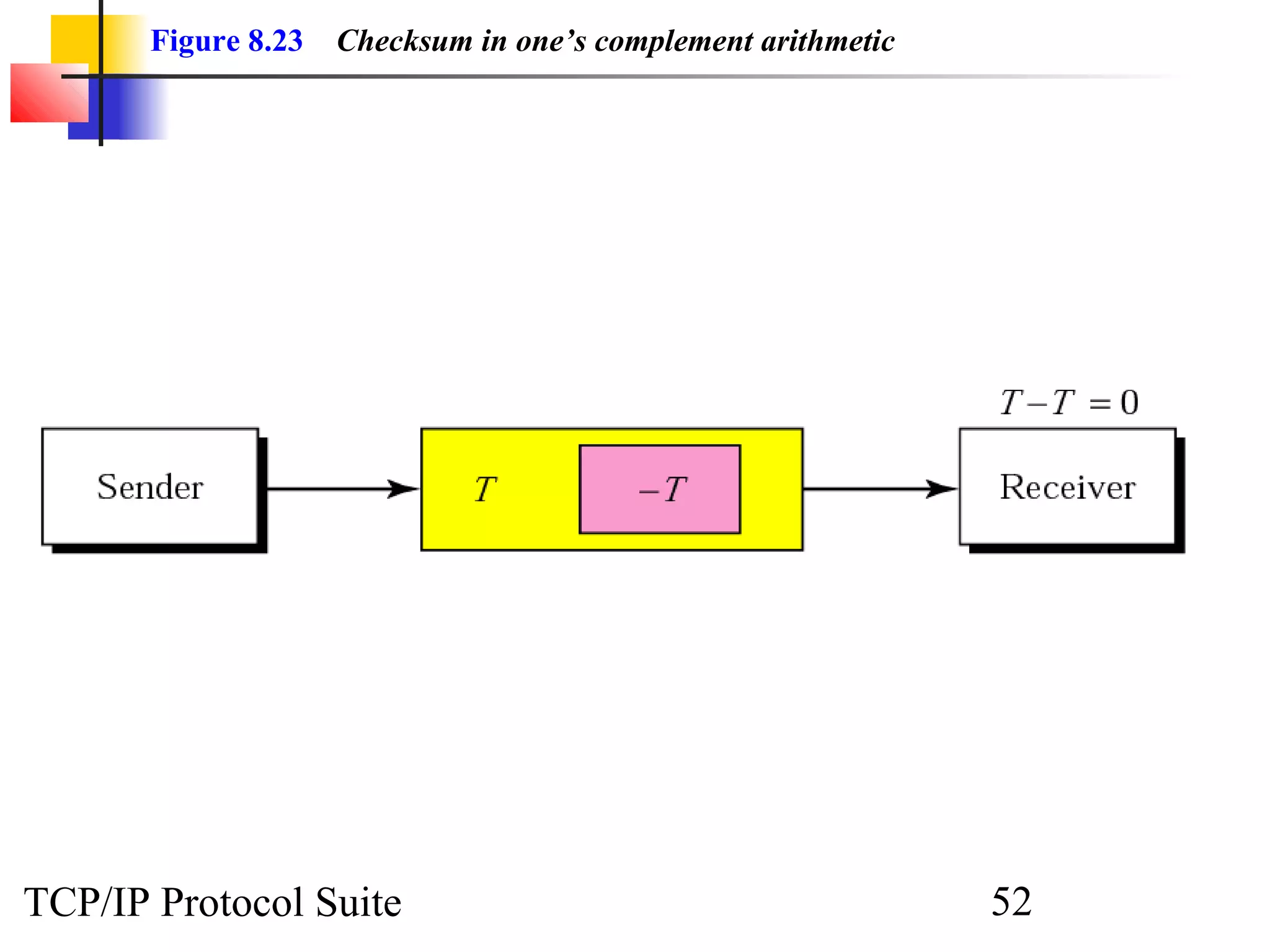
Figure 8.23 Checksum in one’s complement arithmetic 
TCP/IP Protocol Suite 52
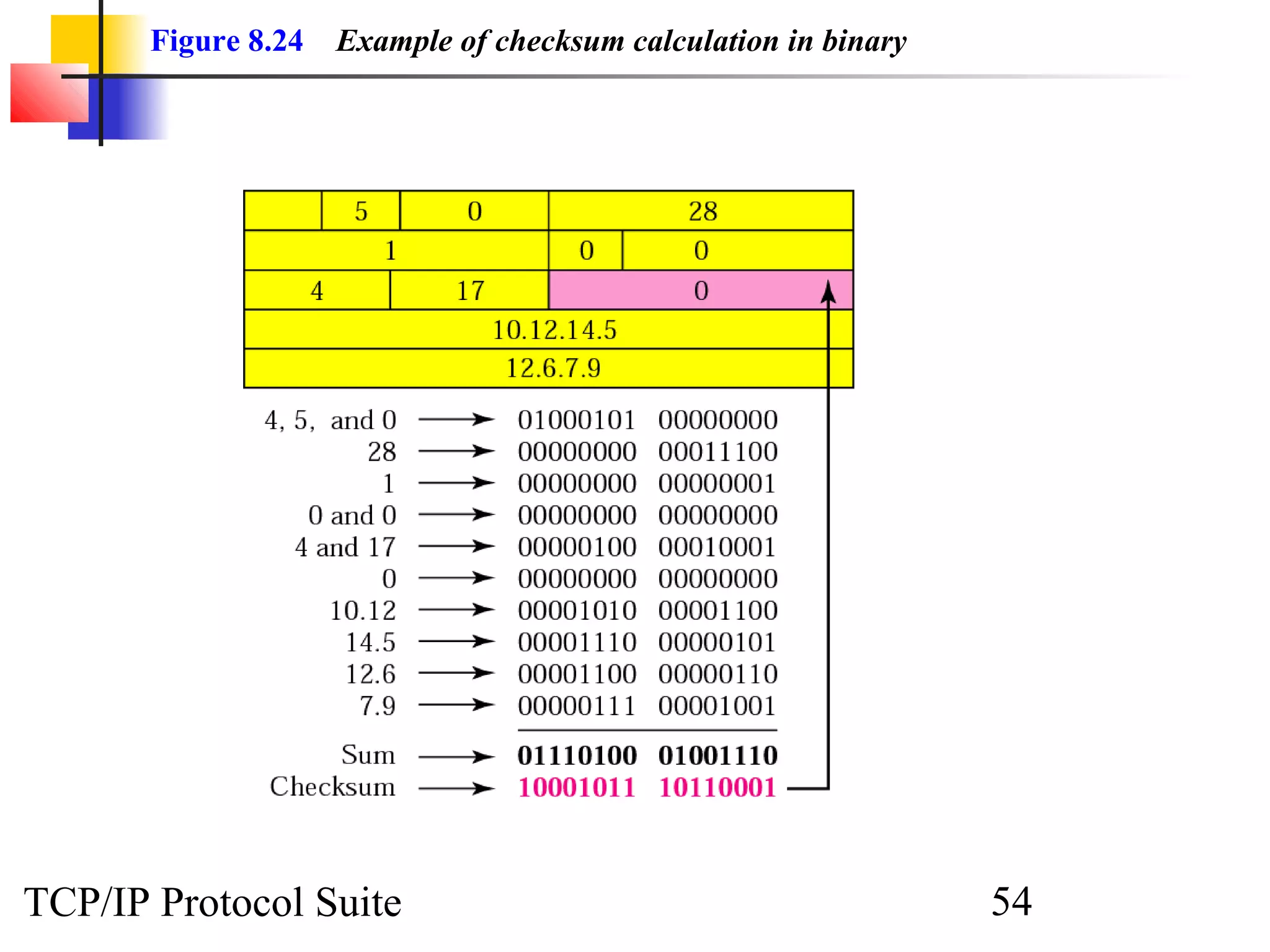
ExamplE 
17 
Figure 8.24 shows an example of a checksum calculation for 
an IP header without options. The header is divided into 16-bit 
sections. All the sections are added and the sum is 
complemented. The result is inserted in the checksum field. 
See Next Slide 
TCP/IP Protocol Suite 53
Figure 8.24 Example of checksum calculation in binary 
TCP/IP Protocol Suite 54
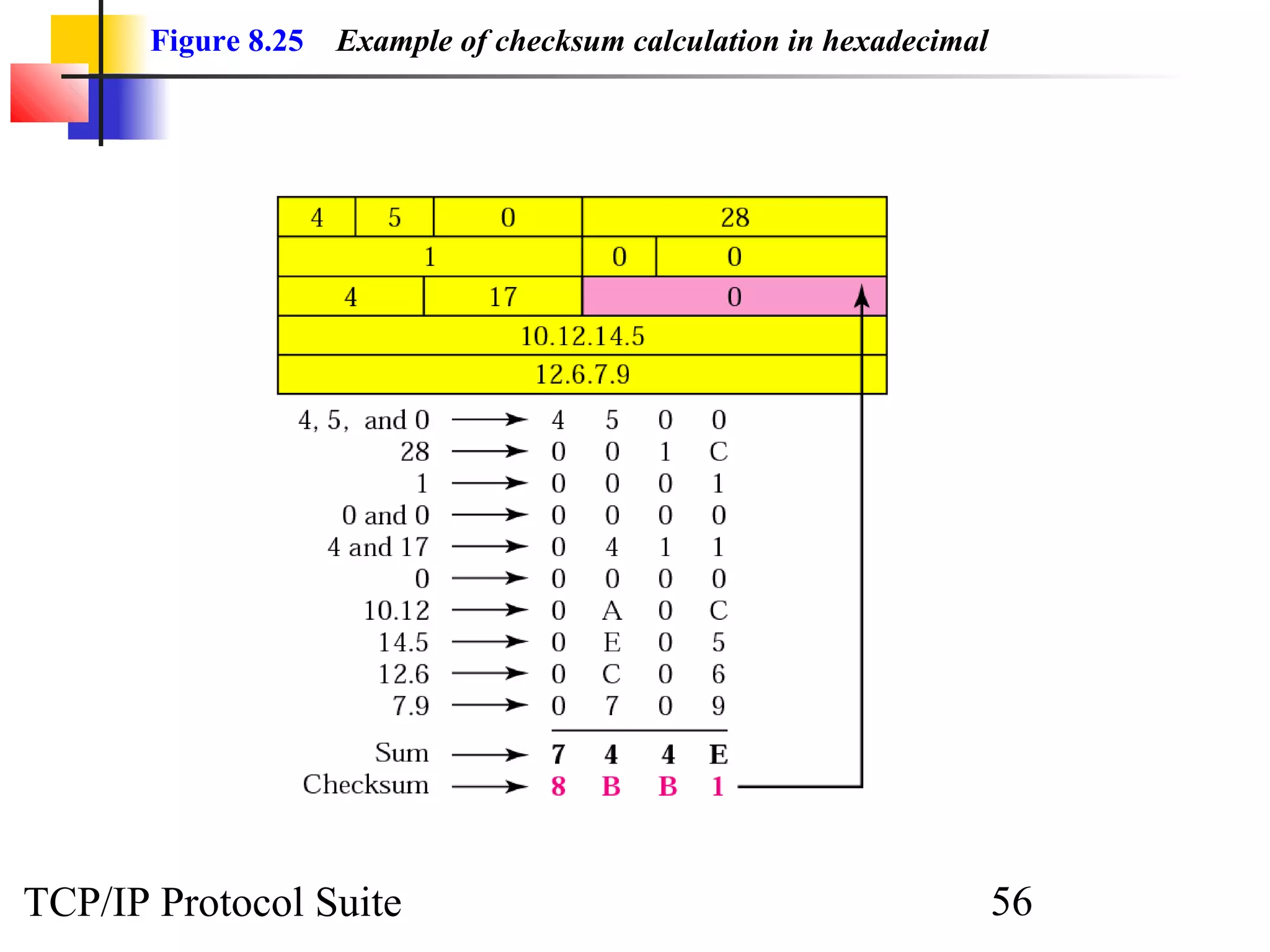
ExamplE 
18 
Let us do the same example in hexadecimal. Each row has four 
hexadecimal digits. We calculate the sum first. Note that if an 
addition results in more than one hexadecimal digit, the right-most 
digit becomes the current-column digit and the rest are 
carried to other columns. From the sum, we make the 
checksum by complementing the sum. However, note that we 
subtract each digit from 15 in hexadecimal arithmetic (just as 
we subtract from 1 in binary arithmetic). This means the 
complement of E (14) is 1 and the complement of 4 is B (11). 
Figure 8.25 shows the calculation. Note that the result (8BB1) 
is exactly the same as in Example 17. 
See Next Slide 
TCP/IP Protocol Suite 55
Figure 8.25 Example of checksum calculation in hexadecimal 
TCP/IP Protocol Suite 56
NNoottee:: 
Check Appendix C for a detailed 
description of checksum calculation 
and the handling of carries. 
TCP/IP Protocol Suite 57
8.5 IP PACKAGE 
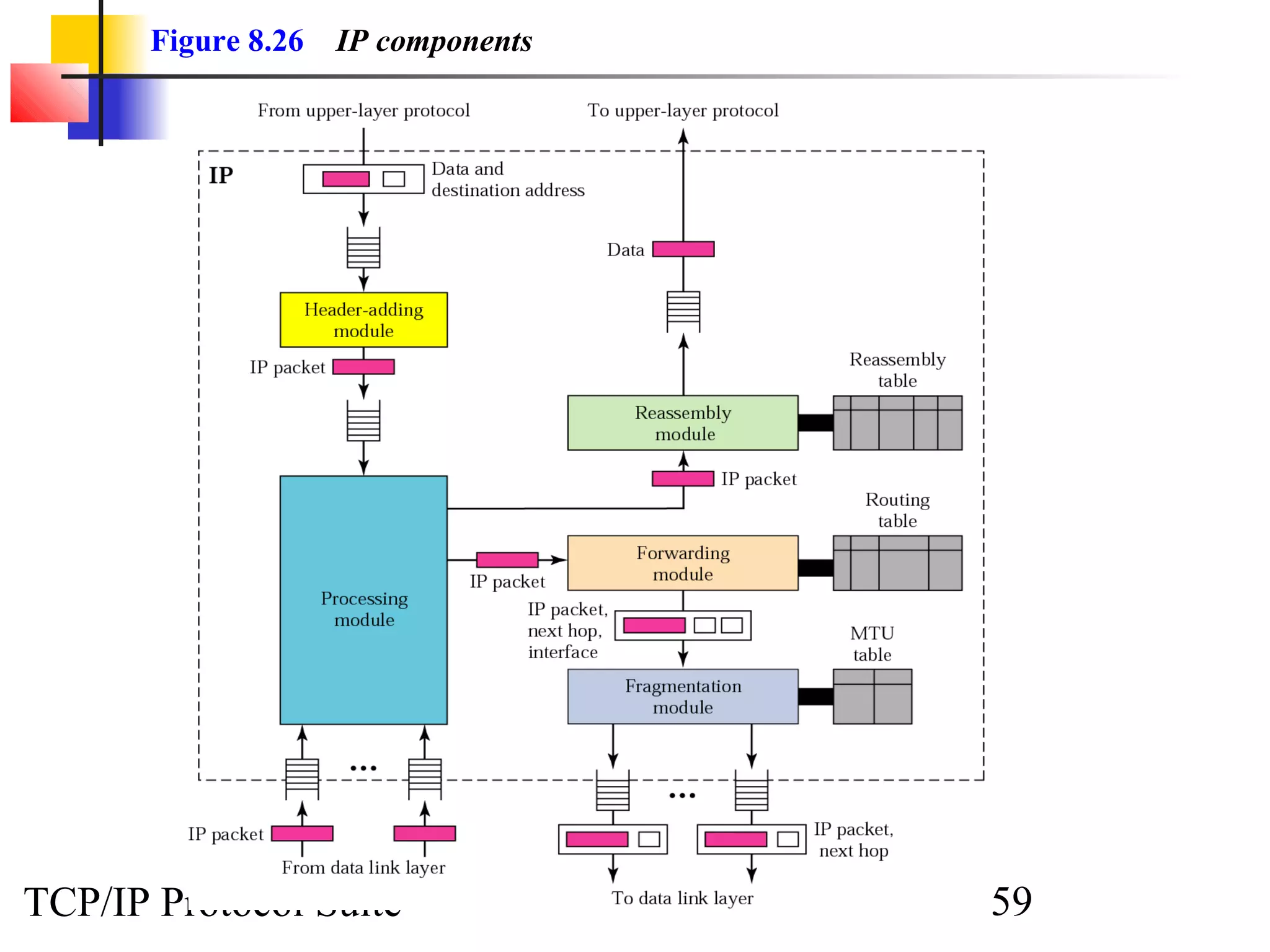
We give an example of a simplified IP software ppaacckkaaggee ttoo sshhooww iittss 
ccoommppoonneennttss aanndd tthhee rreellaattiioonnsshhiippss bbeettwweeeenn tthhee ccoommppoonneennttss.. TThhiiss IIPP 
ppaacckkaaggee iinnvvoollvveess eeiigghhtt mmoodduulleess.. 
TThhee ttooppiiccss ddiissccuusssseedd iinn tthhiiss sseeccttiioonn iinncclluuddee:: 
HHeeaaddeerr--AAddddiinngg MMoodduullee 
PPrroocceessssiinngg MMoodduullee 
QQuueeuueess 
RRoouuttiinngg TTaabbllee 
FFoorrwwaarrddiinngg MMoodduullee 
MMTTUU TTaabbllee 
FFrraaggmmeennttaattiioonn MMoodduullee 
RReeaasssseemmbbllyy TTaabbllee 
RReeaasssseemmbbllyy MMoodduullee 
TCP/IP Protocol Suite 58
Figure 8.26 IP components 
TCP/IP Protocol Suite 59
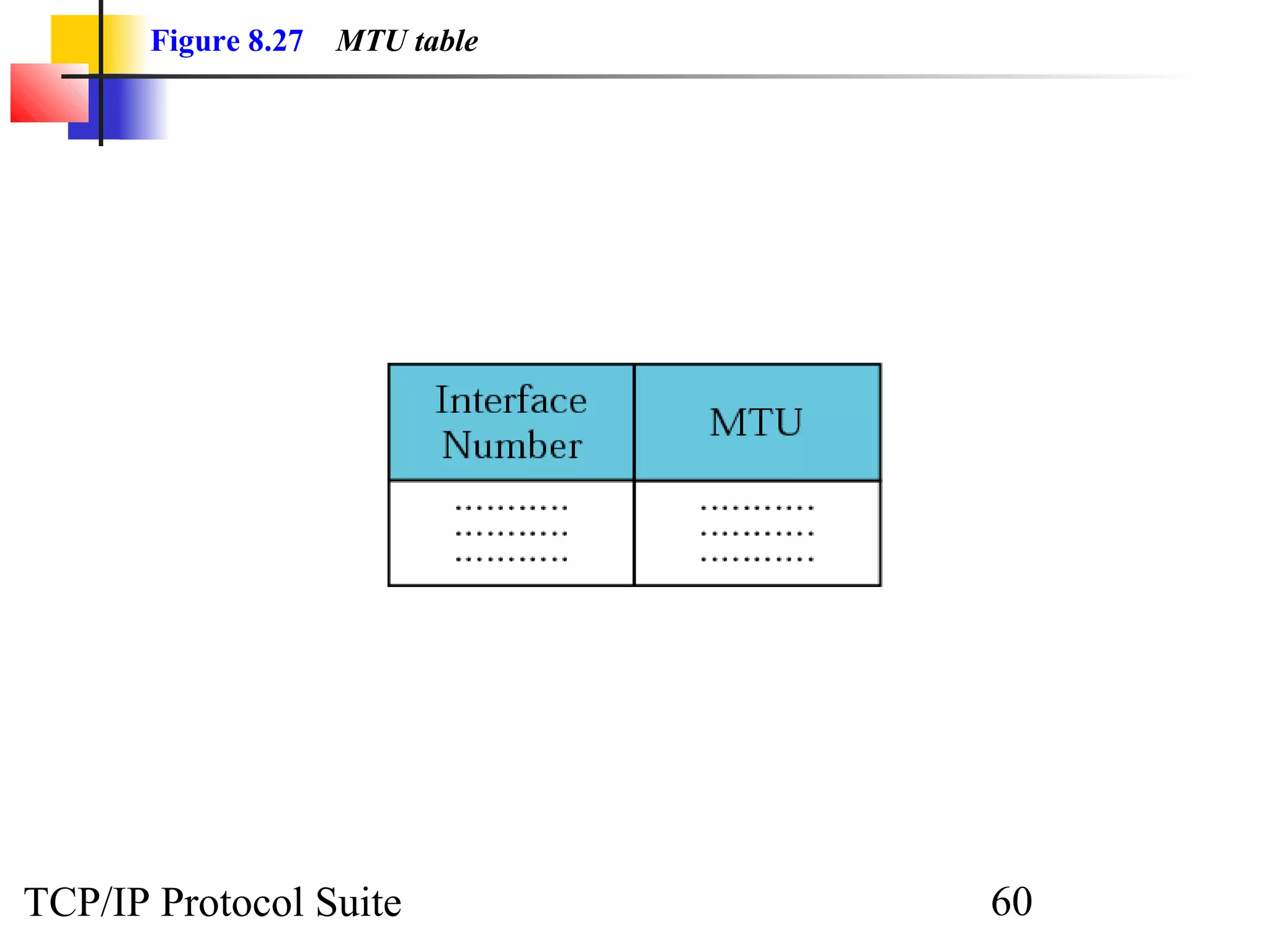
Figure 8.27 MTU table 
TCP/IP Protocol Suite 60
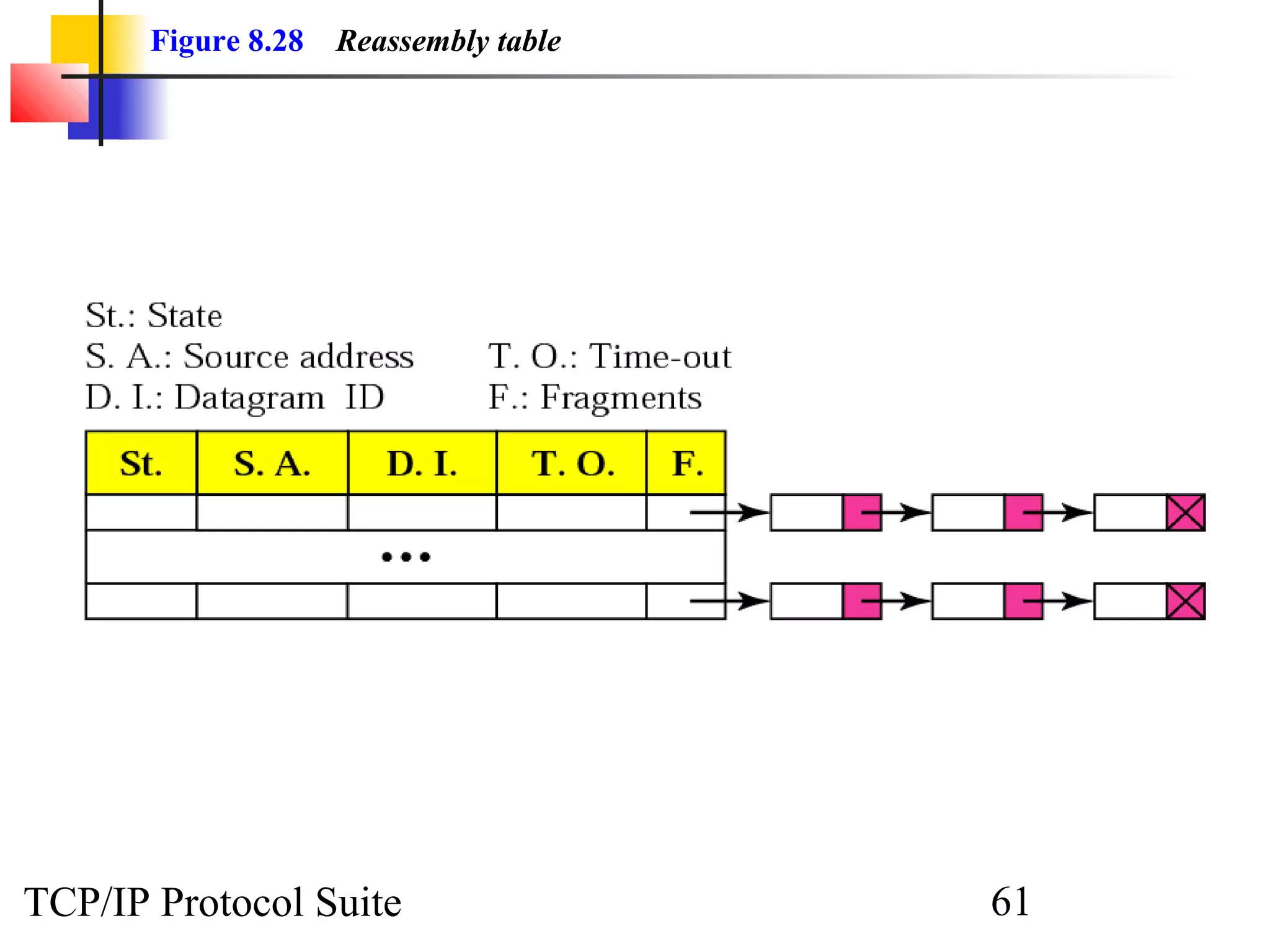
Figure 8.28 Reassembly table 
TCP/IP Protocol Suite 61

Chap 08 ip

  • 1.
    CChhaapptteerr 88 IInntteerrnneettPPrroottooccooll Objectives Upon completion you will be able to: • Understand the format and fields of a datagram • Understand the need for fragmentation and the fields involved • Understand the options available in an IP datagram • Be able to perform a checksum calculation • Understand the components and interactions of an IP package TCP/IP Protocol Suite 1
  • 2.
    Figure 8.1 Positionof IP in TCP/IP protocol suite TCP/IP Protocol Suite 2
  • 3.
    8.1 DATAGRAM Apacket in the IP layer is called a datagram, a variable-lleennggtthh ppaacckkeett ccoonnssiissttiinngg ooff ttwwoo ppaarrttss:: hheeaaddeerr aanndd ddaattaa.. TThhee hheeaaddeerr iiss 2200 ttoo 6600 bbyytteess iinn lleennggtthh aanndd ccoonnttaaiinnss iinnffoorrmmaattiioonn eesssseennttiiaall ttoo rroouuttiinngg aanndd ddeelliivveerryy.. TCP/IP Protocol Suite 3
  • 4.
    Figure 8.2 IPdatagram TCP/IP Protocol Suite 4
  • 5.
    Figure 8.3 Servicetype or differentiated services TCP/IP Protocol Suite 5
  • 6.
    NNoottee:: The precedencesubfield was designed, but never used in version 4. TCP/IP Protocol Suite 6
  • 7.
    TTaabbllee 88..11 TTyyppeessooff sseerrvviiccee TCP/IP Protocol Suite 7
  • 8.
    TTaabbllee 88..22 DDeeffaauullttttyyppeess ooff sseerrvviiccee TCP/IP Protocol Suite 8
  • 9.
    TTaabbllee 88..33 VVaalluueessffoorr ccooddeeppooiinnttss TCP/IP Protocol Suite 9
  • 10.
    NNoottee:: The totallength field defines the total length of the datagram including the header. TCP/IP Protocol Suite 10
  • 11.
    Figure 8.4 Encapsulationof a small datagram in an Ethernet frame TCP/IP Protocol Suite 11
  • 12.
    Figure 8.5 Multiplexing TCP/IP Protocol Suite 12
  • 13.
    TTaabbllee 88..44 PPrroottooccoollss TCP/IP Protocol Suite 13
  • 14.
    ExamplE 1 AnIP packet has arrived with the first 8 bits as shown: 01000010 The receiver discards the packet. Why? Solution There is an error in this packet. The 4 left-most bits (0100) show the version, which is correct. The next 4 bits (0010) show the header length; which means (2 × 4 = 8), which is wrong. The minimum number of bytes in the header must be 20. The packet has been corrupted in transmission. TCP/IP Protocol Suite 14
  • 15.
    ExamplE 2 Inan IP packet, the value of HLEN is 1000 in binary. How many bytes of options are being carried by this packet? Solution The HLEN value is 8, which means the total number of bytes in the header is 8 × 4 or 32 bytes. The first 20 bytes are the base header, the next 12 bytes are the options. TCP/IP Protocol Suite 15
  • 16.
    ExamplE 3 Inan IP packet, the value of HLEN is 516 and the value of the total length field is 002816 . How many bytes of data are being carried by this packet? Solution The HLEN value is 5, which means the total number of bytes in the header is 5 × 4 or 20 bytes (no options). The total length is 40 bytes, which means the packet is carrying 20 bytes of data (40 − 20). TCP/IP Protocol Suite 16
  • 17.
    ExamplE 4 AnIP packet has arrived with the first few hexadecimal digits as shown below: 45000028000100000102 . . . How many hops can this packet travel before being dropped? The data belong to what upper layer protocol? Solution To find the time-to-live field, we skip 8 bytes (16 hexadecimal digits). The time-to-live field is the ninth byte, which is 01. This means the packet can travel only one hop. The protocol field is the next byte (02), which means that the upper layer protocol is IGMP (see Table 8.4). TCP/IP Protocol Suite 17
  • 18.
    8.2 FRAGMENTATION Theformat and size of a frame depend on the pprroottooccooll uusseedd bbyy tthhee pphhyyssiiccaall nneettwwoorrkk.. AA ddaattaaggrraamm mmaayy hhaavvee ttoo bbee ffrraaggmmeenntteedd ttoo ffiitt tthhee pprroottooccooll rreegguullaattiioonnss.. TThhee ttooppiiccss ddiissccuusssseedd iinn tthhiiss sseeccttiioonn iinncclluuddee:: MMaaxxiimmuumm TTrraannssffeerr UUnniitt ((MMTTUU)) FFiieellddss RReellaatteedd ttoo FFrraaggmmeennttaattiioonn TCP/IP Protocol Suite 18
  • 19.
    Figure 8.6 MTU TCP/IP Protocol Suite 19
  • 20.
    TTaabbllee 88..55 MMTTUUssffoorr ssoommee nneettwwoorrkkss TCP/IP Protocol Suite 20
  • 21.
    Figure 8.7 Flagsfield TCP/IP Protocol Suite 21
  • 22.
    Figure 8.8 Fragmentationexample TCP/IP Protocol Suite 22
  • 23.
    Figure 8.9 Detailedfragmentation example TCP/IP Protocol Suite 23
  • 24.
    ExamplE 5 Apacket has arrived with an M bit value of 0. Is this the first fragment, the last fragment, or a middle fragment? Do we know if the packet was fragmented? Solution If the M bit is 0, it means that there are no more fragments; the fragment is the last one. However, we cannot say if the original packet was fragmented or not. A nonfragmented packet is considered the last fragment. TCP/IP Protocol Suite 24
  • 25.
    ExamplE 6 Apacket has arrived with an M bit value of 1. Is this the first fragment, the last fragment, or a middle fragment? Do we know if the packet was fragmented? Solution If the M bit is 1, it means that there is at least one more fragment. This fragment can be the first one or a middle one, but not the last one. We don’t know if it is the first one or a middle one; we need more information (the value of the fragmentation offset). See also the next example. TCP/IP Protocol Suite 25
  • 26.
    ExamplE 7 Apacket has arrived with an M bit value of 1 and a fragmentation offset value of zero. Is this the first fragment, the last fragment, or a middle fragment?. Solution Because the M bit is 1, it is either the first fragment or a middle one. Because the offset value is 0, it is the first fragment. TCP/IP Protocol Suite 26
  • 27.
    ExamplE 8 Apacket has arrived in which the offset value is 100. What is the number of the first byte? Do we know the number of the last byte? Solution To find the number of the first byte, we multiply the offset value by 8. This means that the first byte number is 800. We cannot determine the number of the last byte unless we know the length of the data. TCP/IP Protocol Suite 27
  • 28.
    ExamplE 9 Apacket has arrived in which the offset value is 100, the value of HLEN is 5 and the value of the total length field is 100. What is the number of the first byte and the last byte? Solution The first byte number is 100 × 8 = 800. The total length is 100 bytes and the header length is 20 bytes (5 × 4), which means that there are 80 bytes in this datagram. If the first byte number is 800, the last byte number must be 879. TCP/IP Protocol Suite 28
  • 29.
    8.3 OPTIONS Theheader of the IP datagram is made of two parts: aa ffiixxeedd ppaarrtt aanndd aa vvaarriiaabbllee ppaarrtt.. TThhee vvaarriiaabbllee ppaarrtt ccoommpprriisseess tthhee ooppttiioonnss tthhaatt ccaann bbee aa mmaaxxiimmuumm ooff 4400 bbyytteess.. TThhee ttooppiiccss ddiissccuusssseedd iinn tthhiiss sseeccttiioonn iinncclluuddee:: FFoorrmmaatt OOppttiioonn TTyyppeess TCP/IP Protocol Suite 29
  • 30.
    Figure 8.10 Optionformat TCP/IP Protocol Suite 30
  • 31.
    Figure 8.11 Categoriesof options TCP/IP Protocol Suite 31
  • 32.
    Figure 8.12 Nooperation option TCP/IP Protocol Suite 32
  • 33.
    Figure 8.13 Endof option option TCP/IP Protocol Suite 33
  • 34.
    Figure 8.14 Recordroute option TCP/IP Protocol Suite 34
  • 35.
    Figure 8.15 Recordroute concept TCP/IP Protocol Suite 35
  • 36.
    Figure 8.16 Strictsource route option TCP/IP Protocol Suite 36
  • 37.
    Figure 8.17 Strictsource route concept TCP/IP Protocol Suite 37
  • 38.
    Figure 8.18 Loosesource route option TCP/IP Protocol Suite 38
  • 39.
    Figure 8.19 Timestampoption TCP/IP Protocol Suite 39
  • 40.
    Figure 8.20 Useof flag in timestamp TCP/IP Protocol Suite 40
  • 41.
    Figure 8.21 Timestampconcept TCP/IP Protocol Suite 41
  • 42.
    ExamplE 10 Whichof the six options must be copied to each fragment? Solution We look at the first (left-most) bit of the code for each option. a. No operation: Code is 00000001; not copied. b. End of option: Code is 00000000; not copied. c. Record route: Code is 00000111; not copied. d. Strict source route: Code is 10001001; copied. e. Loose source route: Code is 10000011; copied. f. Timestamp: Code is 01000100; not copied. TCP/IP Protocol Suite 42
  • 43.
    ExamplE 11 Whichof the six options are used for datagram control and which are used for debugging and management? Solution We look at the second and third (left-most) bits of the code. a. No operation: Code is 00000001; datagram control. b. End of option: Code is 00000000; datagram control. c. Record route: Code is 00000111; datagram control. d. Strict source route: Code is 10001001; datagram control. e. Loose source route: Code is 10000011; datagram control. f. Time stamp: Code is 01000100; debugging and management control. TCP/IP Protocol Suite 43
  • 44.
    ExamplE 12 Oneof the utilities available in UNIX to check the travelling of the IP packets is ping. In the next chapter, we talk about the ping program in more detail. In this example, we want to show how to use the program to see if a host is available. We ping a server at De Anza College named fhda.edu. The result shows that the IP address of the host is 153.18.8.1. $ ping fhda.edu PING fhda.edu (153.18.8.1) 56(84) bytes of data. 64 bytes from tiptoe.fhda.edu (153.18.8.1): .... The result shows the IP address of the host and the number of bytes used. TCP/IP Protocol Suite 44
  • 45.
    ExamplE 13 Wecan also use the ping utility with the -R option to implement the record route option. $ ping -R fhda.edu PING fhda.edu (153.18.8.1) 56(124) bytes of data. 64 bytes from tiptoe.fhda.edu (153.18.8.1): icmp_seq=0 ttl=62 time=2.70 ms RR: voyager.deanza.fhda.edu (153.18.17.11) Dcore_G0_3-69.fhda.edu (153.18.251.3) Dbackup_V13.fhda.edu (153.18.191.249) tiptoe.fhda.edu (153.18.8.1) Dbackup_V62.fhda.edu (153.18.251.34) Dcore_G0_1-6.fhda.edu (153.18.31.254) voyager.deanza.fhda.edu (153.18.17.11) The result shows the interfaces and IP addresses. TCP/IP Protocol Suite 45
  • 46.
    ExamplE 14 Thetraceroute utility can also be used to keep track of the route of a packet. $ traceroute fhda.edu traceroute to fhda.edu (153.18.8.1), 30 hops max, 38 byte packets 1 Dcore_G0_1-6.fhda.edu (153.18.31.254) 0.972 ms 0.902 ms 0.881 ms 2 Dbackup_V69.fhda.edu (153.18.251.4) 2.113 ms 1.996 ms 2.059 ms 3 tiptoe.fhda.edu (153.18.8.1) 1.791 ms 1.741 ms 1.751 ms The result shows the three routers visited. TCP/IP Protocol Suite 46
  • 47.
    ExamplE 15 Thetraceroute program can be used to implement loose source routing. The -g option allows us to define the routers to be visited, from the source to destination. The following shows how we can send a packet to the fhda.edu server with the requirement that the packet visit the router 153.18.251.4. $ traceroute -g 153.18.251.4 fhda.edu. traceroute to fhda.edu (153.18.8.1), 30 hops max, 46 byte packets 1 Dcore_G0_1-6.fhda.edu (153.18.31.254) 0.976 ms 0.906 ms 0.889 ms 2 Dbackup_V69.fhda.edu (153.18.251.4) 2.168 ms 2.148 ms 2.037 ms TCP/IP Protocol Suite 47
  • 48.
    ExamplE 16 Thetraceroute program can also be used to implement strict source routing. The -G option forces the packet to visit the routers defined in the command line. The following shows how we can send a packet to the fhda.edu server and force the packet to visit only the router 153.18.251.4, not any other one. $ traceroute -G 153.18.251.4 fhda.edu. traceroute to fhda.edu (153.18.8.1), 30 hops max, 46 byte packets 1 Dbackup_V69.fhda.edu (153.18.251.4) 2.168 ms 2.148 ms 2.037 ms TCP/IP Protocol Suite 48
  • 49.
    8.4 CHECKSUM Theerror detection method used by most TCP/IP protocols iiss ccaalllleedd tthhee cchheecckkssuumm.. TThhee cchheecckkssuumm pprrootteeccttss aaggaaiinnsstt tthhee ccoorrrruuppttiioonn tthhaatt mmaayy ooccccuurr dduurriinngg tthhee ttrraannssmmiissssiioonn ooff aa ppaacckkeett.. IItt iiss rreedduunnddaanntt iinnffoorrmmaattiioonn aaddddeedd ttoo tthhee ppaacckkeett.. TThhee ttooppiiccss ddiissccuusssseedd iinn tthhiiss sseeccttiioonn iinncclluuddee:: CChheecckkssuumm CCaallccuullaattiioonn aatt tthhee SSeennddeerr CChheecckkssuumm CCaallccuullaattiioonn aatt tthhee RReecceeiivveerr CChheecckkssuumm iinn tthhee IIPP PPaacckkeett TCP/IP Protocol Suite 49
  • 50.
    NNoottee:: To createthe checksum the sender does the following: ❏ The packet is divided into k sections, each of n bits. ❏ All sections are added together using 1’s complement arithmetic. ❏ The final result is complemented to make the checksum. TCP/IP Protocol Suite 50
  • 51.
    Figure 8.22 Checksumconcept TCP/IP Protocol Suite 51
  • 52.
    Figure 8.23 Checksumin one’s complement arithmetic TCP/IP Protocol Suite 52
  • 53.
    ExamplE 17 Figure8.24 shows an example of a checksum calculation for an IP header without options. The header is divided into 16-bit sections. All the sections are added and the sum is complemented. The result is inserted in the checksum field. See Next Slide TCP/IP Protocol Suite 53
  • 54.
    Figure 8.24 Exampleof checksum calculation in binary TCP/IP Protocol Suite 54
  • 55.
    ExamplE 18 Letus do the same example in hexadecimal. Each row has four hexadecimal digits. We calculate the sum first. Note that if an addition results in more than one hexadecimal digit, the right-most digit becomes the current-column digit and the rest are carried to other columns. From the sum, we make the checksum by complementing the sum. However, note that we subtract each digit from 15 in hexadecimal arithmetic (just as we subtract from 1 in binary arithmetic). This means the complement of E (14) is 1 and the complement of 4 is B (11). Figure 8.25 shows the calculation. Note that the result (8BB1) is exactly the same as in Example 17. See Next Slide TCP/IP Protocol Suite 55
  • 56.
    Figure 8.25 Exampleof checksum calculation in hexadecimal TCP/IP Protocol Suite 56
  • 57.
    NNoottee:: Check AppendixC for a detailed description of checksum calculation and the handling of carries. TCP/IP Protocol Suite 57
  • 58.
    8.5 IP PACKAGE We give an example of a simplified IP software ppaacckkaaggee ttoo sshhooww iittss ccoommppoonneennttss aanndd tthhee rreellaattiioonnsshhiippss bbeettwweeeenn tthhee ccoommppoonneennttss.. TThhiiss IIPP ppaacckkaaggee iinnvvoollvveess eeiigghhtt mmoodduulleess.. TThhee ttooppiiccss ddiissccuusssseedd iinn tthhiiss sseeccttiioonn iinncclluuddee:: HHeeaaddeerr--AAddddiinngg MMoodduullee PPrroocceessssiinngg MMoodduullee QQuueeuueess RRoouuttiinngg TTaabbllee FFoorrwwaarrddiinngg MMoodduullee MMTTUU TTaabbllee FFrraaggmmeennttaattiioonn MMoodduullee RReeaasssseemmbbllyy TTaabbllee RReeaasssseemmbbllyy MMoodduullee TCP/IP Protocol Suite 58
  • 59.
    Figure 8.26 IPcomponents TCP/IP Protocol Suite 59
  • 60.
    Figure 8.27 MTUtable TCP/IP Protocol Suite 60
  • 61.
    Figure 8.28 Reassemblytable TCP/IP Protocol Suite 61